React Native 0.89.0-rc.3 reached npm on 23 November 2026, six days after rc.2 and two weeks before the 0.89.0 release planned for 7 December. If you are testing the release candidate, the change to re-test is on iOS: a ScrollView with contentInsetAdjustmentBehavior set to 'scrollableAxes' no longer pads its content across the scroll axis, and contentContainerStyle padding below a navigation bar, tab bar or toolbar now adds to the inset again instead of being swallowed by it. On Android, rc.3 fixes text that wrapped one pixel early and text effects that were skipped after a text update. Radial gradients with length stops resolve differently on both platforms.
We diffed the npm packages of react-native 0.89.0-rc.2 and rc.3, and built a fresh 0.89.0-rc.3 app on our M1 lab Mac with Xcode 26.2. It builds and runs without changes: a clean iOS Release simulator build took 57 seconds, because the new-app template pulls React’s core in prebuilt, and the Android release build succeeded too.
Why we did this: our banking apps run React Native 0.88.1 and the 0.89 upgrade is next. We covered the 0.89 RC upgrade, rc.1 to rc.2 and 30 libraries checked for 0.89 earlier; this is the next step.
What is in the rc.3 tarball
The two tarballs differ in 20 files. Five of them only carry the version number (ReactNativeVersion.js, RCTVersion.m, ReactNativeVersion.kt, ReactNativeVersion.h, gradle.properties), and package.json moves the six @react-native/* dependencies from rc.2 to rc.3. We also packed @react-native/gradle-plugin, codegen, community-cli-plugin and virtualized-lists at both versions: apart from package.json, nothing in them changed. The rest:
- iOS ScrollView (5 files):
RCTScrollViewComponentView.mm,RCTEnhancedScrollView.h,RCTScrollContentViewComponentView.h, the sharedScrollContentViewState.h, and a new case inScrollContentViewTest.cpp. - Radial gradients (2 files):
RCTRadialGradient.mmon iOS,RadialGradient.kton Android. - Android text (2 files):
ReactTextView.javaandTextLayoutManager.kt. - Android progress bar (1 file):
ReactProgressBarViewManager.kt. - Yoga (1 file):
CalculateLayout.cpp. - CocoaPods (1 file):
scripts/codegen/templates/ReactCodegen.podspec.template. - JavaScript (2 files): the
ScrollView.jsdoc comment and its generated.d.ts, which describe the new iOS behaviour.
npm pack react-native@0.89.0-rc.2 react-native@0.89.0-rc.3
mkdir a b
tar xzf react-native-0.89.0-rc.2.tgz -C a
tar xzf react-native-0.89.0-rc.3.tgz -C b
diff -rq a/package b/package
iOS: ScrollView safe areas, narrowed
React Native 0.89 adds content padding for the safe area across the scroll axis (side insets in landscape, the vertical bar on iPhone Duo). It is not in 0.88.1; from rc.0 to rc.2 it applied for every contentInsetAdjustmentBehavior value except 'never'. rc.3 narrows that in two ways.
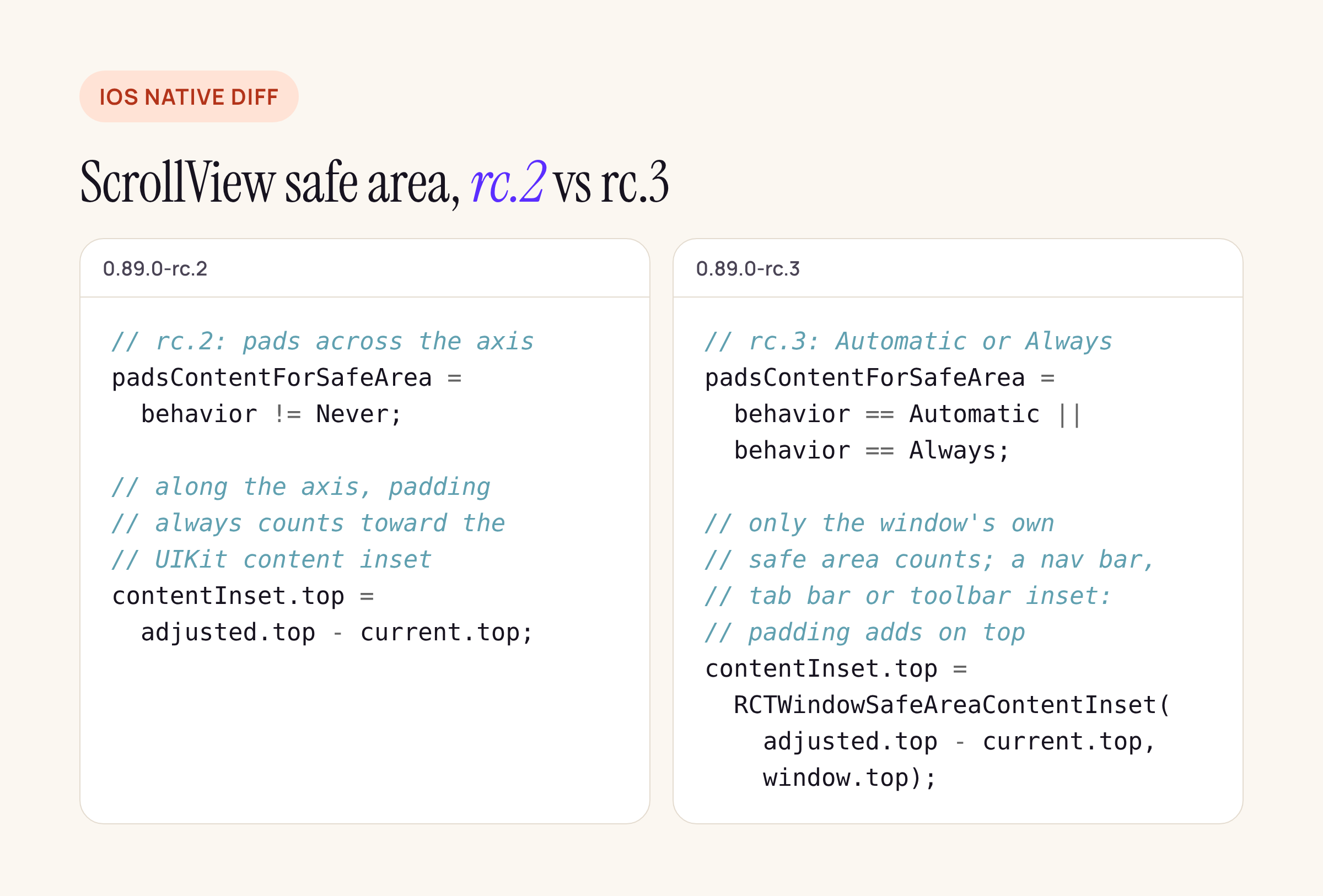
The two conditions that changed in RCTScrollViewComponentView.mm, simplified.
Across the axis, only 'automatic' and 'always' pad the content container now. A new RCTPadsContentForSafeArea() helper decides it, and 'scrollableAxes' goes back to UIKit’s own .scrollableAxes behaviour: insets along the scroll axis only, no side padding. If you used 'scrollableAxes' on a horizontal list and liked the padding the earlier RCs gave it, switch to 'automatic'.
Along the axis, rc.0 to rc.2 let your contentContainerStyle padding count toward the whole content inset UIKit adds, so the content sat at the larger of the two. That was right for the status bar or the home indicator, but below a navigation bar it ate the spacing people had set on purpose. rc.3 adds RCTWindowSafeAreaInsetsInView(), which works out how much of the inset is the window’s own safe area at that edge. Only when the window’s safe area alone makes up the inset does the padding count toward it; when a navigation bar, tab bar or toolbar adds to it, the padding adds on top, as it did in 0.88. The new test in ScrollContentViewTest.cpp pins exactly this: 20 points of vertical padding stay 20 at the top under a navigation bar, and become 0 at the bottom, where the 34 point home-indicator inset covers them.
What to check in your own app on rc.3:
- Screens with a
ScrollVieworFlatListunder a native stack header: the first item should sit at its old distance from the bar again. - Horizontal lists with
contentInsetAdjustmentBehavior="scrollableAxes": they lose the top and bottom padding the earlier RCs gave them. - Landscape on a notched iPhone, and the iPhone Duo simulator if you have Xcode 27.1: with
'automatic', content stays clear of the side insets while the background still runs edge to edge.
The doc comment in ScrollView.js now spells out all four values and recommends 'automatic' for any ScrollView or FlatList that is the root of a screen. The default is still 'never'.
Radial gradients: length stops follow the CSS spec
Both RCTRadialGradient.mm and RadialGradient.kt change one argument. Colour stops given as lengths ("40px") used to resolve against max(radiusX, radiusY); in rc.3 they resolve against radiusX, with a link to the CSS Images 3 rule that the gradient line starts at the centre and extends to the right. Circles and percentage stops look the same. An ellipse that is taller than it is wide, with stops in pixels, now places those stops further out than in rc.2, matching what a browser draws.
Android: text that wrapped one pixel early
TextLayoutManager.kt gets a floorPixelWidth() helper. Widths reach it in pixels converted from Yoga’s floating-point DIPs, so a text measured at exactly 372 pixels could come back as 371.99997 and be floored to 371, one pixel too narrow, and wrap. rc.3 adds a 0.001 pixel tolerance before flooring, in all three places that floored the width.
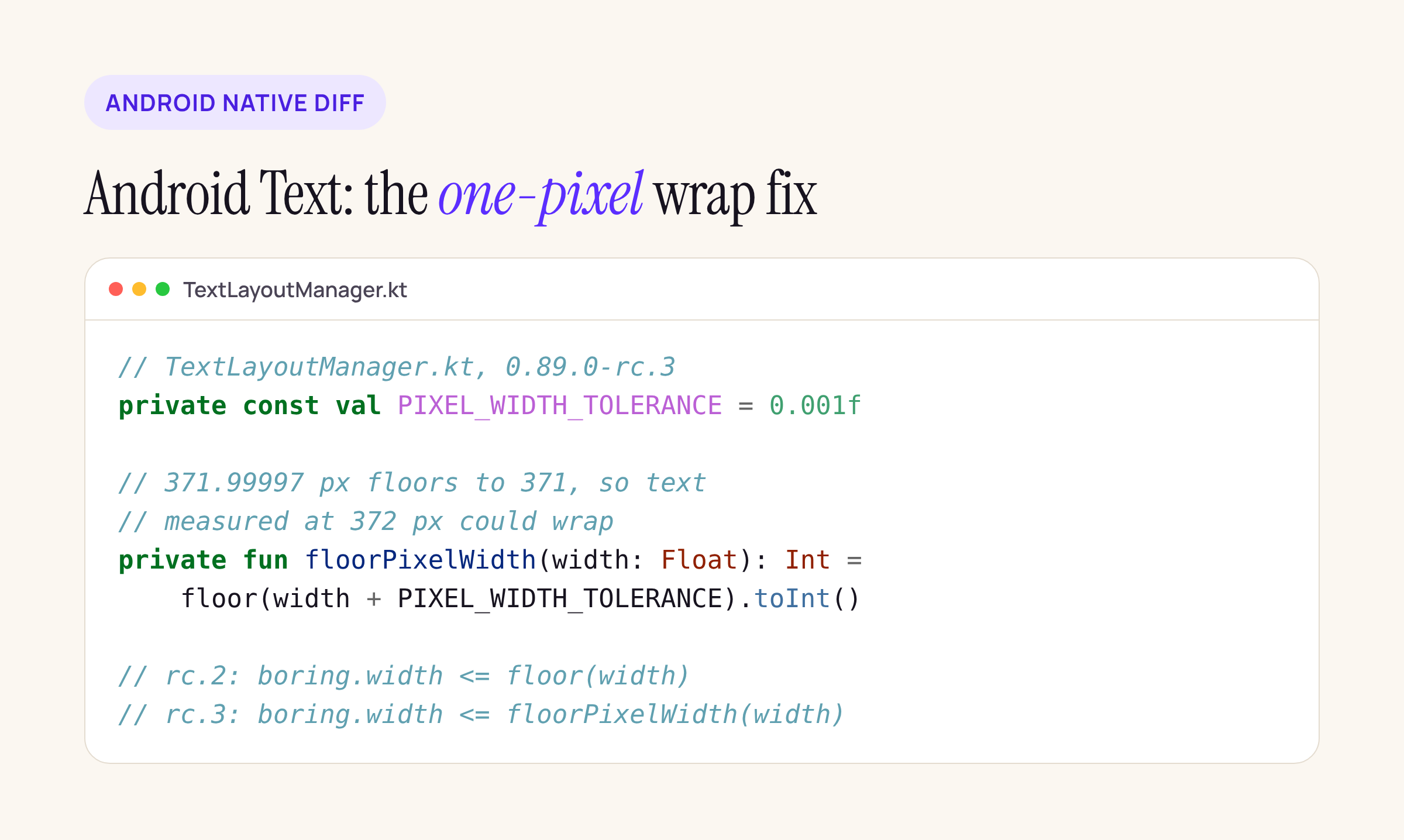
The new helper in TextLayoutManager.kt, with the condition it replaces.
ReactTextView.java fixes a second text bug: setText drops the view’s Layout, and Fabric only re-measures when the frame changes. A text update that kept the same frame reached onDraw with no layout, so CanvasEffectSpan effects were skipped for that frame. rc.3 re-measures at the current size when that happens.
ReactProgressBarViewManager.kt swaps a WeakHashMap<Int, ...> for a SparseArray guarded by synchronized, so measuring ProgressBarAndroid from more than one thread no longer races on the cache. The old map also needed a suppressed warning, because boxed Int keys and weak references do not mix.
Yoga and CocoaPods
CalculateLayout.cpp computes isBaselineLayout(node) once per layout pass and passes it down, instead of calling it again for every flex line and for step 8. Layout results do not change; it only removes repeated calls.
ReactCodegen.podspec.template adds React-ImageManager to the header search paths ReactCodegen gets when CocoaPods builds frameworks. These framework-style paths are what ReactCodegen compiles against when CocoaPods builds React Native as frameworks (use_frameworks!); the default static setup used in our build below does not need them.
The rc.3 app on Xcode 26.2
We created a new app with @react-native-community/cli 21.0.0 and --version 0.89.0-rc.3 and built it without touching a file. Tools, from the build log: Xcode 26.2 (17C52) with the iOS 26.2 SDK, Node 24.22.3, CocoaPods 1.17.0, JDK 17.0.21 (Zulu), all on our M1 lab Mac with 16 GB and macOS 15.7.3.
npx @react-native-community/cli@21.0.0 init Rn89Lab \
  --version 0.89.0-rc.3 --install-pods false
cd Rn89Lab/ios && pod install && cd ../..
xcodebuild -workspace Rn89Lab/ios/Rn89Lab.xcworkspace \
  -scheme Rn89Lab -configuration Release \
  -sdk iphonesimulator \
  -destination "generic/platform=iOS Simulator" \
  -derivedDataPath dd CODE_SIGNING_ALLOWED=NO build
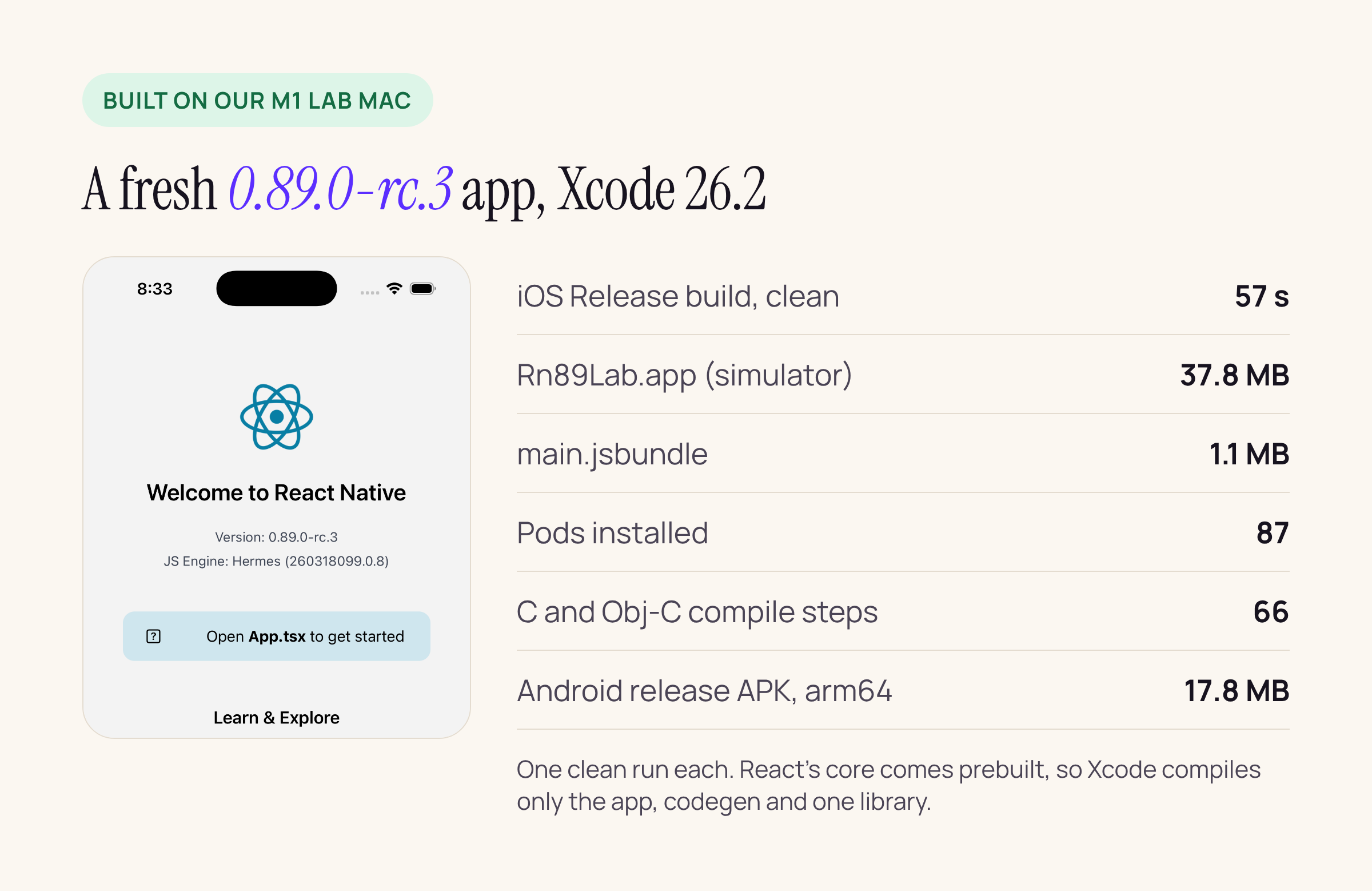
The new app on an iPhone 17 Pro simulator (iOS 26.3), next to the numbers from the same run.
What we saw:
pod installresolved 88 dependencies into 87 pods, withReact-Core-prebuiltandReactNativeDependenciesdownloaded as tarballs from repo.reactnative.dev, and Hermes reported as260318099.0.8. It took 7 minutes 5 seconds, almost all of it downloads into an empty cache, so treat that as a network figure.- The iOS Release build succeeded in 57 seconds from an empty derived data folder. Because the core is prebuilt, Xcode only had the app’s
AppDelegate.swift,ReactCodegen,ReactAppDependencyProviderandreact-native-safe-area-context(which the template includes) to compile: 66 C and Objective-C compile steps, each file built twice because a generic simulator destination builds both arm64 and x86_64. The log has 197 warning lines, mostly umbrella-header and nullability warnings from the React module headers, and fourRCTRootViewdeprecation notices from the legacy architecture code that is on its way out. - Size: the simulator
.appcame to 37.8 MB, of whichmain.jsbundleis 1.1 MB. - Run: installed on the iPhone 17 Pro simulator with the iOS 26.3 runtime, it launched to the new welcome screen, which reports “Version: 0.89.0-rc.3” and the Hermes build.
- Android:
./gradlew assembleReleasefor arm64-v8a succeeded with Gradle 9.4.1, Kotlin 2.3.21, compileSdk and targetSdk 37, build tools 37.0.0 and NDK 28.2.13676358, and produced a 17.8 MB APK. It took 16 minutes, but that includes downloading NDK 28.2, which this Mac did not have yet, so the time says little about the build itself.
One detail in the template’s package.json: it pins @react-native-community/cli 21.0.0-alpha.1 in devDependencies, while 21.0.0 is the current latest on npm. If you upgrade an existing app with the upgrade helper, take the newer CLI.
These are single runs on one Mac, not benchmarks. What they do show is that 0.89.0-rc.3 builds and launches with Xcode 26.2; you do not need Xcode 27 to try the release candidate.
Should you move from rc.2 to rc.3?
Yes, if you are testing 0.89 at all. Nothing in rc.3 adds a build step or a breaking API change, and the iOS ScrollView change brings back spacing that the earlier 0.89 RCs removed under navigation bars. Re-test the three ScrollView cases above, any ellipse gradients with pixel stops, and Android screens where text sits exactly at the width of its container. 0.89.0 is planned for 7 December.