
React Native 0.89.0-rc.2 reached npm on 17 November 2026, a week after rc.1, with no release notes on GitHub yet. We unpacked both npm tarballs and diffed them: 91 files differ. The change to act on first: rc.2 turns on the C++ implementation of Native Animated by default on iOS and Android, plus two animation-backend flags in the open-source stable set. If you are testing the 0.89 RC, re-run your animation-heavy screens on rc.2 before anything else.
The rest: a new iOS API for the iPhone Duo status bar rail, ScrollView content that now pads itself clear of the safe area across the scroll axis, a pod install guard for apps converted to Swift Package Manager, gradient fixes on both platforms, an Android networking change that skips base64 work outside debugging, and Hermes 260318099.0.8. @react-native/gradle-plugin, codegen and community-cli-plugin were republished with only their version numbers changed.
Why we did this: our banking app runs React Native 0.88.1 and the 0.89 upgrade is planned, so we read every RC before it lands. Our 0.89 RC overview covers what changes from 0.88; this post covers only rc.1 to rc.2. It is a source diff of the two npm packages; behaviour in your own app is for your test pass.
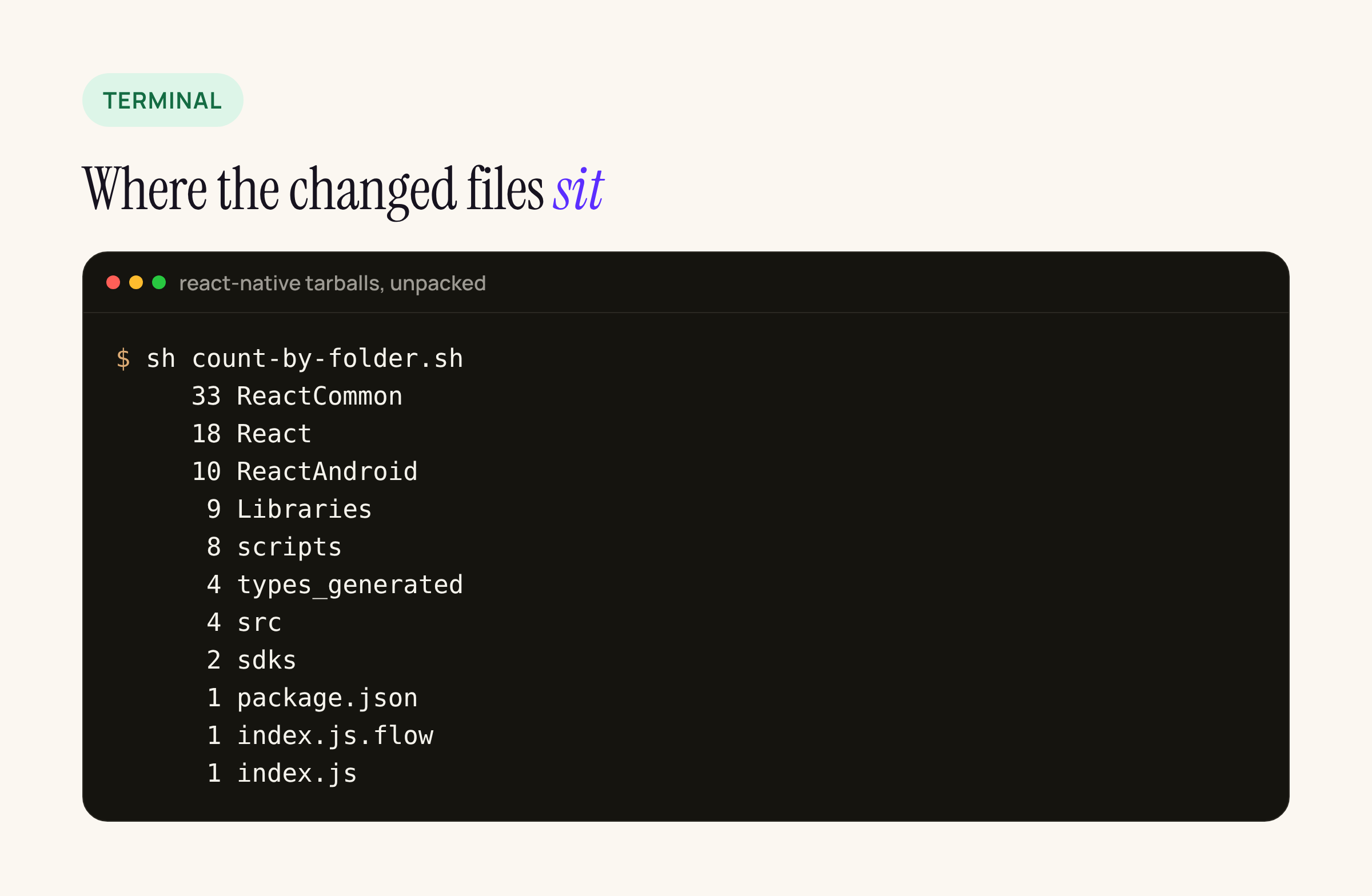
Changed files per top-level folder in the react-native package, rc.1 to rc.2.
How we compared the two release candidates
npm pack react-native@0.89.0-rc.1 react-native@0.89.0-rc.2
mkdir rc1 rc2
tar xzf react-native-0.89.0-rc.1.tgz -C rc1 --strip-components=1
tar xzf react-native-0.89.0-rc.2.tgz -C rc2 --strip-components=1
diff -rq rc1 rc2 | wc -l    # 91
We did the same for @react-native/gradle-plugin, @react-native/codegen and @react-native/community-cli-plugin at both versions: only package.json differs. React Native’s release overview still lists 0.89.x with a release date of 2026-12-07, so more RCs are likely before then.
Feature flags: C++ Native Animated is now the default
ReactNativeFeatureFlagsDefaults.h (shared C++) and ReactNativeFeatureFlagsDefaults.kt (Android) flip two defaults from false to true:
cxxNativeAnimatedEnabled, described in the flags header as “Use a C++ implementation of Native Animated instead of the platform implementation.”fuseboxFrameRecordingEnabled: frame timings and screenshots in the React Native DevTools backend.
The open-source stable overrides, which RCTReactNativeFactory on iOS and DefaultNewArchitectureEntryPoint on Android apply to a standard app, also gain two flags set to true:
optimizedAnimatedPropUpdates: on Android, “a batched int/double buffer protocol with a single JNI call” for animated props.useSharedAnimatedBackend: the shared animation backend in C++ Animated.
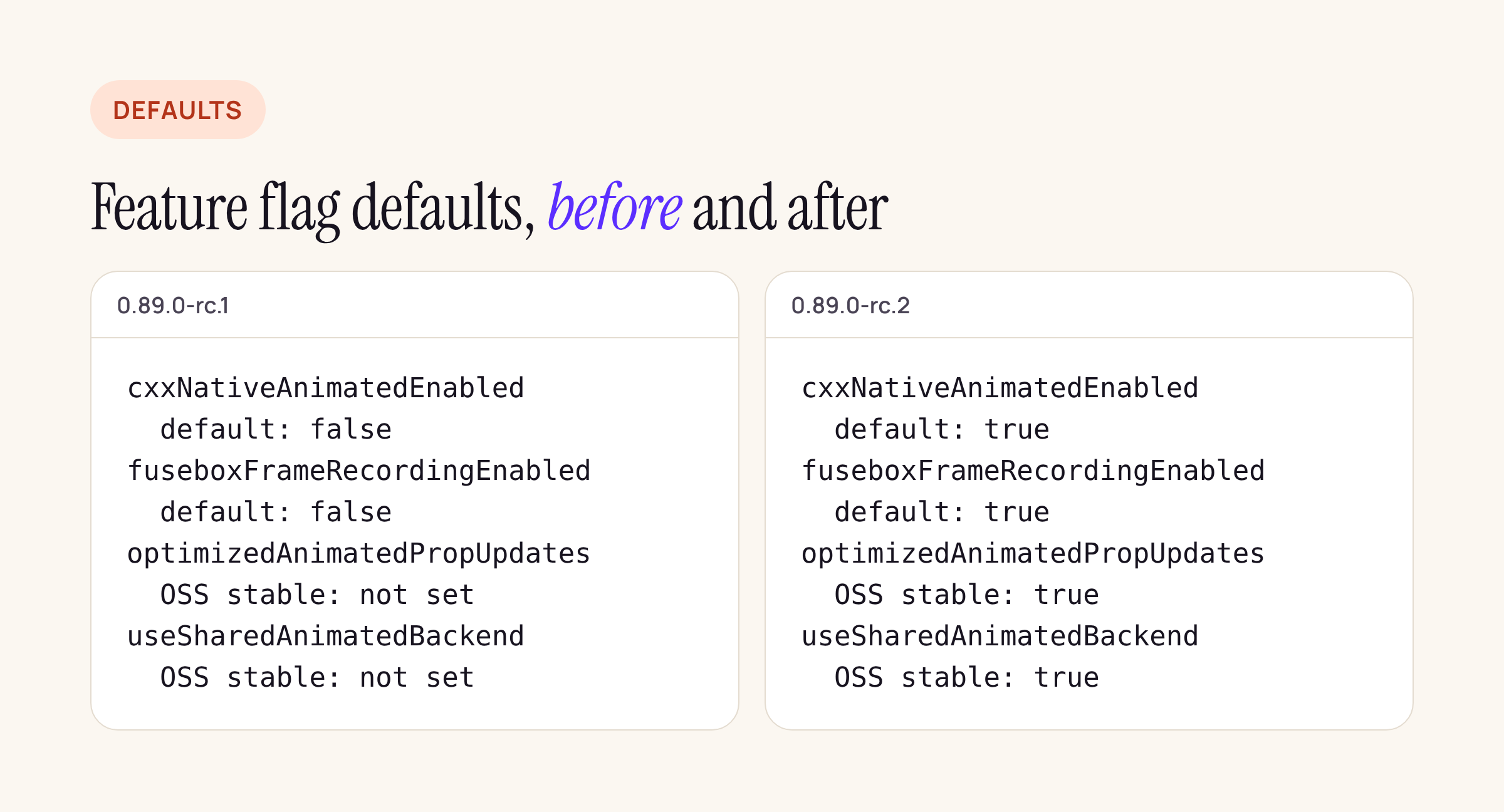
Four flags that change how Animated runs with useNativeDriver: true.
The supporting code moved with it. On iOS, RCTInstance now observes the event dispatcher and forwards component events to C++ listeners on the main thread, through a new RCTEventDispatcherEventPayload; in ReactCommon, EventEmitterListener.h moved from renderer/animated to renderer/core, and the animation backend files (AnimatedPropsRegistry, AnimationBackendCommitHook) changed.
What to re-test on rc.2: anything driven by Animated with useNativeDriver: true, especially animations tied to scroll events (Animated.event on onScroll), interrupted animations, and screens that mount and unmount animated views quickly. If a library ships its own native animation code, check it too.
iOS: the iPhone Duo status bar rail
rc.2 adds a way to ask where the system put the vertical bar that holds the status bar, “such as the side rail on iPhone Duo”:
StatusBar.getVerticalBarEdgeIOS()returns'leading','trailing'ornull.useVerticalBarEdgeIOS(), exported fromreact-native, is a hook that updates on the newverticalBarEdgeDidChangeevent.- The doc comments on
hiddenandsetHiddennow say they have “no effect on iPhone Duo, where the status bar is in a vertical bar”.
In RCTStatusBarManager.mm the native side reads traitCollection.verticalBarEdge inside #if __IPHONE_OS_VERSION_MAX_ALLOWED >= 270100 and @available(iOS 27.1, *). In practice: an app built with an SDK older than iOS 27.1 compiles that branch out and always gets null, so you need Xcode with the iOS 27.1 SDK to see a real edge.
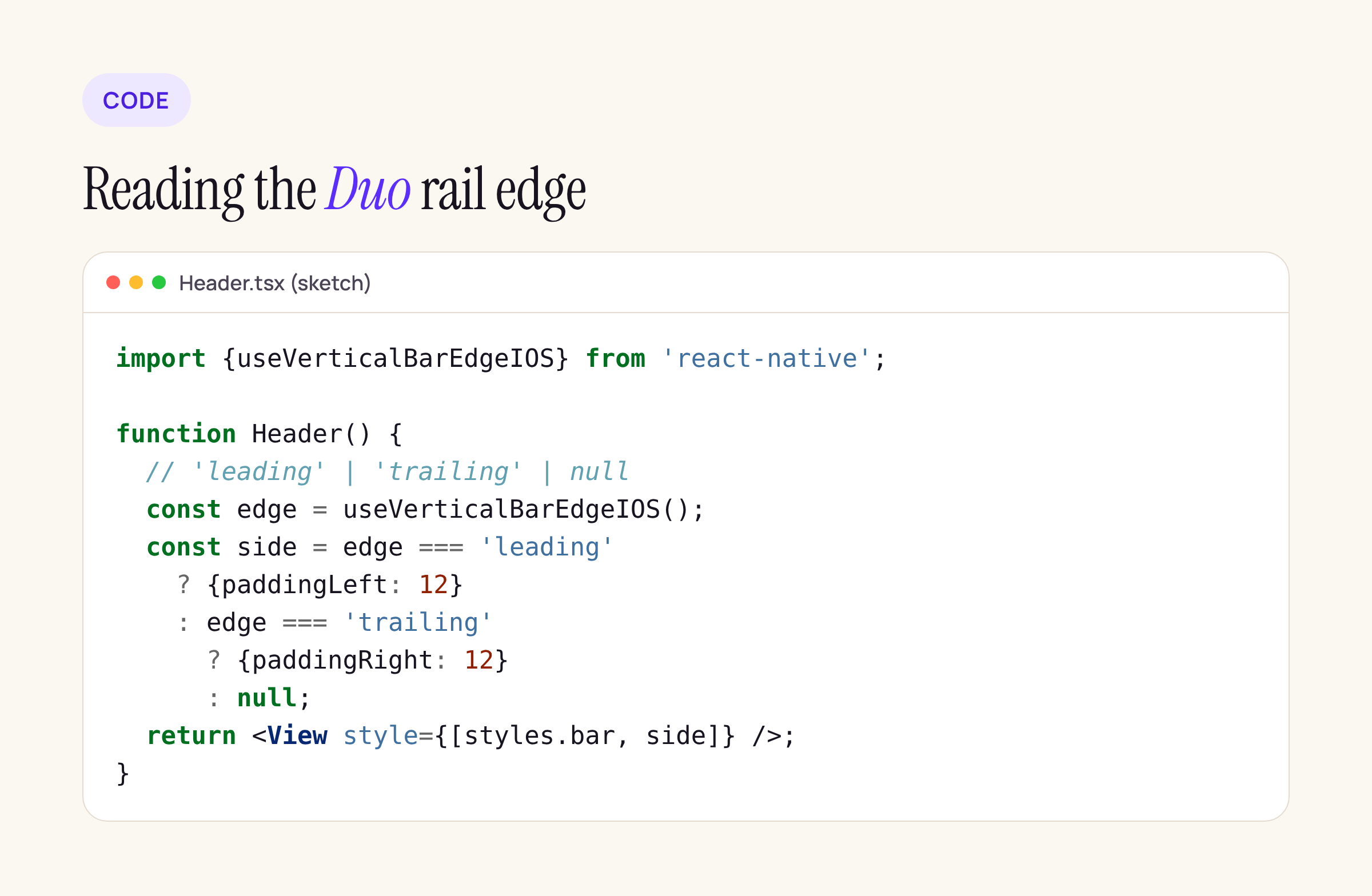
A sketch of a header that keeps its content off the rail; adapt it to your layout.
import {useVerticalBarEdgeIOS} from 'react-native';

function Header() {
  // 'leading' | 'trailing' | null
  const edge = useVerticalBarEdgeIOS();
  const side = edge === 'leading'
    ? {paddingLeft: 12}
    : edge === 'trailing'
      ? {paddingRight: 12}
      : null;
  return <View style={[styles.bar, side]} />;
}
For the wider layout picture on that device, see our post on iPhone Duo arrangements and reserved regions.
iOS: ScrollView content now clears the safe area across the axis
This is the change most likely to move pixels in an existing app. rc.2 adds a new Fabric component for the ScrollView content container (RCTScrollContentViewComponentView on iOS, ScrollContentViewShadowNode, props and state in ReactCommon), and RCTScrollViewComponentView now hands it the safe area insets whenever they change, including on layoutSubviews and scrollViewDidChangeAdjustedContentInset:.
The new ScrollView.js documentation spells out the behaviour for contentInsetAdjustmentBehavior:
- Along the scrollable axis, insets stay content insets, so content still scrolls under system UI.
- Across the axis, “every value except
'never'pads the content container by the insets”, such as the rail on iPhone Duo or the camera cutout in landscape, while the container background still reaches the edges. - Your
contentContainerStylepadding counts toward the inset: content sits at the larger of the two, not the sum.
The padsContentForSafeArea prop that rc.1 had in BaseScrollViewProps is gone; the scroll view now derives it from contentInsetAdjustmentBehavior. What to check: vertical lists in landscape on notched iPhones, and horizontal carousels, where a list that set contentInsetAdjustmentBehavior="automatic" and its own side padding may now look different from rc.1. Lists with 'never' are unchanged.
iOS build: pod install stops on an SPM-converted app
scripts/cocoapods/utils.rb gains error_if_spm_injected, called from prepare_react_native_project!, use_react_native! and use_native_modules!. If any .xcodeproj next to the Podfile contains .spm-injected.json (the marker npx react-native spm add writes), pod install now raises:
This app uses Swift Package Manager for React Native
(<App>.xcodeproj has .spm-injected.json), so `pod install`
would break the Xcode project. To go back to CocoaPods,
run `npx react-native spm deinit` first, then `pod install`.
The SPM scripts changed alongside it: spm add --deintegrate now keeps the Podfile instead of stripping React Native from it, spm deinit undoes the .gitignore lines add appended and removes empty generated folders, and the Package.swift scaffolder moves to version 22, which adds RCT_NEW_ARCH_ENABLED=1 for podspecs that call install_modules_dependencies(s), as CocoaPods does. If you tried the SPM path on rc.1, run spm update on rc.2 so the regenerated manifests pick this up.
Gradients, layout and Android networking
- Gradients, iOS and Android: both platforms now handle colour stops placed outside the gradient’s range the way the CSS spec describes:
clipColorStops(new inRCTGradientUtils.mmand inColorStop.kt) replaces them with stops at the range boundaries, coloured as the gradient would be at that point, because the platform shaders “pin them to the range instead”. On iOS the boundary colour is interpolated with premultiplied alpha “as CSS does”, and stop positions are clamped to finite values, with a guard for a zero-length gradient line.processBackgroundImage.jsnow drops non-finite stop positions. If you use stops below 0% or above 100%, compare those screens against rc.1. - Layout:
YogaLayoutableShadowNode.cppresets its configured flag when a style is rebuilt from props, so the left and right swap in RTL is applied again. Worth a look if you ship an RTL locale. - Android networking: in
NetworkEventUtil.kt, theonDataReceivedvariant that carries raw bytes now base64-encodes them for DevTools only whenInspectorNetworkReporter.isDebuggingEnabled(). In rc.1 it encoded them every time, debugger or not, so release builds now skip that copy.
Versions that moved
| Item | rc.1 | rc.2 |
|---|---|---|
| react-native | 0.89.0-rc.1 | 0.89.0-rc.2 |
| Hermes engine | 260318099.0.7 | 260318099.0.8 |
| hermes-compiler (package.json) | 260318099.0.7 | 260318099.0.8 |
| @react-native/ |
0.89.0-rc.1 | 0.89.0-rc.2 |
| ReactAndroid VERSION_NAME | 0.89.0-rc.1 | 0.89.0-rc.2 |
Gradle, AGP, Kotlin and the CLI pins did not change between the two RCs. On the JavaScript side, besides the StatusBar and ScrollView changes above, the LogBox inspector now pads itself for left and right safe area insets.
What to do on your branch
- Bump to
0.89.0-rc.2, thenpod installandpod update React-Core-prebuiltso the prebuilt core matches. - Re-test native-driven animations first: this is the one default change with wide reach.
- Check ScrollViews that use
contentInsetAdjustmentBehaviorin landscape and in horizontal lists. - Look at gradients with transparent stops on iOS and Android.
- If you experimented with
npx react-native spm, runspm update, orspm deinitbefore going back to CocoaPods.
This post will be updated when 0.89.0 final ships.






