Compose UI 1.13.0 (stable since 18 November 2026, BOM 2026.11.01) lets a Dialog blur what sits behind it with four new DialogProperties parameters: blurBehindRadius, backgroundBlurRadius, scrimAlpha and windowShape. Popup gets the first and third. The takeaway: on Android 11 and older, and on any phone where the system has cross-window blur switched off (Battery Saver is the common case), Compose applies no blur and adds no fallback of its own. If your dialog relies on a light scrim plus blur to separate it from the screen, read the new WindowInfo.isCrossWindowBlurEnabled and raise scrimAlpha when it is false.
This is a source read of androidx.compose.ui:ui: the published API files for 1.12.0-beta01 and 1.13.0-beta01, and AndroidDialog.android.kt and AndroidWindowInfo.android.kt from androidx-main (commit 7d79a84a, 24 November 2026).
Why we looked: the confirm and PIN dialogs in the banking-type Android apps we build sit on top of account screens, and “blur the background” is a request we get from designers. Before saying yes we wanted to know what a user on Battery Saver sees.
What changed in DialogProperties
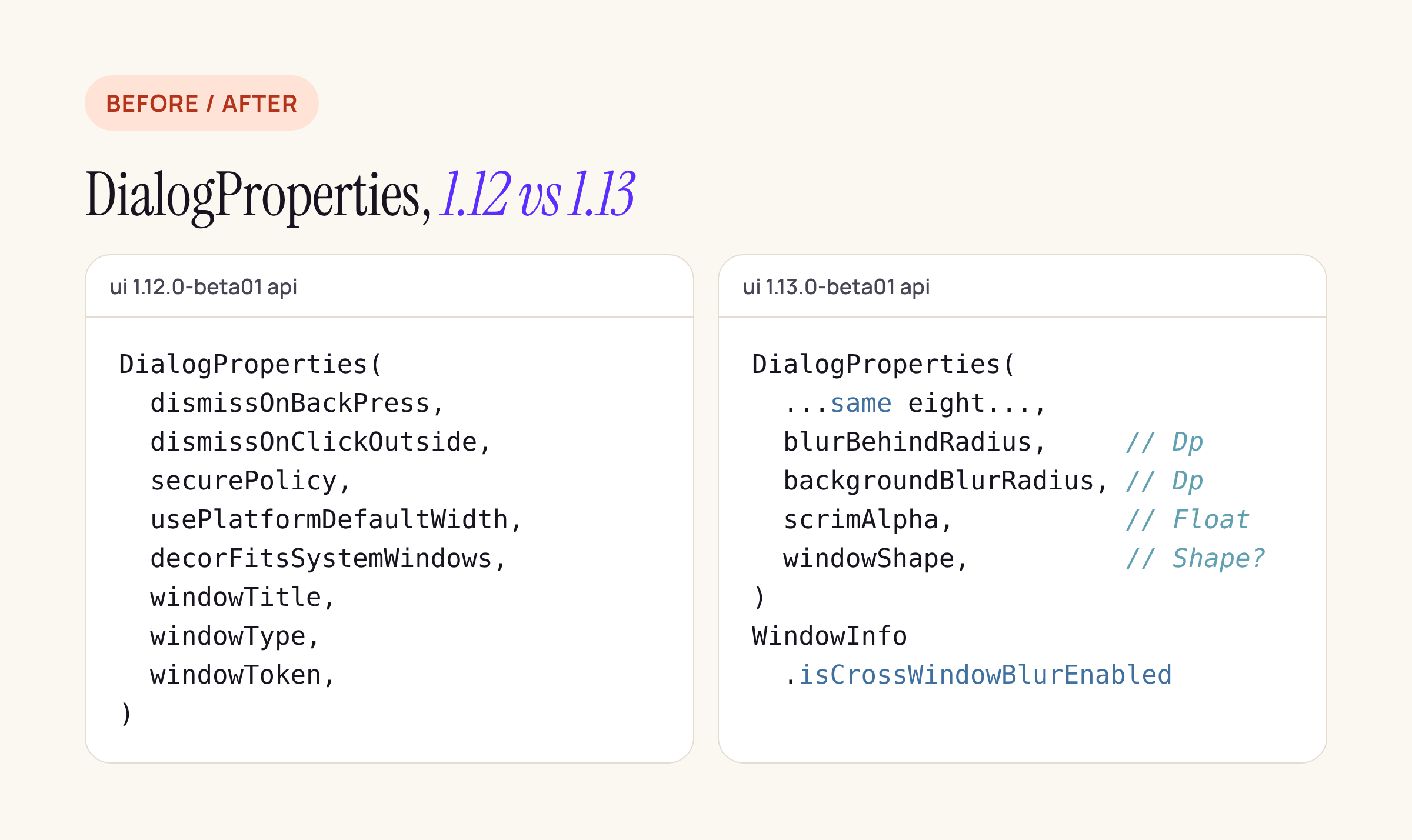
Compared from the API signature files that ship in the androidx repository.
The diff of the two API files for anything named blur, scrim or windowShape gives exactly this:
DialogPropertiesgainsblurBehindRadius: Dp,backgroundBlurRadius: Dp,scrimAlpha: FloatandwindowShape: Shape?. All four default to “unspecified” (Dp.Unspecified,Float.NaN,null), so existing dialogs behave as before.PopupPropertiesgainsblurBehindRadiusandscrimAlphaon both of its full constructors (the one withflagstoo). No background blur or shape for popups.WindowInfo.isCrossWindowBlurEnabledis new, a top-level extension property you read throughLocalWindowInfo.current.- Unrelated to dialogs but in the same diff:
Modifier.blurgets aBlurRadiusSpecoverload and aBlurScopelambda form (the progressive blur the release notes mention).
The release notes date the dialog properties to 1.13.0-alpha01 (12 August) and isCrossWindowBlurEnabled to 1.13.0-alpha03 (9 September). Android’s November 2026 Compose release post lists both; the upgrade needs Kotlin 2.2 or newer and compileSdk 37.1.
What the two blur radii do
They map one to one onto the platform window APIs from Android 12 (API 31):
blurBehindRadiusblurs the whole screen behind the dialog window. Compose converts the Dp to pixels, setsFLAG_BLUR_BEHINDand writesWindowManager.LayoutParams.blurBehindRadius. A value of0.dpclears the flag again.backgroundBlurRadiusblurs only inside the dialog window’s bounds, the frosted-glass look. Compose callsWindow.setBackgroundBlurRadius.windowShapegives the native window background an outline from a ComposeShape, so the background blur clips to your card’s rounded corners instead of a rectangle. Without it, a 28 dp rounded card shows square blurred corners around it.scrimAlphacallsWindow.setDimAmount. It is the only one of the four that also works below Android 12.
The KDoc in AndroidDialog.android.kt suggests about 10.dp for blur behind and 30.dp for background blur, and warns against radii above 50.dp for performance. The sample in the repository (DialogWithBlurSample) uses 15 dp, 30 dp and a scrim of 0.2.
What happens when blur is off
This is the part the release notes do not spell out. The whole blur branch in DialogWrapper is guarded by a version check and nothing else:
if (Build.VERSION.SDK_INT >= Build.VERSION_CODES.S) {
    if (properties.blurBehindRadius.isSpecified) {
        DialogApi31Impl.setBlurBehindRadius(window, px)
    }
    if (properties.backgroundBlurRadius.isSpecified) {
        DialogApi31Impl.setBackgroundBlurRadius(window, px)
    }
}
if (!properties.scrimAlpha.isNaN()) {
    window.setDimAmount(properties.scrimAlpha)
}
So:
- Android 11 and older: the radii are ignored. Your
scrimAlphastill applies. - Android 12+ with cross-window blur disabled by the system: Compose still sets the flag and the radius, and the platform draws nothing. The KDoc says it directly: some devices cannot do cross-window blur because of GPU limits, and the system can turn it off at runtime, for example in Battery Saver; “in such situations, no blur will be computed or drawn”.
- In both cases the dialog is left with whatever
scrimAlphayou chose. A value tuned to sit on top of a blur (0.2 in the sample) is very light without one, and a white card over a busy account screen can lose its edge.
The fallback: isCrossWindowBlurEnabled
WindowInfo.isCrossWindowBlurEnabled is how Compose exposes the system state. In AndroidWindowInfo.android.kt it wraps WindowManager.isCrossWindowBlurEnabled and registers addCrossWindowBlurEnabledListener on API 31+, backing the value with mutableStateOf. Three details from the source matter:
- It is observable state: when the user turns Battery Saver on while the screen is open, a composable that read it recomposes.
- The listener is lazy: it is registered only after something reads the property, and removed when the views detach.
- Below API 31 it always returns false, which is the answer you want for the fallback.
Because the dialog’s window attributes are re-applied when its properties change, passing a different scrimAlpha on recomposition updates the open dialog.
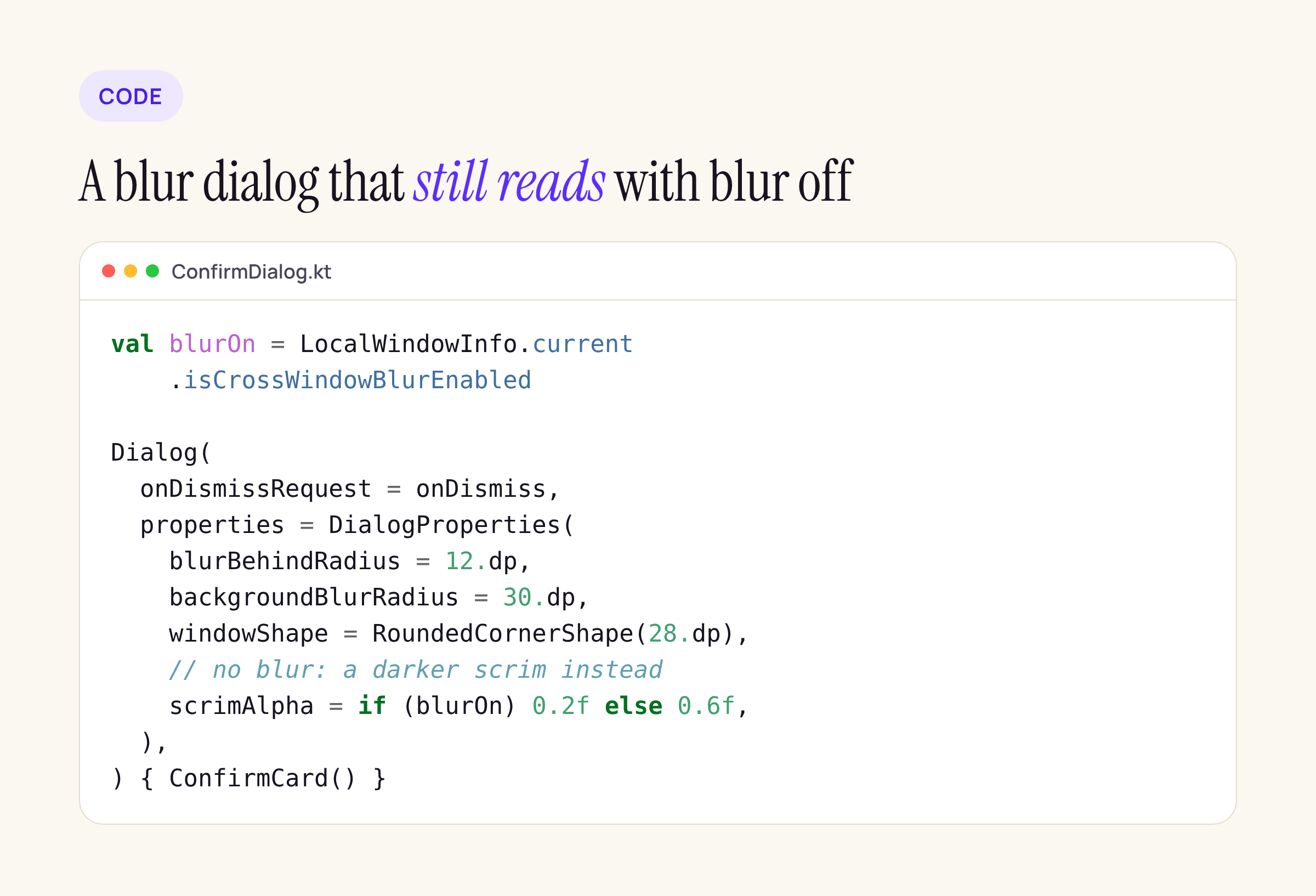
The values are a starting point, not a measured recommendation; pick your own against your screens.
@Composable
fun ConfirmDialog(onDismiss: () -> Unit) {
    // Read outside the dialog, in the host composition.
    val blurOn = LocalWindowInfo.current.isCrossWindowBlurEnabled

    Dialog(
        onDismissRequest = onDismiss,
        properties = DialogProperties(
            blurBehindRadius = 12.dp,
            backgroundBlurRadius = 30.dp,
            windowShape = RoundedCornerShape(28.dp),
            scrimAlpha = if (blurOn) 0.2f else 0.6f,
        ),
    ) {
        ConfirmCard(shape = RoundedCornerShape(28.dp))
    }
}
Treat this as a sketch to adapt and compile against your own module. Two more things to adjust with the same flag: if the card itself is translucent so the background blur shows through, make it opaque when blurOn is false, and keep windowShape and the card’s shape in one constant so the blur outline cannot drift from the card.
Material 3 dialogs and popups
AlertDialog and BasicAlertDialog in Material 3 take a properties: DialogProperties parameter, so the same fallback works there: build the DialogProperties with the flag and pass it in. For a Popup (a custom dropdown or tooltip window) only blurBehindRadius and scrimAlpha exist, so there is no frosted background inside the popup; the same scrimAlpha switch applies.
What to check in your own app
- Search for
blurBehindRadiusandbackgroundBlurRadiusand make sure every call site also setsscrimAlphafromisCrossWindowBlurEnabled, not a fixed light value. - If you set
backgroundBlurRadiuson a rounded card, setwindowShapeto the same shape. - Keep radii at or under
50.dp, as the KDoc advises. - Look at each blurred dialog on an Android 11 emulator or device and on an Android 12+ device with Battery Saver on: both show the no-blur path.
- On Android TV, where many devices are low-power, treat the no-blur path as the normal one and design the scrim for it first.
Sources
- Jetpack Compose November 2026 release, Android Developers blog, 18 November 2026
- Compose UI release notes: 1.13.0-alpha01, 1.13.0-alpha03, 1.13.0
- androidx on GitHub:
compose/ui/ui/api/1.12.0-beta01.txt,1.13.0-beta01.txt,AndroidDialog.android.kt,AndroidWindowInfo.android.kt,DialogSample.kt