PHP 8.2 receives its last security fix this year: php.net lists its security support as ending on 31 December 2026, and the 21 October 8.2.35 announcement says it “will receive no further security fixes after that date”. If a WordPress site or a Laravel app still runs on an 8.2 pool, plan the move now. The short version from our test: on PHP 8.4.27, WordPress 7.1.5 core and the latest WooCommerce, Elementor, Yoast SEO, Contact Form 7 and Akismet all lint with zero parse errors, and the only compile-time deprecation that shows up (26 times) is the implicitly nullable parameter. Your own theme and custom plugins are where the real work is, and the script below finds it in a minute.
Why we did this: we keep WordPress sites (with our Paperkite plugin) and Laravel apps on a CloudPanel VPS, and every PHP branch change starts with the same question: what in this codebase will complain on the new version? This is the check we wanted before any 8.2 pool moves.
The dates that matter
From php.net/supported-versions, read on 21 November 2026:
| Branch | Active support until | Security support until |
|---|---|---|
| 8.2 | 31 Dec 2024 | 31 Dec 2026 |
| 8.3 | 31 Dec 2025 | 31 Dec 2027 |
| 8.4 | 31 Dec 2026 | 31 Dec 2028 |
| 8.5 | 31 Dec 2027 | 31 Dec 2029 |
| 8.6 | 31 Dec 2028 | 31 Dec 2030 |
The current releases are 8.2.36, 8.3.37, 8.4.28, 8.5.13 and 8.6.0, all from 19 November (our patch notes for that release cover the security side).
Why 8.4 and not 8.3? A jump from 8.2 to 8.3 only buys one more year of security fixes. 8.4 is covered until the end of 2028, WordPress marks it as fully supported from 6.8 onward (PHP compatibility table), and Laravel 11, 12 and 13 all run on it. If your plugins are already clean on 8.5, going straight to 8.5 gives you a year of active support on top; the checks below are the same, plus the 8.5 list.
What changes between 8.2 and 8.4
You cross two migration guides: 8.2 to 8.3 and 8.3 to 8.4. Most entries touch extensions a typical WordPress or Laravel site never calls. These are the ones we would look for first:
| Change | Version | What to search for | Source |
|---|---|---|---|
Implicitly nullable parameter (Foo $x = null) is deprecated |
8.4 | Typed params with a null default and no ? |
8.4 deprecated |
trigger_error() with E_USER_ERROR is deprecated |
8.4 | E_USER_ERROR passed to trigger_error |
8.4 deprecated |
E_STRICT level removed, constant deprecated |
8.4 | E_STRICT in error-reporting code |
8.4 incompatible |
lcg_value() deprecated |
8.4 | lcg_value( |
8.4 deprecated |
mysqli_ping(), mysqli_refresh(), mysqli_kill() deprecated |
8.4 | Custom DB drivers and health checks | 8.4 deprecated |
exit() behaves like a function: invalid types throw TypeError |
8.4 | exit($array) or objects passed to exit |
8.4 incompatible |
round() with an invalid mode throws ValueError |
8.4 | Computed rounding modes | 8.4 incompatible |
DOM methods throw DOMException instead of returning false |
8.4 | HTML parsers and importers using DOMDocument |
8.4 incompatible |
Opcache JIT default changed to disable |
8.4 | Hosts that relied on the old default | 8.4 incompatible |
++ on empty or non-alphanumeric strings deprecated |
8.3 | Counters built from strings | 8.3 deprecated |
get_class() and get_parent_class() without arguments deprecated |
8.3 | Bare get_class() in old base classes |
8.3 deprecated |
assert_options() and assert.* INI settings deprecated |
8.3 | Old debug helpers | 8.3 deprecated |
Deprecations do not stop a site on 8.4. They write a line to the log on every request that hits them, which on a busy site fills disks and hides real errors, and they become errors in a later major version.
A lint script that finds the compile-time ones
php -l compiles a file without running it, and PHP 8.4 reports compile-time deprecations, like the nullable one, while it does so. Since PHP 8.3, php -l takes several files at once, so a whole plugin folder lints in seconds. Run it with an 8.3 or newer binary: in our test the 8.2 CLI linted only the first file of each batch.
#!/usr/bin/env bash
# php-compat-scan.sh: lint every PHP file under a folder with a given PHP binary
# and count the compile-time deprecations it reports.
# usage: PHP_BIN=php8.4 ./php-compat-scan.sh wp-content/plugins/woocommerce
set -euo pipefail
PHP_BIN=${PHP_BIN:-php}
DIR=${1:?folder to scan}
OUT=$(mktemp)
echo "PHP: $($PHP_BIN -r 'echo PHP_VERSION;')"
echo "Files: $(find "$DIR" -name '*.php' ${SKIP_VENDOR:+-not -path '*/vendor/*'} | wc -l)${SKIP_VENDOR:+ (vendor/ skipped)}"
find "$DIR" -name '*.php' ${SKIP_VENDOR:+-not -path '*/vendor/*'} -print0 |
  xargs -0 -n 200 $PHP_BIN -d error_reporting=-1 -d display_errors=1 -l >"$OUT" 2>&1 || true
echo "Parse errors: $(grep -c '^PHP Parse error\|^Parse error' "$OUT" || true)"
echo "Deprecations: $(grep -c 'Deprecated:' "$OUT" || true)"
grep 'Deprecated:' "$OUT" |
  sed -E 's/^.*Deprecated: //; s/ in [^ ]+ on line [0-9]+$//; s/^[^ ]+\(\): //; s/\$[A-Za-z_0-9]+/$x/g' |
  sort | uniq -c | sort -rn | head -5
rm -f "$OUT"
Point it at wp-content/themes, wp-content/plugins, or a Laravel app’s app/ and vendor/. It needs a PHP 8.4 binary next to your current one; on a CloudPanel or Ubuntu server that usually means installing the 8.4 CLI package alongside 8.2 before switching any site.
What it found in WordPress 7.1.5 and four big plugins
We ran it on a Linux test server against fresh downloads from WordPress.org on 21 November 2026: WordPress 7.1.5, WooCommerce 11.3.1, Elementor 4.4.1, Yoast SEO 28.9, Contact Form 7 6.2.5 and Akismet 5.7.2, vendor folders included. PHP versions: 8.2.35 and 8.4.27 (the php-wasm builds that WordPress Playground uses) and the distribution’s 8.3.6.
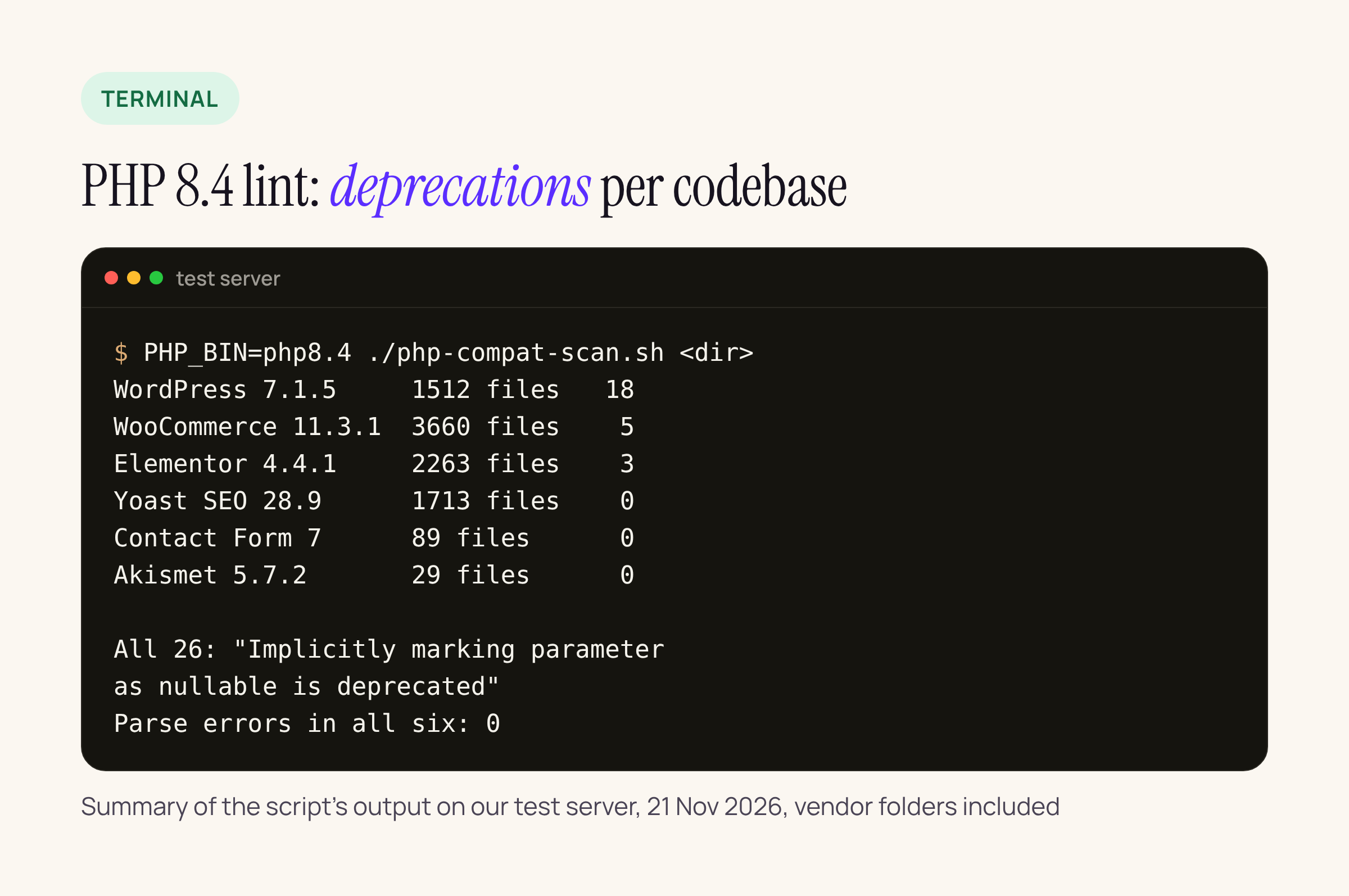
Summary of the script’s output: 26 deprecations in about 9,300 files, all the same message, and no parse errors. PHP 8.2 does not have this deprecation, which is why none of it shows in an 8.2 log today.
- WordPress core, 18: all in
wp-includes/sodium_compat/src/Core32/, the pure-PHP fallback for 32-bit builds. On a normal 64-bit server those classes are not loaded at runtime, so you will see them in a lint, not in the error log. - WooCommerce, 5 and Elementor, 3: typed constructor or method parameters with
= nulland no?. Elementor’s are in its import and export code (app/modules/import-export/processes/import.phpline 152 and two related files). - Yoast SEO, Contact Form 7, Akismet: none.
The fix is the same everywhere: add ? to the type. It has been valid syntax since PHP 7.1, so the patched file still runs on every PHP version WordPress supports.
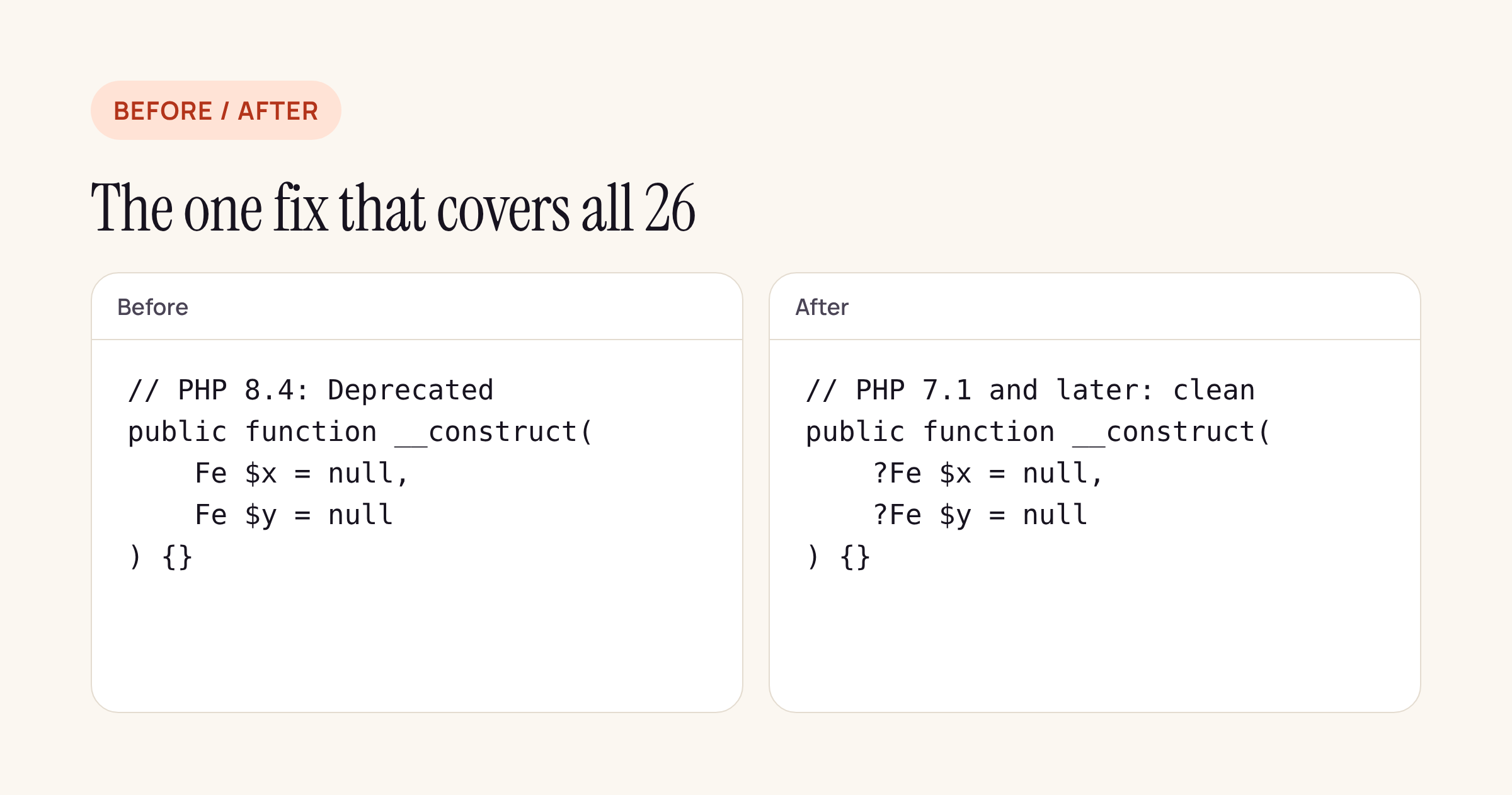
The fix for every one of the 26: make the null explicit.
The runtime ones need a search, not a lint
E_USER_ERROR, E_STRICT and lcg_value() are only reported when the line runs, so php -l cannot see them. A small script shows the difference between the three versions:
<?php
set_error_handler(function ($no, $msg) {
    echo "   ", $msg, "\n";
    return true;
});
echo "PHP ", PHP_VERSION, "\n";
echo "1 E_STRICT\n";      $a = E_STRICT;
echo "2 \$s = ''; \$s++\n"; $s = ''; $s++;
echo "3 lcg_value()\n";    $f = lcg_value();
echo "4 round(1.5, 0, 99)\n";
try { round(1.5, 0, 99); } catch (\ValueError $e) {
    echo "   ValueError: ", $e->getMessage(), "\n";
}
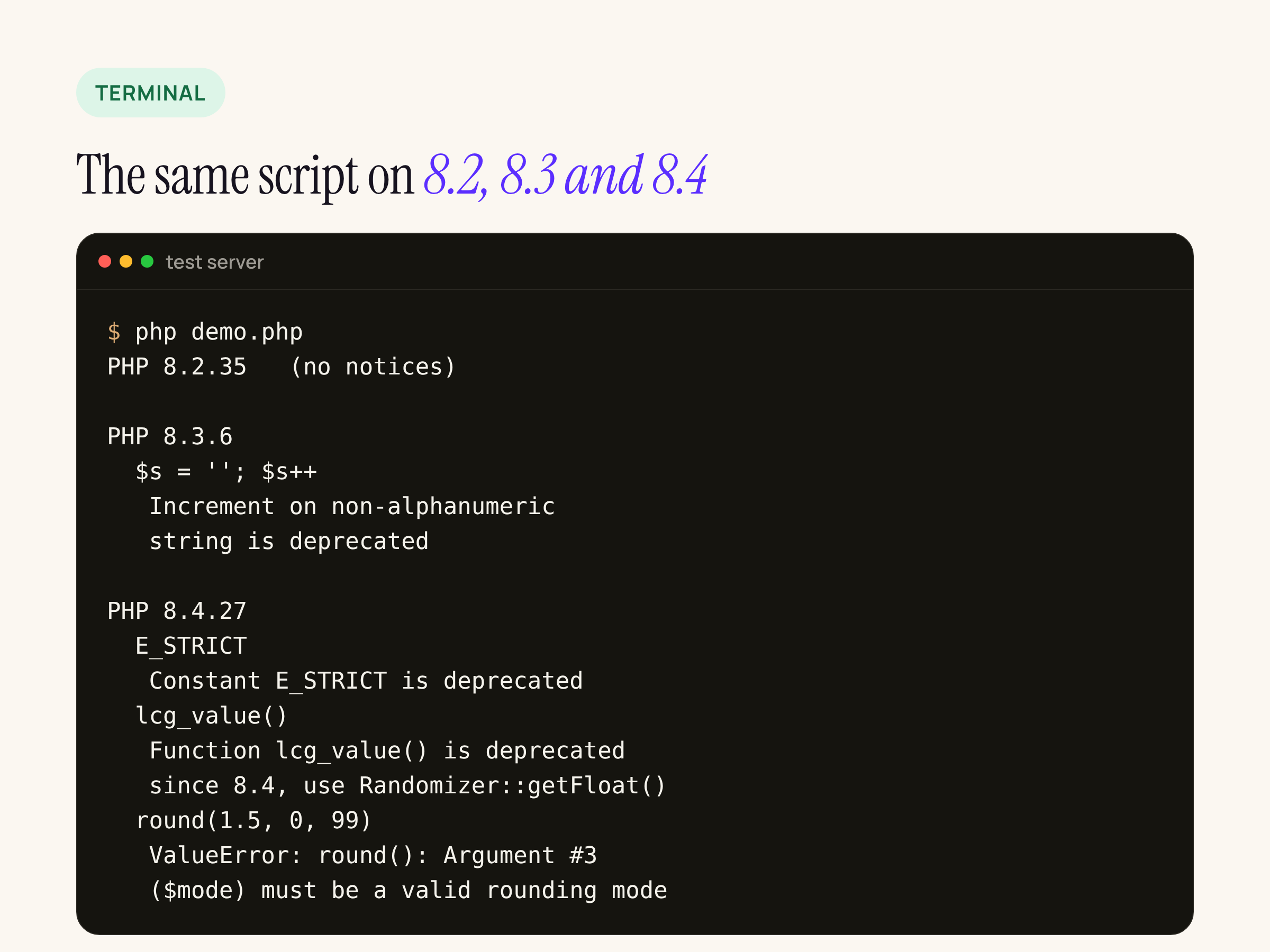
Real output from our test server, long lines shortened to fit.
So grep for them. In the same six codebases, E_STRICT, lcg_value( and mysqli_ping( appear nowhere. trigger_error(..., E_USER_ERROR) appears in 8 places:
grep -rEn --include='*.php' 'trigger_error\s*\([^;]*E_USER_ERROR' wp-content/
grep -rEn --include='*.php' '\bE_STRICT\b|\blcg_value\s*\(|\bmysqli_(ping|refresh|kill)\s*\(' wp-content/
Read each hit before you count it. The three in Yoast SEO’s bundled Guzzle sit behind if (\PHP_VERSION_ID >= 70400) { throw $e; }, so they never run on a modern PHP. The one in WordPress core sits in the bundled Nyholm PSR-7 stream (part of the new php-ai-client) and runs only when a Symfony error handler is active. The two in WooCommerce’s Action Scheduler (__clone and __wakeup guards) and two in Elementor’s data API do run when reached: on 8.4 they log a deprecation and then stop the request as before.
Laravel: the framework version decides
Laravel’s release table settles most of it:
| Laravel | PHP | Security fixes until |
|---|---|---|
| 10 | 8.1 to 8.3 | 4 Feb 2025 |
| 11 | 8.2 to 8.4 | 12 Mar 2026 |
| 12 | 8.2 to 8.5 | 24 Feb 2027 |
| 13 | 8.3 to 8.5 | 17 Mar 2028 |
A Laravel 13 app cannot be on 8.2 at all, because 13 requires 8.3. A Laravel 12 app on 8.2 can move to 8.4 with no framework change: run composer update on the new PHP first so the lock file picks dependency versions that declare 8.4 support, then lint app/, routes/, database/ and vendor/ with the script. A Laravel 10 or 11 app is out of framework security support already, so the PHP move is a good moment for the framework hops too. Our PHP 8.6 post lists what comes after 8.5, if you want to look one step further.
A switch order that keeps a rollback
- Install the PHP 8.4 CLI and FPM next to 8.2; switch nothing yet.
- Run the lint script and the two greps over the theme, every plugin and
mu-plugins, or over a Laravel app and itsvendor/. - Patch your own code; for third-party plugins, update to the latest version and check its changelog for “PHP 8.4”.
- Move a staging copy of the site to the 8.4 pool with
error_reportingatE_ALLand log to a file; click through checkout, forms, imports and cron. - Move production, watch the log for a day, and keep the 8.2 pool installed until the log is quiet.
What to check on your own sites
- Which sites still run on an 8.2 pool (in CloudPanel, the PHP version is in each site’s settings).
- The lint count for your theme and custom plugins, not just the big plugins: those were clean or nearly clean in our test.
- Any
trigger_error(..., E_USER_ERROR)in your own code: replace it with an exception. - For Laravel, the framework version first: 12 and 13 run on 8.4, 10 and 11 need hops.
We will update this post in the last week of December with the final 8.2 release and anything the PHP team announces about the end of the branch.