Apple’s developer news of 9 September 2026 says macOS 26 is the final release supporting Intel Mac computers and Rosetta, and macOS 27 will be Apple silicon only. Its advice to developers is just as short: “set your Xcode build architecture to arm64 only, then rebuild and resubmit.” The change is one build setting, ARCHS = arm64 (or EXCLUDED_ARCHS = x86_64) on Release. The part that catches people is checking it: on Xcode 26.2, an xcodebuild without -destination built arm64 only even when we asked for both architectures, so a local check can tell you the app is already arm64-only when the archive is still universal.
We built one small SwiftUI Mac app (deployment target macOS 14.0) on our M1 lab Mac with Xcode 26.2 and Swift 6.2.3, Release configuration, in four variants, two clean builds each. Why we did this: our Mac apps, Nix and OneClick QuitAll, ship as universal binaries today, and macOS 27 makes dropping the Intel slice a decision we have to make for both.
What to change in Xcode
In the target’s Build Settings, under Architectures, either of these gives an arm64-only Release build:
// Option A: name the one architecture you want
ARCHS = arm64

// Option B: keep Standard Architectures, drop Intel
EXCLUDED_ARCHS = x86_64
Both produced byte-identical results in our builds: a thin arm64 binary of 76,168 bytes. Option B is the smaller diff if your project still uses Standard Architectures, which Apple’s Building a universal macOS binary recommends (“remove your customizations and use the Standard Architectures setting instead”). On Xcode 26.2, ARCHS_STANDARD for macOS is arm64 x86_64, and our project’s Release configuration had ONLY_ACTIVE_ARCH = NO.
Leave “Build Active Architecture Only” at its defaults: Yes for Debug, No for Release. Apple’s page describes the same split: Xcode builds only the current architecture while you debug and a universal binary for release.
The check that misleads: xcodebuild with no destination
Our first round built the app with xcodebuild -scheme ArchLab -configuration Release build and no -destination. Every variant came out arm64-only, including the default one, while -showBuildSettings still reported ARCHS = arm64 x86_64. The build log explains it:
--- xcodebuild: WARNING: Using the first of multiple matching destinations:
{ platform:macOS, arch:arm64, ..., name:My Mac }
{ platform:macOS, arch:x86_64, ..., name:My Mac }
{ platform:macOS, name:Any Mac }
With no destination, xcodebuild picked “My Mac” on its arm64 side and compiled one architecture. We then passed ARCHS="arm64 x86_64" explicitly, still with no destination: the result was again a thin arm64 binary. Only with -destination generic/platform=macOS (the “Any Mac” destination that archives use) did the default settings produce a universal binary. The compiler lines in the logs agree: the “Any Mac” default build ran its compile steps for both arm64-apple-macos14.0 and x86_64-apple-macos14.0, the “My Mac” builds for arm64 only.
So when you check whether your change worked, build for Any Mac (or check the archive), not a plain scheme build:
xcodebuild -project App.xcodeproj -scheme App \
  -configuration Release \
  -destination 'generic/platform=macOS' \
  -derivedDataPath dd build
lipo -archs dd/Build/Products/Release/App.app/Contents/MacOS/App
What the Intel slice costs
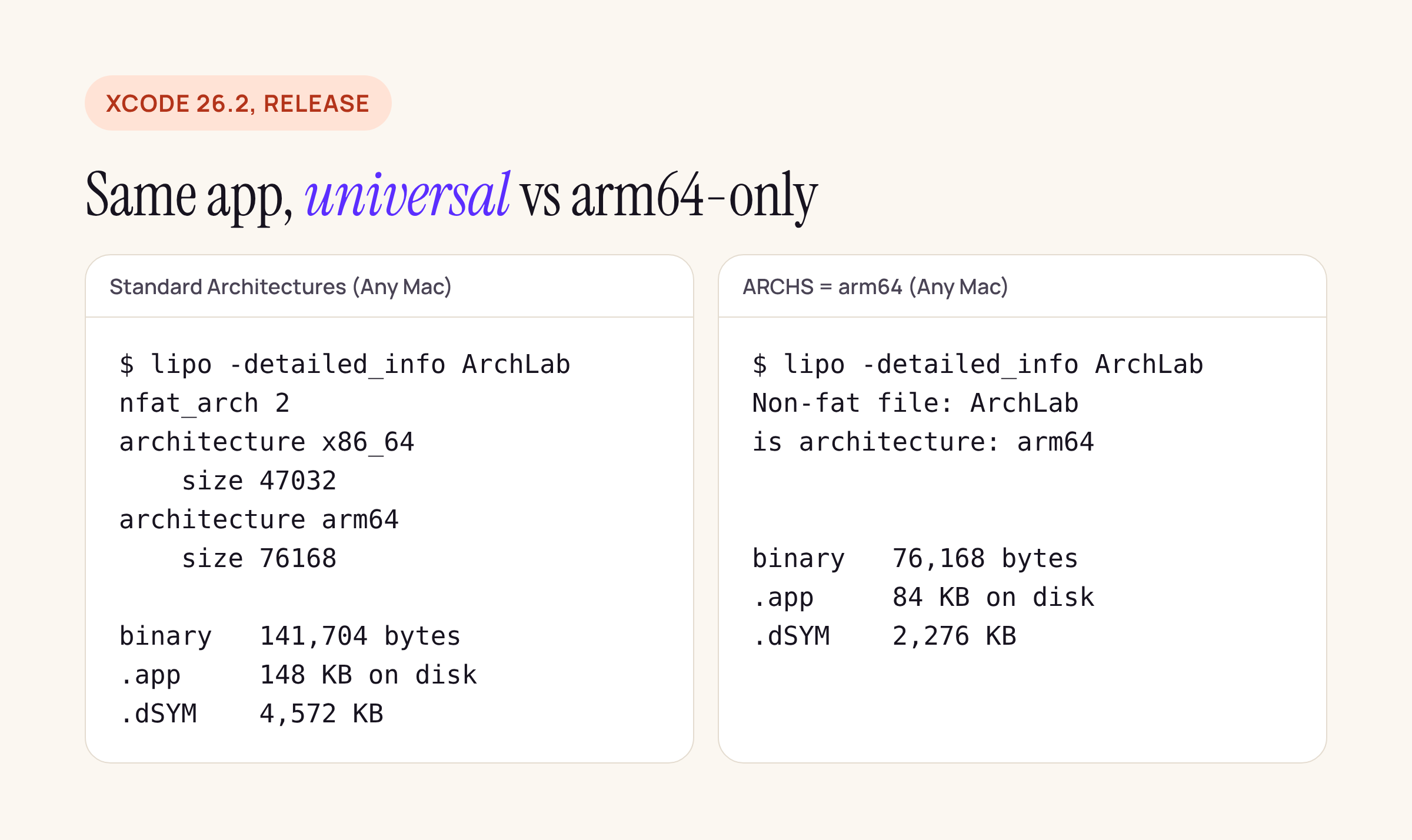
The same app built for Any Mac with Standard Architectures and with ARCHS = arm64, Xcode 26.2.
The numbers from our builds:
- Universal binary: 141,704 bytes, of which the x86_64 slice is 47,032 bytes and the arm64 slice 76,168 bytes. The .app takes 148 KB on disk, the dSYM 4,572 KB.
- arm64-only binary: 76,168 bytes, the .app 84 KB on disk, the dSYM 2,276 KB.
- Clean Release builds: 6 to 7 seconds universal, 5 seconds arm64-only.
This is a two-file sample app, so the absolute numbers say little about a real product, and the timings are one Mac and two runs each, not a benchmark. What carries over is the shape: the binary loses a whole slice, and the dSYM roughly halves because it carries debug information for each architecture. In a larger app with embedded frameworks, every framework binary carries its own slices as well.
vtool -show-build on the binary reports minos 14.0 and sdk 26.2. Dropping x86_64 does not change the deployment target; those are separate settings.
Find every leftover x86_64 slice in a bundle
Your own target is one setting, but frameworks, helpers and plug-ins inside the bundle are built elsewhere. This script walks an .app and lists every Mach-O file with its architectures, reading the Mach-O headers directly, so it runs anywhere Python 3 does:
#!/usr/bin/env python3
"""List every Mach-O file in an .app bundle and its architectures."""
import os, struct, sys

CPU = {0x01000007: "x86_64", 0x0100000C: "arm64", 7: "i386", 12: "arm"}
FAT = {0xCAFEBABE: 20, 0xCAFEBABF: 32}  # fat_arch / fat_arch_64 sizes
THIN = {0xFEEDFACF, 0xCFFAEDFE, 0xFEEDFACE, 0xCEFAEDFE}

def archs(path):
    with open(path, "rb") as f:
        head = f.read(8)
        if len(head) < 8:
            return None
        magic = struct.unpack(">I", head[:4])[0]
        if magic in FAT:
            n = struct.unpack(">I", head[4:8])[0]
            out = []
            for _ in range(n):
                cpu = struct.unpack(">i", f.read(FAT[magic])[:4])[0] & 0xFFFFFFFF
                out.append(CPU.get(cpu, hex(cpu)))
            return out
        if magic in THIN:
            end = ">" if magic in (0xFEEDFACF, 0xFEEDFACE) else "<"
            cpu = struct.unpack(end + "I", head[4:8])[0]
            return [CPU.get(cpu, hex(cpu))]
    return None

app = sys.argv[1]
legacy = 0
for root, _, files in os.walk(app):
    for name in files:
        p = os.path.join(root, name)
        a = archs(p) if not os.path.islink(p) else None
        if a:
            extra = [x for x in a if x != "arm64"]
            legacy += bool(extra)
            flag = "  <- " + ", ".join(extra) if extra else ""
            print(f"{os.path.relpath(p, app)}: {' '.join(a)}{flag}")
print(f"{legacy} file(s) with a non-arm64 slice")
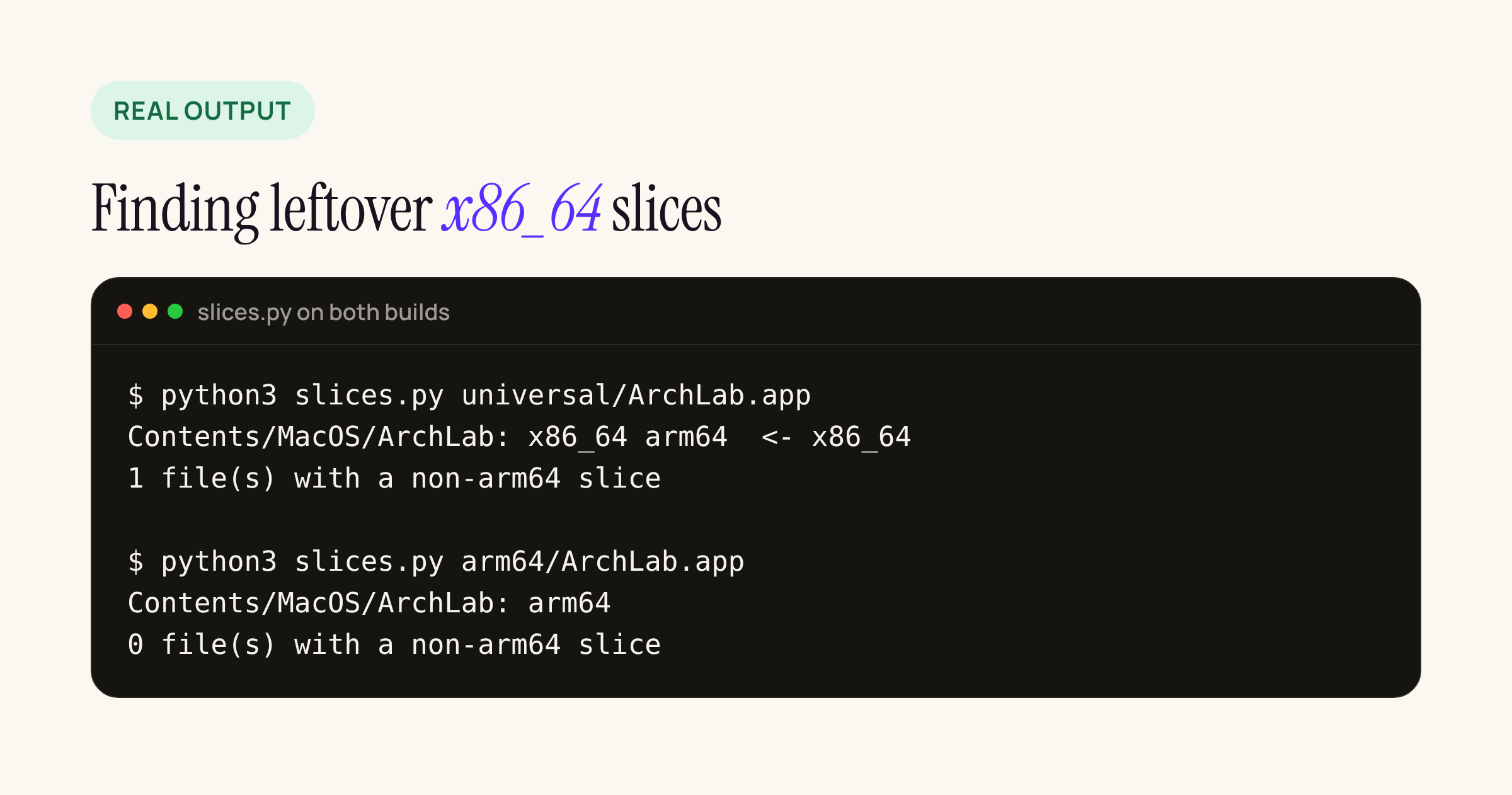
Real output from both builds of our sample app.
Our sample has no embedded frameworks, so this post does not show what happens to a prebuilt framework or a Swift package binary target that still ships an x86_64 slice. Run the script on your archived app: if it lists anything besides your main binary, that file comes from a dependency, and the fix belongs in that dependency’s build or in a newer release of it.
Before you drop Intel: who stops getting updates
An arm64-only build does not launch on an Intel Mac. Intel Macs stay on macOS 26 at most, and many of them can run your current deployment target, so the moment you ship arm64-only, those users stop receiving updates. Things to decide first:
- Which release is the last universal one. Keep it available, and say in your release notes that later versions need a Mac with Apple silicon.
- The deployment target. It stays where it is unless you raise it on purpose. Raising it to macOS 27 would also make the Intel question moot, since no Intel Mac runs it, but it drops Apple silicon users who have not upgraded yet.
- Your CI and archive scripts. Make sure the archive step builds for Any Mac with the new setting, then run
lipo -archs(or the script above) on the archived binary as a release check. - Every target, not just the app. Login items, helpers, extensions and XPC services have their own architecture settings.
What to check on your own app
- Set
EXCLUDED_ARCHS = x86_64(orARCHS = arm64) on the Release configuration of every target. - Build with
-destination 'generic/platform=macOS'or archive, never a plain scheme build, when you verify. - Run
lipo -archson the main binary and the script above on the whole bundle. - Compare the dSYM size before and after: it should drop with the slice.
- Plan the last universal release before you ship the first arm64-only one.
For the user side of the same change, our guide to finding Intel-only code on a Mac covers how to see which installed apps still need Rosetta.