Apple’s Rosetta page says the translation layer “will be available through macOS 27” as a general-purpose tool; from macOS 28 only “a subset of Rosetta functionality aimed at supporting older unmaintained gaming titles” stays. The thing to do now: list every Intel-only binary on your Macs, including the ones hidden inside apps that are otherwise native (login-item helpers, plug-ins, audio units, printer drivers), because those are what macOS 27.3 has started warning about. Below is a read-only Python script that does this from the Mach-O header alone. We tested it on 9 November 2026 against real x86_64, arm64 and universal Mach-O files taken from npm packages (esbuild 0.28.2, sharp 0.35.5, fsevents 2.3.3), not yet on a Mac.
Why we did this: Nix, our Mac uninstaller, already walks app bundles to find what they leave behind. “Which of my apps stop working on macOS 28” is the next question its users will ask, and the scan is the same walk with a different check. Our own Nix and QuitAll builds and their helpers are on the checklist below.
What Apple has said, and when
| Date | Source | What it says |
|---|---|---|
| Undated, read 9 Nov 2026 | About the Rosetta translation environment | Rosetta “will be available through macOS 27” as “a general-purpose tool for Intel apps”. After that, a subset stays for “older unmaintained gaming titles, that rely on Intel-based frameworks”. |
| 21 Sep 2026 | Apple Support 102527 | “Starting with macOS 28, the next major macOS release, Rosetta functionality will be available only for certain older, unmaintained games that rely on Intel-based frameworks.” Users may be told an app “or a component used by your app will not work with a future release of macOS (macOS 28)”. |
| macOS 27.3 beta | macOS 27.3 beta release notes, Rosetta deprecations | macOS “now notifies users when an audio plug-in or print dialog extension that requires Rosetta is used, and lists these plug-ins in the Intel-based apps list in General settings” (180686443). It also notifies when printing with “a printer driver that requires Rosetta but is not yet updated for Apple silicon” (188594616). |
The support article also says: “Some apps might include or use components, such as extensions or updaters, that need to be updated separately.” That sentence is the reason a list of apps is not enough.
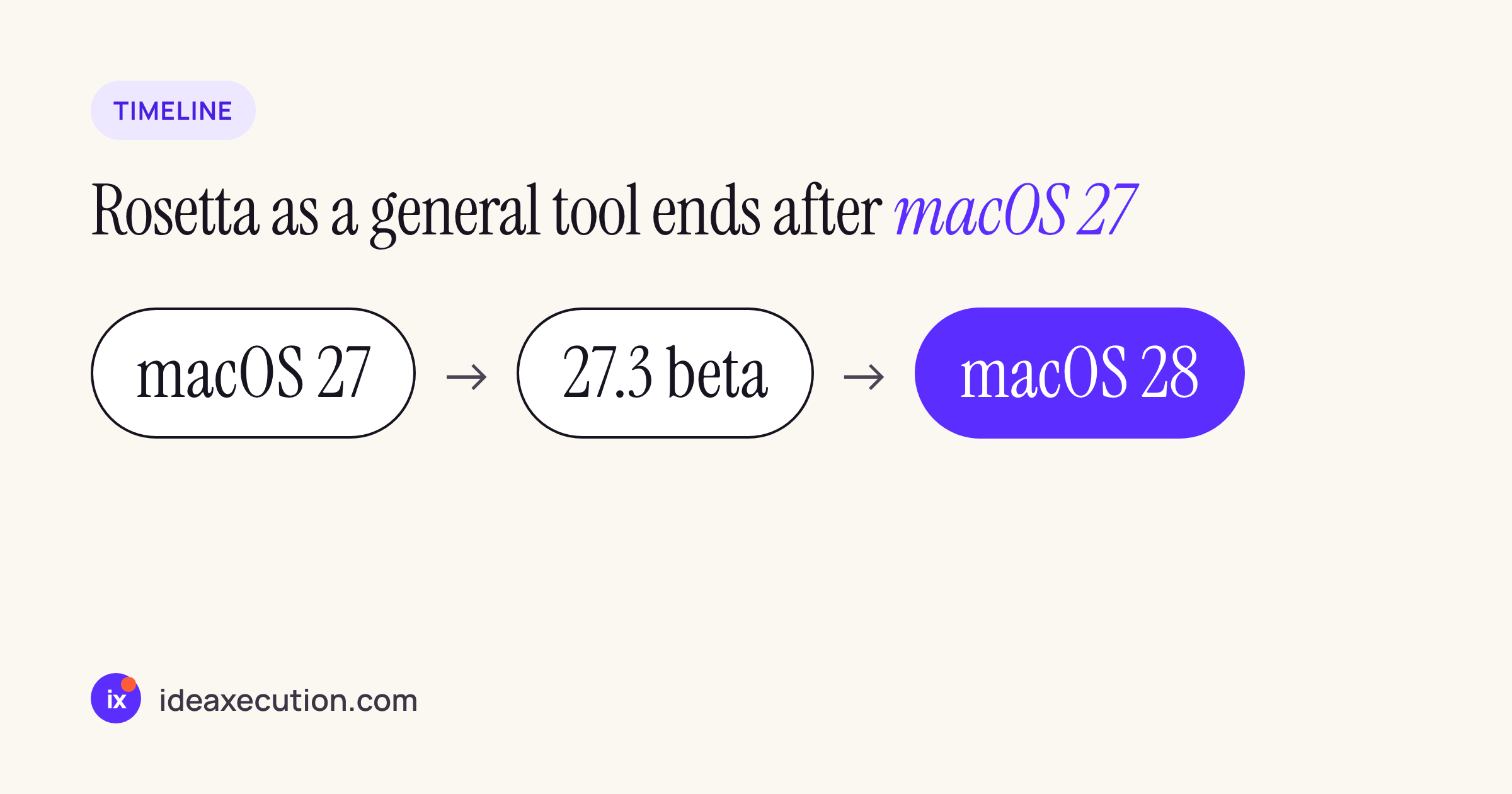
General Rosetta use through macOS 27; 27.3 adds warnings for plug-ins and printer drivers; macOS 28 keeps only a games subset.
What Rosetta never translated, from the same Apple page: kernel extensions, and virtual machine apps that virtualize x86_64. It translates AVX and AVX2 but not AVX512. None of that changes in macOS 27.
How the script decides
Every Mac binary starts with a few bytes that say which CPU it is for. The script reads only those bytes:
- A thin Mach-O file starts with
cf fa ed fe(64-bit) orce fa ed fe(32-bit), followed by the CPU type:0x01000007is x86_64,0x0100000cis arm64,7is i386. - A universal (fat) file starts with
ca fe ba beand then the number of slices, each with its own CPU type. - Java
.classfiles also start withca fe ba be. The next four bytes there are the class version (65 for Java 21), so the script treats a “slice count” of 30 or more as not Mach-O.
A file is INTEL-ONLY when it has an x86_64 slice and no arm64 slice. It walks each folder, groups every Mach-O file under its outermost bundle (.app, .component, .vst3, .plugin, .bundle, .driver and others), reads CFBundleExecutable from Info.plist to find the main binary, and reports a bundle when the main binary or anything inside it is Intel-only. A native app with an Intel-only login item is reported with the helper indented under it. It exits 1 when it finds anything, so it can run from a script or MDM.
Tested on real Mach-O files
There is no Mac in our cloud workspace, but npm ships real macOS binaries. We packed @esbuild/darwin-x64 and @esbuild/darwin-arm64 0.28.2 (thin executables), @img/sharp-darwin-x64 0.35.5 (an x86_64 bundle), @img/sharp-libvips-darwin-arm64 1.3.4 (an arm64 dylib) and fsevents 2.3.3 (a universal x86_64 + arm64 bundle), and put them into fake app bundles:
OldTool.app: x86_64 main binary.NativeTool.app: arm64 main binary, plus a shell script and a fake Java class file that must not be reported.Universal.app: the fsevents universal binary as its main binary.Mixed.app: arm64 main binary and arm64 framework, with an x86_64 login item (Contents/Library/LoginItems/Helper.app) and an x86_64 plug-in (Contents/PlugIns/Legacy.bundle).OldSynth.componentinLibrary/Audio/Plug-Ins/Components: an x86_64 audio unit.
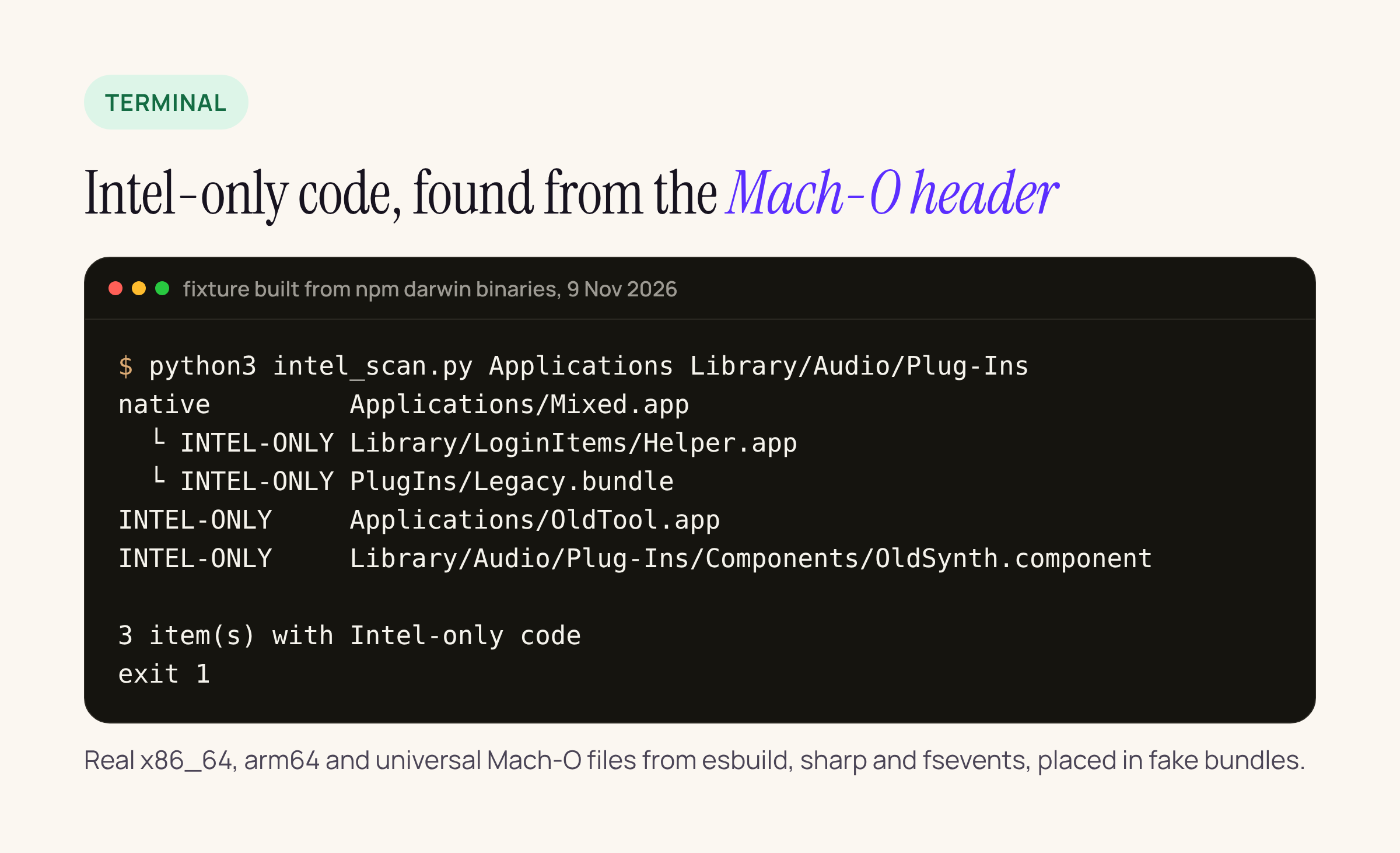
Python 3.13 on Linux, 9 Nov 2026. NativeTool and Universal are not listed, which is the point.
We checked every verdict against the file command on the same files: it reported x86_64 for the esbuild darwin-x64 binary and the sharp bundle, arm64 for the other esbuild binary and the dylib, and “Mach-O universal binary with 2 architectures: [x86_64 … ] [arm64 …]” for fsevents. The scan agreed on all seven Mach-O files and skipped the script and the class file. Scanning only NativeTool.app and Universal.app printed “0 item(s)” and exited 0.
On a Mac, the same cross-check is:
lipo -archs "/Applications/Some.app/Contents/MacOS/Some"
file "/Applications/Some.app/Contents/MacOS/Some"
Running it on a Mac
# save the source at the end of this post as intel_scan.py
python3 intel_scan.py                           # default folders
python3 intel_scan.py /Applications ~/Applications /Library/Audio/Plug-Ins
With no arguments it scans /Applications, ~/Applications, /Library/Audio/Plug-Ins, ~/Library/Audio/Plug-Ins, /Library/Printers, /Library/PrivilegedHelperTools and /Library/Application Support. It needs only the python3 that comes with the Xcode command line tools. Some of those folders may need Full Disk Access for Terminal; anything it cannot read is skipped, not reported.
What it does not cover yet: launch agents and daemons that point to binaries outside these folders (read ProgramArguments in /Library/LaunchAgents and /Library/LaunchDaemons and pass those paths), kernel extensions (Rosetta never ran those anyway), and code that only runs from inside a disk image or installer.
What we will check on our side
These are the next steps, not results yet:
- Run the scan on the studio Macs and note what it lists.
- Run it on the current Nix and QuitAll release builds, helpers included, and confirm every Mach-O file in them has an arm64 slice.
- Add the check to Nix as a “will stop working on macOS 28” filter, once the Mac run confirms the output matches
lipoon real apps.
The script
#!/usr/bin/env python3
"""List Intel-only code on a Mac: apps, helpers, plug-ins, login items, audio units, printer drivers.
Reads Mach-O and fat headers only (first bytes of each file). Read-only, no dependencies, Python 3.8+.
    python3 intel_scan.py                      # default macOS locations
    python3 intel_scan.py /Applications ~/Dev  # or any folders
"""
import os, plistlib, re, struct, sys

CPU = {7: "i386", 0x01000007: "x86_64", 12: "arm", 0x0100000C: "arm64", 0x0200000C: "arm64_32"}
BUNDLES = (".app", ".appex", ".component", ".vst", ".vst3", ".plugin", ".bundle", ".driver", ".framework", ".xpc", ".kext")
DEFAULT = ["/Applications", "~/Applications", "/Library/Audio/Plug-Ins", "~/Library/Audio/Plug-Ins",
           "/Library/Printers", "/Library/PrivilegedHelperTools", "/Library/Application Support"]


def archs(path):
    """Return the set of CPU types in a Mach-O or fat file, or None if it is not Mach-O."""
    try:
        with open(path, "rb") as f:
            head = f.read(8)
            if len(head) < 8:
                return None
            magic = head[:4]
            if magic in (b"\xcf\xfa\xed\xfe", b"\xce\xfa\xed\xfe"):          # thin, little-endian
                return {CPU.get(struct.unpack("<i", head[4:8])[0] & 0xFFFFFFFF, "other")}
            if magic in (b"\xca\xfe\xba\xbe", b"\xca\xfe\xba\xbf"):          # fat (universal), big-endian
                n = struct.unpack(">I", head[4:8])[0]
                if not 0 < n < 30:                                          # Java .class files share 0xCAFEBABE
                    return None
                size = 20 if magic.endswith(b"\xbe") else 32
                out = set()
                for _ in range(n):
                    ent = f.read(size)
                    out.add(CPU.get(struct.unpack(">i", ent[:4])[0] & 0xFFFFFFFF, "other"))
                return out
    except (OSError, struct.error):
        return None
    return None


def verdict(a):
    if "arm64" in a:
        return "native" if "x86_64" not in a else "universal"
    if "x86_64" in a:
        return "INTEL-ONLY"
    if a == {"i386"}:
        return "32-BIT"  # does not run at all
    return "other: " + ",".join(sorted(a))


def outer_bundle(path, root):
    """The outermost bundle a file sits in, so a plug-in is reported under its app."""
    if root.rstrip("/").endswith(BUNDLES):
        return root.rstrip("/")
    rel = os.path.relpath(path, root).split(os.sep)
    for i, part in enumerate(rel):
        if part.endswith(BUNDLES):
            return os.path.join(root, *rel[: i + 1])
    return path


def main_exe(bundle):
    try:
        with open(os.path.join(bundle, "Contents", "Info.plist"), "rb") as f:
            name = plistlib.load(f).get("CFBundleExecutable")
        if name:
            return os.path.join(bundle, "Contents", "MacOS", name)
    except Exception:
        pass
    return None


def short(rel):
    """Contents/Library/LoginItems/Helper.app/Contents/MacOS/Helper -> Library/LoginItems/Helper.app"""
    rel = re.sub(r"/Contents/MacOS/[^/]+$", "", rel)
    return rel.replace("Contents/", "")


def scan(root):
    found = {}
    for base, dirs, files in os.walk(root):
        dirs[:] = [d for d in dirs if not d.startswith(".")]
        for fn in files:
            p = os.path.join(base, fn)
            if os.path.islink(p) or not os.path.isfile(p):
                continue
            a = archs(p)
            if a:
                found.setdefault(outer_bundle(p, root), []).append((p, a))
    return found


def main():
    roots = [os.path.expanduser(r) for r in (sys.argv[1:] or DEFAULT) if os.path.isdir(os.path.expanduser(r))]
    intel = 0
    for root in roots:
        for bundle, items in sorted(scan(root).items()):
            main = main_exe(bundle)
            top = next((a for p, a in items if p == main), None) or items[0][1]
            bad = [(p, a) for p, a in items if "arm64" not in a and "x86_64" in a]
            if not bad and "arm64" in top:
                continue                                    # nothing here needs Rosetta
            intel += 1
            print(f"{verdict(top):14} {bundle}")
            for p, a in bad:
                if p != main:
                    print(f"{'  └ ' + verdict(a):14} {short(os.path.relpath(p, bundle))}")
    print(f"\n{intel} item(s) with Intel-only code")
    return 1 if intel else 0


if __name__ == "__main__":
    sys.exit(main())
Related: iOS 26 SDK to iOS 27.1: what to change before April 2027 covers the other Apple deadline on our list.