Short version: from Jetpack Compose 1.13.0 (stable on 18 Nov 2026, BOM 2026.11.01), every Modifier.clickable, combinedClickable, selectable, toggleable and text link plays Android’s standard click sound, through the same framework call a View uses, so it follows the user’s Touch sounds setting. To silence one part of a screen, wrap it in SoundEffectOnInteraction(enabled = false). The two 1.12 feature flags that used to switch this behaviour are gone from the 1.13 API. If you build for TV with tv-material, its Surface, Card and Button handle the D-pad centre key themselves and do not play the click sound in the current source, so a TV app now sounds different depending on which component a row uses.
Why we did this: our BMDB.fun app runs on Android TV, where every press of the remote’s centre key is a click, and our banking client apps have PIN pads where a click sound on every digit is a design decision, not a default. We wanted to know exactly what 1.13 changes before moving either to the new BOM.
What we checked
This post is a review of the Compose sources and release notes. We read:
- the Compose November 2026 release post and the Foundation and UI release notes;
- the API signature files that androidx keeps per release (
api/1.12.0-beta01.txtandapi/1.13.0-beta01.txtforcompose/ui/uiandcompose/foundation/foundation), from the androidx repository at the commit of 23 Nov 2026; - the sources behind them:
Clickable.kt,SoundEffect.kt,SoundEffectOnInteraction.android.kt,AndroidSoundEffect.android.kt,AndroidComposeView.android.kt, and tv-material’sSurfaceClickableUtils.ktandSurfaceImpl.kt; - four of Google’s sample repositories, with a 31-line script that counts clickables and manual click-sound calls.
What changed between 1.12 and 1.13
The plumbing arrived in 1.12. The UI release notes for 1.12.0 describe click and navigation sounds and the SoundEffectOnInteraction opt-out; the Foundation notes for 1.13.0-alpha01 say clicks on clickable elements now play interaction sound effects automatically. The API files show what happened in between:
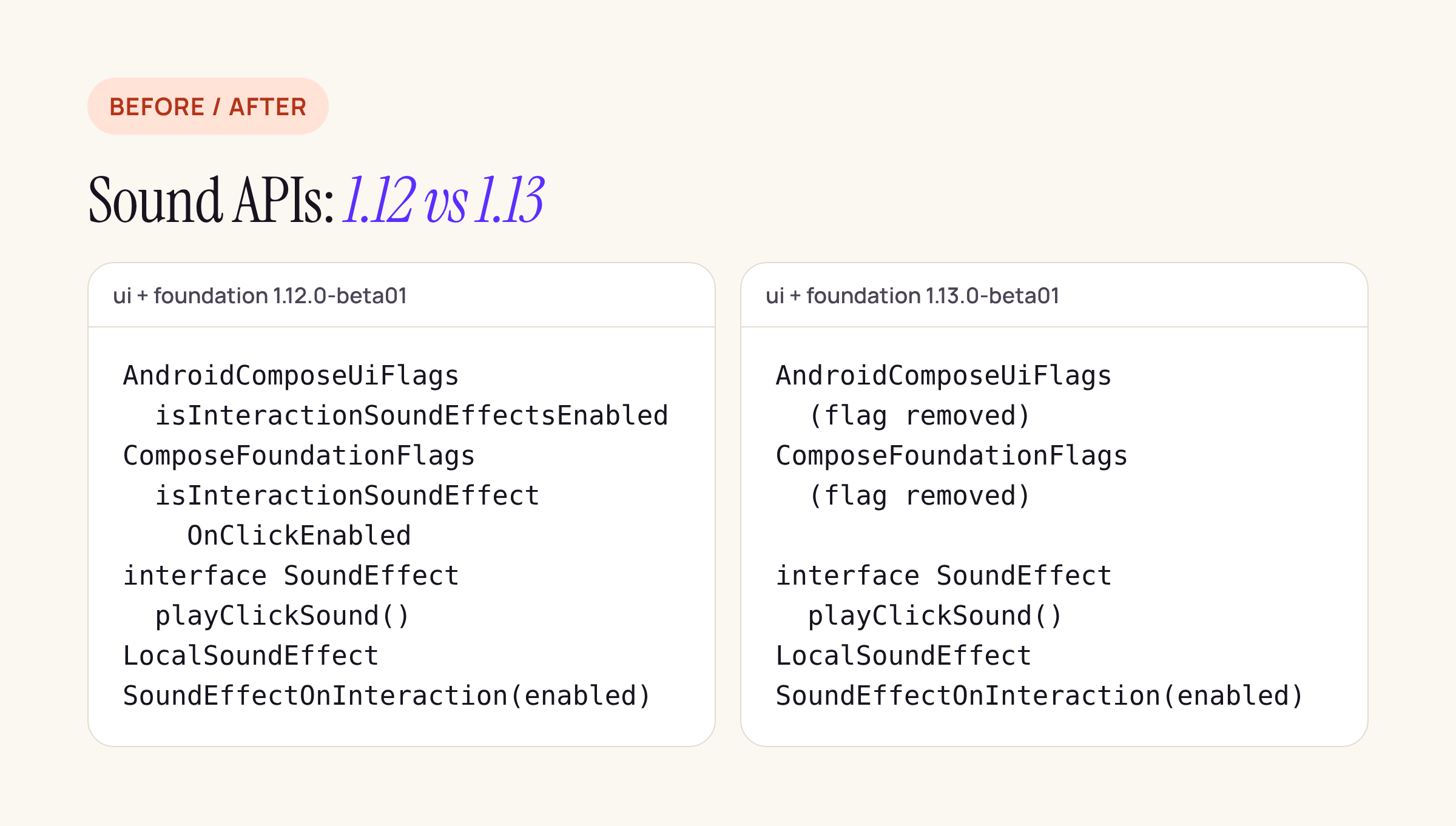
Built from the androidx api files for both versions. Everything else stayed the same.
In 1.12 there were two experimental switches, AndroidComposeUiFlags.isInteractionSoundEffectsEnabled and ComposeFoundationFlags.isInteractionSoundEffectOnClickEnabled. In 1.13 both are deleted, so code that sets either flag stops compiling when you move to the new BOM, and there is no global switch left. The public surface that remains is small. All three live in androidx.compose.ui.platform:
SoundEffect: an interface with one method,playClickSound().LocalSoundEffect: theSoundEffectthat clickables call; on Android it plays through the host view.SoundEffectOnInteraction: wrapsLocalSoundEffectfor a subtree and drops calls whenenabledis false.
Which interactions play the sound
All the foundation click modifiers share one node, ClickableNode, and selectable, toggleable, the tri-state toggle and text links in TextLinkScope build on it. Material 3 components that take an onClick are built on these modifiers, so they inherit the behaviour. Inside the node, the sound comes from one function: performClick() calls playClickSound() and then your onClick. Here is where it is called:
- Touch or mouse tap released: sound.
handleUpEventcallsperformClick(). - Enter or D-pad centre key released: sound.
onClickKeyUpEventcallsperformClick(). - Accessibility click, for example a TalkBack double tap: sound. The semantics
onClickaction callsperformClick(). - Long click: no sound.
onLongClick?.invoke()is called directly. combinedClickablewithonDoubleClick: sound on the first tap, before the double-tap timeout. The source comment reads “Play the click sound immediately, even if it later becomes a double click”.- Disabled element: no sound. The up handlers check
enabledfirst.
The Android side is a few lines in AndroidSoundEffect: it calls view.playSoundEffect(SoundEffectConstants.CLICK) and ignores a DeadObjectException if the audio service is gone. The framework documents that playSoundEffect only plays when sound effects are enabled by the user and on the view, so a phone with Touch sounds off stays silent. That is the parity with Views the release post describes.
Silencing a subtree, or using your own sound
SoundEffectOnInteraction is a plain composable that provides a new LocalSoundEffect to its content. When enabled is false, playClickSound() becomes a no-op for everything inside. Nested wrappers unwrap each other, so an inner SoundEffectOnInteraction(enabled = true) inside a silenced area turns the sound back on for that inner part.
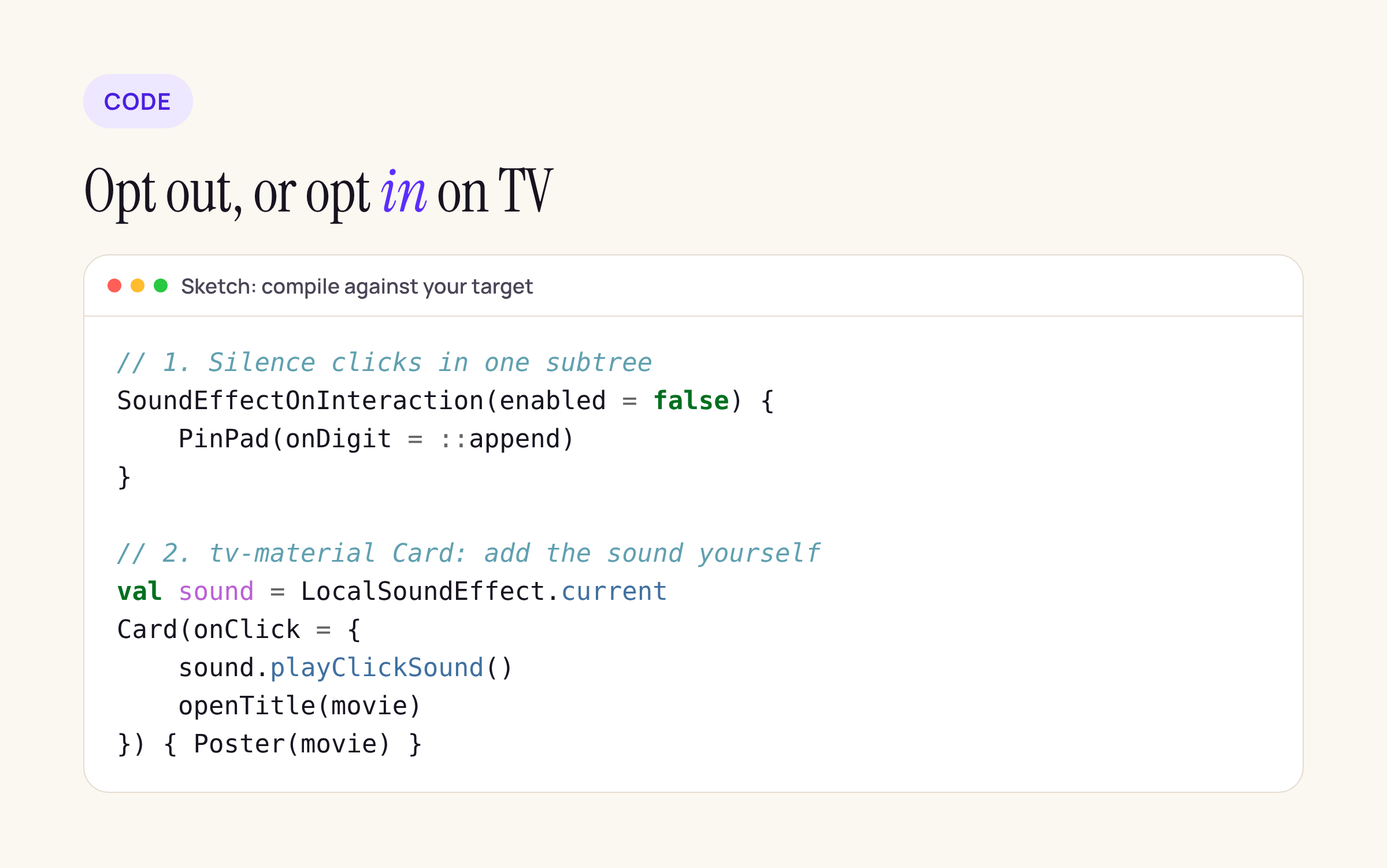
Treat this as a starting point and compile it against your target. PinPad, Poster and openTitle stand for your own code.
Because LocalSoundEffect is a public ProvidableCompositionLocal, you can also provide your own SoundEffect, for example one that plays a branded sound through SoundPool. Keep in mind the framework check described above no longer applies then: your implementation has to respect the user’s setting itself.
One trap: if your app already calls view.playSoundEffect(SoundEffectConstants.CLICK) (or LocalView.current.playSoundEffect) inside an onClick, 1.13 plays the sound first and your code plays it again. Remove the manual call when you take the new BOM.
D-pad navigation sounds are a separate path
On TV, moving focus with the remote is as audible as clicking. AndroidComposeView has its own AndroidComposeViewNavigationSoundEffect: when a D-pad key moves focus, it plays the framework sound for that direction (SoundEffectConstants.getConstantForFocusDirection, with the fast-scroll variant on API 31 and later when the key repeats). It also goes through view.playSoundEffect, so it follows Touch sounds, but SoundEffectOnInteraction does not touch it. The only switch in the source is setNavigationSoundEffectEnabled, which is restricted to androidx’s own tests.
The tv-material gap
tv-material’s clickable Surface (and everything built on it: Card, ClassicCard, CompactCard, Button, ListItem) does not use Modifier.clickable. The comment in SurfaceClickableUtils.kt explains why: with clickable, a disabled surface would stop being focusable, and on TV a disabled item should still take focus. Instead it uses its own handleDPadEnter key handler, which calls onClick?.invoke() on key up. There is no LocalSoundEffect or playSoundEffect anywhere in tv-material’s main sources.
So in a 1.13 TV app, a row of foundation-based items clicks audibly on the centre key and a row of tv-material cards does not. Google’s JetStream sample shows how common the second case is: its Compose code passes 32 onClick arguments, imports tv-material’s Surface, Button, ListItem and cards, and has no Modifier.clickable at all. If you want one behaviour across the app, either call LocalSoundEffect.current.playClickSound() in the tv-material handlers (the second half of the sketch above) or wrap the foundation-based screens in SoundEffectOnInteraction(enabled = false).
What Google’s samples needed
We ran the scan over compose-samples, nowinandroid, snippets and tv-samples as of their latest commits (16 Nov, 20 Oct, 20 Nov and 18 Nov 2026):
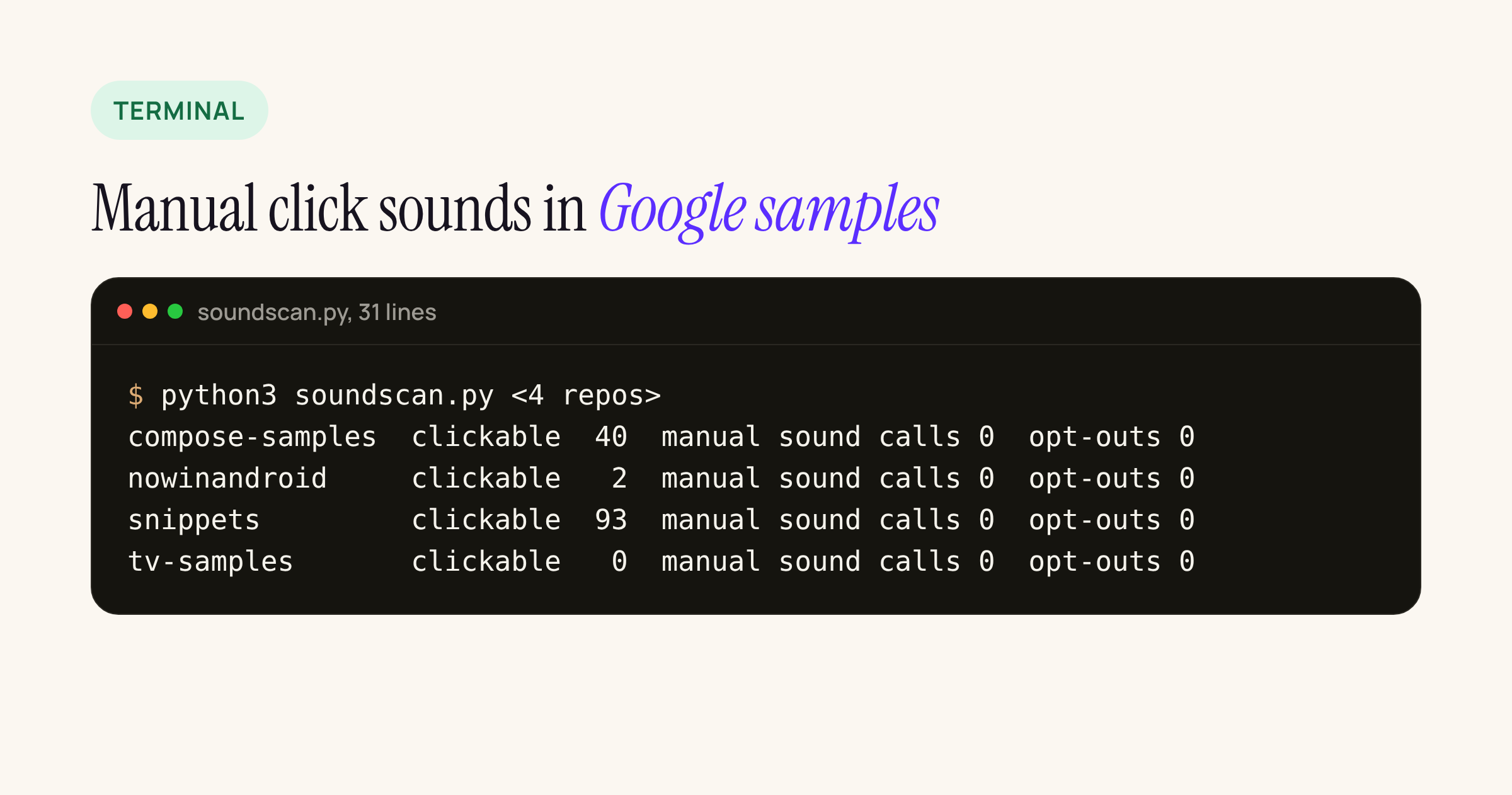
Real output of our script. tv-samples shows 0 clickables because it uses tv-material components.
None of them plays click sounds by hand, so none gets a double sound, and none uses the new opt-out yet. For a typical phone app the upgrade is therefore silent in code and audible on the device: users with Touch sounds on will hear clicks they did not hear before.
Checklist before moving to BOM 2026.11.01
- Search for
isInteractionSoundEffectsEnabledandisInteractionSoundEffectOnClickEnabled. Both flags are gone in 1.13; remove the assignments. - Search for
playSoundEffect(andSoundEffectConstants. Remove manual click sounds that now duplicate the built-in one. - Decide per screen: PIN pads, keyboards and games often should be silent; wrap them in
SoundEffectOnInteraction(enabled = false). - On TV, list which rows use tv-material and which use foundation clickables, and pick one behaviour for the whole app.
- The release post says the BOM needs Kotlin 2.2 or newer and
compileSdk 37.1; check both before you start.
For the rest of 1.13, our Compose 1.12 to 1.13 porting table and the TV focus change in 1.13 cover the other changes that reach an app.