react-native-tvos 0.89.0-0rc2 went to npm on 22 November, and its TV layer changes more than the version bump suggests. We compared the fork’s TV-only native code in 0.88.1-0 and 0.89.0-0rc2, with core React Native 0.88.1 and 0.89.0-rc.2 subtracted and formatting ignored. The takeaway: on tvOS, hasTVPreferredFocus, focus guides and focus commands now work for views inside a Modal; on both platforms a recycled view with hasTVPreferredFocus can take focus again; and on Android TV a horizontal ScrollView stops swallowing the D-pad at its ends. If your TV app has workarounds for any of these, plan to remove them when 0.89.0-0 ships, which should follow React Native 0.89.0 (scheduled for 7 December).
Why we did this: our BMDB app runs on Android TV, and focus handling is where every React Native TV upgrade has cost us time. This is a source diff of the npm packages; runtime behaviour on a TV is outside this post.
How we compared the two releases
A plain diff -r of the two react-native-tvos packages is not useful: 1,145 native files differ, almost all of them because core React Native changed between 0.88 and 0.89. What a TV app cares about is the code the fork adds on top of core, and whether that changed.
So for every native file (Objective-C, C++, Kotlin, Java, Gradle and CocoaPods Ruby) we took the statements react-native-tvos has that core react-native at the same version does not, once for 0.88 and once for 0.89, and compared the two sets. Comments and whitespace are dropped first, because the fork ran clang-format over its TV files in this release: most of RCTTVRemoteHandler.m, for example, is re-indented but unchanged.
# forkdelta.py OLD_TVOS OLD_CORE NEW_TVOS NEW_CORE
# Which TV-only native code changed between two react-native-tvos releases?
import os, re, sys
from collections import Counter

EXT = ('.swift', '.m', '.mm', '.h', '.kt', '.java', '.cpp', '.gradle', '.kts', '.podspec', '.rb')

def stmts(path):  # statements with comments and all whitespace removed
    if not os.path.exists(path):
        return Counter()
    src = re.sub(r"//[^\n]*|/\*.*?\*/", "", open(path, errors="ignore").read(), flags=re.S)
    return Counter(s for s in re.split(r"[;{}]", re.sub(r"\s+", "", src)) if s)

def files(root):
    return {os.path.relpath(os.path.join(d, f), root)
            for d, _, fs in os.walk(root) for f in fs if f.endswith(EXT)}

t0, r0, t1, r1 = sys.argv[1:5]
rows = []
for p in sorted(files(t0) | files(t1)):
    old = stmts(f"{t0}/{p}") - stmts(f"{r0}/{p}")   # what the fork adds to core, before
    new = stmts(f"{t1}/{p}") - stmts(f"{r1}/{p}")   # ... and after
    if old != new:
        rows.append((p, sum((new - old).values()), sum((old - new).values())))
print(f"native files whose TV-only code changed: {len(rows)}")
for p, a, r in rows:
    print(f"  +{a:<3} -{r:<3} {p}")
The four inputs are the unpacked package folders of npm pack react-native-tvos@0.88.1-0, react-native@0.88.1, react-native-tvos@0.89.0-0rc2 and react-native@0.89.0-rc.2. It reports 42 files. We read every one of them: most are version strings, reordered imports, or a long statement that changed because core changed a line inside it. The seven below carry the real TV changes.
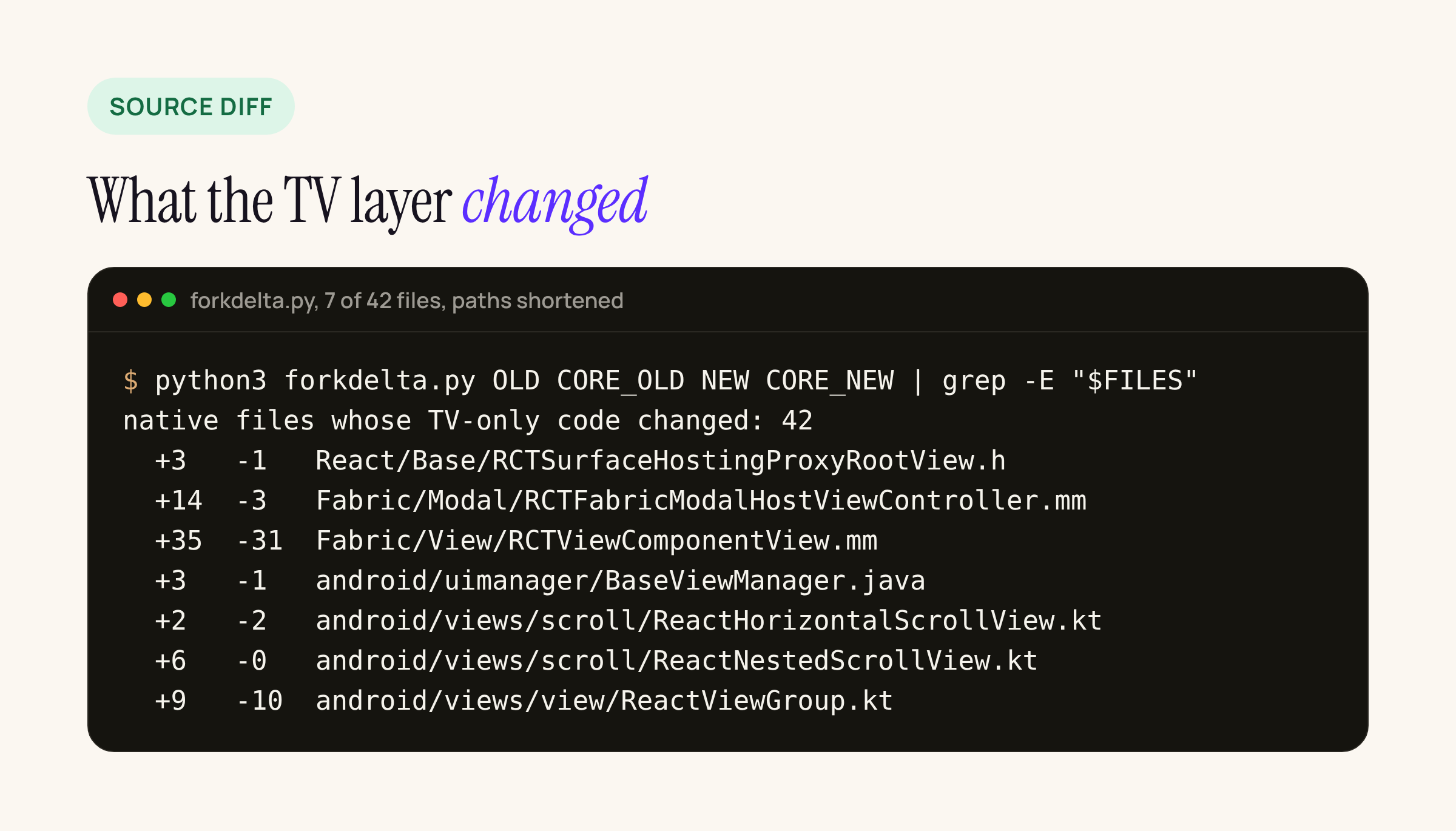
Real output from our comparison of the two npm packages, filtered to the seven files discussed below.
tvOS: focus inside a Modal now has a root
In 0.88.1-0, a view that wanted focus (through hasTVPreferredFocus, nextFocusUp and friends, or a focus command) walked up its superviews looking for exactly one class, RCTSurfaceHostingProxyRootView, the app’s root view, and stored its focus request there. A Modal is presented by its own view controller, whose view in 0.88.1-0 is a plain UIView outside that root view. Our reading of the 0.88.1-0 source: inside a modal the walk ends at nil and the request goes nowhere.
0.89.0-0rc2 adds a protocol, RCTTVFocusRoot, in RCTSurfaceHostingProxyRootView.h:
@protocol RCTTVFocusRoot <NSObject>
@property (nonatomic, weak, nullable) UIView *reactPreferredFocusedView;
@property (nonatomic, copy, nullable) NSArray<id<UIFocusEnvironment>> *reactPreferredFocusEnvironments;
@end
The root view adopts it, and RCTFabricModalHostViewController now creates a new RCTFabricModalHostView as its view on tvOS, which adopts it too and returns those properties from preferredFocusEnvironments. RCTViewComponentView looks for the nearest view that conforms to the protocol instead of the nearest root view.
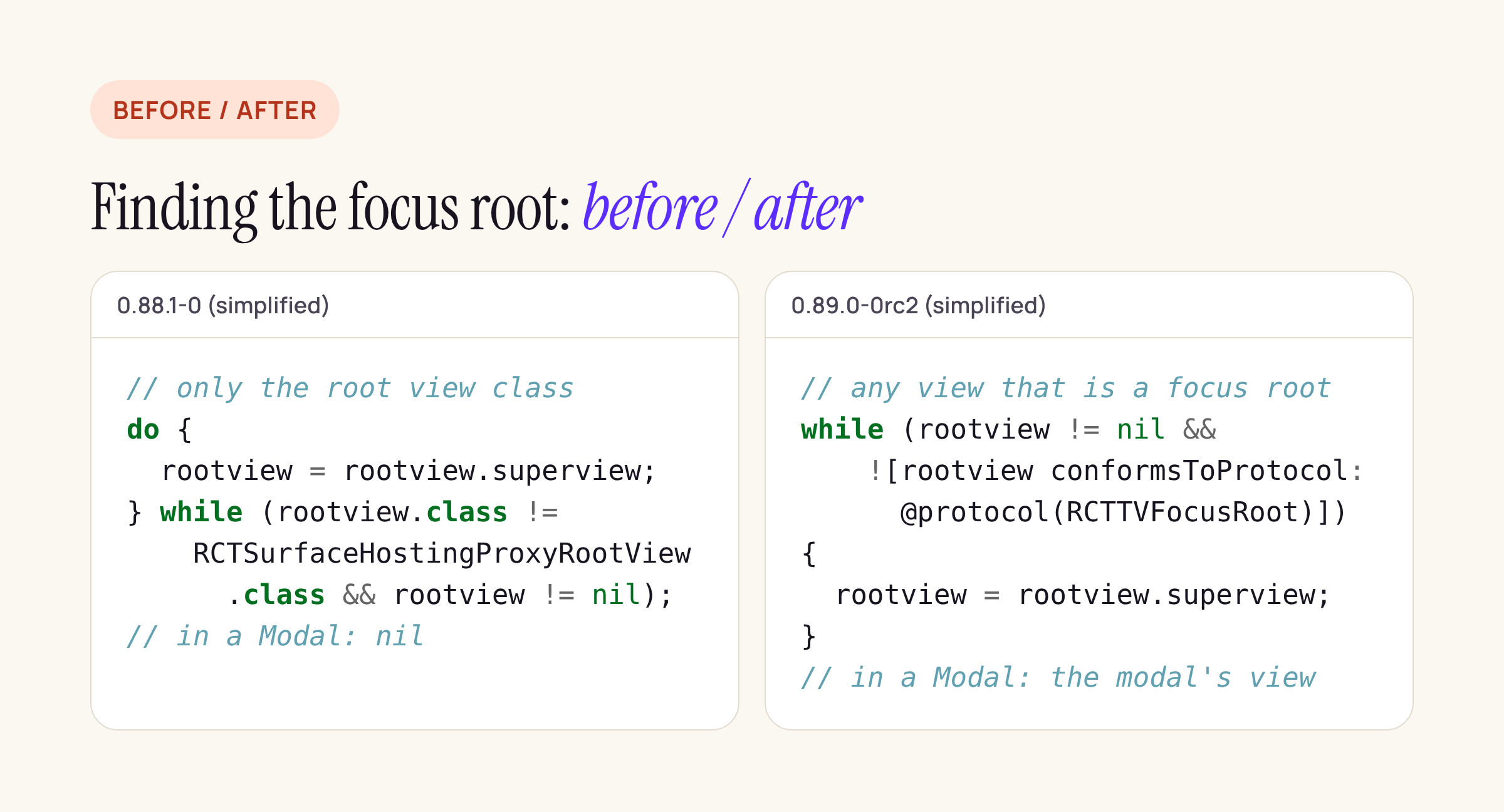
Simplified from RCTViewComponentView.mm in both releases.
What this means for a TV app: a modal that opened with focus on the wrong control, or that needed a setTimeout plus a focus command to land on its first button, should now honour hasTVPreferredFocus directly. Remove the workaround in a branch and check each modal with the Siri Remote or the Simulator’s remote.
tvOS: focus guides attach to the parent view
The four focus guides that implement nextFocusUp, nextFocusDown, nextFocusLeft and nextFocusRight used to be added to the root view and removed from it again. In 0.89.0-0rc2 RCTViewComponentView adds them to its own superview and removes each through its owningView. That is a precondition for the modal fix (a modal has no root view to hold them), and it means the guides now move with the view’s parent. If you set nextFocus* on views inside a list or a modal, test those paths again.
Both platforms: recycled views can take preferred focus again
React Native recycles native views. The hasTVPreferredFocus setter skips unchanged values on purpose, because calling requestFocus on every prop update would steal focus. The side effect: a recycled view that still remembered true never requested focus again when it was reused for a new element with hasTVPreferredFocus={true}.
0.89.0-0rc2 resets the flag when a view is recycled, on both platforms:
- Android:
ReactViewGroupnow setshasTVPreferredFocus = falsein its recycle path, with the comment “a recycled view that kepttruewould never request focus again”. - tvOS:
RCTViewComponentView.prepareForRecycleresets_hasTVPreferredFocusand_shouldFocusOnMount, and the prop comparison now uses that state rather than the old props.
If you worked around missing initial focus on screens you return to (a key change to force a fresh view, or a delayed focus call), this is the release to try without it.
Android TV: D-pad scrolling in horizontal ScrollViews
ReactHorizontalScrollView.arrowScroll had an unconditional else branch that handled a left or right key press even when the row could not scroll further. In 0.89.0-0rc2 that branch only runs when canScrollHorizontally(...) is true in the pressed direction, with the comment “At either end, leave the key unhandled so the focus search can move focus out”. On a TV catalogue screen built from horizontal rows, this is the difference between focus leaving the row at its end and focus being stuck there. Check any onKeyDown or TVEventHandler code you wrote to push focus out of a row by hand.
ReactNestedScrollView, the scroll view Android uses for nested scrolling, also gains the snapping props the regular one already had: snapToAlignment, snapToStart and snapToEnd through its view manager, plus setters for snap interval and offsets and flashScrollIndicators().
Android TV: accessibilityState.disabled no longer disables the view
In BaseViewManager.java the fork now skips view.setEnabled(!disabled) when UiModeUtils.isTVDevice(...) is true; on a TV the view’s disabled state from accessibilityState is reset instead. A Pressable with disabled still ignores presses in JavaScript, but the native view stays enabled on Android TV. Our reading is that this keeps disabled controls reachable by the D-pad focus search, so a disabled button no longer becomes a hole in a focus path. If your app relied on disabled items being skipped during D-pad navigation, check those screens and set focusable={false} where you really want them skipped.
What to check in your TV app before 0.89.0-0
Search the app for the places these changes touch:
grep -rnE "hasTVPreferredFocus|nextFocus(Up|Down|Left|Right)|TVFocusGuideView|requestTVFocus" src/ | grep -v node_modules
grep -rnE "<Modal\b" src/
grep -rnE "horizontal(=\{true\}|\b)" src/ | grep -i scroll
Then, on 0.89.0-0rc2 in a branch:
- Open every modal with the remote and confirm where focus lands first.
- Leave a screen with a preferred-focus element and come back; focus should land on it again.
- Press left and right at both ends of each horizontal row on Android TV.
- Walk through disabled buttons with the D-pad on Android TV.
Everything else in the RC’s TV layer is version strings and formatting. For the core changes underneath, see our React Native 0.89 library readiness check, and for the previous TV release, react-native-tvos 0.87.1 to 0.88.1: the TV focus code, diffed.