A React Native 0.88 app on the scene lifecycle needs two methods in SceneDelegate.swift that forward URLs to RCTLinkingManager. Leave them out and nothing fails: the app builds, launches and runs, but Linking.addEventListener('url', ...) never fires for a link opened while the app is running. We built the same React Native 0.88.1 app twice on our M1 lab Mac (Xcode 26.2, iPhone 17 Pro simulator on iOS 26.3), once with the forwarding and once without, and the screenshots below show the difference.
Check today: open your SceneDelegate.swift and make sure it has scene(_:openURLContexts:) and scene(_:continue:), each calling RCTLinkingManager. If you ported an older AppDelegate by hand, its application(_:open:options:) method is no longer the one UIKit calls.
Why we did this: our banking apps open screens from links (payment requests, password reset mails, campaign links), and a deep link that silently lands on the home screen is the kind of bug that reaches production because no test crashes.
What changed in 0.88
The React Native 0.88 template moves the app onto the UIScene lifecycle (release notes). When we upgraded a 0.87.1 app to 0.88.1 with the template diff, the change was:
AppDelegate.swiftshrinks toreturn true; theRCTReactNativeFactory, the window andbundleURL()move into a newSceneDelegate.swiftInfo.plistgainsUIApplicationSceneManifest, withUIApplicationSupportsMultipleScenesset tofalse(React Native 0.88 supports one scene) and$(PRODUCT_MODULE_NAME).SceneDelegateas the delegate classstartReactNativenow takes the scene’sconnectionOptionsinstead oflaunchOptions
Once an app declares a scene manifest, UIKit delivers URLs for a running app to the scene delegate’s scene(_:openURLContexts:) rather than to the app delegate. React Native’s own header says the same: in RCTLinkingManager.h (0.88.1) the application:openURL: methods are marked “Invoke from AppDelegate for non-scene apps”, and two new class methods are marked “Invoke from your SceneDelegate”.
The two methods
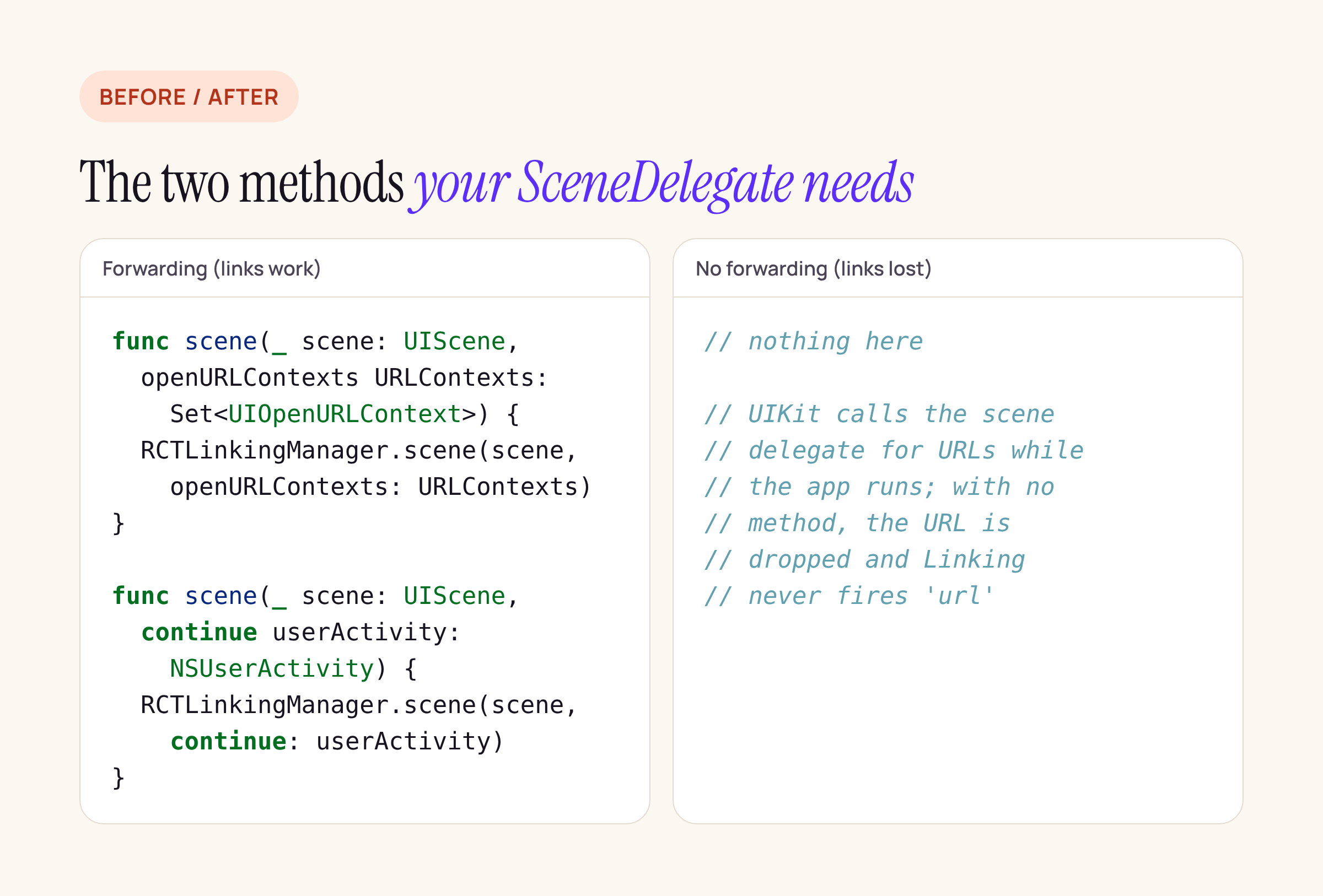
The 0.88.1 template already includes both methods. Apps that wrote their own SceneDelegate, or copied one from a native iOS project, are the ones at risk.
func scene(_ scene: UIScene, openURLContexts URLContexts: Set<UIOpenURLContext>) {
  RCTLinkingManager.scene(scene, openURLContexts: URLContexts)
}

func scene(_ scene: UIScene, continue userActivity: NSUserActivity) {
  RCTLinkingManager.scene(scene, continue: userActivity)
}
The first handles custom schemes (yourapp://...) while the app is running; the second handles universal links, which arrive as an NSUserActivity.
What we built
The test app is a React Native 0.88.1 CLI project (React 19.3.0, Reanimated 4.7.1, react-native-screens 4.30.1, react-native-safe-area-context 5.11.1, Gesture Handler 3.5.0) with a chainlab:// URL scheme in CFBundleURLTypes. Its only screen shows Linking.getInitialURL() and appends every url event it receives. Three seconds after launch the app calls Linking.openURL('chainlab://transfer/7') on itself, which goes through the system’s URL handling like an external link but without the “Open in …?” confirmation iOS shows when another app or the command line opens a custom scheme.
useEffect(() => {
  Linking.getInitialURL().then(u => setInitial(u ?? '(none)'));
  const t = setTimeout(() => {
    Linking.openURL('chainlab://transfer/7').catch(e =>
      setEvents(prev => [...prev, 'openURL failed: ' + String(e)]),
    );
  }, 3000);
  const sub = Linking.addEventListener('url', e =>
    setEvents(prev => [...prev, e.url]),
  );
  return () => {
    clearTimeout(t);
    sub.remove();
  };
}, []);
We built two Release configurations that differ only in SceneDelegate.swift: the template version, and the same file with the two scene(...) methods removed. Both compiled, installed and launched. Each ran for 15 seconds before the screenshot.
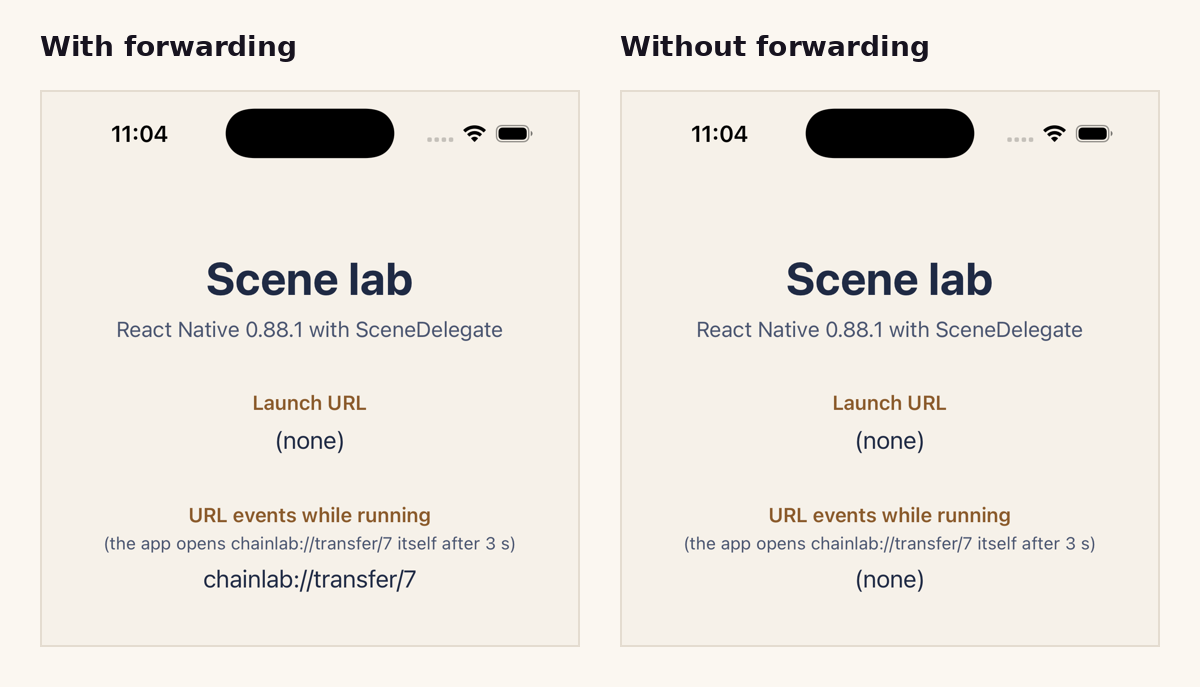
Release builds on the iPhone 17 Pro simulator, 15 seconds after launch. Left: the URL arrived as an event. Right: no event.
With forwarding, the event list shows chainlab://transfer/7. Without it, the list stays at “(none)”. In both builds openURL resolved without an error, because iOS did open the URL: it delivered it to a scene delegate that had no method to receive it. Nothing in the JavaScript layer can tell you the link was lost.
Cold start is a separate path
A link that launches the app is not delivered through scene(_:openURLContexts:). It arrives in the connectionOptions passed to scene(_:willConnectTo:options:), which is why the 0.88 template hands connectionOptions to startReactNative, and it reaches JavaScript through Linking.getInitialURL(). If your SceneDelegate starts React Native some other way (for example with the old launchOptions call kept from AppDelegate), test a cold-start link separately. This post covers the warm path, with the app already running; the cold-start and universal-link checks are in the list below.
What to check on your own app
Info.plisthasUIApplicationSceneManifest, andUIApplicationSupportsMultipleScenesisfalse.SceneDelegate.swifthas both forwarding methods shown above.startReactNative(withModuleName:in:connectionOptions:)receives theconnectionOptionsfromscene(_:willConnectTo:options:).- Any old
application(_:open:options:)orapplication(_:continue:restorationHandler:)inAppDelegateis removed, so nobody assumes it still runs. - Test three cases in a Release build: a custom-scheme link while the app is running, the same link with the app closed, and a universal link (this needs your associated domains entitlement and a signed build on a device).
- If you use
useAnimatedKeyboard, be on Reanimated 4.7.1 or later before the switch: its 4.7.1 release fixes a crash in scene-based apps whoseAppDelegateno longer exposeswindow.
The wider 0.85 to 0.88 jump, including the template merge that brings SceneDelegate in, is in our post on the four breaks we hit going from React Native 0.85 to 0.88.