Xcode 26 added compilation caching, an opt-in build setting that stores compiler outputs and replays them when the same inputs come back. We switched it on in a fresh React Native 0.89.0-rc.3 iOS app and built it five times on our M1 lab Mac (16 GB, macOS 15.7.3) with Xcode 26.2 (17C52). The takeaway: with the cache on, a rebuild after deleting the build products took 29 s instead of 37 s, and a build after xcodebuild clean took 25 s, because clean leaves the cache in place. Deleting the whole derived data folder throws the cache away. One more thing we did not expect: with caching on, 168 -Wincomplete-umbrella warnings from the React pods disappeared from the build log.
These are one run per step on one Mac, so read them as what this app did there, not as a benchmark.
Why we did this: our React Native banking and TV apps build on Mac CI runners where every minute of a Release build is paid for, and “turn on compilation caching” is the first suggestion anyone makes about Xcode 26. We wanted to see what it does on a real React Native project before changing a CI config.
Turning it on
Apple’s Xcode 26 release notes describe it as “an opt-in feature, which speeds-up iterative build/test cycles for Swift and C-family languages”, switched on with the Enable Compilation Caching build setting. The setting name behind it is COMPILATION_CACHE_ENABLE_CACHING. We passed it on the xcodebuild command line so nothing in the project changed:
xcodebuild -workspace Rn89Lab/ios/Rn89Lab.xcworkspace \
  -scheme Rn89Lab -configuration Release \
  -sdk iphonesimulator \
  -destination "generic/platform=iOS Simulator" \
  -derivedDataPath dd \
  CODE_SIGNING_ALLOWED=NO COMPILER_INDEX_STORE_ENABLE=NO \
  COMPILATION_CACHE_ENABLE_CACHING=YES build
In a project you would set it in an .xcconfig or in Build Settings. Because a React Native app compiles most of its native code inside the Pods project, setting it only on the app target leaves the pods uncached; passing it to xcodebuild (as above) applies it to every target in the build. The same goes for a post_install hook in the Podfile if you prefer it in source control.
The app and the five builds
The app is the React Native community CLI template at 0.89.0-rc.3, with its 87 pods installed and React Native’s prebuilt core in use. A Release simulator build of it runs 66 CompileC steps, 12 SwiftCompile steps, 238 PrecompileModule steps (explicit modules) and 12 script phases, including the Hermes JavaScript bundle step. That last part matters: script phases are not cached, so a share of every build here can never get faster.
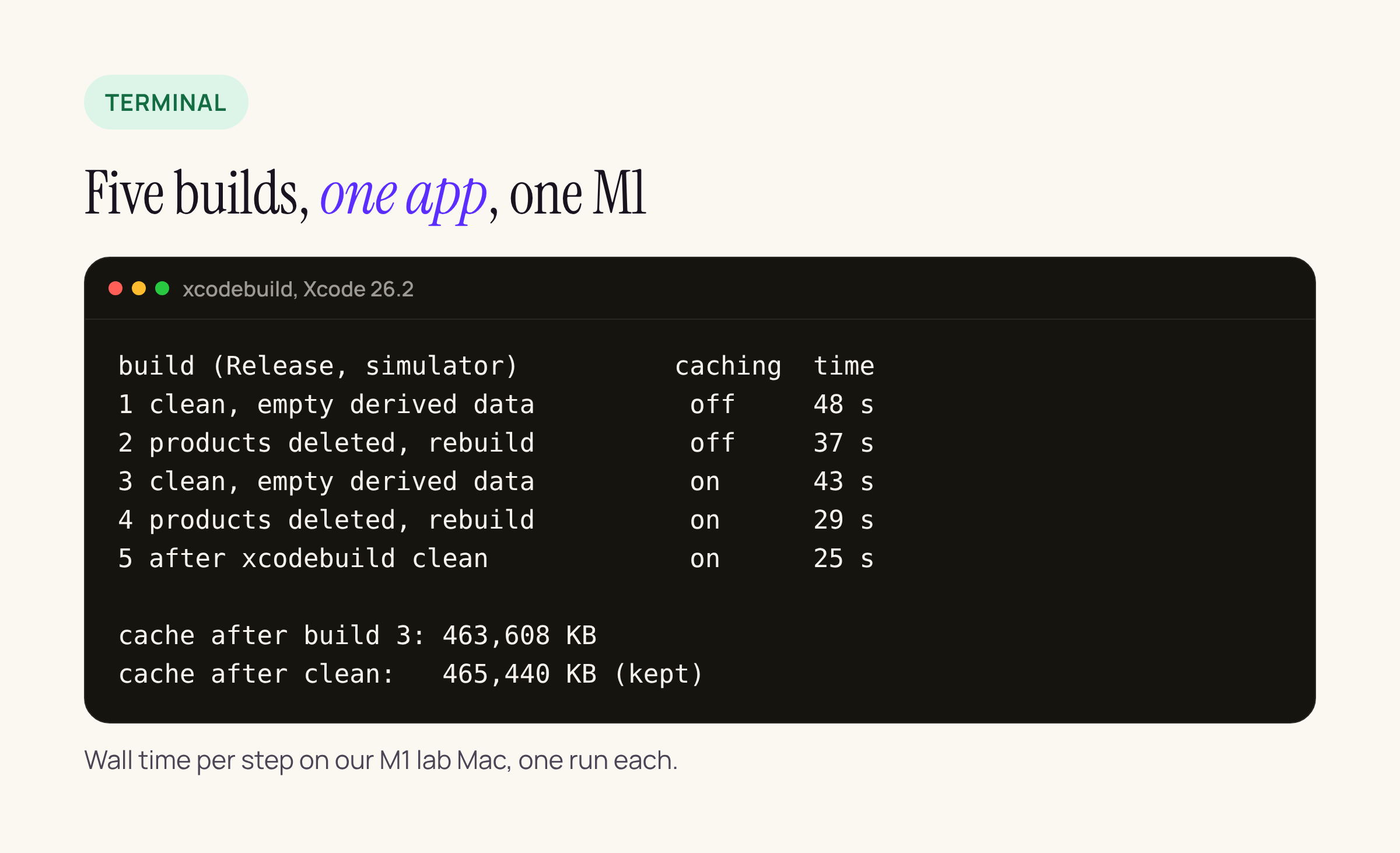
Wall time per step from the build job’s own timer, rounded to the second.
The steps, in order:
- Derived data removed, caching off: 48 s.
- Only
dd/Buildremoved (products and intermediates), caching off: 37 s. Everything was compiled again; the 11 s saved comes from what else stays in derived data and from a warm file system. - Derived data removed, caching on: 43 s. This is the build that fills the cache.
- Only
dd/Buildremoved, caching on, withCOMPILATION_CACHE_ENABLE_DIAGNOSTIC_REMARKS=YES: 29 s. xcodebuild clean, then build with caching on: 25 s.
The fair comparison is 2 against 4: the same thing deleted, caching off and on. That is 37 s down to 29 s for this app. Build 3 being faster than build 1 is most likely order (build 1 ran first on a cold Mac), not the cache; we would not read anything into it from one run.
What the cache replayed
With the diagnostic remarks setting on, every replayed compile prints a note in the build log:
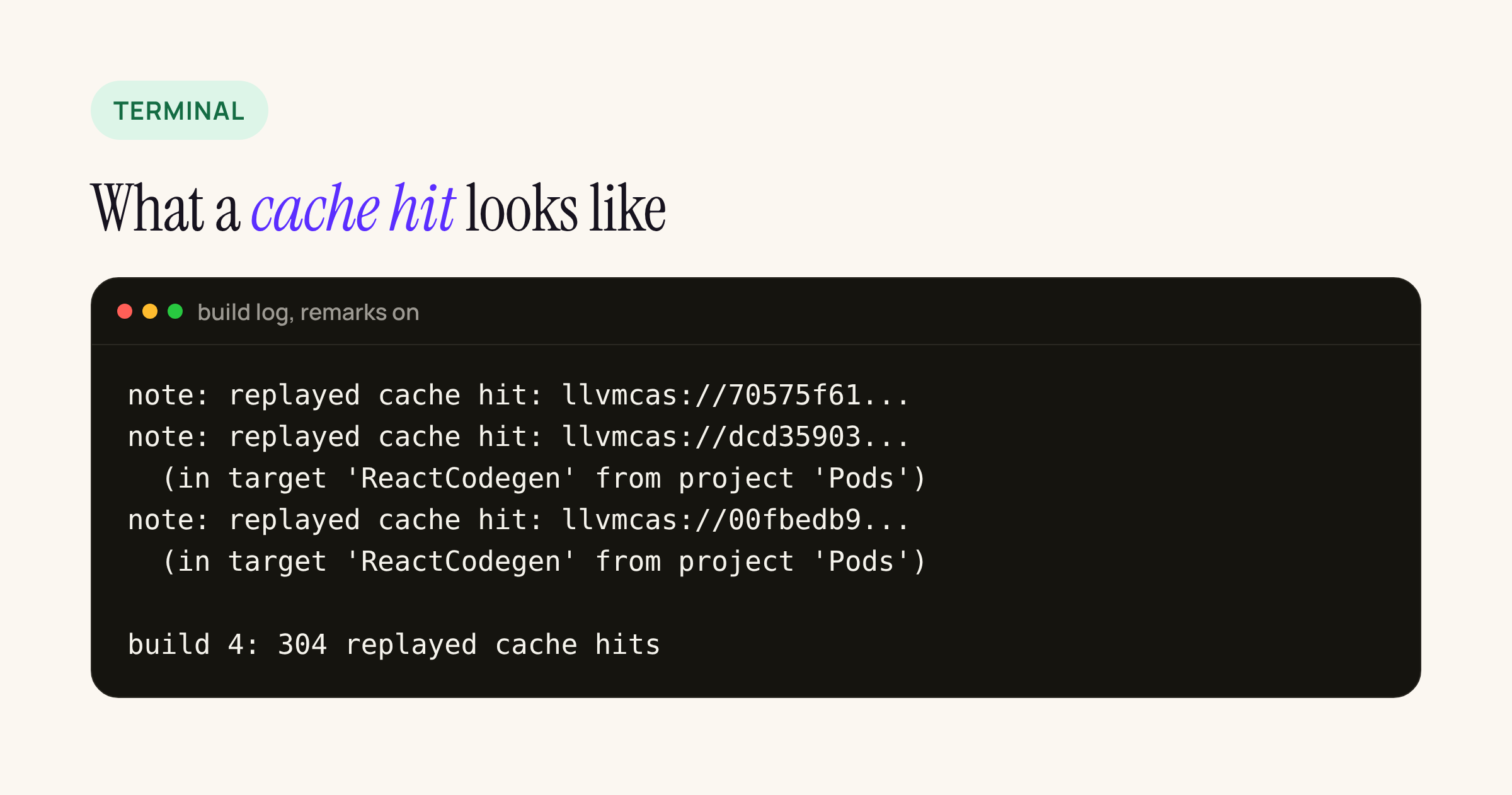
Hashes shortened. The full lines name the target, here React Native’s codegen pod.
Build 4 printed 304 “replayed cache hit” notes. In the same log there are 318 lines that start a CompileC, SwiftCompile, PrecompileModule or SwiftEmitModule step, so close to every compile in the app came from the cache. What was left of the 29 s is linking, the asset catalog, the script phases and the JavaScript bundle.
Where the cache lives, and what clean does
The cache went into dd/CompilationCache.noindex, inside the derived data folder we passed with -derivedDataPath. The build log shows Xcode setting COMPILATION_CACHE_CAS_PATH to that folder. After build 3 it held 463,608 KB, about 450 MB, for one app in one configuration.
xcodebuild clean took 3 s and removed the build products, but the derived data folder still listed CompilationCache.noindex and ModuleCache.noindex afterwards, and the cache had grown slightly, to 465,440 KB. Build 5 after the clean was the fastest of the five. So:
xcodebuild cleankeeps the cache. A “clean build” on CI that runscleanfirst still gets cache hits.- Deleting derived data deletes the cache. If your CI wipes the default DerivedData folder (or a custom
-derivedDataPath) between jobs, the cache never survives to the next build. Keep the folder, or move the cache elsewhere withCOMPILATION_CACHE_CAS_PATHand keep that, which is the setting Tuist documents for it. - Budget the disk. Around 450 MB for one Release simulator configuration of a template app; a real app with Debug, Release and device builds will hold more.
The warnings that went away
With caching off, the log had 197 warning lines; with it on, 23. The difference is almost entirely -Wincomplete-umbrella (“umbrella header for module ‘React’ does not include header …”) from the React pods: 168 such lines with caching off, 0 with it on, in all three cached builds including the first, cold one. The nullability warnings and the JavaScript bundler warnings were there in both modes.
We did not chase the cause in this build; the point for a team is practical. If you count warnings in CI, or fail on new ones, turning on caching changes the count by itself. Compare warnings between two builds with the same caching setting.
Should you turn it on
For a React Native iOS app on Xcode 26.2, on this evidence:
- On a developer Mac, yes: rebuilds after a branch switch or a clean are where it pays, and it changes no code.
- On CI, only if the runner keeps derived data (or the cache path) between jobs. A fresh runner with an empty cache runs build 3, not build 4.
- Expect the gain to be capped by what is not cached: script phases (Hermes, the JavaScript bundle, CocoaPods copy phases), linking and asset catalogs. The more of your native code comes prebuilt, as React Native’s core does now, the smaller the compile share.
- Check your warning baseline the day you switch it on.
For the same React Native release built without caching, see our rc.3 native diff and clean build; for build time with SwiftPM instead of CocoaPods, React Native 0.88 on SwiftPM, measured.
Sources
- Xcode 26 release notes, Build System, New Features
- Tuist: Xcode cache, for
COMPILATION_CACHE_ENABLE_CACHING,COMPILATION_CACHE_CAS_PATHand the diagnostic remarks setting - Builds: React Native 0.89.0-rc.3, community CLI 21.0.0 template, CocoaPods 1.17, Xcode 26.2 (17C52), Swift 6.2.3, Apple M1 16 GB, macOS 15.7.3, 24 November 2026