The takeaway: with the Jetpack Compose November 2026 release (BOM 2026.11.01, Compose 1.13, Material3 1.5.0, published 18 Nov 2026), Google calls Compose Material 2 “deprecated and no longer actively maintained”. Do not wait for compiler warnings to tell you what to move: we diffed the published API files of androidx.compose.material 1.12 and 1.13, and the only new @Deprecated entries are the M2 text fields. Scaffold, BottomNavigation, TopAppBar and the rest compile silently. Run an inventory, migrate the theme first, then screens, then drop the M2 dependency.
Why we did this: our Android work (Peepal, Shopkeeper and the BMDB TV app) and the client apps we maintain are all on Compose, and older screens in that kind of codebase are where M2 lingers. This post is the checklist we work from: a mapping built from Google’s M2 to M3 migration guide (updated 18 Nov 2026), an API file diff, and a small scanner run against Google’s own sample repositories.
What “deprecated” means in Compose 1.13
The November 2026 release post says: “As Material 3 enters its sixth year of availability, the Compose Material 2 library is deprecated and no longer actively maintained.” That is a status for the library, not a wave of annotations.
We compared compose/material/material/api/1.12.0-beta01.txt with 1.13.0-beta01.txt in the androidx repository (androidx-main as of 20 Nov 2026; current.txt matches 1.13 apart from the signature format header):
@Deprecatedentries went from 105 to 117.- All 12 new ones are text field APIs: the value-based
TextFieldandOutlinedTextFieldoverloads (StringandTextFieldValue) and theTextFieldDecorationBox/OutlinedTextFieldDecorationBoxhelpers. - The deprecation message in
TextField.ktpoints to “the TextField(state: TextFieldState, …) overload”, withrememberTextFieldState(initialText)as the starting point. - No component outside the text fields gained an annotation.
BackdropScaffoldStateandswipeablewere already deprecated before 1.13.
So a project on BOM 2026.11.01 gets warnings for its M2 text fields and nothing else. The rest of the migration has to come from an inventory, which is what the script further down does.
Gradle: the lines that change
The BOM needs Kotlin 2.2 or newer and compileSdk 37.1, per the release post. In a module that still uses M2, add Material 3 next to it first; you remove M2 last.
dependencies {
    implementation(platform("androidx.compose:compose-bom:2026.11.01"))
    implementation("androidx.compose.material3:material3")
    // replaces androidx.compose.material:material-ripple
    implementation("androidx.compose.material3:material3-ripple")
    // icons stay on the material coordinates
    implementation("androidx.compose.material:material-icons-extended")
    // remove at the end of the migration:
    implementation("androidx.compose.material:material")
}
The icons line is the one that confuses scanners and reviewers: Google’s guide keeps material-icons-* on the androidx.compose.material group even in a fully M3 app. Imports of androidx.compose.material.icons.* are not M2 debt.
The order to migrate in
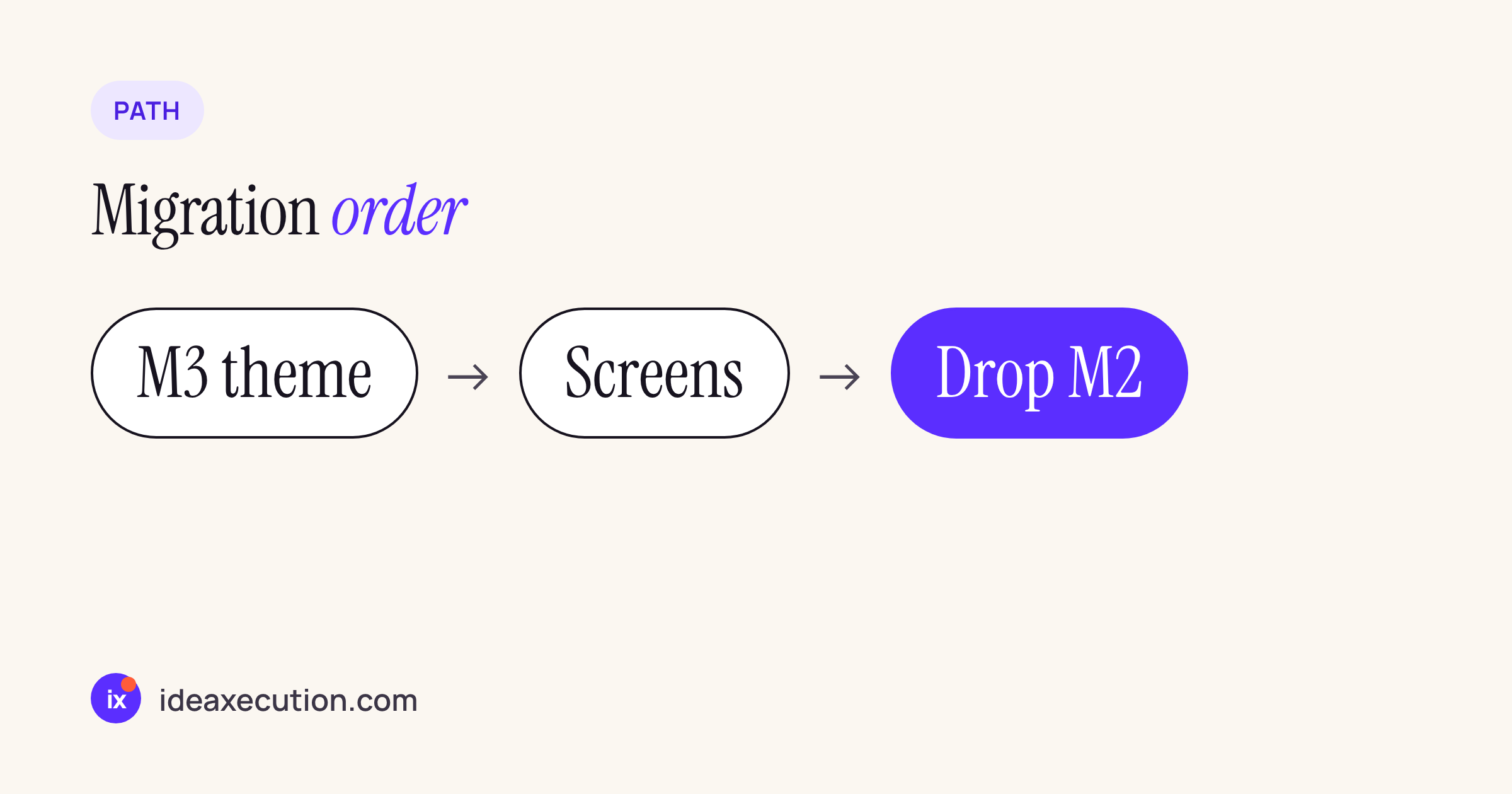
The guide’s phased approach, condensed. Keep both libraries only for the length of the migration; the guide is explicit that “you should not use both M2 and M3 in a single app long-term”.
- Add the M3 dependency next to M2.
- Write an M3 theme beside the M2 one (
MaterialThemefromandroidx.compose.material3, with aColorScheme, M3TypographyandShapes). - Move screens or modules one at a time: scaffolds and bars first, because they decide colours and insets for everything inside them, then leaf components.
- Delete the M2 theme once nothing uses it.
- Remove
androidx.compose.material:material.
Theme: colours, type and shapes
MaterialTheme(colors = ...)becomesMaterialTheme(colorScheme = ...);lightColors()/darkColors()becomelightColorScheme()/darkColorScheme(). Colour section.- The guide does not give a one-to-one colour role table. When you generate an M3 scheme in Material Theme Builder, it maps M2
primaryto Primary,primaryVariantto Secondary,secondaryto Tertiary, andsurfaceorbackgroundto Neutral. Colors.isLighthas no M3 counterpart. Put the light/dark decision into your own theme values (the guide’s example is aLocalCardElevationcomposition local).- With dynamic colour (
dynamicLightColorScheme,dynamicDarkColorScheme) keep a custom fallback scheme for devices that do not support it. - Typography:
h1,h2,h3becomedisplayLarge,displayMedium,displaySmall;h4,h5becomeheadlineMedium,headlineSmall;h6,subtitle1,subtitle2becometitleLarge,titleMedium,titleSmall;body1,body2,captionbecomebodyLarge,bodyMedium,bodySmall;buttonbecomeslabelLargeandoverlinebecomeslabelSmall.headlineLargeandlabelMediumare new. M3Typographyhas nodefaultFontFamily, so setfontFamilyon each style. - Shapes:
small,medium,largekeep their names;extraSmallandextraLargeare new. For “none” and “full” useRectangleShapeandCircleShape.
Surfaces, elevation and emphasis
Surface(elevation = ...)becomesSurface(shadowElevation = ..., tonalElevation = ...). Tonal elevation tints withprimaryby default; change it throughsurfaceTintin theColorScheme.ElevationOverlayandLocalElevationOverlayare gone;LocalAbsoluteElevationis nowLocalAbsoluteTonalElevation.ContentAlphaandLocalContentAlphado not exist in M3. High emphasis ononSurfacestaysonSurface; medium becomesonSurfaceVariant; disabled becomesonSurface.copy(alpha = 0.38f). For icons, provideLocalContentColorinstead of an alpha.- Every
background*parameter becomescontainer*with the same value, for examplebackgroundColortocontainerColor.
Components: renamed, reworked, or just a new package
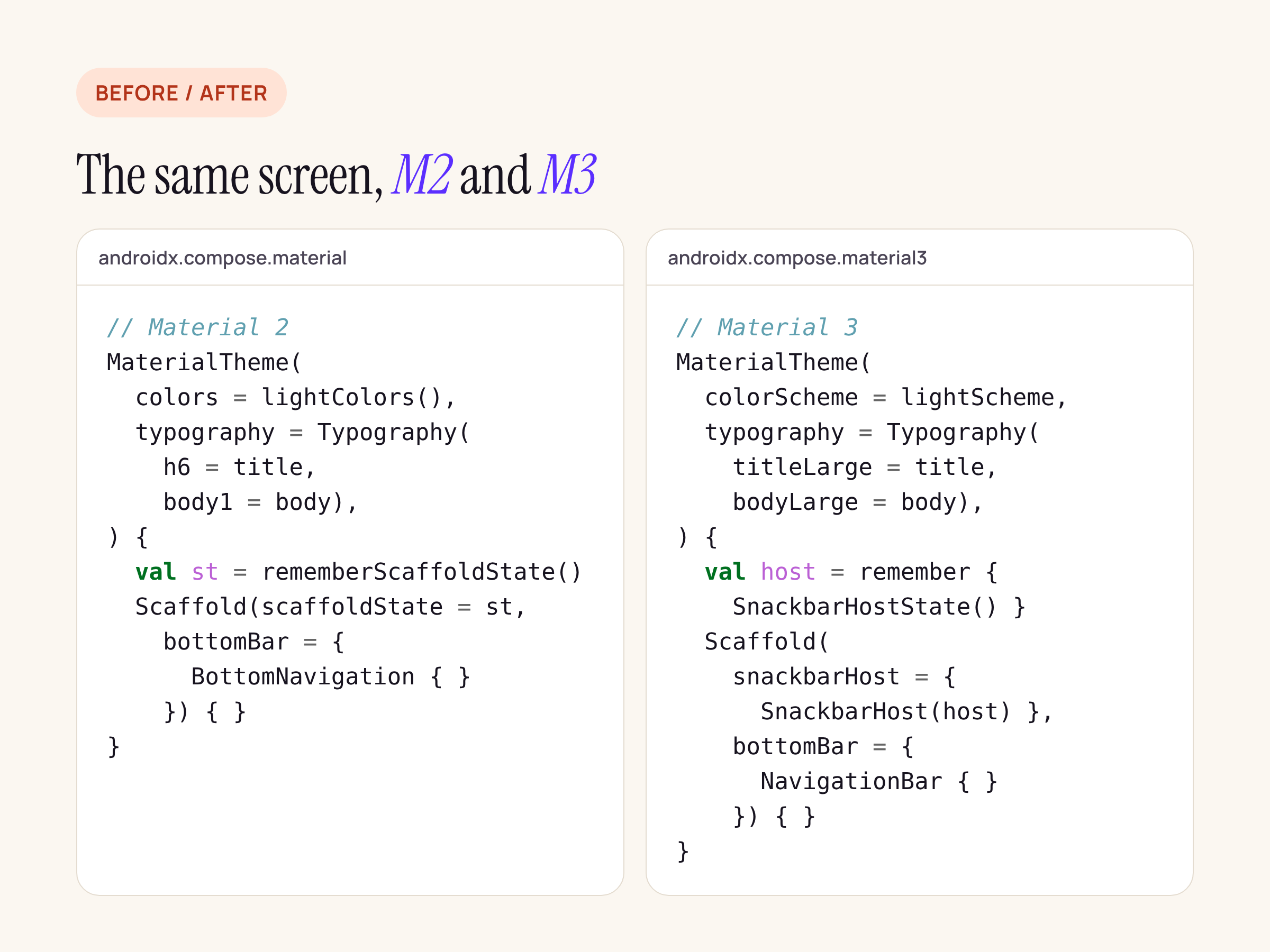
Before and after for one screen: the theme parameters, the scaffold state and the bottom bar all change, the structure does not.
Renamed in M3:
BottomNavigationtoNavigationBar,BottomNavigationItemtoNavigationBarItemModalDrawertoModalNavigationDrawer(withModalDrawerSheetandrememberDrawerState)ModalBottomSheetLayouttoModalBottomSheetChiptoAssistChiporSuggestionChip
Needs rework:
Scaffoldhas noScaffoldState, norememberScaffoldState()and nodrawer*parameters. Snackbars go throughSnackbarHostStateandsnackbarHost = { SnackbarHost(state) };SnackbarDatais split intoSnackbarDataandSnackbarVisuals. Drawers wrap the scaffold inModalNavigationDrawer.TopAppBarelevation is replaced by ascrollBehavior, for exampleTopAppBarDefaults.pinnedScrollBehavior()plusModifier.nestedScroll(scrollBehavior.nestedScrollConnection).CenterAlignedTopAppBar,MediumTopAppBarandLargeTopAppBarare worth a look while you are there; our Material3 1.4 to 1.5 notes cover what else changed in that release.BackdropScaffoldhas no M3 version: useScaffoldorBottomSheetScaffold.BottomDrawerbecomes aModalBottomSheet.Modifier.swipeablehas no M3 equivalent yet, per the guide.- Text fields: move straight to the state-based overloads with
TextFieldStateinstead of to M3’s value-based ones. We covered that move in BasicTextField to TextFieldState. - Ripples:
RippleThemeandrememberRipplego; see Google’s Indication and Ripple migration and thematerial3-rippleartifact.
Same name, new package only: AlertDialog, Badge, BottomAppBar, BottomSheetScaffold, Button, Card, Checkbox, Divider, DropdownMenu, FloatingActionButton, Icon, IconButton, ListItem, NavigationRail, RadioButton, Slider, Snackbar, Switch, Tab, TabRow, Text and others listed in the guide. Their parameters still differ (colours, container naming), so a search and replace on imports is a start, not the finish.
Find every M2 call: the inventory script
Because the compiler will not list your M2 usage, we use a 30-line Python script. It only reads .kt files, groups every androidx.compose.material.* import by what it becomes, and leaves icons out of the debt count.
import os, re, sys
from collections import Counter, defaultdict
RENAME = {"BottomNavigation": "NavigationBar", "BottomNavigationItem": "NavigationBarItem",
          "ModalDrawer": "ModalNavigationDrawer", "ModalBottomSheetLayout": "ModalBottomSheet",
          "Chip": "AssistChip / SuggestionChip", "lightColors": "lightColorScheme",
          "darkColors": "darkColorScheme", "Colors": "ColorScheme",
          "ExperimentalMaterialApi": "ExperimentalMaterial3Api"}
REWORK = {"BackdropScaffold": "Scaffold or BottomSheetScaffold", "BottomDrawer": "ModalBottomSheet",
          "swipeable": "no M3 equivalent yet", "rememberSwipeableState": "no M3 equivalent yet",
          "FractionalThreshold": "no M3 equivalent yet", "rememberScaffoldState": "SnackbarHostState",
          "ScaffoldState": "SnackbarHostState", "ContentAlpha": "colour roles (onSurfaceVariant)",
          "LocalContentAlpha": "LocalContentColor", "LocalElevationOverlay": "removed (tonal elevation)",
          "ElevationOverlay": "removed (tonal elevation)", "primarySurface": "colorScheme roles"}
TEXT = {"TextField", "OutlinedTextField", "SecureTextField"}
hits, files = defaultdict(Counter), set()
for root, _, names in os.walk(sys.argv[1]):
    for p in (os.path.join(root, n) for n in names if n.endswith(".kt")):
        for sym in re.findall(r"^import androidx\.compose\.material\.([\w.]+)", open(p, errors="replace").read(), re.M):
            last = sym.split(".")[-1]
            if sym.startswith("icons"): hits["keep: material-icons (stays on M2 coordinates)"]["icons.*"] += 1; continue
            files.add(p)
            if sym.startswith("ripple") or "Ripple" in last: hits["move: ripple APIs -> material3-ripple / Indication"][last] += 1
            elif last in TEXT: hits["deprecated in 1.13: M2 text fields -> TextFieldState"][last] += 1
            elif last in RENAME: hits["rename"][f"{last} -> {RENAME[last]}"] += 1
            elif last in REWORK: hits["rework"][f"{last} -> {REWORK[last]}"] += 1
            else: hits["package only: material -> material3"][last] += 1
print(f"{len(files)} files import Material 2 (icons excluded)")
for group in sorted(hits):
    print(f"\n[{group}] {sum(hits[group].values())}")
    for k, v in hits[group].most_common(8): print(f"  {v:3}  {k}")
It works on imports, so a file that uses a wildcard import (androidx.compose.material.*) shows up under “package only” and needs a manual look.
We ran it against five of Google’s public repositories, cloned on 21 Nov 2026:
- compose-samples (last commit 16 Nov 2026): no M2 imports at all.
- nowinandroid (20 Oct 2026): 0 M2 files, 18 icon imports.
- sunflower and architecture-samples: icons only.
- snippets (20 Nov 2026), the repository behind the code on developer.android.com: 11 files still import M2, mostly on purpose (it holds the M2 examples that the guides compare against).
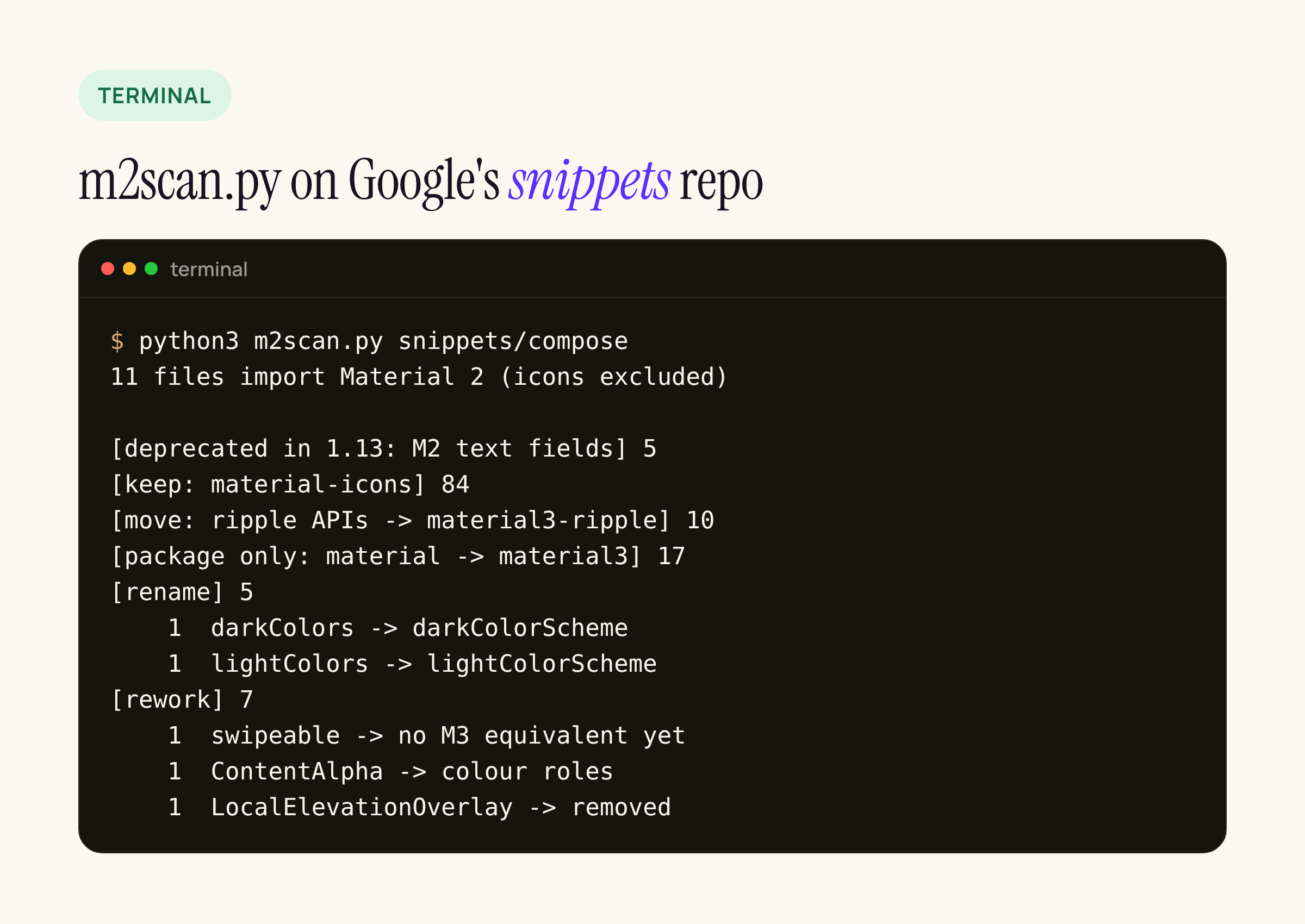
Real output from our test server, condensed: the full run lists 3 ExperimentalMaterialApi imports under rename and 7 items under rework, including swipeable, ContentAlpha and LocalElevationOverlay.
Expect a similar shape in an older app: icons everywhere (fine), ripple customisation and ContentAlpha in a few shared components (small but fiddly), and one gesture built on swipeable that has no direct M3 replacement and needs its own plan, for example AnchoredDraggable from foundation.
What to check on your own app
- Run the scanner per module and start with the module that has the fewest “rework” hits; that gets your M3 theme into production early.
- Grep for
isLightandContentAlphabefore writing the M3 theme; both shape how you model colours. - After each screen moves, compare light and dark screenshots: tonal elevation changes surface colours even where the layout stays the same.
- Remove
androidx.compose.material:materialfrom each module once the scan reports 0 files; keepmaterial-icons-*.
If you are on Compose 1.12, the 1.12 to 1.13 upgrade notes cover the other changes that arrive with the same BOM.