Compose Material3 1.5.0 went stable on 18 November 2026, fourteen months after 1.4.0 (24 September 2025), and it arrives with Compose BOM 2026.11.01, which needs Kotlin 2.2 or newer and compileSdk 37.1 (Compose November 2026 release). Most screens compile after the bump with deprecation warnings, but five changes need real work: Slider and RangeSlider move to SliderState with a required onValueChange, RangeSliderState.activeRangeStart/activeRangeEnd become startValue/endValue, bottom sheets no longer drop the half-open state on their own, the TopAppBar scroll behaviours rename isAtTop to isAtStart, and SecureTextField stops showing the last typed character by default. Fix those first, then work through the deprecations.
Why we did this: Peepal and Shopkeeper are form and list apps on Material3, with sliders for quantities and price filters, bottom sheets for item details and password fields at login. Every one of the five changes above lands on a screen we maintain.
This post is a review of the official release notes. We read the Material3 release notes from 1.4.0 through every 1.5.0 pre-release (alpha01 to alpha29, beta01, beta02 and rc01) and built the tables below; each row links to the version section where the change first appeared. The code snippets are sketches to adapt: compile them against 1.5.0 in your own project.
Upgrade order
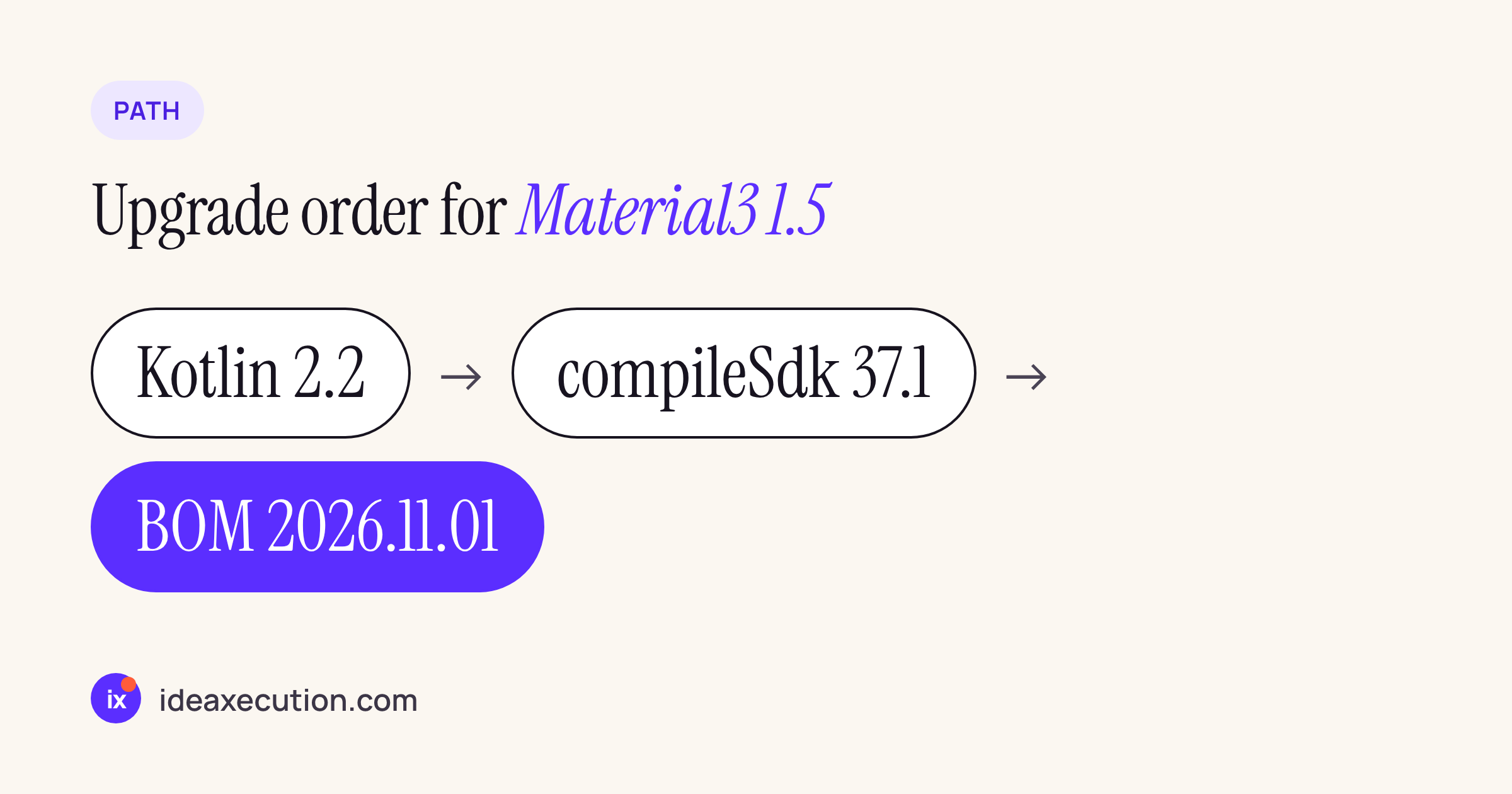
The BOM is the last step, not the first: it will not build with an older Kotlin or compileSdk.
Raise Kotlin to 2.2 and compileSdk to 37.1 first, build once on the old BOM, then move the BOM to 2026.11.01. That BOM also brings Compose core 1.13; if you have not done that part yet, our Compose 1.12 to 1.13 notes and the BasicTextField to TextFieldState guide cover the core side. This post stays on Material3. One thing that is not changing yet: the value-based TextField overloads are, in the words of the blog post, “not deprecated yet in 1.5.0”.
Source changes that hit ordinary screens
| API | Change | First in | What to do |
|---|---|---|---|
Stateless Slider / RangeSlider overloads |
Deprecated | 1.5.0-alpha28 | Move to the SliderState / RangeSliderState overloads |
onValueChange on Slider and RangeSlider |
Now required and moved in the parameter list (source-breaking) | 1.5.0-alpha29 | Pass it by name |
RangeSliderState.activeRangeStart / activeRangeEnd |
Renamed startValue / endValue |
1.5.0-alpha28 | Rename reads and writes |
SliderState.Saver, RangeSliderState.Saver (two-parameter) |
Deprecated | 1.5.0-alpha25 | Use the current Saver overload |
rememberModalBottomSheetState, rememberStandardBottomSheetState |
Deprecated; rememberBottomSheetState is the unified API |
1.5.0-alpha20 | Move to rememberBottomSheetState |
pinnedScrollBehavior / enterAlwaysScrollBehavior isAtTop |
Renamed isAtStart |
1.5.0-alpha16 | Rename the argument |
| Same scroll behaviours | Overloads that accept a ScrollableState; legacy overloads deprecated, then removed |
1.5.0-alpha22, alpha27 | Pass the list’s LazyListState or ScrollState |
SplitButtonLayout |
Deprecated | 1.5.0-alpha25 | Use SplitButton |
TonalToggleButton |
Renamed FilledTonalToggleButton; ToggleButtonDefaults.shapes deprecated for shapesFor |
1.5.0-alpha25 | Rename |
DropdownMenuItem trailingIcon |
Becomes trailingContent in the new overloads |
1.5.0-alpha25 | Rename when you move overloads |
ExposedDropdownMenu |
Now an extension function | 1.5.0-alpha26 | Add the new import |
LocalMotionScheme |
Listed as deprecated in the 1.5.0 notes | 1.5.0 | Read MaterialTheme.motionScheme |
RichTimePickerDialog, richColors |
Renamed VibrantTimePickerDialog, vibrantColors |
1.5.0-alpha27 | Rename (only if you used the experimental API) |
TextFieldLabelPosition.Attached |
Deprecated; Inside and Cutout added |
1.5.0-alpha21 | Pick one of the new positions |
| material-ripple configuration APIs | Deprecated; new material3-ripple artifact with inset focus rings |
1.5.0-alpha18, alpha24 | Add the artifact if you configure ripples |
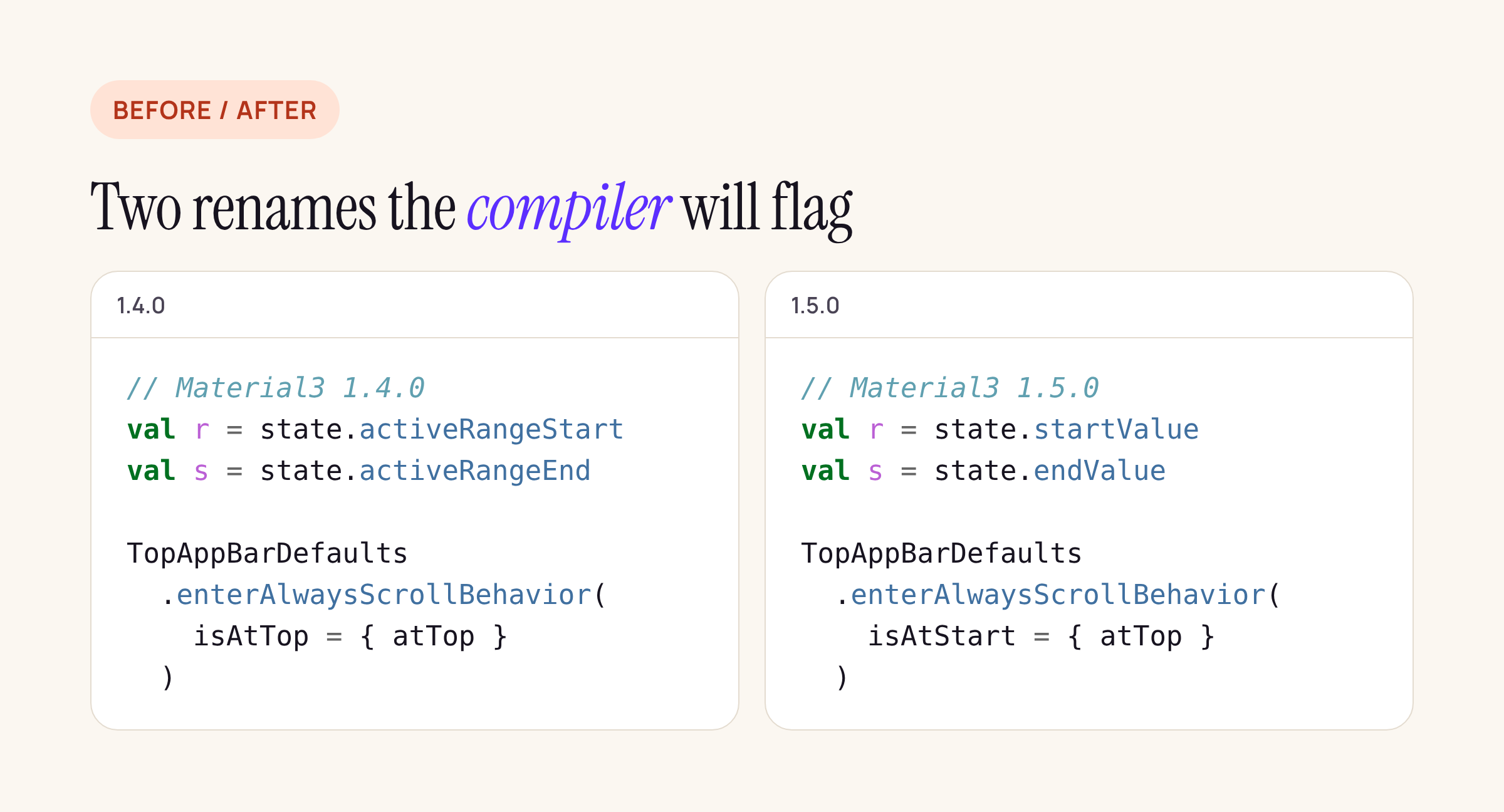
The two renames you will meet first. A sketch: check the exact parameter types against 1.5.0.
Sliders: state first, callback required
The 1.5.0 notes deprecate the stateless overloads, the ones that take value and onValueChange directly. In alpha29 onValueChange became required and moved in the parameter list, and in beta01 the overloads with a nullable onValueChange were kept as hidden deprecated APIs, so old binaries still link while new source has to change. For a quantity slider in a cart screen, the shape becomes:
// Material3 1.5.0, a sketch to adapt
val qty = remember {
    SliderState(value = 1f, valueRange = 1f..20f, steps = 18)
}
Slider(
    state = qty,
    onValueChange = { viewModel.setQuantity(it) },
)
Name the arguments rather than relying on position: the notes call the parameter move source-breaking, and named arguments are what keeps a call site stable across it. If you save slider state across process death, note that the two-parameter SliderState.Saver and RangeSliderState.Saver are deprecated since alpha25.
The rc01 fixes matter for price filters: a tap on overlapping RangeSlider thumbs, floating-point precision in discrete ticks, and a RangeSlider inside a horizontally scrolling container were all fixed in 1.5.0-rc01.
Bottom sheets keep the half-open state
This one compiles without complaint and changes behaviour. Since 1.5.0-alpha21, the PartiallyExpanded anchor of ModalBottomSheet and BottomSheetScaffold is “no longer programmatically removed based on layout conditions”. In 1.4, a short sheet whose content fitted could skip the half-open stop on its own; in 1.5 the stop stays unless you say otherwise through rememberBottomSheetState, the unified state API from alpha20.
What to do on each sheet:
- Decide whether the sheet should ever rest half open. Item detail sheets in a shop app usually should not.
- Replace
rememberModalBottomSheetStateorrememberStandardBottomSheetStatewithrememberBottomSheetStateand configure the half-open state there explicitly. - For
BottomSheetScaffold, asheetPeekHeightof 0 disables thepartiallyExpandedanchor (1.5.0-alpha14).
The notes also name a temporary way back to the old behaviour, the isBottomSheetPartiallyExpandedDeterministicEnabled flag, or the deprecated state functions. Treat that as a bridge for a release, not a fix.
Top app bars and scrolling
1.5.0-alpha12 taught the scroll behaviours about LazyListState, ScrollState and reverse scrolling, alpha16 renamed isAtTop to isAtStart, alpha22 made ScrollableState the way in, and alpha27 removed the deprecated overloads. beta01 brought back the reverseLayout overload of enterAlwaysScrollBehavior, as deprecated. So a call that compiled against 1.4 can fail outright against 1.5.0; the fix is to pass the scrolling list’s state and rename the argument. TopAppBar, its variants and TopAppBarScrollBehavior are stable in 1.5.0, so the @OptIn you may have added for them can go.
Changes with no compile error
| Change | First in | What users see |
|---|---|---|
SecureTextField and OutlinedSecureTextField default to TextObfuscationMode.System instead of RevealLastTyped |
1.5.0-alpha28 | The system setting decides whether the last typed character shows. Pass RevealLastTyped if your login relied on it |
| Navigation item label colour changed for contrast | 1.5.0-alpha26 | Selected labels in navigation bars and rails look different; check screenshots |
Checkbox sizing, behind isCheckboxStylingFixEnabled |
1.5.0-alpha03 | Only if you turn the flag on |
Bottom sheet nested scroll and drag follow MaterialTheme.motionScheme |
1.5.0-alpha16 | Sheet motion follows your theme’s motion scheme |
| DatePicker month navigation in one frame | 1.5.0-alpha29 | Faster month changes |
The password field is the one to check by hand on a banking or shop login: a user who expects to see the last character will notice.
What became stable, and what is new
Per the 1.5.0 notes and the November release post, stable now includes BottomAppBar, TopAppBar and its variants, SearchBarState with the slot-based SearchBar, the core Slider and RangeSlider, BasicAlertDialog, toggle buttons, SplitButton, ButtonGroup, the FAB menu and the expressive FloatingToolbar. The release post says experimental annotations went from 120 to 58. Still experimental: loading indicators, material shapes, AppBarWithSearch, carousel parallax and the standalone static sheet.
New components worth a look: ScrollField, VibrantTimePickerDialog, the standalone Scrim, a static Sheet (experimental), selectable and checkable dropdown menu items, and the wavy progress indicators. The same release post deprecates the Material 2 Compose library, which matters if an older screen still imports androidx.compose.material.
If your app also ships on TV, tv-material is a separate library with its own renames; see porting to tv-material 1.1.0.
What to check on your own app
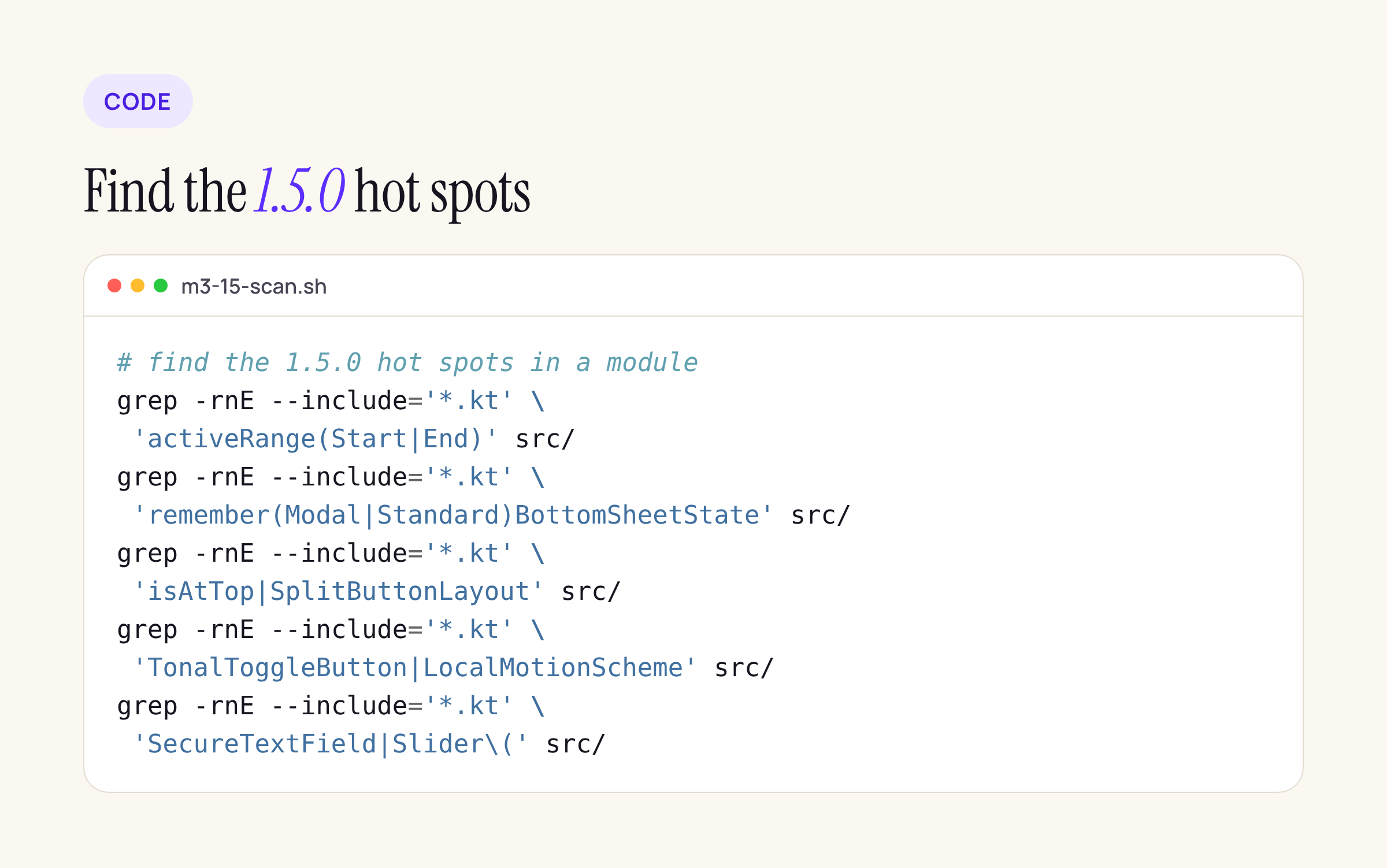
Five searches cover the changes above; run them per module before you bump the BOM.
- Run the searches above in every module that depends on Material3, so you know the size of the change before you start.
- Bump Kotlin and
compileSdk, then the BOM, and build. Fix errors first (isAtStart, removed scroll behaviour overloads,onValueChange, the RangeSlider renames), then warnings. - Open every bottom sheet and decide whether its half-open state should exist.
- Type into every password field and compare with the old behaviour.
- Take screenshots of screens with navigation bars or rails and compare label colours.
- Remove
@OptIn(ExperimentalMaterial3Api::class)where the API is now stable, so the warnings that remain are the ones that matter.
If you ship to Play’s large-screen tiers, the Tier 3 checklist is the next stop after this upgrade.