If your Mac utility shows the user a list of apps, use NSWorkspace.shared.runningApplications and filter on activationPolicy == .regular. Use libproc (proc_listallpids, proc_pidinfo) only if you need every process, including daemons and helpers. Then check how you plan to quit them, because Apple’s documentation for NSRunningApplication.terminate() says: “Sandboxed applications can’t use this method to terminate other applications.” That one line decides more of the design than the listing API does.
This post is a documentation review plus a source check. We compared Apple’s AppKit pages (read on 19 Nov 2026), the libproc.h header in Apple’s open-source xnu (tag xnu-12377.1.9), and the Swift sources of two open-source Mac tools: Microsoft’s Procexp-Mac (commit 28449f0, 11 Nov 2026) and Stats (commit 8bf536f, 18 Nov 2026).
Why we did this: our OneClick QuitAll lists running apps with their memory and CPU and quits the ones you did not tick, so the app gets the chance to save. It ships on the Mac App Store, which means it runs inside the App Sandbox, so every choice below goes through that filter first.
What each API lists
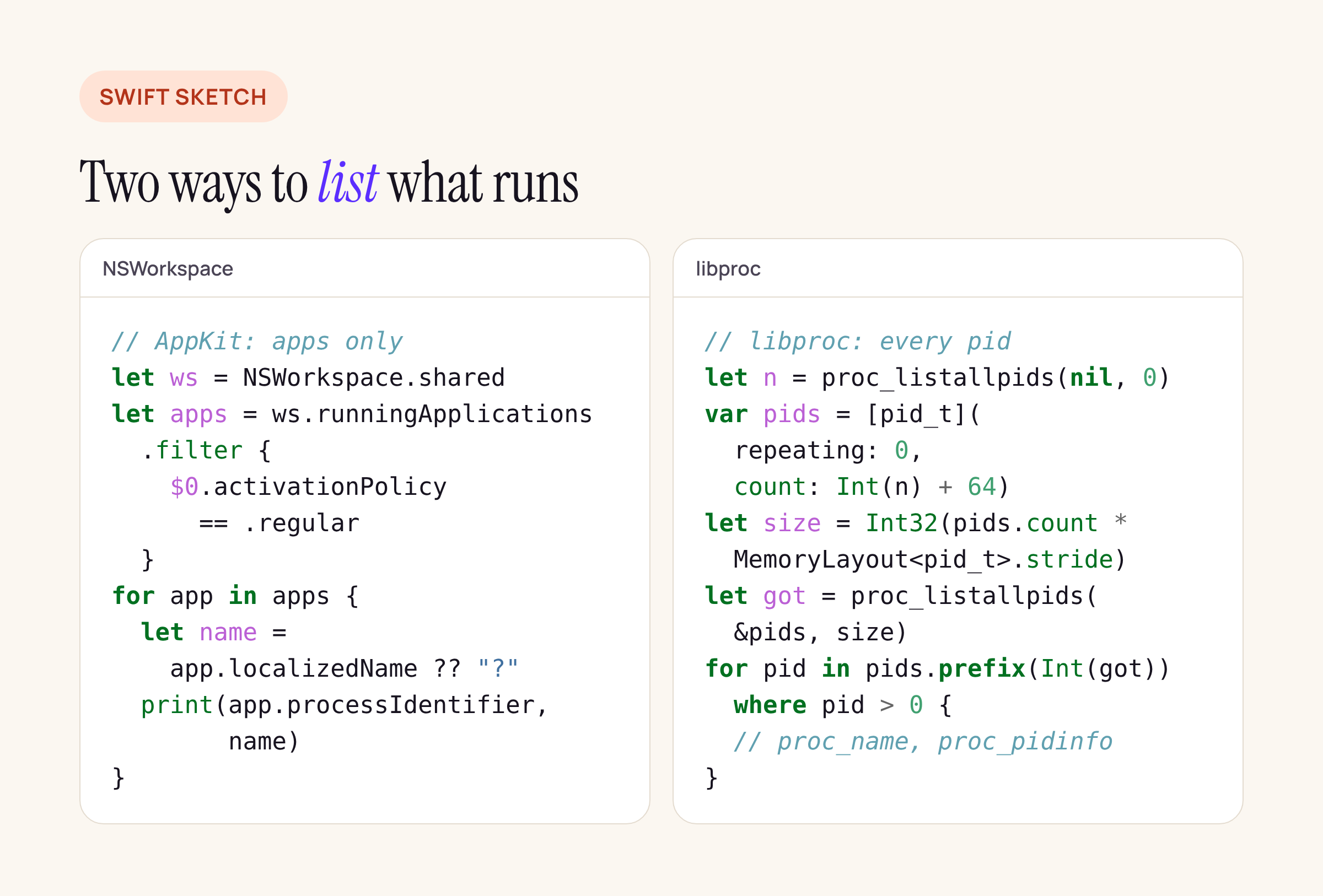
Both paths side by side. Treat them as sketches to adapt and compile against your own target.
runningApplications returns NSRunningApplication objects: “An object that can manipulate and provide information for a single instance of an app.” Each has a bundle identifier, a localised name, an icon and an activationPolicy. The three policies, in Apple’s words:
regular: “an ordinary app that appears in the Dock and may have a user interface.”accessory: “doesn’t appear in the Dock and doesn’t have a menu bar, but it may be activated programmatically or by clicking on one of its windows.” Menu bar utilities live here.prohibited: “doesn’t appear in the Dock and may not create windows or be activated.”
So the filter on .regular gives you roughly what the user sees in the Dock and in Command-Tab. Keep .accessory apps in a separate group if your users run many menu bar tools.
libproc works one level lower. proc_listallpids (macOS 10.7 and later in the header) returns process IDs for everything: the kernel task, launchd, daemons, XPC services, other users’ processes. You then call proc_name, proc_pidpath or proc_pidinfo per PID to learn what each one is. There is no bundle identifier, no icon and no notion of “app”.
| Question | NSWorkspace / NSRunningApplication | libproc |
|---|---|---|
| What it returns | Apps (runningApplications) | Every PID (libproc.h) |
| Available since | macOS 10.6 | proc_listpids 10.5, proc_ 10.7, proc_ 10.9 |
| Names and icons | Yes: localizedName, icon, bundleIdentifier |
Process name and path only |
| Change tracking | KVO on runningApplications |
Poll and diff |
| Thread safety | “safe to call from any of your app’s threads” | Not stated in the header |
| Quit politely | terminate(), not from a sandboxed app |
None: signals only |
Watching apps come and go
Apple’s page for runningApplications says the order of the array “is unspecified, but it is stable”, and that it only changes “when the main run loop runs in a common mode. Instead of polling, use key-value observing.”
The detail that catches people is on the didTerminateApplicationNotification page: “The system doesn’t post this notification for background apps or for apps that have the LSUIElement key in their Info.plist file.” Menu bar apps usually set LSUIElement. If your list listens only to launch and terminate notifications, quitting a menu bar app leaves a stale row. Observe runningApplications with KVO instead, as the same page recommends, and use isTerminated (also KVO-observable) to confirm a quit finished.
Quitting: what the sandbox allows
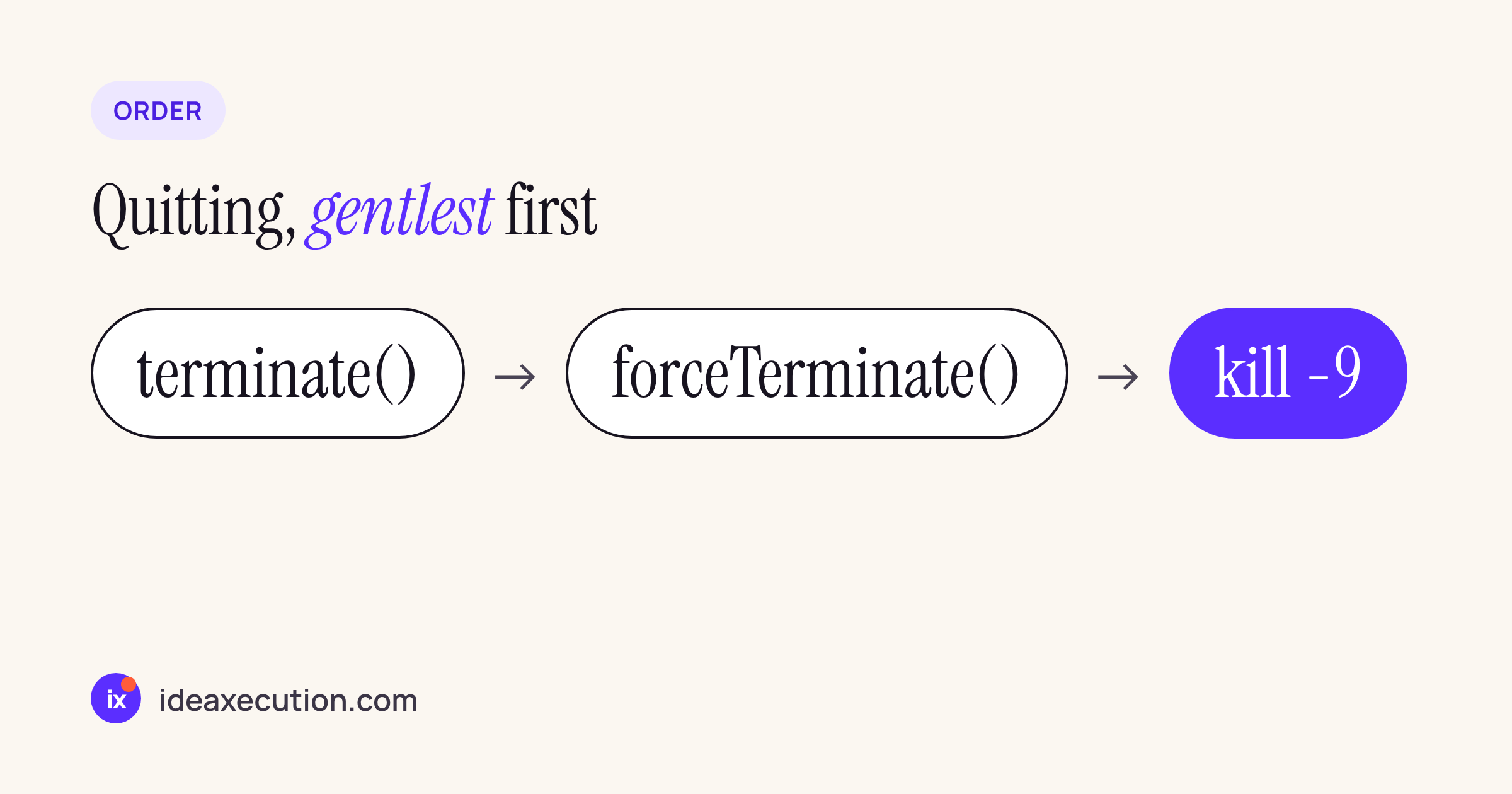
The usual escalation outside the sandbox. Inside it, the first two return false.
terminate() “Attempts to quit the receiver normally” and returns true “if the request was successfully sent”. It “may return before the receiver exits; you should observe the terminated property”. forceTerminate() “Attempts to force the receiver to quit.” Both pages carry the same sentence: sandboxed apps can’t use them on other apps, and the method “returns false when called from a sandboxed application.”
kill(2) with SIGTERM or SIGKILL skips the app’s own quit handling entirely, so unsaved documents are lost. For a tool whose promise is that apps get to save, it is a last resort, not a quit button.
The other documented route is Apple events. The Apple Events entitlement “indicates whether the app may prompt the user for permission to send Apple events to other apps”, and NSAppleEventsUsageDescription “is required if your app uses APIs that send Apple events.” That means a consent prompt the user sees, and App Review will ask why you need it. Plan the onboarding screen for that prompt before you write the quit code.
The App Sandbox page is blunt about distribution: “To distribute a macOS app through the Mac App Store, you must enable the App Sandbox capability.” A Developer ID build outside the store has more options, which is exactly what the two open-source tools below show.
What two open-source tools actually call
We cloned both repositories and counted calls to the process APIs in their Swift sources with a short grep script.
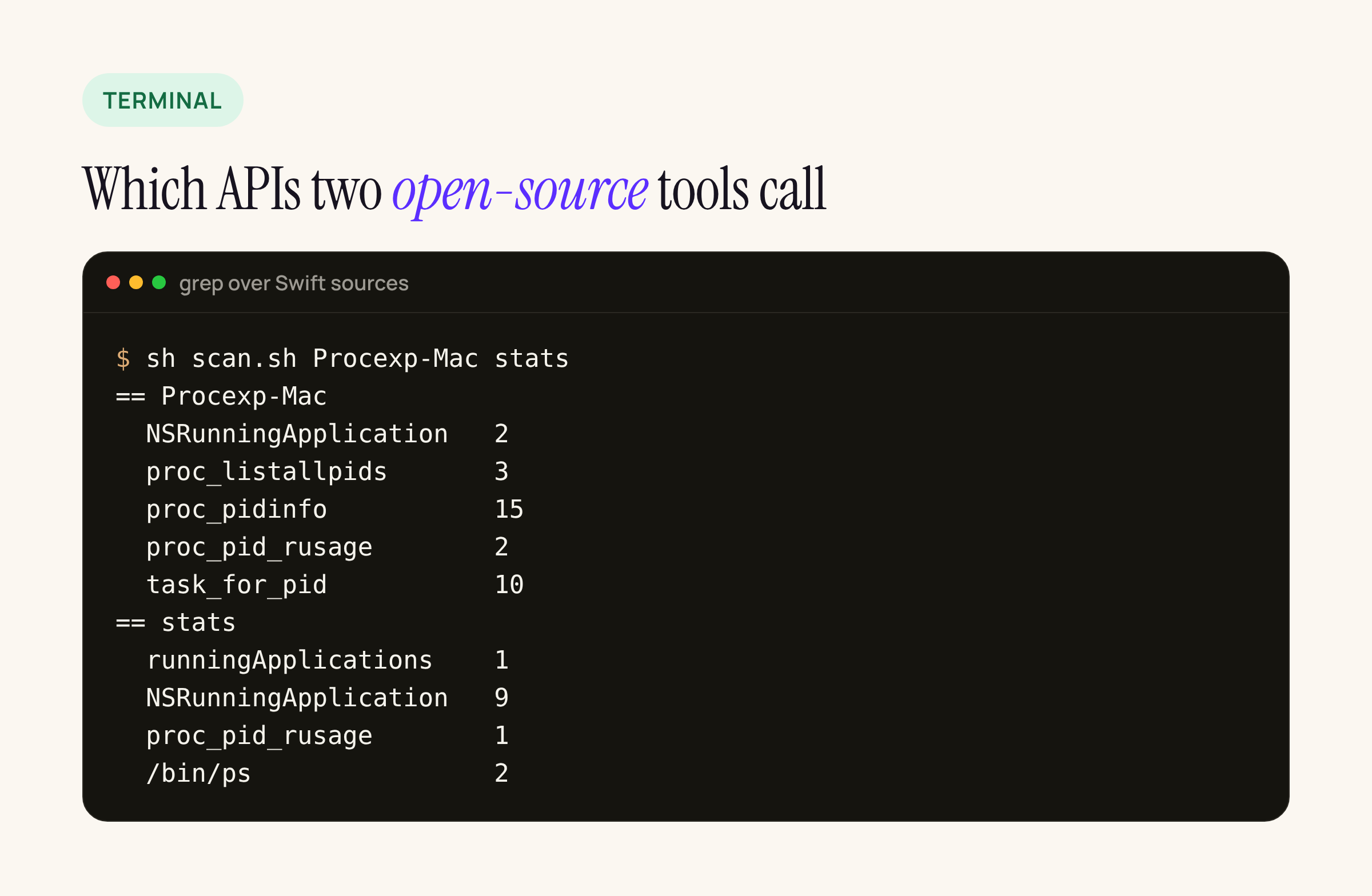
Real output from our test server, run on the commits named above. Counts are lines that mention each API.
#!/bin/sh
# Which process APIs does a Mac app's source call?
for repo in "$@"; do
  echo "== $(basename "$repo")"
  for api in runningApplications NSRunningApplication \
             proc_listallpids proc_listpids proc_pidinfo \
             proc_pid_rusage /bin/ps task_for_pid; do
    n=$(grep -rF --include='*.swift' "$api" "$repo" | wc -l)
    [ "$n" -gt 0 ] && printf '  %-22s %s\n' "$api" "$n"
  done
done
Procexp-Mac: libproc for everything, a root helper for the rest
Microsoft’s Sysinternals-style process explorer (macOS 13 and later, per its Package.swift) lists processes with proc_listallpids and reads each one with proc_pidinfo. Its source notes that PROC_PIDTBSDINFO returns EPERM for SIP-protected processes such as launchd, so it falls back to PROC_PIDT_SHORTBSDINFO, which “is readable for every pid without elevated rights”, so no process drops out of the list.
Killing goes straight to Darwin.kill with SIGKILL; on EPERM it retries through an optional privileged helper that runs as root and carries the com.apple.security.cs.debugger entitlement for task_for_pid. NSRunningApplication appears only to bring a GUI process to the front. There is no App Sandbox entitlement in the repository: this design only works outside the Mac App Store.
Stats: ps for the list, AppKit for the names
Stats builds its “top processes” list by running /bin/ps -Aceo pid,pcpu,comm -r and then looks up a friendlier name and icon with NSRunningApplication(processIdentifier:). Its kill button runs kill -9 through a shell. The main app’s entitlements file has no app-sandbox key; only its small launch-at-login helper is sandboxed.
What to take from this for your own Mac app
- Decide the distribution first. Mac App Store means App Sandbox, and that rules out
terminate(),forceTerminate()and signals against other apps. - For a user-facing list, start from
runningApplications, split.regularand.accessory, and observe it with KVO rather than notifications. - Add libproc only for data AppKit does not give you, such as per-process CPU time and memory (
proc_pid_rusage), keyed byprocessIdentifier. - Keep signals for a clearly labelled force-quit, and never as the default path for apps that may hold unsaved work.
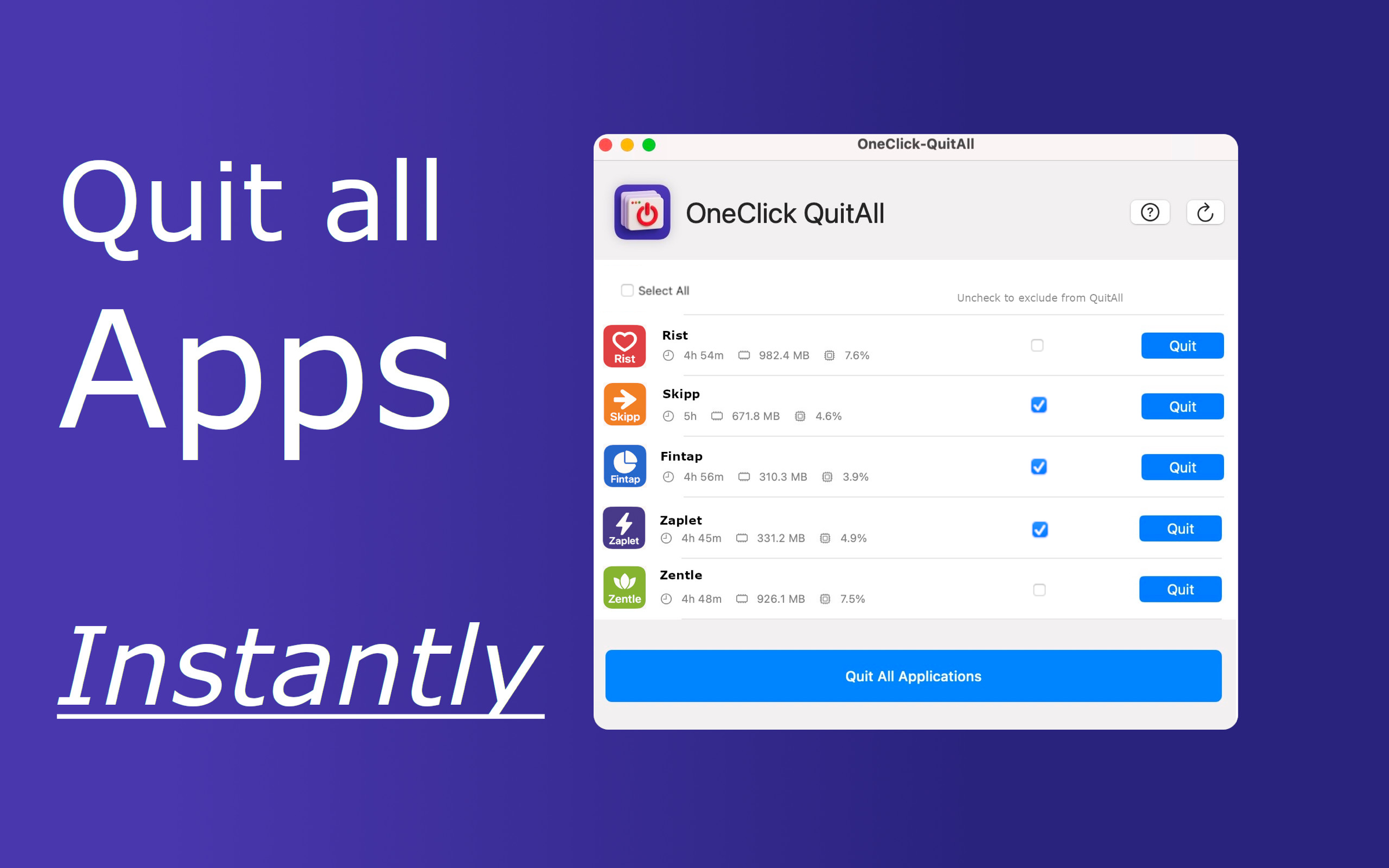
QuitAll’s list of running apps with memory and CPU, from our Mac App Store screenshots.