The short version: a Mac app that ships outside the App Store has to be signed with a Developer ID certificate, hardened runtime and a secure timestamp, uploaded as a zip, disk image or flat package with xcrun notarytool submit --wait, and then stapled with xcrun stapler staple. Check the signature before the upload, read the notary log even when the status is Accepted, and staple the app, not the zip. Apple stopped accepting altool uploads on 1 November 2023, and the Xcode 27.2 release notes list no change to notarization, so the flow below is the one to use on Xcode 27.
This post covers a short Bash script, every step taken from Apple’s “Customizing the notarization workflow” and “Resolving common notarization issues” pages, linted with shellcheck 0.11.0, and compared with the release pipelines of five open-source Mac apps on GitHub.
Why we did this: Nix and QuitAll are our Mac apps, and the Developer ID CA change in February 2027 (our earlier post) means everyone who ships Mac software outside the App Store will touch this pipeline in the next few months. It is the right moment to make the notarization step strict.
The order: sign, notarize, staple
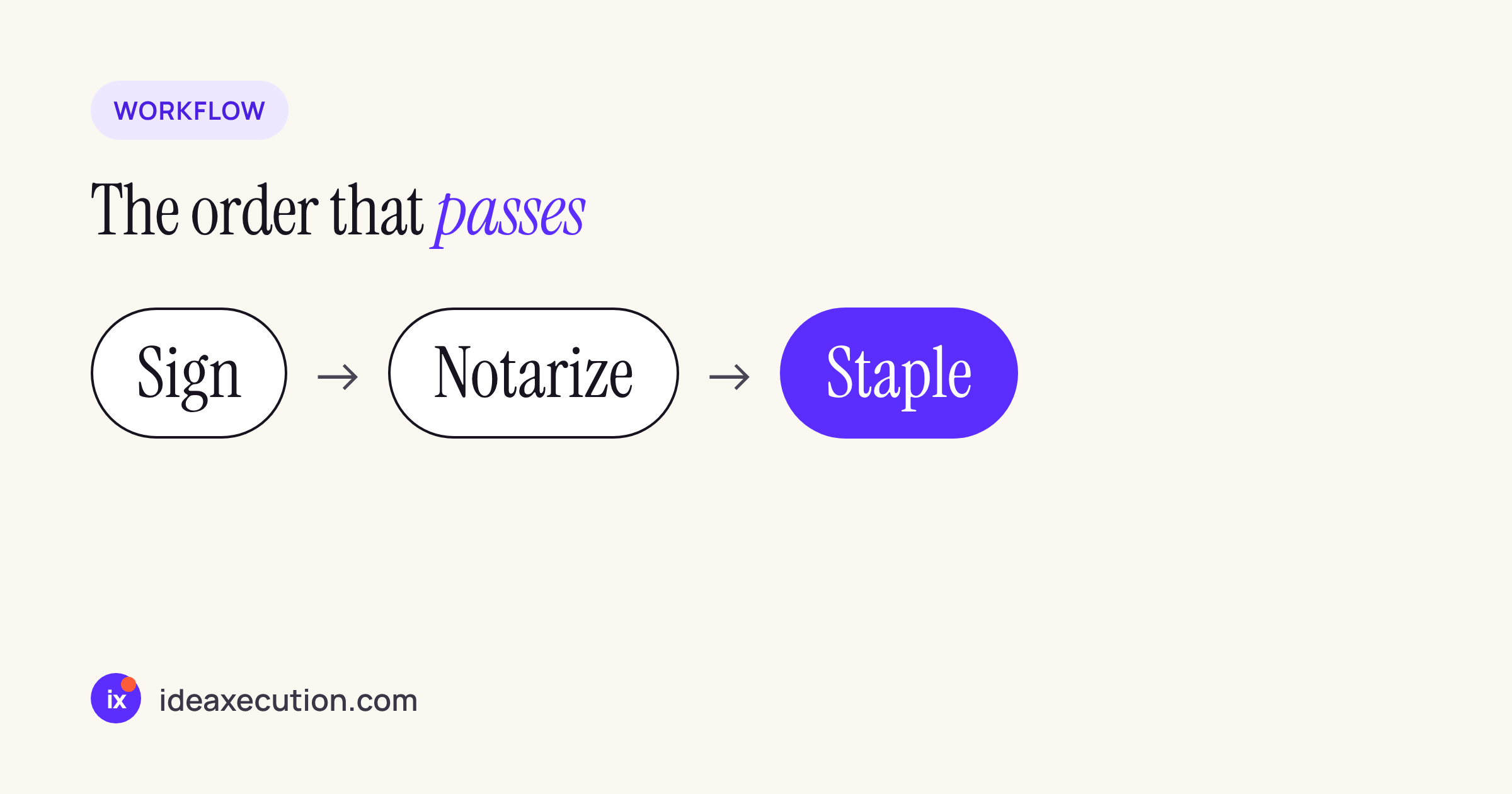
Sign happens in xcodebuild -exportArchive with a developer-id export method. Notarize is an upload to Apple’s notary service. Staple attaches the ticket to the app so Gatekeeper does not need to look it up online on first launch.
Three rules from Apple’s pages decide most of the script:
- “You can’t upload the .app bundle directly.” The notary service accepts disk images (UDIF), signed flat installer packages and ZIP archives, so the app is zipped with
ditto -c -k --keepParent. - “While you can notarize a ZIP archive, you can’t staple to it directly.” Staple the
.appafter notarization, then build a new zip (or a disk image) for release. - Apple says notarization finishes “for most software within 5 minutes, and for 98 percent of software within 15 minutes”, and asks you to limit notarizations to 75 a day. A CI job that notarizes every commit will hit that limit; notarize tagged releases only.
The script
Treat this as a starting point and run it on your own build Mac with your own archive. It needs a keychain profile created once on that Mac (the profile name is up to you):
xcrun notarytool store-credentials "notarytool-password" \
  --apple-id "<Apple ID>" \
  --team-id <TEAMID> \
  --password <app-specific password>
App Store Connect requires two-factor authentication, which is why the password here is an app-specific password, not the account password. Then the release script:
#!/usr/bin/env bash
# notarize.sh: export, verify, notarize, staple, assess.
# Usage: notarize.sh <archive.xcarchive> <ExportOptions.plist> <out-dir>
set -euo pipefail

ARCHIVE="$1"; OPTIONS="$2"; OUT="$3"
PROFILE="${NOTARY_PROFILE:-notarytool-password}"

xcodebuild -exportArchive -archivePath "$ARCHIVE" \
  -exportOptionsPlist "$OPTIONS" -exportPath "$OUT"

APP="$(find "$OUT" -maxdepth 1 -name '*.app' -print -quit)"
[ -n "$APP" ] || { echo "no .app in $OUT" >&2; exit 1; }
ZIP="${APP%.app}.zip"

# 1. Catch signing problems before the upload.
codesign -vvv --deep --strict "$APP"
SIG="$(codesign -dvv "$APP" 2>&1)"
grep -q '^Timestamp=' <<<"$SIG" \
  || { echo "no secure timestamp" >&2; exit 1; }
ENT="$(codesign -d --entitlements :- "$APP" 2>/dev/null || true)"
if grep -q 'get-task-allow' <<<"$ENT"; then
  echo "get-task-allow is set" >&2; exit 1
fi

# 2. Zip with ditto (the .app cannot be uploaded as is).
/usr/bin/ditto -c -k --keepParent "$APP" "$ZIP"

# 3. Submit and wait; keep the output for the id.
RESULT="$(xcrun notarytool submit "$ZIP" \
  --keychain-profile "$PROFILE" --wait)"
echo "$RESULT"
ID="$(awk '/^ *id:/ {print $2; exit}' <<<"$RESULT")"

# 4. Always fetch the log, even on success.
xcrun notarytool log "$ID" --keychain-profile "$PROFILE" \
  "$OUT/notary-log.json"
grep -q 'status: Accepted' <<<"$RESULT" \
  || { echo "notarization failed, see notary-log.json" >&2; exit 1; }

# 5. Staple the app (not the zip), then re-zip for release.
xcrun stapler staple "$APP"
rm -f "$ZIP"
/usr/bin/ditto -c -k --keepParent "$APP" "$ZIP"

# 6. Ask Gatekeeper what a user's Mac will decide.
spctl -vvv --assess --type exec "$APP"
The ExportOptions.plist needs method set to developer-id; that is what makes xcodebuild sign with the Developer ID Application certificate.
Each step, and the Apple page behind it
| Step | Command | Why |
|---|---|---|
| Verify signature | codesign -vvv --deep --strict |
Fails on “The signature of the binary is invalid” before you wait for the service |
| Secure timestamp | codesign -dvv, look for Timestamp= |
A “Signed Time” line instead means no secure timestamp; Apple accepts only its own timestamp server |
| Debug entitlement | codesign -d --entitlements : |
com. is rejected |
| Package | ditto -c -k --keep |
The . cannot be uploaded directly |
| Submit | notarytool submit --keychain-profile --wait |
--wait exits only when the service is done, so no polling |
| Log | notarytool log <id> <file> |
“Always check the log file, even if notarization succeeds” |
| Staple | stapler staple <app> |
Works on an app, bundle, disk image or flat package, not on a zip |
| Assess | spctl -vvv --assess --type exec |
The same check Gatekeeper runs |
Two flags worth knowing that the script does not use: --webhook <url> on submit makes the service call a URL when it finishes, which suits a CI system that should not hold a runner for 15 minutes, and --no-s3-acceleration switches the upload from the accelerated S3 endpoint to the regional one when a corporate firewall only allows the latter. Both are on Apple’s workflow page.
What the failures look like
The notary log is JSON with an issues array (each entry has message, path and severity) plus status and statusSummary. A rejected upload shows "status": "Invalid" and "statusSummary": "Archive contains critical validation errors". The messages in the issues array map one to one to the headings on Apple’s troubleshooting page:
- “The executable does not have the hardened runtime enabled.” Turn on Hardened Runtime in Signing & Capabilities, or pass
--options runtimewhen you sign by hand. Exceptions (JIT, unsigned memory and so on) go in the entitlements file. - “The signature does not include a secure timestamp.” Xcode adds the timestamp in archive and export; a manual
codesignneeds--timestampand network access. - “The binary is not signed with a valid Developer ID certificate.” Developer ID Application for apps, frameworks, disk images and command-line tools; Developer ID Installer for
.pkgfiles. - “Embedded entitlements are invalid: syntax error near line 1”. The entitlements were embedded as a binary plist.
plutil -convert xml1andplutil -linton the.entitlementsfile fix it.
How five open-source Mac apps do it
We searched the repositories of five well-known open-source Mac apps for the notarization commands (notarytool submit, stapler staple, spctl, notarytool log), excluding docs and translations.
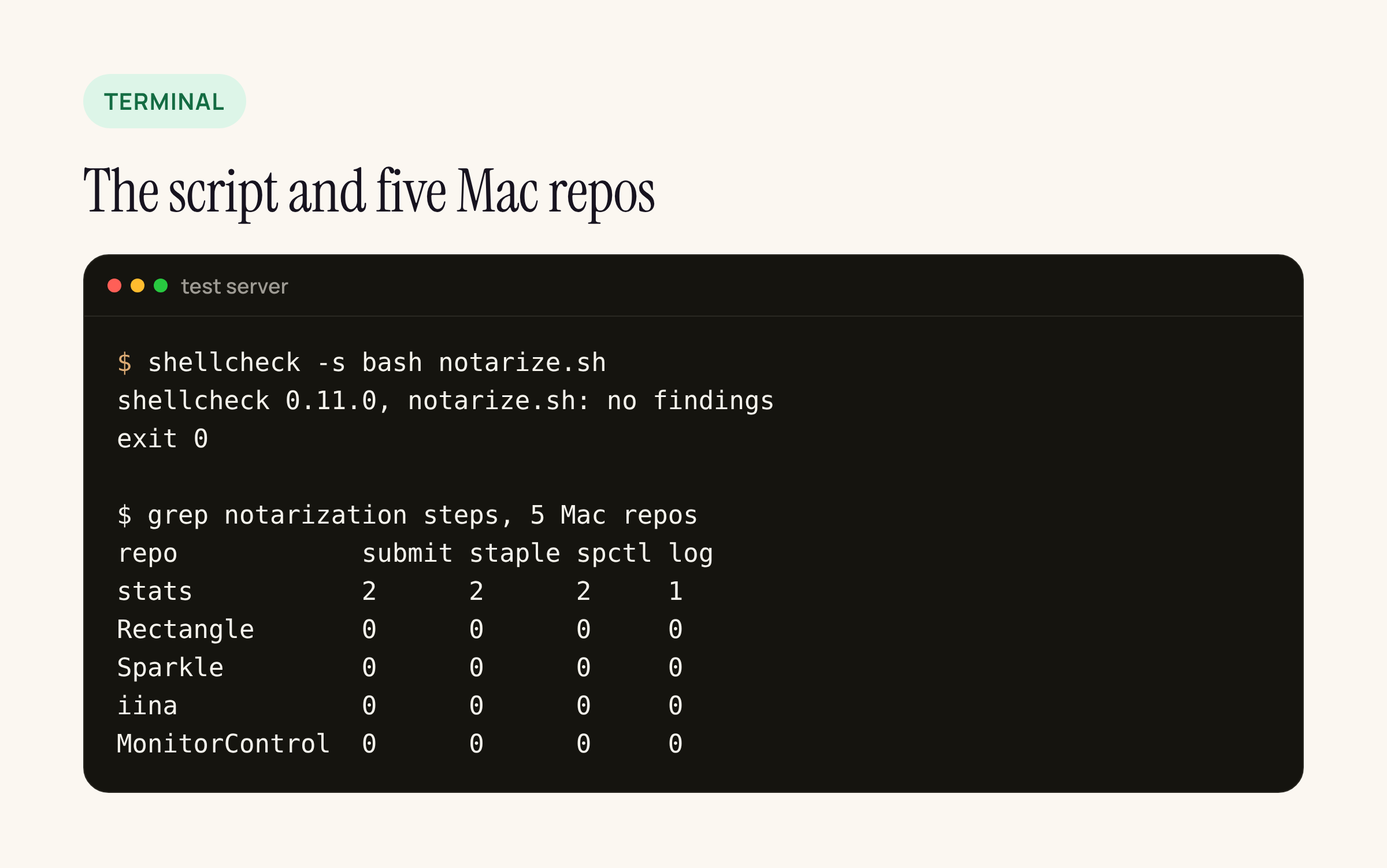
Real output from our test server: shellcheck reports nothing for the script; only one of the five repositories runs notarization in its own files.
- Stats (commit 4ef8b91) is the full pipeline in GitHub Actions: archive, export with
methoddeveloper-id,dittozip,notarytool submit --apple-id --team-id --password --wait,stapler stapleon the app, thenspctl -a -t exec -vvv. Its Makefile keepsnotarytool logandnotarytool historytargets for local debugging. It does not fetch the log on success, which is the one step we added. - Rectangle (commit 8ab33d0) builds a CI artifact and re-signs it after export with
codesign --force --deep. That workflow does not notarize (the project’s Chinese README shows the released app passingspctlas “Notarized Developer ID”), but it shows a trap worth naming. - Sparkle, IINA and MonitorControl have no notarization commands in their repositories. Sparkle runs
codesign --verify -vvv --deepover its binaries in its release packaging script, which is the same pre-flight check as step 1 above.
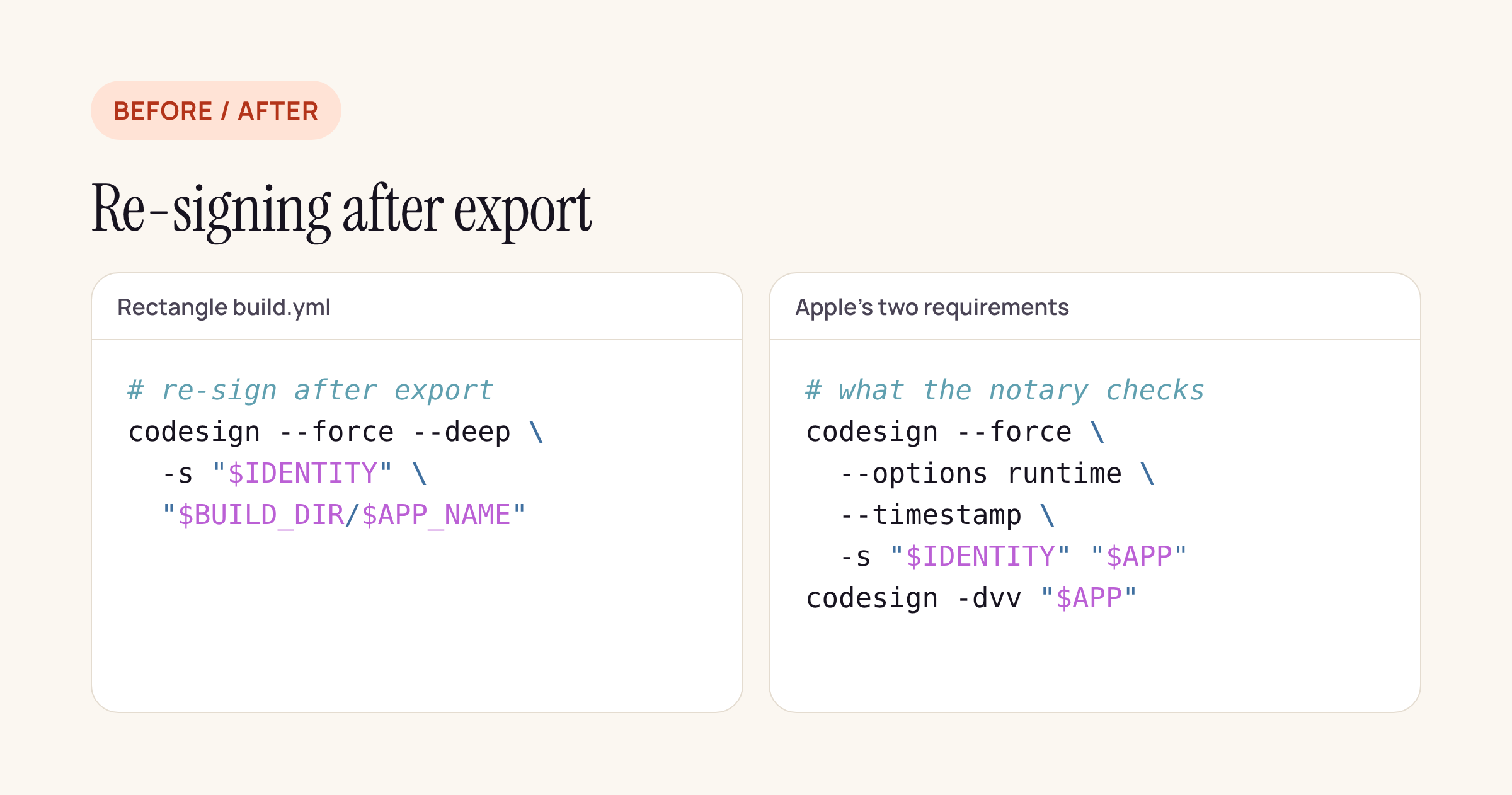
If you re-sign after export, pass --options runtime and --timestamp again and confirm with codesign -dvv.
The trap: codesign --force replaces the existing signature. A re-sign without --options runtime and --timestamp produces a signature the notary service rejects on two of its checks (hardened runtime and secure timestamp). If a pipeline needs to re-sign, for example after embedding a helper, pass both flags again and check the result with codesign -dvv before uploading.
What to check on your own pipeline
- Search your CI files for
altool. Anything still calling it has been failing since 1 November 2023 or is dead code. - Confirm your export method is
developer-id, and that nothing re-signs the app after export without--options runtime --timestamp. - Store the notary log next to the build artifact. Warnings in an
Acceptedlog become errors later. - Staple the app or disk image you ship, and run
spctl -vvv --assess --type execon it as the last CI step. - Note the Developer ID certificate’s expiry date in the same place as the pipeline; our February 2027 post covers the CA change and installers.
Sources: Apple, Customizing the notarization workflow; Apple, Resolving common notarization issues; Apple, Xcode 27.2 release notes (no notarization items). All pages read on 18 November 2026.