Two Apple changes this month touch small Mac utilities. In the macOS 27.2 SDK, “The EnablePasteboardPrivacyDeveloperPreview user default has been removed” (186955507), so there is no longer a developer switch for the pasteboard privacy behaviour: test your app against the shipping default, which Apple documents as “ask upon programmatic access” for the General pasteboard. If your app looks at the clipboard on its own (on launch, on a timer, when a window opens), move that check to detectedPatterns(for:) or detectedMetadata(for:), which do not notify the user, and read the contents only when the user pastes. Separately, the macOS 27.3 beta SDK adds Product.supportsMultiSeatPurchase, so an auto-renewable subscription can now be sold to a group from inside a Mac app.
This is a review of Apple’s macOS 27.2 and Xcode 27.3 beta release notes, the AppKit NSPasteboard and StoreKit multiseat reference pages (read 16 Nov 2026), and a source search of four open-source Mac utilities. Why we did this: we ship two Mac utilities, Nix and OneClick QuitAll, and both live next to the clipboard and the Mac App Store, so these are the two changes we checked first. Our AppKit checklist for the other macOS 27 change, touch input on Mac, went up earlier today.
Pasteboard privacy: what the documentation says
The pasteboard APIs involved are not new in macOS 27; they arrived in macOS 15.4. What changed in 27.2 is the removal of the preview default. Every row below is from Apple’s pages:
| API or rule | Available | What Apple says | Source |
|---|---|---|---|
EnablePasteboardPrivacyDeveloperPreview default |
Removed in 27.2 | “The EnablePasteboardPrivacyDeveloperPreview user default has been removed.” (186955507) | macOS 27.2 notes |
NSPasteboard.accessBehavior |
macOS 15.4 | “The current pasteboard access behavior.” Users can change it per app in System Settings once an app has triggered the alert | accessBehavior |
AccessBehavior.default |
macOS 15.4 | General pasteboard: ask upon programmatic access; other pasteboards: always allow. After the first alert the state becomes .ask |
AccessBehavior |
.ask / .alwaysDeny |
macOS 15.4 | Access that is user originated and paste related is always allowed without a notification | AccessBehavior |
detectedPatterns(for:) |
macOS 15.4 | “the system doesn’t notify the person using the app”; only says whether the first item matches a pattern | detectedPatterns |
detectedMetadata(for:) |
macOS 15.4 | Limited metadata “without notifying the person using the app” | detectedMetadata |
detectedValues(for:) |
macOS 15.4 | Reads the contents on a match, and “the system informs the person using the app”; throws if the person denies access | detectedValues |
Two details are easy to miss. First, detectedValues(for:) is not the quiet one: it reads the matched value, so it shows the notice like a plain read. Second, the patterns you can detect are the data detector types listed on NSPasteboard.DetectedValues: links, probableWebURL, probableWebSearch, emailAddresses, phoneNumbers, postalAddresses, calendarEvents, moneyAmounts, number, flightNumbers and shipmentTrackingNumbers. A file path or a bundle identifier is not one of them, so a utility that wants to recognise a copied app path cannot detect it quietly; it has to wait for the user to paste.
The code change
The pattern to drop is reading the General pasteboard because something happened in your app, not because the user pasted. The replacement asks the detector whether the clipboard holds something useful, shows a hint, and reads the value in the paste action:
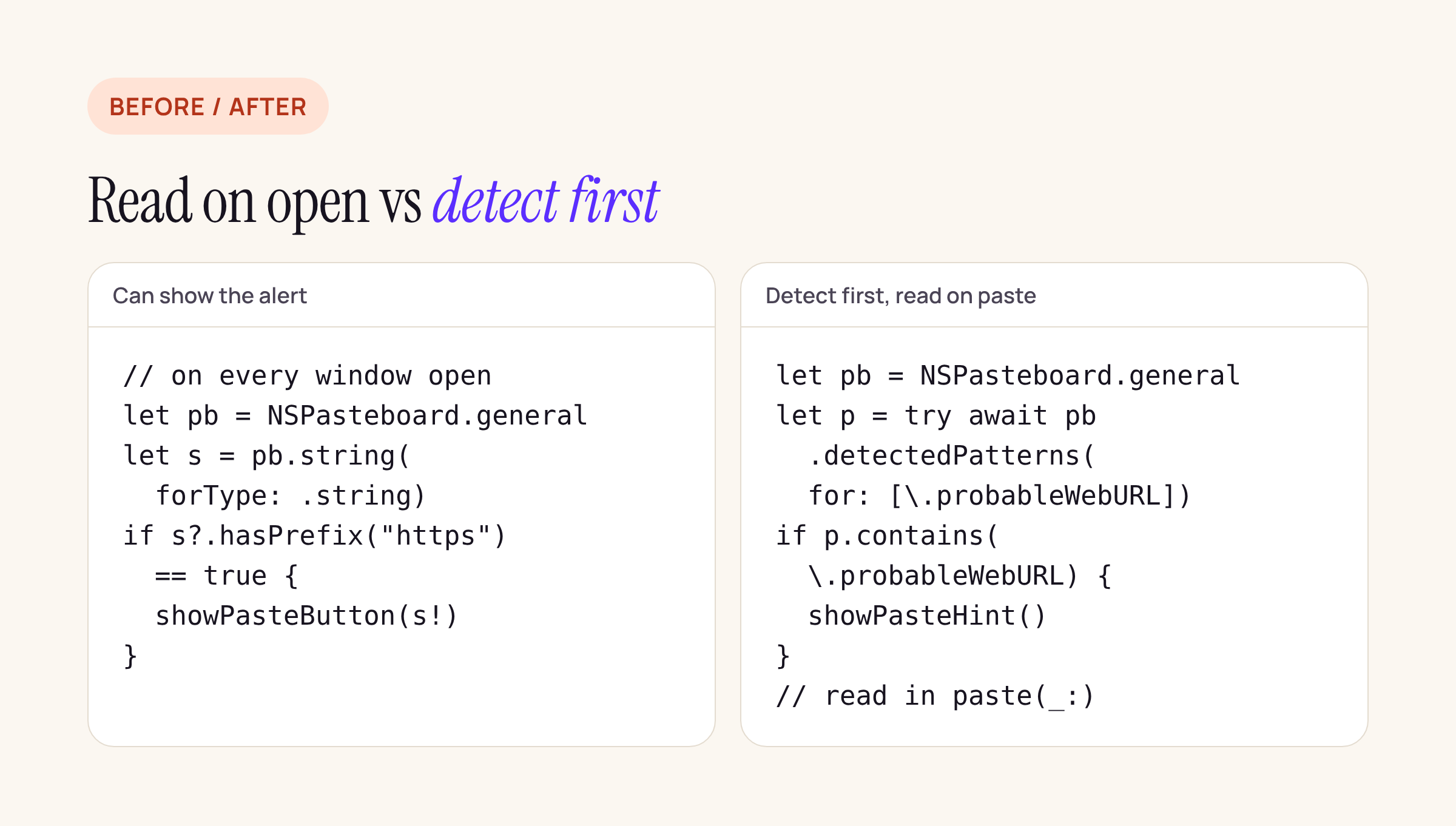
The left side reads the General pasteboard on its own initiative; the right side only detects a pattern until the user pastes.
// Sketch: compile it against your target and adapt the names.
@MainActor
func refreshPasteHint() async {
    let pb = NSPasteboard.general
    guard pb.accessBehavior != .alwaysDeny else { return hidePasteHint() }
    let found = try? await pb.detectedPatterns(for: [\.probableWebURL])
    if found?.contains(\.probableWebURL) == true {
        showPasteHint()
    } else {
        hidePasteHint()
    }
}

// Wired to Edit > Paste (Command-V), so the read is user originated and paste related.
@IBAction func paste(_ sender: Any?) {
    guard let s = NSPasteboard.general.string(forType: .string) else { return }
    handlePastedURL(s)
}
Writing to the pasteboard (a “Copy path” button) and drag-and-drop pasteboards are not what the alert is about: Apple documents “ask” as the default for the General pasteboard only, and “always allow” for the others.
How four open-source Mac utilities use the pasteboard
To see how common the risky pattern is, we cloned four popular open-source Mac utilities on 16 Nov 2026 and searched their Swift sources for NSPasteboard, reads (string(forType:), data(forType:), pasteboardItems, readObjects) and the 15.4 APIs (accessBehavior, detectedPatterns, detectedValues, detectedMetadata):
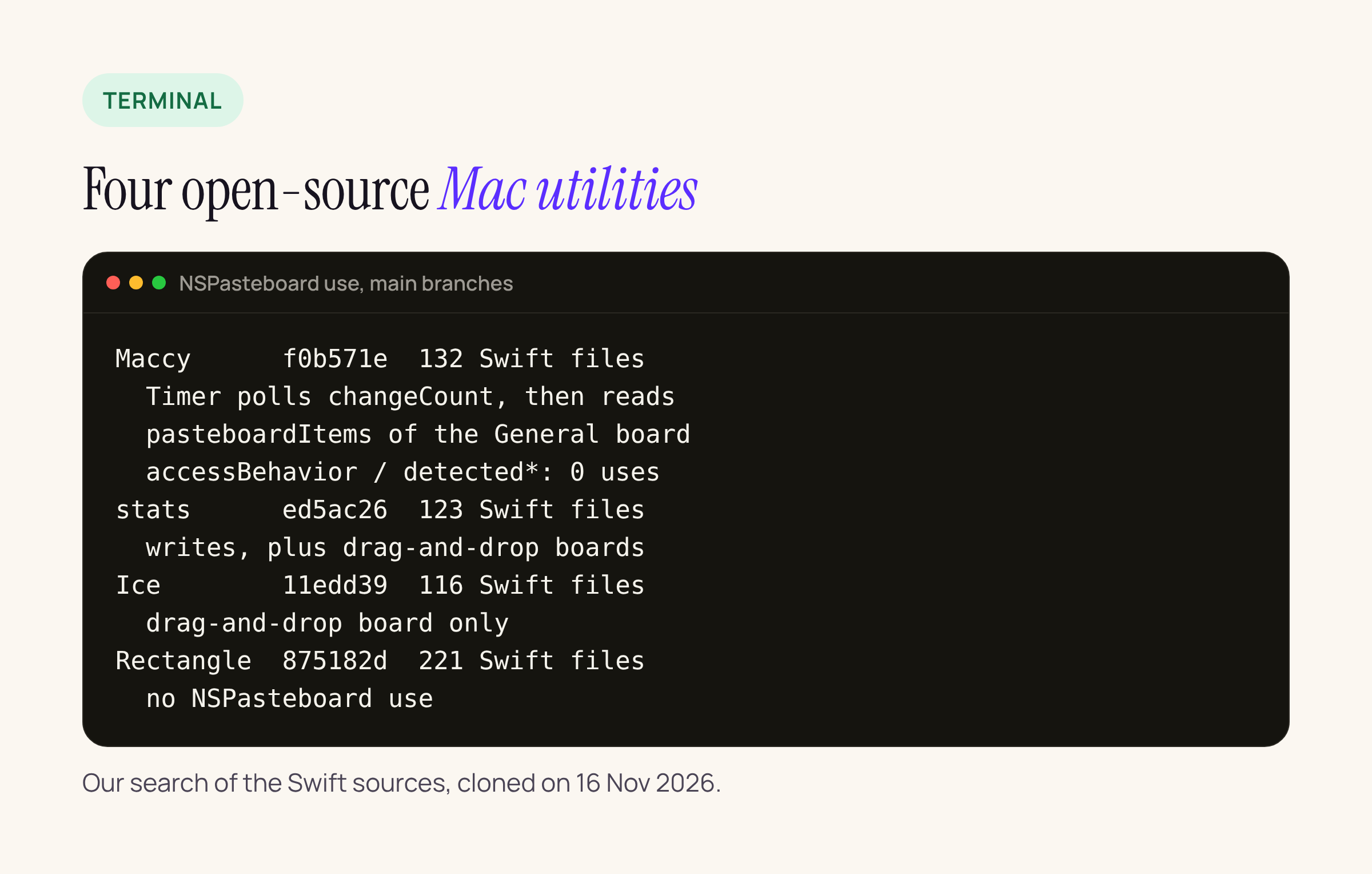
What we found, with commits:
- Maccy (f0b571e, 132 Swift files): a clipboard manager.
Clipboard.swiftstarts aTimer, comparesNSPasteboard.general.changeCount, and on a change readspasteboardItemsand their data. This is programmatic access by design: a clipboard history cannot work any other way, so for this kind of app the answer is the per-app permission, not the detect APIs. No use ofaccessBehavioror the detect methods. - stats (ed5ac26, 123 files): writes a value to the clipboard from the Clock popup and uses pasteboard items for drag-and-drop reordering. No reads of the General pasteboard.
- Ice (11edd39, 116 files): a drag-and-drop pasteboard item in the menu bar layout editor only.
- Rectangle (875182d, 221 files): no
NSPasteboarduse.
So three of the four never read the General pasteboard on their own, and the one that does is a clipboard manager. For any other utility, the takeaway is the same as for ours: search for reads outside a paste action and remove them. For a clipboard manager, check accessBehavior at launch and explain to the user why the alert appears, since the per-app choice in System Settings is now the only switch.
StoreKit multiseat in the 27.3 SDK
The StoreKit pages describe what Apple calls Group Purchases: one person buys several seats of an auto-renewable subscription and invites others. From Supporting multiseat purchases in your app and the reference pages:
| Item | What Apple says | Source |
|---|---|---|
Product.supportsMultiSeatPurchase |
“A Boolean value that indicates whether multiseat purchases are allowed for this product.” Beta, 27.3 on every platform | supportsMultiSeatPurchase |
Product.PurchaseOption.seats(_:) |
“Pass the total number of seats the subscription has after the purchase, not the number of seats to add.” Back-deployed; listed from macOS 12 | seats(_:) |
| Platforms | Customers can buy group subscriptions on iOS, iPadOS and macOS; up to 100 seats in one purchase | seats(_:) |
| Xcode | “Group Purchases requires Xcode 27.3 or later.” | Supporting multiseat |
| App Store Connect | A setting on each auto-renewable subscription; “New subscriptions allow multiseat purchases by default.” | Supporting multiseat |
| Pricing | Per-seat (default) or volume discount, up to five price tiers; no API adds up the total | Supporting multiseat |
| Invitations | Run by the App Store, or by your app and server (then you keep seat records current through the App Store Server API) | Supporting multiseat |
| Limits | A group holds up to 100 people; offer codes are not available for group purchases; only the purchaser can share with Family Sharing | Supporting multiseat |
| Sandbox | Subscriptions always allow multiseat purchases in the sandbox, whatever App Store Connect says | Testing multiseat subscriptions |
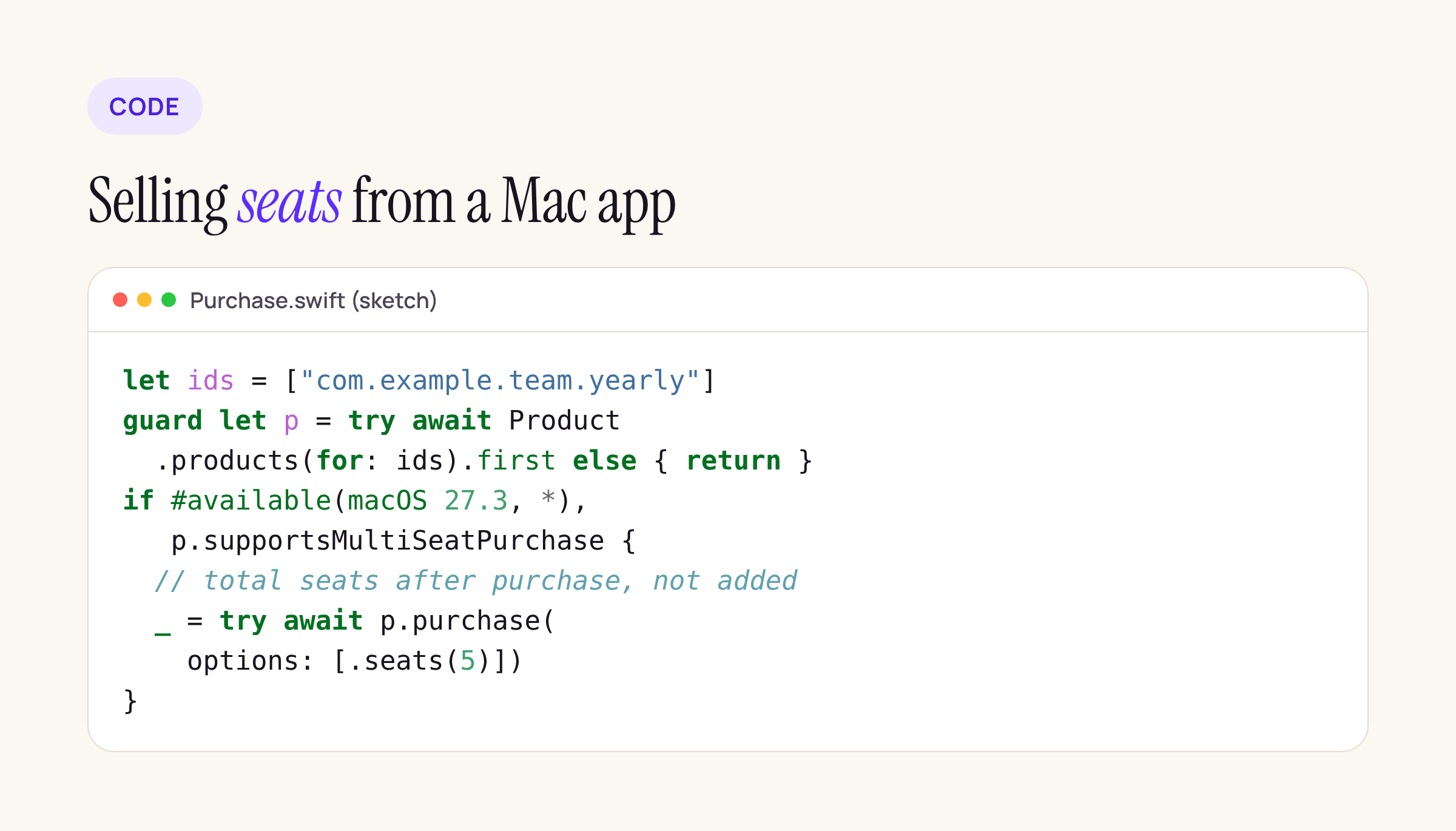
A sketch of the purchase call, with the availability check the 27.3 property needs.
Three things to decide, even if you never plan to sell seats:
- The default is on. New subscriptions allow multiseat purchases unless you turn it off in App Store Connect, so if your purchase screen or server assumes one buyer equals one user, check existing subscriptions before the 27.3 release and decide per product.
- Sandbox lies in one direction. Every sandbox subscription allows multiseat, so a test pass in the sandbox does not tell you what production will do.
- Errors to handle. The guide names
multiSeatPurchaseDisabledwhen a product does not allow it andseatReductionNotAllowedwhen seats are reduced in the purchase call; seat reductions go through Manage Subscriptions (showManageSubscriptions(from:)on macOS).
Multiseat applies only to auto-renewable subscriptions. A Mac utility sold as a free download or a one-time purchase has nothing to change here.
What to check on your own Mac app
- Search your Swift sources for
NSPasteboard.generalreads (string(forType:),data(forType:),pasteboardItems,readObjects) and list the ones that run outside a paste action. - Replace each one with
detectedPatterns(for:)ordetectedMetadata(for:)where a data detector type fits, and read inpaste(_:). - On a Mac running 27.2, reset the app’s pasteboard setting in System Settings and walk through launch, window open and wake from sleep to confirm no alert appears without a paste.
- For each auto-renewable subscription, open its Purchase Options in App Store Connect and set multiseat on or off on purpose.
- If you keep it on, make your server accept transactions that grant access to group members, not only the purchaser.
The steps for the 27.2 pasteboard change come from Apple’s release notes and AppKit reference; the multiseat details come from the 27.3 beta documentation and may change before release.