The short version: Android 16 for TV adds three things a catalogue app can use (picture profiles through MediaQualityManager, Eclipsa Audio in the IAMF format, and playback speed and consistency work), and all of them are opt-in. The changes that actually need code come from raising targetSdk to 36: the Back button on the remote no longer reaches onBackPressed() or a KEYCODE_BACK key handler, the edge-to-edge opt-out stops working, orientation locks are ignored on displays of 600dp smallest width and above, and elegantTextHeight is ignored, which matters for Tamil and Telugu titles.
This post is a review of Google’s Android 16 for TV page (last updated 20 May 2025) and the Android 16 behaviour changes page (last updated 28 October 2026), plus a 24-line checker run against two of Google’s open-source TV samples.
Why we did this: BMDB runs on Android TV and Google TV boxes, and API 36 is the next target bump for a TV app on 35. A TV app is mostly D-pad focus and a Back button, so the back change alone decides whether the update is a one-line Gradle edit or a week of testing.
What the Android 16 for TV page adds
Google’s TV page is short and says that “not all those features apply to TV” from the phone release. It then lists TV-specific work and states plainly: “The following features are only available on Android TV hardware: MediaQualityManager, Platform Eclipsa Audio codec support, HDMI-CEC reliability, and performance optimizations for 64-bit kernels.”
| Item | What it is | Does a catalogue app need code? |
|---|---|---|
Media |
Lets an app select picture profiles | Only if you want to switch profiles, for example a “cinema” profile for long-form playback |
| Eclipsa Audio (IAMF) | Spatial audio format for creators | Only if your catalogue serves IAMF tracks; the Media3 IAMF decoder extension plays them on earlier Android versions too |
| Media playback | Speed, consistency and efficiency work | No; it applies to every player |
| HDMI-CEC, 64-bit kernels | Platform reliability and performance | No |
The page names no target SDK requirement and no TV-only behaviour change. Its only advice is to validate the app on the Android Emulator for TV. So the code work comes from the general behaviour changes, which apply on TV like everywhere else once targetSdk is 36.
The API 36 changes, read for a TV app
The behaviour-change page mentions TV once, in a list of form factors (“phones, tablets, foldables, desktops, cars, and TVs”), and exempts no form factor anywhere. Here is each change against what a catalogue and playback app actually does:
| Change at targetSdk 36 | What it means on TV | What to change |
|---|---|---|
| Predictive back on by default: “onBackPressed is not called and KeyEvent.KEYCODE_BACK is not dispatched anymore” | The remote’s Back button is the main navigation key. Any player or detail screen that overrides onBackPressed() or waits for KEYCODE_ in a key listener stops seeing it |
Move to On (Views) or BackHandler (Compose). Temporary opt-out: android: |
Edge to edge: window is deprecated and disabled |
The opt-out stops working; the app draws edge to edge | Remove the attribute; check that your overscan-safe padding does not depend on system bar insets |
| Orientation and resizability ignored on displays with smallest width of 600dp or more | android: is common in TV manifests. Whether it is ignored depends on the density the box reports (see below) |
Do not rely on the lock; lay out for the window you get. Temporary opt-out: PROPERTY_ |
elegantTextHeight ignored, UI fonts discontinued |
Affects Arabic, Lao, Myanmar, Tamil, Gujarati, Kannada, Malayalam, Odia, Telugu and Thai text | Check title rows and cards with Tamil and Telugu titles for clipped ascenders and descenders |
Fixed-rate scheduling: at most one missed schedule run executes on return |
A box that sleeps between sessions will not catch up every missed tick | Fine for progress polling; do not count ticks to measure watch time |
| Local network permission (opt-in now, rollout through 26Q2) | Casting and LAN discovery are named as likely affected | See our post on local network permission |
Safer intents, opt-in intent |
Matters for apps that receive deep links from the launcher or a voice search | Optional; test deep links with enforce before turning it on |
The 600dp rule depends on the box
A TV screen looks large, but the rule is about smallest width in dp, and that comes from the density the device reports. The arithmetic: a 1920 x 1080 panel reported at 320 dpi (xhdpi) is 960 x 540 dp, under 600, so the orientation lock still holds. The same panel reported at 213 dpi (tvdpi) is about 1442 x 811 dp, above 600, so the lock is ignored. Run adb shell wm size and adb shell wm density on the boxes your users have, and test the app as if the lock were gone.
Two Google TV samples, checked
We wrote a short checker that walks a source tree and counts the API 36 hot spots above, then ran it on Google’s android/tv-samples repository: JetStreamCompose at the current main (commit c2987fd, 18 Nov 2026) and LeanbackShowcase at commit 15ac8df, the last commit before Google removed the Leanback samples on 30 October 2026.
CHECKS = {
    "targetSdk": r"targetSdk(?:Version)?\s*=?\s*(\d+)",
    "edge-to-edge opt-out": r"windowOptOutEdgeToEdgeEnforcement",
    "onBackPressed() override":
        r"override fun onBackPressed\(|public void onBackPressed\(",
    "KEYCODE_BACK in key handler": r"KEYCODE_BACK",
    "back callback API":
        r"OnBackPressedCallback|BackHandler\(|OnBackInvokedCallback",
    "orientation lock": r"screenOrientation|setRequestedOrientation",
    "elegantTextHeight": r"elegantTextHeight",
    "scheduleAtFixedRate": r"scheduleAtFixedRate",
    "MediaQualityManager": r"MediaQualityManager",
}
# walks .kt, .java, .xml, .kts and .gradle files, skips baseline profiles,
# and prints a count per check
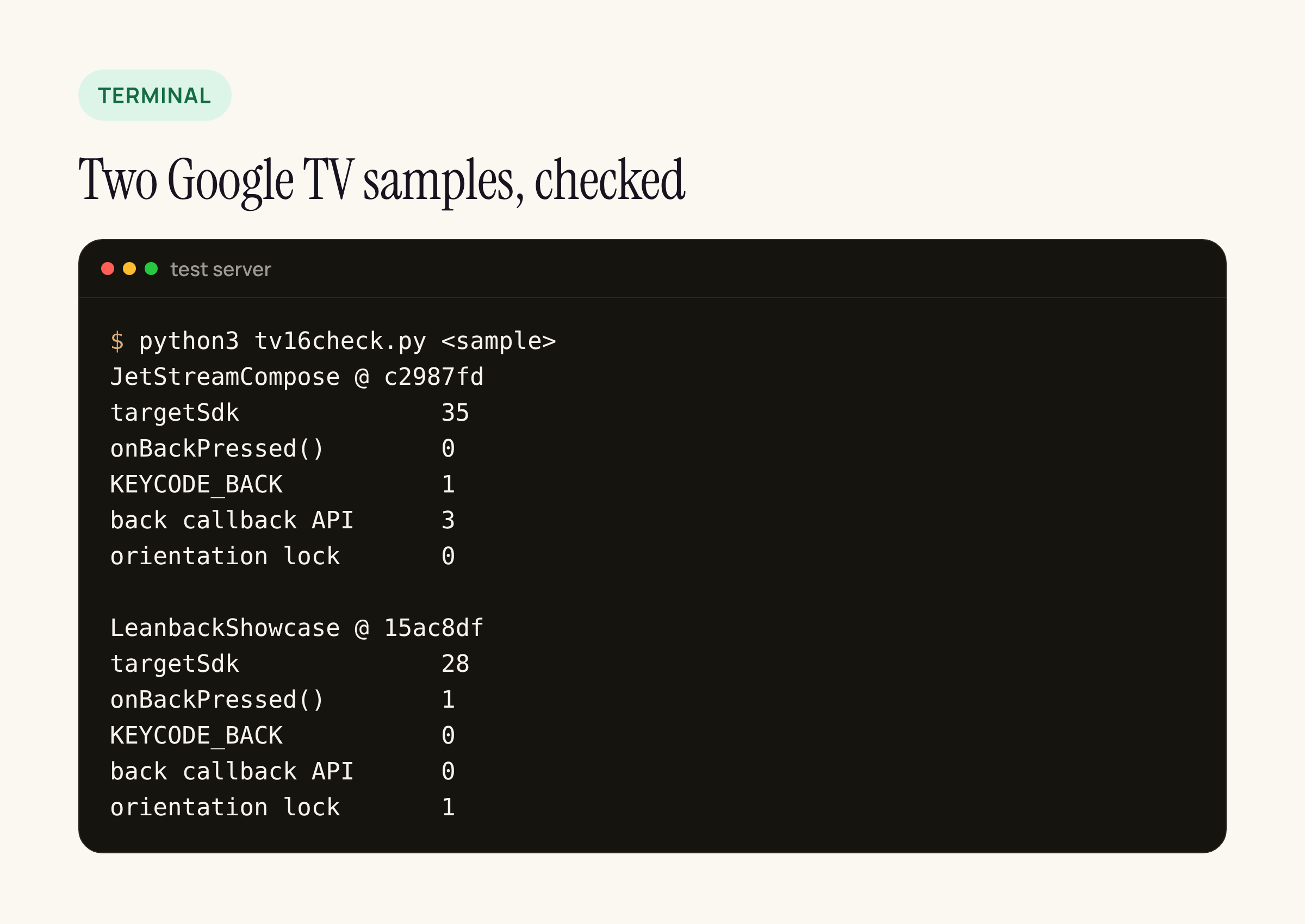
Real output from our test server. Neither sample uses the edge-to-edge opt-out or MediaQualityManager, so those rows are left out.
What the counts point to:
- JetStreamCompose targets SDK 35 and already handles Back with
BackHandlerin three screens (category list, movie details, video player), which keeps working at 36. The one hit to look at is inSearchScreen.kt: anonKeyEventon the search field that moves focus out onKEYCODE_BACK. That is exactly the kind of handler the behaviour-change page says stops receiving the key once predictive back is on, so test it after the bump and move it to aBackHandlerif focus no longer leaves the field. - LeanbackShowcase targets SDK 28, overrides
onBackPressed()inWizardExampleActivity.javaand locks the main activity to landscape in its manifest. Both need a change at 36. The older Leanback and ClassicsKotlin samples at the same commit also lock to landscape, and ClassicsKotlin’sNowPlayingFragmentchecksKEYCODE_BACKin a key listener.
A Leanback app that grew from these samples, as many catalogue apps did, will have the same pattern.
The back change in code
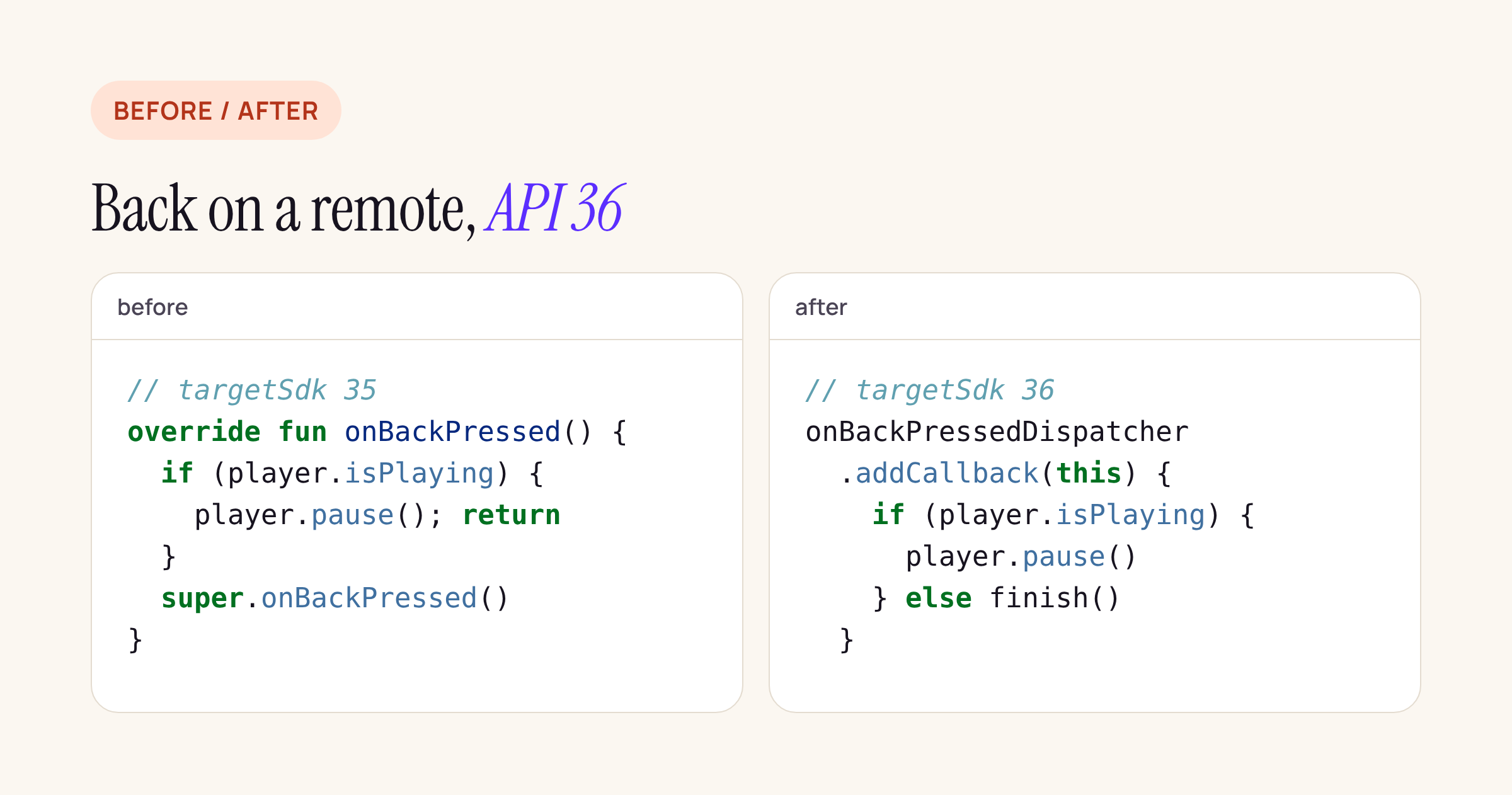
A player screen that pauses on the first Back press, written for API 36.
// targetSdk 36: register the callback once, in onCreate
onBackPressedDispatcher.addCallback(this) {
    if (player.isPlaying) {
        player.pause()
    } else {
        isEnabled = false
        onBackPressedDispatcher.onBackPressed()
    }
}
Treat this as a starting point and compile it against your own player screen. In Compose, BackHandler(enabled = player.isPlaying) { player.pause() } does the same with less code: when the player is paused, the handler is disabled and Back goes to the navigation stack.
What to check on your own TV app
- Search for
onBackPressed()overrides andKEYCODE_BACKin key listeners; move each toOnBackPressedCallbackorBackHandler. - Remove
windowOptOutEdgeToEdgeEnforcementand check your overscan padding on a TV emulator image. - Check
wm sizeandwm densityon the boxes you support; if any report 600dp or more as smallest width, test with the orientation lock ignored. - Open screens with Tamil, Telugu or Malayalam titles and look for clipped text.
- Decide whether
MediaQualityManageror IAMF audio is worth it for your catalogue. Both are optional, and the IAMF decoder is a Media3 extension, so it does not depend on Android 16.
Sources: Google, Android 16 for TV (updated 20 May 2025); Google, Behavior changes: apps targeting Android 16 or higher (updated 28 October 2026); android/tv-samples at c2987fd and 15ac8df. Pages read on 18 November 2026.