
On the iOS 27.1 SDK, an iPhone Duo app has two separate layout tools. Arrangements (UIArrangementViewController in UIKit, ArrangementView in SwiftUI) put a primary and a secondary view controller side by side or on top of each other. Reserved regions (reservedRegions(kind:)) tell you where the hinge and the cameras sit, so you can keep content out of them. The takeaway for a React Native app: neither reaches JavaScript. We searched the iOS sources of react-native 0.88.1 and react-native-safe-area-context 5.11.1 and found no reference to either API, so an RN app gets safe area insets and nothing about the fold unless the native host does the work.
The API table below comes from Apple’s documentation pages, the Tech Talk “Strike a pose with adaptive layouts on iPhone Duo” and the Human Interface Guidelines page “Designing for iPhone Duo”, read on 16 Nov 2026. Where a symbol appears only in the Tech Talk’s code and not yet on a documentation page, the table says so.
Why we did this: our Beacon-type banking apps are a UIKit host with React Native screens. An account list with a detail pane is the obvious two-pane layout on the open Duo, and we want it without rewriting the screens.
Arrangements: the API, symbol by symbol
| Symbol | Kind | What Apple says | Where documented |
|---|---|---|---|
UIArrangementViewController |
UIKit class, iOS 27.1 | “A view controller that presents its container view controllers through an arrangement.” | Docs |
setViewController(_:for:animated:) |
Method | Sets the view controller for a placement (.primary, .secondary) |
Docs |
updateArrangement(_:animated:) |
Method | Updates the arrangement (split or overlay) | Docs |
state(for:) |
Method | Returns a ViewState for a placement; the Tech Talk reads its zIndex |
Docs |
viewController(for:), placement(for:) |
Methods | Look up a controller by placement, or the reverse | Docs |
UISplitArrangement, UIOverlayArrangement |
UIKit structs | “An arrangement that splits views” / “overlays views”, each with axes(_:) |
Listed on the class page |
ArrangementView |
SwiftUI view, 27.1 | Lays out a primary and secondary view “based on size class, orientation, and reserved regions” | Docs |
.arrangementViewStyle(.split) / .overlay |
SwiftUI modifier | Split places views side by side; overlay layers primary over secondary, or side by side on a folded display | split, overlay |
.split.axes(_:) |
Style method | Lays the split out along the axes you pass | Docs |
splitArrangementLayoutRatio(_:) and size modifiers |
SwiftUI modifiers | Ratio and min/ideal/max sizes for each side of a split | Listed under View |
@Environment(\.overlayArrangementZIndex) |
Environment value | Which view is on top in an overlay | Tech Talk code only |
One thing that makes this cheap to adopt: Apple’s Group Lab summary (DTS, 22 Sep 2026) says arrangement views work on other iPhones and on iPad too, so one layout path serves every device rather than a Duo-only branch.
Mapping a bank app onto an arrangement
Our account flow already has the right shape: an accounts list (the primary) and a transaction detail (the secondary). In UIKit the host controller becomes a UIArrangementViewController, and each React Native surface stays in its own view controller.
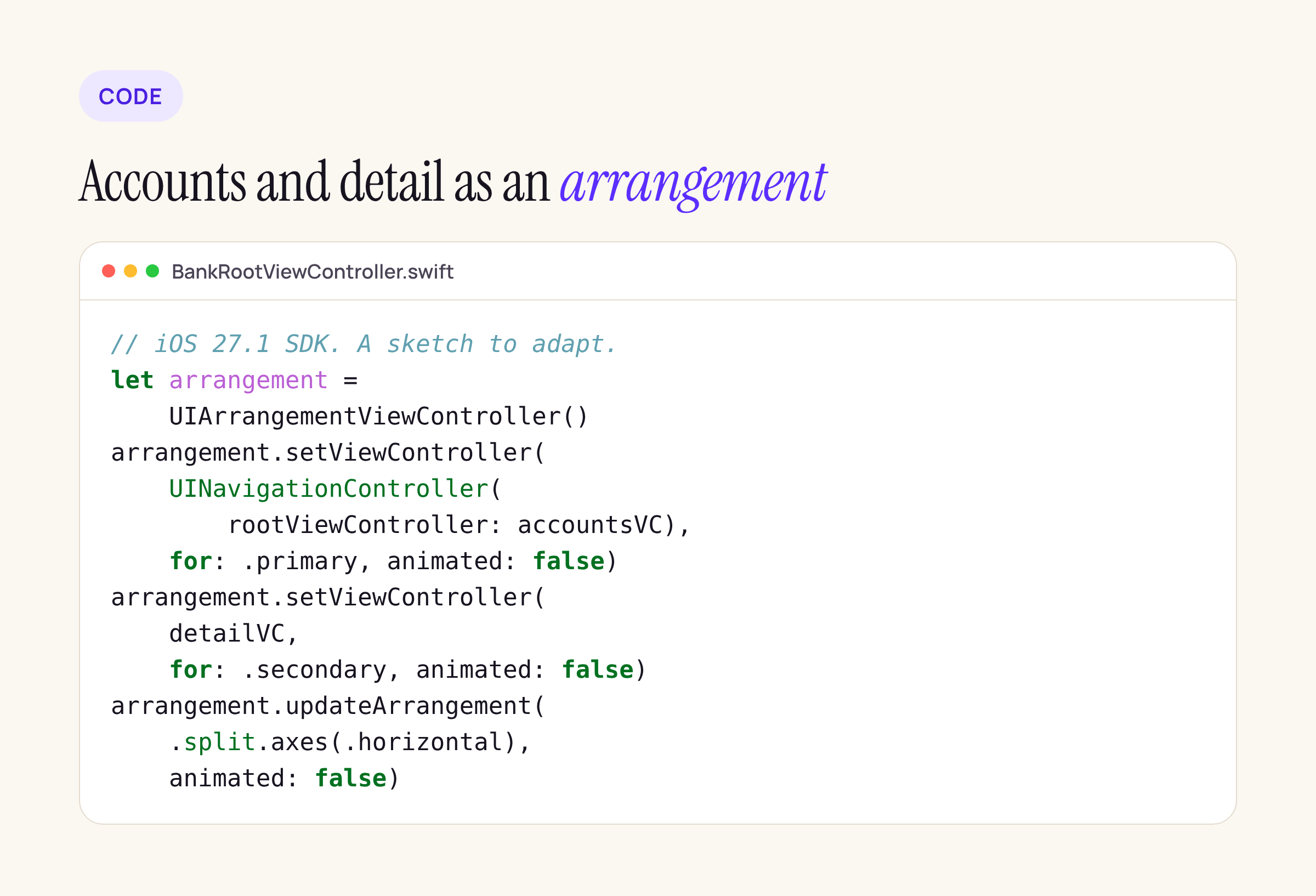
The same code as text, written against the documented signatures. Treat it as a starting point and compile it against the iOS 27.1 SDK in your target:
import UIKit

final class BankRootViewController: UIViewController {
    private let arrangement = UIArrangementViewController()

    func install(accountsVC: UIViewController, detailVC: UIViewController) {
        addChild(arrangement)
        view.addSubview(arrangement.view)
        arrangement.view.frame = view.bounds
        arrangement.view.autoresizingMask = [.flexibleWidth, .flexibleHeight]
        arrangement.didMove(toParent: self)

        arrangement.setViewController(
            UINavigationController(rootViewController: accountsVC),
            for: .primary, animated: false)
        arrangement.setViewController(detailVC, for: .secondary, animated: false)
        arrangement.updateArrangement(.split.axes(.horizontal), animated: false)
    }
}
accountsVC and detailVC are whatever hosts your React Native surfaces today. Nothing inside the RN screens changes: Yoga lays out each surface inside the frame UIKit gives it.
Split or overlay? The Tech Talk has a chapter on choosing between them and one on when not to use an arrangement. For a bank app the split is the safer default: a statement next to the account list is reference content, not a panel that should cover it. Apple’s talk also states three rules we copied into our checklist: displacement moves elements out of the way when the fold appears, continuous scrolling content should not displace, and an ArrangementView never goes inside a List or ScrollView.
Reserved regions: where the hinge and cameras are
Arrangements handle the big split. Reserved regions handle everything else, such as a “Pay” button that must not sit on the fold. The HIG page (new on 9 Sep 2026) names three: the outer camera, the inner camera (shown only when active) and the folding region.
| Call | From | Notes |
|---|---|---|
view.reservedRegions(kind: .division) |
Tech Talk code, UIKit | Returns regions; the talk maps them with .map(\.frame) |
proxy.reservedRegions(kind: .division) |
Tech Talk code, SwiftUI | Inside a GeometryReader or onGeometryChange |
kind: .occlusion |
Tech Talk code | Regions that cover content (cameras) rather than divide it |
options: .includeInactive |
Tech Talk code | Also returns regions not active right now |
reservedRegions(kind:options:) (UIKit), reservedRegions(kind:options:layoutDirectionBehavior:) (SwiftUI) |
Group Lab summary | The full signatures DTS gave |
These calls are in Apple’s Tech Talk 111463 code, chapters “Query reserved regions” and “Division and occlusion regions”. We took them from the talk’s code rather than from reference pages, so check the exact spelling in Xcode’s quick help before you rely on it.
An open question worth knowing about: a forum thread from a Flutter contributor asks whether there is a notification or delegate for reserved-region changes, for renderers that do not use UIKit layout. It had no answer from Apple on 16 Nov 2026. React Native is in exactly that position.
What React Native gets for free
We packed react-native@0.88.1 and react-native-safe-area-context@5.11.1 from npm and searched every Objective-C, Objective-C++, header and Swift file for the new APIs.
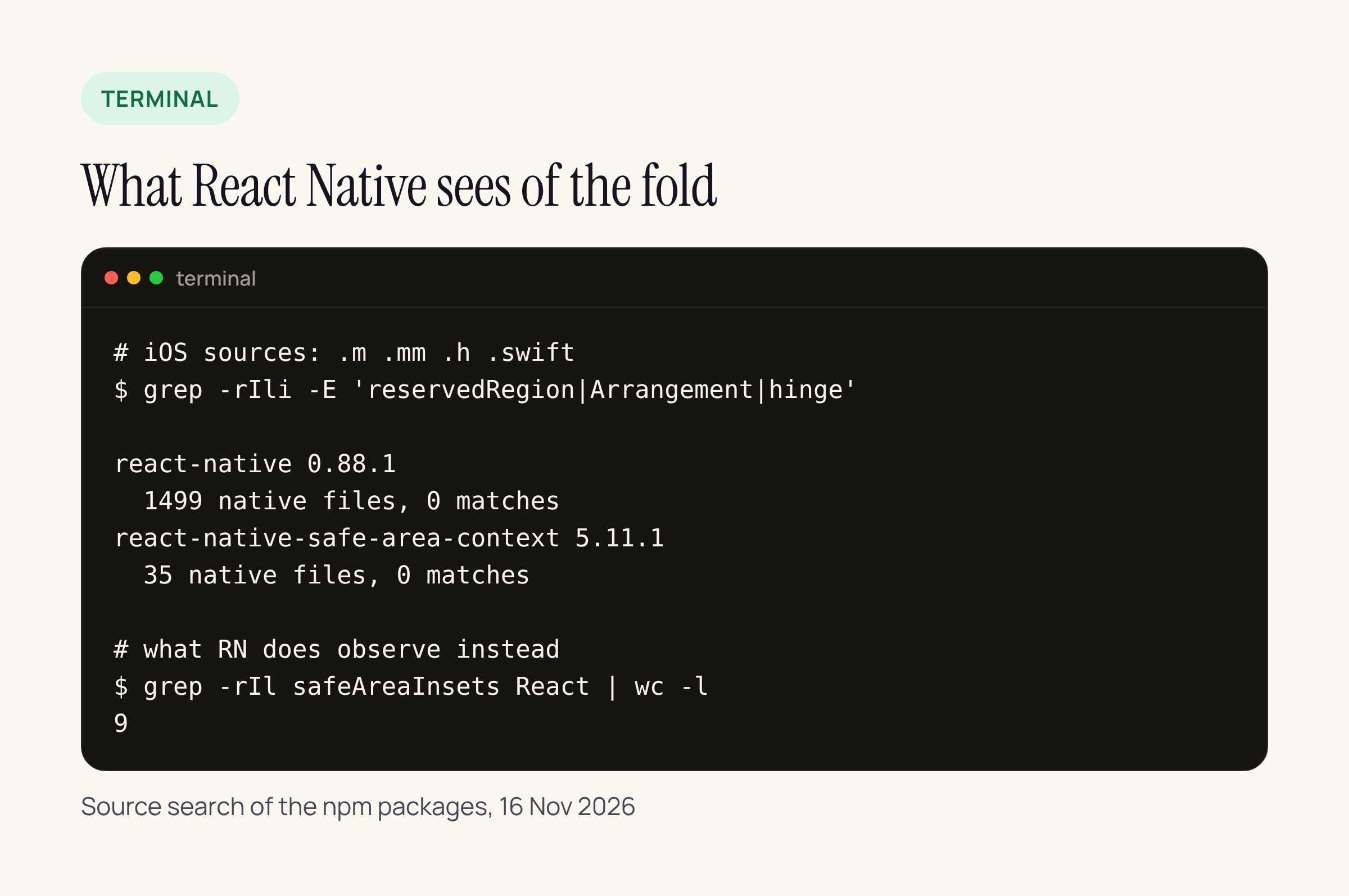
Real output from the two npm packages, 16 Nov 2026.
What RN does observe is the safe area: nine files under React/ read safeAreaInsets, and RCTSurfaceHostingView overrides traitCollectionDidChange:. So an RN screen re-lays out on safe area and trait changes, but it is never told where the fold is. Whether the folding region shows up in the safe area at all is something to check on the device; the documentation treats it as a separate region kind, not as an inset.
The practical split for a hybrid app:
- Two panes: do it in the UIKit host with
UIArrangementViewController, as above. No JavaScript change. - Single-pane screens that must avoid the fold: read
reservedRegions(kind: .division)in the host view controller’sviewDidLayoutSubviews, convert the frames to the RN root view’s coordinates, and send them to JS through a small native module event. Keep it to frames and kinds; JS then pads or moves the button. - Everything else: leave it to safe area insets as today.
What to check on your own app
- Open your root view controller and list which screens would make sense as primary and secondary. If the answer is “none”, skip arrangements and only audit fold-sensitive controls.
- Search your project for buttons pinned to the vertical centre of the screen; those are the ones the folding region can split.
- In Xcode 27.1, confirm the
reservedRegionssignatures in quick help before writing the native module. - On an iPhone Duo or its simulator, compare
safeAreaInsetswith the division region frame in both postures, and log both to see whether your RN layouts already avoid the fold.






