NGINX2Root is five nginx CVEs disclosed on 18 Nov 2026, led by CVE-2026-123007, an HTTP/2 memory corruption bug. Upstream fixed them in nginx 1.30.7 (stable) and 1.31.9 (mainline); Debian and Ubuntu shipped patched packages on 19 Nov. The takeaway: upgrade the distro package, then restart nginx. A reload keeps the old binary in memory. We showed that on a Ubuntu 24.04 test server: after apt installed the fixed package and nginx was reloaded, the running master process still pointed at the deleted old binary.
Below: the check script we wrote (read-only, 36 lines), its real output before and after the upgrade, the fixed package version for each Debian and Ubuntu release, and which mitigations cover which CVE.
Why we did this: our WordPress and Laravel sites run behind nginx and PHP-FPM on a VPS, and so do most of the client sites we maintain. After the PHP fix of 19 Nov, this is the second patch in a week on the same stack, so we wanted one script that answers “is this server done?” without reading five advisories.
The five CVEs and what puts a server in scope
From nginx.org’s security advisories and the Qualys write-up of 18 Nov. All five are fixed in 1.30.7 and 1.31.9.
| CVE | Area | nginx severity | Affected | In scope when |
|---|---|---|---|---|
| CVE-2026-123007 | HTTP/2 flow control | major | 1.9.5 to 1.31.8 | HTTP/2 is on |
| CVE-2026-123633 | HTTP/2 use-after-free | medium | 1.19.7 to 1.31.8 | HTTP/2 to clients, proxying to a backend, workers short of connections |
| CVE-2026-123634 | Resolver use-after-free | medium | 0.6.18 to 1.31.8 | proxy_pass with a variable in the host name, plus an SSI or mirror subrequest to the same name |
| CVE-2026-121810 | HTTP/3 use-after-free | medium | 1.25.0 to 1.31.8 | HTTP/3 (QUIC) is on |
| CVE-2026-113425 | Mail proxy use-after-free | major | 0.5.33 to 1.31.8 | nginx runs as a mail proxy |
Qualys reports F5 scoring all five 9.2 in CVSS 4.0. As of 19 Nov neither Qualys nor GetPageSpeed had seen confirmed exploitation in the wild, though public proof-of-concept code exists. The “root” in the name comes from the researchers chaining an nginx bug with a Linux kernel SCTP flaw that has no patch yet.
A typical PHP site (HTTP/2 on 443, fastcgi_pass to a PHP-FPM socket, no mail block) is in scope for the first two. Our test server’s config was exactly that.
Fixed package versions
Distros backport the fix and keep the old upstream version string, so nginx -v on a patched Ubuntu 24.04 still says 1.24.0. Compare the package version instead (dpkg -l nginx).
| Release | Fixed nginx package |
Source |
|---|---|---|
| Ubuntu 26.04 LTS | 1.28.3-2ubuntu1.13 | USN-9159-1 |
| Ubuntu 24.04 LTS | 1.24.0-2ubuntu7.20 | USN-9159-1 |
| Ubuntu 22.04 LTS | 1.18.0-6ubuntu14.23 | USN-9159-1 |
| Ubuntu 20.04 LTS | 1.18.0-0ubuntu1.7+esm5 (Ubuntu Pro only) | USN-9159-1 |
| Debian 13 (trixie) | 1.26.3-3+deb13u11 (DSA-6642-1) | Debian tracker |
| Debian 12 (bookworm) | 1.22.1-9+deb12u11 (DLA-4918-1) | Debian tracker |
| Upstream | 1.30.7 stable, 1.31.9 mainline | nginx.org |
One more release followed: nginx 1.30.8 and 1.31.10 on 23 Nov fix a further CVE (CVE-2026-132779). On 24 Nov the Ubuntu 24.04 archive already offered 1.24.0-2ubuntu7.21, newer than the USN-9159-1 version, so a plain apt upgrade takes you past both.
If nginx on your server comes from a control panel’s or a third-party repository rather than the distro, this table does not apply. apt-cache policy nginx shows where yours comes from; check that vendor’s advisory.
The check script
It reads the package version, compares it with the table above, checks whether the running master process is still the old binary, and looks at the loaded config (nginx -T) for the features that put a server in scope. It changes nothing.
#!/usr/bin/env bash
# nginx2root-check.sh: read-only check for the NGINX2Root CVEs (18 Nov 2026)
# on Debian and Ubuntu packages. Run as root: it reads `nginx -T`.
set -u
. /etc/os-release
pkg=$(dpkg-query -W -f='${Version}' nginx 2>/dev/null || echo none)
case "$ID-$VERSION_ID" in
  ubuntu-26.04) fixed=1.28.3-2ubuntu1.13 ;;
  ubuntu-24.04) fixed=1.24.0-2ubuntu7.20 ;;
  ubuntu-22.04) fixed=1.18.0-6ubuntu14.23 ;;
  debian-12)    fixed=1.22.1-9+deb12u11 ;;
  debian-13)    fixed=1.26.3-3+deb13u11 ;;
  *)            fixed=unknown ;;
esac
echo "system:   $PRETTY_NAME"
echo "nginx -v: $(nginx -v 2>&1 | cut -d/ -f2)"
echo "package:  $pkg (fixed: $fixed)"
if [ "$fixed" = unknown ]; then
  echo "PACKAGE   no table entry: check your vendor's advisory"
elif dpkg --compare-versions "$pkg" ge "$fixed"; then
  echo "PACKAGE   ok"
else
  echo "PACKAGE   VULNERABLE: upgrade nginx"
fi
pid=$(cat /run/nginx.pid 2>/dev/null)
if [ -n "$pid" ] && ls -l /proc/$pid/exe | grep -q deleted; then
  echo "RUNNING   old binary still in memory: restart"
elif [ -n "$pid" ]; then
  echo "RUNNING   binary on disk matches"
fi
conf=$(nginx -T 2>/dev/null | grep -v '^\s*#')
has() { grep -Eq "$1" <<<"$conf" && echo yes || echo no; }
echo "http2:    $(has 'listen[^;]*http2|^\s*http2\s+on')"
echo "http3:    $(has 'listen[^;]*quic|^\s*http3\s+on')"
echo "mail:     $(has '^\s*mail\s*\{')"
echo "var upstream: $(has 'proxy_pass\s+[^;]*\$')"
The RUNNING line uses the trick GetPageSpeed describes: when a package upgrade replaces /usr/sbin/nginx, the process that is still running points at a file the kernel marks (deleted). The var upstream line is a coarse flag: it says yes to any proxy_pass with a variable, and you still need the SSI or mirror part for CVE-2026-123634.
Before and after, on a test server
We set up a Ubuntu 24.04.5 test server with the release package 1.24.0-2ubuntu7 (the one a fresh install from the original 24.04 media gets), a site listening on 443 with ssl http2, and a PHP location passing to a PHP-FPM socket.
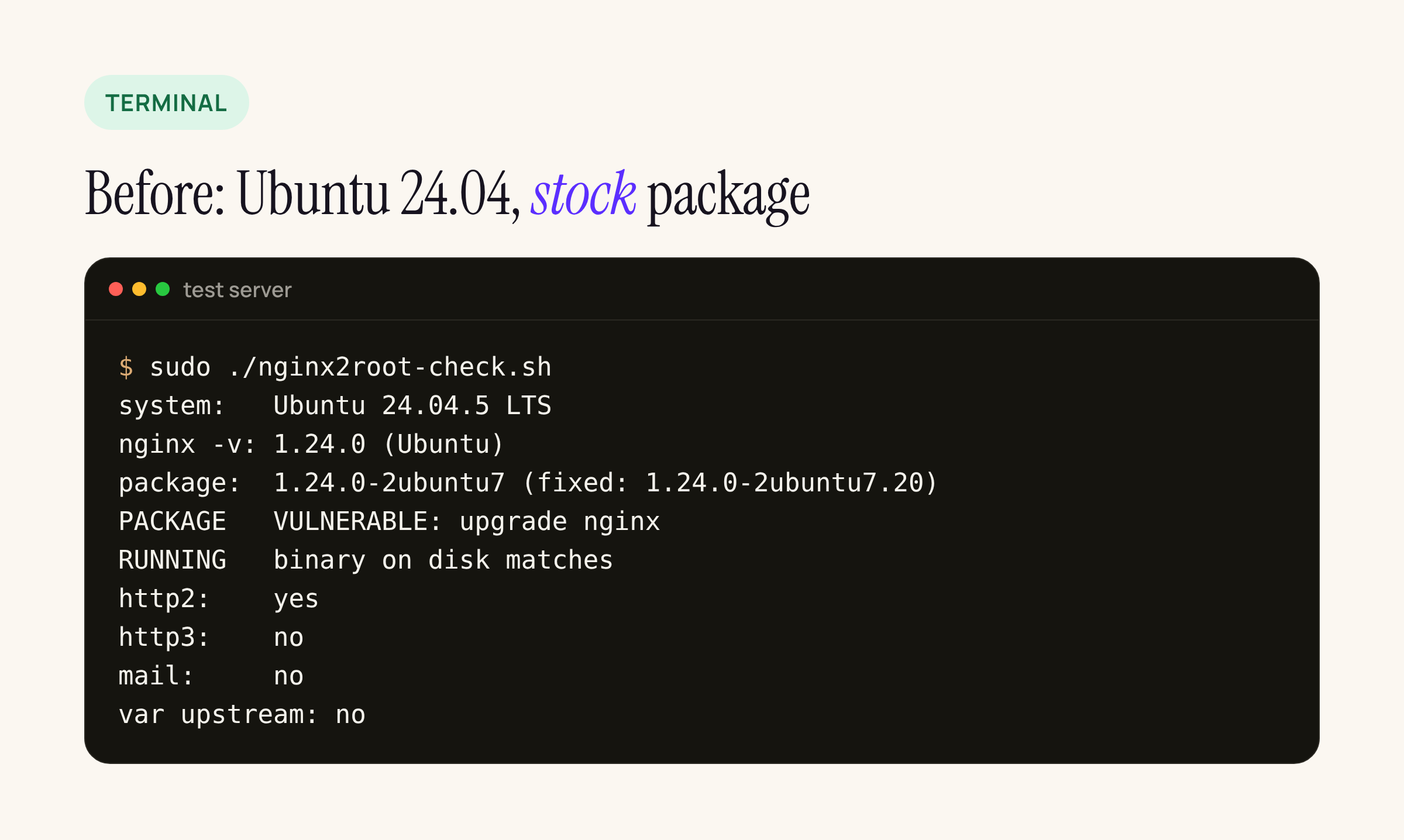
Real output from our test server: the stock package is below the fixed version and HTTP/2 is on.
Then the upgrade. The nginx -V build flags of the Ubuntu 24.04 package include --with-http_v2_module and the mail module (as a separate dynamic module), but no HTTP/3 module, so CVE-2026-121810 cannot apply to the stock Ubuntu 24.04 build.
sudo apt update
sudo apt install --only-upgrade nginx nginx-common
sudo nginx -s reload
sudo ./nginx2root-check.sh
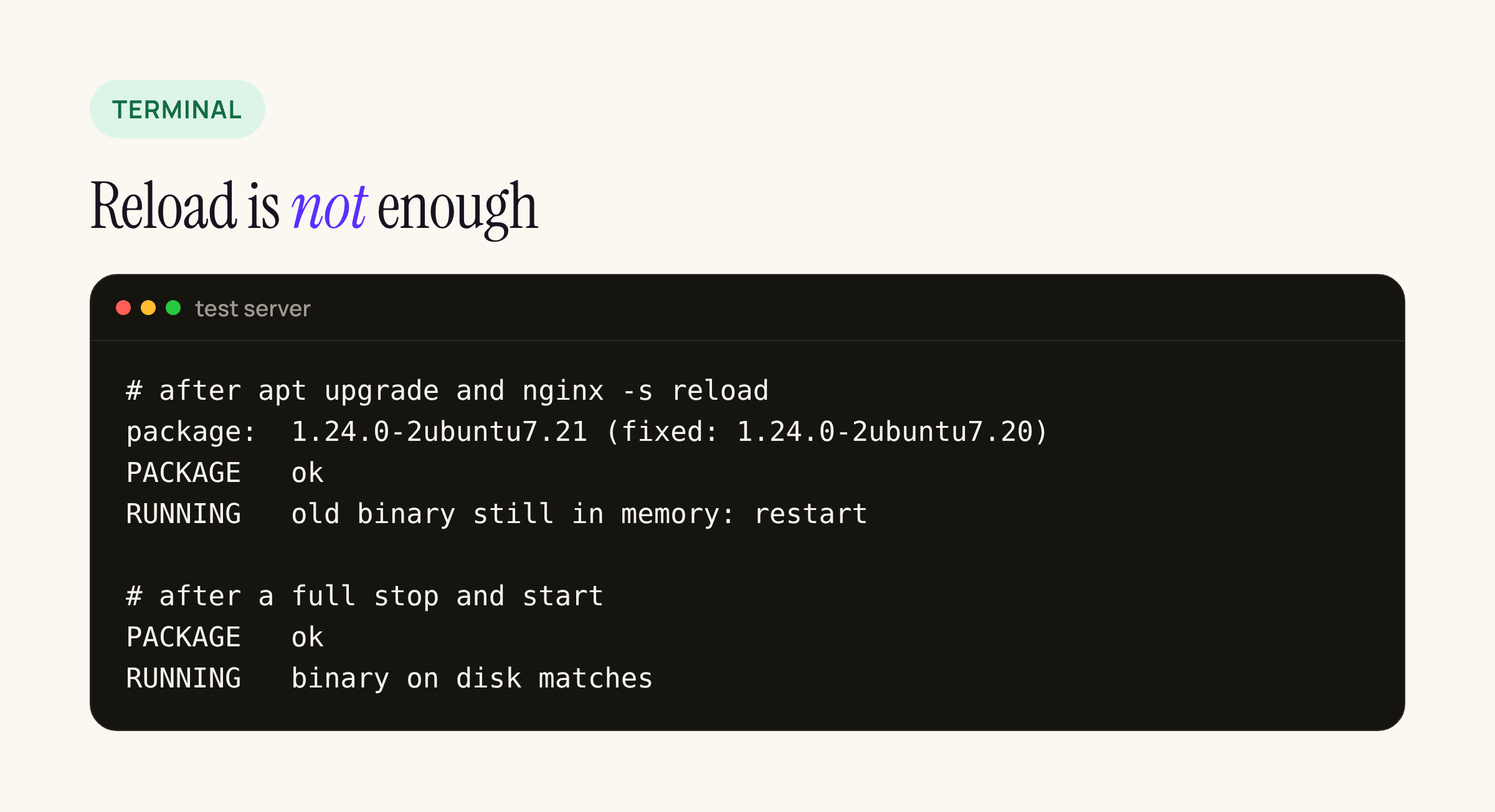
After the upgrade and a reload, the package is fixed but the running nginx is still the old program. Only a full stop and start cleared it.
A reload re-reads the configuration and starts new worker processes, but they are forked from the same master, which keeps running the binary it was started from. That is why Qualys and GetPageSpeed both say restart. On a systemd server:
sudo systemctl restart nginx
sudo ls -l /proc/$(cat /run/nginx.pid)/exe   # no "(deleted)" at the end
On our test server the package’s own install script did not restart nginx either, so do not assume the upgrade did it for you: check the RUNNING line. A restart drops open connections for a moment, so pick a quiet minute rather than waiting for a maintenance window.
If you cannot patch today
These narrow the exposure; none of them is a fix.
- HTTP/2 off covers CVE-2026-123007 and CVE-2026-123633 only. On nginx 1.25.1 and newer,
http2 off;in every server block that shares the listen address; on older versions, removehttp2from thelistenlines. Clients fall back to HTTP/1.1 and gRPC stops working. - HTTP/3 off: remove the
quiclisten lines and sethttp3 off;. - Resolver bug: point
proxy_passat a fixedupstreamblock, so no name is resolved during a request. - Mail proxy: keep untrusted clients away from the mail listeners.
- Kernel half: on hosts that do not use SCTP, GetPageSpeed suggests blocking the module with
install sctp /bin/falsein a file under/etc/modprobe.d/.
The short version
- Run the script, or
dpkg -l nginx, and compare with the table. apt install --only-upgrade nginx nginx-common.systemctl restart nginx, not reload.- Check that
/proc/<pid>/exeno longer ends in(deleted).
If PHP-FPM is on the same server and you have not applied the PHP update of 19 Nov yet, do both in the same maintenance minute: PHP-FPM has the same rule, the old binary keeps running until the service is restarted.