WordPress.org released Reprint on 13 November 2026: a free, open-source plugin plus a command-line client that copies a site’s files and database to another machine. If you already copy sites with wp-cli, the short answer is: keep your script for copies where you have SSH on both ends, and look at Reprint when you only have WordPress admin on the source, the connection is unreliable, or you copy the same site again and again. Below are the five wp-cli commands we ran on WordPress 7.1.5 (PHP 8.3.6, MariaDB 10.11, wp-cli 2.12.0), with the output, and what Reprint 0.11.10 does differently according to its documentation and plugin code.
Why we did this: we copy WordPress sites every few weeks, for the Paperkite rebuild and for staging copies of client sites, and a new official tool for the job deserved a look next to the script we already trust.
The wp-cli copy we ran
The test site: a fresh WordPress 7.1.5 install on https://old.example.test with a post containing an image block and a link, an option stored as a serialized PHP array with two URLs in it, an uploaded file, and the Reprint plugin active. The target: a new folder and an empty database, at https://staging.example.test.
#!/usr/bin/env bash
# Copy a WordPress site with wp-cli: files, database, then URLs.
set -euo pipefail
SRC=/srv/source DST=/srv/dest
OLD=https://old.example.test NEW=https://staging.example.test
rsync -a --exclude wp-config.php "$SRC/" "$DST/"
wp --path="$SRC" db export /tmp/site.sql --quiet
wp --path="$DST" config create --dbname=dst --dbuser=wp \
   --dbpass=wp --skip-check --quiet          # new salts
wp --path="$DST" db import /tmp/site.sql --quiet
wp --path="$DST" search-replace "$OLD" "$NEW" \
   --all-tables --precise --skip-columns=guid \
   --report-changed-only
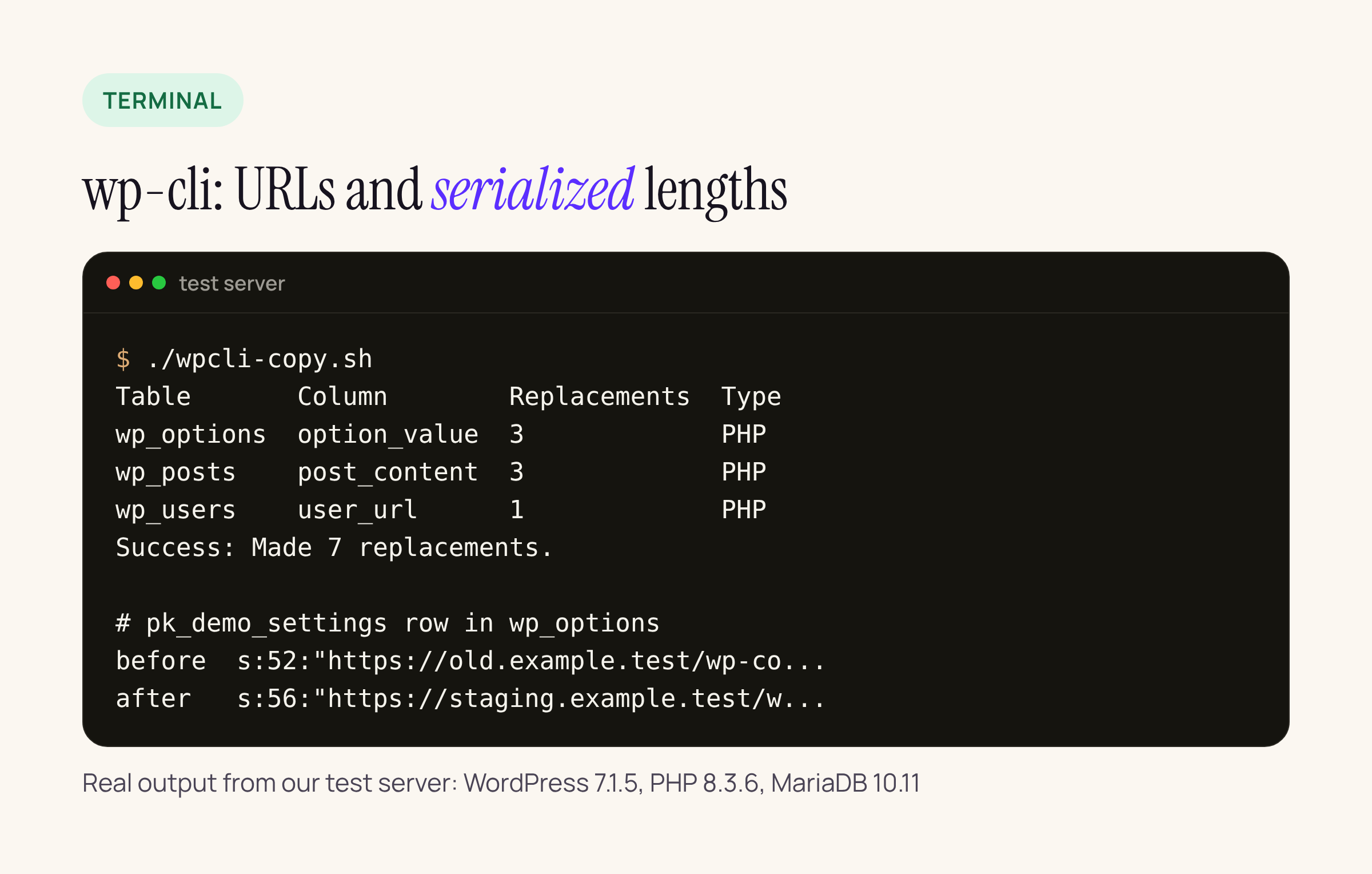
Real output from our test server. Note the s:52 becoming s:56: the URL got four characters longer and the stored length followed.
What each line takes care of:
- Files:
rsync -akeeps permissions and timestamps;wp-config.phpstays behind on purpose, so the copy never talks to the source database. - Salts:
wp config createwrites a newwp-config.phpwith fresh keys and salts (we compared theAUTH_KEYlines: they differ). Everyone logged in on the source is logged out on the copy, which is what you want for staging. - Serialized data:
wp search-replaceunserializes PHP values, replaces inside them and serializes again, so lengths stay correct. TheType: PHPcolumn in the output is the precise (PHP) mode that--preciseforces. - GUIDs:
--skip-columns=guidleaves post GUIDs alone; feed readers use them as permanent IDs. Our first pass without it also rewrote 4 GUIDs. - Uploads: they travel with
rsyncbecause they live underwp-content/uploads. Ifupload_pathis set to an absolute path in options, search for it too.
On this small test site the whole script ran in under a second on one machine. That figure says nothing about a real site: on a live move the time is the network transfer and the database dump, and a dropped SSH connection in the middle means starting rsync and the dump again (rsync at least resumes file by file).
What Reprint does differently
Reprint has two parts. The plugin goes on the source site; the client, reprint.phar, runs on the machine that receives the copy and needs PHP 7.4 or newer with curl, hash, json, mbstring, openssl, PDO and zlib (requirements). The plugin itself declares PHP 5.6.20 and WordPress 4.7 as minimums, so it installs on very old hosts. The scope here: the client steps come from the copy a site and move to another host guides; the plugin behaviour is what we saw on our test site.
The plugin: nothing is exported until a key is enrolled
We installed Reprint 0.11.10 from the plugin directory on the WordPress 7.1.5 test site and activated it. It adds Tools > Reprint Server and answers requests that carry a reprint-api query parameter. The check for that parameter sits at the top of reprint.php, so it runs while plugins load, before most of WordPress. Before anyone sets up a connection, it refuses:
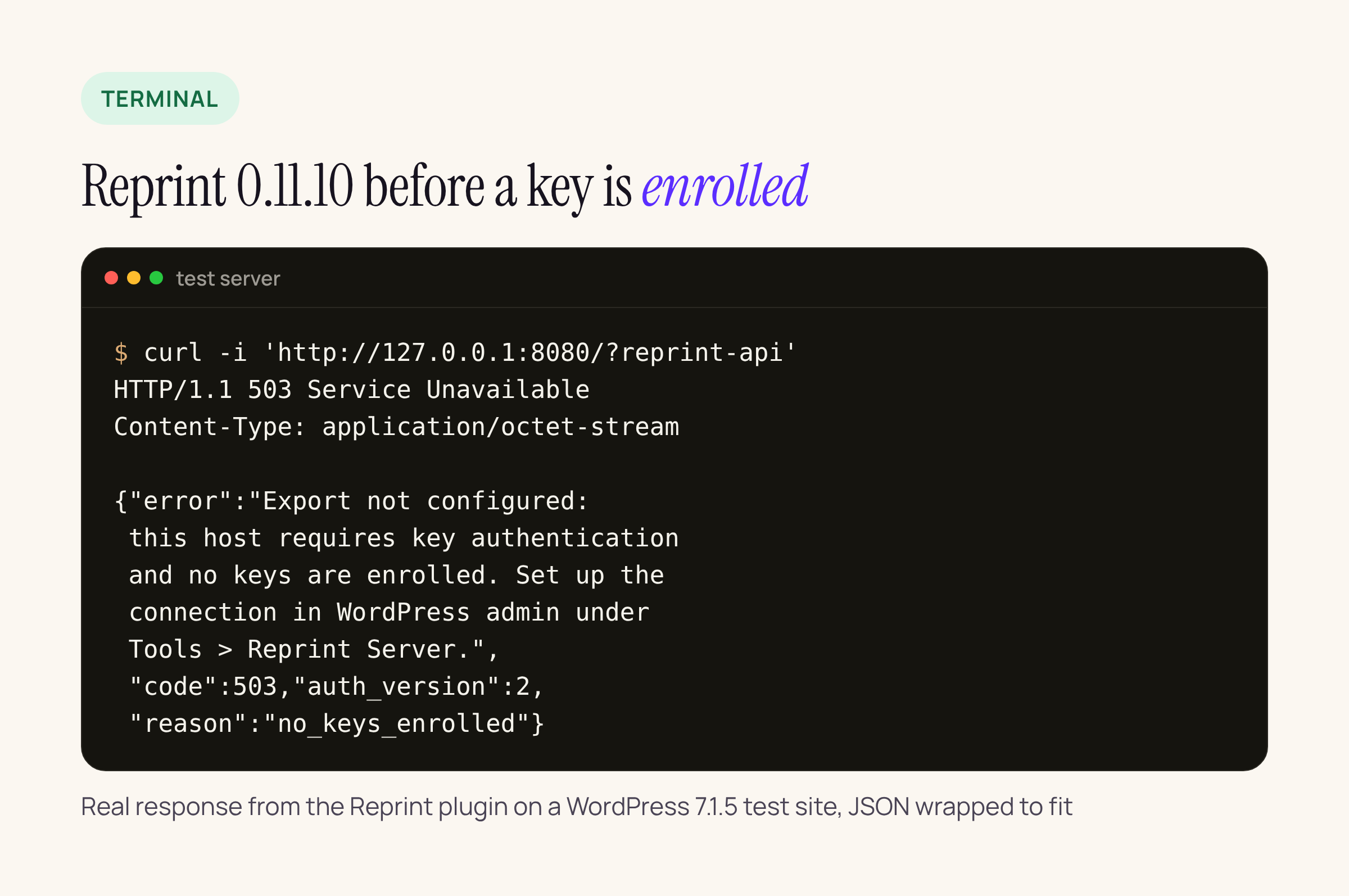
That is a sensible default for a plugin that can hand out a full database. It also means that once a key is enrolled, the security of your site’s data rests on that key: remove it in Tools > Reprint Server when the move is done, and deactivate the plugin.
The client: keygen, then pull
From the copy guide, the client creates a key pair, you paste the public key into the source site’s admin, and then you pull:
curl -fL https://plugins.svn.wordpress.org/reprint/downloads/reprint.phar -o reprint.phar
php reprint.phar keygen https://example.com \
  --state-dir=./state --out=./reprint-key.pem
php reprint.phar pull https://example.com \
  --private-key-path=./reprint-key.pem \
  --state-dir=./state --fs-root=./files \
  --target-engine=mysql --target-host=127.0.0.1 --target-port=3306 \
  --target-db=reprint_copy --target-user=reprint_user --target-pass='YOUR_PASSWORD' \
  --new-site-url=http://localhost:8881
The commands reference lists what the script above does by hand:
- Resume: there is no
--resumeflag. You run the samepullagain with the same--state-dirand--fs-root, and it continues;--abortthrows away unfinished work. - Repeat copies: the default
--mode=catch-upfetches only files that changed since the last pull. - URLs:
--new-site-url, plus a repeatable--rewrite-url FROM TO. The database reference says rewriting covers serialized PHP, JSON, block markup and plain text while keeping them valid, and also that URLs inside deeply nested encoded strings may stay unchanged. - Targets: MySQL or SQLite (
--target-engine=mysql|sqlite); SQLite is handy for a local copy without a database server. - Files:
--includeand--excludewith tokens such as:wp-content:,:wp-uploads:and:wp-core:. Backups, caches, logs and VCS folders are skipped by default. - wp-config.php: the
:wp-core:set leaves it out, and the move guide tells you to configure it for the destination yourself. Neither guide says anything about salts, so treat new salts as your job, as in the wp-cli script.
Side by side
| wp-cli script | Reprint 0.11.10 | |
|---|---|---|
| Access needed on the source | SSH and wp-cli | WordPress admin, plugin installed, HTTPS address |
| Transport | rsync over SSH, SQL dump file | HTTPS, streamed in pieces |
| Interrupted transfer | rerun rsync; redo the dump | rerun pull with the same state folder |
| Serialized URLs | wp search-replace --precise |
--rewrite-url, also JSON and block markup |
| GUIDs | --skip-columns=guid |
not stated in the guides |
| wp-config.php and salts | new file, new salts via wp config create |
left out; you configure the destination |
| Target database | anything wp-cli can import into | MySQL or SQLite |
| Leftovers on the source | none | the plugin and an enrolled key, until you remove them |
Which one we would reach for
- SSH on both ends, one-off copy: the wp-cli script. It is five commands, every one of them can be read and rerun, and nothing is installed on the source.
- Only wp-admin on the source (managed hosts without SSH, a client handing over a site): Reprint, then remove the key and the plugin afterwards.
- A slow or flaky link, or a big uploads folder: Reprint’s resumable, catch-up pulls are the feature wp-cli does not have.
- A local copy to debug a theme: Reprint with
--target-engine=sqliteskips setting up a database server.
What to check after any copy
wp option get siteurlandwp option get homeon the copy show the new address.- A settings page of a plugin that stores URLs in a serialized option still loads its values (a broken length shows up as empty settings).
- Logins on the copy need a fresh sign-in (new salts).
- Outgoing email and cron on a staging copy are switched off before anyone opens it.
- On the source, no copy tool is left active once the move is done.