
Short version: when your Android app moves to targetSdk 37, any traffic to a device on the same Wi-Fi (mDNS, SSDP, NsdManager, a plain socket to 192.168.x.x, even OkHttp) needs the new ACCESS_LOCAL_NETWORK runtime permission, and without it TCP connections time out and UDP fails with EPERM. Declare it in the manifest in the same commit as the targetSdk bump, not before, and request it before the first LAN call, or use the system device picker and skip the prompt entirely. On iOS 14 and later the matching pieces are NSLocalNetworkUsageDescription, an NSBonjourServices list, and for multicast the com.apple.developer.networking.multicast entitlement. Of four React Native networking libraries we checked (react-native-zeroconf 0.17.7, react-native-tcp-socket 6.4.3, react-native-udp 4.1.7, react-native-google-cast 4.9.1), none declares the Android permission for you.
Why we did this: two kinds of app we build talk to devices on the same Wi-Fi: TV apps with a phone companion, and shop apps that print receipts over the network. Both need the same answer on both platforms, so we put the two rule sets side by side.
The rules below come from Android’s Local network permission page (last updated 3 Nov 2026), the Android 17 behaviour changes (11 Nov 2026) and Apple’s TN3179: Understanding local network privacy (latest revision 6 Oct 2026). The library findings come from the Android and iOS sources inside each npm package.
What each platform gates
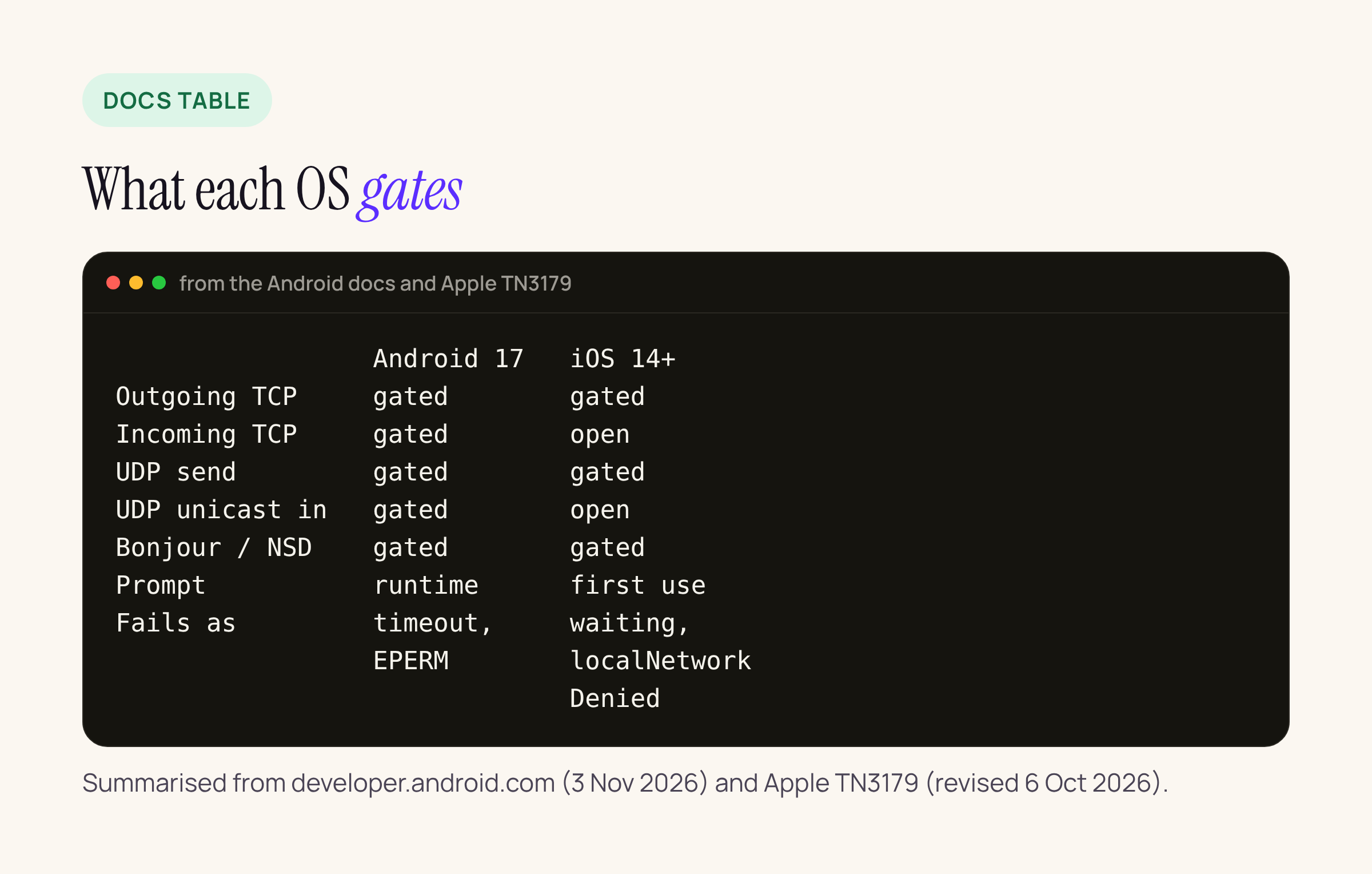
Built from the two vendor documents; the rows below link the wording.
| Question | Android 17 (targetSdk 37), then iOS 14+ |
|---|---|
| Who is affected | Android 17: Apps targeting 37. Below that, “local network access is implicitly granted using the INTERNET permission” iOS: Every app; macOS 15 and visionOS too, not tvOS or watchOS |
| What counts | Android 17: “Traffic to and from a local network address”, applied to “all networking APIs”, including Cronet and OkHttp, and . name resolutioniOS: Outgoing TCP, UDP sends, incoming multicast and broadcast, all Bonjour operations, local DNS names |
| Not gated | Android 17: Internet traffic, mobile network, a local DNS server on port 53 iOS: Listening for incoming TCP, incoming UDP unicast, WKWebView and Safari traffic, a local DNS server or proxy |
| When the prompt appears | Android 17: When you request it at runtime. It is in the NEARBY_ group, so users who granted a Bluetooth permission are not asked againiOS: Automatically on the first local network operation; “There’s no API to explicitly bring up the local network alert” |
| How it fails | Android 17: “TCP Connections will typically result in a timeout error”; UDP gives EPERMiOS: The connection waits with the unsatisfied reason local; Bonjour reports k (-65570) |
| Way around the prompt | Android 17: System pickers: Output Switcher for Cast, Nsd with DiscoveryiOS: High-level services: AirPlay, UIKit printing, DeviceDiscoveryUI, AccessorySetupKit |
Two details are easy to miss. On Android, Google says plainly: for target SDKs below 37, “don’t add ACCESS_LOCAL_NETWORK to your manifest or request it at runtime”, so the manifest line belongs in the same change as the targetSdk bump. On iOS, the first operation may be refused before the user even answers the alert, so TN3179 recommends an API that waits for connectivity (Network framework) instead of failing fast.
The lines to add
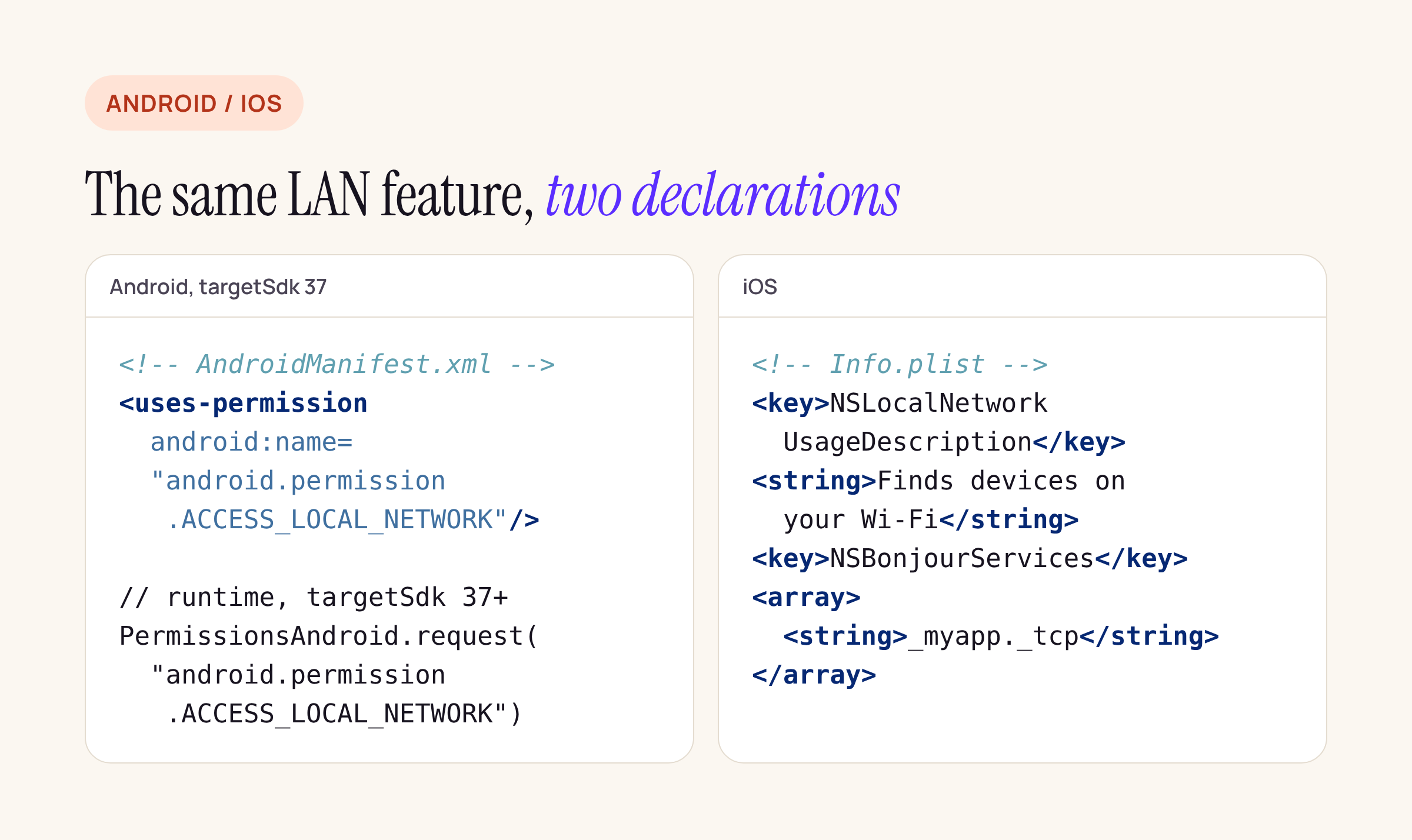
The same LAN feature declared on each platform; the service type is a placeholder for your own.
Android, android/app/src/main/AndroidManifest.xml, together with targetSdkVersion 37:
<uses-permission android:name="android.permission.ACCESS_LOCAL_NETWORK" />
Then ask before the first LAN call. In React Native, PermissionsAndroid takes the permission string directly:
import { PermissionsAndroid, Platform } from 'react-native';

export async function ensureLanAccess() {
  if (Platform.OS !== 'android' || Platform.Version < 37) return true;
  const r = await PermissionsAndroid.request(
    'android.permission.ACCESS_LOCAL_NETWORK',
  );
  return r === PermissionsAndroid.RESULTS.GRANTED;
}
Treat this as a starting point: on a device running Android 17 with an app still targeting 36, the permission is implicitly granted, and Google asks you not to request it then, so a stricter check also reads your own targetSdk from the native side.
iOS, ios/<App>/Info.plist:
<key>NSLocalNetworkUsageDescription</key>
<string>Finds devices on your Wi-Fi.</string>
<key>NSBonjourServices</key>
<array>
  <string>_myapp._tcp</string>
</array>
TN3179 adds: “if your iOS app performs multicast operations, sign it with the com.apple.developer.networking.multicast entitlement”, and the same entitlement covers browsing arbitrary or all Bonjour service types. Put both keys in the app’s Info.plist, never in an extension’s. One more practical note from the same page: “The simulator doesn’t support local network privacy”, so the prompt only shows on a device.
Four React Native libraries, checked
We ran npm pack on the current latest of each and read android/ and ios/.
| Library | Android, then iOS |
|---|---|
| react-native-zeroconf 0.17.7 | Android: Already aware of the change: a check method that requests ACCESS_ through Permissions, and NSD error 7 mapped to “permission denied, the app needs the ACCESS_LOCAL_NETWORK permission”. Its own manifest declares INTERNET, ACCESS_ and CHANGE_, not the new permission, so your manifest mustiOS: Uses DNSService. The same check “uses a service type from NSBonjourServices (the first one by default) and can show the permission prompt”, so list your types there |
| react-native-tcp-socket 6.4.3 | Android: No mention. Manifest has ACCESS_ and CHANGE_ only. Connections to a LAN address will time out until you request the permissioniOS: No local network handling; add NSLocal yourself |
| react-native-udp 4.1.7 | Android: No mention; takes a Multicast. Sends and receives will fail with EPERM without the permissioniOS: Uses GCDAsync with join, so multicast needs the entitlement as well as the usage string |
| react-native-google-cast 4.9.1 | Android: Pulls play- (version + unless you pin cast). Android’s page points Cast apps to the Output Switcher, which needs no local network permissioniOS: Follow Google’s Cast iOS setup for the Bonjour entries; the library does not add them |
The useful pattern from zeroconf: one JavaScript call that checks and asks on both platforms, made right before discovery starts, not at app launch. On Android that keeps the request tied to a visible reason; on iOS it is the only way to trigger the alert at all, since the alert comes from the first operation.
What to check on your own app
- Search for LAN traffic you may not think of as LAN: a debug server on
10.0.2.2or a laptop IP, a printer IP from settings, SSDP for smart TVs.
grep -rnE "192\.168\.|10\.0\.|\.local\b|NsdManager|MulticastLock|DatagramSocket" android/ src/
- Decide per feature: system picker (no prompt) or
ACCESS_LOCAL_NETWORK(prompt). Cast and mDNS discovery have pickers on Android 17; raw sockets do not. - Add the manifest line in the same commit as
targetSdkVersion 37, and handle denial: Google notes that users can revoke it later in settings, after which “local network traffic will be blocked”. - On iOS, test the first launch on a physical device, deny the alert, and confirm your UI explains the waiting state instead of spinning forever.
For the rest of the targetSdk 37 list, see targetSdk 36 to 37 (Android 17): what to change in your code, and for library audits against the other Android 17 rules, Android 17 and 18 traps in React Native libraries, audited.






