
Short version: in the Android sources of 19 npm packages (react-native 0.88.1 and 0.89.0-rc.1, plus the audio, share, camera and networking libraries a typical React Native app ships), nothing writes a static final field and nothing calls System.load() with a file path, so the two Android 17 crash rules do not fire from library code. The work is elsewhere: background audio in react-native-track-player 4.1.2 drops its foreground service 5 seconds after playback stops, react-native-sound 0.13.0 has no foreground service at all, and the Android 18 share-grant change is already handled by react-native-share 12.3.1, expo-sharing 58.0.23 and react-native-image-picker 8.3.0. Your own ACTION_SEND code is the part to check.
Why we did this: react-native 0.89.0-rc.1 moves the template to targetSdk = "37" (0.88.1 has "36", both in gradle/libs.versions.toml), and our banking apps and the BMDB TV app ship most of these libraries. Before the bump we wanted to know which rules hit library code and which hit ours.
This is a source audit: we ran npm pack on each package, unpacked it, and searched the android/ and ReactAndroid/ folders. The rules come from Android’s behaviour changes for apps targeting 17 (last updated 11 Nov 2026) and for all apps (9 Nov 2026). Runtime behaviour on a device is outside this post; the last section lists the commands to check it.
The packages we read
| Package | Version |
|---|---|
| react-native | 0.88.1, 0.89.0-rc.1 |
| reanimated, gesture-handler, screens | 4.7.1, 3.5.0, 4.30.1 |
| firebase/app, mmkv, vision-camera | 27.1.1, 4.3.2, 5.2.4 |
| track-player, sound | 4.1.2, 0.13.0 |
| expo-av, expo-audio | 16.0.8, 58.0.12 |
| share, expo-sharing | 12.3.1, 58.0.23 |
| image-picker, camera-kit | 8.3.0, 18.0.1 |
| zeroconf, tcp-socket | 0.17.7, 6.4.3 |
| udp, google-cast | 4.1.7, 4.9.1 |
Names without a scope are react-native-* packages; firebase/app is @react-native-firebase/app. All were the npm latest tags on 17 Nov 2026, except react-native 0.89.0-rc.1.
Static finals and Safer Native DCL (targetSdk 37)
Android’s wording, for apps that target Android 17: “If an app attempts to change a static final field by using reflection, it will cause an IllegalAccessException. Attempting to modify one of these fields through JNI APIs (such as SetStaticLongField()) will cause the app to crash.” And for native code: “All native files loaded using System.load() must be marked as read-only. Otherwise, the system throws UnsatisfiedLinkError.”
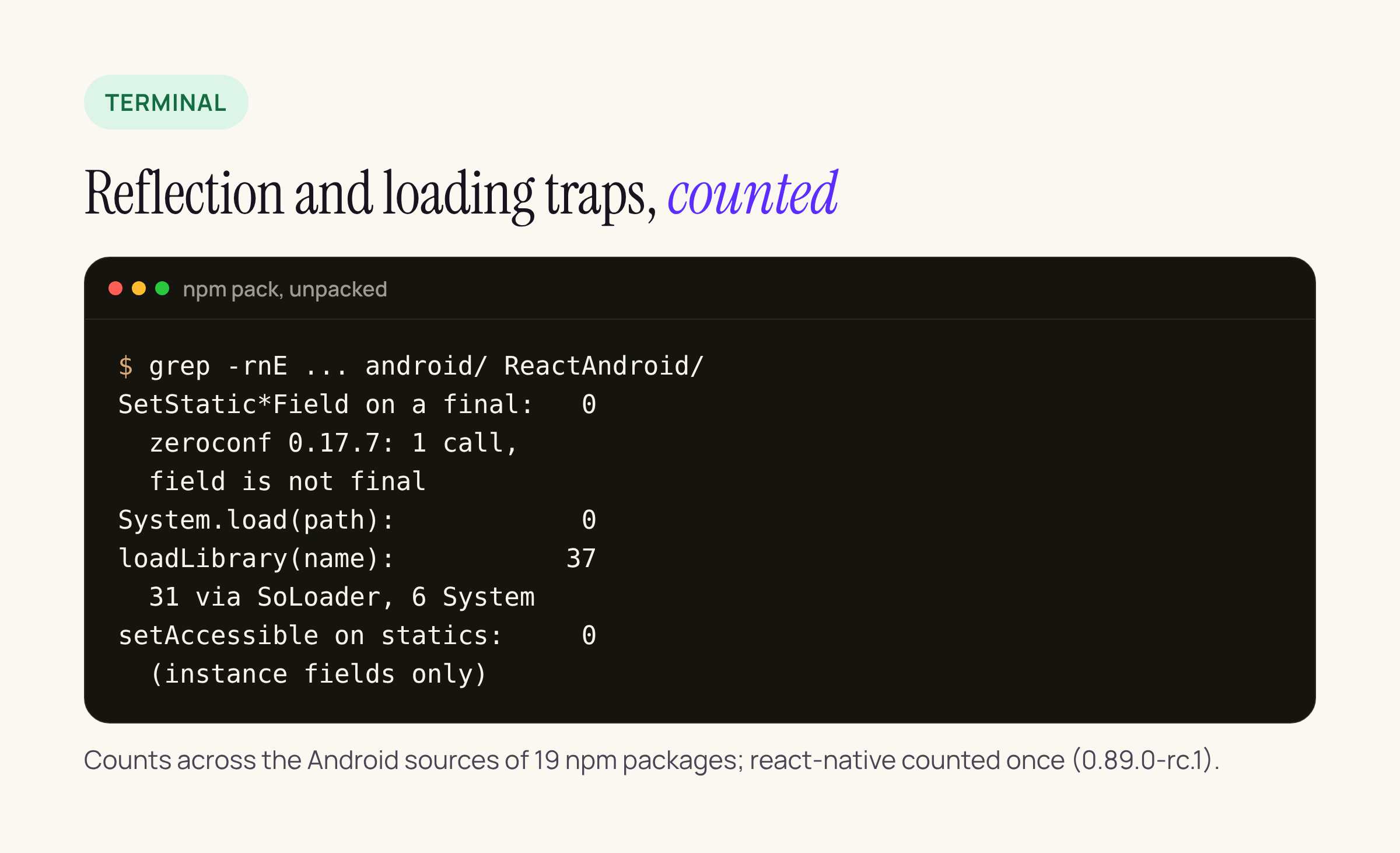
Our search across the 19 packages, with react-native counted once.
What the search found:
- JNI static writes: the only real
SetStaticBooleanFieldcall is in react-native-zeroconf 0.17.7 (android/src/main/jni/JNISupport.c, line 167). It writeshasAutoCallbacks, whichInternalDNSSD.javadeclares asstatic public booleanwith nofinal, so the rule does not apply. The other hits are declarations in thejni.hheader react-native vendors. - Reflection: react-native’s
ReactTextInputManager.kt,ReactScrollView.ktand friends, and reanimated’sNativeProxy.kt, callsetAccessible(true)onmEditor,mCursorDrawable,mScrollerandmMountingManager. All of them are instance fields, not statics. - Native loading: no
System.load(path)anywhere. There are 37loadLibrary(name)calls: 31 through SoLoader and 6 throughSystem.loadLibrary. Loading by name from the APK is not what the DCL rule targets.
One thing the npm packages cannot show: react-native pins com.facebook.soloader:soloader 0.12.1 (in both 0.88.1 and 0.89.0-rc.1), and SoLoader’s own Java sits in that Maven artifact, not in the npm tarball. If your app extracts or downloads .so files itself, or ships an SDK that does, that code is what to search. The fix is the one Android names: make the file read-only before loading it, or better, stop loading code from writable storage.
Background audio hardening (all apps, stricter at 37)
From Android 17, background audio calls fail quietly. The background audio page (updated 28 Oct 2026) says playback “is silenced. No exceptions, no failure message”, and requestAudioFocus() “Returns AUDIOFOCUS_REQUEST_FAILED“. All apps need a visible activity or a foreground service that is not SHORT_SERVICE; apps targeting 37 need that service to have while-in-use capabilities, which in practice means starting it while the app is in the foreground.
| Library | Source, then what to change |
|---|---|
| react-native-track-player 4.1.2 | Music is declared with foreground and calls start when the notification becomes ongoing. When playback pauses or ends it calls stop after stop, default 5 seconds (Music, lines 587 to 591 and 852). Change: Resuming from the background later needs a new foreground start. The library already reports a refused start as android-; listen for it. Android’s advice is to keep the media service up through short interruptions of under 10 minutes, so look at the stop option |
| react-native-sound 0.13.0 | No foreground service. request result ignored (Sound., line 205). Change: Fine for sounds while the screen is up. Background playback needs your own media service |
| expo-av 16.0.8 | No foreground service. Checks for AUDIOFOCUS_ and throws Audio otherwise (AVManager., lines 355 to 359). Change: Background playback on Android 17 will surface that exception; move to expo-audio or add a service |
| expo-audio 58.0.12 | Audio extends media3 Media with FOREGROUND_; the config plugin adds the service and permissions when enable is on (the default); AUDIOFOCUS_ is handled. Change: Closest to Android’s recommended setup; keep background playback enabled in the plugin config |
For a TV catalogue app like BMDB, the realistic case is trailer audio continuing after the user presses Home. With track-player that works while the notification is ongoing; with react-native-sound or expo-av it will go silent on Android 17 without any error in JavaScript.
Implicit URI grants end in Android 18 (all apps)
The all-apps page says: “Starting in Android 18, the system will no longer automatically grant these permissions” for ACTION_SEND, ACTION_SEND_MULTIPLE and ACTION_IMAGE_CAPTURE. The fix is an explicit FLAG_GRANT_READ_URI_PERMISSION (plus FLAG_GRANT_WRITE_URI_PERMISSION for image capture). This one applies whatever your targetSdk is.
| Library | Explicit grant in the source |
|---|---|
| react-native-share 12.3.1 | Yes. Share sets Clip and FLAG_ for single and multiple files (lines 161 to 190); the Instagram and Facebook paths set it too |
| expo-sharing 58.0.23 | Yes. The ACTION_ intent gets FLAG_ (Sharing, line 121), and it calls grant for every resolved package (line 49) |
| react-native-image-picker 8.3.0 | Yes. The ACTION_ intent gets read and write grants (Image, line 108) |
| react-native-camera-kit 18.0.1 | Not affected: no ACTION_, it captures in-app |
So the libraries are ready. What is usually not ready is a hand-written native module that shares a PDF statement or a receipt. If yours builds an ACTION_SEND intent, it should look like this:
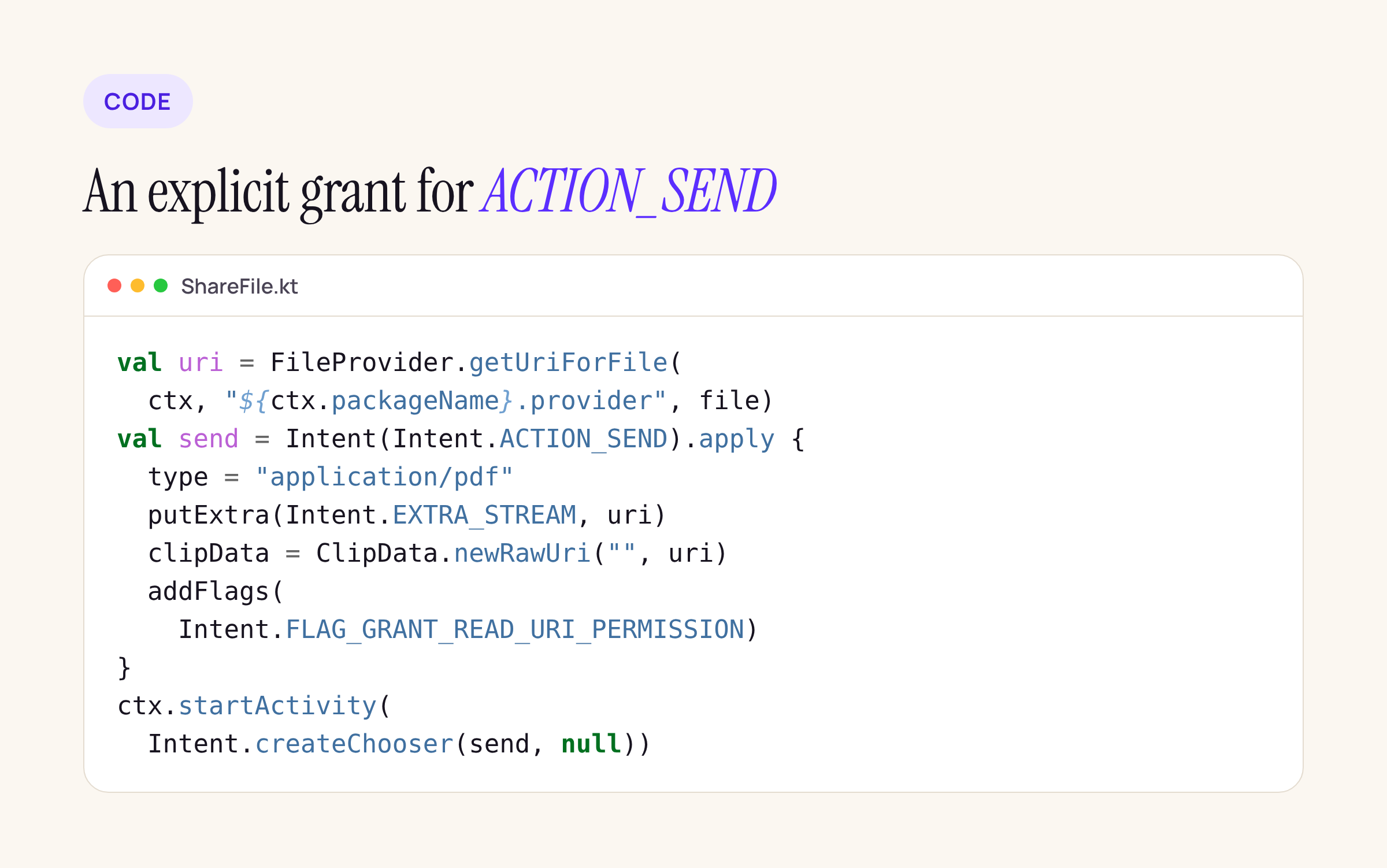
A starting point for your own share module; compile it against your target and adjust the provider authority.
val uri = FileProvider.getUriForFile(ctx, "${ctx.packageName}.provider", file)
val send = Intent(Intent.ACTION_SEND).apply {
    type = "application/pdf"
    putExtra(Intent.EXTRA_STREAM, uri)
    clipData = ClipData.newRawUri("", uri)
    addFlags(Intent.FLAG_GRANT_READ_URI_PERMISSION)
}
ctx.startActivity(Intent.createChooser(send, null))
What to check on your own app
- Turn on the StrictMode check Android documents for the grant change, in debug builds:
StrictMode.setVmPolicy(
    StrictMode.VmPolicy.Builder()
        .detectImplicitUriPermissionGrant()
        .penaltyLog()
        .build()
)
- Watch for the log line Android names:
adb logcat | grep "Please set the grant explicitly in the app". - Force audio hardening on an Android 17 device or emulator and play audio, then press Home:
adb shell cmd audio set-enable-hardening throw. Inthrowmode focus and volume calls raiseIllegalStateException, so silent failures become visible.adb shell dumpsys audiolistsAudioHardeningentries for your package:level: partialmeans no foreground service,level: fullmeans a service without while-in-use capability. - Search your own
android/folder and any vendored SDKs the same way we did:
grep -rnE "SetStatic(Long|Int|Object|Boolean)Field|System\.load\(|ACTION_SEND|ACTION_IMAGE_CAPTURE" android/
For the full list of targetSdk 37 changes, see our targetSdk 36 to 37 guide, and for the React Native side of the bump, React Native 0.89 RC: what changes and what breaks.






