When App Review rejects a build, the fastest fix depends on which of five paths you take, and the wrong one costs days: resubmitting to answer a question starts a new review and closes the conversation, an appeal is allowed once per rejection, and a Bug Fix Submission offer is lost if you resubmit. Apple now documents each path in its App Review help pages, announced in the Hello Developer November 2026 newsletter on 10 November 2026. We read the articles on each path and the App Review Guidelines (last updated 16 October 2026) and mapped them into one table below.
Why we did this: we ship iOS updates for regulated banking apps, where a review that stalls on missing documents can hold a fix for days. This is the checklist we now use before and after submitting.
The one rule that saves the most time
Don’t resubmit to answer App Review. Apple’s review status article says resubmitting “starts a new review, after which App Review can no longer reply to your previous message.” If the rejection asks for information, reply in App Store Connect. Resubmit only when the build or metadata actually changed, and “Don’t resubmit until you’ve resolved every issue identified by App Review.”
Apple’s own diagram on the complete review page makes the same point: a complete submission goes straight through, an incomplete one is rejected for missing information, resubmitted and reviewed again.
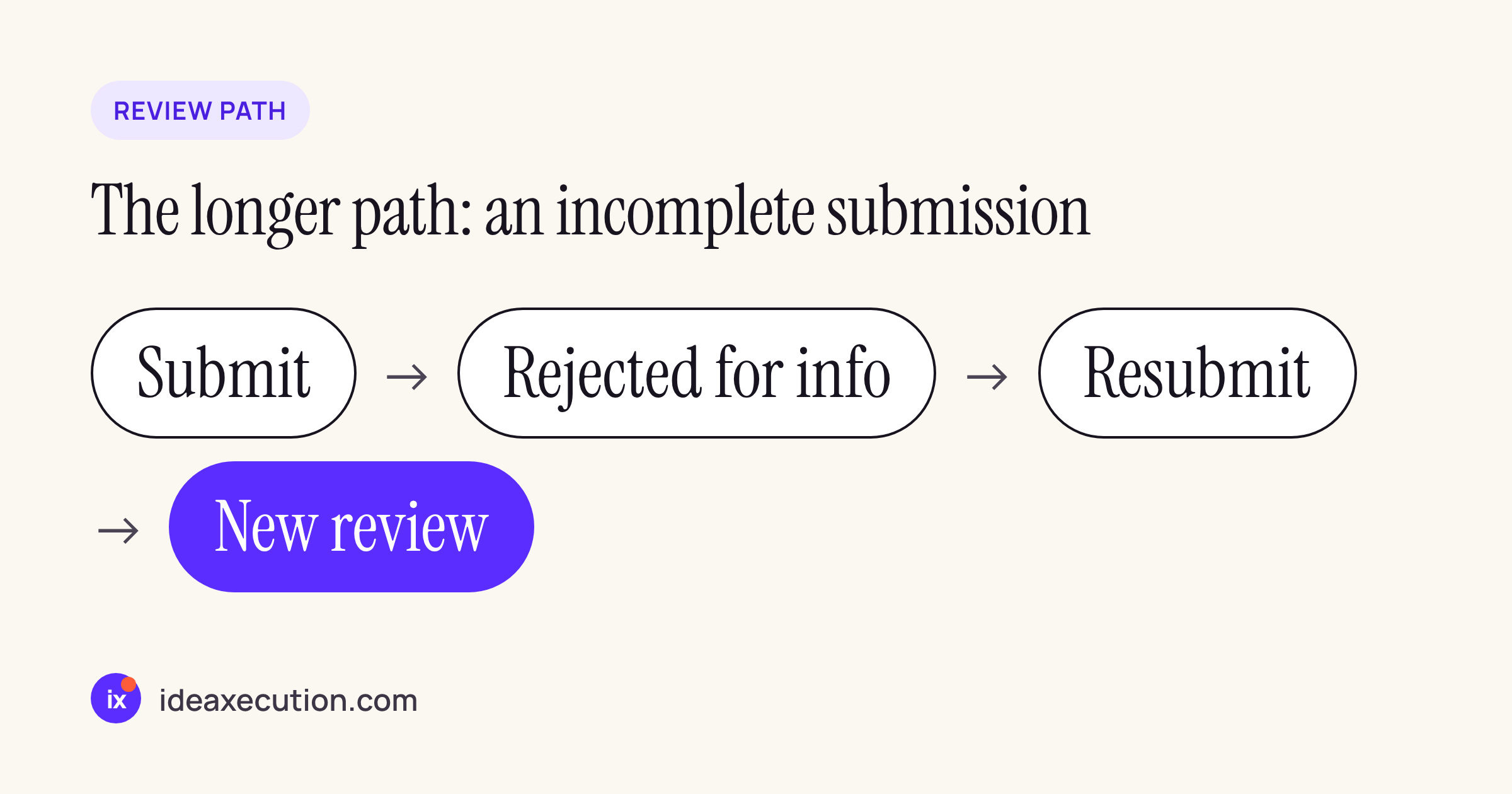
The path a complete submission avoids.
Which path, mapped
| Situation | Path Apple describes | What to prepare | Limits Apple states | Article |
|---|---|---|---|---|
| Before submitting, a question about review | One-on-one App Review appointment (30-minute Webex call) | App’s Apple ID, specific questions | Tuesdays and Thursdays, subject to availability; no preapproval of apps or features | Appointment |
| Submitting any build | Fill in App Review Information completely | Demo account that works at submission time, notes, regulated-field documents, devices tested, regional differences | “Incomplete submissions will be rejected.” | Complete review |
| Review asks for information, or you need to clarify | Reply to App Review in App Store Connect | The answer, not a new build | Not for appeals or expedite requests; a phone call takes about three to five business days to arrange | Contact App Review |
| A bug-fix update is rejected, no legal or safety concern | Accept the Bug Fix Submission offer by replying | Reply that you want this build approved and will fix the issues next | Only for updates to approved apps; deferred issues cannot be deferred again; do not resubmit | Bug Fix Submissions |
| Critical bug, or a release tied to an event | Request an expedited review | The submission already sent to review; bug details in Notes, or the event and its date | “Reserved for matters of genuine urgency”; granted as availability allows | Expedited review |
| You believe the app complies, or treatment was unfair | Reply first; if unresolved, appeal to the App Review Board | Clarification first, then the appeal form | One appeal per rejected or removed app; not after resubmitting; not for information requests | Appeal |
| A live app is removed | Reply to the removal message; submit a compliant update | The fix | Less severe issues “may be given 14 days”; serious ones are removed immediately | App removals |
| Waiting | Track status in App Store Connect (webhooks available) | Nothing | Apple aims to review 50% in under 24 hours and 90% in under 48 | Review status |
Two pairs are easy to confuse. Expedite vs reply: an expedite request goes through a separate form and only for a build already in review; a question about a rejection goes in the App Store Connect reply. Bug Fix Submission vs appeal: if the rejection note says “Bug Fix Submissions: The issues we’ve identified below are eligible to be resolved on your next update”, you do not need to argue. Reply, get this build approved, and fix the issue next time.
What a banking app adds
The review status article names “Required documentation” (authorizations, licenses, partnership agreements) as one reason reviews take longer. For a finance app, these guidelines decide what goes in the submission:
| Guideline | What it says | What we attach or do |
|---|---|---|
| 3.2.1(viii) | Apps for “financial trading, investing, or money management should be submitted by the financial institution performing such services” and need licensing where they are offered | Submit under the bank’s own developer account, not ours |
| 5.1.1(ix) | Apps in highly regulated fields, banking included, “should be submitted by a legal entity that provides the services, and not by an individual developer” | Same: the bank’s organisation account |
| 2.1 | Include demo account info “(and turn on your back-end service!)”; a built-in demo mode instead of a demo account needs prior approval | A demo user whose one-time passwords work without a SIM in India |
| Before You Submit | “Provide required documentation for apps and features that require regulatory approval” | The regulated-field documents in App Review Information |
| Complete review, 3.2.1 row | “Documentation showing your partnership with the financial institution or bank providing the underlying service” | Needed when the submitting entity is not the bank itself |
| 5.1.1(v) | Apps with accounts must let people start account deletion in the app; regulated apps “may use additional customer service flows” to confirm | An in-app entry point, then the bank’s own confirmation process |
| 5.1.1(ii) | Purpose strings must clearly and completely describe the use; localized strings required | Camera (KYC), location (branch finder) and Face ID strings in English and Hindi |
The help page also allows a demonstration mode “if your app handles sensitive user information, or operates in a highly regulated industry”. Guideline 2.1 adds that it needs Apple’s prior approval, so we treat it as a fallback and give a demo account by default.
Our review notes template
A login that depends on an Indian mobile number and an OTP is the classic incomplete submission: the reviewer cannot get past the first screen. Our notes answer that before it is asked.
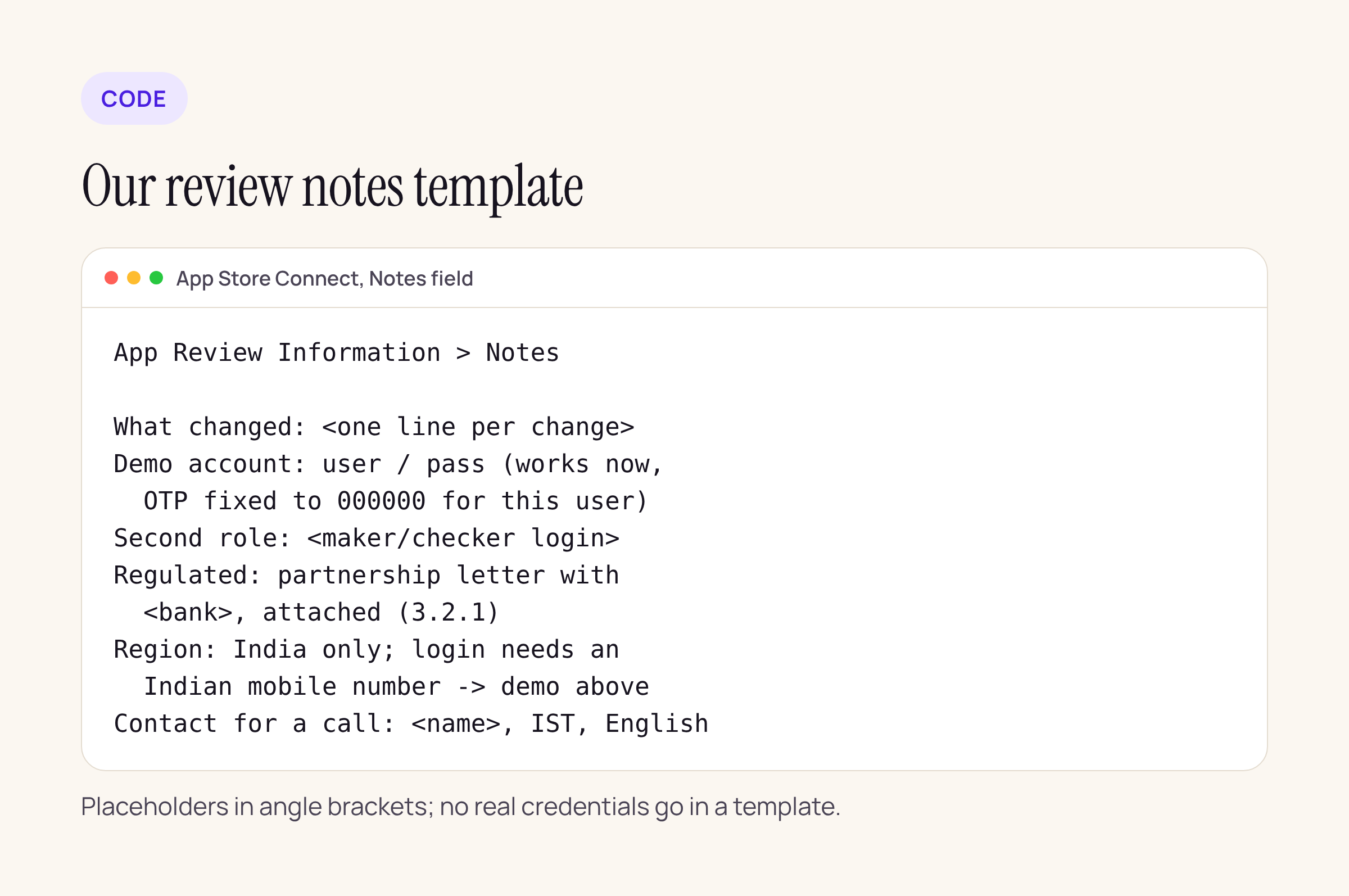
The template we fill in for each banking app update.
The habits behind it:
- A demo account that works at submission time, with a fixed OTP for that one user on the review backend, as the complete-review page asks.
- One line per change in What’s New and in the notes, so the reviewer can find the changed screen.
- Every role the app has (for example a maker and a checker login), in the Notes field as Apple suggests for multiple account types.
- Region notes: what a reviewer outside India will see.
- A contact for a call, with time zone and language, so a callback does not wait on a reply.
After a rejection, in order
- Read the message. Does it ask for information, or name a guideline?
- Information request: reply in App Store Connect. Do not resubmit.
- Bug Fix Submission note on an update: reply and accept it.
- A real guideline issue: fix it, resubmit once everything is fixed, and expedite only if a user-facing bug or a dated event needs it.
- You believe the build complies: reply with the clarification first, appeal only if that fails, and only once.