Android 17 adds three limits that do not show up as compile errors. At targetSdk 37 the new lock-free MessageQueue breaks test libraries that reflect into it, so move to Espresso 3.7.0 and Robolectric 4.17 and switch @LooperMode(LEGACY) tests to PAUSED. On every app, whatever its targetSdk, a memory limiter can now kill the process, and you only see it in ApplicationExitInfo. And at targetSdk 37, a widget update whose bitmaps exceed 6 x width x height bytes throws IllegalArgumentException instead of logging a warning.
This post is built from Google’s Android 17 behaviour-change pages (updated 28 Oct, 9 Nov and 11 Nov 2026), the ApplicationExitInfo and AppWidgetManager references, a source search of four React Native npm packages, and a read of Google’s Glance widget sample. Why we did this: our Beacon-type banking apps ship a balance widget, the BMDB TV catalogue app runs on 1 to 2 GB Android TV boxes, and both test suites still run Robolectric in LEGACY looper mode.
For the rest of the targetSdk 37 list, see our targetSdk 36 to 37 guide.
1. The lock-free MessageQueue breaks reflection in tests
Google’s MessageQueue guidance (updated 28 Oct 2026) says apps targeting API 37 get a new lock-free android.os.MessageQueue, and that this “may break clients that reflect on MessageQueue private fields and methods.” The field most code reaches for stays, but empty: “Android 17 keeps the mMessages field, but in the new implementation this field is always null, regardless of whether there are messages in the queue.”
Two test libraries are named, with the versions that work:
| Library | Works from | What to change | Source |
|---|---|---|---|
| Espresso | 3.7.0 | Upgrade; it uses the TestLooperManager API |
MessageQueue guidance |
| Robolectric | 4.17 | Upgrade, and move @LooperMode(LEGACY) tests to @LooperMode(PAUSED) |
MessageQueue guidance |
| Your own code | n/a | Stop reading MessageQueue internals by reflection |
MessageQueue guidance |
What React Native ships today
We unpacked the npm packages of react-native 0.88.1 and 0.89.0-rc.1 and read gradle/libs.versions.toml in both. Both pin espresso-core = "3.6.1" and robolectric = "4.15.1", below the versions above. The 0.89 RC already moves targetSdk to 37 in that same catalog, so the gap matters as soon as you take the RC’s targetSdk into an app that also runs Robolectric or Espresso tests. Your app’s own test dependencies are what count: pin them in your app module, not through React Native.
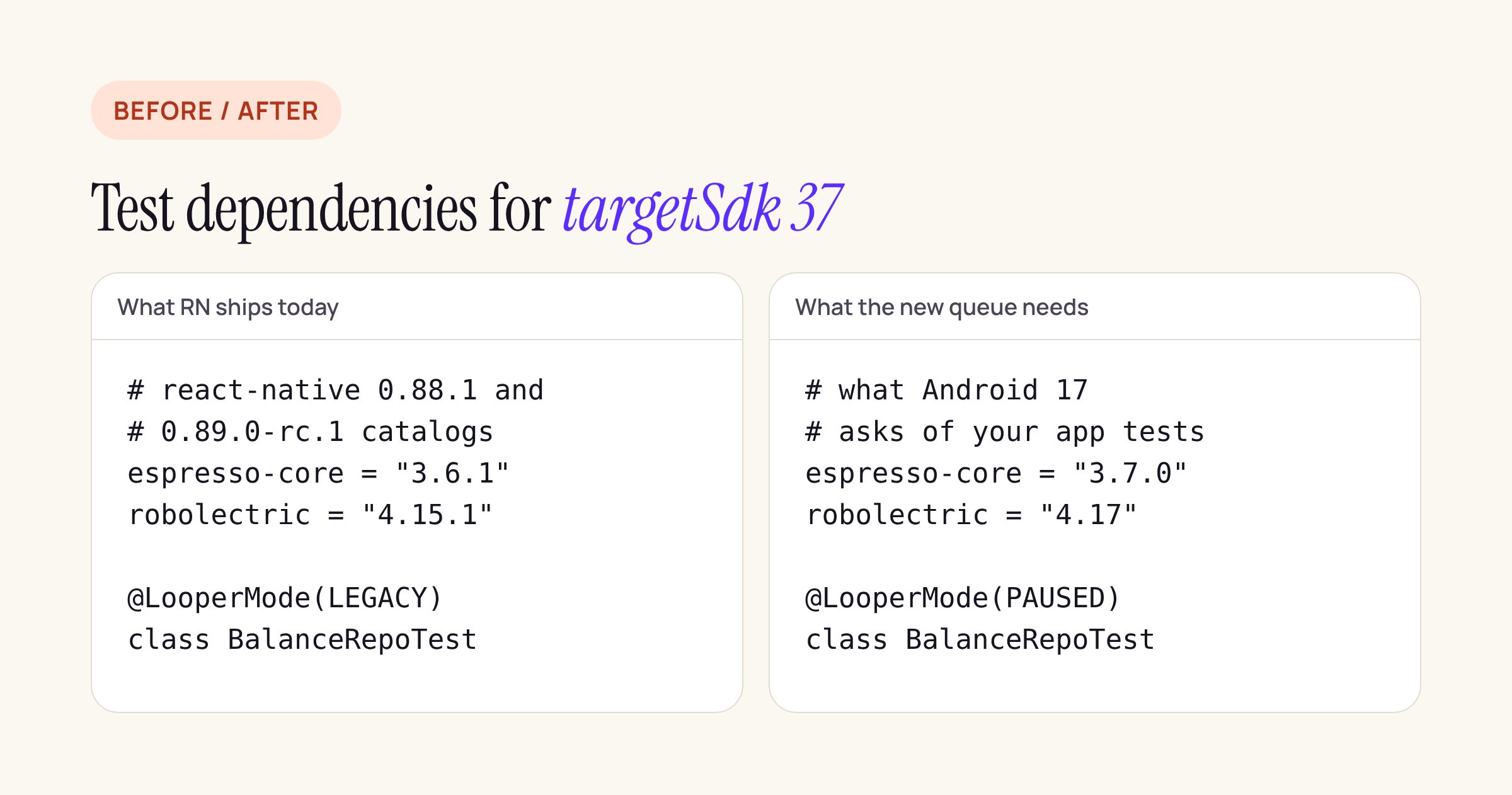
The left column is copied from the two React Native catalogs; the right column is Google’s minimum.
Does any of our native stack reflect into the queue?
We searched the Kotlin and Java sources of react-native 0.88.1 (748 files), react-native-screens 4.30.1 (240), react-native-gesture-handler 3.5.0 (59) and react-native-reanimated 4.7.1 (37) for android.os.MessageQueue, mMessages, getQueue(), Looper.myQueue, IdleHandler and MessageQueue::class. There were no hits. React Native’s own MessageQueueThread is its thread wrapper, not the platform queue, and the reflection that does exist in these packages targets other fields (mScroller, mEditor, mMountingManager).
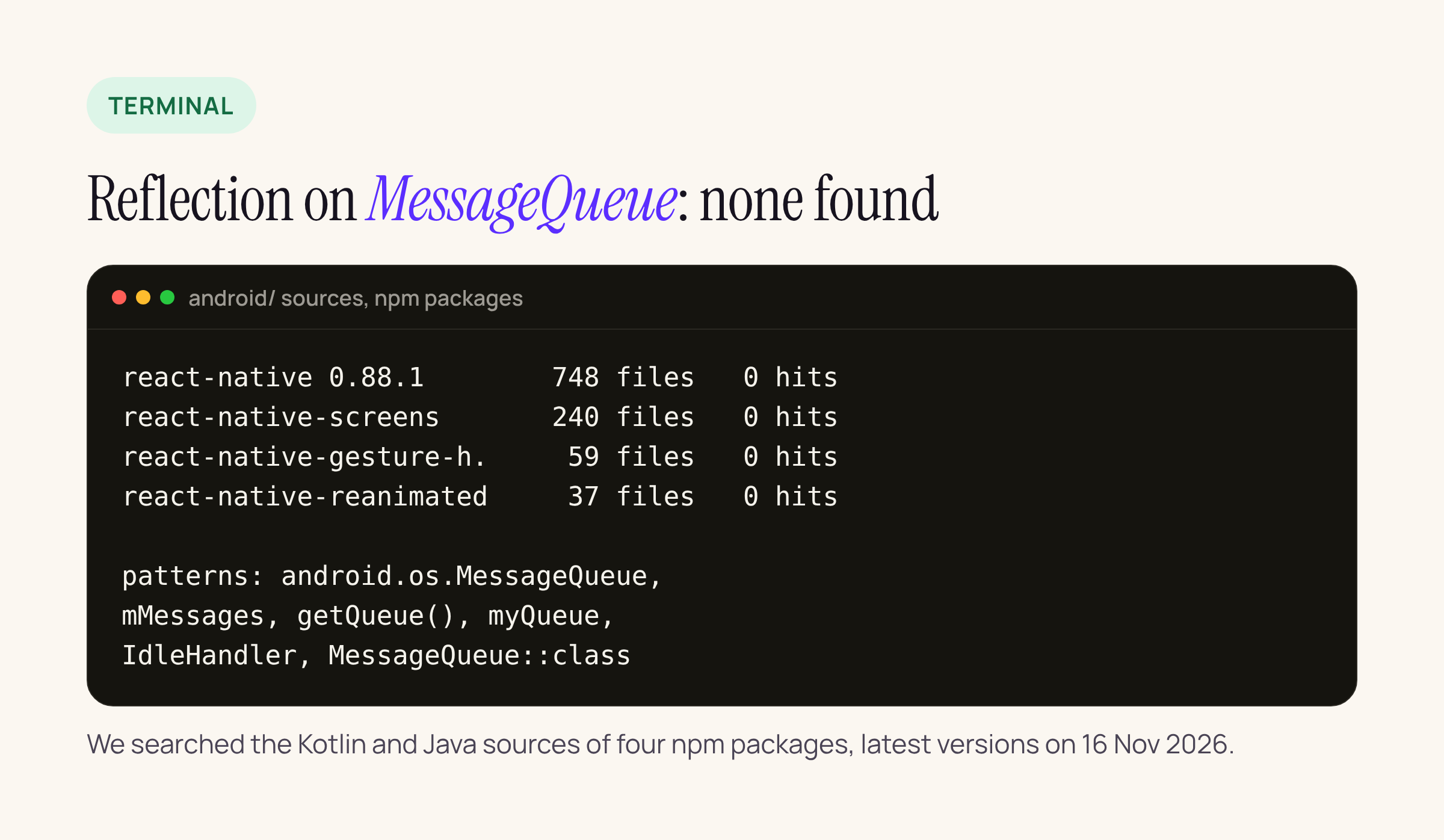
So for an RN app the risk sits in your tests and in any in-house code that peeks at the queue, not in these libraries.
Testing the change before you raise targetSdk
The guidance page gives a compat flag for debuggable builds, so you can run the new queue before changing targetSdk:
adb shell am compat enable USE_NEW_MESSAGEQUEUE com.example.bank
# and back to the legacy queue:
adb shell am compat disable USE_NEW_MESSAGEQUEUE com.example.bank
The same switch is in Developer Options under App Compatibility Changes.
2. App memory limits apply to every app
The all-apps behaviour changes page (updated 9 Nov 2026) says: “Android 17 introduces app memory limits based on the device’s total RAM.” Because it is on the all-apps page, it applies regardless of targetSdk. No thresholds are published.
You find out after the fact. The page says that if your app was affected, “the exit reason will be REASON_OTHER and the description will contain the string “MemoryLimiter:AnonSwap”.” The ApplicationExitInfo reference also lists a dedicated REASON_MEMORY_LIMITER (value 17) and REASON_ANOMALY (18), both “added in version 37.2”, which the behaviour-change page does not mention yet. A check that covers both readings looks like this:
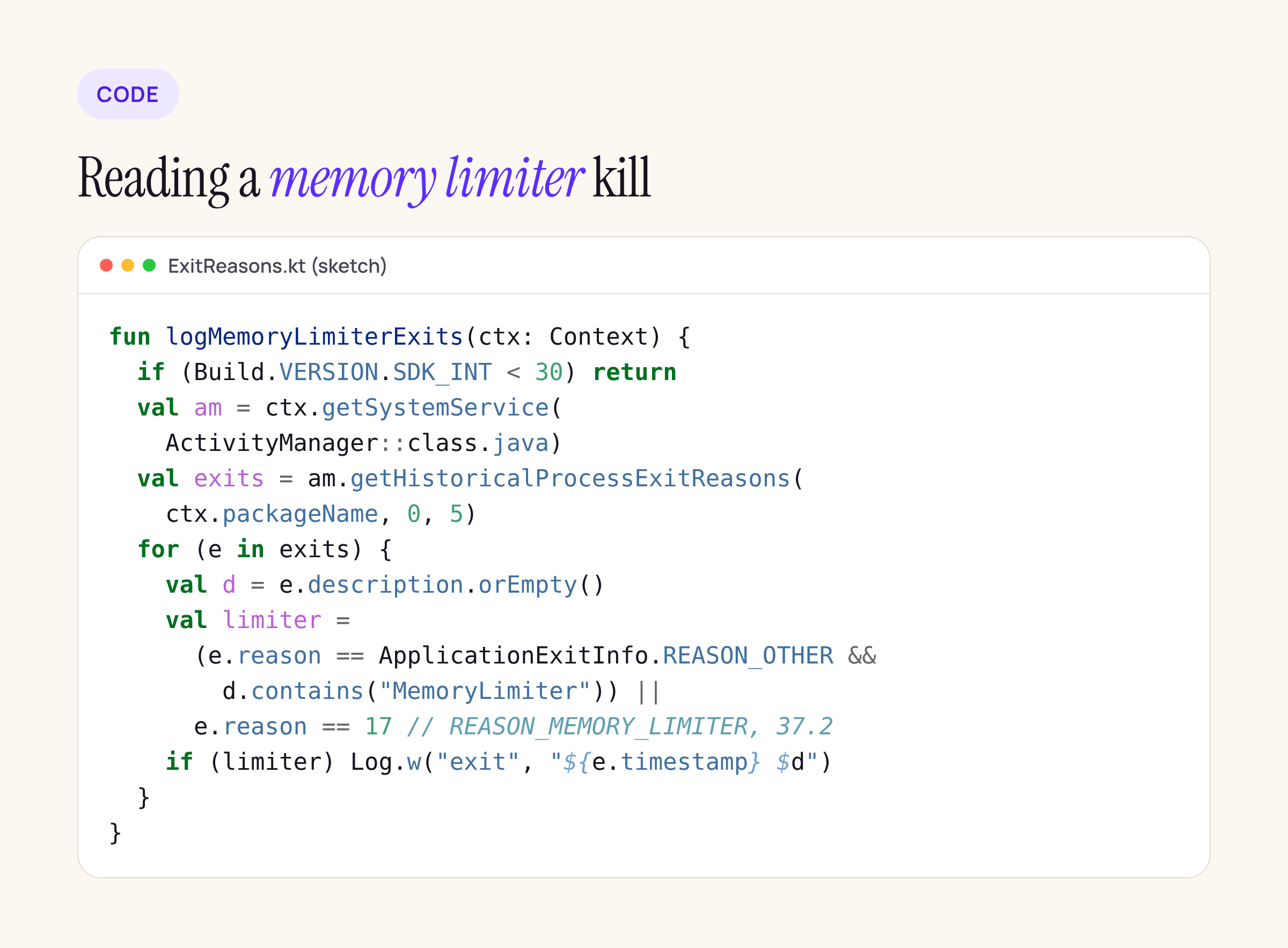
Treat it as a starting point and compile it against your target. Note that the reference says the description format is “only intended to be human-readable” and not guaranteed stable, so match loosely and log the full string to your crash or analytics pipeline.
fun logMemoryLimiterExits(ctx: Context) {
    if (Build.VERSION.SDK_INT < 30) return
    val am = ctx.getSystemService(ActivityManager::class.java)
    val exits = am.getHistoricalProcessExitReasons(ctx.packageName, 0, 5)
    for (e in exits) {
        val d = e.description.orEmpty()
        val limiter = (e.reason == ApplicationExitInfo.REASON_OTHER &&
            d.contains("MemoryLimiter")) ||
            e.reason == 17 // REASON_MEMORY_LIMITER, API 37.2
        if (limiter) Log.w("exit", "${e.timestamp} $d")
    }
}
The adb commands
The page lists three am memory-limiter subcommands, which “have no effect on a device which does not impose memory limits”:
| Command | What it does |
|---|---|
am memory-limiter status |
Shows the limiter state |
am memory-limiter manual <pid> <limit> (or max, none) |
Sets a limit in MB for one process |
am memory-limiter ignore <uid> (or none, all) |
Exempts a UID, none or all |
For a catalogue app on a small TV box, manual is the useful one: set a low limit on your own process in a debug build and watch which screen gets the app killed. The page also points to trigger-based profiling with TRIGGER_TYPE_ANOMALY for heap dumps. In BMDB the usual suspects are image caches sized for phones; capping the image cache by ActivityManager.memoryClass is the first change we would make there.
3. App widgets get a hard bitmap ceiling
From the Android 17 behaviour changes (updated 11 Nov 2026): when an app passes RemoteViews to AppWidgetManager.updateAppWidget, the system adds up the memory of all image data “across every orientation and size bucket in the payload”. If the total is above the ceiling, an app targeting API 37 gets:
java.lang.IllegalArgumentException: RemoteViews for widget update exceeds maximum bitmap memory usage (used: XXXXX, max: YYYYY)
Apps targeting 36 or lower only get a Slog.w warning in the log, which is easy to miss. The budget is “6 * width * height bytes”, that is 1.5 times a full-screen ARGB_8888 buffer.
The arithmetic for a balance widget
On a 1080 x 2400 px screen the budget is 6 x 1080 x 2400 = 15,552,000 bytes. An ARGB_8888 bitmap costs 4 bytes per pixel, so:
| Bitmap in the widget | Decoded size | Bytes |
|---|---|---|
| Bank logo shipped as a 1600 x 1600 PNG | 1600 x 1600 x 4 | 10,240,000 |
| Same logo decoded at 160 x 160 px | 160 x 160 x 4 | 102,400 |
| QR code at 600 x 600 px | 600 x 600 x 4 | 1,440,000 |
| Full-bleed chart at 1000 x 500 px | 1000 x 500 x 4 | 2,000,000 |
The first row alone uses two thirds of the budget, and the rule counts every size bucket: a widget that sends the same full-size logo in a portrait and a landscape layout is at 20,480,000 bytes and over the line. Decoded at the size it is drawn, the same logo is a rounding error.
What counts and what does not
The page counts bitmaps and bitmap-backed Icon objects in the RemoteViews bitmap cache. URI-backed images (Icon.createWithContentUri, setImageViewUri) are not counted against this cap, but the launcher decodes them at full resolution, so a URI is not a way to send a 4K image. Google’s mitigations: size bitmaps from WindowManager.currentWindowMetrics.bounds on API 30+, use RGB_565 where there is no transparency, swap images with a full updateAppWidget rather than partiallyUpdateAppWidget, and inspect usage with adb shell dumpsys appwidget.
What Google’s own Glance sample does
We read the AppWidget module of android/user-interface-samples (commit 2c0b04e). Its ImageGlanceWidget uses SizeMode.Exact, and an ImageWorker fetches one image per reported widget size in pixels through Coil. When the cached path is a file, the widget calls BitmapFactory.decodeFile(path) and wraps the result in ImageProvider(bitmap); for content:// paths it uses ImageProvider(uri). The sample’s own comment already warns: “When using bitmaps directly your might reach the memory limit for RemoteViews.” Because the images are requested at widget size, the sample is the right pattern; the risk is copying the decodeFile line with an asset that was not resized first. The weather widget in the same module uses drawable resources (ImageProvider(R.drawable...)), which travel as resource IDs rather than bitmaps.
For a widget that has to show a stored image, decode it at the drawn size:
fun decodeForWidget(path: String, wPx: Int, hPx: Int): Bitmap? {
    val bounds = BitmapFactory.Options().apply { inJustDecodeBounds = true }
    BitmapFactory.decodeFile(path, bounds)
    var sample = 1
    while (bounds.outWidth / (sample * 2) >= wPx &&
        bounds.outHeight / (sample * 2) >= hPx) sample *= 2
    val opts = BitmapFactory.Options().apply {
        inSampleSize = sample
        inPreferredConfig = Bitmap.Config.RGB_565 // opaque images only
    }
    return BitmapFactory.decodeFile(path, opts)
}
What to check on your own app
- Raise Espresso to 3.7.0 and Robolectric to 4.17 in the app module, and grep your tests for
LooperMode.Mode.LEGACYand@LooperMode(LEGACY). - Run your instrumented tests with
am compat enable USE_NEW_MESSAGEQUEUEbefore you change targetSdk. - Grep your own code for
mMessages,MessageQueueandgetQueue()reflection. - Add the exit-reason check to app start and send the result to your crash reporting, so memory limiter kills stop looking like random restarts.
- List every bitmap your widgets send, multiply width x height x 4 for each size bucket, and compare with 6 x screen width x screen height.
- Run
adb shell dumpsys appwidgetwith the widget on the home screen and check the bitmap usage it reports.
Runtime behaviour on a specific device is outside this post; the steps above are how to confirm it on yours.