Advent of Code 2026 starts on 1 December (“Day 1 = Dec 1”, per the about page). If you want to solve it in Swift on a Mac, one Swift package is enough: a library target with one file per day, a tiny aoc command that picks the day and times each part, and Swift Testing checks that run each day against the sample from the puzzle. We built and tested the starter below on our M1 lab Mac with Xcode 26.2 and Swift 6.2.3: the clean release build took 3.2 s, and swift test ran 4 tests (6 cases) green.
One thing to know before day 1: with swift-tools-version: 6.0 the package compiles in Swift 6 language mode, and the usual puzzle shortcut, a global var memo dictionary, is a compile error. The fix is in the last section.
Why we did this: Nix and OneClick QuitAll are Swift apps, and a small daily puzzle is a good excuse to keep the team’s Swift 6 habits current away from production code.
The layout
AdventOfCode2026/
  Package.swift
  Sources/
    AdventCore/
      Day.swift
      Day00.swift
      Day01.swift
    aoc/
      main.swift
  Tests/
    AdventCoreTests/
      Day00Tests.swift
  Inputs/     (gitignored)
Day.swift holds the protocol and the registry, Day00.swift is a warm-up day and Day01.swift a template to copy. Advent of Code asks people who post a repository not to include “the puzzle text or your inputs”, so Inputs/ goes in .gitignore together with .build/, and tests use the short sample from the puzzle page typed into the test file.
Package.swift
// swift-tools-version: 6.0
import PackageDescription

let package = Package(
    name: "AdventOfCode2026",
    platforms: [.macOS(.v14)],
    targets: [
        .target(name: "AdventCore"),
        .executableTarget(name: "aoc", dependencies: ["AdventCore"]),
        .testTarget(name: "AdventCoreTests", dependencies: ["AdventCore"]),
    ]
)
No dependencies: Swift Testing ships with the Xcode 26 toolchain, so import Testing works without adding a package.
One protocol, one registry
Each day parses its input once in init and answers both parts as strings (some answers are numbers, some are words).
public protocol Day: Sendable {
    static var number: Int { get }
    init(input: String)
    func part1() -> String
    func part2() -> String
}

public func day(_ number: Int) -> (any Day.Type)? {
    switch number {
    case 0: Day00.self
    case 1: Day01.self
    default: nil
    }
}
The registry is a function with a switch rather than a global array, so there is no shared state for the Swift 6 checker to question. A new day is one new file plus one case line.
The warm-up day is our own puzzle, not an Advent of Code one: each line is x,y; part 1 sums the Manhattan distances from the origin, part 2 counts distinct points.
public struct Day00: Day {
    public static let number = 0
    struct Point: Hashable, Sendable { let x: Int; let y: Int }
    let points: [Point]

    public init(input: String) {
        points = lines(input).compactMap { line in
            let parts = line.split(separator: ",")
            guard parts.count == 2,
                  let x = Int(parts[0]), let y = Int(parts[1])
            else { return nil }
            return Point(x: x, y: y)
        }
    }

    public func part1() -> String {
        String(points.reduce(0) { $0 + abs($1.x) + abs($1.y) })
    }

    public func part2() -> String { String(Set(points).count) }
}
The runner: pick a day, time each part
swift run -c release aoc 3 reads Inputs/day03.txt; a second argument points at another file. ContinuousClock gives the timings.
func timed<T>(_ body: () -> T) -> (T, Duration) {
    let clock = ContinuousClock()
    let start = clock.now
    let value = body()
    return (value, clock.now - start)
}

let (solver, tParse) = timed { dayType.init(input: input) }
let (p1, t1) = timed { solver.part1() }
let (p2, t2) = timed { solver.part2() }
print("Day \(n)  parse  \(ms(tParse))")
print("Day \(n)  part 1 \(p1)  (\(ms(t1)))")
print("Day \(n)  part 2 \(p2)  (\(ms(t2)))")
The rest of main.swift is argument handling: a usage line and exit code 64 without a day number, 65 for a day that is not registered yet (“no solution registered for day 7” in our run), 66 when the input file is missing.
Tests per day with Swift Testing
import Testing
@testable import AdventCore

@Suite("Day 0")
struct Day00Tests {
    @Test func part1() {
        #expect(Day00(input: sample).part1() == "22")
    }

    @Test(arguments: [("1,1", "2"), ("-3,0\n0,3", "6"), ("", "0")])
    func part1Cases(input: String, expected: String) {
        #expect(Day00(input: input).part1() == expected)
    }

    @Test func registry() {
        #expect(day(0) != nil)
        #expect(day(25) == nil)
    }
}
sample is a multi-line string literal at the top of the file. A parameterised test with a list of tuples turns each pair into its own case, so one failing edge case is reported on its own line. swift test list prints the four test IDs, handy for swift test --filter part1 on a busy morning.
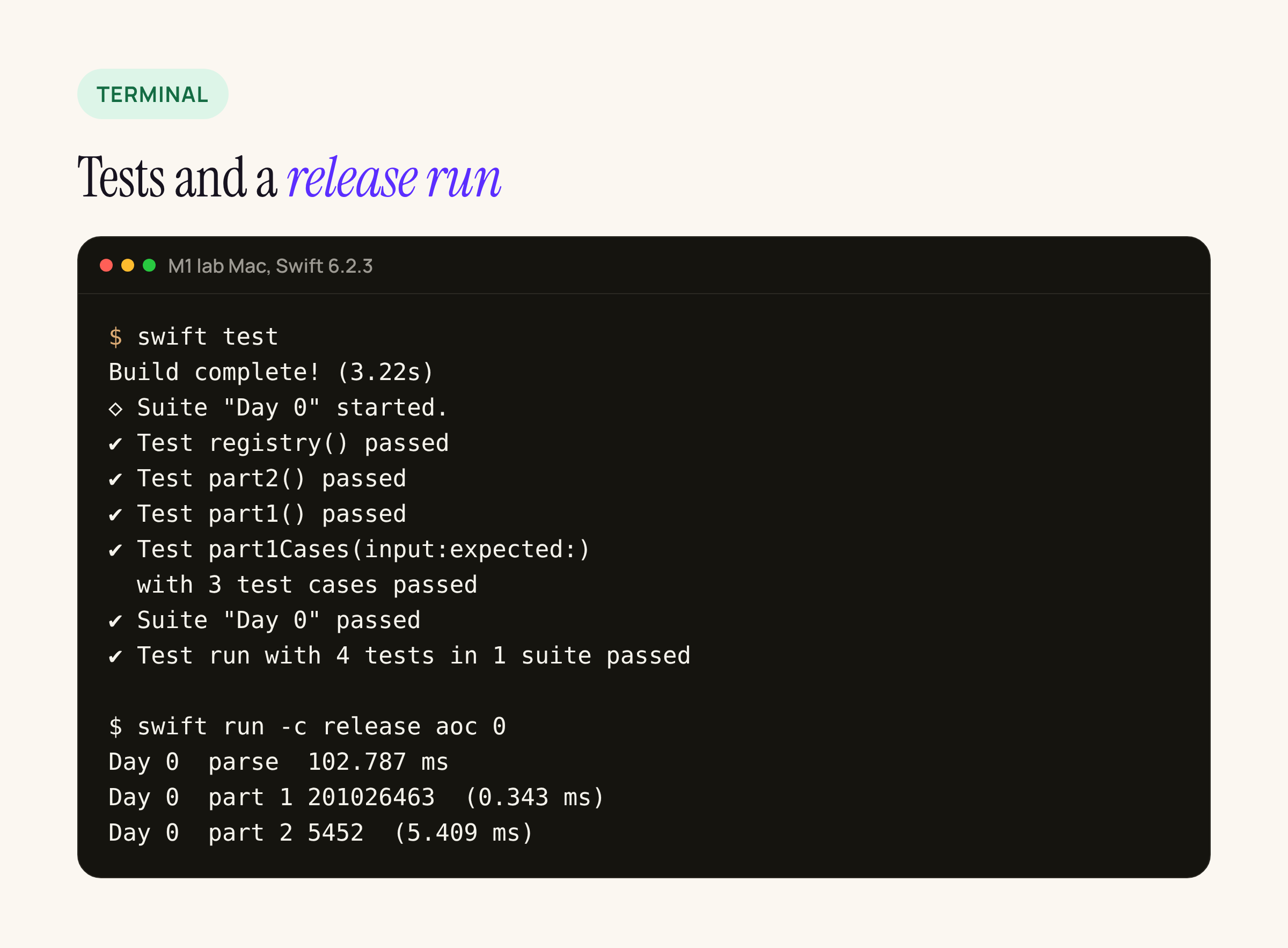
Real output from our M1 lab Mac (Xcode 26.2, Swift 6.2.3, macOS 15.7.3).
What it measured on our lab Mac
One Mac, one run each, so read these as orientation rather than benchmarks:
- Clean release build: SwiftPM reported “Build complete! (3.16s)” for
swift build -c releaseafter deleting.build. - First
swift test: the debug build took 3.22 s, the four tests well under a millisecond each. A second run was a no-op build. - Day 0 on a 200,000-line generated input: parsing took 145 ms on the first run and 103 ms on the second; part 1 took 0.34 ms and part 2 (a
Setof points) 5.4 ms. - Binary: the release
aocexecutable is 90,752 bytes.
Parsing dominates. On days with big inputs, that is the place to look first, not the algorithm in part 1.
swift test also printed an XCTest line (“Executed 0 tests”) before the Swift Testing results. That is expected: both runners run, and only Swift Testing has tests here.
Swift 6 mode: the global memo is an error
Puzzle code loves a global cache. In a library target, Swift 6 mode rejects it. We compiled a small probe package with the two usual shortcuts:
error: var 'memo' is not concurrency-safe because it is
  nonisolated global shared mutable state
error: static property 'directions' is not concurrency-safe
  because it is nonisolated global shared mutable state
The compiler’s notes offer three ways out: make it a let, put it on @MainActor, or turn the check off for that variable. For puzzle code the clean one is usually to keep the cache inside the call:
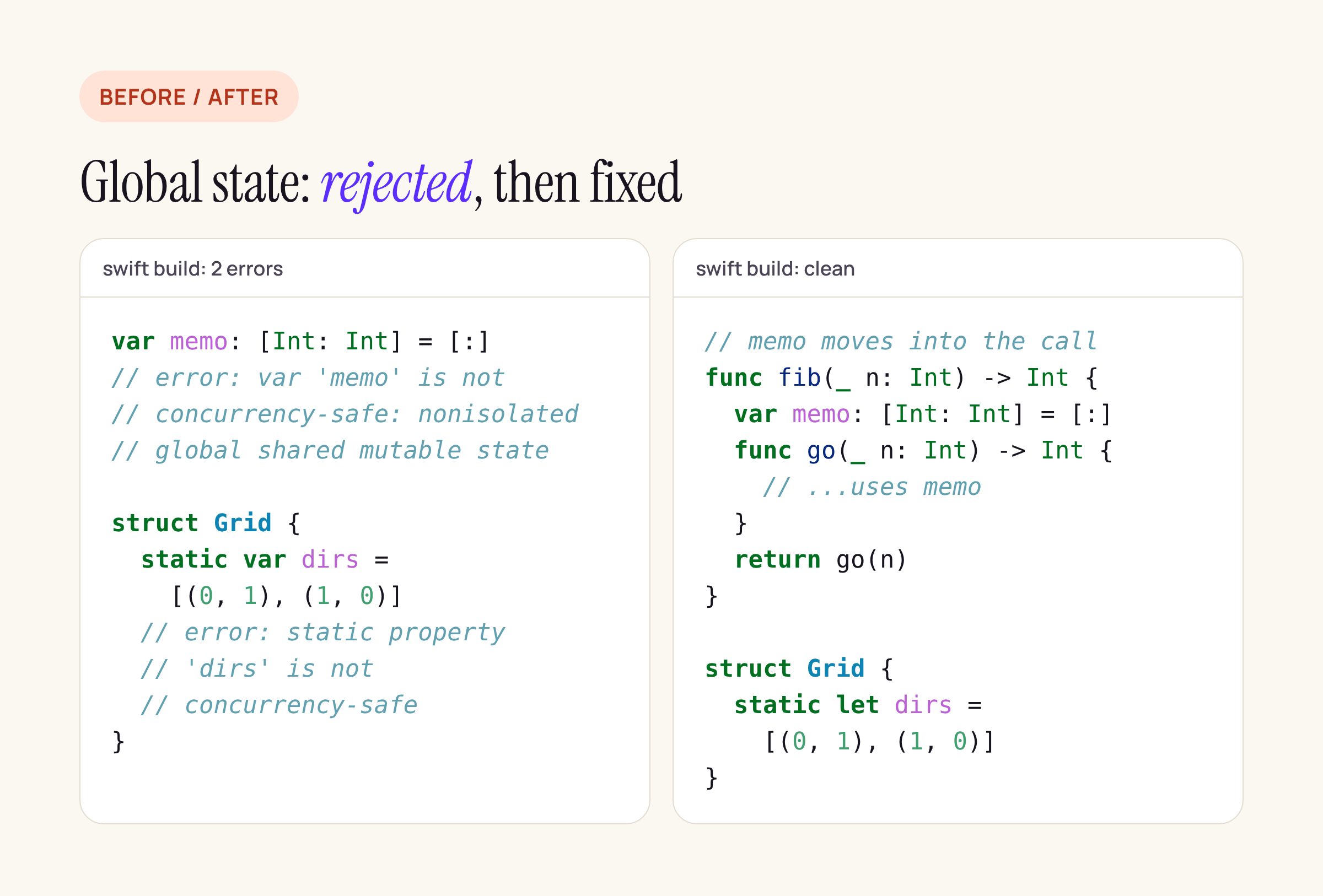
The fixed probe built cleanly in 0.65 s on the same Mac.
- Constant tables (directions, lookup maps) become
static let. - Caches move into the function, or into the
Daystruct as a property filled ininit. - Top-level variables in
main.swiftare main-actor isolated in Swift 6, which is why the same code can compile in the runner and fail once you move it intoAdventCore.
If you would rather start in Swift 5 mode, set swiftLanguageModes: [.v5] in Package.swift, but the errors above are worth fixing once; they are the same ones a Mac app hits.
Checklist for 1 December
- Copy
Day01.swiftfor the new day and add itscaseline. - Paste the puzzle’s sample into the test file with the expected answer; add a
Day01Testssuite and runswift test --filter Day01Tests. - Save your input to
Inputs/day01.txt(gitignored). - Run
swift run -c release aoc 1; use release for timed runs, since debug builds are not optimised.