Compose Material3 1.6.0-alpha01 deprecates the TextField and OutlinedTextField overloads that take value and onValueChange, and both DecorationBox helpers, in favour of the TextFieldState overloads. The practical takeaway: you can port your forms now, on Material3 1.5.0. The state overloads, SecureTextField, InputTransformation and TextFieldDefaults.decorator all compiled cleanly against 1.5.0 in our test, so the move does not have to wait for the alpha. Only one replacement API, maxLengthReject, needs the newer foundation library.
We checked this on our M1 lab Mac with Kotlin 2.3.21, AGP 9.2.1, Gradle 9.4.1, JDK 17 and compileSdk 37: a sample module with the five kinds of field a banking sign-up form uses, compiled against Material3 1.5.0 and 1.6.0-alpha01, then ported field by field, plus a diff of the two Material3 source jars.
Why we did this: our Beacon-type banking apps have long login and KYC forms built on the value-based fields, and we want the port planned before 1.6 goes stable. Our earlier post on BasicTextField to TextFieldState in Compose 1.13 covered the foundation layer; this one is the Material3 layer on top.
What Material3 1.6.0-alpha01 deprecates
We diffed the Material3 sources jars of 1.5.0 and 1.6.0-alpha01. The alpha adds six @Deprecated annotations that point to the state-based migration guide (the 1.5.0 sources have none), all at warning level:
TextField(value: String, ...): useTextField(state: TextFieldState, ...).TextField(value: TextFieldValue, ...): useTextField(state, ...)and read the selection fromstate.selection.OutlinedTextField(value: String, ...): useOutlinedTextField(state: TextFieldState, ...).OutlinedTextField(value: TextFieldValue, ...): useOutlinedTextField(state, ...).TextFieldDefaults.DecorationBox(...): useTextFieldDefaults.decorator(...)onBasicTextField(state, ...).OutlinedTextFieldDefaults.DecorationBox(...): useOutlinedTextFieldDefaults.decorator(...).
Source: the Compose Material3 release notes for 1.6.0-alpha01 (18 Nov 2026) and the sources jars themselves.
The alpha also changes your classpath. Material3 1.5.0 resolved foundation 1.12.0 in our module; 1.6.0-alpha01 resolved foundation 1.14.0-alpha01. Several of the warnings you will see come from that newer foundation, not from Material3: the value-based BasicTextField, VisualTransformation and PasswordVisualTransformation are deprecated there too.
The compiler output on the old form
The “before” module is a typical form: full name (TextField), email (OutlinedTextField), a six-digit PIN filtered inside onValueChange, a password with PasswordVisualTransformation, a multi-line address with minLines and maxLines, and one custom field built from BasicTextField plus TextFieldDefaults.DecorationBox.
On Material3 1.5.0 it compiled with no deprecation warnings. On 1.6.0-alpha01 the same code produced 11:
- 5 for the
TextFieldandOutlinedTextFieldcalls (one per field, the PIN, password and address included); - 1 for the value-based
BasicTextFieldin the custom field; - 1 for
TextFieldDefaults.DecorationBox; - 4 for
VisualTransformationandPasswordVisualTransformation, counting the imports.
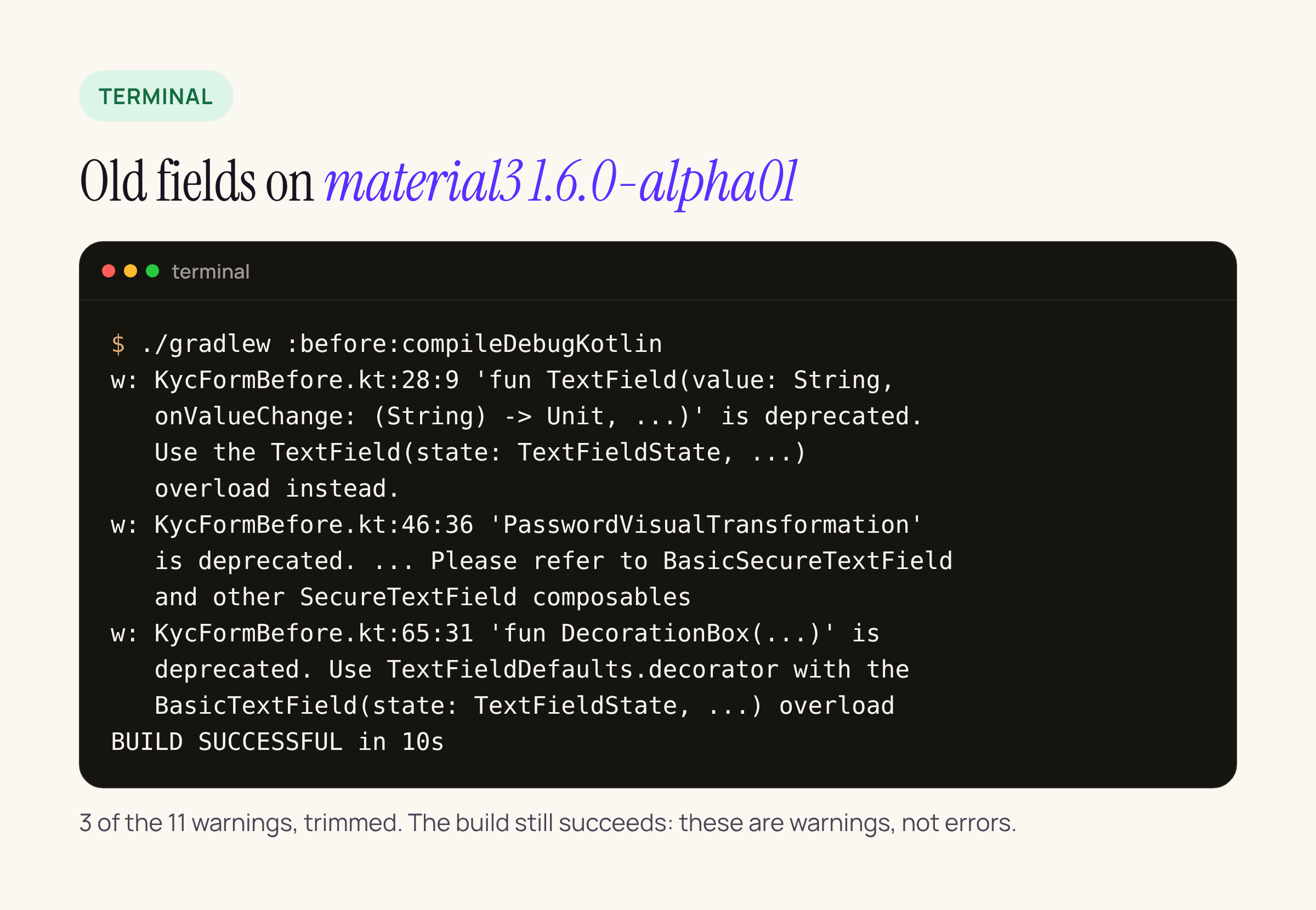
Real output from our lab Mac, trimmed to three of the eleven warnings.
The build still succeeds. Nothing breaks on upgrade; the warnings are a timetable. Each message is long and useful: it spells out the whole migration (state holder, snapshotFlow, InputTransformation, OutputTransformation, TextFieldLineLimits, KeyboardActionHandler), so read one in full before you start.
Porting each field type
The rule of thumb from the messages: the value and its setter become one TextFieldState, filtering moves from onValueChange into an InputTransformation, display masking moves to an OutputTransformation or a secure field, and singleLine, minLines and maxLines become lineLimits.
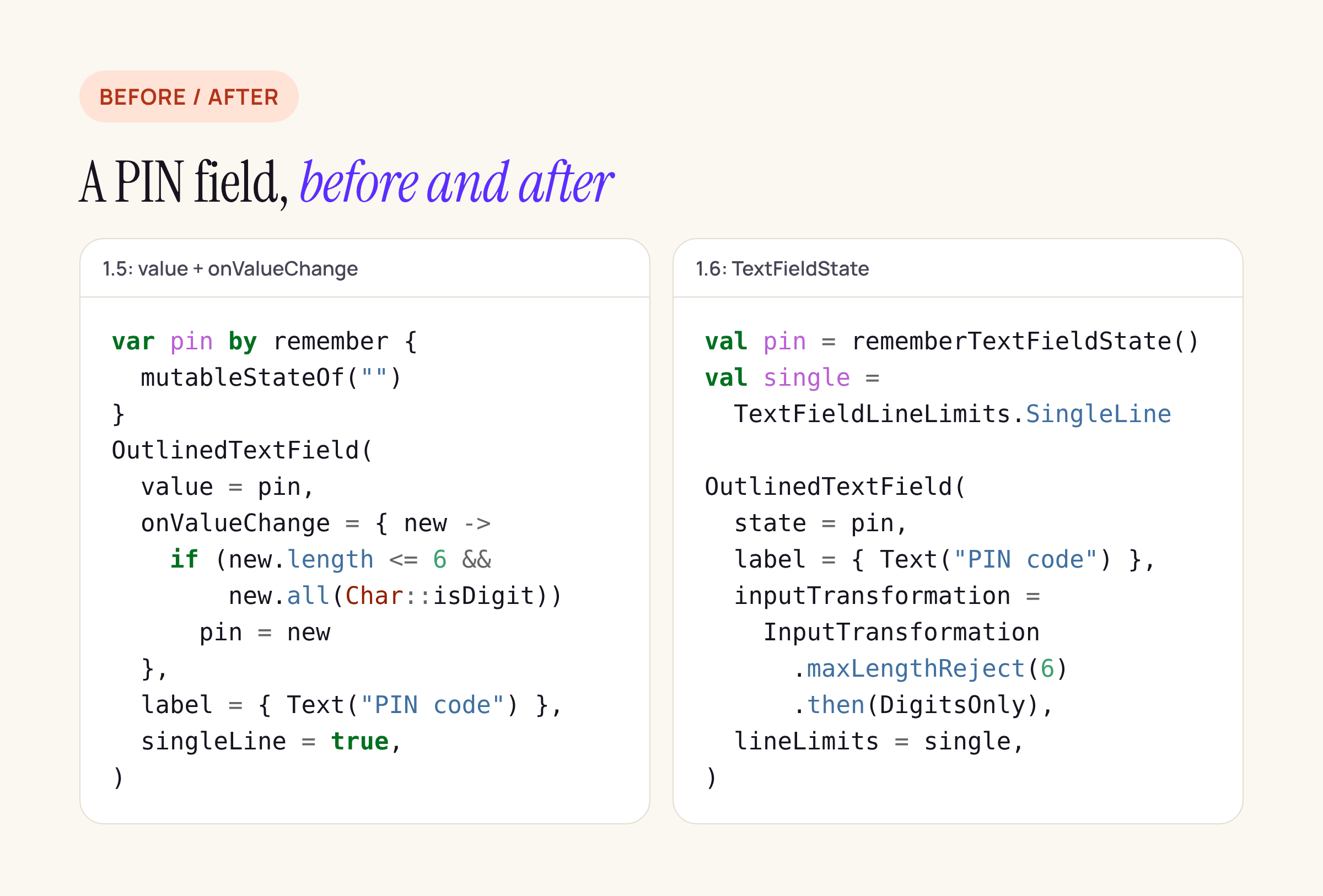
The PIN field, before and after.
Plain and outlined fields
val name = rememberTextFieldState()

TextField(
    state = name,
    label = { Text("Full name") },
    lineLimits = TextFieldLineLimits.SingleLine,
)
Read the text with name.text, write it with name.setTextAndPlaceCursorAtEnd("...") or name.edit { ... }, and watch it with snapshotFlow { name.text } where you used to react inside onValueChange.
Filtered input (PIN, amounts, IFSC codes)
The filter that used to live in onValueChange becomes an InputTransformation:
object DigitsOnly : InputTransformation {
    override fun TextFieldBuffer.transformInput() {
        if (!asCharSequence().all { it in '0'..'9' }) revertAllChanges()
    }
}

val PinTransformation =
    InputTransformation.maxLength(6).then(DigitsOnly)
This compiled on both versions, but on 1.6.0-alpha01 maxLength itself raised a warning: “Use maxLengthTrim to truncate excess characters or maxLengthReject to reject input exceeding maxLength.” We switched to InputTransformation.maxLengthReject(6). That compiled cleanly on 1.6.0-alpha01 and failed on 1.5.0 with Unresolved reference 'maxLengthReject', so keep maxLength until you take the 1.14 foundation, then pick trim or reject on purpose. For a PIN, rejecting the extra digit is the behaviour users expect; for a pasted reference number, trimming may be kinder.
Passwords
SecureTextField(
    state = form.password,
    label = { Text("Password") },
)
SecureTextField (and OutlinedSecureTextField) replace PasswordVisualTransformation. It compiled on 1.5.0 as well, so this is the easiest field to move first.
Multi-line fields
minLines = 3, maxLines = 5 becomes lineLimits = TextFieldLineLimits.MultiLine(minHeightInLines = 3, maxHeightInLines = 5).
Custom fields built on DecorationBox
The replacement is a TextFieldDecorator passed to the state-based BasicTextField:
val state = rememberTextFieldState()
val interaction = remember { MutableInteractionSource() }

BasicTextField(
    state = state,
    lineLimits = TextFieldLineLimits.SingleLine,
    interactionSource = interaction,
    decorator = TextFieldDefaults.decorator(
        state = state,
        enabled = true,
        lineLimits = TextFieldLineLimits.SingleLine,
        outputTransformation = null,
        interactionSource = interaction,
        label = { Text("Account nickname") },
    ),
)
decorator takes the same state, lineLimits and outputTransformation you give the field, so pass the same values to both. It is already in the 1.5.0 sources, and this snippet compiled against 1.5.0 too.
Where the form state lives now
With value-based fields, form state was a handful of Strings in a ViewModel. With TextFieldState it can be a plain class:
class KycFormState {
    val name = TextFieldState()
    val email = TextFieldState()
    val pin = TextFieldState()
    val password = TextFieldState()
    val address = TextFieldState()

    fun isComplete(): Boolean =
        name.text.isNotBlank() && email.text.contains('@') &&
            pin.text.length == 6 && password.text.length >= 8
}
We ran three JVM unit tests against this class on 1.6.0-alpha01 and all three passed. One of them is worth knowing about: setting the PIN in code with setTextAndPlaceCursorAtEnd("12ab567890") stored all ten characters. The InputTransformation is attached to the composable, not to the state, so it filters what the user types, not what your code writes. If you prefill fields from a saved draft or a server response, validate in the state holder as well, and keep server-side validation for anything that matters, as a banking form always should.
The order we recommend
- Stay on Material3 1.5.0 and port field by field:
SecureTextFieldfirst, then the plain fields, then filtered fields withInputTransformation.maxLength, then customDecorationBoxfields todecorator. - Move validation that lived in
onValueChangeinto the state holder, and add unit tests for it. - When you take Material3 1.6 and foundation 1.14, compile once, fix the remaining warnings, and replace
maxLengthwithmaxLengthTrimormaxLengthReject.
This post covers compiler output and unit tests. Keyboard behaviour, autofill and accessibility of the ported fields are worth a pass on your own devices before release, especially for password and PIN fields.