From 27 January 2027, a React Native app that targets Android 17 (API 37) and asks for location once in a while must use Android’s new location button, and keeping ACCESS_FINE_LOCATION for anything else needs a Play Console declaration explaining why coarse location or the button is not enough. If your app uses expo-location 58.0.22, that package already merges ACCESS_FINE_LOCATION into your manifest whether you use precise location or not. On the security side, the GrapheneOS bank-app story from early November was not a Play Integrity failure at all, and the two RN Play Integrity wrappers on npm both default to com.google.android.play:integrity 1.3.0 while Google’s setup page lists 1.6.0.
This post is a docs review of Google’s Play policy and Android pages (read on 21 Nov 2026) plus a source check of eight npm packages we unpacked: expo-location 58.0.22, @react-native-community/geolocation 3.4.0, react-native-geolocation-service 5.3.1, react-native-permissions 5.6.3, react-native-maps 1.29.11, @react-native-firebase/app-check 27.1.1, react-native-google-play-integrity 1.1.0 and @pagopa/io-react-native-integrity 1.0.0.
Why we did this: we build React Native banking apps, and a bank app usually has both a “find a branch or ATM” screen and an integrity check at login. Both are touched by Play’s January date.
What changes on 27 January 2027
| Rule | What Google’s pages say |
|---|---|
| Location button | “Apps targeting Android 17 (API 37+) must use the Android location button for one-time or infrequent location requests” (Play preview page) |
| Precise location | To use ACCESS_FINE_LOCATION, submit a Play Console declaration justifying why coarse location or the location button is insufficient (same page) |
| Timeline | The precise location declaration opens in November 2026; compliance is mandatory on 27 Jan 2027, with 30-day self extensions in Play Console (Minimum scope article) |
| Existing apps | No exemption: new and existing apps that target Android 17+ must comply (same article) |
| Background | “The location button is strictly for foreground, transactional use” (same article); background location keeps its own declaration (background location policy) |
| Foreground services | Geofencing is no longer an approved foreground service use case; Google points to the Geofence API (policy deadlines) |
| Also on that date | Contacts (use the Contact Picker without broad access), and READ_CALL_LOG no longer allowed for account verification by phone call (same deadlines page) |
The trigger is targeting API 37. An app that stays on targetSdk 36 is not caught by the location button rule yet, but Play’s yearly target API requirement will move it there, so the work has a date either way.
What the location button is
Android 17 adds a system-drawn button that grants precise location for the current session only. It ships as an experimental Jetpack library, androidx.core.locationbutton:locationbutton and locationbutton-compose, both at 1.0.0-alpha01 (release notes). On Android 16 and lower the library falls back to the standard location permission prompt (developer guide).
The Compose entry point from Google’s guide:
LocationButton(
    onPermissionResult = { isGranted ->
        if (isGranted) {
            onPermissionGranted()
        } else {
            onPermissionDenied()
        }
    },
)
The guide’s manifest needs a new permission, android.permission.USE_LOCATION_BUTTON, and offers a flag that restricts precise location to the button: android:usesPermissionFlags="onlyForLocationButton" on ACCESS_FINE_LOCATION.
For a bank app, a “nearest ATM” screen is the textbook case: one tap, one location, done. Coarse location also changes in Android 17, from a fixed 2 km grid to an area that depends on population density (Android Developers Blog, March 2026), so test whether coarse is already good enough for your branch search before reaching for precise.
What the React Native packages ship today
We ran npm pack on each package, unpacked it, and searched the Android sources and library manifests for location permissions, the location button and the Play Integrity dependency.
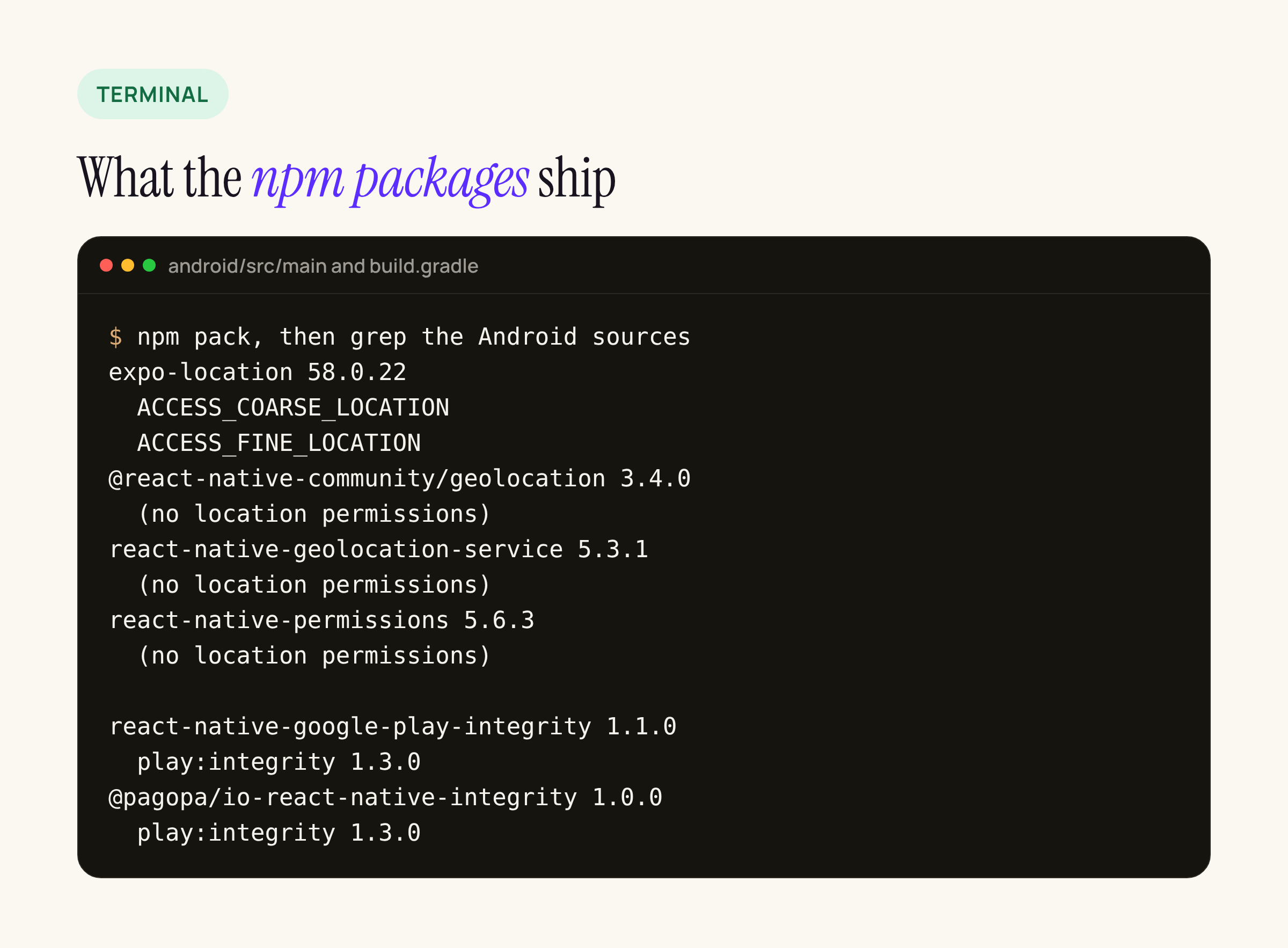
Summary of what we found in the package sources; the full list of packages is in the intro.
expo-location58.0.22 declares bothACCESS_COARSE_LOCATIONandACCESS_FINE_LOCATIONin its ownandroid/src/main/AndroidManifest.xml, and its config plugin adds them again (a comment inplugin/build/withLocation.jssays they “are already added in the library AndroidManifest.xml”). Any app that installs it gets precise location in the merged manifest, and therefore in Play’s declaration flow once it targets API 37.@react-native-community/geolocation,react-native-geolocation-serviceandreact-native-permissionsdeclare no location permissions; the app’s own manifest decides.- None of the eight packages mention
USE_LOCATION_BUTTON,onlyForLocationButtonorandroidx.core.locationbutton. The only “location button” hits arereact-native-maps‘showsMyLocationButton, which is the Google Maps re-centre control, not Android 17’s permission button.
So for now the location button is native work: a small Compose or View wrapper exposed to JavaScript, or a native screen. The Jetpack library is alpha, so pin the version and expect API changes.
Taking precise location off the table
If the app only needs approximate location, or only needs precise location through the button, the manifest is where that is decided. The manifest merger lets the app override what a library adds.
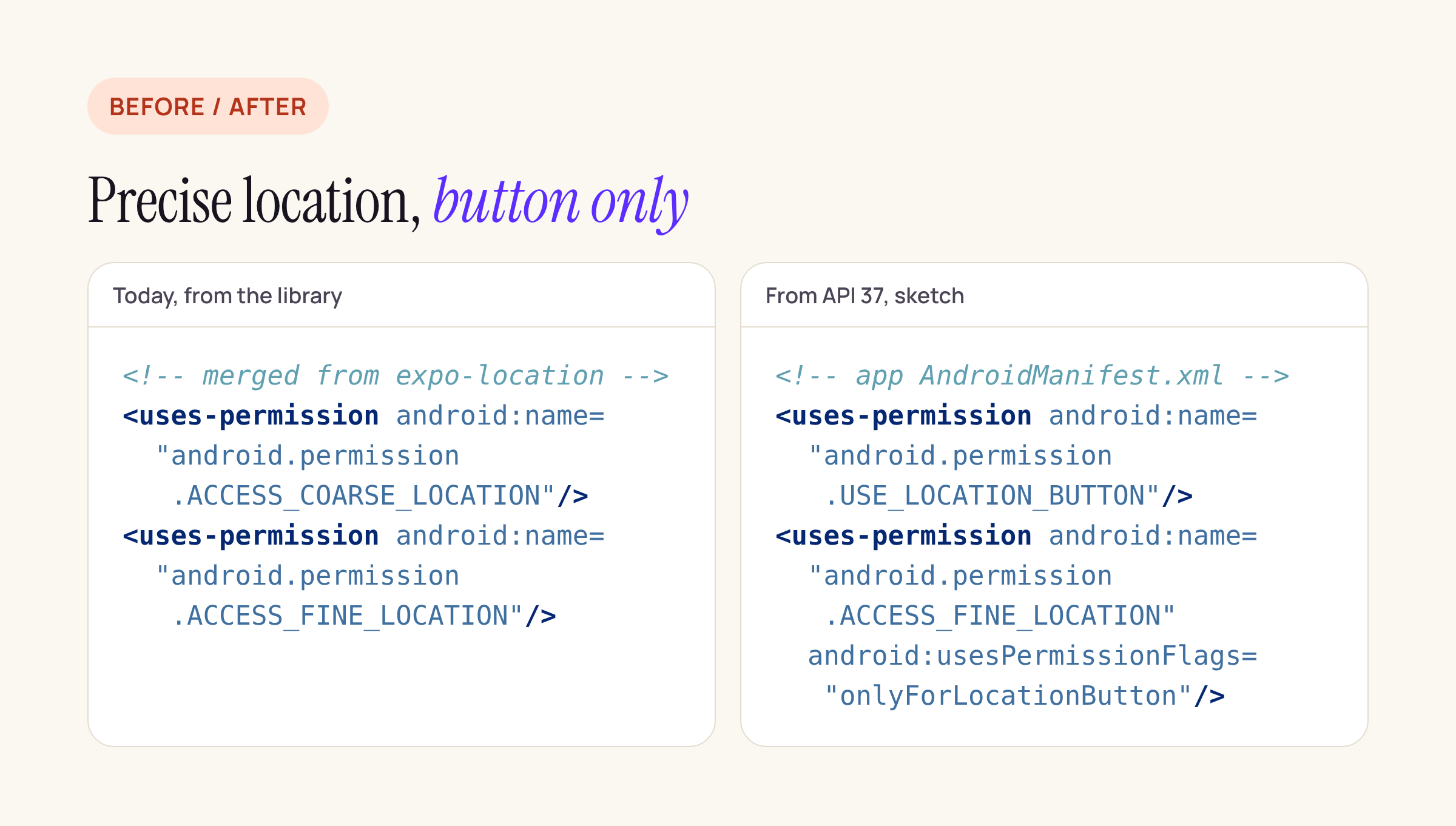
The card is wrapped to fit; the copyable version is below.
<manifest xmlns:android="http://schemas.android.com/apk/res/android"
    xmlns:tools="http://schemas.android.com/tools">

    <uses-permission android:name="android.permission.ACCESS_COARSE_LOCATION" />
    <uses-permission android:name="android.permission.USE_LOCATION_BUTTON" />

    <!-- Option A: precise location only through the location button -->
    <uses-permission
        android:name="android.permission.ACCESS_FINE_LOCATION"
        android:usesPermissionFlags="onlyForLocationButton" />

    <!-- Option B: no precise location at all (use instead of A) -->
    <!-- <uses-permission android:name="android.permission.ACCESS_FINE_LOCATION"
         tools:node="remove" /> -->
</manifest>
Treat this as a starting point and check the result where it counts: the merged manifest under app/build/intermediates/merged_manifests/ after ./gradlew :app:processReleaseManifest, and the permissions list Play Console’s App bundle explorer shows for the uploaded bundle. If a library you depend on calls a precise-only API at runtime, removing the permission turns that call into a SecurityException, so search your JavaScript for enableHighAccuracy and Accuracy.Highest style options first.
Play Integrity: what the GrapheneOS thread actually showed
The Hacker News thread of 6 November was about ASN Bank’s app on GrapheneOS. The compatibility report it points to (issue 105), in a 15 June 2026 entry for ASN Bank 1.34.2 and 1.35.1, marks Google Play Integrity API as “No” and says enforcement “still does not appear to be applicable at all”. What broke was dynamic code loading: with GrapheneOS restricting dynamic code loading via both memory and storage, the app crashed on opening; other combinations worked. That is a different failure, and a useful reminder: a bank app can lock out users through its packer or obfuscator long before Play Integrity says anything.
When an app does use Play Integrity, the verdict that matters is deviceIntegrity.deviceRecognitionVerdict, an array of labels (verdicts reference):
| Label | What Google says it means |
|---|---|
MEETS_ |
Passes basic integrity checks; the bootloader may be unlocked. On Android 13+ it only needs a Google-provided attestation root of trust. |
MEETS_ |
Genuine, certified Android device. On Android 13+ this includes hardware-backed proof that the bootloader is locked. |
MEETS_ |
Certified device with a recent security update. On Android 13+: device integrity plus security updates in the last year for all partitions. |
MEETS_ |
Emulator with Play services, Play Games for PC only. |
Google also notes that the optional basic and strong labels are returned on Android 13+ only when the app is licensed.
A decision table for a bank login, as a starting point to agree with the bank’s risk team:
| Server sees | Sensible response |
|---|---|
Wrong request, or app not PLAY_ |
Refuse: the token is not for this request or this build |
MEETS_ present |
Allow normal login |
Only MEETS_ |
Allow read-only banking, step up for payments (OTP, limits) |
| No label, or no Play services | Do not crash. Show a clear message and an alternative channel |
Blocking on MEETS_STRONG_INTEGRITY means refusing genuine phones whose maker stopped shipping security updates more than a year ago. That is a business decision, not a default.
The RN Play Integrity wrappers
Both npm wrappers we unpacked use the standard request type (StandardIntegrityManager.prepareIntegrityToken, then a request with setRequestHash), which Google’s overview describes as a few hundred milliseconds after a warm-up of a few seconds, with replay protection handled by Play. react-native-google-play-integrity 1.1.0 also keeps the classic nonce-based IntegrityTokenRequest path.
Both default to com.google.android.play:integrity:1.3.0; Google’s setup page lists 1.6.0. react-native-google-play-integrity reads a playIntegrityVersion Gradle extra, so the app can raise it without patching the package:
// android/build.gradle
buildscript {
    ext {
        playIntegrityVersion = "1.6.0"
    }
}
@pagopa/io-react-native-integrity hardcodes the version; declaring implementation "com.google.android.play:integrity:1.6.0" in the app module lets Gradle’s conflict resolution pick the newer one. @react-native-firebase/app-check 27.1.1 takes the Play Integrity provider from the Firebase BOM instead.
Keep the default quota in mind too: 10,000 requests a day across all installs unless you ask Google for more, per the overview. Request a token at login and before payments, not on every screen.
What to check in your own app before 27 January
- Open the merged release manifest and list every location permission and where it came from (
expo-locationis the common surprise). - Decide per screen: coarse is enough, the location button, or a declared need for precise location. Prepare the Play Console declaration text now that the form is open.
- Remove geofencing from any foreground service and move it to the Geofence API.
- If you use Play Integrity, raise the library to 1.6.0, confirm the server checks
requestHashandappRecognitionVerdict, and write down what eachdeviceRecognitionVerdictoutcome does. - Test the app with Play services missing and confirm it shows a message instead of crashing; check that your obfuscator or packer does not depend on dynamic code loading from storage.