Short version: Kotlin 2.5.0-RC (released 11 November 2026) moves Swift export from Alpha to Beta and replaces the swiftExport {} block with export { swift {} }. The old block still works in 2.5.0 with a deprecation warning, the Gradle plugin’s own message says it “will become an error in Kotlin 2.5.20 and will be removed in Kotlin 2.6.0”, and using both blocks in one project is already an error. The step that is easy to miss: in the new DSL, the umbrella module has to call xcodeIntegration(), because that call is what registers the embedSwiftExportForXcode task your Xcode build phase runs.
This is a source and docs review. We read the Kotlin Gradle plugin sources at the tags v2.4.21 and v2.5.0-RC in JetBrains/kotlin, the Kotlin 2.5.0-RC what’s new page, the current Swift export docs, and ran a small checker over two commits of JetBrains’ swift-export-sample: d21f61f (Kotlin 2.4.10, old DSL) and 654a686 (Kotlin 2.5.0-Beta2, new DSL). Kotlin 2.5.0 final is listed on the releases page as “Planned for December 2026”.
Why we did this: we write Kotlin for Android (BMDB on Android TV, Peepal, Shopkeeper) and Swift for iOS, and sharing Kotlin with an iOS app without the Objective-C layer is the reason Swift export exists. Our Kotlin 2.4 to 2.5 RC notes for Android covered the Android half of this release; this is the iOS half.
Why move from the Objective-C framework at all
The classic setup exports Kotlin as an Objective-C framework that Swift then imports. Swift export skips Objective-C and generates Swift modules directly. The Swift export docs list what that buys an iOS developer:
- Each Kotlin module becomes its own Swift module, and Kotlin packages are preserved, so no prefixed or mangled names.
- Nullable primitives stay nullable primitives: an
Int?no longer arrives as a boxedKotlinInt. - Overloaded Kotlin functions can be called from Swift without ambiguity.
- Suspending functions can be called from Swift, and
kotlinx.coroutinesflows arrive as Swift’sAsyncSequence.
The same page lists the known gaps, worth reading before you commit a project: types that inherit from List, Set or Map are ignored, generic type parameters are erased to their upper bounds, and Swift export works only in projects that use direct integration of the Kotlin framework into the Xcode project (the default for projects created with the KMP wizard).
The DSL, before and after
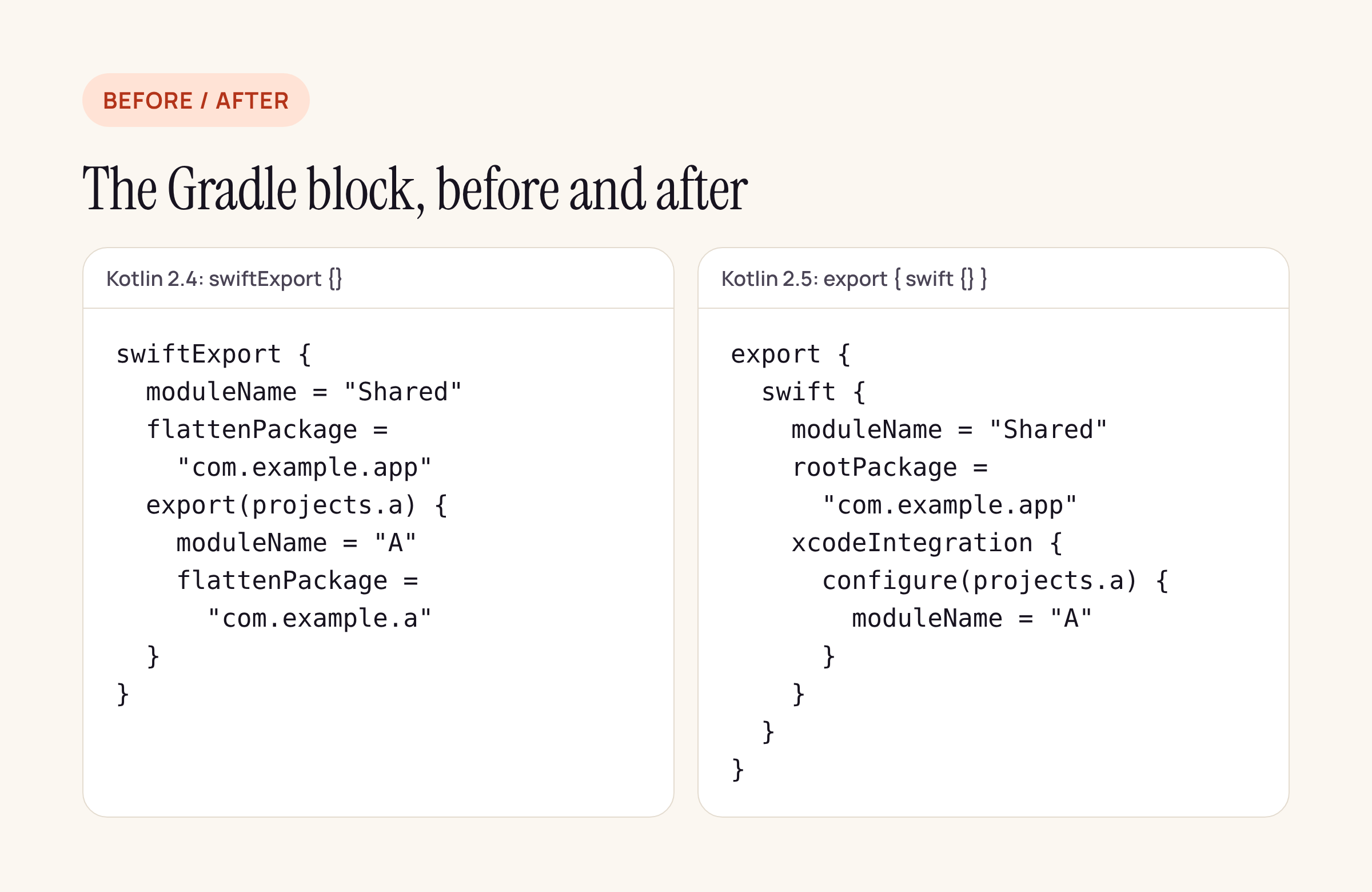
The same module and one exported dependency, in both DSLs.
The 2.5.0-RC what’s new page gives this mapping. We checked each row against the plugin source at v2.5.0-RC:
Kotlin 2.4: swift |
Kotlin 2.5: export { swift {} } |
|---|---|
swift |
export { swift { } } |
flatten |
root |
export( |
nothing: api dependencies are exported automatically |
export( to rename a dependency |
xcode |
configure { free |
removed |
| (implicit: using the block wires up Xcode) | xcode |
Three behaviours behind that table:
Dependencies follow your Gradle scopes. An api dependency is exported as its own Swift module without any extra call. JetBrains’ sample at 654a686 shows the other cases with SwiftExportVisibility: an implementation dependency can be forced into its own module with visibility = SwiftExportVisibility.EXPOSED, or kept out of Swift with SwiftExportVisibility.HIDDEN (the sample does this for Koin, whose types leak into its API).
Library authors can ship the settings. A module can now publish its own moduleName and rootPackage, and consumers pick them up automatically. In the plugin source (SetupSwiftExportDSL.kt), setting either property in a module’s export { swift {} } block registers a metadata task and shares the values with consumers. That is why the sample’s module-a has its own small export { swift {} } block and the umbrella module no longer repeats its name.
The opt-in stays. Every type in the new DSL (the swift function on ExportExtension, and SwiftExportConfigurationDsl) is still marked @ExperimentalSwiftExportDsl, a warning-level opt-in, in v2.5.0-RC. Beta is the stability label of the feature, not of the Gradle API, so keep @OptIn(ExperimentalSwiftExportDsl::class) on the block as the sample does.
A full umbrella module as a starting point to adapt (Kotlin 2.5.0-RC, module and package names are placeholders):
import org.jetbrains.kotlin.gradle.swiftexport.ExperimentalSwiftExportDsl

kotlin {
    iosArm64()
    iosSimulatorArm64()

    export {
        @OptIn(ExperimentalSwiftExportDsl::class)
        swift {
            moduleName = "Shared"
            rootPackage = "com.example.app"
            // Registers :shared:embedSwiftExportForXcode
            xcodeIntegration {
                configure(projects.featureA) {
                    moduleName = "FeatureA"
                    rootPackage = "com.example.featurea"
                }
            }
        }
    }

    sourceSets.commonMain.dependencies {
        api(projects.featureA)        // exported as its own Swift module
        implementation(libs.koin.core)
    }
}
The Xcode build phase: the part that breaks quietly
With the old DSL, an Xcode project switches from the Objective-C framework to Swift export by replacing the embedAndSignAppleFrameworkForXcode task in the Run Script phase with:
./gradlew :shared:embedSwiftExportForXcode
That does not change in 2.5. What changes is when the task exists. In v2.5.0-RC, isSwiftExportXcodeIntegrationActivated() in SetupSwiftExportDSL.kt returns true for the new DSL only when xcodeIntegration was called; the source comment says “an exported module doesn’t have to be integrated into Xcode, only the umbrella module does.” If you port the block and leave out xcodeIntegration() in the umbrella module, the Gradle task that your Xcode Run Script phase calls is never registered, so the problem shows up in the Xcode build, not in a Gradle sync. The plugin’s deprecation warning spells out the same step: “call ‘xcodeIntegration()’ to register the task that embeds Swift Export’s output into your Xcode project.”
The same source keeps one compatibility path: a project with no Swift export block at all still gets embedSwiftExportForXcode registered in 2.5, and a TODO in the source marks that default for removal together with the old DSL in 2.6.0. Adding an explicit xcodeIntegration() now means that change cannot catch you.
There is also a second output in 2.5: swiftPackageIntegration() registers exportDebugSwiftPackage and exportReleaseSwiftPackage, which write a local Swift package (by default into SwiftPackage next to the build script, one subfolder per build type). The source warns that the export “deletes everything in these subdirectories that is not part of the package”, so do not point it at a folder you keep other files in.
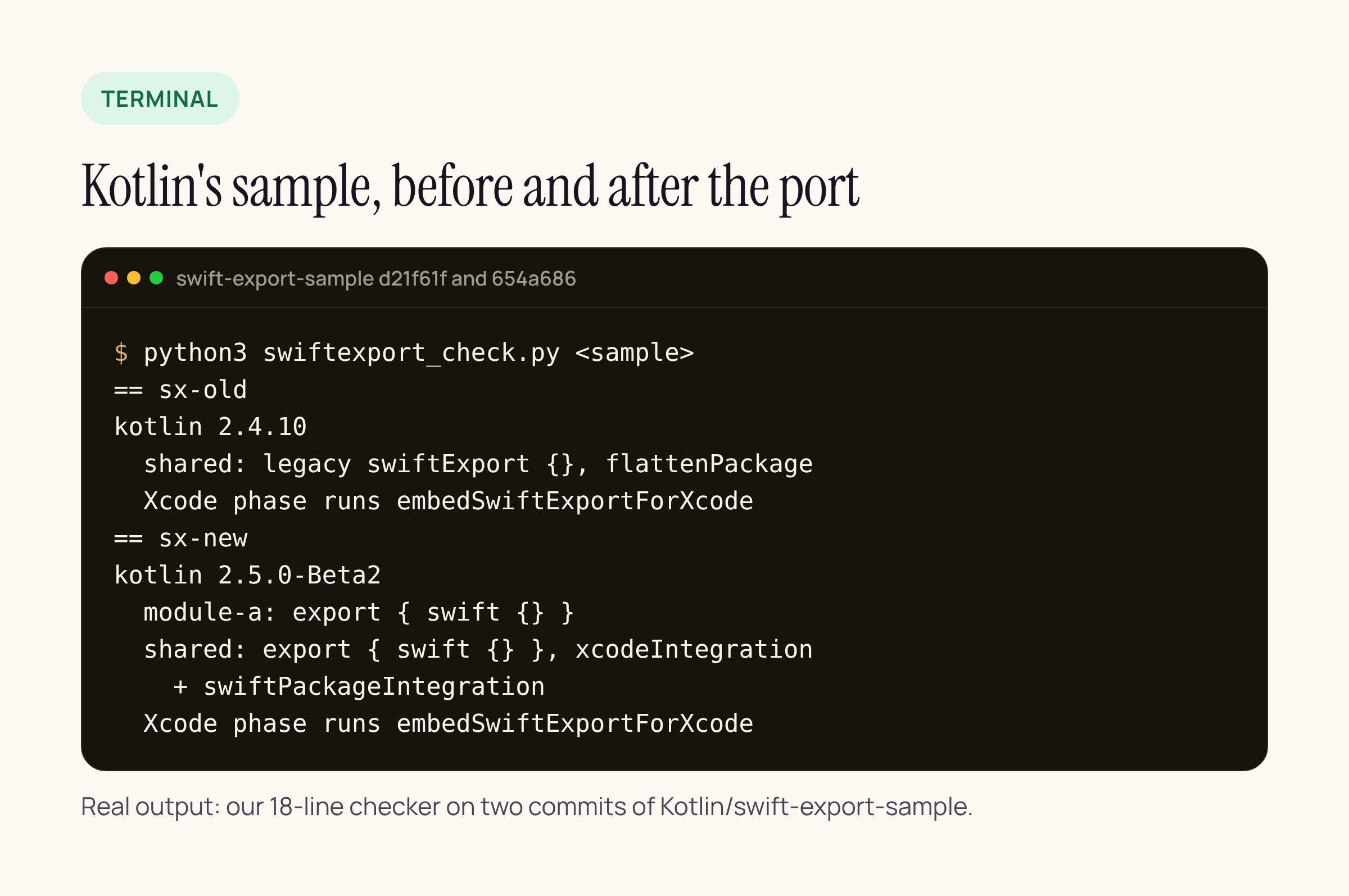
Our 18-line checker reports the DSL in each Gradle module and the task the Xcode phase runs. The Xcode phase is identical before and after the port; the umbrella module gained xcodeIntegration.
The deprecation dates and the JDK 17 rule
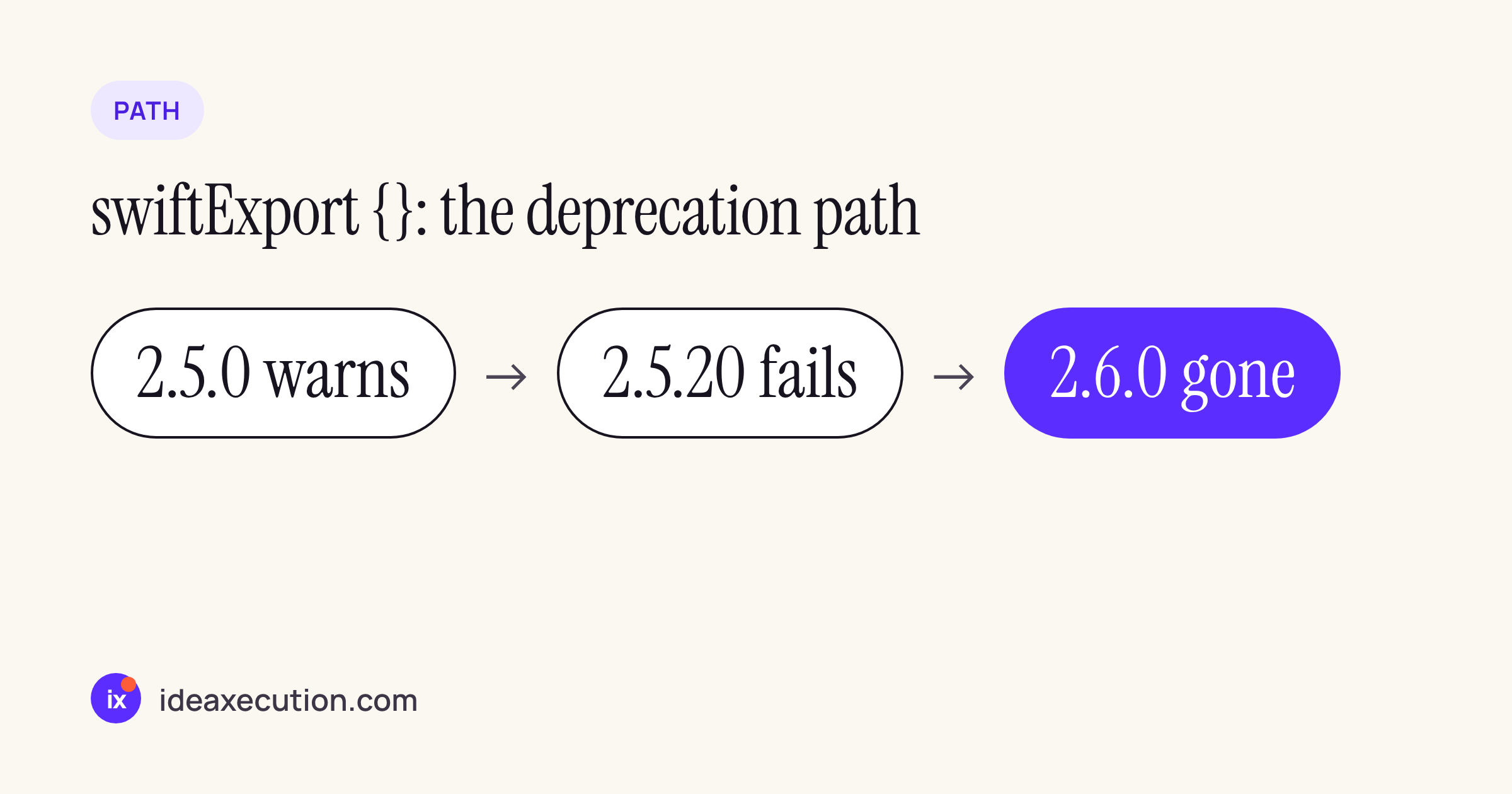
From the plugin’s diagnostics at v2.5.0-RC:
DeprecatedSwiftExportDsl(warning): “The ‘swiftExport { }’ DSL is deprecated. It will become an error in Kotlin 2.5.20 and will be removed in Kotlin 2.6.0.”ConflictingSwiftExportDsls(error, today): a project that configures both blocks fails, because “Only one of them is applied, so part of the configuration is silently ignored.” Port each module in one go; do not leave the old block next to the new one.
Separately, Kotlin 2.5.0-RC makes it an error to run the Kotlin compiler on a JDK older than 17. The what’s new page names the escape hatch, -Xallow-pre-17-runtime-jdk, and says it “will be removed in Kotlin 2.5.20 or 2.6.0 when JDK 17 becomes mandatory.” This hits iOS teams more often than Android ones, because the Gradle step runs inside Xcode’s build phase and on Mac CI runners, which often pick up whatever JDK is first on the path. JetBrains’ own sample pins Temurin 21 in its GitHub Actions workflow. Set JAVA_HOME explicitly in the Run Script phase environment or in gradle.properties (org.gradle.java.home) so Xcode and the terminal use the same JDK.
Porting checklist
- Make sure Gradle runs on JDK 17 or newer everywhere: terminal, Xcode build phase, CI.
- Bump Kotlin to
2.5.0-RC(and to 2.5.0 when it ships). - In each module that sets
moduleNameor a package rule, replaceswiftExport { }withexport { swift { } }and renameflattenPackagetorootPackage. - In the umbrella module, add
xcodeIntegration { }. Move anyexport(dep) { }renames intoconfigure(dep) { }inside it, and deleteexport(...)calls forapidependencies. - Move compiler arguments from the old
configure { }block to the module’scompilerOptions { }. - Keep
@OptIn(ExperimentalSwiftExportDsl::class)on the block. - Leave the Xcode Run Script phase as
./gradlew :shared:embedSwiftExportForXcode, build in Xcode, and compare the generated module names with your Swiftimportlines.