Short version: if you embed Compose screens in an iOS app, Compose Multiplatform 1.13.0-rc01 lets you delete the @OptIn(ExperimentalComposeUiApi::class) around ComposeUIView() and ComposeUIViewConfiguration, because both are stable now. The two headline iOS features, content-based sizing inside SwiftUI and UIKit and native password save and autofill, are real but still sit behind that same opt-in. Plan to keep the annotation on those calls, and add a sizeThatFits forwarder to your SwiftUI wrapper if you want a Compose view to size itself.
This is a source and docs review of Compose Multiplatform 1.12.2 against 1.13.0-rc01. We compared the iOS sources of JetBrains/compose-multiplatform-core at the tags v1.12.2 and v1.13.0-rc01, the stable API dump (ui.klib.api) at both tags, the project changelog for every release in between, and JetBrains’ 1.13 what’s new page (updated 18 Nov 2026).
Why we did this: we ship Kotlin and Compose on Android (BMDB on Android TV, Peepal, Shopkeeper) and native iOS apps next to them. When a shared Compose screen lands inside an iOS app, the iOS layer is where the surprises are, so that is the side of this release we read line by line.
Which version this is about
The what’s new page is titled “What’s new in Compose Multiplatform 1.13.0-rc01”, but its GitHub link points at the v1.13.0-beta01 release. The tags tell the real story: both compose-multiplatform and compose-multiplatform-core carry a v1.13.0-rc01 tag, and the changelog’s top entry is “1.13.0-rc01 (November 2026)”. Everything below compares v1.12.2 with v1.13.0-rc01.
The changelog splits the 1.13 work across five entries (alpha01, alpha02, beta01, beta02, rc01). Two notes in alpha02 matter for any project before you touch iOS code:
- “Kotlin version has been upgraded to 2.4.20. The minimal supported Kotlin version for k/native is 2.4.0.”
- On Android, “
compileSdk37.1 is required”.
Material3 in this release is based on Jetpack Material3 1.5.0-rc01, and runtime, UI and foundation on Jetpack Compose 1.13.0-rc01 (dependency table in the changelog). If you also ship the Android side, our Jetpack Compose 1.12 to 1.13 notes cover that half.
ComposeUIView is stable: delete the opt-in
In 1.12.2, both ComposeUIView factory functions in ComposeUIView.uikit.kt carry @ExperimentalComposeUiApi, and so does the ComposeUIViewConfiguration class. In 1.13.0-rc01 the annotations are gone from all three. The stable API dump agrees: ComposeUIView(...) and ComposeUIViewConfiguration appear in compose/ui/ui/api/ui.klib.api at v1.13.0-rc01 and not at v1.12.2. The changelog entry is in alpha02: “Promote the ComposeUIView() factory functions and their ComposeUIViewConfiguration to stable API”.
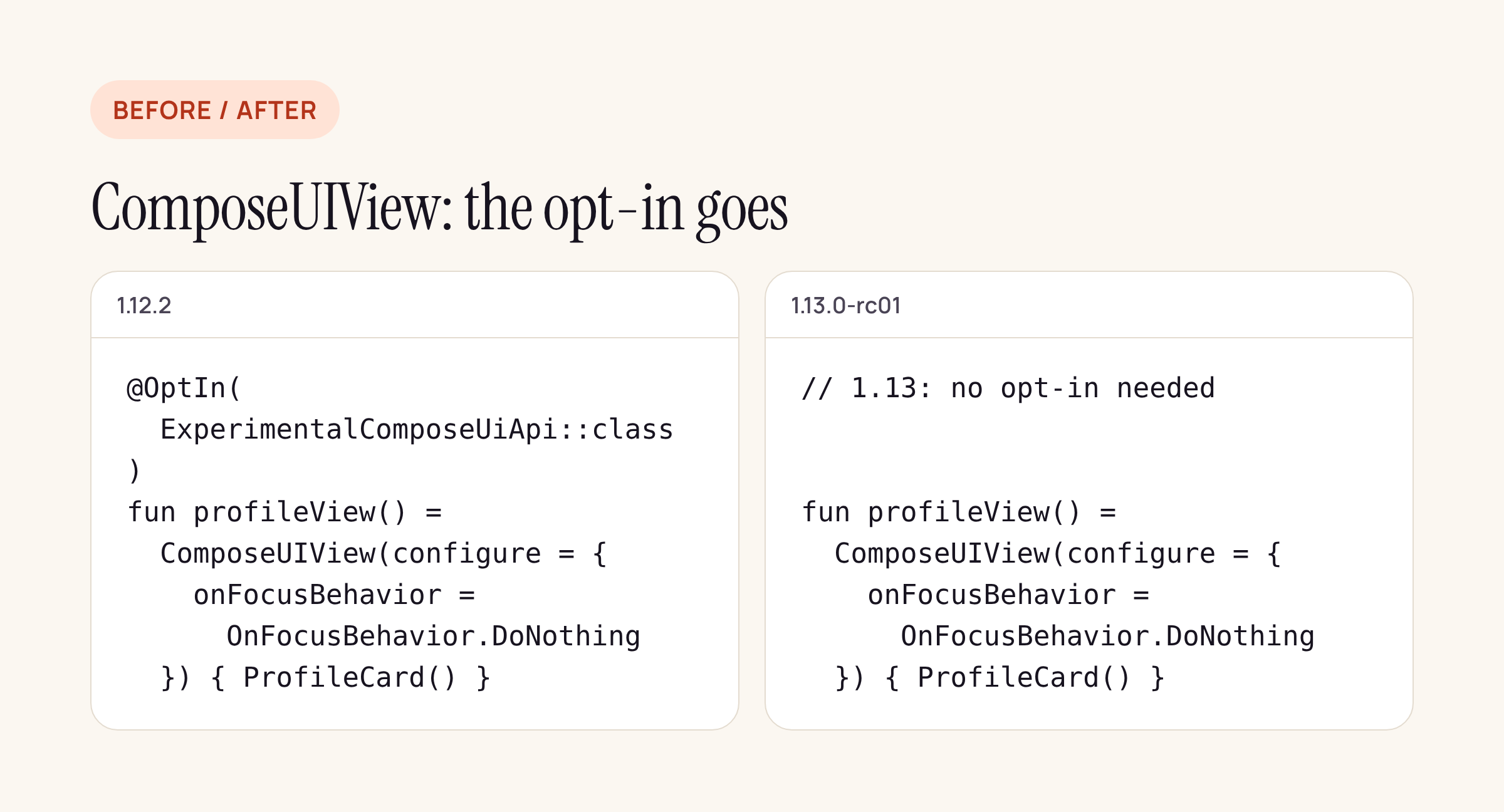
The same factory, before and after. onFocusBehavior was already stable in 1.12.2.
One naming trap: the what’s new page lists the stable item as “configuring it with ComposeUIViewportConfiguration“. No class by that name exists in the iOS sources at v1.13.0-rc01. The class is ComposeUIViewConfiguration, which is what the changelog and the code use. ComposeViewportConfiguration (no “UI”) is the web one. Search your project for the name in the code, not the one on the page.
What to do: remove @OptIn(ExperimentalComposeUiApi::class) from functions that only call ComposeUIView or set stable properties on its configuration. Leave it where the same function also touches anything in the next two sections.
Content-based sizing in SwiftUI and UIKit
This is the change iOS teams asked for: a Compose view hosted in a SwiftUI or UIKit layout can now answer sizeThatFits with the size of its content instead of filling whatever frame it gets. It arrived in 1.13.0-alpha01 and is new against 1.12.2 (the property does not exist in 1.12.2’s ComposeContainerConfiguration).
The switch is ComposeContainerConfiguration.preferredSizeReportingStrategy, with two values:
| Strategy | When to use it (from the source docs) |
|---|---|
Size (default) |
UIKit, and SwiftUI on iOS 16 and later |
Intrinsic |
SwiftUI on iOS 15 and earlier, where UIView does not exist |
Both the property and the PreferredSizeReportingStrategy interface are annotated @ExperimentalComposeUiApi at v1.13.0-rc01 (source). The default needs no code, but setting IntrinsicContentSize does need the opt-in, even though the docs sample for iOS 15 omits it.
SwiftUI on iOS 16 and later
The default works only if your UIViewRepresentable forwards SwiftUI’s proposal. JetBrains’ SwiftUI integration page (10 Nov 2026) shows the pattern. Our condensed version, as a starting point to adapt and compile against your target:
struct ComposeView: UIViewRepresentable {
    let make: () -> UIView

    func makeUIView(context: Context) -> UIView { make() }
    func updateUIView(_ uiView: UIView, context: Context) {}

    @available(iOS 16.0, *)
    func sizeThatFits(_ proposal: ProposedViewSize,
                      uiView: UIView,
                      context: Context) -> CGSize? {
        uiView.sizeThatFits(CGSize(
            width: proposal.width ?? UIView.noIntrinsicMetric,
            height: proposal.height ?? UIView.noIntrinsicMetric))
    }
}
Two details from the docs that are easy to miss. First, the Compose content has to wrap the dimension you want measured: a Box(Modifier.fillMaxSize()) will still report “as big as you let me”. Second, if your Kotlin function returns a UIViewController (the usual ComposeUIViewController { } pattern), put the same method on your UIViewControllerRepresentable as sizeThatFits(_:uiViewController:context:) and call uiViewController.view.sizeThatFits(...).
UIKit
No configuration in Kotlin. The UIKit integration page pins the width with Auto Layout, calls composeView.sizeThatFits in viewDidLayoutSubviews with UIView.noIntrinsicMetric for the height, and copies the result into a height constraint. It also says to call view.setNeedsLayout() after Compose processes a content change, because nothing else triggers the next measurement. If you have hard-coded heights on Compose views inside table or stack layouts today, this is the release where you can remove them, one screen at a time.
Password save and autofill on login screens
The what’s new page says Compose text fields on iOS can now trigger the system prompts to save a login and to autofill it. The calls you make are not new. PlatformImeOptions { textContentType(...) } and isSecureTextEntry(...) already existed in 1.12.2’s PlatformImeOptions.ios.kt, and both are still @ExperimentalComposeUiApi at v1.13.0-rc01.
What changed is underneath. 1.13 adds TextInputContainer.ios.kt (new file, not present at v1.12.2), whose source comment says it “Provides a temporary connection between non-editable text field and iOS text input. Used to support the auto-save/autofill password feature.” That is why the docs insist on keeping both the username and the password field on screen: iOS has to see the pair as one login form, including the field that is not focused.
A sketch of the login fields, following the docs sample (iOS source set, opt-in required):
@OptIn(ExperimentalComposeUiApi::class)
@Composable
fun LoginFields(user: String, onUser: (String) -> Unit,
                pass: String, onPass: (String) -> Unit) {
    Column {
        TextField(user, onUser, keyboardOptions = KeyboardOptions(
            keyboardType = KeyboardType.Email,
            platformImeOptions = PlatformImeOptions {
                textContentType(UITextContentTypeUsername)
            }))
        TextField(pass, onPass,
            visualTransformation = PasswordVisualTransformation(),
            keyboardOptions = KeyboardOptions(
                keyboardType = KeyboardType.Password,
                platformImeOptions = PlatformImeOptions {
                    isSecureTextEntry(true)
                }))
    }
}
Worth knowing from the same source file (SkikoUITextInputTraits.ios.kt): if you set no PlatformImeOptions, KeyboardType.Password and NumberPassword already map to UITextContentTypePassword with secure entry on, and KeyboardType.Email maps to UITextContentTypeEmailAddress. The explicit UITextContentTypeUsername matters because a username field is not always an email field. For the save prompt to offer your domain, the app still needs the usual Associated Domains webcredentials: setup on the iOS side, which Compose does not change.
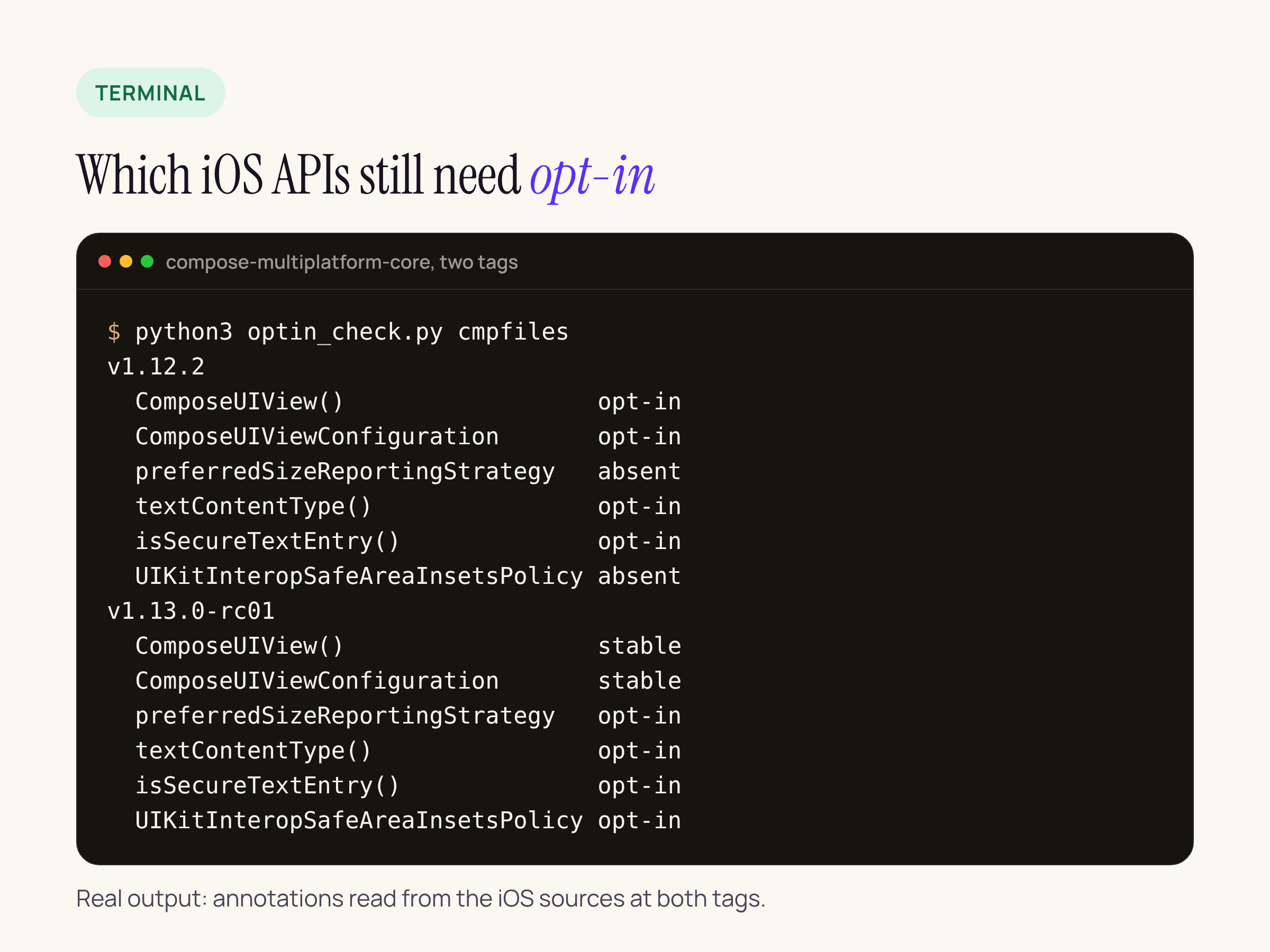
Real output of our 23-line checker, which reads the annotation above each declaration in the iOS sources at both tags.
The rest of the iOS changelog, sorted by who should care
| Change (first release) | Who should care |
|---|---|
UIKit on UIKit, opt-in (beta01) |
Apps embedding UIKit views (maps, video players) inside Compose that fight safe-area insets |
| Dynamic Type font scaling (alpha01) | Everyone: text in Compose screens now follows the accessibility text size, so check fixed-height rows |
| Reduce Motion respected (beta02) | Apps with custom animations: check screens with the setting on |
| Trackpad pan and pinch (alpha02) | iPad apps |
| Writing Tools menu fixed for text inputs (beta02) | Apps with long text fields |
| No full-screen CPU bitmap cleared before each frame (rc01) | Everyone: less main-thread work per frame |
| Keyboard covering the focused field after rotation fixed (alpha02) | Login and form screens |
| Possible Skiko GC deadlocks fixed (beta02) | Everyone |
The 1.13 page lists no breaking changes for iOS. The one deprecation carried over from 1.12 is LocalSystemTheme, now @InternalComposeUiApi; if you read the system theme through it, plan a replacement before it is removed.
What to check in your own app
- Bump Kotlin to at least 2.4.20 (2.4.0 is the floor for Kotlin/Native), then Compose Multiplatform to
1.13.0-rc01. - Remove
@OptIn(ExperimentalComposeUiApi::class)where it only coveredComposeUIVieworComposeUIViewConfiguration. Search forComposeUIViewportConfigurationin any notes or snippets you copied: it is the wrong name. - For each Compose view inside SwiftUI with a hard-coded
.frame(height:), add thesizeThatFitsforwarder, make the content wrap its height, and drop the fixed height. - On login screens: username field with
UITextContentTypeUsername, password withisSecureTextEntry(true), both visible at once, then try the save and autofill prompts on a device with a saved password for your domain. - Run your screens with larger Dynamic Type sizes and with Reduce Motion on, since both now reach Compose content.