
Jetpack Compose 1.13 (BOM 2026.11.01, released 18 Nov 2026) deprecates the value-based BasicTextField, the Material 2 TextField overloads that take value and onValueChange, and VisualTransformation. The replacement is the state-based API: TextFieldState holds the text, InputTransformation filters what the user types, and OutputTransformation formats what is shown, with cursor mapping handled for you. Material 3 1.5.0 has not deprecated its value-based TextField yet, but Material 3 1.6.0-alpha01 already does. The takeaway: port forms now, field by field, starting with any field that uses a VisualTransformation, because that is where the new API removes the most code.
This post maps every old parameter to its replacement, using the Compose release notes and Google’s migration guide, then ports the three fields every banking app has: an amount with Indian digit grouping, an account number in groups of four, and a six-digit OTP box. We also counted the value-based fields left in Google’s own sample apps.
Why we did this: the login and transfer forms in our Beacon-type banking apps are exactly these three fields, and the BOM bump to 2026.11.01 turns every one of them into a deprecation warning.
What is deprecated, and since when
The deprecations landed in 1.13.0-alpha03 (9 Sep 2026) and shipped in the 1.13.0 stable release on 18 Nov 2026. From the foundation release notes:
- “
BasicTextFieldoverloads that acceptvalue, onValueChangeparameters are deprecated. Please migrate to theBasicTextFieldoverload that usesTextFieldStateto hoist its state.” - “
VisualTransformationis also deprecated since it is only exposed through thisTextFieldflavor. Existing transformations should migrate toOutputTransformation.” InputTransformation.maxLengthis deprecated in favour of two new filters,maxLengthTrimandmaxLengthReject.
The Material release notes add the same deprecation for Material 2 text fields. On Material 3, the November release post says the value-based overloads “are not deprecated yet in 1.5.0”, and the Material 3 notes show 1.6.0-alpha01 deprecating TextField and OutlinedTextField with value/onValueChange, plus TextFieldDefaults.DecorationBox. So a Material 3 app sees no warning today and will on the next minor release.
The BOM upgrade itself needs Kotlin 2.2 or newer and compileSdk 37.1, per the release post. Do that first, in its own commit.
The old-to-new mapping
Built from Google’s migration guide (last updated 10 Nov 2026) and the release notes above.
| Value-based (old) | State-based (new) |
|---|---|
value + onValueChange + mutableStateOf |
rememberTextFieldState( |
singleLine = |
lineLimits = |
maxLines = |
TextFieldLineLimits. |
filtering inside onValueChange |
InputTransformation |
InputTransformation. |
maxLengthTrim( or maxLengthReject( |
VisualTransformation + OffsetMapping |
OutputTransformation |
assigning a new value |
setTextAndPlaceCursorAtEnd( |
building a new TextFieldValue |
state. |
| password field with a visual transformation | SecureTextField |
One rule from the user input guide to keep in mind while porting: “Don’t mutate state inside the InputTransformation.transformInput() call.” Validation that used to set an error flag inside onValueChange moves out to wherever you read the state.
The code below follows Google’s documented samples. Treat it as a starting point and compile it against your own Compose BOM; check maxLengthReject and maxLengthTrim against the 1.13 API reference, since the guide’s samples still use the deprecated maxLength.
A shared digits-only filter
All three fields accept digits only. The user input guide’s own filter, written once:
import androidx.compose.foundation.text.input.InputTransformation
import androidx.compose.foundation.text.input.TextFieldBuffer
import androidx.core.text.isDigitsOnly

object OnlyDigits : InputTransformation {
    override fun TextFieldBuffer.transformInput() {
        if (!asCharSequence().isDigitsOnly()) revertAllChanges()
    }
}
revertAllChanges() throws away the edit that broke the rule, so a pasted “12a4” is rejected as a whole instead of half-applied. That matches what most value-based onValueChange filters did with an early return.
Field 1: an amount with Indian digit grouping
The value-based version needed a VisualTransformation with a hand-written OffsetMapping, the part of every banking form that broke cursor movement at some point. With OutputTransformation, you only insert the separators; the guide notes that it “takes care of the offset mapping automatically.”
Indian grouping puts a comma after the last three digits and then every two (1,23,45,678). Inserting from the right keeps the earlier indices valid:
object IndianGrouping : OutputTransformation {
    override fun TextFieldBuffer.transformOutput() {
        var i = length - 3
        while (i > 0) {
            insert(i, ",")
            i -= 2
        }
    }
}

object NoLeadingZeros : InputTransformation {
    override fun TextFieldBuffer.transformInput() {
        while (length > 0 && charAt(0) == '0') delete(0, 1)
    }
}

@Composable
fun AmountField(state: TextFieldState) {
    TextField(
        state = state,
        inputTransformation = OnlyDigits
            .then(NoLeadingZeros)
            .then(InputTransformation.maxLengthReject(9)),
        outputTransformation = IndianGrouping,
        lineLimits = TextFieldLineLimits.SingleLine,
        keyboardOptions = KeyboardOptions(keyboardType = KeyboardType.Number),
        prefix = { Text("₹") },
    )
}
The leading-zero filter is the one from Google’s migration guide. The state holds plain digits (“12345678”), so nothing downstream has to strip commas before parsing. This version handles whole rupees; paise need a decimal-aware filter on top.
Field 2: an account number in groups of four
Same idea, separators every four digits. The migration guide’s credit card sample hard-codes positions 4, 9 and 14; a loop works for any length:
object GroupsOfFour : OutputTransformation {
    override fun TextFieldBuffer.transformOutput() {
        var i = 4
        while (i < length) {
            insert(i, " ")
            i += 5          // four digits plus the space just added
        }
    }
}

@Composable
fun AccountNumberField(state: TextFieldState) {
    OutlinedTextField(
        state = state,
        inputTransformation = OnlyDigits.then(InputTransformation.maxLengthReject(18)),
        outputTransformation = GroupsOfFour,
        lineLimits = TextFieldLineLimits.SingleLine,
        keyboardOptions = KeyboardOptions(keyboardType = KeyboardType.Number),
        label = { Text("Account number") },
    )
}
maxLengthReject refuses the keystroke that would go past the limit; maxLengthTrim keeps the first characters of a longer paste. For an account number, rejecting is safer: a trimmed paste looks valid and is wrong.
Field 3: a six-digit OTP box
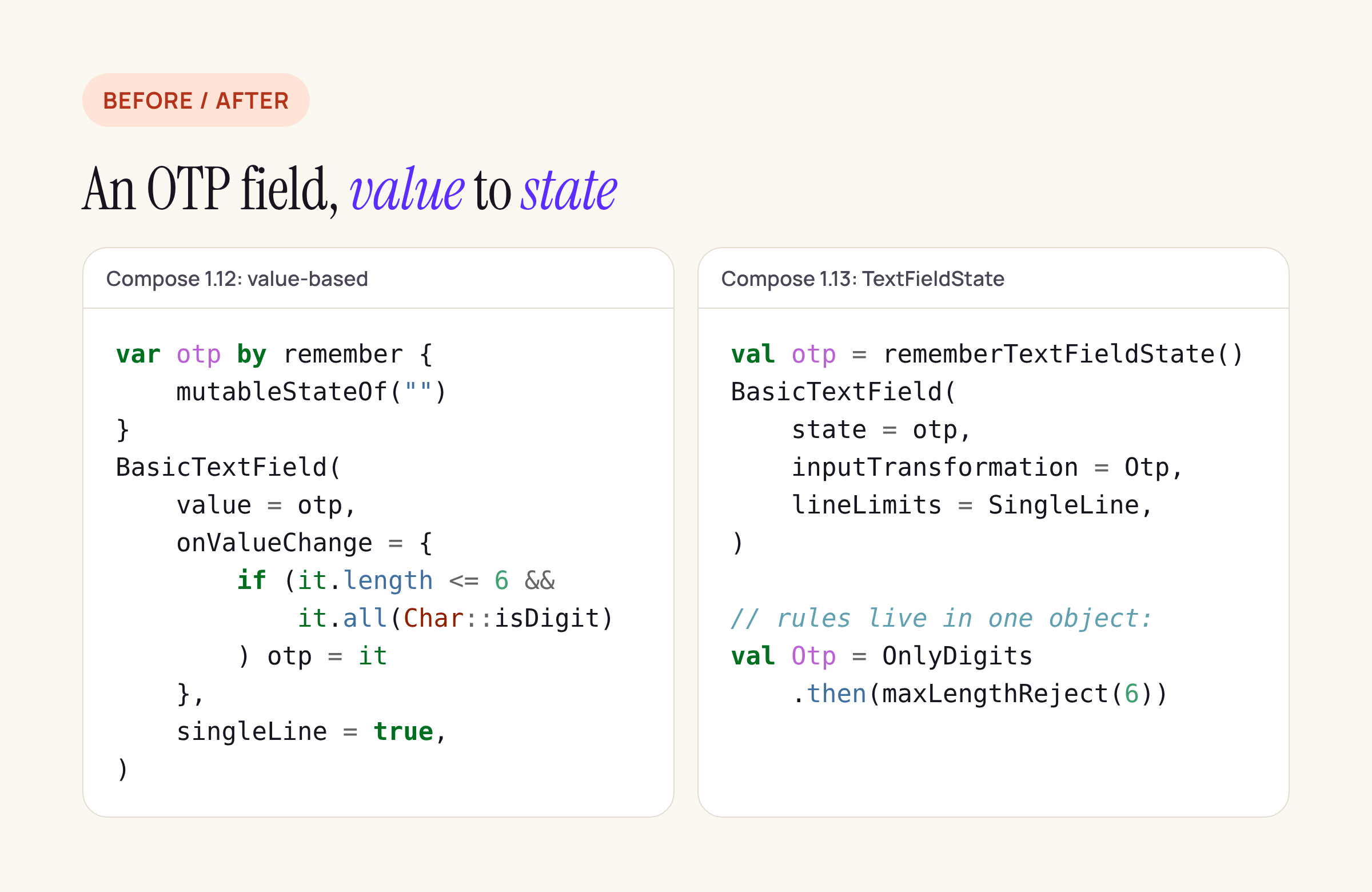
Left: the usual Compose 1.12 OTP field. Right: the same rules as one InputTransformation.
The six separate boxes are drawn by the decorator, which the state-based BasicTextField takes in place of the old decorationBox. The decorator must place innerTextField() exactly once; here it sits invisibly under the boxes so the field still receives focus and keyboard input:
val Otp = OnlyDigits.then(InputTransformation.maxLengthReject(6))

@Composable
fun OtpField(state: TextFieldState) {
    BasicTextField(
        state = state,
        inputTransformation = Otp,
        lineLimits = TextFieldLineLimits.SingleLine,
        keyboardOptions = KeyboardOptions(keyboardType = KeyboardType.NumberPassword),
        decorator = { innerTextField ->
            Box {
                Box(Modifier.alpha(0f)) { innerTextField() }
                Row(horizontalArrangement = Arrangement.spacedBy(8.dp)) {
                    repeat(6) { i ->
                        OtpCell(digit = state.text.getOrNull(i))
                    }
                }
            }
        },
    )
}
OtpCell is your own composable for one box. Because state.text is snapshot state, reading it inside the decorator redraws the boxes on every keystroke without any extra plumbing.
Moving the state into the ViewModel
The migration guide’s recommended pattern keeps the TextFieldState objects in the ViewModel, and says that “keeping a reference to a TextFieldState within your ViewModel is not an inherently bad practice”:
class TransferViewModel : ViewModel() {
    val amount = TextFieldState()
    val account = TextFieldState()
    val otp = TextFieldState()

    val canSubmit: Boolean
        get() = amount.text.isNotEmpty() &&
            account.text.length in 9..18 &&
            otp.text.length == 6
}
Validation reads the state instead of running inside a callback, which is also how you follow the “don’t mutate state in transformInput” rule. Two things change compared with rememberTextFieldState() in the UI: saving and restoring across process death is now yours to handle (the guide calls this out), and if a ViewModel needs a flow of changes, the guide uses snapshotFlow { state.text.toString() }.
To set a value from code, for example an OTP read from the SMS Retriever API, use otp.setTextAndPlaceCursorAtEnd(code) instead of assigning a new value. A callback for text changes, onTextChanged, arrives in foundation 1.14.0-alpha01; it is not part of 1.13.
For the PIN or password on the same screen, SecureTextField replaces the old field with a password visual transformation. Its default obfuscation changed to TextObfuscationMode.System in 1.13.0-alpha03, while the user input guide still lists RevealLastTyped as the mobile default, so set the mode explicitly if your security review cares which one you get.
How much is left in Google’s own samples
To see how common the old API still is, we wrote a short Python counter that finds TextField, OutlinedTextField, BasicTextField and the secure variants in Kotlin files, reads the call’s arguments, and sorts each call into value-based or state-based. We ran it on our Linux test server against android/compose-samples at commit 09aae20 (16 Nov 2026) and android/nowinandroid at 2982e63:
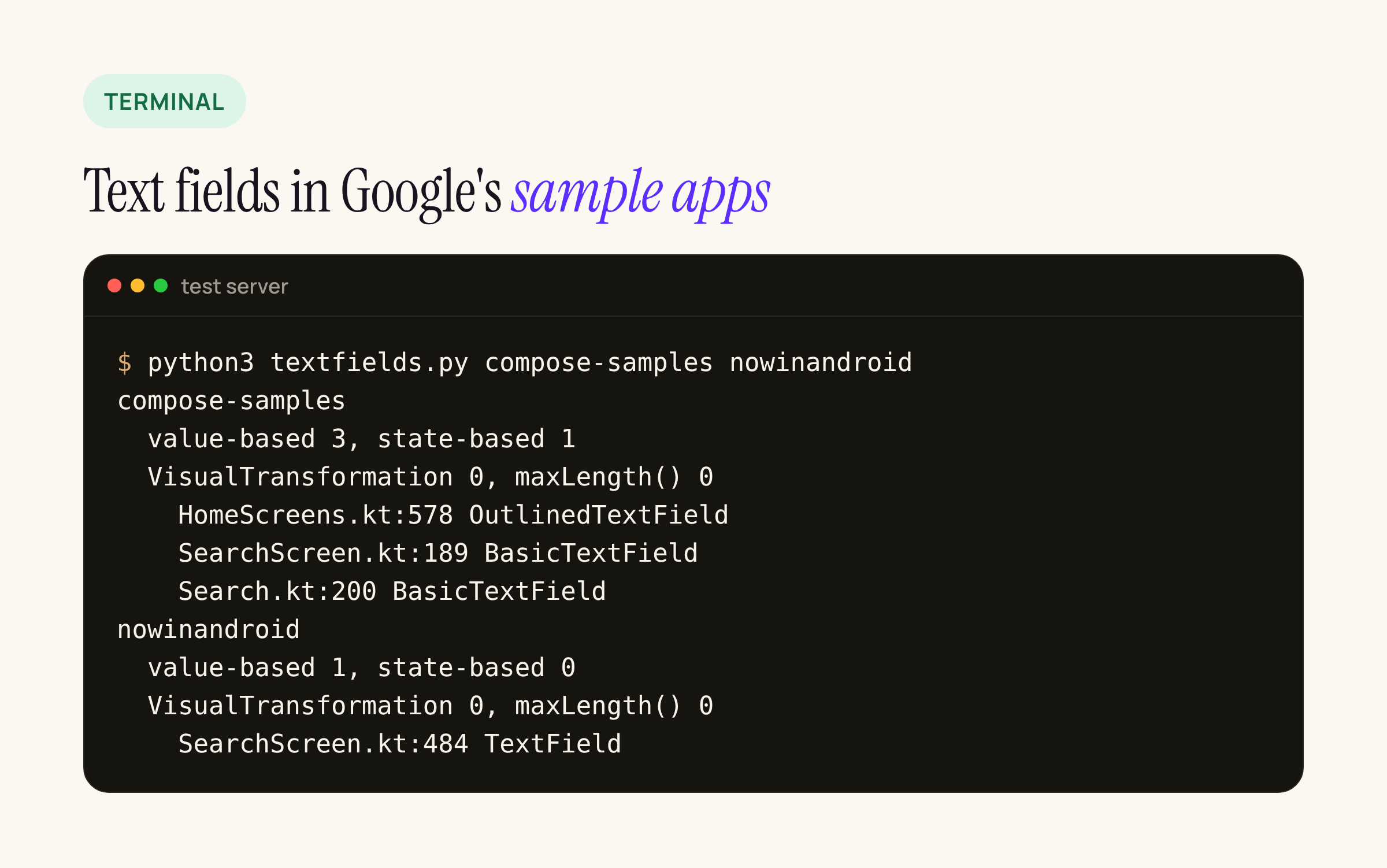
Real output from our test server.
Four of the five text fields in these samples are still value-based: the search fields in JetNews, Jetcaster TV, Jetsnack and Now in Android. Only Jetchat’s composer uses TextFieldState. None of them uses VisualTransformation, so each port is the simple first row of the mapping table. The samples still pin BOMs from September 2026 and earlier, so they show no warning yet. A banking app with formatted amount and account fields has more work per field than any of these.
The counter is short enough to run on your own project:
#!/usr/bin/env python3
"""Count Compose text fields by API flavour: value-based (value/onValueChange) or state-based (TextFieldState)."""
import re, sys, pathlib, collections
CALL = re.compile(r"\b(BasicTextField|OutlinedTextField|TextField|SecureTextField|OutlinedSecureTextField)\s*\(")
def args(src, i):                      # text between the call's balanced parentheses
    depth, j = 0, i
    while j < len(src):
        depth += src[j] == "("; depth -= src[j] == ")"
        if depth == 0: return src[i:j]
        j += 1
    return ""
for root in sys.argv[1:]:
    n = collections.Counter(); hits = []
    for f in pathlib.Path(root).rglob("*.kt"):
        s = f.read_text(errors="ignore")
        if "import androidx.compose" not in s: continue
        n["VisualTransformation"] += len(re.findall(r"\bVisualTransformation\b", s))
        n["maxLength("] += len(re.findall(r"InputTransformation\.maxLength\(", s))
        for m in CALL.finditer(s):
            a = args(s, m.end() - 1)
            if re.search(r"\bstate\s*=", a): kind = "state"
            elif re.search(r"\bonValueChange\b|\bvalue\s*=", a): kind = "value"
            else: continue           # a declaration or a wrapper call, not a field
            n[kind] += 1
            if kind == "value": hits.append(f"{f.name}:{s[:m.start()].count(chr(10)) + 1} {m.group(1)}")
    print(f"{root}\n  value-based {n['value']}, state-based {n['state']}\n"
          f"  VisualTransformation {n['VisualTransformation']}, maxLength() {n['maxLength(']}")
    for h in hits: print("    " + h)
It works on source text, so a wrapper composable of your own that forwards value is counted where it is called, not where it is declared. Good enough to size the job.
Porting order we suggest
- Bump the BOM to 2026.11.01 with Kotlin 2.2 and compileSdk 37.1, and nothing else, in one commit.
- Run the counter and list every value-based field and every
VisualTransformation. - Port fields with a
VisualTransformationfirst: anOutputTransformationreplaces the offset mapping and fixes cursor bugs on the way. - Move field state into the ViewModel where the screen already has one, and move validation out of the input callbacks.
- Replace
maxLengthwithmaxLengthRejectormaxLengthTrim, choosing per field. - On Material 3, port now even without a warning: 1.6.0 will add one.