If your mobile app talks to Firestore or Cloud Storage straight from the client, your security rules are the only thing between a stranger and your users’ data. Write tests for them and run those tests in CI against the Firebase emulator: no live Firebase project, no real data, and a rule change that opens a hole fails the build. Below is the suite we use as a starting point (nine tests, five access patterns), run with firebase-tools 15.36.0, @firebase/rules-unit-testing 5.0.2, the firebase JS SDK 12.19.0 and mocha 12 on Node 22.23.4, OpenJDK 21 and Ubuntu 24.04. Then we broke the rules five ways and recorded which tests caught each break.
Why we did this: our consumer React Native apps (Peepal, Shopkeeper) and the BMDB sync keep user data in Firestore and Storage, and a public research write-up this month showed what happens when nobody checks the access rules on a client-facing backend.
What happened with the Lovable apps
German security firm Crissy Field looked at 159,041 projects built with Lovable, an AI app builder, taken from the Common Crawl archive. Per Techzine’s report of 4 November 2026 and Cybernews, 34,545 of them used Supabase, and 24,664 of those returned records to anyone who loaded the page. The exposed data included more than 1,000 records with passport numbers at one provider and over 200,000 chat messages on a forum. Cybernews writes that the flaws “seem to stem from unconfigured or missing Row Level Security rules in backend databases rather than a hack of the Lovable AI platform itself.” The researchers used only the key each page hands to the browser, with read-only requests. The original research is at crissyfield.de.
Supabase is not Firebase, but the shape of the failure is the same. The client ships a key that is public by design, so the server-side rules decide everything. In Firebase those rules are firestore.rules and storage.rules.
The data model and the rules we test
A small model that looks like a consumer app with a KYC step:
users/{uid}: a profile with name and phone number. Only the owner reads or writes it, and nobody can set arolefield on themselves.messages/{id}: a thread with amembersarray. Only members can read it.- Storage
kyc/{uid}/{file}: an identity scan. Only the owner can read or upload it; uploads must be images under 5 MB.
rules_version = '2';
service cloud.firestore {
  match /databases/{db}/documents {

    function signedIn() { return request.auth != null; }
    function isUser(uid) { return signedIn() && request.auth.uid == uid; }

    match /users/{uid} {
      allow read: if isUser(uid);
      allow create, update: if isUser(uid)
        && !request.resource.data.keys().hasAny(['role']);
    }

    match /messages/{id} {
      allow get, list: if signedIn()
        && request.auth.uid in resource.data.members;
      allow create: if signedIn()
        && request.auth.uid == request.resource.data.from
        && request.auth.uid in request.resource.data.members;
    }
  }
}
rules_version = '2';
service firebase.storage {
  match /b/{bucket}/o {
    match /kyc/{uid}/{file} {
      allow read: if request.auth != null
        && request.auth.uid == uid;
      allow write: if request.auth != null
        && request.auth.uid == uid
        && request.resource.size < 5 * 1024 * 1024
        && request.resource.contentType.matches('image/.*');
    }
  }
}
The test suite
@firebase/rules-unit-testing gives you three kinds of client: an unauthenticated one, one signed in as a given user ID, and a setup context with rules switched off for seeding data. The Firebase unit test guide documents initializeTestEnvironment, authenticatedContext, unauthenticatedContext, assertSucceeds and assertFails. The setup:
import { readFileSync } from 'node:fs';
import { initializeTestEnvironment, assertFails, assertSucceeds }
  from '@firebase/rules-unit-testing';
import { doc, getDoc, setDoc, collection, getDocs, query, where }
  from 'firebase/firestore';
import { ref, uploadString, getBytes } from 'firebase/storage';

let env;
const FS = process.env.FS_RULES || 'firestore.rules';
const ST = process.env.ST_RULES || 'storage.rules';

before(async () => {
  env = await initializeTestEnvironment({
    projectId: 'demo-ixn-rules',
    firestore: { rules: readFileSync(FS, 'utf8'), host: '127.0.0.1', port: 8080 },
    storage: { rules: readFileSync(ST, 'utf8'), host: '127.0.0.1', port: 9199 },
  });
});
after(async () => { await env.cleanup(); });

beforeEach(async () => {
  await env.clearFirestore();
  await env.withSecurityRulesDisabled(async (ctx) => {
    const db = ctx.firestore();
    await setDoc(doc(db, 'users/alice'), { name: 'Alice', phone: '+91 0000000001' });
    await setDoc(doc(db, 'users/bob'), { name: 'Bob', phone: '+91 0000000002' });
    await setDoc(doc(db, 'messages/m1'), { from: 'alice', members: ['alice', 'bob'], text: 'hi' });
    await setDoc(doc(db, 'messages/m2'), { from: 'carol', members: ['carol', 'dave'], text: 'private' });
    await uploadString(ref(ctx.storage(), 'kyc/alice/passport.jpg'), 'not-a-real-scan', 'raw',
      { contentType: 'image/jpeg' });
  });
});

const alice = () => env.authenticatedContext('alice');
const bob = () => env.authenticatedContext('bob');
const anon = () => env.unauthenticatedContext();
The FS_RULES and ST_RULES variables let the same tests run against any rules file, which is how we tried the broken versions below. The project ID starts with demo-, so the emulator never needs a real Firebase project.
Each test is one sentence about who may do what. Note that every “cannot” test has a matching “can” test, so a rules file that simply denies everything does not pass:
describe('2. another signed-in user', () => {
  it('cannot read Alice\'s profile', async () => {
    await assertFails(getDoc(doc(bob().firestore(), 'users/alice')));
  });
  it('Alice can read her own profile', async () => {
    await assertSucceeds(getDoc(doc(alice().firestore(), 'users/alice')));
  });
});

describe('4. listing messages', () => {
  it('a list without a member filter is refused', async () => {
    await assertFails(getDocs(collection(alice().firestore(), 'messages')));
  });
  it('a list filtered to her own threads works', async () => {
    const q = query(collection(alice().firestore(), 'messages'),
      where('members', 'array-contains', 'alice'));
    await assertSucceeds(getDocs(q));
  });
});

describe('5. storage', () => {
  it('Bob cannot download Alice\'s KYC scan', async () => {
    await assertFails(getBytes(ref(bob().storage(), 'kyc/alice/passport.jpg')));
  });
});
The other groups follow the same pattern: an anonymous read of a profile, Bob writing Alice’s profile, Alice writing role: 'admin' into her own profile, and Alice downloading her own scan.
The list test matters because Firestore checks a query against everything it could return, not the documents it happens to find. Firebase’s query rules guide puts it as rules are not filters: a query that could include a document the user cannot read fails as a whole. So the app must query with the same constraint the rule checks.
Running it
One command starts the Firestore and Storage emulators, runs mocha, and shuts them down:
npx firebase emulators:exec --only firestore,storage \
  --project demo-ixn-rules \
  "npx mocha --timeout 20000 test/rules.test.mjs"
The emulators run on Java, so the machine or CI runner needs a JDK (we used OpenJDK 21). The firebase.json next to the rules only names the two rules files and the ports (8080 for Firestore, 9199 for Storage). With the correct rules, all nine pass:
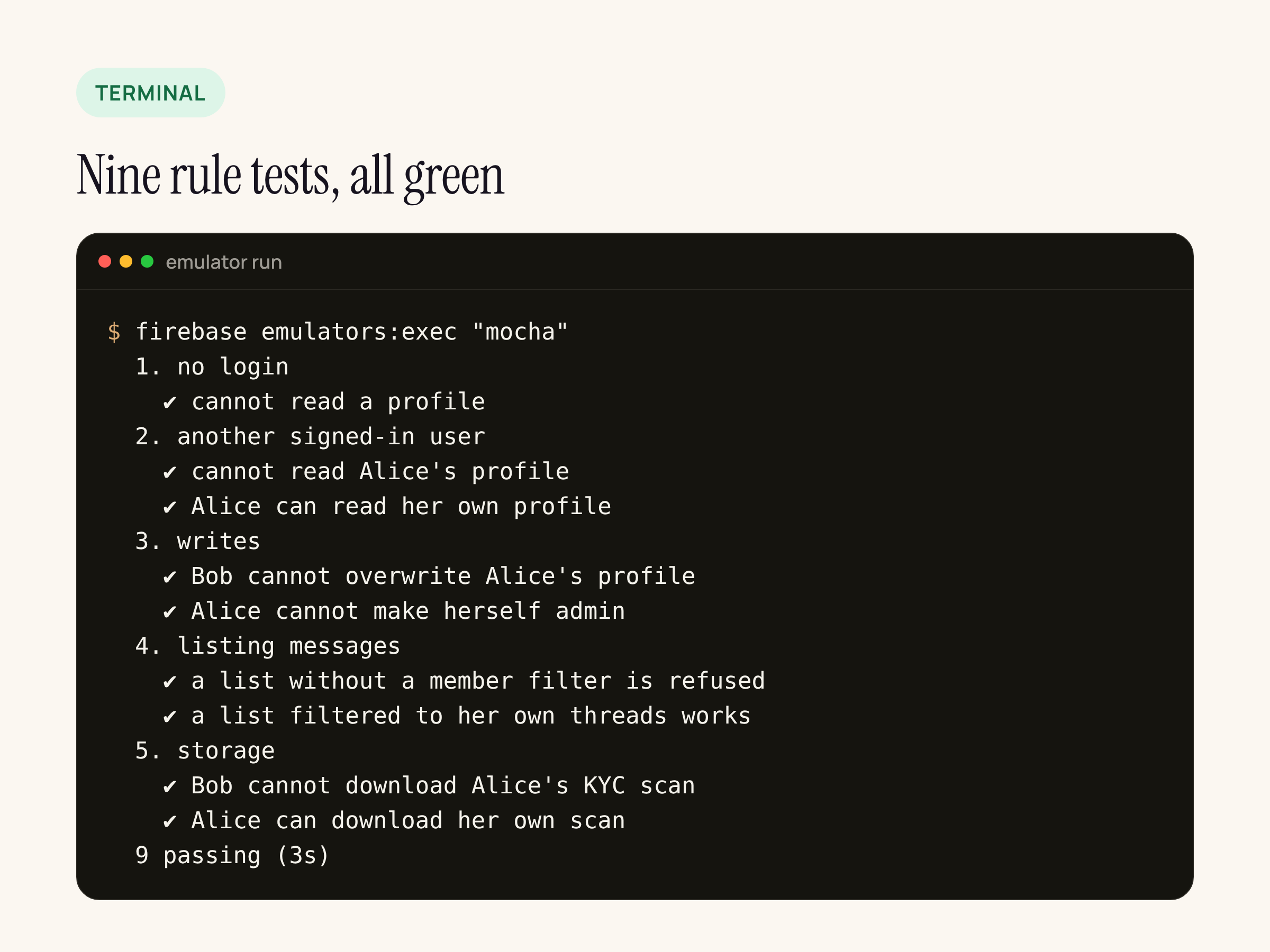
Real output from our test server, timings removed.
Five rule mistakes and the tests that catch them
We wrote five broken versions of the rules, each one a pattern that shows up in real projects, and ran the unchanged suite against each. Every count below comes from those runs. In short: test mode lets anyone read and write everything; login-only lets any account do the same; the other three each open one path.
| Broken rule | Tests that failed |
|---|---|
Test mode: if true on every document | 5 of 9: anonymous read, cross-user read and write, admin role, unfiltered list |
Login only: if request.auth != null on every document | 4 of 9: cross-user read and write, admin role, unfiltered list |
Owner check, no check on the role field | 1 of 9: the admin role test |
allow list: if signedIn() on messages | 1 of 9: the unfiltered list test |
| Storage read for any signed-in user | 1 of 9: Bob downloading Alice’s scan |
The login-only version is the one to look at twice. It reads like a security rule, and every screen in the app works with it, but it fails four tests:
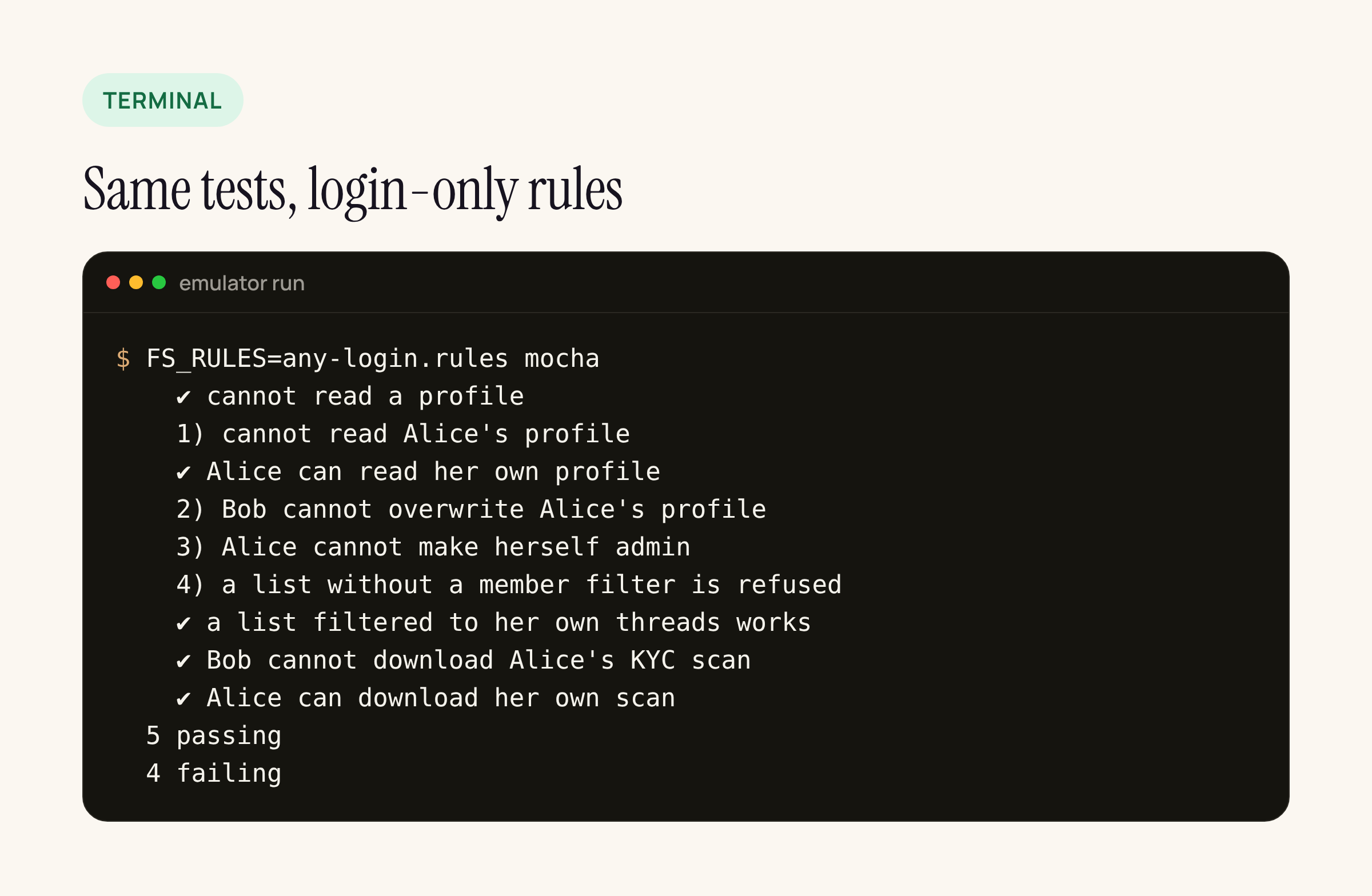
Real output from our test server: the same suite against the login-only rules.
The fix is to tie every rule to the document’s owner or members, not to the fact that someone has an account:
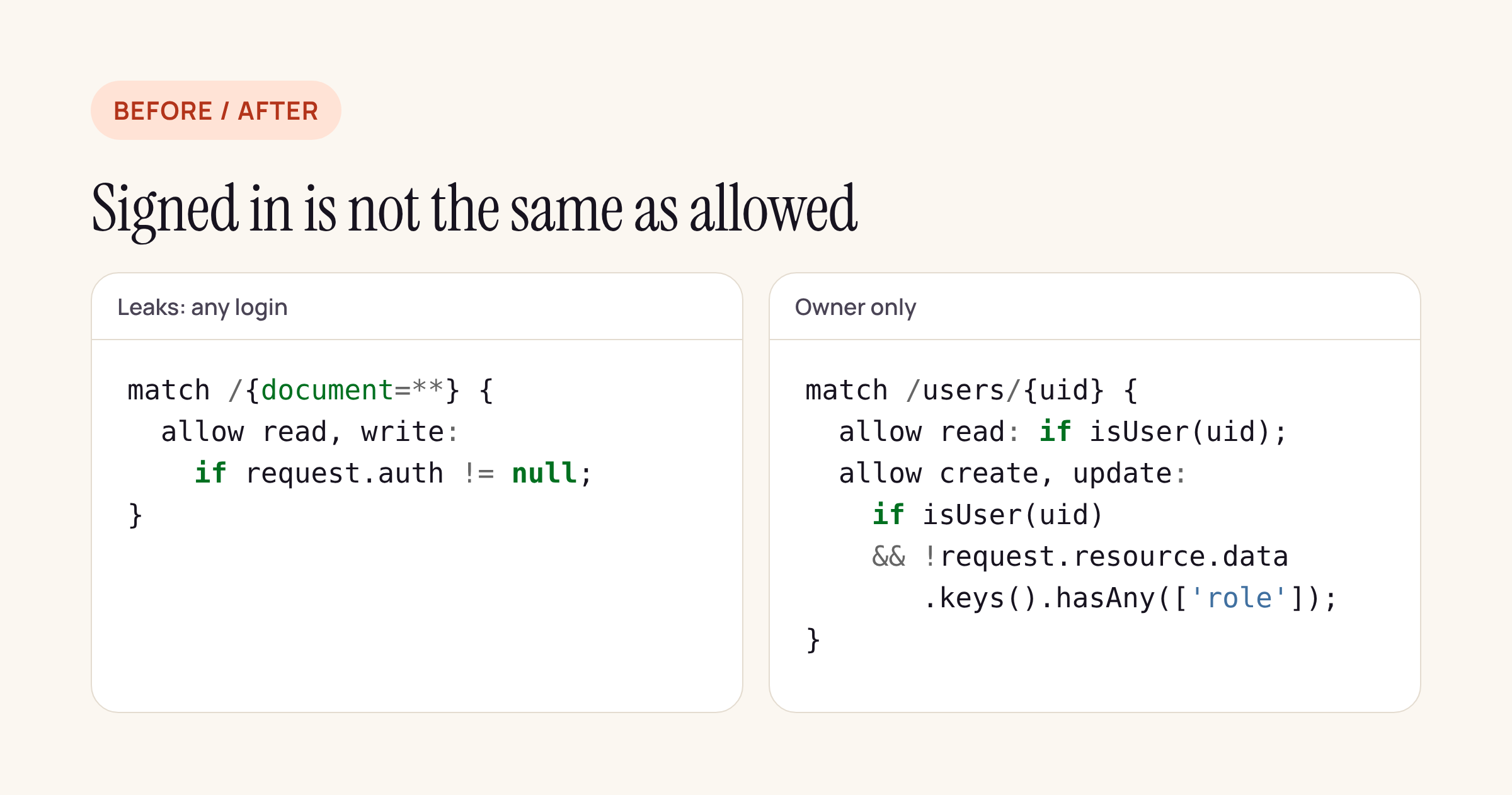
The rule on the left lets any account read and write everything; the one on the right lets only the owner in, and blocks the role field.
Two of the five mistakes, the open list and the Storage read, sit next to rules that are correct. A review that reads the get rule or the Firestore file and stops there misses them. A test for each access path catches them because it does not care how the rule is written.
Putting it in CI
- Keep
firestore.rules,storage.rulesand the tests in the same repository as the app, and deploy rules only from CI, never from the console. - Run the
emulators:execcommand above on every pull request that touches rules. It needs Node and a JDK on the runner, nothing else. - For every new collection or Storage path, add one test per access path: anonymous, another user, the owner, and a list or query if the app lists it.
- Seed data with
withSecurityRulesDisabledand clear it inbeforeEach, so tests do not depend on each other.
What to check on your own app this week
- Open the Firebase console’s rules tab for Firestore and Storage and search for
if trueand forrequest.auth != nullwith no uid comparison next to it. - List every collection and Storage path the app reads. Each one needs at least one “another user cannot” test.
- Look for fields that grant rights (
role,isAdmin,plan,verified) and check that the rules stop users from writing them. - Check every query the app runs: it must carry the same filter as the rule, or it will fail once the rule is right.
The same thinking applies outside Firebase. On Supabase it is row-level security policies; on a Laravel or Node API it is the authorisation check on each route. In every case, the test that matters is “a different, valid user tries to read this”, because that is the one a quick manual check never covers.