If your plugin imports @wordpress/ui, @wordpress/dataviews, @wordpress/admin-ui or @wordpress/grid, those packages are in your JavaScript bundle, not loaded from core, and every copy older than ui 0.26.0, dataviews 22.0.0, admin-ui 3.1.0 or grid 0.11.0 can share CSS class names with another plugin’s copy and restyle it. The fix is a version bump and a new release before WordPress 7.2 ships on 8 December 2026. Below is a 36-line script that reads package-lock.json and tells you which copies can reach your bundle, the results from 13 open-source plugins, and the bump that cleared it on a test plugin. Versions used: WordPress 7.2 RC1 (17 Nov), @wordpress/dependency-extraction-webpack-plugin 7.1.0, Node 22.23.5 and npm 10.9.9 on a Linux test server.
Why we did this: the Paperkite plugin behind this site ships editor code built with the WordPress packages, so we wanted a check we can run on any plugin before a core release, not a note we read once.
What the WordPress 7.2 note says
On 16 November Lena Morita posted Update bundled @wordpress/* packages and @wordpress/build to fix CSS module class name collisions on Make WordPress Core. The short version, in the note’s own words:
If your plugin bundles its own copy of any package below, update to the listed version or later and release a new version of your plugin before WordPress 7.2.
The cause was a bug in @wordpress/build. CSS module class names “were meant to change whenever the CSS that defines them changes. Instead, they depended only on the file path and the class name.” Two different copies of the same package on one page therefore shared class names, and each copy’s styles applied to the other’s components. The note’s example is a focus ring appearing on every hovered tab.
| Package | First fixed | On npm |
|---|---|---|
@wordpress/ |
0.26.0 | 4 Nov 2026 |
@wordpress/ |
22.0.0 | 4 Nov 2026 |
@wordpress/ |
3.1.0 | 4 Nov 2026 |
@wordpress/ |
0.11.0 | 4 Nov 2026 |
@wordpress/ |
44.0.0 | 4 Nov 2026 |
@wordpress/ (CSS modules) |
0.27.0 | 4 Nov 2026 |
Two details in the note decide who has work to do:
- The packages that ship with WordPress 7.2 are built the new way, so an older copy in your plugin no longer collides with core’s copy. What remains is plugin against plugin: “two copies built before the change can still collide with each other, for example when two plugins on the same site bundle different older versions of
@wordpress/ui.” - For
@wordpress/components: “If your plugin loads@wordpress/componentsthrough thewp-componentsscript, WordPress 7.2 provides the fixed copy.”
The note gives no date beyond “before WordPress 7.2”. The RC1 announcement gives the date: final release on December 8, 2026.
Which packages your build bundles anyway
Most @wordpress/* imports never reach your bundle. @wordpress/scripts runs the dependency extraction plugin, which rewrites @wordpress/i18n to wp.i18n, @wordpress/components to wp.components, and so on, so core supplies them at runtime. We unpacked @wordpress/dependency-extraction-webpack-plugin 7.1.0 from npm to see the exceptions. lib/util.js keeps a BUNDLED_PACKAGES list, and any request on it returns undefined, which means “do not externalize, bundle it”:
const BUNDLED_PACKAGES = [
    '@wordpress/admin-ui',
    '@wordpress/dataviews',
    '@wordpress/dataviews/wp',
    '@wordpress/fields',
    '@wordpress/global-styles-engine',
    '@wordpress/global-styles-ui',
    '@wordpress/grid',
    '@wordpress/icons',
    '@wordpress/interface',
    // ... kebab-case, react-inert-value, style-runtime,
    // sync, ui, undo-manager, views
];
Four of the five runtime packages in the note (ui, dataviews, admin-ui, grid) are on that list. So “if your plugin bundles” is not a choice you made: importing any of them bundles them. It also means a copy nested inside another bundled package, for example the ui that comes with dataviews or interface, is bundled too. components is the odd one out: it goes to wp.components unless you turned externals off.
The check: one script over package-lock.json
The script walks package-lock.json, finds every copy of the six packages, drops copies that sit under an externalized @wordpress parent (that parent comes from core, so webpack never reads its files), and compares each remaining copy with the minimum from the note. It needs the semver package (npm i -D semver).
// check-wp-bundles.js: which copies of the packages named in the
// WordPress 7.2 CSS-module note can end up in your plugin's bundle?
// Usage: node check-wp-bundles.js path/to/plugin   (needs package-lock.json)
const fs = require('fs'), path = require('path'), semver = require('semver');
const MIN = { '@wordpress/ui': '0.26.0', '@wordpress/dataviews': '22.0.0',
  '@wordpress/admin-ui': '3.1.0', '@wordpress/grid': '0.11.0',
  '@wordpress/components': '44.0.0', '@wordpress/build': '0.27.0' };
// Packages that @wordpress/dependency-extraction-webpack-plugin 7.1.0
// never maps to a wp.* global, so webpack bundles them (lib/util.js).
const BUNDLED = ['@wordpress/admin-ui', '@wordpress/dataviews', '@wordpress/fields',
  '@wordpress/global-styles-engine', '@wordpress/global-styles-ui', '@wordpress/grid',
  '@wordpress/icons', '@wordpress/interface', '@wordpress/kebab-case',
  '@wordpress/react-inert-value', '@wordpress/style-runtime', '@wordpress/sync',
  '@wordpress/ui', '@wordpress/undo-manager', '@wordpress/views'];
const dir = process.argv[2] || '.';
const showComponents = process.argv.includes('--components'); // only if you bundle it
const lock = JSON.parse(fs.readFileSync(path.join(dir, 'package-lock.json')));
const hits = [];
for (const [p, info] of Object.entries(lock.packages || {})) {
  const chain = p.split('node_modules/').slice(1).map(s => s.replace(/\/$/, ''));
  const name = chain.at(-1);
  if (!MIN[name] || !info.version) continue;
  const parents = chain.slice(0, -1);
  // A copy nested under an externalized @wordpress package is never bundled:
  // the parent comes from core at runtime, so webpack never reads its files.
  const viaCore = parents.some(x => x.startsWith('@types/') ||
    (x.startsWith('@wordpress/') && !BUNDLED.includes(x)));
  let where = parents.length ? 'inside ' + parents.at(-1) : 'top level';
  if (name === '@wordpress/build') where = 'build tool';
  else if (viaCore) continue;
  else if (name === '@wordpress/components' && !showComponents) continue;
  const old = semver.lt(info.version, MIN[name]);
  hits.push({ package: name.replace('@wordpress/', ''), version: info.version,
              where, fix: old ? '>= ' + MIN[name] : 'ok' });
}
console.table(hits.sort((a, b) => a.package.localeCompare(b.package)));
A row is a copy the lockfile can put into your build. It ships only if your code, or a bundled package you import, imports it, so confirm a hit with a quick grep -r "@wordpress/dataviews" src/ before you plan the work. Pass --components if your webpack config bundles @wordpress/components instead of using wp-components.
What it found in 13 open-source plugins
We ran it on the default branch of each repository on GitHub on 18 November 2026. Jetpack and Jetpack Boost use pnpm, so for those two we read the pinned versions in package.json instead. This is the state of development branches on one day, not of the released plugins on WordPress.org, and several teams are likely mid-update.
| Plugin (branch) | Copies older than the fix | Verdict |
|---|---|---|
| Sensei LMS (trunk) | admin-ui 2.4.1, dataviews 10.1.7, ui 0.17.0 |
update |
| Newspack (trunk) | admin-ui 1.1.0, dataviews 10.1.0 |
update |
| AMP (develop) | dataviews 9.1.0 |
update |
| AI (develop) | admin-ui 2.12.0, dataviews 19.0.0, plus 10 nested copies inside interface, fields, views, global-styles-ui, admin-ui and dataviews |
update |
| ActivityPub (trunk) | none: admin-ui 3.1.0, dataviews 22.0.0, ui 0.26.0 |
ok |
| Jetpack (trunk) | none: ui 0.26.0, dataviews 22.0.0, build 0.27.0 pinned |
ok |
| Jetpack Boost (trunk) | none: ui 0.26.0, admin-ui 3.1.0, build 0.27.0 pinned |
ok |
| Elementor, Create Block Theme, Performance Lab, Plugin Check, Two Factor, WordPress Importer | no copy of the four bundled packages | nothing to do |
The AI plugin row is the instructive one. Its own package.json already asks for @wordpress/ui 0.26.0, and the top-level copy is fixed, yet older ui copies still sit inside interface, views, fields and global-styles-ui. All four are on the bundled list, so their nested copies are bundled too. Bumping the package you import directly is not enough when another bundled package brings its own copy.
The fix, on a test plugin
To see the fix end to end we made a small test plugin that depends on @wordpress/dataviews 19.0.0 and @wordpress/interface 9.0.0, ran the check, bumped both, and ran it again. The latest releases of the bundled parents already depend on the fixed versions: interface 11.1.0 requires admin-ui ^3.1.0, views 3.1.0 requires dataviews ^22.0.0, and fields 0.51.0 and global-styles-ui 2.1.0 require ui ^0.26.0 and dataviews ^22.0.0 (from npm view on 18 Nov). So bumping the parents clears the nested copies without overrides.
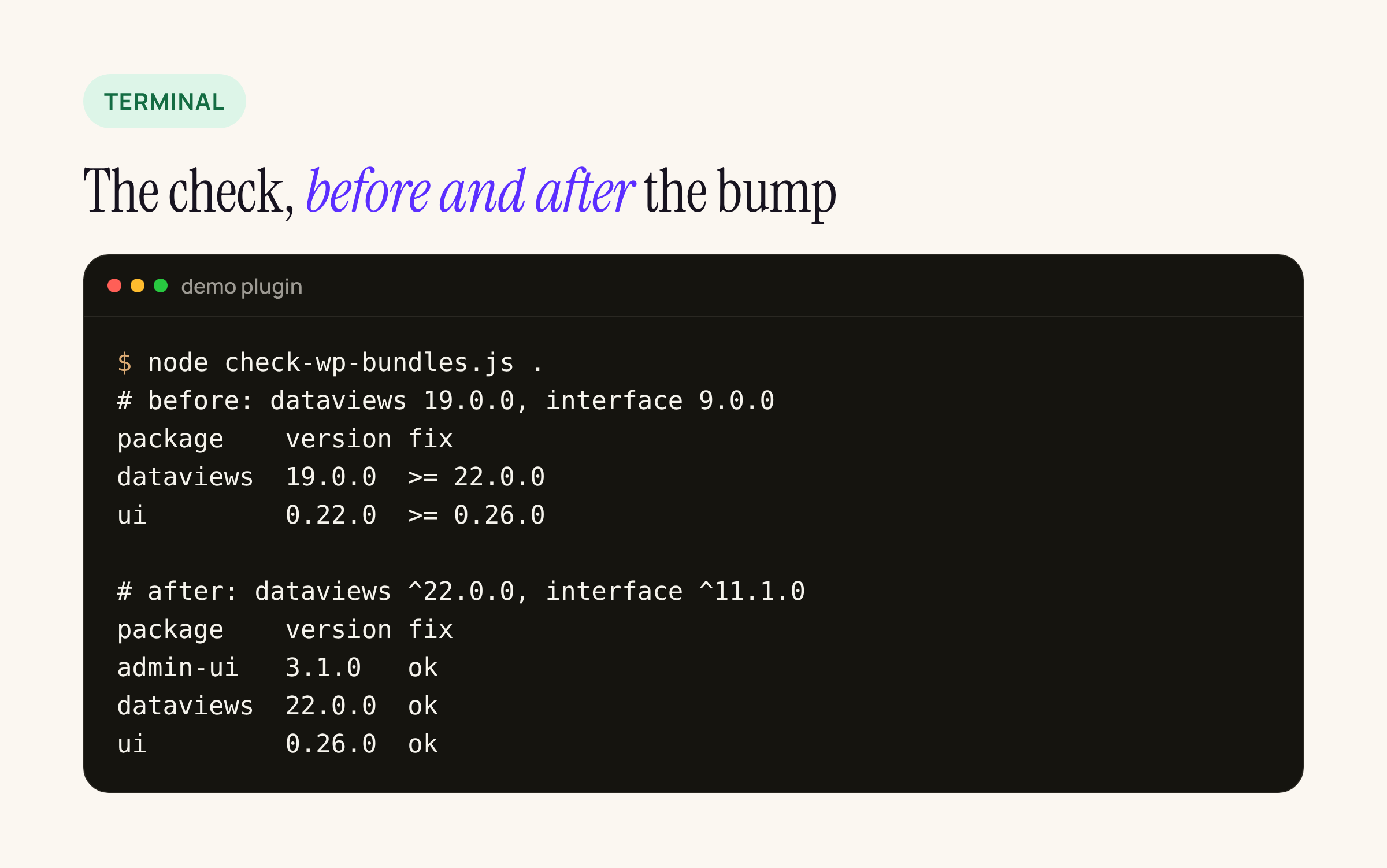
Real output from our test server, condensed to three columns.
npm install @wordpress/dataviews@^22.0.0 @wordpress/interface@^11.1.0
npm ls @wordpress/ui @wordpress/admin-ui @wordpress/dataviews
node check-wp-bundles.js .
npm run build
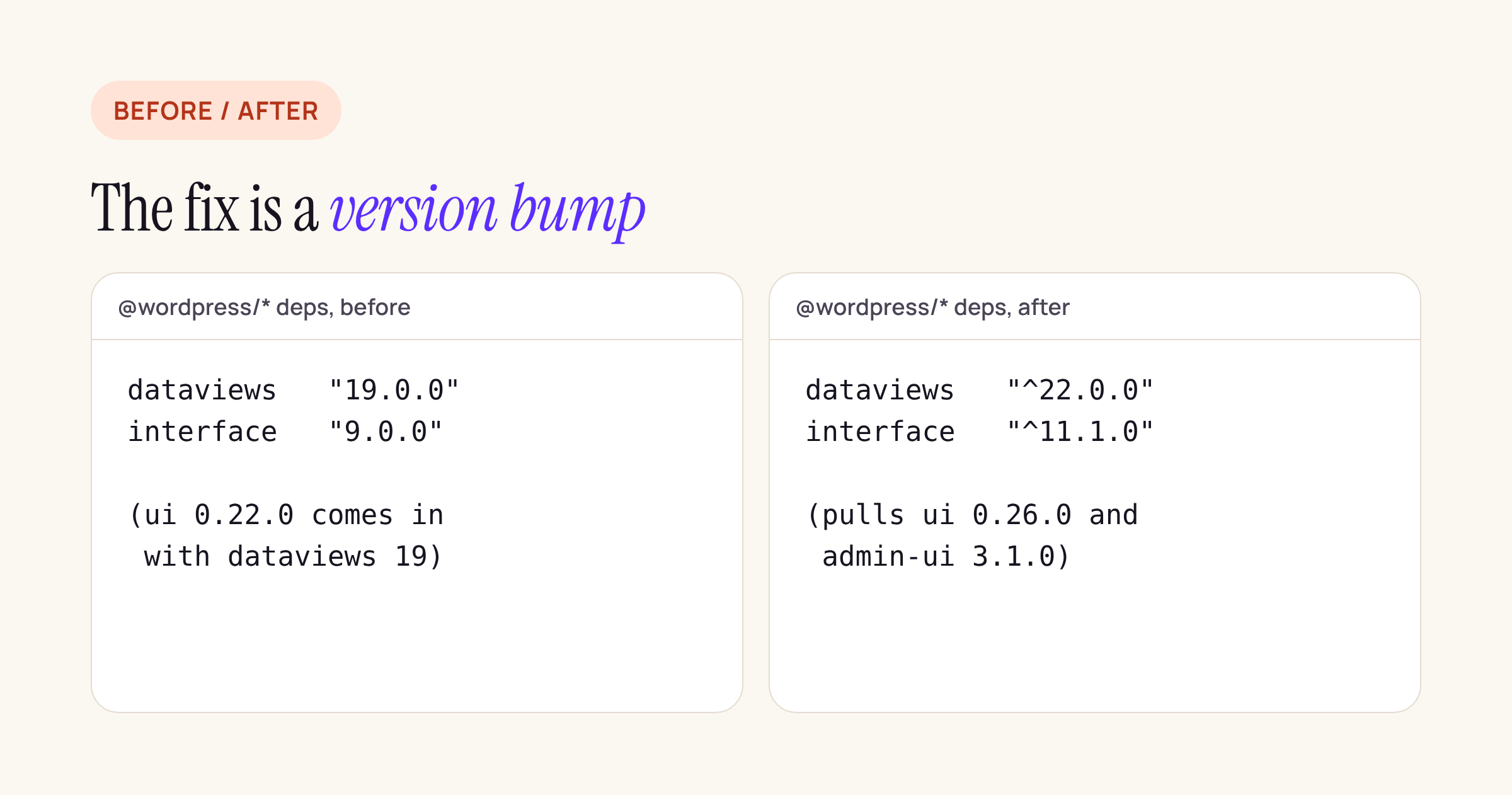
The whole change in the test plugin: two version ranges.
dataviews 19 to 22 is three major versions, so read the dataviews changelog for the breaking entries in between before you ship, and click through every screen that renders a DataViews table or a DataForm.
What to check on your own plugin
- Run the script against your plugin’s
package-lock.json(or read the pins inpackage.jsonif you use pnpm or Yarn). - For every row marked with a minimum, confirm the import with
grepin your source. - Bump the package you import and every bundled parent the script names under “inside”.
- If you compile CSS modules with
@wordpress/build, move it to 0.27.0 or later and rebuild, as the note says. - Rebuild, run the script again until every row says ok, and release before 8 December.
- Test the admin screens on WordPress 7.2 RC1 with
wp core update --version=7.2-RC1on a staging site, with your other admin plugins active, since plugin against plugin is the case that remains.
One open question from the note’s comments: Scott Kingsley Clark asked whether the new package versions still work on sites back to WordPress 6.3. There was no answer on 18 November. If your plugin supports old WordPress versions, test the bumped build on the oldest one you support before you release.