The takeaway: you can move a React Native Android build to Kotlin DSL file by file, but keep one thing exactly as it is: the version values in the root buildscript (compileSdkVersion, minSdkVersion, ndkVersion, kotlinVersion and friends) must stay as extra properties on the root project, with the same names and types. Popular RN libraries still read them through rootProject.ext from their own Groovy build files. Put your own dependencies in a version catalog; leave those root values where libraries can find them.
This is a source read of the React Native Android template in @react-native-community/template 0.76.9, 0.88.1 and 0.89.0-rc.1, the React Native Gradle plugin 0.88.1 and 0.89.0-rc.1, and three libraries (react-native-screens 4.30.1, react-native-safe-area-context 5.11.1, react-native-vision-camera 5.2.4), all unpacked from npm. The .kts files below are our port of the 0.88.1 template.
Why we did this: our Beacon-type React Native banking apps and the BMDB TV app carry Groovy build files from the 0.7x template, and the ports have to keep every native library building.
What the template ships today
We ran npm pack on three template versions and diffed template/android/. The build files are Groovy in all three, including the 0.89 release candidate.
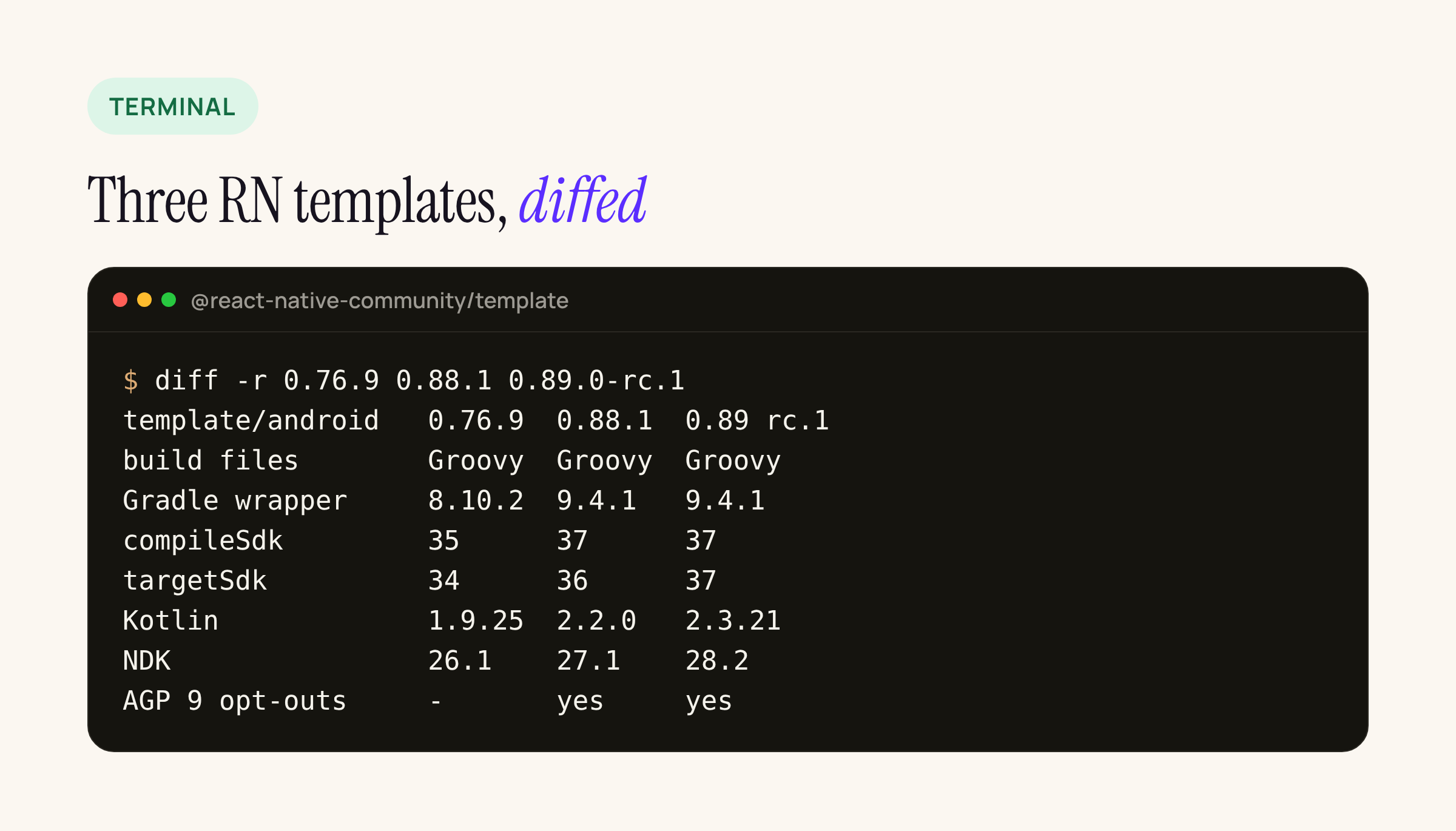
From 0.76.9 to 0.89.0-rc.1: Gradle wrapper 8.10.2 to 9.4.1, compileSdk 35 to 37, Kotlin 1.9.25 to 2.3.21.
Two details in that diff matter for a port:
- 0.88.1 added two AGP 9 opt-outs to
gradle.properties:android.builtInKotlin=falseandandroid.newDsl=false, under the comment “Opt out of built-in kotlin and new DSL behavior that ships with AGP 9. Starting from AGP 10.x these opt outs will be removed.” Keep them when you port: theandroid {}code below is written for the DSL those flags keep. - 0.89.0-rc.1 changes only values in the root file (targetSdk 36 to 37, NDK 27.1.12297006 to 28.2.13676358, Kotlin 2.2.0 to 2.3.21) plus
MainActivity.kt. Nothing in the Gradle structure moves, so a port done on 0.88.1 carries over.
The Gradle plugin’s own catalog (packages/gradle-plugin/gradle/libs.versions.toml) pins AGP 9.2.1 in both 0.88.1 and 0.89.0-rc.1, with Kotlin 2.2.0 and 2.3.21. That is why the template’s classpath(...) lines have no versions: the included plugin build supplies them.
The rules that bite, from Android’s guide
Android’s Migrate your build configuration from Groovy to Kotlin guide (updated 28 Oct 2026) lists the mechanical changes. The ones the RN template hits:
| Groovy in the RN template | Kotlin DSL | Source |
|---|---|---|
compileSdk rootProject.ext.compileSdkVersion |
compileSdk = ... (assignment needs =) |
guide |
'android', 'HelloWorld' |
double quotes only | guide |
def enableProguardInReleaseBuilds = false |
val |
guide |
release { minifyEnabled ... } |
getByName("release") { isMinifyEnabled = ... } |
guide |
include ':app' |
include(":app") |
guide |
apply plugin: "com.android.application" |
plugins { id("com.android.application") } |
guide |
implementation jscFlavor |
catalog entry, implementation(libs.jsc.android) |
catalogs |
The guide also says you “can have a mix of Kotlin and Groovy build files in a project”, and to make sure the project still compiles after each file. It warns that “builds using Kotlin tend to be slower than builds using Groovy”. Port for readability and IDE help, not for build speed.
settings.gradle.kts
The settings plugin’s extension is com.facebook.react.ReactSettingsExtension, and autolinkLibrariesFromCommand() is annotated @JvmOverloads with default arguments in the plugin source, so the Kotlin call needs no parameters.
pluginManagement {
    includeBuild("../node_modules/@react-native/gradle-plugin")
}
plugins { id("com.facebook.react.settings") }
extensions.configure<com.facebook.react.ReactSettingsExtension> {
    autolinkLibrariesFromCommand()
}
rootProject.name = "HelloWorld"
include(":app")
includeBuild("../node_modules/@react-native/gradle-plugin")
build.gradle.kts (root): keep the extra properties
This is the file to be careful with. Here is what three libraries’ Groovy build files do with the root values:
- react-native-screens 4.30.1:
safeExtGet('compileSdkVersion', ...), which readsrootProject.ext. - react-native-safe-area-context 5.11.1:
rootProject.ext.has('kotlinVersion'), andgetExtOrDefault('compileSdkVersion', 31). - react-native-vision-camera 5.2.4:
ndkVersion getExtOrDefault("ndkVersion")fromrootProject.ext.
If you move those numbers into a catalog only, these libraries fall back to their own defaults (or, for vision-camera, to VisionCamera_-prefixed Gradle properties). So the root file keeps them as extra properties, with Int for SDK levels and String for the rest, as the Groovy file had them:
buildscript {
    // RN libraries read these through rootProject.ext:
    // keep the names and the types (Int vs String).
    extra.apply {
        set("buildToolsVersion", "37.0.0")
        set("minSdkVersion", 24)
        set("compileSdkVersion", 37)
        set("targetSdkVersion", 36)
        set("ndkVersion", "27.1.12297006")
        set("kotlinVersion", "2.2.0")
    }
    repositories {
        google()
        mavenCentral()
    }
    dependencies {
        // versions come from the included RN Gradle plugin build
        classpath("com.android.tools.build:gradle")
        classpath("com.facebook.react:react-native-gradle-plugin")
        classpath("org.jetbrains.kotlin:kotlin-gradle-plugin")
    }
}
apply(plugin = "com.facebook.react.rootproject")
Android’s guide recommends moving from buildscript {} to the plugins {} block. In an RN project the classpath entries resolve through the included plugin build, so we keep buildscript for this step and treat that move as a separate change.
app/build.gradle.kts and the react {} block
In the plugin source, the react {} extension (ReactExtension.kt) declares its settings as Gradle ListProperty and Property types: debuggableVariants, hermesFlags, extraPackagerArgs and nodeExecutableAndArgs are ListProperty<String>. In Kotlin DSL, set them with .set(listOf(...)); the Groovy list literal from the template comments will not compile.
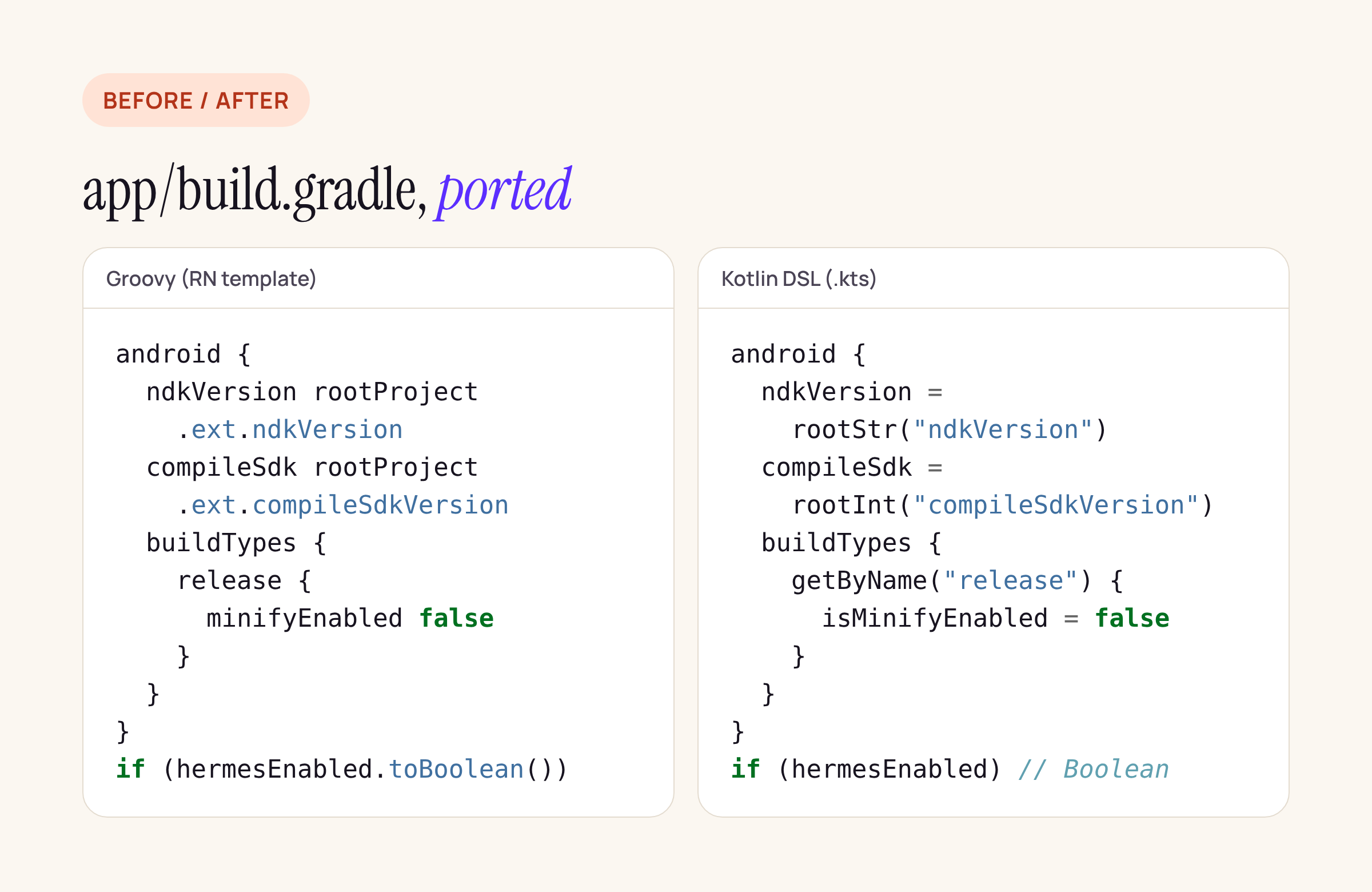
The is prefix, getByName, and a typed read of the root values are most of the diff.
The template reads hermesEnabled as a bare Groovy property from gradle.properties. In Kotlin, read it through providers.gradleProperty:
plugins {
    id("com.android.application")
    id("org.jetbrains.kotlin.android")
    id("com.facebook.react")
}

react {
    // debuggableVariants.set(listOf("liteDebug", "prodDebug"))
    autolinkLibrariesWithApp()
}

val enableProguardInReleaseBuilds = false
val hermesEnabled = providers.gradleProperty("hermesEnabled")
    .getOrElse("true").toBoolean()

fun rootInt(name: String) = rootProject.extra[name] as Int
fun rootStr(name: String) = rootProject.extra[name] as String

android {
    ndkVersion = rootStr("ndkVersion")
    buildToolsVersion = rootStr("buildToolsVersion")
    compileSdk = rootInt("compileSdkVersion")
    namespace = "com.helloworld"
    defaultConfig {
        applicationId = "com.helloworld"
        minSdk = rootInt("minSdkVersion")
        targetSdk = rootInt("targetSdkVersion")
        versionCode = 1
        versionName = "1.0"
    }
    signingConfigs {
        getByName("debug") {
            storeFile = file("debug.keystore")
            storePassword = "android"
            keyAlias = "androiddebugkey"
            keyPassword = "android"
        }
    }
    buildTypes {
        getByName("debug") {
            signingConfig = signingConfigs.getByName("debug")
        }
        getByName("release") {
            // use your own upload key in production
            signingConfig = signingConfigs.getByName("debug")
            isMinifyEnabled = enableProguardInReleaseBuilds
            proguardFiles(
                getDefaultProguardFile("proguard-android-optimize.txt"),
                "proguard-rules.pro",
            )
        }
    }
}

dependencies {
    // react-android's version is set by the RN Gradle plugin
    implementation("com.facebook.react:react-android")
    if (hermesEnabled) {
        implementation("com.facebook.react:hermes-android")
    } else {
        implementation(libs.jsc.android)
    }
    implementation(libs.androidx.biometric)
}
The debug signing block mirrors the template. For release builds, Android’s guide points to removing signing information from build files; a bank app should read the upload key from the environment or a local properties file outside Git.
The version catalog: what it holds in an RN app
Android’s catalog guide puts the file at gradle/libs.versions.toml and recommends kebab-case names, so androidx-biometric becomes libs.androidx.biometric. In an RN app the catalog holds less than in a native app: react-android and hermes-android take their version from the RN plugin, and the AGP and Kotlin plugin versions come from the included plugin build. What is left is your own native dependencies:
[versions]
jsc = "2026004.+"
biometric = "1.1.0"

[libraries]
jsc-android = { module = "io.github.react-native-community:jsc-android", version.ref = "jsc" }
androidx-biometric = { module = "androidx.biometric:biometric", version.ref = "biometric" }
androidx.biometric stands in for whatever your app adds natively; in a banking app that is typically biometric, Play Integrity and security-provider libraries.
Port order, one commit per file
- Add
=and parentheses to the Groovy files first, as Android’s guide suggests, and build. - Port
settings.gradle, build, commit. - Port the root
build.gradlewith the extra properties intact, build, commit. - Port
app/build.gradle, build a debug and a release variant, commit. - Move your own dependencies into
libs.versions.tomlone at a time, syncing after each, as the catalog guide recommends.
What to check on your own project
- After the root file is ported, open each native library’s
build.gradleinnode_modulesand search forrootProject.extandsafeExtGet; every name they read must exist in yourextrablock. - Compare
./gradlew :app:dependencies --configuration releaseRuntimeClasspathbefore and after the port; the output should not change. - Keep
android.builtInKotlin=falseandandroid.newDsl=falseingradle.propertiesuntil React Native’s template drops them. - If you use product flavors, list the debuggable ones with
debuggableVariants.set(listOf(...)), or the JS bundle gets skipped in the wrong variant.