The safe way to reach React Native 0.88.1 is four steps, each one building on its own: react-native-worklets 0.13 and Reanimated 4.7 together, then Gesture Handler 3, then react-native-screens and safe-area-context, and only then React Native itself, with every @react-native/* package and a fresh lockfile in the same change. We ran that chain on a fresh React Native 0.87.1 app on our M1 lab Mac (macOS 15.7.3, Xcode 26.2, iOS 26.3 Simulator, Node 24.22.3, npm 11.19.1, CocoaPods 1.17.0, JDK 17) on 15 November 2026, with a clean iOS Release build after every step and Android release builds at both ends. Three things surprised us: npm only warns when worklets moves without Reanimated, it refuses the React Native bump while the 0.87 lockfile is still there, and pod install kept the 0.87.1 prebuilt iOS core until we ran pod update React-Core-prebuilt.
Why we did this: our React Native CLI banking app uses the same five libraries, and we wanted the order proven on a throwaway app before it touches real code.
The test app
A fresh @react-native-community/cli init app on React Native 0.87.1 with one screen that actually uses the stack: a card you drag with Gesture.Pan() inside GestureDetector, animated with a Reanimated shared value, inside GestureHandlerRootView, SafeAreaProvider and enableScreens(). The Babel config has the react-native-worklets/plugin. The screen uses only the Gesture Handler API that exists in both 2.x and 3.x, so the same file had to build at every step.
Starting set: react-native 0.87.1, react 19.2.3, react-native-worklets 0.12.2, react-native-reanimated 4.6.0, react-native-gesture-handler 2.33.1, react-native-screens 4.29.0, react-native-safe-area-context 5.10.1.
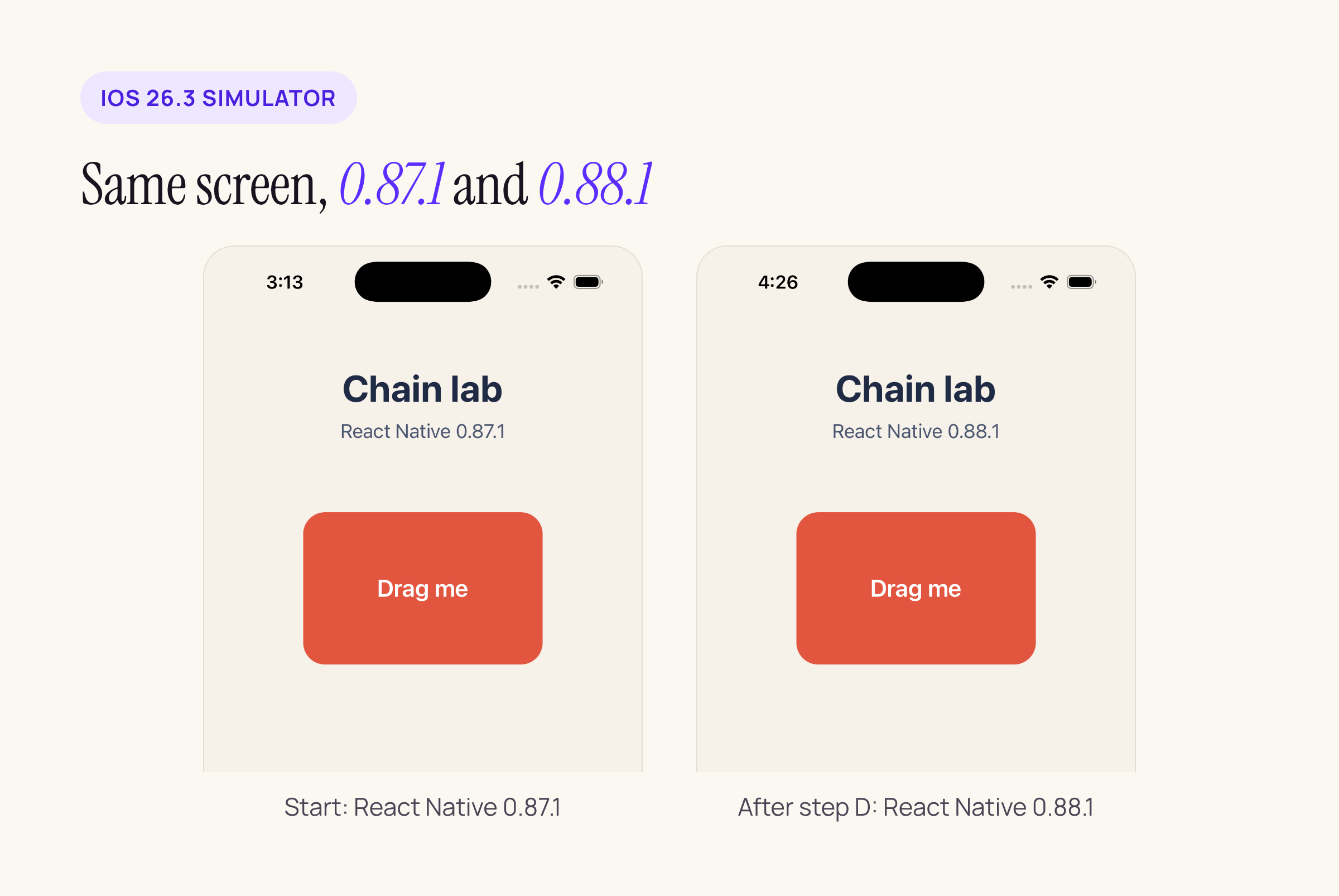
The drag card at the start and after the last step: Release builds on an iPhone 17 Pro Simulator, iOS 26.3.
The order, and what each step cost
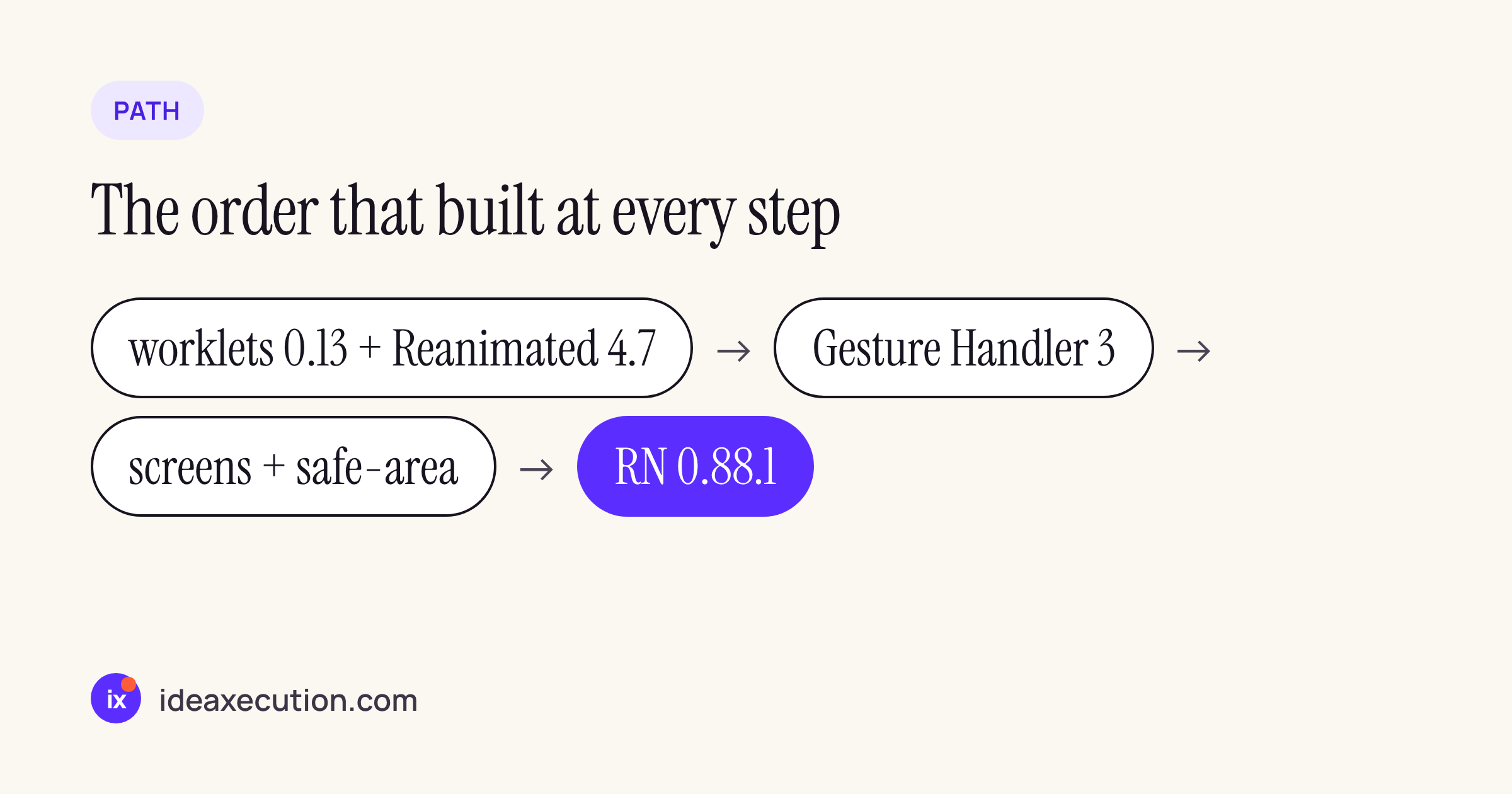
Each step: change the versions, pod install, delete derived data, then a clean xcodebuild Release build for the Simulator. App size is the .app bundle; the JS bundle is the main.jsbundle inside it.
| Step | What changed | pod install | Clean iOS Release build | .app | main.jsbundle |
|---|---|---|---|---|---|
| Start | RN 0.87.1 set above | 35 s | 5m 54s (first build) | 51.3 MB | 2.34 MB |
| A | worklets 0.13.1 + Reanimated 4.7.1 | 16 s | 3m 48s | 52.1 MB | 2.45 MB |
| B | Gesture Handler 3.5.0 | 16 s | 4m 22s | 52.8 MB | 2.55 MB |
| C | screens 4.30.1 + safe-area-context 5.11.1 | 17 s | 4m 13s | 52.9 MB | 2.55 MB |
| D | React Native 0.88.1 + react 19.3.0 | 2m 56s, then pod update 1m 52s |
3m 49s | 55.3 MB | 2.54 MB |
The first clean build was the first one on a freshly set-up Mac and ran 1.5 to 2 minutes longer than the next three; read the A to C builds against each other, not against it. These are single runs on one Mac, useful for “did anything blow up”, not as benchmarks. On Android, a release build of the arm64-v8a ABI took 12 min 40 s at the start (APK 26.1 MB) and 3 min 56 s on 0.88.1 (APK 27.3 MB). That first Android build also downloaded Gradle 9.4.1 and every dependency, so compare the two APK sizes, not the two times. Neither Android build needed a code or Gradle change: the Android template is identical between 0.87.1 and 0.88.1.
Step D’s pod install was the slow one because 0.88.1 ships new Hermes and React Native core binaries for iOS that had to be downloaded. The .app grew about 2.4 MB on 0.88.1 while the JS bundle barely changed, so the growth is on the native side.
Step A: worklets and Reanimated move together
Reanimated 4.6.0 requires worklets 0.12.x; Reanimated 4.7.x requires worklets 0.13.x. Both 4.7 and worklets 0.13 accept React Native 0.86 to 0.88 in their peer ranges, so this step can land while you are still on 0.87.
What we did not expect is how quietly npm handles getting it wrong. Moving worklets alone, with Reanimated 4.6.0 still installed:
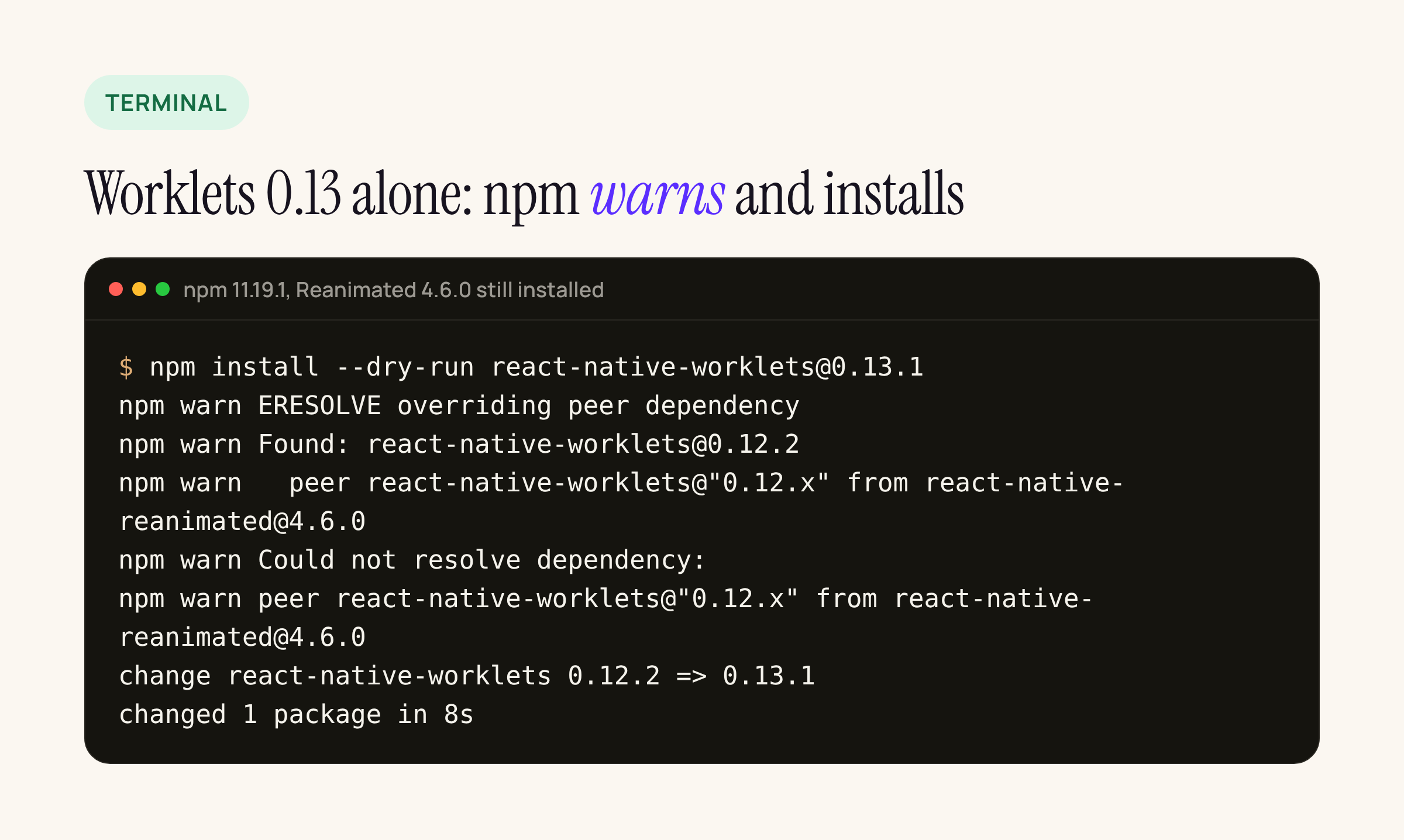
npm 11.19.1 prints an ERESOLVE overriding peer dependency warning and installs worklets 0.13.1 anyway.
That is a warning, not an error, so in CI it scrolls past. The mismatch then shows up later in the native build or at runtime, far from the change that caused it. Install the pair in one command:
npm install --save-exact react-native-worklets@0.13.1 react-native-reanimated@4.7.1
cd ios && pod install
With both in one install, npm resolved cleanly (“changed 2 packages in 15s”) and the iOS build passed.
Step B: Gesture Handler 3 kept our screen building
Gesture Handler 3 is a major release, but the code path most apps use survived: the 3.5.0 GestureDetector accepts the builder-style Gesture.Pan() objects and hands them to its legacy detector. Our screen built on 3.5.0 with no code change, and it rendered in the final 0.88.1 run shown below.
What did change is the export list. We diffed the public index.ts of 2.33.1 and 3.5.0 from the npm packages:
- Gone:
Swipeable,DrawerLayout,gestureHandlerRootHOC,enableExperimentalWebImplementation,enableLegacyWebImplementation. - Renamed:
createNativeWrapperis nowlegacy_createNativeWrapper; the oldRectButton,BaseButton,BorderlessButton,Pressable,ScrollView,FlatList,Switch,TextInputandRefreshControllive on asLegacy*exports. - New: hook-based gestures such as
usePanGesture,useTapGestureanduseSimultaneousGestures, plus new component implementations under the old button and list names.
So grep your app for the removed names before this step. If none appear, the step is a version bump.
Step C: screens and safe-area-context
Both declare react-native: "*" as their peer, so npm never forces their timing. They moved in one install with no warnings and the build passed. We did them before React Native only to keep the 0.88 step small.
Step D: React Native 0.88.1, and the lockfile
React Native 0.88.1 needs react 19.3.0, and @react-native/new-app-screen 0.87.1 pins react-native to exactly 0.87.1, so the runtime and every @react-native/* package have to move in the same change. We set all of them in package.json first, the way Upgrade Helper lays it out:
npm pkg set dependencies.react-native=0.88.1 dependencies.react=19.3.0 \
  dependencies.@react-native/new-app-screen=0.88.1 \
  devDependencies.@react-native/babel-preset=0.88.1 \
  devDependencies.@react-native/eslint-config=0.88.1 \
  devDependencies.@react-native/jest-preset=0.88.1 \
  devDependencies.@react-native/metro-config=0.88.1 \
  devDependencies.@react-native/typescript-config=0.88.1 \
  devDependencies.react-test-renderer=19.3.0
Then npm install failed anyway:
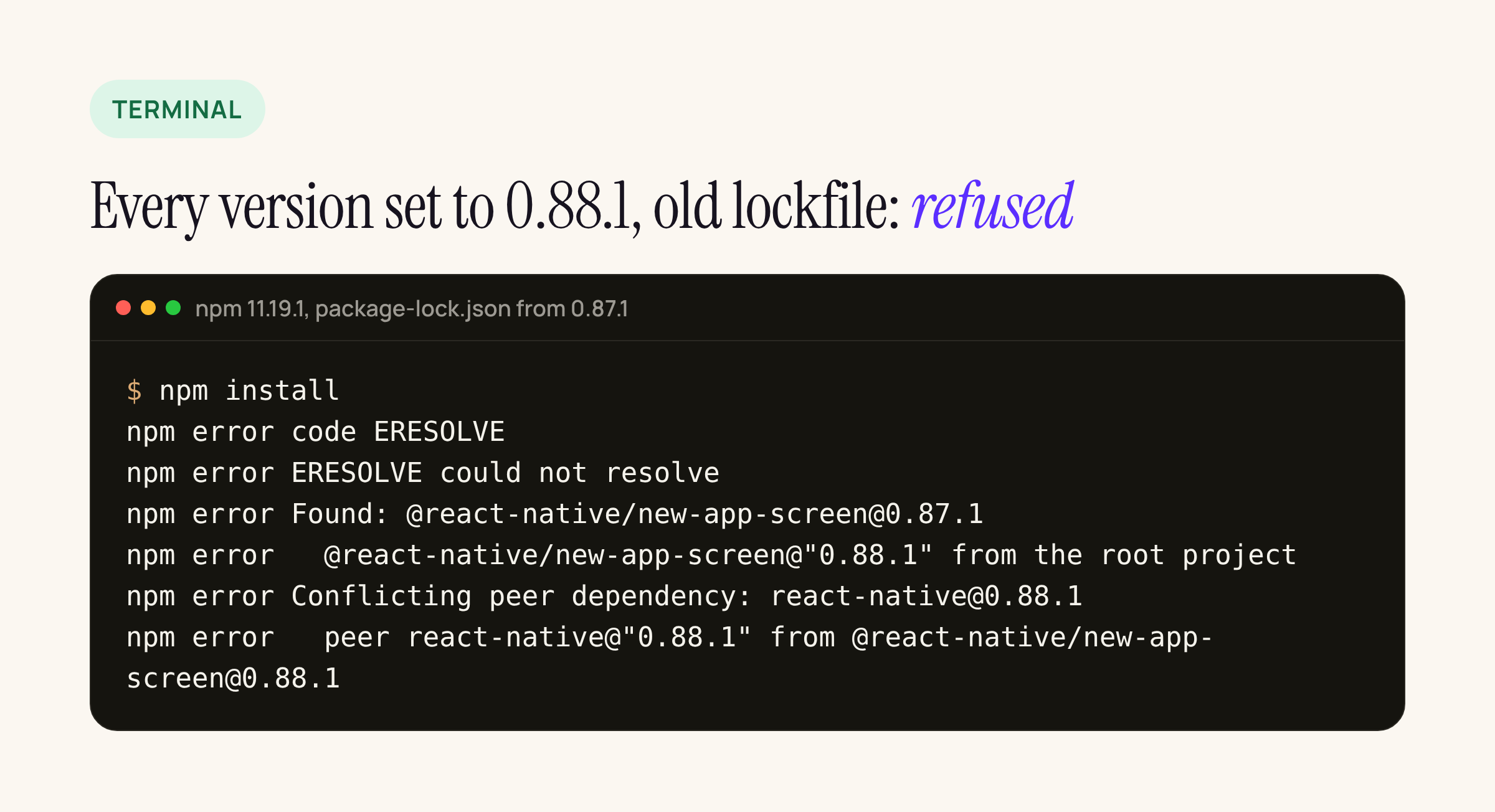
Every version in package.json said 0.88.1; the lockfile still held the 0.87.1 tree, and npm would not move it.
Deleting node_modules and package-lock.json and installing again resolved the whole 0.88.1 set in 85 seconds. We checked the same package.json with npm 10.9 and saw the same result: it refuses with the old lockfile and resolves with a fresh one. Commit the new lockfile in the same PR so reviewers see the full tree change.
Step D, part two: pod install keeps the old prebuilt core
With the packages on 0.88.1 and the scene changes applied, the first 0.88 build failed:
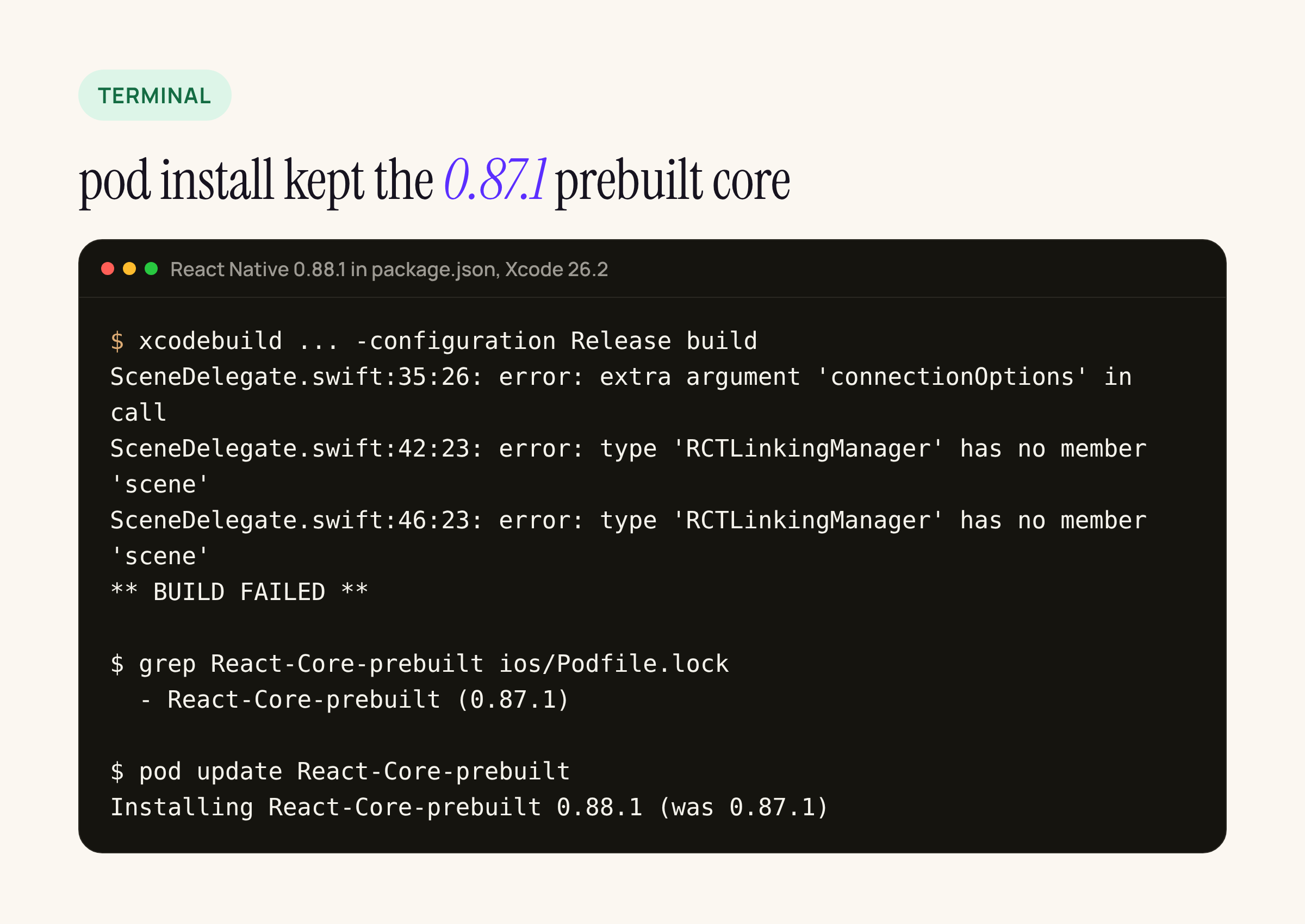
The 0.88.1 headers do declare these APIs; the build was compiling against the 0.87.1 prebuilt core that Podfile.lock still pinned.
React Native’s iOS core comes as a prebuilt pod, React-Core-prebuilt. After the bump, Podfile.lock listed React at 0.88.1 but React-Core-prebuilt still at 0.87.1, and a plain pod install keeps whatever the lockfile pins. The new SceneDelegate calls startReactNative(withModuleName:in:connectionOptions:) and RCTLinkingManager.scene(...), which exist only in the 0.88 core, so the Swift compiler stopped there.
pod update React-Core-prebuilt moved it to 0.88.1, and the same build then passed in 3 min 49 s. Check the lockfile after every React Native bump:
cd ios && pod install
grep -E "^  - React-Core-prebuilt|^  - React \(" Podfile.lock   # both should show the new version
pod update React-Core-prebuilt                                  # if they don't
The iOS template change in 0.88: scenes
Apart from the version numbers in package.json, the only changes between @react-native-community/template 0.87.1 and 0.88.1 are on iOS. The Android template is identical. App startup moves from AppDelegate into a new SceneDelegate:
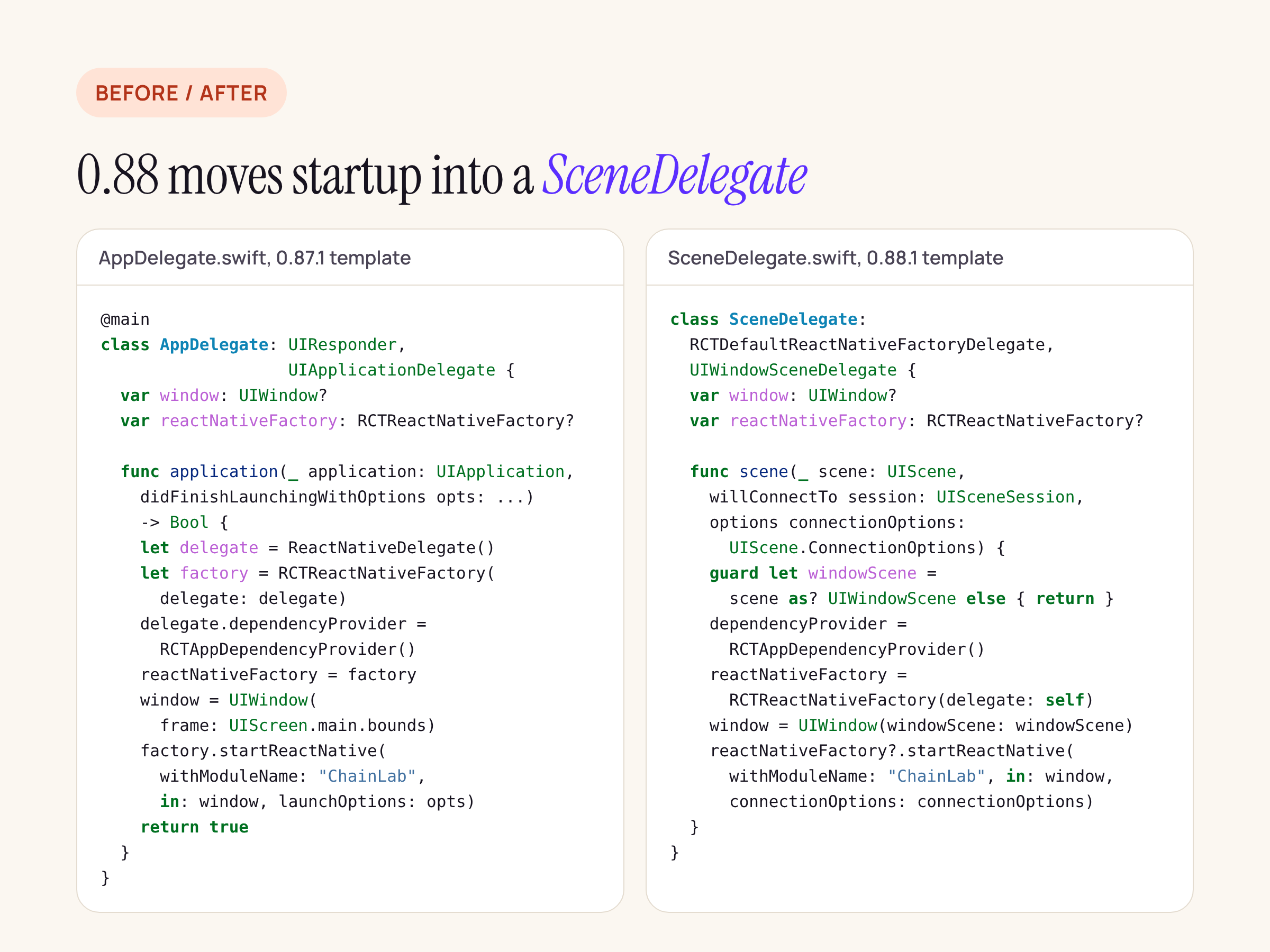
In 0.88.1 the AppDelegate becomes a stub that returns true, and React Native starts once per window scene.
The full change is four files: AppDelegate.swift, a new SceneDelegate.swift (added to the Xcode target), a UIApplicationSceneManifest entry in Info.plist pointing at $(PRODUCT_MODULE_NAME).SceneDelegate, and UIViewControllerBasedStatusBarAppearance flipped to true.
One detail if you apply the template diff as a patch: it did not apply to our real app. init and pod install had already edited Info.plist and project.pbxproj (after pod install, Info.plist already carried RCTNewArchEnabled, and the project file had an extra privacy manifest build entry), so the context lines no longer matched the template. We rebuilt the patch against the app’s own files. Expect the same in any app that has been through pod install, which is every app.
If your AppDelegate does more than start React Native (deep links, push registration, URL handling), those application(_:open:...) style callbacks need their scene equivalents; the 0.88.1 template already routes openURLContexts and continue userActivity through RCTLinkingManager in SceneDelegate.
The checklist
- On your current React Native:
npm installworklets 0.13.1 and Reanimated 4.7.1 in one command,pod install, build both platforms. - Search for
Swipeable,DrawerLayout,gestureHandlerRootHOCandcreateNativeWrapper; then move Gesture Handler to 3.x and build. - Move react-native-screens and safe-area-context; build.
- Set react-native, react and every
@react-native/*package to 0.88.1 inpackage.json, deletenode_modulesandpackage-lock.json, install,pod install, then checkPodfile.lockand runpod update React-Core-prebuiltif it still shows the old version. - Apply the iOS scene changes by hand or rebuild the template patch against your own
Info.plistand project file; move any URL or user-activity handling intoSceneDelegate. - Build both platforms and launch the app before touching anything else.
What this post does not cover: a physical device, gesture behaviour under a real finger, and app code beyond one screen. Treat the timings as one clean build each on an M1 with 16 GB, not as a forecast for a large app.