The takeaway: on iPhone Duo, AVCaptureDevice.position still tells you where a camera sits, but not which way it faces. Opening or closing the device moves your app to the other display, so a camera that faced the user can end up facing away. Apple’s answer is AVCaptureDeviceDirectionCoordinator, which groups cameras into forward-facing and backward-facing in relation to your preview view. If your selfie code picks a lens by position, or decides mirroring from position == .front, change it to read the coordinator’s map.
This post covers Apple’s iPhone Duo camera guidance (Hello Developer, November 2026, and the two articles it links) and a source read of four React Native camera libraries as published on npm: react-native-vision-camera 5.2.4 and 4.7.3, expo-camera 58.0.14 and react-native-camera-kit 18.0.1.
Why we did this: our Beacon-type banking apps run a KYC flow that takes a selfie and then photographs an ID card, and that is exactly the code that assumes “front camera equals selfie”. Cardigami already ships on iPhone Duo, so the fold is part of our daily work.
What Apple says changed
Apple’s Hello Developer for November 2026 puts it in one line: “On iPhone Duo, the direction a camera faces changes as the device opens and closes.” The article Choosing a camera by the direction it faces explains why. iPhone Duo “has a display on each side and a camera above each one, so which way a camera faces depends on the display your app appears on.”
Three details from that article decide what a selfie flow has to change:
- The virtual front camera follows the app. On iPhone Duo, asking for
.builtInWideAngleCameraor.builtInUltraWideCameraat position.frontreturns a virtual front camera that “streams from the camera above the display your app appears on”. Code that only ever asks for that default device keeps getting a camera on the user’s side. - A rear camera can face forward. “A rear camera can be the forward-facing one, which is how someone takes a selfie with it.” If your app lets the user choose a lens, or picks a specific physical camera,
positionis no longer enough. - Mirroring follows direction, not position. “Decide mirroring from the direction map rather than from a camera’s position.” A rear camera facing the user needs a mirrored preview; a front camera facing away does not.
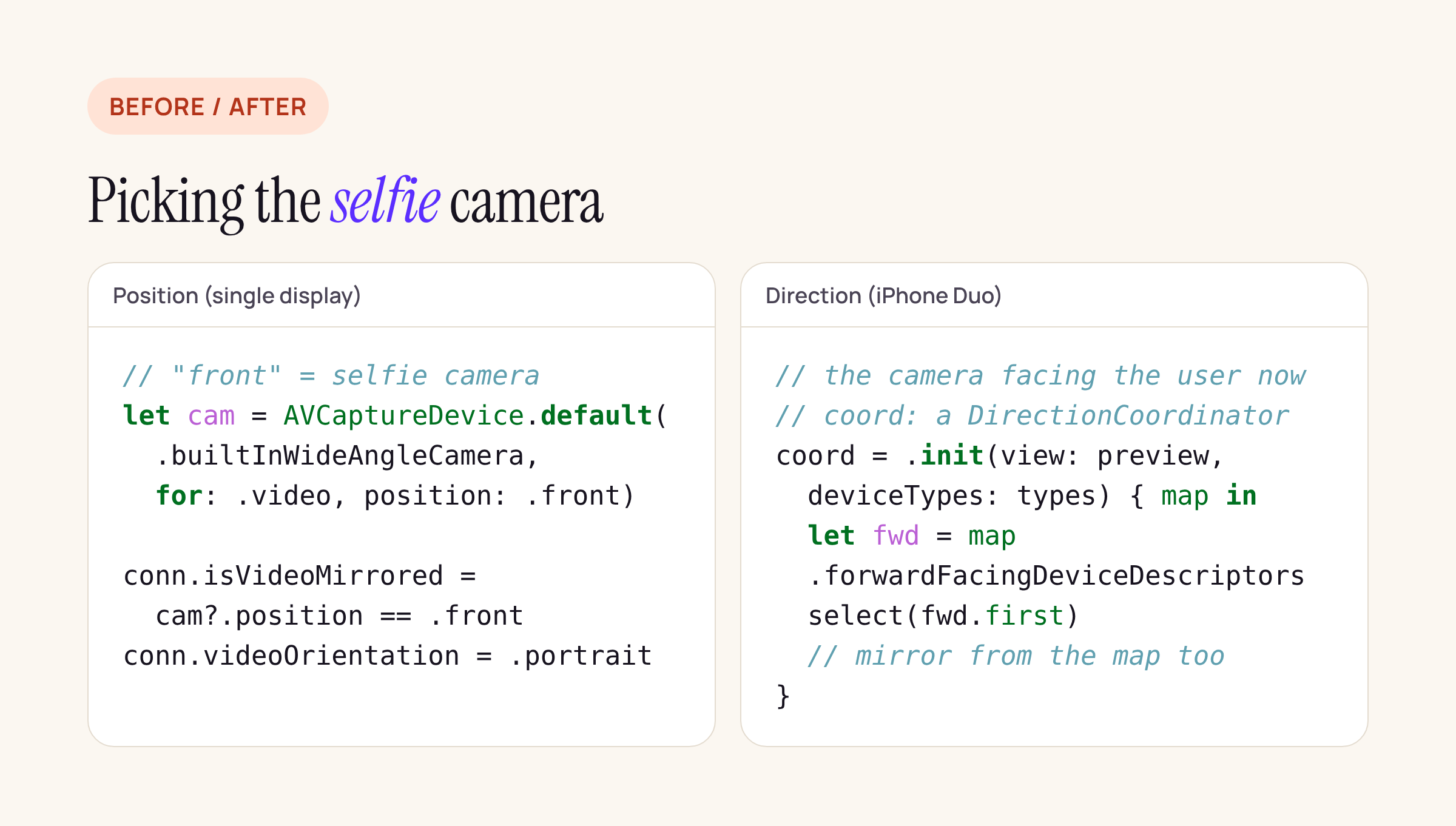
Left: the single-display pattern most apps ship. Right: the direction-based pattern from Apple’s article, shortened.
The APIs, in one table
Every row links the page we read. Availability is quoted where Apple’s page states it.
| What | Role in a selfie flow | Status |
|---|---|---|
| AVCaptureDeviceDirectionCoordinator | Tracks which way each camera faces in relation to a view; calls a change handler on the main actor when that changes | New with the iPhone Duo guidance |
deviceDirections (an AVCaptureDeviceDirectionMap) |
forwardFacingDeviceDescriptors and backwardFacingDeviceDescriptors |
Empty until the first handler call |
| AVCaptureDevice.RotationCoordinator | Angles that keep preview and captured media level | iOS 17.0+ |
| videoRotationAngleForHorizonLevelPreview | Apply to the preview connection; KVO, main queue | iOS 17.0+ |
| AVCaptureConnection.videoOrientation | The old way to rotate | Deprecated in iOS 17.0: “Use -videoRotationAngle instead” |
| AVCaptureDevice.position | Where the camera sits on the hardware | Unchanged; no longer equals direction on Duo |
| systemPreferredCamera | System’s choice of camera; “may change spontaneously”, so observe it | iOS 17.0+ |
The sample Supporting device rotation in your camera app is listed for iOS 27.0 and Xcode 27.0. Two of its rules matter on a foldable: “A rotation coordinator binds to one device for its lifetime; changing cameras means creating a new coordinator”, and read both angles once before observing them, because KVO “reports only later changes”.
What four React Native camera libraries do today
We ran npm pack on each version, unpacked the tarballs and searched the iOS sources (Swift, Objective-C and headers) for the direction and rotation APIs.

Counts are matching lines in each package’s iOS sources.
What the lines say:
- No library references
AVCaptureDeviceDirectionCoordinatoryet. None of the four can tell your JavaScript that the camera on the user’s side has changed. - react-native-vision-camera 5.2.4 maps the JS
fronttarget toAVCaptureDevice.default(.builtInWideAngleCamera, for: .video, position: .front)(AVCaptureDevice+defaultFor.swift). On iPhone Duo that is the virtual front camera, which follows the app. Mirroring goes throughautomaticallyAdjustsVideoMirroringunless you force a mirror mode. - expo-camera 58.0.14 already uses
RotationCoordinatorfor the preview (iOS 17+), and readssystemPreferredCamera. Its photo capture still setsconnection?.videoOrientationand mirrors whenpresetCamera == .front(CameraPhotoCapture.swift). Its front discovery session covers several device types (wide, telephoto, ultra wide, TrueDepth and the virtual multi-camera types), all filtered byposition: .front. - react-native-camera-kit 18.0.1 sets
videoOrientationon the preview and photo connections, and its Vision barcode path picks mirrored orientations fromcameraPosition == .front(RealCamera.swift). - vision-camera 4.7.3 relies on
videoOrientationthroughout.
So for the common case, “open the default front camera and take a selfie”, the virtual front camera does the right thing without a library change. What none of them handle yet is a user who takes the selfie with a rear camera that now faces them, or a flow that holds on to one physical camera across an open or close.
What we change in a KYC selfie flow
A KYC flow has stricter needs than a social camera: the selfie must show the person holding the phone, the image must not be mirrored in a way that breaks a liveness or face-match check, and the document photo must come from a camera facing away.
- Ask for the virtual front camera for the selfie step. Keep the default
.builtInWideAngleCameraat.frontrather than a specific physical lens. Apple’s own sample does the same. - Add a direction coordinator on the native side. Create it on the main actor with your preview view and every built-in camera type you capture from, and keep a strong reference while the view is on screen. In the handler, check that the active camera is still in
forwardFacingDeviceDescriptorsfor the selfie step (or inbackwardFacingDeviceDescriptorsfor the document step); if not, switch input inside onebeginConfigurationandcommitConfigurationpair. - Decide mirroring from the map. Preview mirrored when the active camera faces forward, unmirrored when it faces backward. Re-apply it after every input switch, because a new input creates a new preview connection.
- Replace
videoOrientationwith the rotation coordinator. Create a new coordinator whenever the device changes, read both angles once, then observe them. - Send the direction to JavaScript. In a React Native app, a small native module can give the flow screen one event, say
cameraDirectionChanged, so it can pause the step with a “Turn the phone so the screen faces you” message instead of capturing the wrong side.
A Swift sketch of step 2, adapted from Apple’s article. Treat it as a starting point and compile it against the iOS 27.1 SDK:
@MainActor
final class SelfieDirectionWatcher {
    private var coordinator: AVCaptureDeviceDirectionCoordinator?
    var onChange: ((Bool) -> Void)?   // true = selfie camera faces the user
    var activeID: String?

    func start(preview: UIView) {
        coordinator = AVCaptureDeviceDirectionCoordinator(
            view: preview,
            deviceTypes: [.builtInDualWideCamera,
                          .builtInOuterUltraWideCamera,
                          .builtInInnerUltraWideCamera]
        ) { [weak self] map in
            guard let self, let id = self.activeID else { return }
            let facing = map.forwardFacingDeviceDescriptors
                .contains { $0.uniqueID == id }
            self.onChange?(facing)
        }
    }
}
Note that the coordinator leaves out the virtual front camera (“because the system moves it for you”), so activeID here is a physical camera the user chose. If the flow only uses the virtual front camera, the watcher mainly guards the document step.
What to check on your own app
- Search your iOS code and your camera library for
position == .front,.frontchecks that setisVideoMirrored, andvideoOrientation. - On iPhone Duo, start the selfie step with the device open, then close it, and the other way round; check which camera streams and whether the preview is mirrored.
- Start the document step and close the device mid-capture; the captured image should come from the camera facing away from the user.
- Keep an eye on your camera library’s changelog for direction support before writing your own module.