
The short version: universal links and Android App Links fail without an error message. The app simply opens the browser. Before a release, check four things on every host your app claims: the file is at /.well-known/ over HTTPS with no redirect, the JSON parses, every iOS app ID is <Team ID>.<bundle ID>, and every Android fingerprint is upper-case, colon-separated SHA-256. Then ask Google’s Digital Asset Links API what it sees, because that is closer to what a phone sees than your own curl.
Below is the checker we run, the rule each check comes from, its output on a deliberately broken pair of files, and what Google’s API returned on 16 Nov 2026 for 10 payment and banking domains. Tested with Python 3.13 on Ubuntu 24.04; the script uses only the standard library.
Why we did this: our React Native banking apps use links for payment approval and KYC callbacks. When an association file breaks, the approval link opens a web page instead of the app, and users drop off at the worst moment. A script in the release checklist catches it before the build ships.
The rules, and where each one comes from
Apple’s Supporting associated domains and Android’s Verify App Links and Configure website associations pages are the sources. We only check what the docs state.
| Rule | iOS (AASA) | Android (assetlinks.json) | Source |
|---|---|---|---|
| Path | https://<domain>/.well-known/apple-app-site-association, no file extension |
https://<domain>/.well-known/assetlinks.json |
Apple, Android |
| HTTPS, valid certificate, no redirects | Stated | Stated | same pages |
| Content type | Not stated on the current page | application/json |
Android configure page |
| App identity | appIDs: <Application Identifier Prefix>.<Bundle Identifier>, e.g. ABCDE12345.com.example.app |
package_name plus sha256_cert_fingerprints (colon-separated hex, several allowed) |
same pages |
| URL matching | components array with /, ?, # keys, exclude, comment |
intent filters in the manifest; dynamic rules only for hosts in the manifest | same pages |
| One file per host | each subdomain serves its own file | publish the file on each domain | same pages |
| How fast a fix arrives | Apple’s CDN fetches the file within 24 hours; devices check about once a week after install | re-verification is per device; see the adb commands below | same pages |
Two things we no longer check because Apple’s current page does not state them: a size limit and a content type for the AASA file. Older blog posts quote both. We print the size and leave the decision to the reviewer.
Play App Signing is a common Android trap: the fingerprint of your upload key is not the one Google signs with. The Android configure page warns about exactly this. Put the app signing key fingerprint from Play Console into the file, and the upload key too if you install builds signed with it.
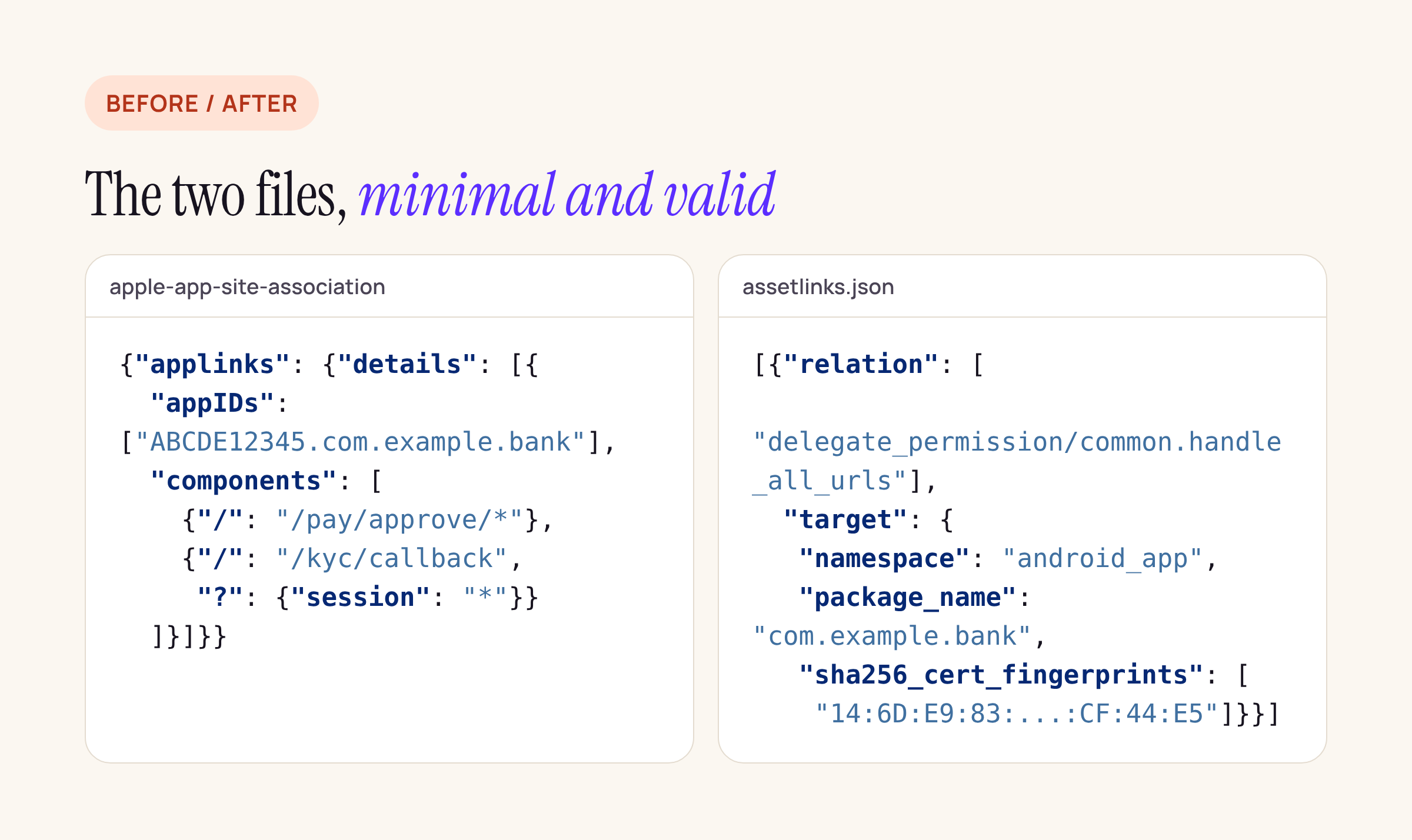
A minimal pair of files that passes every check. The fingerprint is Android’s documentation example, shortened.
The checker
Three modes: fetch both files from a live domain, query Google’s API, or test against local fixtures (which skips only the HTTPS rule). It exits 1 on any failure, so it can gate a CI job.
#!/usr/bin/env python3
"""Check apple-app-site-association and assetlinks.json before a release.
  python3 check_links.py example.com            # fetch both files over HTTPS
  python3 check_links.py --google example.com   # what Google's Digital Asset Links API sees
  python3 check_links.py --base http://127.0.0.1:8000 example.com   # test against local fixtures
"""
import json, re, sys, urllib.request, urllib.error

FP = re.compile(r"^([0-9A-F]{2}:){31}[0-9A-F]{2}$")        # SHA-256, upper case, colon-separated
APPID = re.compile(r"^[A-Z0-9]{10}\.[A-Za-z0-9.\-]+$")       # <Team ID>.<bundle ID>
API = ("https://digitalassetlinks.googleapis.com/v1/statements:list"
       "?source.web.site=https://{d}&relation=delegate_permission/common.handle_all_urls")

TEST = False  # --base: local fixtures over plain http, so the https rule is skipped

class NoRedirect(urllib.request.HTTPRedirectHandler):
    def redirect_request(self, *a, **k):
        return None  # a redirect is a failure for both files, so never follow it

def fetch(url):
    try:
        with urllib.request.build_opener(NoRedirect).open(url, timeout=20) as r:
            return r.status, r.headers.get("Content-Type", ""), r.read()
    except urllib.error.HTTPError as e:
        return e.code, e.headers.get("Content-Type", ""), b""

def aasa(base):
    errs = []
    st, ct, body = fetch(base + "/.well-known/apple-app-site-association")
    if st != 200:
        return [f"status {st} (needs 200, no redirect)"]
    if not base.startswith("https://") and not TEST:
        errs.append("not served over https")
    try:
        doc = json.loads(body)
    except ValueError:
        return errs + ["not valid JSON"]
    details = (doc.get("applinks") or {}).get("details") or []
    if not details:
        errs.append("no applinks.details")
    for d in details:
        ids = d.get("appIDs") or ([d["appID"]] if "appID" in d else [])
        if not ids:
            errs.append("details entry without appIDs")
        errs += [f"bad app ID {i!r} (Team ID.bundle ID)" for i in ids if not APPID.match(i)]
        if "components" not in d:
            errs.append("no components (old 'paths' format only)")
        for c in d.get("components", []):
            if not any(k in c for k in ("/", "?", "#")):
                errs.append(f"component matches nothing: {c}")
    return errs

def assetlinks(base):
    errs = []
    st, ct, body = fetch(base + "/.well-known/assetlinks.json")
    if st != 200:
        return [f"status {st} (needs 200, no redirect)"]
    if ct.split(";")[0].strip() != "application/json":
        errs.append(f"content type {ct or 'missing'} (needs application/json)")
    try:
        doc = json.loads(body)
    except ValueError:
        return errs + ["not valid JSON"]
    apps = [s for s in doc if "delegate_permission/common.handle_all_urls" in s.get("relation", [])
            and s.get("target", {}).get("namespace") == "android_app"]
    if not apps:
        errs.append("no handle_all_urls statement for an android_app")
    for s in apps:
        t = s["target"]
        if not t.get("package_name"):
            errs.append("statement without package_name")
        fps = t.get("sha256_cert_fingerprints", [])
        if not fps:
            errs.append(f"{t.get('package_name')}: no sha256_cert_fingerprints")
        errs += [f"{t.get('package_name')}: bad fingerprint {f[:23]}..." for f in fps if not FP.match(f)]
    return errs

def google(domain):
    st, ct, body = fetch(API.format(d=domain))
    sts = json.loads(body).get("statements", []) if st == 200 else []
    pkgs = sorted({s["target"]["androidApp"]["packageName"] for s in sts if "androidApp" in s["target"]})
    fps = [s["target"]["androidApp"]["certificate"]["sha256Fingerprint"] for s in sts if "androidApp" in s["target"]]
    return {"statements": len(sts), "packages": len(pkgs), "fingerprints_ok": all(FP.match(f) for f in fps)}

if __name__ == "__main__":
    args = sys.argv[1:]
    if args and args[0] == "--google":
        for d in args[1:]:
            print(d, json.dumps(google(d)))
        sys.exit()
    base = None
    if args and args[0] == "--base":
        base, args, TEST = args[1], args[2:], True
    failed = False
    for d in args:
        b = base or f"https://{d}"
        for name, fn in (("AASA", aasa), ("assetlinks", assetlinks)):
            errs = fn(b)
            failed |= bool(errs)
            print(f"{d:<14} {name:<11} {'PASS' if not errs else 'FAIL'}")
            for e in errs:
                print(f"{'':<14} - {e}")
    sys.exit(1 if failed else 0)
The app ID pattern assumes the usual 10-character Team ID. Treat the script as a starting point: add your own hosts, paths and package names so a wrong components pattern also fails the build.
What a broken pair of files looks like
We served two sets of fixtures on a local web server: a valid pair, and a pair with four common mistakes. The valid pair prints PASS twice and exits 0. The broken pair:
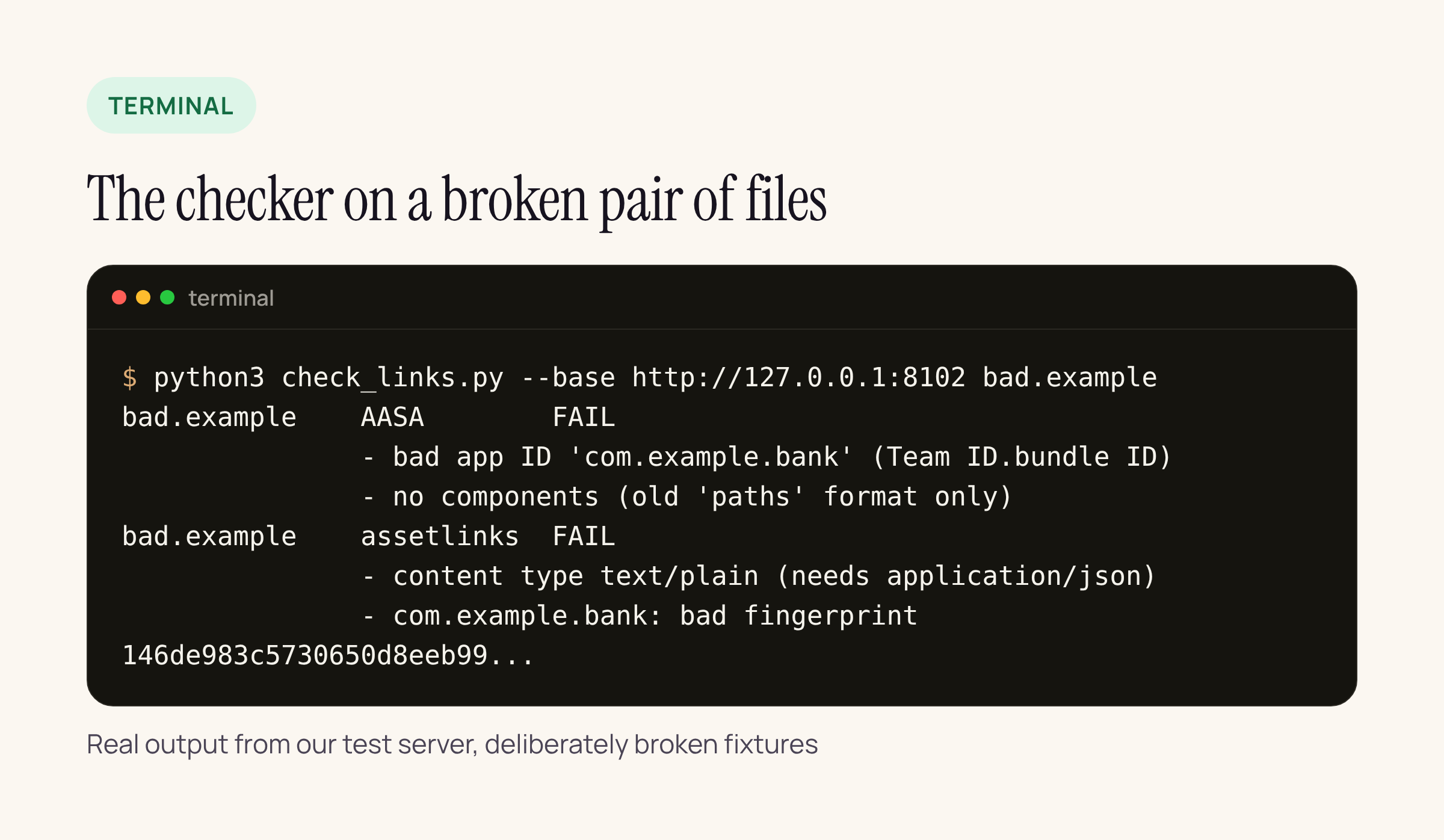
An app ID without the Team ID prefix, the older paths format instead of components, assetlinks.json served as text/plain, and a fingerprint copied as lower-case hex without colons.
Every one of these looks fine in a browser. keytool prints fingerprints in the right format; other tools often print the bare hex string, which is easy to paste by mistake.
What Google’s API sees for 10 payment domains
Google runs a public Digital Asset Links API. Ask it for delegate_permission/common.handle_all_urls statements for a site and it returns what it could read from that site’s assetlinks.json. That makes it a good second opinion, since it fetches from Google’s side and not from your laptop or VPN.
curl "https://digitalassetlinks.googleapis.com/v1/statements:list?source.web.site=https://wise.com&relation=delegate_permission/common.handle_all_urls"
We ran --google against 10 well-known payment and banking hosts on 16 Nov 2026:
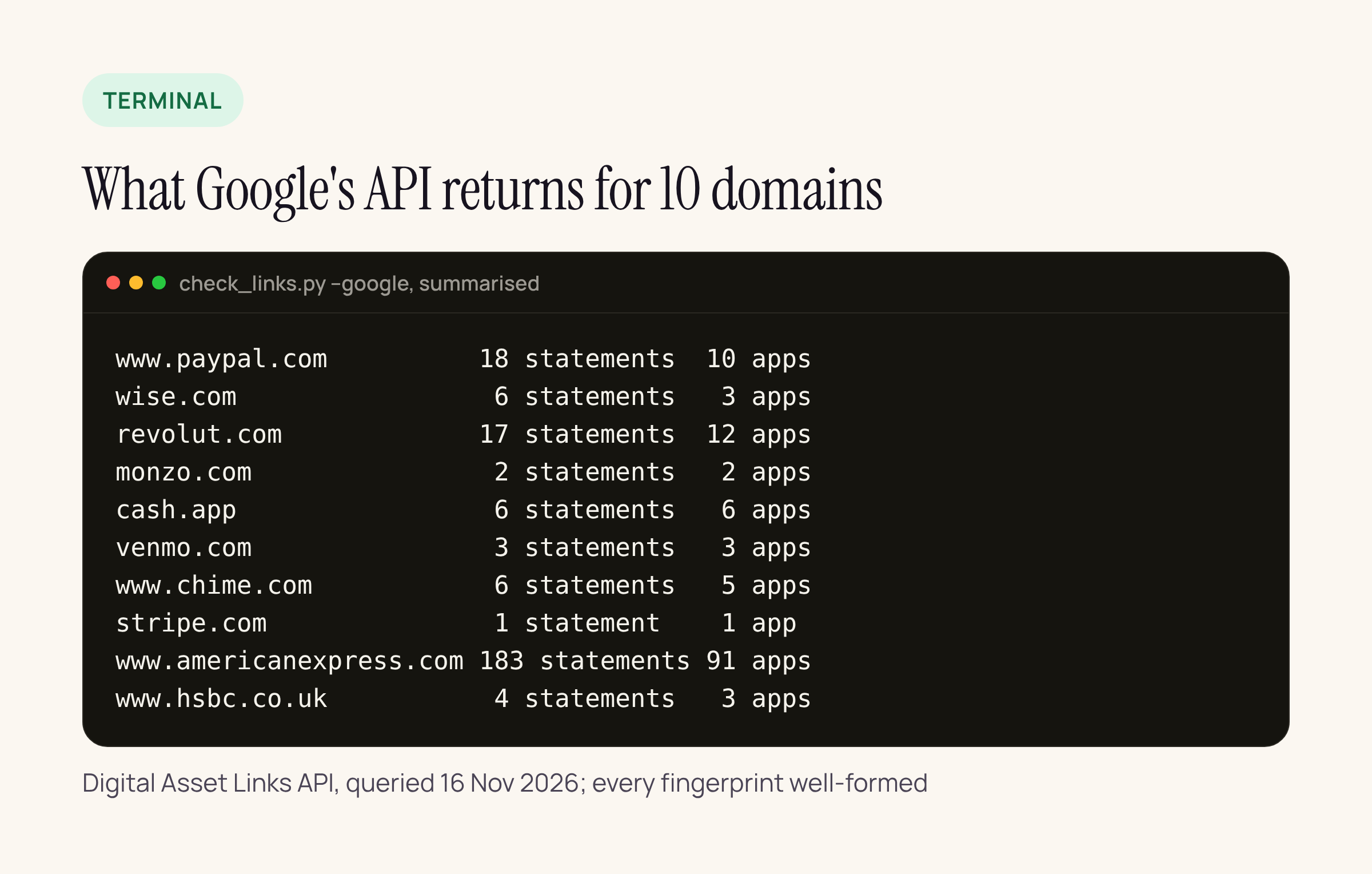
Every domain returned at least one statement and every fingerprint was well-formed. The counts show how far these files grow: one host lists 183 statements for 91 apps.
The interesting part was the host variants. For the same brands, the API returned zero statements for paypal.com, www.wise.com, www.monzo.com, americanexpress.com, hsbc.co.uk, www.stripe.com and www.venmo.com, while the other spelling of each host had statements. www.revolut.com and chime.com returned the same as their siblings. For the brands themselves this is probably fine, as long as their apps only claim the host that serves the file. For your app it is the check that matters: list every host from your AndroidManifest.xml intent filters (and every applinks: entry in your entitlements) and run the checker on each one. A host that redirects to its sibling does not count.
On the device
The script checks the files. The Android docs give the commands to see what a device decided:
adb shell pm verify-app-links --re-verify com.example.bank
adb shell pm get-app-links com.example.bank
get-app-links prints a state per domain: verified is what you want; none or legacy_failure means the device could not verify that host. On iOS, remember the CDN: a fixed AASA can take up to a day to reach Apple’s CDN, and installed apps check about once a week, so ship the file fix before the app build, not with it.
Our release checklist
- Run
check_links.pyon every host in the manifest and entitlements, in CI, on each release branch. - Run
--googleon the Android hosts and compare the package names with the app you are about to ship. - After a key rotation or a move to Play App Signing, update assetlinks.json first, then release.
- After any CDN, WAF or redirect change on the website, run the checker again. Those changes live on the web side, where the app team rarely sees them.






