The short version: from April 2027, App Store Connect only accepts iOS and iPadOS builds made with the iOS 27 SDK or later. The change that stops an app cold is in the iOS 27 release notes: apps built with the latest SDK must adopt the scene-based life cycle “or they fail to launch”. If your app still sets up its window in application(_:didFinishLaunchingWithOptions:), move that code to a UIWindowSceneDelegate first. On React Native, 0.88 is the first release whose template does this for you.
This guide covers Xcode 26 (iOS 26 SDK) to Xcode 27.1 (Swift 6.4, iOS 27.1 SDK, needs macOS Tahoe 26.6 or later). Checked on 8 Nov 2026 against Apple’s Xcode 27, 27.1 and 27.2 release notes, the iOS 27 release notes and Apple’s 9 Sep 2026 news post. We also diffed the native iOS sources of react-native 0.87.1 and 0.88.1, and of the @react-native-community/template at the same two versions, all pulled with npm pack.
Why we did this: every iOS app we maintain has to make this hop before April. That includes the Beacon-type banking apps on React Native, Peepal and Shopkeeper, and the iOS side of our TV work. We wanted one list we could work through for each project.
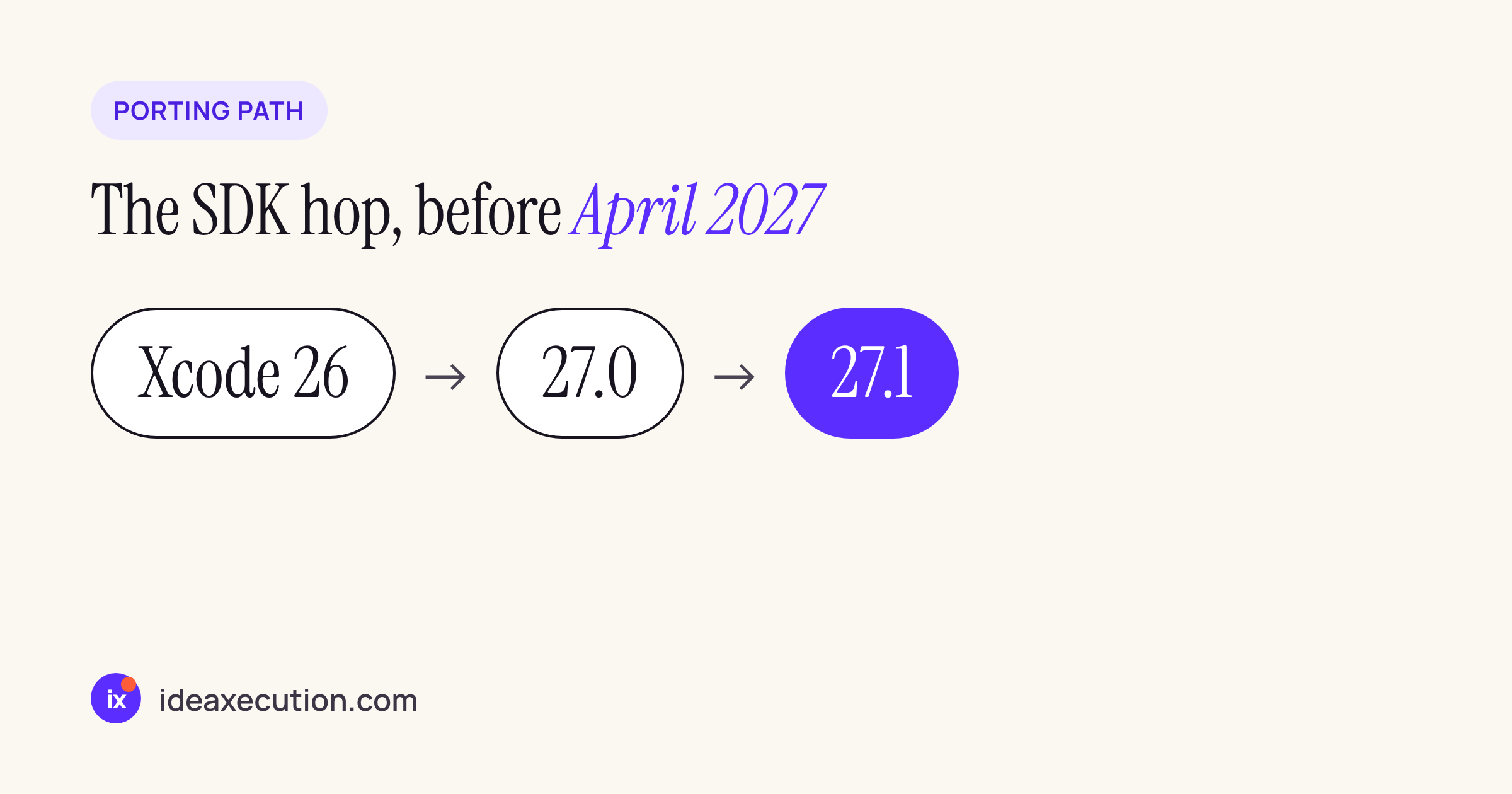
The order we recommend: Xcode 26, then 27.0 notes, then 27.1. The 27.1 notes add Mac Catalyst and simulator issues on top of 27.0.
The deadline, in Apple’s words
Apple’s news post of 9 September 2026 (App Store submissions now open for the latest OS releases) says: “Starting April 2027, apps and games uploaded to App Store Connect need to meet the following minimum requirements”. The first item is “iOS and iPadOS apps must be built with the iOS 27 & iPadOS 27 SDK or later”. The same rule applies to tvOS, visionOS and watchOS with their 27 SDKs. No day in April is given.
Two related rules are already in force, per Apple’s upcoming requirements page. Since 28 April 2026, uploads must be built with Xcode 26 or later. Since 9 September 2026, iOS and iPadOS uploads “must target iOS 13 or later”.
Porting steps
- Install Xcode 27.1 on a Mac running macOS Tahoe 26.6 or later. Xcode 27 “will only install and run on Apple silicon Macs” (Xcode 27 notes, 162138432). An Intel build Mac is now a hardware purchase, not a setting.
- Remove
-ld_classicfrom every target and pod. “The ld64 linker has been removed and the-ld_classicoption is no longer supported” (165165518). SearchOTHER_LDFLAGSin your.xcodeproj, your.xcconfigfiles and your Podfilepost_installhooks. - Move to the scene life cycle if you have not already (next section).
- Check you have a launch screen. Apps built with the 27.0 SDK must include one of
UILaunchStoryboardName,UILaunchStoryboards,UILaunchScreenorUILaunchScreensin Info.plist, or they are rejected once the App Store accepts 27.0 SDK builds (iOS 27 notes, 168247372). - Switch status bar control to view controllers. Set
UIViewControllerBasedStatusBarAppearancetoYES(see the React Native section for why). - Fix the Swift 6.4 compile errors (SwiftUI
@State, init accessors), then the deprecation warnings. - Recompile every binary dependency that uses MetricKit’s hitch metrics (see “What broke”).
- Build, then run on a device and the iPhone Duo simulator. We have not done this step yet; see the end of the post.
The scene life cycle is no longer optional
The iOS 27 release notes, UIKit, Deprecations (141837548): “Apps built with the latest SDK must adopt the scene-based life cycle or they fail to launch.”
A pre-scene app does its setup in the app delegate, like this:
// Before: window created in the app delegate (no UIApplicationSceneManifest)
@main
class AppDelegate: UIResponder, UIApplicationDelegate {
  var window: UIWindow?

  func application(_ application: UIApplication,
                   didFinishLaunchingWithOptions launchOptions: [UIApplication.LaunchOptionsKey: Any]?) -> Bool {
    window = UIWindow(frame: UIScreen.main.bounds)
    window?.rootViewController = RootViewController()
    window?.makeKeyAndVisible()
    return true
  }
}
After the change, the app delegate only handles process-level work. The window belongs to a scene delegate:
// After: AppDelegate keeps process-level work only
@main
class AppDelegate: UIResponder, UIApplicationDelegate {
  func application(_ application: UIApplication,
                   didFinishLaunchingWithOptions launchOptions: [UIApplication.LaunchOptionsKey: Any]?) -> Bool {
    true
  }
}

// New file: SceneDelegate.swift
class SceneDelegate: UIResponder, UIWindowSceneDelegate {
  var window: UIWindow?

  func scene(_ scene: UIScene, willConnectTo session: UISceneSession,
             options connectionOptions: UIScene.ConnectionOptions) {
    guard let windowScene = scene as? UIWindowScene else { return }
    window = UIWindow(windowScene: windowScene)
    window?.rootViewController = RootViewController()
    window?.makeKeyAndVisible()
  }
}
Info.plist also needs the scene manifest. This is the exact block the React Native 0.88.1 template adds:
<key>UIApplicationSceneManifest</key>
<dict>
  <key>UIApplicationSupportsMultipleScenes</key>
  <false/>
  <key>UISceneConfigurations</key>
  <dict>
    <key>UIWindowSceneSessionRoleApplication</key>
    <array>
      <dict>
        <key>UISceneConfigurationName</key>
        <string>Default Configuration</string>
        <key>UISceneDelegateClassName</key>
        <string>$(PRODUCT_MODULE_NAME).SceneDelegate</string>
      </dict>
    </array>
  </dict>
</dict>
Code that has to move with it:
- URL handling moves from
application(_:open:options:)toscene(_:openURLContexts:). Cold-start URLs arrive inconnectionOptions.urlContexts. - Universal links move from
application(_:continue:restorationHandler:)toscene(_:continue:). - Foreground and background hooks move to
sceneDidBecomeActive,sceneWillResignActiveand the matching scene methods. Banking apps that blur the screen in the app switcher need to check this one. - Anything that reads
UIApplication.shared.windowsorkeyWindowshould get the window from the scene.
What React Native 0.88 changed on iOS
We diffed react-native@0.87.1 against 0.88.1, and @react-native-community/template@0.87.1 against 0.88.1. All four were pulled with npm pack on 8 Nov 2026. In 0.87.1, six files under React/ and Libraries/ mention UIScene or UIWindowScene. In 0.88.1, eleven do. The new ones are RCTReactNativeFactory, RCTAppDelegate and RCTLinkingManager.
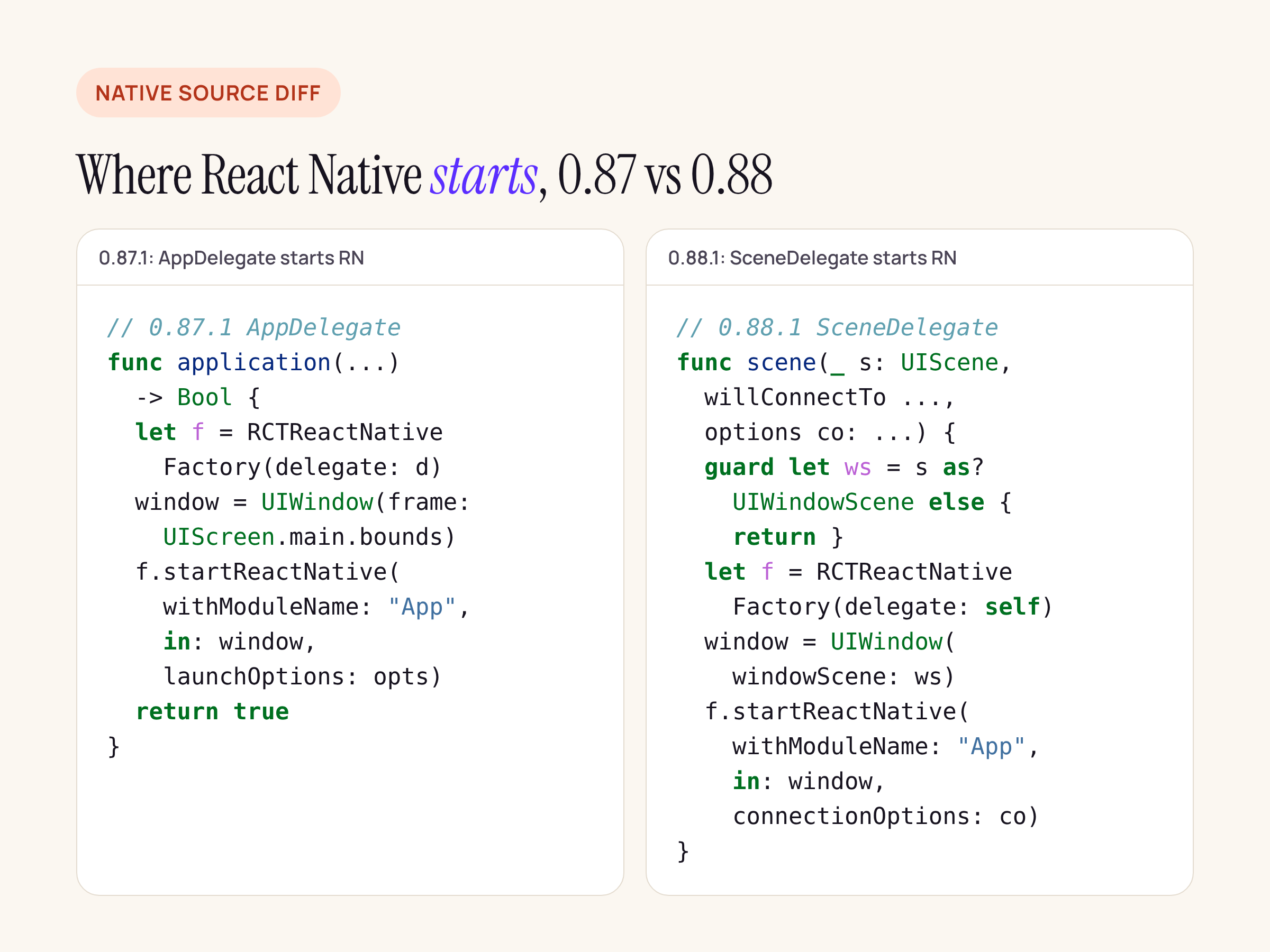
The 0.88.1 template’s AppDelegate.swift shrinks to return true. The new SceneDelegate.swift creates the factory and calls a new entry point.
What the native diff shows:
RCTReactNativeFactory.haddsstartReactNativeWithModuleName:inWindow:connectionOptions:(plus a variant that takesinitialProperties). The header comment says it should be called “fromscene:willConnectToSession:options:in your app-ownedSceneDelegate“. It also notes that “only the first item inURLContextsanduserActivitiesis used”.RCTLinkingManageradds+scene:openURLContexts:and+scene:continueUserActivity:. If you forward deep links today, call these from your scene delegate instead of the app delegate methods.RCTUtils.mmaddsRCTIsSceneDelegateApp(), which returns YES when Info.plist has aUIApplicationSceneManifestwith at least oneUISceneConfigurationsentry.RCTAppDelegate.hgets a new deprecation message: “For UIScene apps implement your own SceneDelegate with RCTReactNativeFactory”. The header also says scene-based apps “must keepUIApplicationSupportsMultipleScenesset tofalse“. It adds that definingRN_ALLOW_MULTIPLE_SCENES“downgrade[s] the unsupported-configuration crash to a warning”. Leave multiple scenes off.- The template’s Info.plist flips
UIViewControllerBasedStatusBarAppearancefromfalsetotrue.
That last line matters because of RCTStatusBarManager.mm in 0.88.1:
// UIKit makes the app-level setters no-ops only for apps built with the iOS 27 SDK.
static BOOL RCTAppLevelStatusBarIsNoOp()
{
#if __IPHONE_OS_VERSION_MAX_ALLOWED >= 270000
  if (@available(iOS 27.0, *)) {
    return YES;
  }
#endif
  return NO;
}
If your app keeps UIViewControllerBasedStatusBarAppearance = NO, StatusBar.setBarStyle and setHidden do nothing once you build with the iOS 27 SDK. React Native logs: “Set UIViewControllerBasedStatusBarAppearance to YES to control the status bar from JavaScript”. The default root view controller in 0.88.1 (RCTRootViewController) reads its style, hidden state and animation from a new RCTStatusBarAppearance class. If you use a custom root view controller, return those three values from it.
For a React Native app on 0.87 or older, the order that follows from this is:
- Upgrade to 0.88.1.
- Add
SceneDelegate.swiftfrom the template, with your module name andinitialProperties. - Strip
AppDelegatedown to process-level work. - Add the scene manifest and flip
UIViewControllerBasedStatusBarAppearancetoYES. - Move deep-link forwarding to the two
RCTLinkingManager.scenemethods.
The minimum iOS version React Native’s CocoaPods helper sets did not move: min_ios_version_supported returns '15.1' in 0.79.7, 0.87.1, 0.88.1 and 0.89.0-rc.0.
What broke: the compile and link errors
Each item below is from Apple’s notes, with the fix Apple gives.
Linker flag -ld_classic
React Native added -Wl -ld_classic to OTHER_LDFLAGS only when building with Xcode 15.0. 0.80.0 still had that code in scripts/cocoapods/utils.rb, and 0.81.0 removed it. A project that was ever built on Xcode 15.0 with an older React Native release may still carry the flag in its own build settings. Xcode 27 no longer supports it.
// Before (project.pbxproj / xcconfig)
OTHER_LDFLAGS = $(inherited) -Wl -ld_classic
// After
OTHER_LDFLAGS = $(inherited)
SwiftUI @State is now a macro
The iOS 27 release notes (105893279) say three things about this. Assigning in init to an @State property that already has an initial value no longer compiles. Composing @State with other wrappers or macros is unsupported. A private memberwise initialiser is no longer synthesised.
// Before: compiles with the iOS 26 SDK
struct AmountField: View {
  @State private var text = ""
  init(prefill: String) { _text = State(initialValue: prefill) }
  var body: some View { TextField("Amount", text: $text) }
}

// After: no initial value on the declaration
struct AmountField: View {
  @State private var text: String
  init(prefill: String) { _text = State(initialValue: prefill) }
  var body: some View { TextField("Amount", text: $text) }
}
Init accessors declared after the getter
Xcode 27 lists this as a Swift compiler known issue (180969028). A computed property with an init accessor and a literal initial value fails to compile if the getter is declared first (an SE-0508 source break). Apple’s workaround is to declare the init accessor first.
Unqualified stat()
Xcode 27 and the iOS 27 notes (177911316): unqualified stat() calls inside your own FilePath or FileDescriptor extensions may conflict with new API. Call Darwin.stat() instead.
MetricKit hitch metrics
ScrollHitchTimeMetric and scrollHitchTime(_:) were removed (180455992). HitchTimeMetric.ratio now uses HitchTimeRatio (180024784). Apple says to recompile to avoid a missing-symbol crash or a launch crash. This applies to prebuilt analytics SDKs in your Podfile too. Ask the vendor for an Xcode 27 build.
Smaller ones
PreviewProvideris deprecated (144168701). Move previews to#Preview.FileDocumentandReferenceFileDocumentare deprecated in favour ofDocument(178776840, 177458781).canOpenURL:is deprecated (179874781).toolbarMinimizeBehaviorbecomestoolbarMinimizationBehavior(177954148). In UIKit,UINavigationItem.navigationBarMinimizationreplacesbarMinimizeBehavior(177953926).- Interface Builder uses a new
toolchaincompile mode for UIKit documents by default (114401122). SetIBC_COCOATOUCH_COMPILER_MODE = simulatorif a storyboard misbehaves. - UI-test target crashes now default to “failure” severity (168107814). CI runs that used to pass with a crash in them will turn red.
Xcode 27.1-specific notes
From the Xcode 27.1 release notes:
- Projects that use iOS 27.1-only APIs show compile errors for Mac Catalyst (185924957). Wrap them in
#if !targetEnvironment(macCatalyst). - Projects targeting iOS 27.1 show no Mac Catalyst run destination (187046347). Apple’s workaround is a Mac Catalyst minimum deployment of 27.0.
- In the iPhone Duo simulator runtime, StandBy and most app extensions are unavailable, and the first launch is slow (187708500, 187708663, 187708767).
Xcode 27.2 (29 Oct 2026) adds one known issue worth knowing if you build Mac or TV targets in the same workspace. Its macOS, watchOS, tvOS and visionOS SDKs “incorrectly report 27.1 as a valid deployment target” (187160501).
How we checked, and what we have not run
- Docs: we read the Xcode 27, 27.1 and 27.2 release notes and the iOS 27 release notes (the Markdown versions of Apple’s pages), Apple’s news post of 9 Sep 2026 and the upcoming-requirements page, all on 8 Nov 2026. The iOS 27.1 release notes page did not load for us, so nothing here comes from it.
- Native sources:
npm packof react-native 0.79.7, 0.80.0 to 0.83.0, 0.87.1, 0.88.1 and 0.89.0-rc.0, plus@react-native-community/template0.87.1 and 0.88.1. We diffedLibraries/AppDelegate,Libraries/LinkingIOS,React/CoreModules/RCTStatusBarManager.mmand the template’sios/folder in a Linux container. - Not run yet: building any of our apps with Xcode 27.1, and checking launch, deep links and the status bar on a device or the iPhone Duo simulator. We will add those results here once the banking app’s scene migration is built and tested.