
The short version: moving from react-native-webview 16.0.2 to 17.1.0 changes nothing on iOS, and the major version exists because the library now needs React Native 0.80 or newer. We unpacked the npm packages of 16.0.2, 17.0.0, 17.0.1, 17.0.2 and 17.1.0 and diffed them. The apple/ and ios/ sources, the podspec and android/build.gradle are identical in all five. What changes is the codegen spec (17.0.0), how Android applies props (17.0.1 and 17.0.2) and a new Android-only profile prop (17.1.0). One more thing to know before you upgrade: as of 17 November 2026 the npm latest tag still points at 14.0.1, and 17.1.0 is on next, so a plain npm install react-native-webview does not give you 17.
Why we did this: the banking apps we build for clients open payment pages, 3-D Secure challenges, statements and terms in WebViews, often two at once (a statement screen with a payment sheet on top). A major bump in that library gets read line by line before it reaches a release branch.
What we compared
We ran npm pack for each version, unpacked the tarballs and diffed the trees. The 17.x line was published within about a day: 17.0.0 on 3 November 2026, 17.0.1 and 17.0.2 early on 4 November, 17.1.0 later that morning (npm publish times, UTC). To check the React Native requirement, we also unpacked react-native 0.79.7 and 0.80.0 and searched their public entry points.
for v in 16.0.2 17.0.0 17.0.1 17.0.2 17.1.0; do
  npm pack react-native-webview@$v
  mkdir -p v$v && tar xzf react-native-webview-$v.tgz -C v$v
done
diff -rq v16.0.2/package v17.1.0/package
diff -r v16.0.2/package/apple v17.1.0/package/apple && echo identical
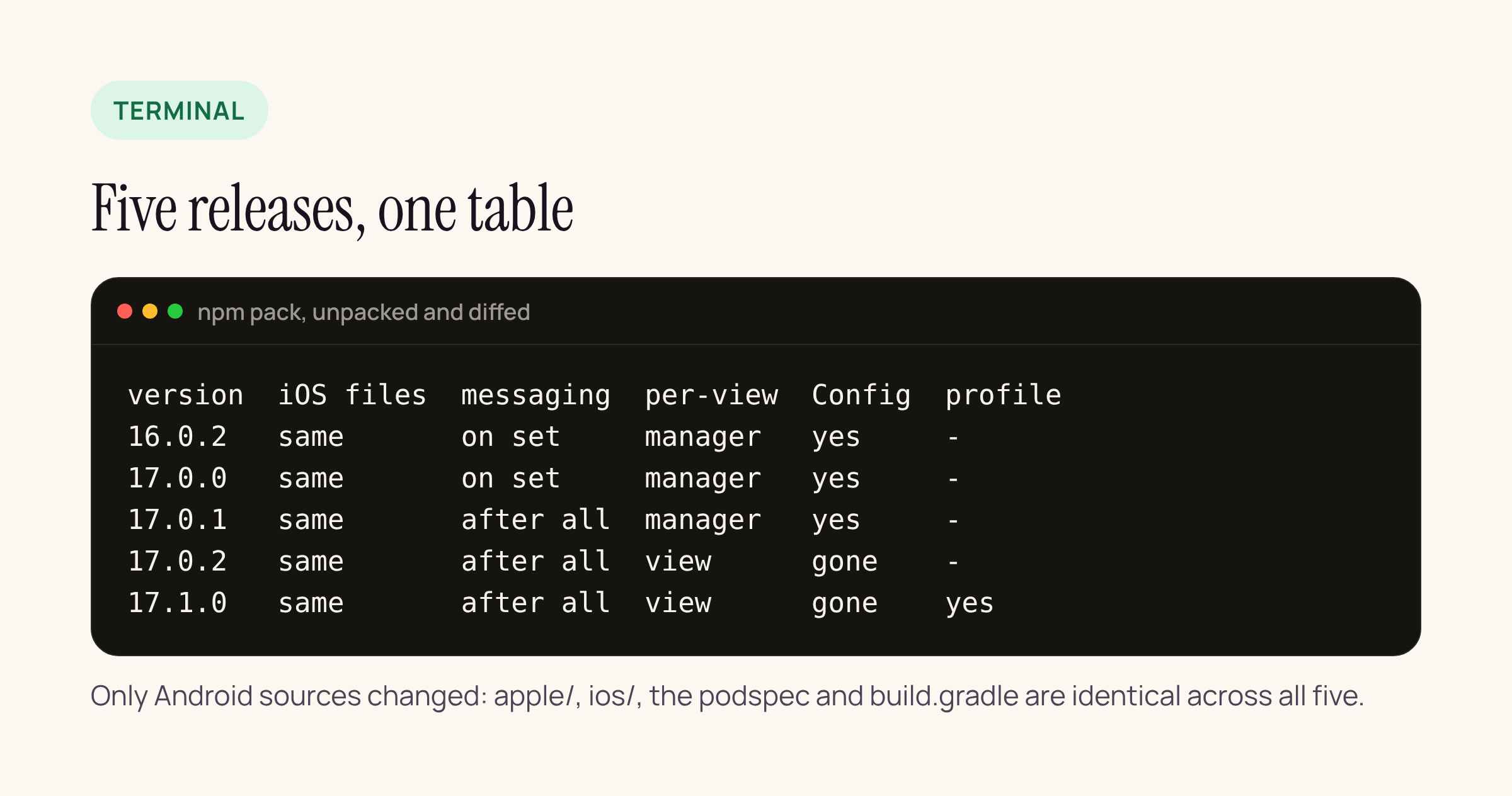
What each release changed, from the unpacked packages. Only Android sources and the codegen spec differ.
Between 16.0.2 and 17.1.0, diff -rq lists 15 differing files: three Android sources, the codegen and TypeScript specs (in src/ and the compiled lib/), the Windows spec, package.json, the README, and one deleted Java file.
17.0.0: React Native 0.80 is now the floor
17.0.0 has no native change at all. It rewrites the codegen spec files (RNCWebViewNativeComponent.ts, NativeRNCWebViewModule.ts and the Windows spec) to import the codegen helpers from the react-native package root instead of deep paths under react-native/Libraries/, and to use the CodegenTypes namespace for Double, Int32, WithDefault and DirectEventHandler.
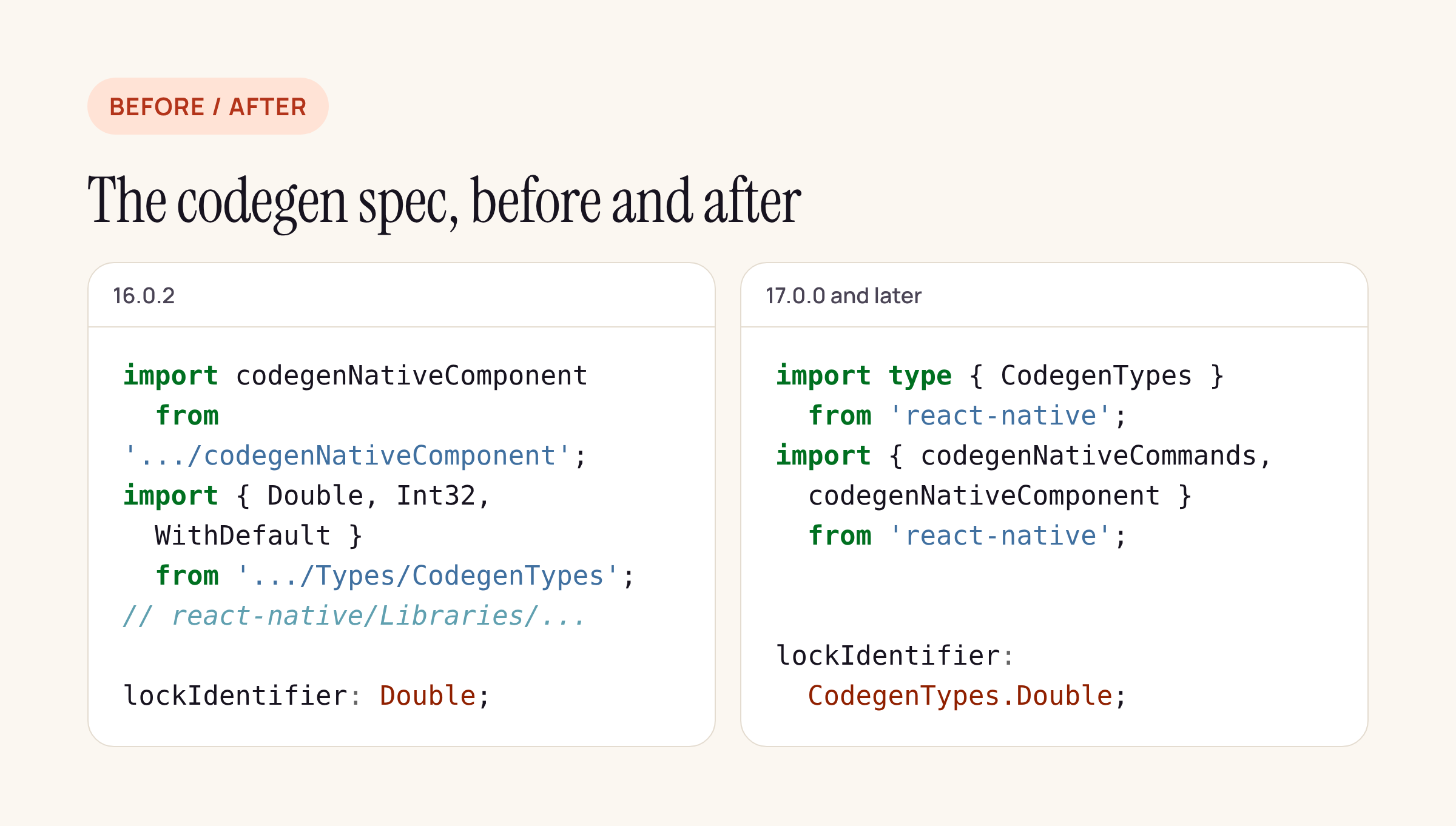
The same spec, before and after. Every Double becomes CodegenTypes.Double.
Those root exports are new in React Native 0.80. In the 0.80.0 package, types/index.d.ts has export * as CodegenTypes and index.js has getters for codegenNativeComponent and codegenNativeCommands; in 0.79.7 neither file mentions them. The README changes to match: “This requires React Native 0.80 or newer (with the new architecture enabled)”, up from 0.76, and react-native-macos 0.81 or newer, up from 0.76. The peerDependencies stay "react-native": "*", so npm will not warn you: an app on 0.76 to 0.79 that installs 17 fails when codegen reads the spec, not at install time.
If you are below 0.80, stay on 16.0.2 until the React Native upgrade lands. If you are on 0.80 or newer, 17.0.0 by itself changes nothing at runtime.
17.0.1: messaging props wait for the whole update
On Android, 16.0.2 registered the JavaScript bridge inside setMessagingEnabled and ran injectJavascriptObject() inside setInjectedJavaScriptObject, at the moment each prop arrived. 17.0.1 turns both setters into plain stores and adds applyMessagingProps(), which the manager calls from onAfterUpdateTransaction after every prop of the update has been set. The comment in the source gives the reason: “Fabric sets props in no particular order”, and registering the bridge needs the final value of javaScriptEnabled.
Two related details:
injectedJavaScriptObjectis now only re-injected when its value actually changed (TextUtils.equalscheck), and it is injected again on every page load while it is set, not only after an injected script ran.- The early return in
setMessagingEnabled(if (messagingEnabled == enabled) return) is gone.
For a payment WebView that talks to the app with postMessage, this is the change most likely to fix a “first load sometimes has no bridge” report on Android. Your JavaScript does not change.
17.0.2: per-WebView state moves off the shared manager
This is the one to read if you show more than one WebView at a time. In 16.0.2, RNCWebViewManager kept these as fields of the manager: mUserAgent, mUserAgentWithApplicationName, mAllowsFullscreenVideo, mAllowsProtectedMedia, mDownloadingMessage, mLackPermissionToDownloadMessage, mHasOnOpenWindowEvent and mPendingSource. The 17.0.2 source explains the problem in a comment: “a single manager instance serves every WebView in the app”. 17.0.2 moves all eight onto RNCWebView, so each view reads back its own values when its WebChromeClient is recreated, its user agent is recomputed, a download starts, or its pending source is loaded.
Reading the 16.0.2 code, a statement WebView with one userAgent and a payment WebView with another could read each other’s stored value when the user agent was recomputed, because both read the same manager field. If you set a custom userAgent or applicationNameForUserAgent per screen, or use downloads with custom messages, this release is worth taking for that alone.
17.0.2 also deletes RNCWebViewConfig.java, the small public interface with configWebView(WebView) that 16.0.2 called from createViewInstance. The manager never received a config from outside (it was always the empty lambda), but if your app or a fork subclassed the manager and referenced RNCWebViewConfig, the Android build breaks on 17.0.2. Move that setup into your own code that runs after the view is created.
17.1.0: a profile prop for a separate cookie jar on Android
17.1.0 adds one prop, profile, documented in WebViewTypes.ts as Android only. It binds the WebView to a named androidx.webkit Profile with its own cookies, web storage, geolocation permissions and service workers. The native side, in bindProfile, checks WebViewFeature.MULTI_PROFILE, calls ProfileStore.getInstance().getOrCreateProfile(name) and WebViewCompat.setProfile, and uses that profile’s CookieManager from then on.
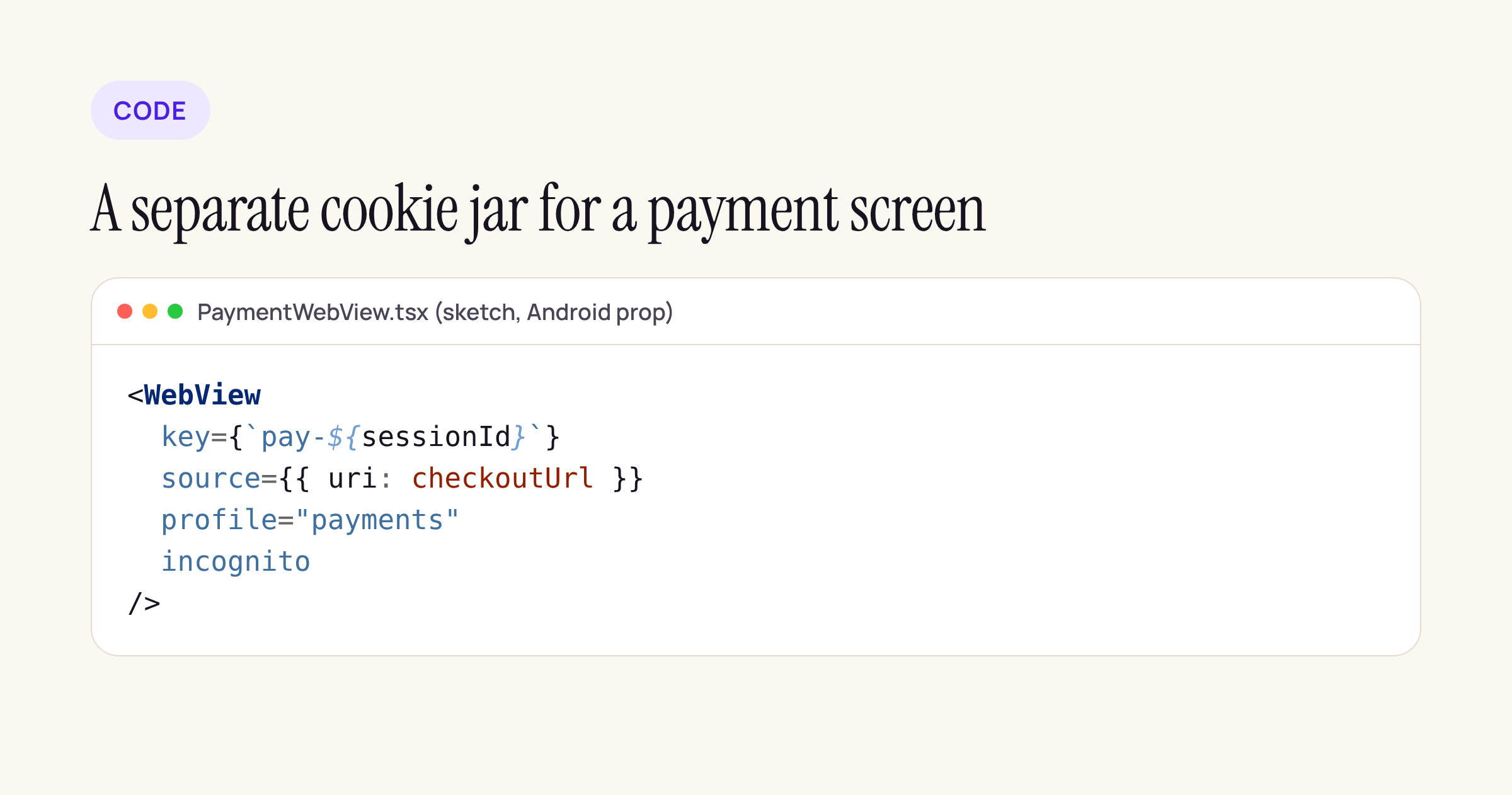
A sketch of a payment screen with its own cookie jar. Treat it as a starting point for your own component.
Rules taken from the source and its doc comment:
- The profile is read once, at the end of the first props update. A later change, including removing the prop, is ignored with a Logcat warning; change the component’s
keyto remount it. "Default"is the shared default profile, so any other name gives an isolated one.- If the device’s WebView does not support
MULTI_PROFILE, the prop is ignored, the default profile is used and a warning is logged. If binding throwsIllegalStateException, the same fallback applies. - The library’s
webkitVersionis1.14.0inandroid/gradle.properties; the doc comment says the feature needs androidx.webkit 1.9 or newer.
incognito changes with it. In 16.0.2 the setter ran as soon as the prop was set and called CookieManager.getInstance().removeAllCookies(null), which clears the app-wide cookie jar. In 17.1.0 it runs once at mount, after the profile is bound, and clears only that WebView’s cookie jar (the profile’s, if one is bound). Toggling incognito on an already-mounted WebView no longer does anything. Downloads (getCookie for the download request) and onPageFinished (flush) also use the WebView’s own cookie jar now.
What stays the same
- iOS and macOS: the
apple/andios/folders are byte-identical from 16.0.2 to 17.1.0, so WKWebView configuration, cookies and message handlers behave as before. The podspec still declares iOS 15.1, macOS 10.15 and visionOS 1.0. - Android build:
android/build.gradleis unchanged, minSdk stays at 24 or your app’s value if higher, andwebkitVersionstays 1.14.0. - Props: apart from
profile, the codegen props are the same list in both versions.
Upgrade checklist for a payment or 3-D Secure WebView
- Check your React Native version. Below 0.80, stay on 16.0.2. On 0.80 or newer, install with an explicit version (
npm install react-native-webview@17.1.0), sincelateststill resolves to 14.0.1. - Run
pod installand a clean Android build, then confirm codegen runs without errors forRNCWebViewSpec. - Search your Android code and any patches for
RNCWebViewConfigand remove the dependency. - If you have patch-package patches against
RNCWebViewManager.kt, rebase them: the manager’s fields are gone in 17.0.2. - Retest
postMessageboth ways on Android on the first page load, withinjectedJavaScriptObjectif you use it. - If two WebViews can be on screen together with different
userAgentvalues, check both after the upgrade. - If you relied on
incognitoto wipe app-wide cookies, note that 17.1.0 only clears the WebView’s own jar. If you adoptprofile, decide the name once per flow and remount with a newkeyto switch.
Runtime behaviour on specific Android WebView versions is outside this post; the steps above are what we would run on our own payment screens before shipping the upgrade.






