
If you move to React Native 0.89, you also move to @react-native-community/cli 21, and the change that matters is not a flag. react-native 0.89.0-rc.1 no longer ships a react-native.config.js, so CLI 21 registers the iOS and Android platforms itself, and start, bundle, codegen and spm only exist if @react-native/community-cli-plugin is in your own devDependencies. On top of that, run-ios skips pod install in a project that react-native spm migrated, and run-android now installs debug builds with downgrades allowed.
This is a source diff. We ran npm pack on CLI 20.2.0 (25 Jun 2026) and 21.0.0 (12 Nov 2026) for cli, cli-config, cli-config-apple, cli-config-android, cli-types, cli-tools, cli-platform-apple, cli-platform-ios, cli-platform-android, cli-doctor, cli-clean and cli-server-api, and diffed the published build/ folders. We also diffed the react-native 0.88.1 and 0.89.0-rc.1 packages, the matching @react-native/community-cli-plugin packages, and both app templates.
Why we did this: our Beacon-type banking apps and the TV apps are React Native CLI projects (no Expo), and the CLI is the first thing that fails on an upgrade morning. React Native 0.89.0 is scheduled for 7 Dec 2026, so this is the window to fix package.json before it does. For the rest of the 0.89 upgrade, see our React Native 0.89 RC post.
The short version
| Change | Package | What you do |
|---|---|---|
react-native 0.89 drops its react-native.config.js |
react-native | Nothing in code, but see the next two rows |
| iOS and Android platforms registered by the CLI itself | cli 21.0.0 | Remove cli-platform-ios and cli-platform-android from devDependencies (the 0.89 template already does) |
start, bundle, codegen, spm come only from the plugin |
community-cli-plugin 0.89 | Add @react-native/community-cli-plugin at the same version as react-native |
| New error when the plugin is missing | cli 21.0.0 | Read it, add the package |
run-ios / build-ios skip CocoaPods in SPM projects |
cli-config-apple, cli-platform-apple | Nothing; --force-pods still runs pods |
--force-pods without a Podfile now throws |
cli-config-apple | Drop the flag in SPM-only CI scripts |
run-android passes -Pandroid.adbOptions.installOptions=-d |
cli-platform-android | Expect older debug builds to install over newer ones |
Flags of run-ios, run-android, doctor |
all | Unchanged: the option files are identical |
| Node minimum of the CLI | cli | Unchanged at >=20.19.4 (the 0.89 template asks for >= 22.11.0) |
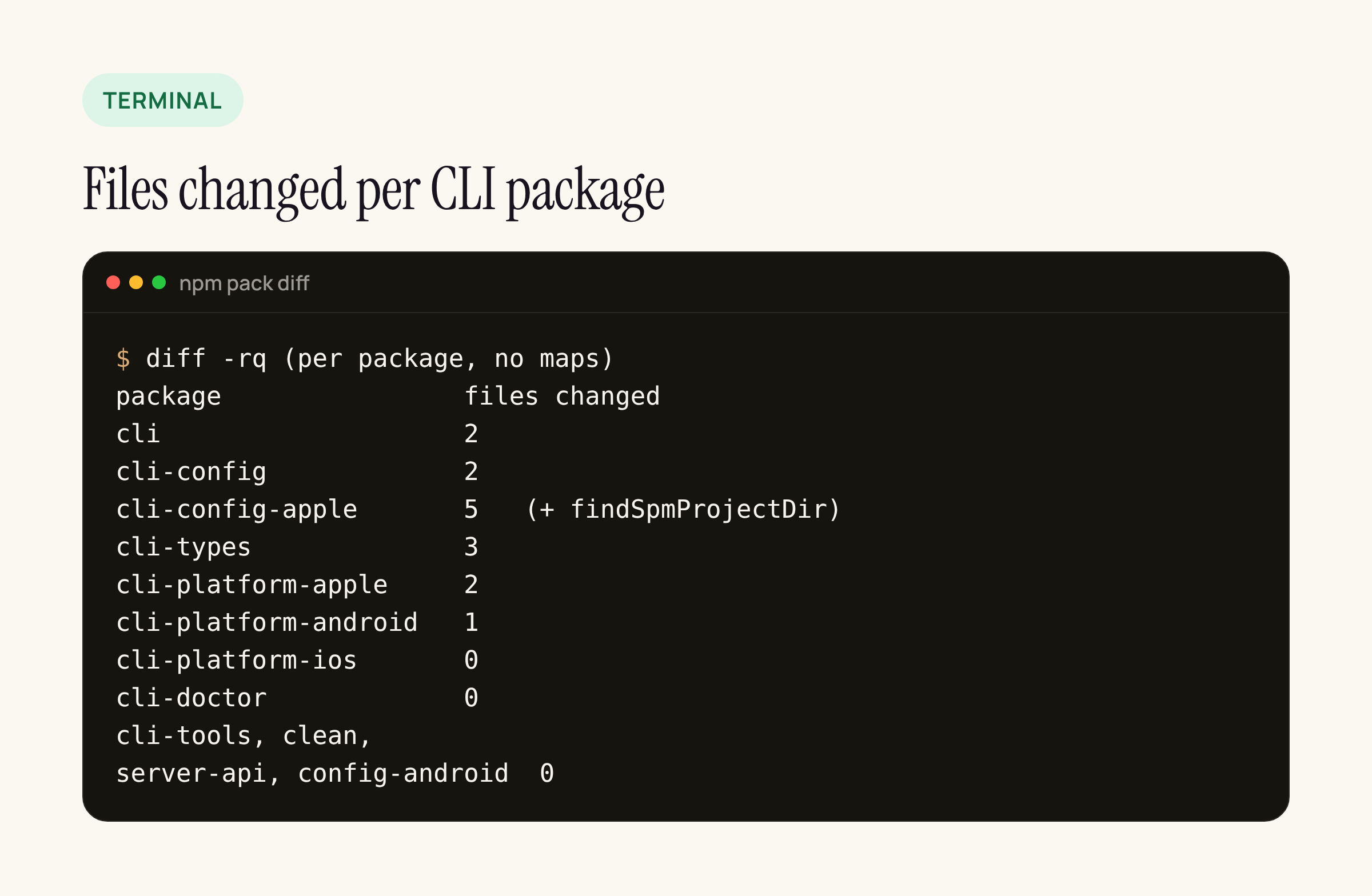
Real output from our test server: only six of twelve packages have code changes, and the doctor, clean and tools packages are untouched.
Where the platforms come from now
In 0.88.1, react-native itself carried a routing file, react-native.config.js. It looked up @react-native-community/cli-platform-ios and cli-platform-android from your project root, pushed their commands, registered them as platforms.ios and platforms.android, and added the four commands from @react-native/community-cli-plugin. Its own comment already announced the end state: “The Community Template should directly depend on and inject” the two platform packages and the plugin.
In 0.89.0-rc.1 that file is gone from the package. CLI 21.0.0 now lists cli-platform-ios and cli-platform-android as its own dependencies and passes them straight into config loading:
// @react-native-community/cli 21.0.0, build/index.js
config = await loadConfigAsync({
  selectedPlatform,
  platforms: {
    ios: {
      projectConfig: cliPlatformIos.projectConfig,
      dependencyConfig: cliPlatformIos.dependencyConfig
    },
    android: {
      projectConfig: cliPlatformAndroid.projectConfig,
      dependencyConfig: cliPlatformAndroid.dependencyConfig
    }
  }
});
loadConfig and loadConfigAsync in cli-config 21.0.0 gained the matching platforms parameter. The comment next to it says the project’s own config and dependency configs can still override these, so an out-of-tree platform (tvOS, macOS, Windows) keeps working the way it did.
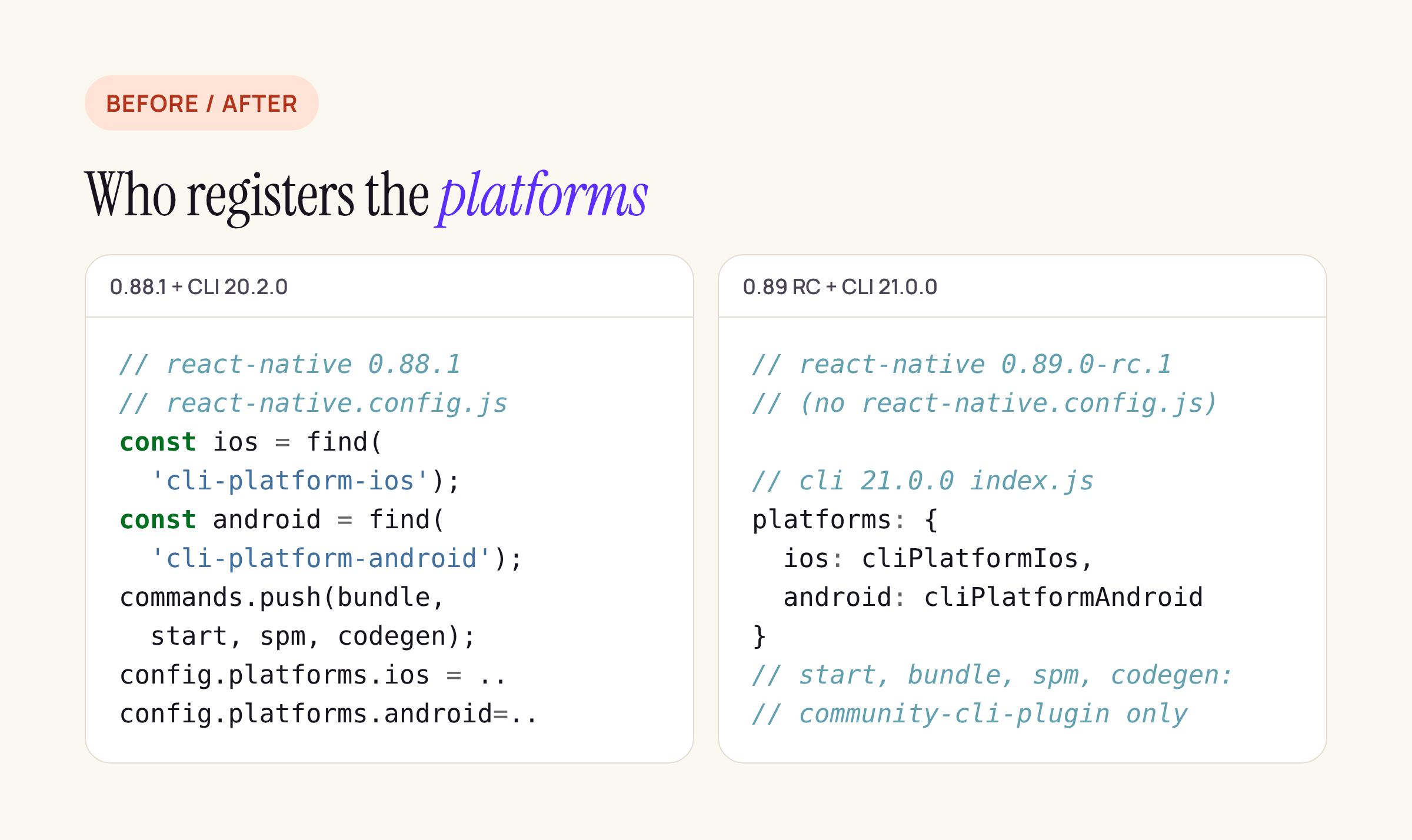
Left: what react-native 0.88.1 registered. Right: where the same work happens with 0.89.0-rc.1 and CLI 21.0.0.
The plugin has to be yours
The four Metro-side commands moved into a react-native.config.js that now ships inside @react-native/community-cli-plugin 0.89.0-rc.1 (the 0.88.1 plugin package had none). The CLI only reads config files from packages your project lists, and react-native still depends on the plugin, so it sits in node_modules either way. That is the trap: it is installed, yet npx react-native start cannot see it until it is in your package.json.
CLI 21.0.0 handles exactly that case. If the first non-flag argument is bundle, codegen, spm or start and no command of that name was registered, it prints this and exits with code 1:
The "start" command is provided by @react-native/community-cli-plugin,
which is not installed in this project. Add it to your devDependencies,
at the same version as react-native, then run your package manager's
install.
The fix, as the 0.89 template has it:
"devDependencies": {
  "@react-native-community/cli": "21.0.0",
  "@react-native/community-cli-plugin": "0.89.0-rc.1"
}
The template itself pins 21.0.0-alpha.1. The final 21.0.0 differs from alpha.1 only in run-android (next section), so you can go straight to 21.0.0.
run-ios and build-ios: CocoaPods or Swift Package Manager
React Native 0.87 added react-native spm, which migrates the Xcode project to Swift Package Manager and leaves the Podfile on disk. CLI 20.2.0 did not know about that: it found the iOS project by looking for a Podfile, and with automatic pod installation on it ran CocoaPods anyway.
CLI 21.0.0 adds findSpmProjectDir to cli-config-apple. It looks in ios/ and the project root for an .xcodeproj bundle that contains .spm-injected.json, the marker react-native spm writes (and react-native spm deinit removes). If it finds one, that folder becomes sourceDir, the Podfile is ignored, and the project config gets a new field, buildSystem: 'spm' (otherwise 'cocoapods'). cli-types exports it as AppleBuildSystem.
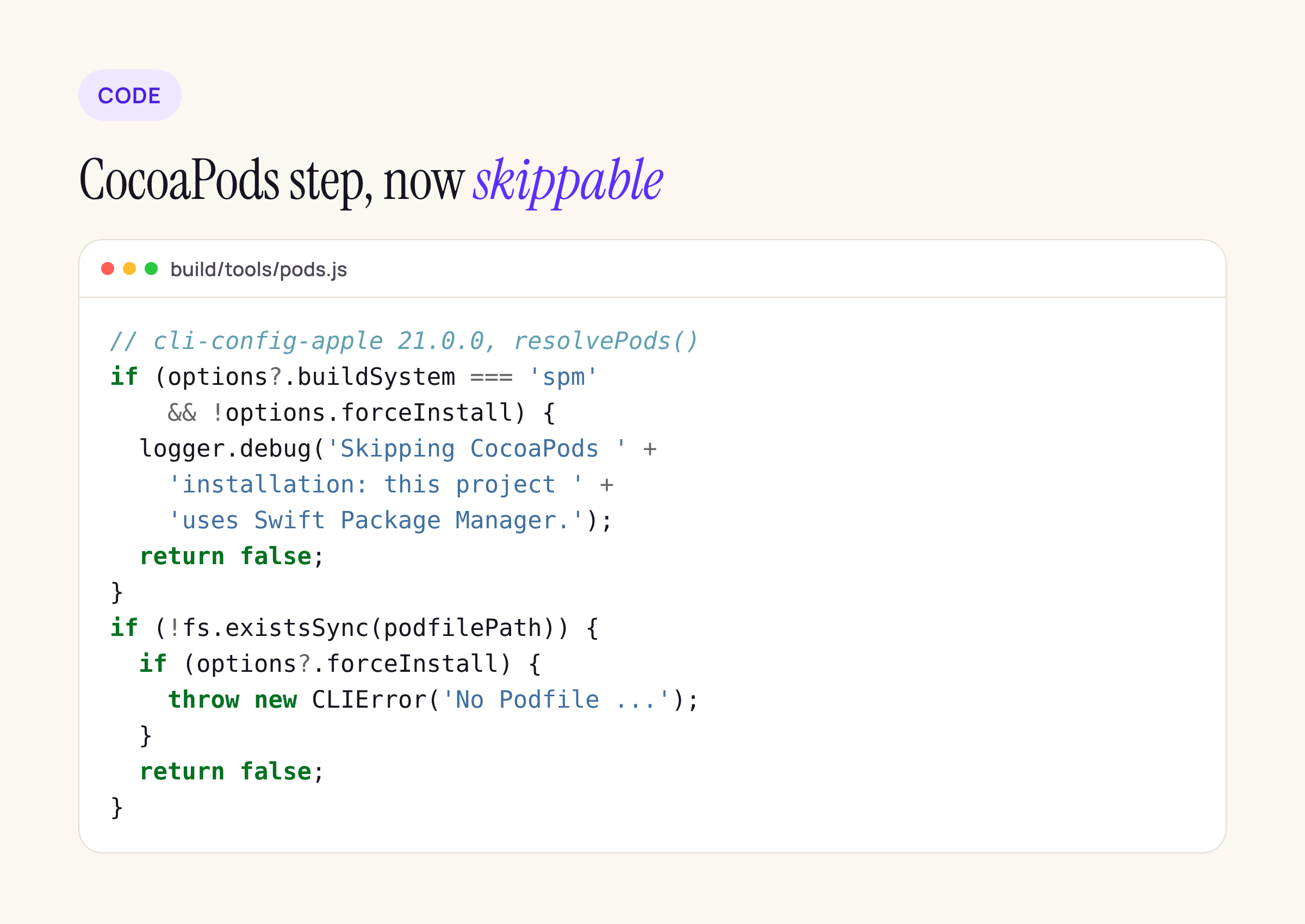
The new branches at the top of resolvePods(), shortened from the published build.
What that means for the commands:
run-iosandbuild-iosin an SPM project skippod installand log “Skipping CocoaPods installation: this project uses Swift Package Manager.” at debug level.--force-podsand--only-podsstill run CocoaPods, for pods that live next to SPM.- A missing
Podfileused to fall through; now--force-podswithout one throws “No Podfile found in …, so CocoaPods cannot be installed”, and suggestsreact-native spm. Without the flag it skips quietly. resolvePodsnow returns whether it installed anything, andcreateRunandcreateBuilduse that value instead of settinginstalledPods = trueevery time.
If your CI still calls npx react-native run-ios --force-pods after an SPM migration, it now fails loudly, which is better than installing pods nobody uses. This ties in with CocoaPods trunk going read-only on 2 Dec 2026; our CocoaPods dependency audit covers which RN libraries are ready for SPM.
run-android: downgrades allowed by default
One line changed in runOnAllDevices.js of cli-platform-android 21.0.0. Before the Gradle install task runs, the CLI now appends:
// Allow version downgrades (adb install -d) by default.
// Note: this only works for debuggable builds.
gradleArgs.push('-Pandroid.adbOptions.installOptions=-d');
The comment says it mirrors the adb install -r -d path the CLI already used for --binary-path. In practice: switching to an older branch with a lower versionCode no longer needs an uninstall first when you run a debug build. Release builds are not covered, as the comment says. If you pass your own installOptions through --extra-params, those come after this one in the Gradle arguments.
This line is not in 21.0.0-alpha.1, the version the 0.89.0-rc.1 template pins.
What did not change
- Flags.
runOptions.jsincli-platform-appleandrunAndroid/index.jsincli-platform-androidare byte for byte the same in 20.2.0 and 21.0.0. No renamed or removed options forrun-ios,build-ios,run-androidorbuild-android. - doctor.
cli-doctorchanged only its version numbers, so the health checks and their minimums are the same as in 20.2.0. - Gradle side of autolinking.
cli-config-androidhas no code changes. - Node. Both CLI majors declare
node >=20.19.4. The 0.89 template’s ownenginesfield (>= 22.11.0) is stricter, unchanged from 0.88.1.
Upgrade checklist
- In
package.json, set@react-native-community/clito21.0.0and add@react-native/community-cli-pluginat yourreact-nativeversion. - Remove
@react-native-community/cli-platform-iosandcli-platform-androidfromdevDependencies; CLI 21 brings its own. - If you have a custom
react-native.config.jsthat imported the platform packages to re-register them, check that it still resolves them: they are now dependencies of the CLI, not of your project, so a strict package manager may not hoist them. - Search CI scripts for
--force-podsand--only-podsin projects you migrated withreact-native spm. - If a test device must never take an older debug build, uninstall before
run-androidin that job.
How we checked
for p in cli cli-config cli-config-apple cli-types \
         cli-platform-apple cli-platform-android; do
  for v in 20.2.0 21.0.0; do
    mkdir -p $p-$v && (cd $p-$v && \
      npm pack @react-native-community/$p@$v && tar xzf *.tgz)
  done
  diff -ru $p-20.2.0/package $p-21.0.0/package
done
The same loop with react-native, @react-native/community-cli-plugin and @react-native-community/template at 0.88.1 and 0.89.0-rc.1 gives the config file and template changes above. Everything here is from the published packages; how your own project’s lockfile resolves the nested platform packages is worth a look before the 0.89.0 final.






