If your Android app targets API 37 and its release manifest lists READ_CONTACTS or ACCESS_LOCAL_NETWORK, Google Play will ask for a declaration that explains why the system picker is not enough. The contacts one comes first: Google’s deadlines table sets 27 January 2027 for READ_CONTACTS, while the local network declaration is due 25 August 2027, with a new MANAGE_CONTACTS rule for full contact editing around the same time. The quickest win for most React Native and Expo apps: if you only let users pick a contact, drop READ_CONTACTS and use the Android 17 contact picker, and check whether a library is adding the permission for you. In a fresh Expo SDK 58 app, the expo-contacts config plugin writes both READ_CONTACTS and WRITE_CONTACTS into AndroidManifest.xml on prebuild.
Why we did this: two kinds of feature we build sit right inside these rules: TV apps like BMDB that look for devices on the same Wi-Fi, and contact-invite or pick-a-customer screens in apps like Peepal and Shopkeeper. We read Google’s 29 October 2026 announcement and policy pages, then checked 14 npm packages (current versions on 26 Nov 2026) and an Expo SDK 58 prebuild to see where the permissions come from.
The three declarations and their dates
All from Google’s policy announcement of 29 October 2026, the policy deadlines table and the declaration help page.
Contacts (READ_CONTACTS), apps targeting API 37+
- Announced 15 April 2026; declaration prompts from September 2026; compliance required 27 January 2027, with a 30-day self-extension.
- Apps that don’t need broad access “must use the Android Contact Picker”.
- Google’s FAQ adds that apps using
READ_CONTACTSonly to share files, collaborate, invite or refer someone, or choose a contact to pay “typically should not request the permission”.
Local network (ACCESS_LOCAL_NETWORK), apps targeting API 37+
- Announced 29 October 2026; declaration prompts from June 2027; compliance required 25 August 2027, with a 30-day self-extension.
- Restricted to “core functionality when device pickers are insufficient”.
- Use cases the form lists: peer-to-peer (multiplayer games, file transfer), smart home and IoT control including printing, router and Wi-Fi tools, and user-initiated media casting.
Manage contacts (MANAGE_CONTACTS)
- Announced 29 October 2026; compliance August 2027. One policy page applies it to apps targeting API 38+, the help page says all apps; plan for the stricter reading.
- For apps whose core job is bulk contact management: contact managers, enterprise sync adapters. Creating or editing a single contact does not qualify; use
ACTION_INSERT,ACTION_EDITorACTION_INSERT_OR_EDIT, which open the system editor. - From API 38, Google says
WRITE_CONTACTSno longer grants create, modify or delete; writes throwSecurityException.
Private and enterprise device management apps are exempt from all three.
What the declaration form asks
For contacts and local network, the help page describes two questions: which user-facing feature needs the permission (pick from the use-case list or “Other”), and why the system contact picker or device picker is not sufficient. For MANAGE_CONTACTS you show that your core feature is contact management and why the intents above would not do. Write the answer about the feature a reviewer can find in the app, not about the code.
Which library brings the permission into your app
Play reads the permissions from the bundle you upload, so what matters is the merged manifest: your own lines plus every library’s. We ran npm pack on the current release of 14 packages that touch the LAN, contacts or permissions and read their AndroidManifest.xml files and Android sources.
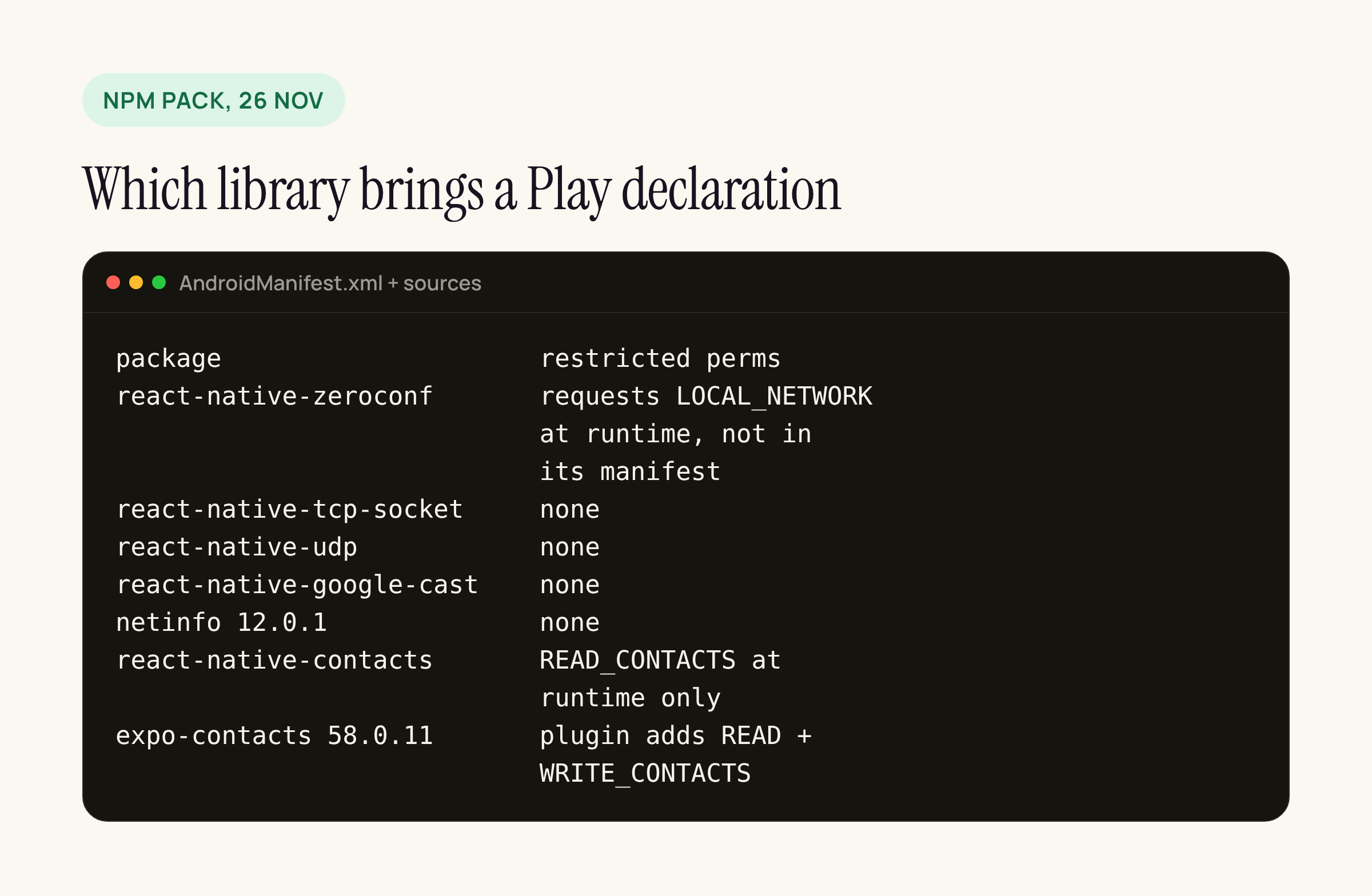
From the manifests and sources inside each npm package, 26 Nov 2026.
What we found:
- No library manifest declares any of the three permissions. react-native-zeroconf 0.17.7, react-native-tcp-socket 6.4.3, react-native-udp 4.1.7, react-native-google-cast 4.9.1, @react-native-community/netinfo 12.0.1, react-native-network-info 5.2.2 and react-native-wifi-reborn 4.13.6 declare only network and Wi-Fi state permissions (plus Internet and multicast in some). None of these needs a declaration.
- react-native-zeroconf asks for
ACCESS_LOCAL_NETWORKat runtime. Its JavaScript requests the permission on Android 17 for apps targeting API 37, but you add the manifest line yourself. That line is what triggers the local network declaration. - react-native-contacts 8.0.10 requests
READ_CONTACTSat runtime and leaves the manifest to you. Its “open contact form” helpers useACTION_INSERTandACTION_EDIT, which need no permission. - expo-contacts 58.0.11 adds both permissions for you. Its config plugin calls
withPermissionswithREAD_CONTACTSandWRITE_CONTACTS, whether you read the address book or only open the picker. - react-native-permissions 5.7.0 has constants for
READ_CONTACTS,WRITE_CONTACTSandNEARBY_WIFI_DEVICES, but none forACCESS_LOCAL_NETWORK; pass the string toPermissionsAndroidinstead, as our local network permission guide shows.
The Expo case, checked
We created a blank Expo SDK 58 app (expo 58.0.26, React Native 0.88.1), added expo-contacts to plugins, and ran npx expo prebuild --platform android. The generated manifest gained READ_CONTACTS and WRITE_CONTACTS. Adding both to android.blockedPermissions and prebuilding again turned them into tools:node="remove" entries, so the manifest merger drops them from the final app.
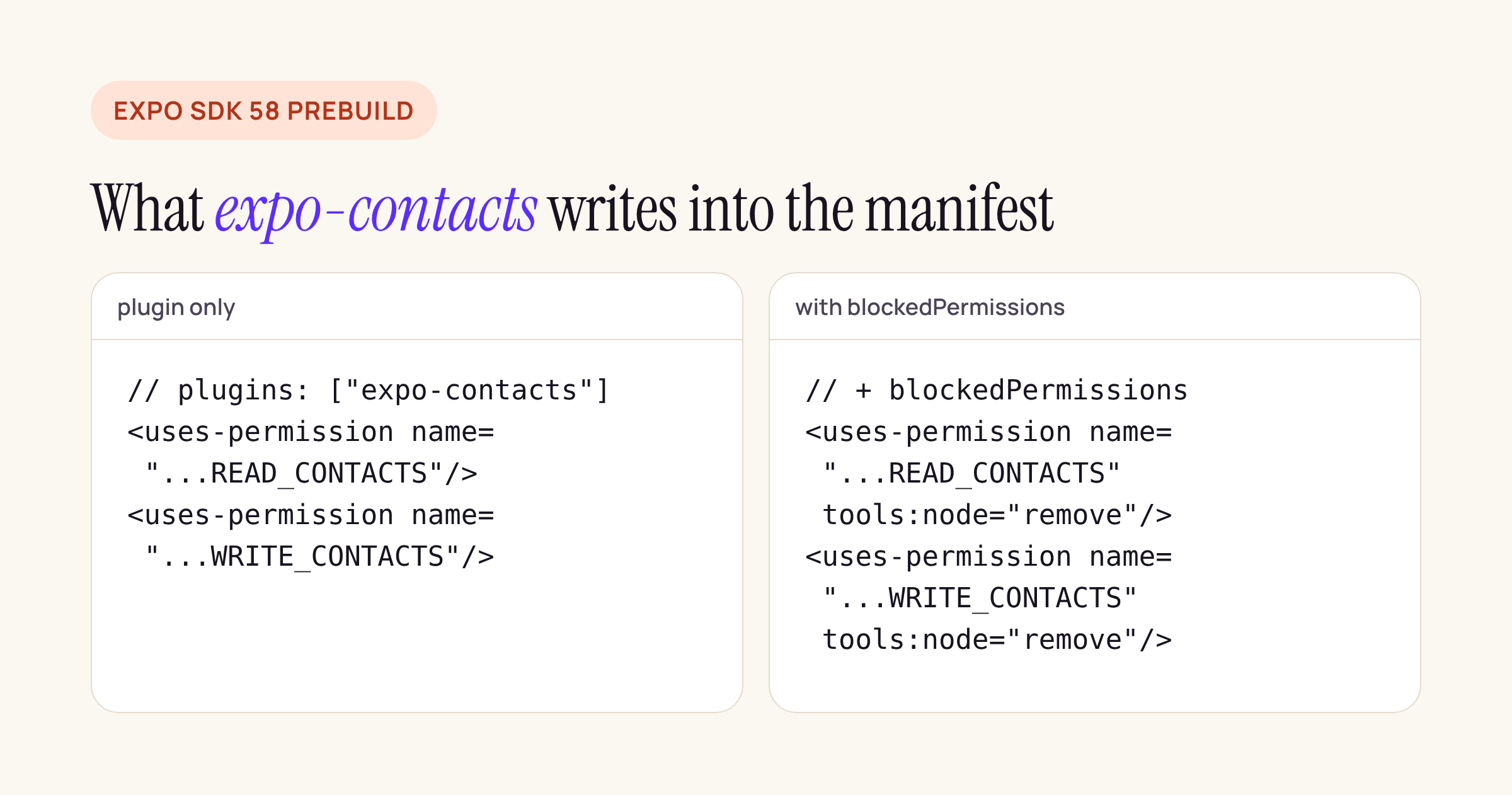
Real prebuild output from Expo SDK 58: before and after blockedPermissions.
{
  "expo": {
    "plugins": ["expo-contacts"],
    "android": {
      "blockedPermissions": [
        "android.permission.READ_CONTACTS",
        "android.permission.WRITE_CONTACTS"
      ]
    }
  }
}
Do this only if your app uses presentContactPickerAsync and the “add contact” form, not getContactsAsync. In the expo-contacts source, the picker sends Intent.ACTION_PICK with the contacts content type, and Google’s contact picker page says legacy ACTION_PICK is upgraded to the new picker for apps targeting API 37+. The “add contact” form sends ACTION_INSERT. Neither needs a permission. Note also that the same blank app targets API 36 out of the box (the React Native 0.88 version catalog sets targetSdk = "36"), so the forms reach you when you move to 37.
The native picker, for apps without Expo
Google’s page names the new action ACTION_PICK_CONTACTS and returns a session URI with temporary read access, no permission needed. The Kotlin from the page, trimmed:
val fields = arrayListOf(
    Email.CONTENT_ITEM_TYPE,
    Phone.CONTENT_ITEM_TYPE,
)
val intent = Intent(ACTION_PICK_CONTACTS).apply {
    putExtra(EXTRA_USE_SYSTEM_CONTACTS_PICKER, true)
    putStringArrayListExtra(
        EXTRA_PICK_CONTACTS_REQUESTED_DATA_FIELDS,
        fields,
    )
}
pickContact.launch(intent)
It is Android 17 only, so keep your old path for earlier versions. Treat this as a starting point and compile it against your compileSdk 37 setup.
For the local network side, Google points casting apps at the Cast SDK’s system Output Switcher (setShowSystemOutputSwitcherOnCastIconClick, Android 13+) and discovery apps at the NsdManager device picker; both avoid the permission and the form.
What to check on your own app
- Build a release bundle and list its permissions:
aapt2 dump permissions app-release.apkor the Play Console bundle explorer. That list, not yourapp.json, is what Play sees. - For each of
READ_CONTACTS,WRITE_CONTACTSandACCESS_LOCAL_NETWORK, find the feature that uses it. If the only user is a “pick someone” or “add to contacts” screen, move it to the picker or the insert intent and remove the permission. - In Expo apps, add
blockedPermissionsfor anything a plugin adds that you do not use, and prebuild again. - If you keep a permission, write the declaration around the user-facing feature and the reason the picker falls short, before you raise
targetSdkto 37. - Put the dates in your calendar: 27 January 2027 for contacts, August 2027 for local network and
MANAGE_CONTACTS.