
Apple released iOS 27.3 beta 2 (24C5049d) and Xcode 27.3 beta 2 (27C5035i) on 16 Nov 2026, two weeks after beta 1. The takeaway for an app team: if you adopted StoreKit multiseat subscriptions on beta 1, recompile against the beta 2 SDK now, because the invitation and consent APIs changed their parameter from a subscription group ID to the original transaction ID and Apple warns of a missing symbol crash otherwise. If you ship a URL filter, move its server URLs into your app’s Info.plist. Everything else in beta 2 is re-test work, not code work.
This post is a release notes review: we read Apple’s iOS & iPadOS 27.3 beta 2 and Xcode 27.3 beta 2 release notes on 18 Nov 2026, compared the Xcode page with the beta 1 entries we covered in our Xcode 27.3 beta post, and turned each entry into a check.
Why we did this: Cardigami (iOS 27.1 and later) and the banking app we build both ship point updates in December, around when Apple expects 27.3 to be final. This is our own re-test list.
What is new, in one table
Apple’s iOS notes page now carries the beta 2 text only and does not mark which entries arrived in beta 2. The Xcode page does: entries under “Updates in Xcode 27.3 Beta” are the beta 1 items, everything above them is new in beta 2. Where an iOS entry’s own wording says something changed (“now take”), we say so; the rest are marked as in the beta 2 notes.
| Entry | What to check |
|---|---|
StoreKit multiseat APIs take original (changed) |
Recompile; pass the transaction’s original |
supports on Product |
Read it before offering seats |
NEURLFilter URLs in Info.plist (NSPIR) |
Move runtime URLs into the app’s Info.plist |
| NEURLFilter and Live Caller ID: power-of-two shard counts | Check your PIR service configuration |
| CIRAWFilter downloads its resources | Call download before decoding RAW |
| SwiftUI soft scroll edge, iOS 26 SDK builds | Re-check screens with safe |
| App Intents: Siri AI may skip unlock (known issue) | Do not rely on authentication alone yet |
| Xcode Previews on iPhone Duo (fixed) | Re-check Duo previews you had given up on |
| Simulator runtime permission checks | Restore / to root: |
| View Body and View Properties instruments removed | Use the SwiftUI instrument |
Sources for every row: iOS & iPadOS 27.3 release notes and Xcode 27.3 release notes. Build numbers are from Apple’s releases page.
StoreKit: multiseat now keys on the transaction
Multiseat subscriptions let a customer buy several seats of an auto-renewable subscription and invite others. In beta 2 Apple adds a way to check for it and changes how you call it.
The new property: “Check whether a subscription supports multiseat purchases through the new supportsMultiSeatPurchase property on Product and AdvancedCommerceProduct, which reflects the setting you configure in App Store Connect.”
The change: “Multiseat invitation and data sharing consent APIs now take the original transaction ID of a multiseat subscription instead of its subscription group ID.” It covers AppStore.presentMultiSeatInvitationSheet(from:originalTransactionID:), AppStore.presentMultiSeatDataSharingConsentSheet(from:originalTransactionID:), Product.SubscriptionInfo.multiSeatDataSharingConsentEligibility(originalTransactionID:) and the two SwiftUI modifiers. The multiSeatDataSharingConsentEligibility instance property is gone, and Apple’s advice is direct: “To avoid a missing symbol crash, recompile your app with the latest SDK.”
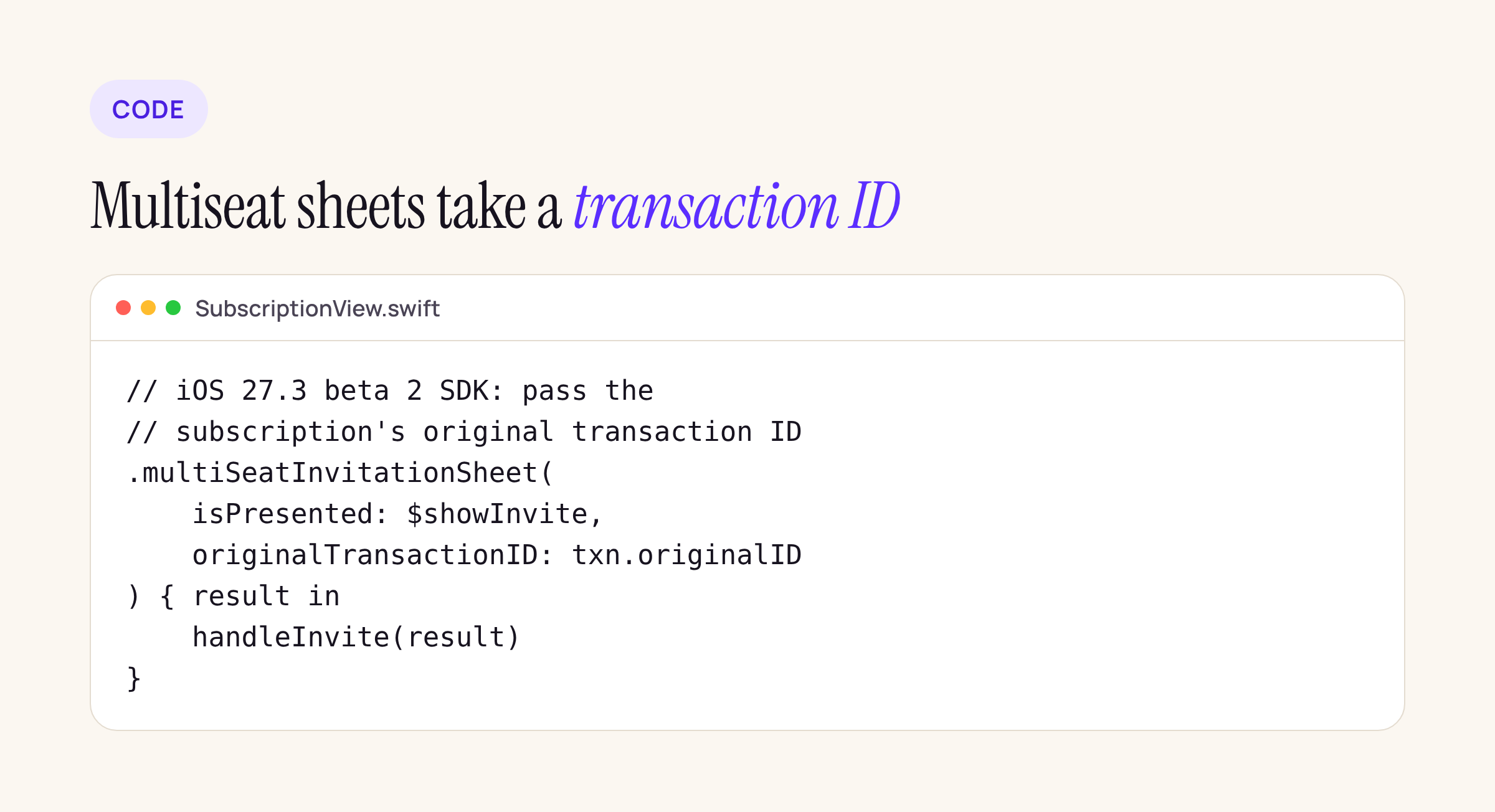
A sketch of the SwiftUI call with the beta 2 signature; adapt the names and compile it against your target.
In practice: any build you made with the beta 1 SDK that calls these APIs should not go to testers on a beta 2 device. Rebuild, and fetch the subscription’s transaction first so you have its originalID to pass.
Also fixed in StoreKit: Ask to Buy requests could not be viewed or approved in the Sandbox when the tester’s iCloud account was in a Family Sharing group, and in StoreKit Testing in Xcode, buying a subscription that belongs to a bundle wrongly let the user unbundle, and some calls could hang on the first launch of an app using SKTestSession. If you had worked around any of these in tests, remove the workaround and re-run.
Cardigami sells a single unlock, not a subscription, so multiseat does not touch it; the subscription screens in client apps are where we will check it.
NEURLFilter and Live Caller ID: configuration moves and tightens
Four entries hit apps that ship a URL filter or a Live Caller ID Lookup service, and they are the ones most likely to break a working setup.
The biggest: “Your NEURLFilter service URL and Privacy Pass issuer URL must now be declared statically in your app’s Info.plist, and providing them only at runtime is deprecated.” The keys go into an NSPIRConfiguration dictionary in the app’s Info.plist, not the extension’s, and each value “should contain only the host name of your server”. If you still set them at runtime, “they must match the Info.plist values exactly, or the system fails to start the filter”.
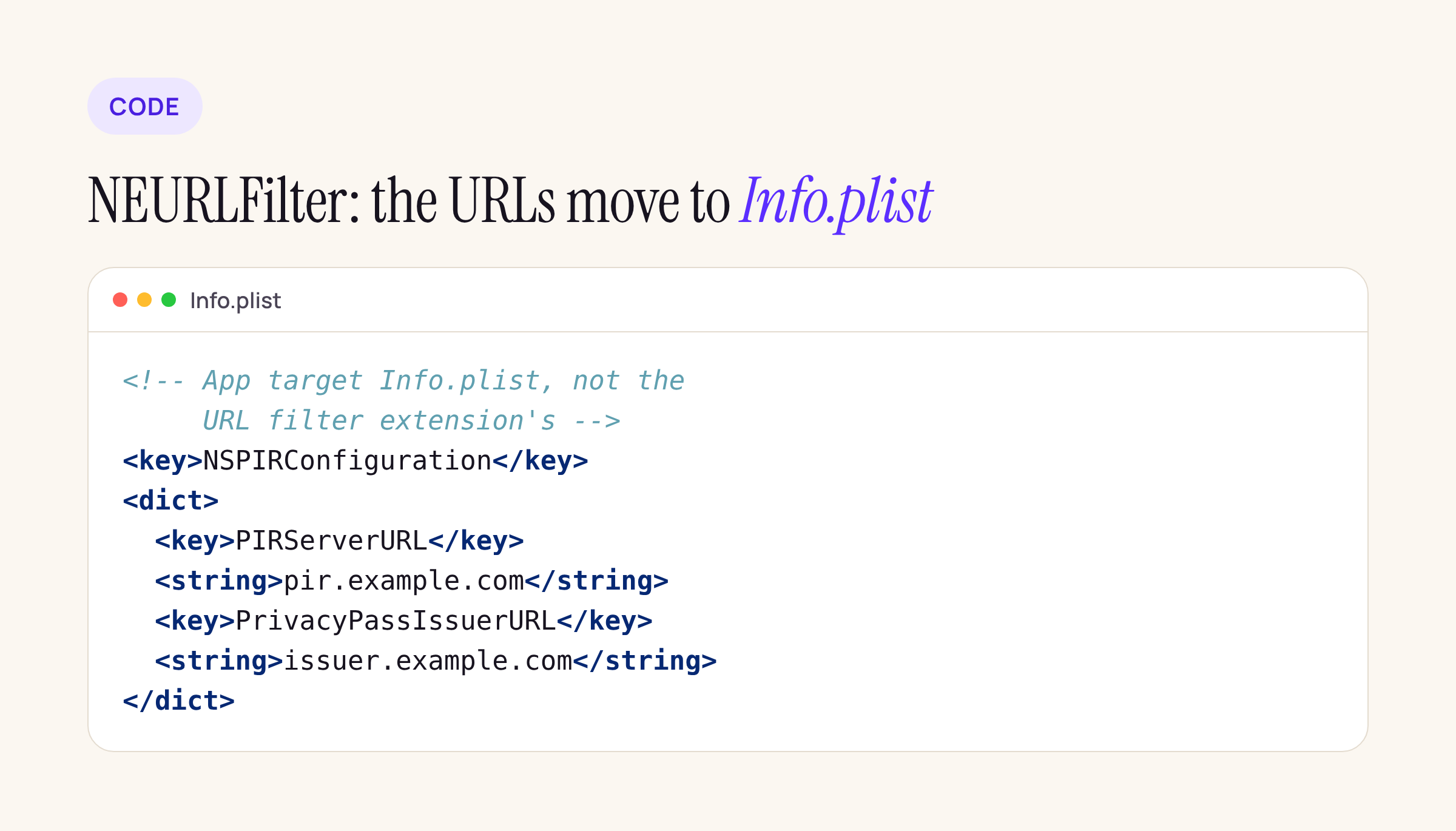
The Info.plist entry from Apple’s description, with placeholder host names.
The other three:
- NEURLFilter “no longer supports user tiers” and stops calling your
/token-key-for-user-tokenendpoint; it uses the first valid public key in your Privacy Pass token issuer directory. - NEURLFilter now caps a PIR configuration at 65,536 shards and, like Live Caller ID Lookup, requires the shard count to be a power of two (256, 512, 1024, 2048). A configuration that breaks either rule is rejected.
- Both services now keep a pool of pre-uploaded evaluation keys and fall back to sending a fresh key inline. “When a query includes an evaluation key, your service must use it directly instead of looking one up by the user identifier.” That is a server change, so tell whoever runs the PIR service.
Core Image, SwiftUI and App Intents
CIRAWFilter. “CIRAWFilter now relies on resources that aren’t included with the operating system.” Use the downloadresources and downloadallresources methods first. Any app that opens RAW photos should check its first-launch path and its offline behaviour.
SwiftUI soft scroll edge. Apps built with the iOS 26 SDK showed a fully transparent edge above a safeAreaBar(edge:) when using ScrollEdgeEffectStyle.soft on iOS 27. “In iOS 27.3 and later, these apps get the iOS 27 soft edge effect.” If your App Store build still uses the iOS 26 SDK, re-check those screens on a 27.3 beta device, because they will look different without a new build. Our iOS 26 SDK to 27.2 guide covers the rest of that move.
App Intents. The known issue we wrote about for bank apps is still listed: “If you define authenticationPolicy on an AppEntity or AppEntity property that requires unlock, Siri AI might not request an unlock before it displays these entities.” Until it is resolved, keep sensitive entities out of Siri AI or check the device lock state in your own code, as in our App Intents and AppFunctions post. Beta 2 also adds a Video schema domain for Siri AI.
Xcode 27.3 beta 2: Previews, Simulator, Instruments
Everything in this section is new in beta 2 on Apple’s Xcode page.
Previews. “Previews now render correctly on iPhone Duo.” Beta 2 also fixes previewing on a device erasing the app’s existing data, and the software keyboard not working in on-device previews. If your team turned off on-device previews on a test phone because it wiped app data, they can try again.
Simulator. Xcode now checks that simulator runtimes have not been modified. Anyone who loosened permissions on /Library, /Library/Developer or /Library/Developer/CoreSimulator “might find that simulators are not discovered”; the fix is to restore root:wheel 755. Build Macs set up by hand years ago are the ones to check first:
ls -ld /Library /Library/Developer /Library/Developer/CoreSimulator
sudo chown root:wheel /Library/Developer/CoreSimulator
sudo chmod 755 /Library/Developer/CoreSimulator
There is also a known issue: a simulator can shut down without warning if its runtime was mounted as a disk image and then remounted as a cryptex.
Instruments. The View Body and View Properties instruments are removed; Apple points to the SwiftUI instrument instead. On the command line, xctrace triage builds a report of the hangs in a trace, and xctrace can now export call trees and summaries as plain text or Markdown, which is handy for attaching to a CI job or a bug report.
Device Hub. CarPlay in Device Hub needs a USB connection, not the network, and the iOS Simulator is not supported for CarPlay. With Sidecar or a touch-capable Mac, only two touches reach the device; Apple’s workaround is to turn off touch gestures under Touch Display in Settings.
Localization and assistants. Beta 2 adds String Catalog tools for AI coding assistants and fixes xcstringstool sync writing keys in a different order from the IDE (that fix needs macOS 27.3 beta 2).
The beta 1 items, the .aea download, XCUIHinge and Swift Testing for UI tests, are unchanged in beta 2; see our Xcode 27.3 beta post for those.
What to check on your own app before 27.3 ships
- Search for
presentMultiSeat,multiSeatInvitationSheetandmultiSeatDataSharingConsent. Every hit needs the transaction ID and a rebuild with Xcode 27.3 beta 2. - If you ship a URL filter, add
NSPIRConfigurationto the app’s Info.plist and check your PIR shard count is a power of two. - Open a RAW photo on a fresh install with the network off and see what your app shows.
- On a 27.3 beta device, look at every scroll view with a
safeAreaBarin your current App Store build. - Run
ls -ldon the CoreSimulator folders on each build Mac.
Apple has not announced a date for beta 3 or the release candidate; MacRumors expects iOS 27.3 in December.






