If your app uses standard UIKit or SwiftUI containers, rebuild it with Xcode 27.1 before you write any iPhone Duo code: Apple says apps built with Xcode 26 and earlier “don’t extend under the status bar and camera” on the device, while standard components adapt on their own. The new layout APIs (UIArrangementViewController, UIView.reservedRegions(kind:options:), SwiftUI ArrangementView) are iOS 27.1 and later, so they need availability checks. On the React Native side, we diffed the native sources of React Native 0.88.1 and 0.89.0-rc.0, react-native-safe-area-context 5.11.1 and react-native-screens 4.30.1 on 7 Nov 2026: none of them call any of the new iPhone Duo APIs yet.
Why we did this: our React Native banking and consumer apps (Beacon-type banking, Peepal, Shopkeeper) will be opened on iPhone Duo, and from April 2027 every upload has to be built with the iOS 27 SDK and include iPhone Duo screenshots. We wanted the list of what changes before anyone opens a simulator.
What Apple shipped for iPhone Duo
iPhone Duo went on sale on 23 October 2026. Xcode 27.1 ships the iOS 27.1 SDK, Swift 6.4 and an iPhone Duo simulator, and needs macOS Tahoe 26.6 or later (Xcode 27.1 release notes). Apple’s Newsroom post names five developer features. We matched each one to the symbol names in Apple’s Preparing your app for iPhone Duo guide and the API reference pages.
| Feature (iOS 27.1) | UIKit | SwiftUI |
|---|---|---|
| Arrangement | UIArrangementViewController, updateArrangement(_:animated:) |
ArrangementView, .arrangementViewStyle(.split) |
| Reserved regions | reservedRegions(kind:options:): occlusion, division |
GeometryProxy.reservedRegions(...) |
| Scene accessories (availability not stated) | UISceneAccessory.cameraCapture(...), registerSceneAccessory(_:) |
.sceneAccessory { CameraCaptureAccessory {...} } |
| Vertical bars | preferredVerticalBarBehavior, verticalBarEdge |
toolbarVerticalBehavior(_:), toolbarVerticalEdge |
| Hinge angle | No symbol published | No symbol published |
Two details from the reserved-region docs matter for layout code. A division is the fold splitting a view in two, and it is active only when the device is partly open, not when it is fully open. An occlusion is hardware covering content, such as the inner front camera, which the Human Interface Guidelines say is a reserved region only while the camera is active. UIKit tracks the regions you read in updateConstraints(), so read them there, not in viewDidLoad.
What an unmodified app gets, by SDK
Apple’s own statement is short: build with the latest Xcode “to use all of the available screen space on iPhone Duo. When you build with Xcode 26 and earlier, your app doesn’t extend under the status bar and camera.” Classmethod’s write-up of Apple’s Tech Talk 111461 (dev.classmethod.jp, 14 Sep 2026) gives more detail, which we have not checked on a device:
| Built with | On the inner display (per Classmethod’s Tech Talk notes) |
|---|---|
| iOS 26 SDK or older | Runs, keeps its layout, padding at the sides |
| iOS 27.0 SDK | Content extends left of the status bar |
| iOS 27.1 SDK | Reaches the screen edges; standard navigation bar and toolbar buttons are laid out vertically |
The deadline that forces this: “Starting April 2027 … iOS and iPadOS apps must be built with the iOS 27 & iPadOS 27 SDK or later” (Apple, 9 Sep 2026), and from April 2027 submissions “will need to include screenshots for iPhone Duo” (Apple, 5 Oct 2026). Apple’s minimum is 27.0, not 27.1, but only 27.1 gives you the full screen and the new APIs.
What breaks in custom UIKit code
Standard containers already adapt: Apple says split views adjust width and margins around the fold, and alerts, context menus and sheets move on their own. The code that does not adapt is the code that guesses the device:
- Layout keyed on
userInterfaceIdiomorUIInterfaceOrientation. Apple’s guide says not to use either for layout decisions; use size classes and the newverticalBarEdge/toolbarVerticalEdgetraits. - Custom tab and navigation bars. Standard bars go vertical on the inner display with the 27.1 SDK; a hand-built bottom bar stays where you drew it, across or beside the fold.
- Fixed widths from
UIScreen.main.bounds. The window can be the outer display, the inner display, or a folded half. - Arrangement inside scrolling containers. Apple: “Avoid placing an arrangement view inside a navigation split view, list, scroll view”, and the HIG says to keep navigation outside arrangement views.
The change for a list-and-detail screen is small if you keep the old path for iOS 26 users:
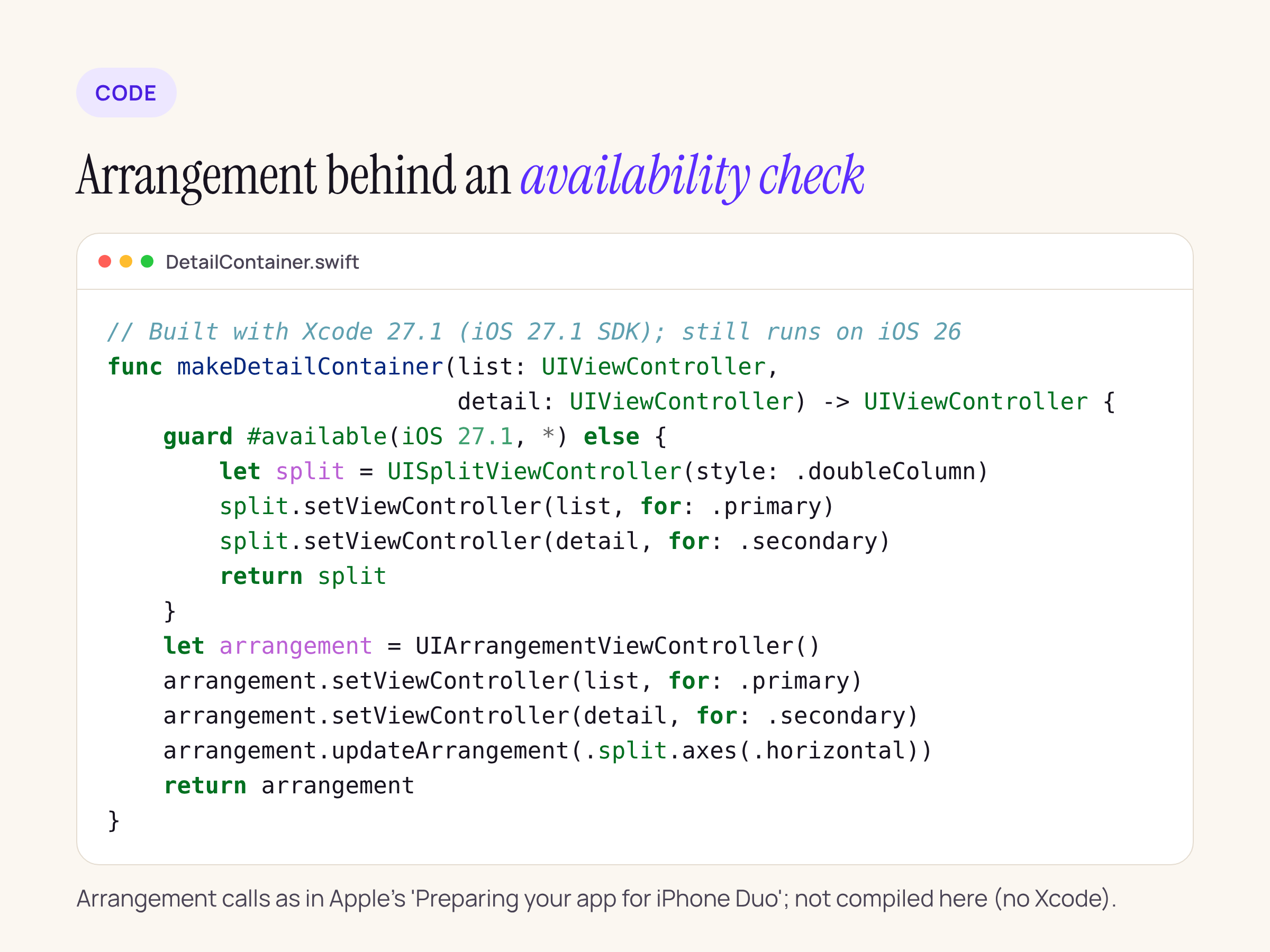
The arrangement calls follow Apple’s guide; we have not compiled this (no Xcode in our check), so treat it as a sketch.
// Before: one container for every device
let split = UISplitViewController(style: .doubleColumn)
split.setViewController(list, for: .primary)
split.setViewController(detail, for: .secondary)

// After: iPhone Duo gets an arrangement that moves around the fold
if #available(iOS 27.1, *) {
    let arrangement = UIArrangementViewController()
    arrangement.setViewController(list, for: .primary)
    arrangement.setViewController(detail, for: .secondary)
    arrangement.updateArrangement(.split.axes(.horizontal))
}
If you ship a Mac Catalyst build from the same target, wrap the 27.1 calls in #if !targetEnvironment(macCatalyst): Xcode 27.1’s known issues list compile errors for Catalyst projects that use iOS 27.1-specific APIs.
What React Native’s native layer handles today
We ran npm pack for each package on 7 Nov 2026, unpacked them, and searched the iOS sources (.m, .mm, .h, .swift) for every symbol in the table above.
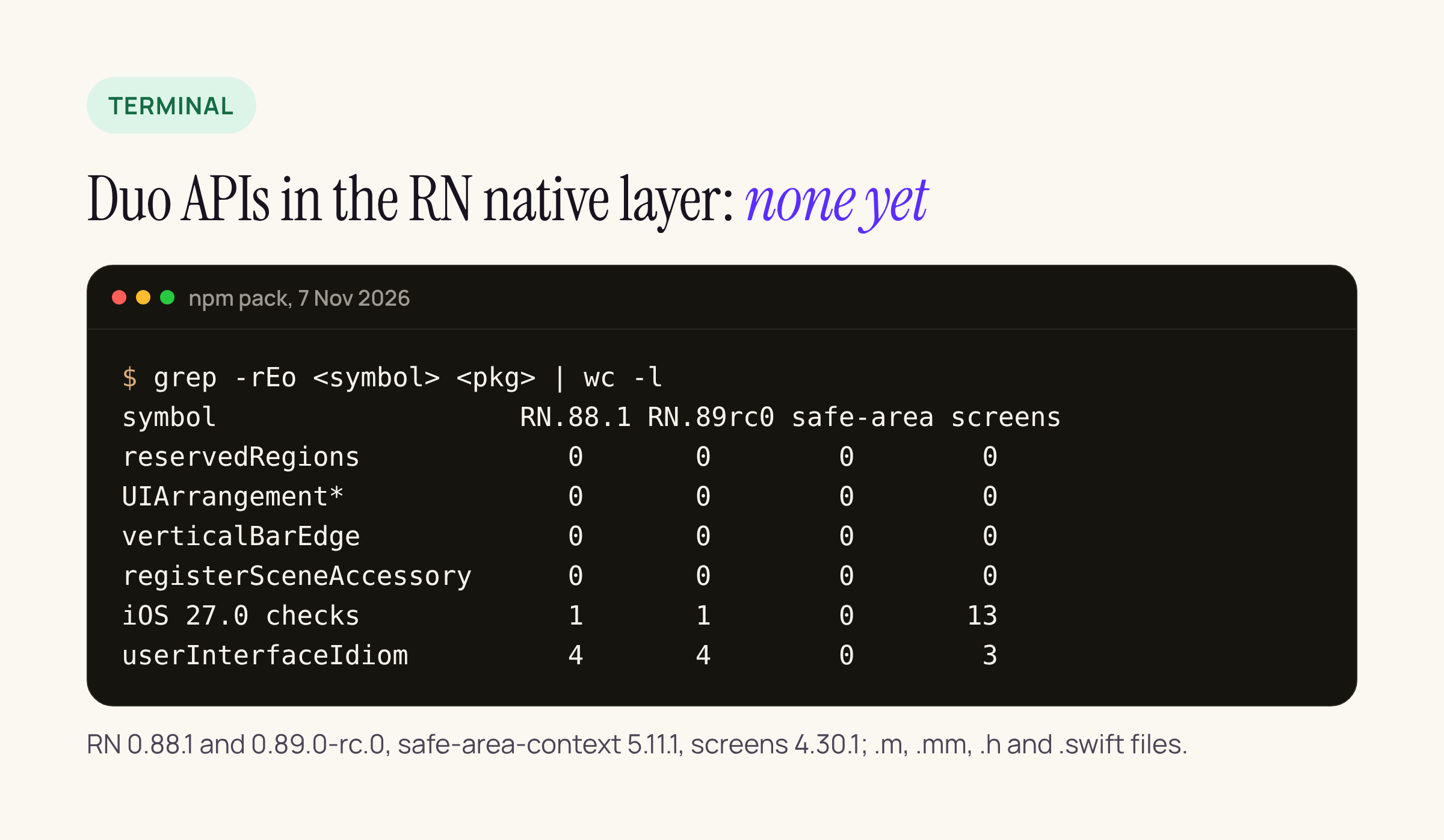
Zero calls to the iPhone Duo APIs in any of the four packages; the iOS 27.0 checks are older iOS 27 work.
What the diff did show:
- React Native 0.88.1 and 0.89.0-rc.0 have one iOS 27 check, in
RCTStatusBarManager.mm, for the iOS 27 SDK change that makes the app-level status bar setters no-ops.RCTAppDelegate.mmstill creates its window with[UIScreen mainScreen].bounds, and four files branch onuserInterfaceIdiom(action sheets, the dev menu, modals,Platform). Those are iPad checks, not layout from screen size, so they should not misplace content on iPhone Duo, but they do meanPlatform.isPadtells you nothing about the inner display. - react-native-safe-area-context 5.11.1 (3 Nov) adds
RNCSafeAreaCornerAdaptation, built onUIViewLayoutRegion safeAreaLayoutRegionWithCornerAdaptation:, an iOS 26 API. It readssafeAreaInsets, which UIKit adjusts for the camera. It does not read reserved regions, so a fold division will not show up as an inset. - react-native-screens 4.30.1 has 13 iOS 27.0 availability checks (bar minimisation, prominent tabs, bar button visibility priority) and native
UINavigationController/UITabBarControllerhosts. Because those are standard UIKit bars, they should pick up the vertical bar behaviour from the SDK; we have not seen it run.
So for an RN app the plan is: build with Xcode 27.1, let the native navigators and safe-area insets do what UIKit gives them, and avoid JS layouts that hard-code a bottom bar or read Dimensions once at start-up. Anything that has to avoid the fold itself needs a small native module over reservedRegions(kind:options:) until a library ships one.
What we have not checked yet
Not run on a device or the iPhone Duo simulator yet. Device Hub in Xcode 27.1 can open, fold and rotate a simulated iPhone Duo; that is the next step, on one of our RN apps built with 0.88.1. Two simulator limits from the release notes to know before you try: StandBy and most app extensions do not run in the iPhone Duo simulator runtime, and the first launch can take several minutes. No hinge-angle symbol is published on the pages we read, so this post does not cover it.