
androidx.biometric 1.4.0-beta01 (4 November 2026) is the first beta of the line that replaces the BiometricPrompt plus FragmentActivity pattern with a launcher: registerForAuthenticationResult(), an AuthenticationRequest and a sealed AuthenticationResult. Stable is still 1.1.0 (January 2021). The short version for a bank app on React Native: nothing forces the move yet, because the old BiometricPrompt class is not deprecated in 1.4, and none of the RN biometric libraries we checked calls the new API. The reasons to plan the port are the new fallback options on API 36.1 and a CryptoObject that now accepts KeyAgreement.
We built this from the androidx.biometric release notes, the library’s public API file on the androidx-main branch (biometric/biometric/api/current.txt, read on 18 November), and the Android sources of eight npm package versions: expo-local-authentication 57.0.3 and 58.0.3, react-native-biometrics 2.2.2 and 3.0.1, react-native-keychain 10.0.0 and 11.0.0, and @sbaiahmed1/react-native-biometrics 0.16.1 and 0.17.1. We also compared the pattern with Google’s BiometricLoginKotlin sample.
Why we did this: biometric unlock of a server-registered key is the login in the Beacon-type banking apps we build in React Native, and “biometric login react native” is one of the searches that brings readers to our older biometric guide. This is the Android side of keeping it current.
What changed between 1.1.0 and 1.4.0-beta01
Every row comes from the release notes page; the 1.2.0 alphas never reached stable and there is no 1.3.
| Version (date) | What changed. For a bank app |
|---|---|
| 1.2.0-alpha04 (17 Nov 2021) | Last alpha Expo still pins. Only as a baseline |
| 1.4.0-alpha02 (7 Aug 2024) | compileSdk 35; custom content views on the prompt; logos (privileged apps only). No |
| 1.4.0-alpha03 (26 Mar 2025) | New register entry point, Authentication input and Authentication output; biometric- removed. Yes: the new API |
| 1.4.0-alpha04 (20 May 2025) | IDENTITY_ authenticator bit added. Check your can handling |
| 1.4.0-alpha05 (17 Dec 2025) | New biometric- module (remember); on renamed on; androidx. Fingerprint is now a no-op; default minSdk 21 to 23. Yes, if anything still calls Fingerprint |
| 1.4.0-alpha06 (25 Mar 2026) | Up to four custom fallback options on API 36.1, delivered as Authentication; KeyAgreement in CryptoObject; launcher takes Component instead of Fragment; compileSdk 36.1. Yes: fallbacks and key agreement |
| 1.4.0-alpha07 (22 Apr 2026) | No notes beyond the release line. No |
| 1.4.0-beta01 (4 Nov 2026) | No notes beyond the release line; API frozen for the beta. Start testing |
Two practical points from the table. The minSdk move to 23 does not touch React Native apps, which have required minSdk 24 since RN 0.76 (we listed what else needs 24 in minSdk 23 to 24). The compileSdk 36.1 requirement from alpha06 does: your app’s compileSdk must be at least 36.1 before Gradle accepts the 1.4 beta. The libraryversions.toml on androidx-main already names 1.4.0-rc01 as the next version.
The API move, side by side
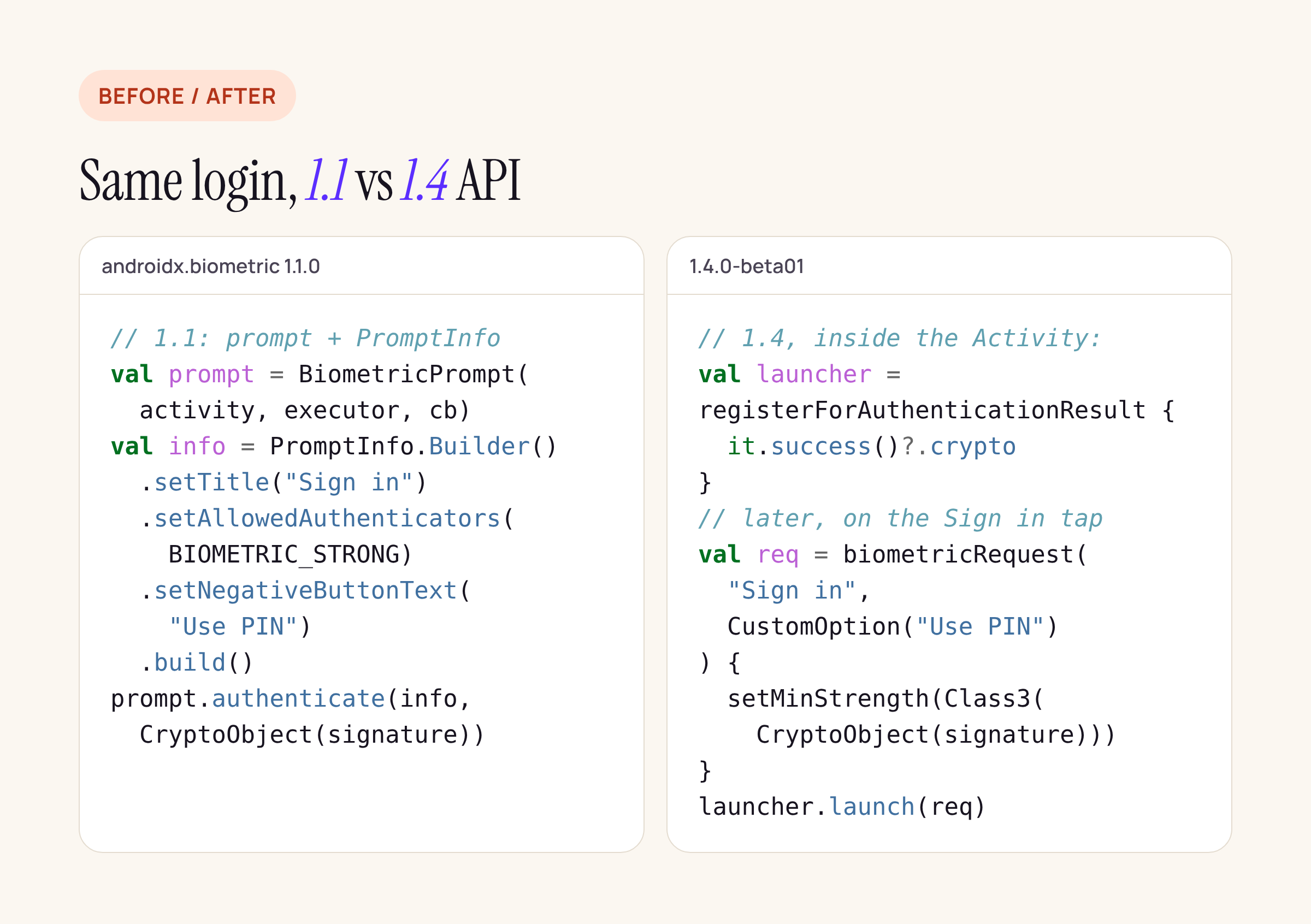
A sketch built from the 1.4 API file; treat it as a starting point and compile it against your own module.
What the API file shows:
- Register, then launch.
registerForAuthenticationResult()is an extension onComponentActivityandFragment(with an optionalExecutor). It returns anAuthenticationResultLauncherwithlaunch(request)andcancel(). The release notes say it is “modeled after the Activity Result API”, whose registration has to happen before the activity is started. That is the real porting cost for React Native: libraries today grabcurrentActivityat call time and build a prompt then. With 1.4 the registration has to move intoMainActivity(or a fragment the library owns), created early. - A request, not a builder plus flags.
AuthenticationRequest.Biometrictakes a title and fallbacks,setMinStrength(Class2 | Class3(cryptoObject)), subtitle, content andsetIsConfirmationRequired. The oldsetAllowedAuthenticators(BIOMETRIC_STRONG or DEVICE_CREDENTIAL)becomesStrength.Class3plusFallback.DeviceCredential.AuthenticationRequest.Credentialcovers device-credential-only prompts on API 30+. - A sealed result.
onAuthResult(result)getsSuccess(crypto, authType),Error(errorCode, errString)orCustomFallbackSelected(fallback). The custom “Use PIN” button no longer arrives as a negative-button error code. - Up to four fallbacks (
getMaxFallbackOptions()), each aCustomOption(text, iconType)withICON_TYPE_PASSWORD,QR_CODE,ACCOUNTorGENERIC. On API 36.1 the prompt shows them; the notes do not say how older releases render more than one, so plan a single fallback for them. - Still there:
BiometricPrompt, itsPromptInfoand theFragmentActivityconstructors are in the 1.4 API file and not deprecated. Deprecated: the no-argumentBiometricManager.canAuthenticate(),setDeviceCredentialAllowed()and theIdentityCredentialcrypto object.
What React Native libraries pin today
We packed the current and previous version of each library from npm and ran a 12-line Python script over their Android sources: which androidx.biometric version the Gradle file pins, and whether the code calls BiometricPrompt( or registerForAuthenticationResult.
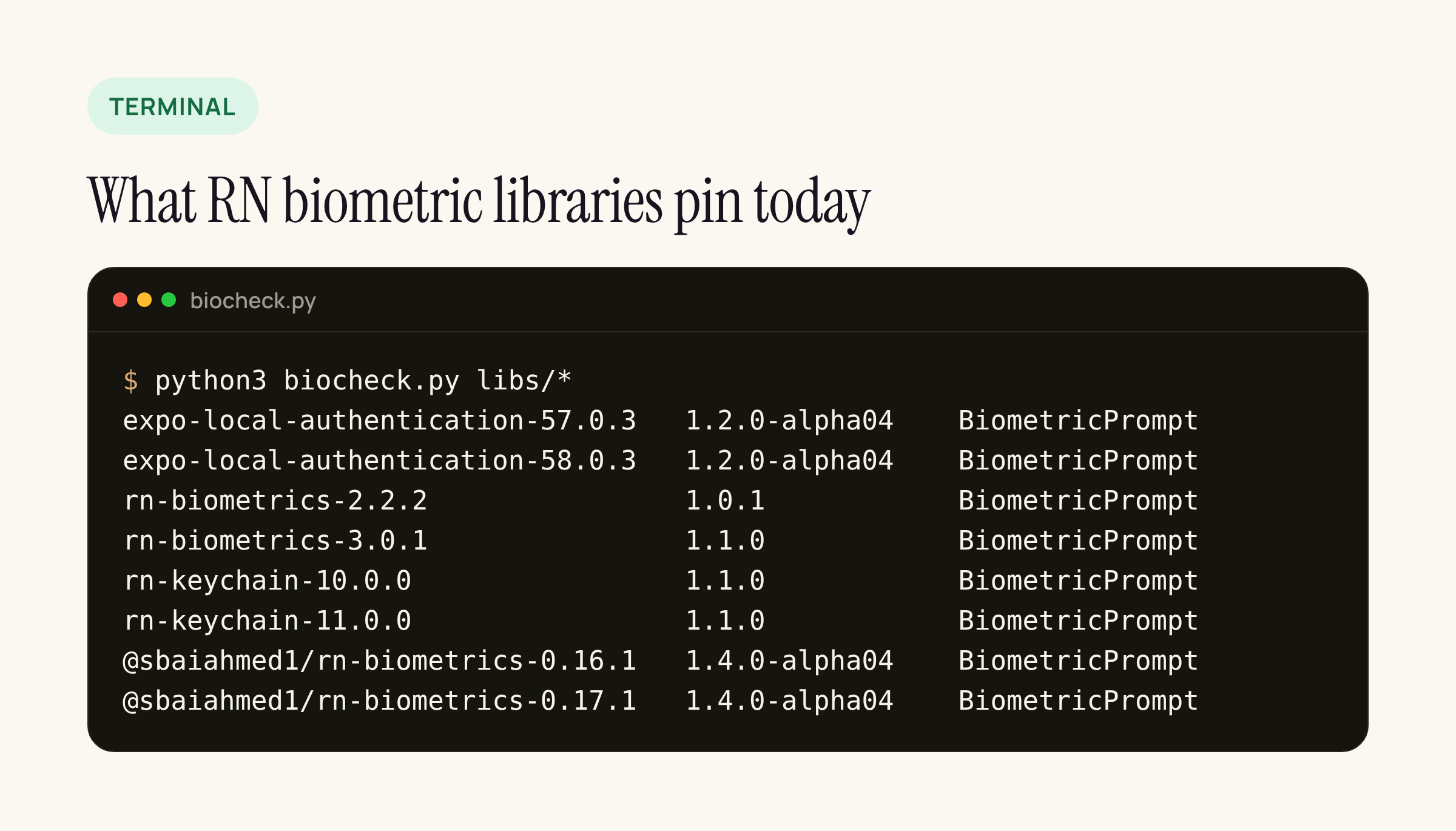
Real output of our script on the eight npm package versions.
- Every version calls the 1.1-style
BiometricPrompt, including @sbaiahmed1/react-native-biometrics, which already pins1.4.0-alpha04. Nobody uses the launcher, fallbacks orKeyAgreementyet. - Gradle resolves the highest pin. An app with react-native-keychain (1.1.0) and @sbaiahmed1/react-native-biometrics (1.4.0-alpha04) ships an alpha of androidx.biometric whether you chose it or not. Check
./gradlew :app:dependencies --configuration releaseRuntimeClasspath | grep biometricbefore a release. - expo-local-authentication 57 and 58 pin
1.2.0-alpha04, an alpha from 2021; between the two versions only the version strings changed. - react-native-biometrics 3.0.1 moved from 1.0.1 to 1.1.0 and signs with a
Signaturein aCryptoObject, the pattern a bank wants. - No library calls
setInvalidatedByBiometricEnrollment, so Android keys made withsetUserAuthenticationRequired(true)keep the platform default and are invalidated when a new fingerprint is enrolled. On iOS, react-native-biometrics 3.0.1 creates its key withkSecAccessControlBiometryAny, which survives a new Face ID or Touch ID enrolment, while @sbaiahmed1/react-native-biometrics offersbiometryCurrentSet. If your risk team wants “new biometric means re-login” on both platforms, that iOS flag is the one to check.
Google’s BiometricLoginKotlin sample is no newer: it pins biometric 1.0.1 with compileSdk 29, calls the deprecated canAuthenticate() without arguments, and builds an AES-GCM key with setUserAuthenticationRequired(true). Use it for the key handling, not for the prompt API.
Porting plan for a React Native bank app
- Pin one version yourself. Add
androidx.biometric:biometric:1.1.0(or the 1.4 beta, deliberately) toandroid/app/build.gradlewith aresolutionStrategyso library pins stop deciding for you. - Raise
compileSdkto 36.1 before trying 1.4.0-beta01; it is a build requirement, not a runtime one. - Keep the crypto, change the prompt. Your
KeyGenParameterSpecand server-registered key stay. Only the prompt call changes:Strength.Class3(CryptoObject(signature))replacesauthenticate(info, CryptoObject(signature)). - Register early. If you write your own native module, create the launcher in
MainActivity.onCreateand expose it to the module, rather than building a prompt fromcurrentActivityon each call. - Map results once. Turn
Success,ErrorandCustomFallbackSelectedinto the three outcomes your JS login screen already knows (signed, cancelled or failed, use PIN). - Wait for a library release before swapping libraries. Until one of the RN libraries above adopts the launcher, a custom module or staying on
BiometricPromptare the two honest options; both work on 1.4.
What to check on your own app
- Run the dependency command in step 1 and note which androidx.biometric you actually ship.
- On a device on API 36.1, open the prompt with two custom fallbacks and confirm the sheet shows both and your handler receives
CustomFallbackSelected. - Enrol a new fingerprint or face, then log in: the Android key should be rejected, and on iOS confirm which access-control flag your library used.






