
Android Studio Rabbit 3 RC 1 reached the Beta channel on 11 Nov 2026, six days after Rabbit 2 Patch 1 (2026.2.2 Patch 1) went to Stable on 5 Nov. The short version for a team on Rabbit 2: the four new Rabbit 3 features are IDE-side and need no change to your build files. The step that does touch your project is AGP 9.6, which raises the minimum Gradle from 9.6.0 to 9.7.1. So update the IDE first, move the Gradle wrapper second, and only then bump the plugin. JDK 17 and SDK Build Tools 36.0.0 stay the same.
This post is a table we built from Google’s own pages: the Rabbit 3 Canary 1, 2, 3 and RC 1 announcements, the preview features page, the Rabbit 2 Patch 1 announcement and the AGP 9.5.0 and 9.6.0 release notes, read on 16 Nov 2026. Every row links to its source.
Why we did this: Peepal and Shopkeeper (Compose) and the BMDB TV app are all built in Android Studio, and our React Native Android work sits on the same Gradle toolchain. We want to know what the next Studio costs before it lands on Stable, not after.
The versions, in order
| Release | Channel | Date | AGP named in the post | Source |
|---|---|---|---|---|
| Rabbit 3 Canary 1 | Canary | 22 Oct 2026 | 9.6.0-alpha01 | Canary 1 post |
| Rabbit 3 Canary 2 | Canary | 28 Oct 2026 | 9.6.0-alpha02 | Canary 2 post |
| Rabbit 2 Patch 1 (2026.2.2) | Stable | 5 Nov 2026 | not named | Patch 1 post |
| Rabbit 3 Canary 3 | Canary | 5 Nov 2026 | 9.6.0-alpha03 | Canary 3 post |
| Rabbit 3 RC 1 | Beta | 11 Nov 2026 | not named | RC 1 post |
Two things the pages do not give yet: a Rabbit 3 build number, and a row for Rabbit 3 in the Studio and AGP compatibility table on the Android Studio release notes. The Patch 1 announcement lists no fixes of its own. Google’s preview features page adds one rule worth repeating: if you use a preview AGP, you must use the matching preview Studio. So AGP 9.6.0-alpha builds belong with Rabbit 3, not with Rabbit 2.
What Rabbit 3 adds, and whether your build has to change
All four features come from the preview features page (last updated 28 Oct 2026). None of them says it needs a Gradle plugin, a Gradle property or a minimum AGP.
| Feature | What it does | Build change stated |
|---|---|---|
| Compose Preview Screenshot Testing tool | Tests Compose UIs from previews and writes HTML reports | None stated |
| Model Assignment | Picks a different AI model per task type, under Settings > Tools > AI > Model Providers | None (IDE setting) |
| Migrate iOS, Flutter and React Native apps to Android | A migration assistant started from the New Project wizard | None (new project) |
| Publish for Testing | Adds a step at the end of Generate Signed App Bundle that sends the bundle to a Google Play test track; needs a Play Console account | None stated |
For us the first one matters most. Shopkeeper already has Compose previews, so screenshot tests from those previews are the cheapest UI regression check we can add. Publish for Testing is a shortcut for small teams that upload internal test builds by hand; teams with a CI upload step lose nothing by ignoring it.
Fixes between Rabbit 2 Patch 1 and Rabbit 3 RC 1
These are the fixes the four Rabbit 3 announcements list. We marked the ones that change how an existing project builds or caches, as opposed to how the editor behaves.
| Issue | Fix | In | Touches the build? |
|---|---|---|---|
| 206104792 | shrinkResources did not work with library APKs after an aapt2 change |
Canary 1 | Yes |
| 572902666 | AGP 9.4+ managed-device sharding ran the whole test suite on every shard | Canary 1 | Yes (CI time) |
| 575549246 | Lint ThreadConstraint partial results not deterministic across JVMs, breaking the build cache for lintAnalyze |
Canary 1 | Yes (cache) |
| 572302953 | DateUtils.formatElapsedTime returned “(1):(23)” in Compose previews and screenshot tests |
Canary 1 | Tests only |
| 567815521 | Unsafe system properties read for R8 tasks | Canary 2 | Yes |
| 567487269 | analyzeReleaseR8Config output now prints a link to the report |
Canary 3 | Output only |
| 396148600 | IDE slowed to a crawl during Gradle builds in large projects | Canary 3 | IDE |
| 491158080 | Prefab did not include prebuilt shared libraries in an .aar |
Canary 3 | Yes (native libs) |
| 526305384 | False “Dependency ‘null’ is declared multiple times” warning in build.gradle.kts with libs.versions.toml bundles |
Canary 3 | Editor |
| 566069554 | AGP 9.x: moving sources broke Lint analysis through a bad Gradle cache | Canary 3 | Yes (cache) |
| 475431060 | R8 failed with com.android.kotlin.multiplatform.library |
Canary 3 | Yes (KMP) |
| 348520440 | Pseudolocales enabled in Compose previews | Canary 3 | Editor |
| 583343830 | Crash opening layout XML files | RC 1 | Editor |
Sources: Canary 1, Canary 2, Canary 3, RC 1. The posts list a few more editor fixes (split view, WebP conversion, focus in the code window); we left out rows that only change the editor’s look.
The RC 1 fix matters on its own: the BMDB TV app still has Leanback screens in layout XML, and a crash on opening them would have been a reason to stay on Rabbit 2. The two cache fixes (575549246 and 566069554) are the ones a CI with a remote build cache feels.
AGP 9.5 to 9.6: the one build step
The AGP 9.5.0 notes and the AGP 9.6.0 notes (both updated 5 Nov 2026) give these minimums:
| AGP 9.5.0 | AGP 9.6.0 | |
|---|---|---|
| Max API level | 37 | 37 |
| Gradle, minimum and default | 9.6.0 | 9.7.1 |
| SDK Build Tools | 36.0.0 | 36.0.0 |
| NDK default | 28.2.13676358 | 28.2.13676358 |
| JDK | 17 | 17 |
| New experimental feature | Backup and restore tests (android.experimental.testSuiteSupport, android.experimental.enableBackupTest) |
On-device coverage for instrumented tests (android.experimental.androidTest.coverage.useOnDeviceAgent, android.experimental.reportAggregationSupport, API 28+ device) |
Neither page lists removed DSL. Both experimental features are opt-in through gradle.properties, so a project that does not set those flags sees only the Gradle minimum move.
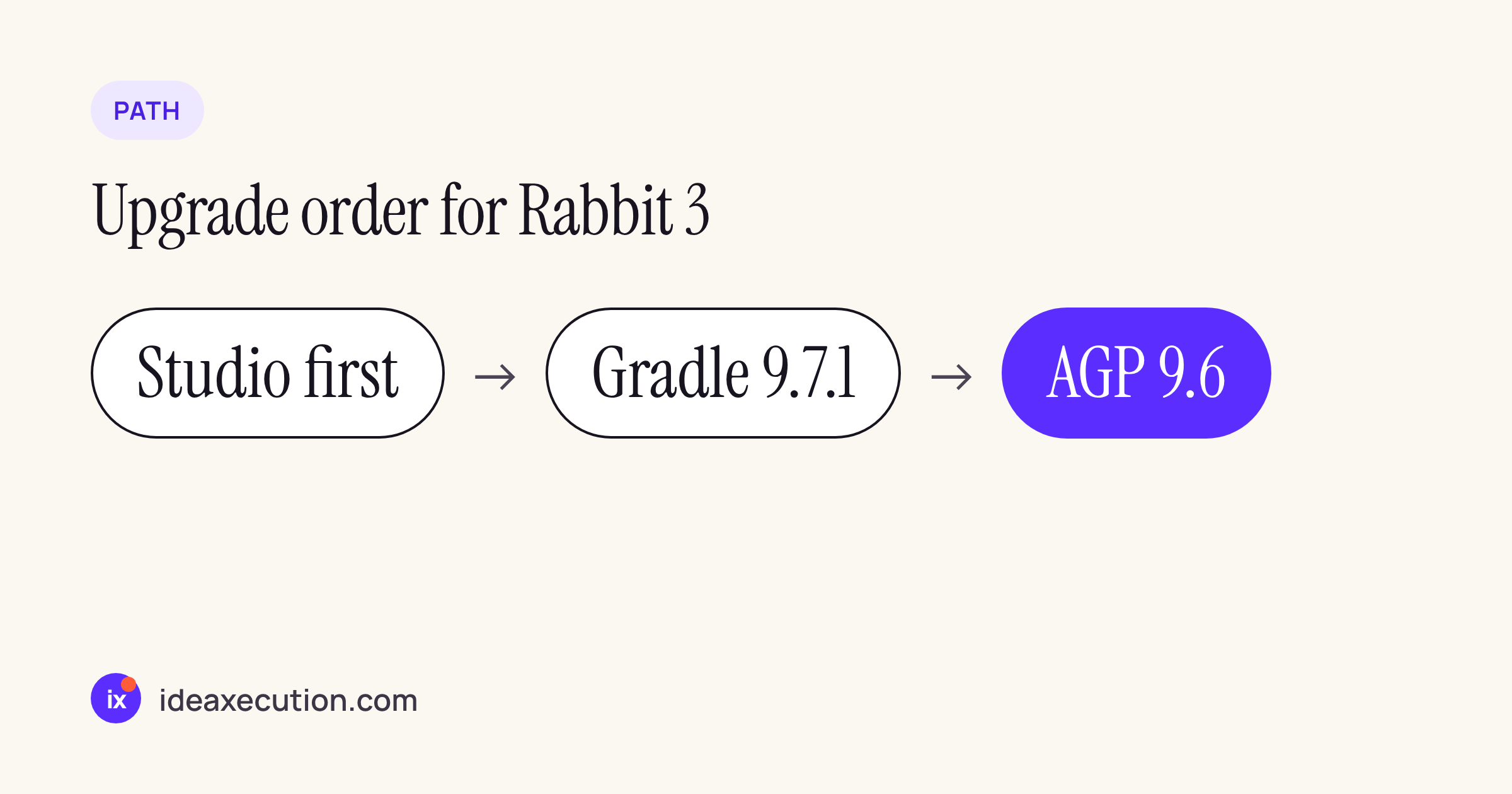
The order that follows from the two tables: IDE, then wrapper, then plugin.
# 1. After installing Rabbit 3, move the wrapper first
./gradlew wrapper --gradle-version 9.7.1

# 2. Build once on the old AGP to separate Gradle problems from AGP ones
./gradlew assembleDebug

# 3. Then bump the plugin in gradle/libs.versions.toml
#    agp = "9.6.0-alpha03"   (or the 9.6.0 build that ships with Rabbit 3 stable)
Treat step 3 as optional until Rabbit 3 is stable: an alpha plugin in a release branch is a risk you take on purpose, not by default.
Where real projects stand today
To see how far a typical project is from AGP 9.6, we read the version catalogs of two open projects: the react-native 0.88.1 package from npm and Google’s Now in Android sample on main at commit 2982e63.
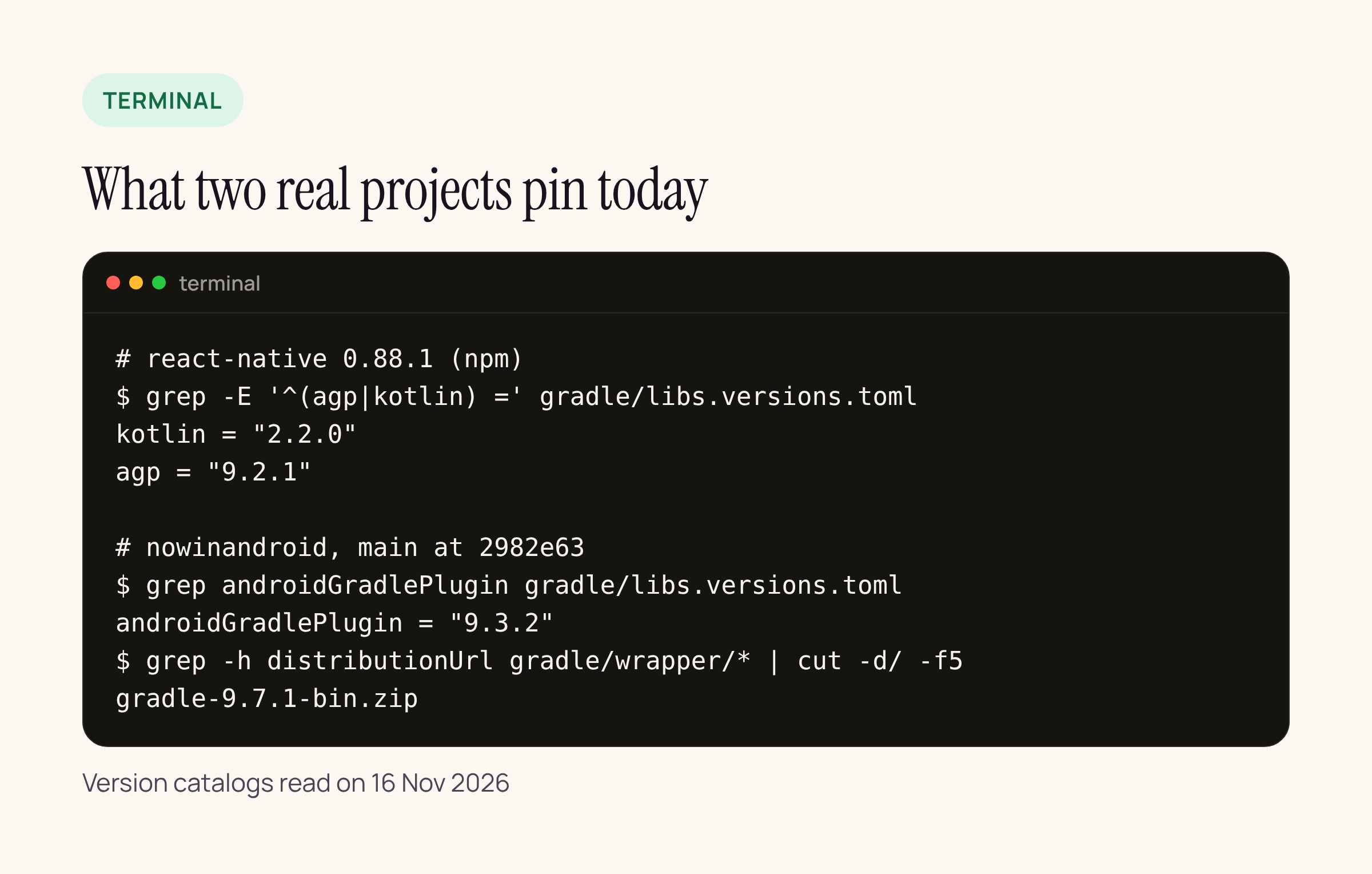
Real output, read on 16 Nov 2026.
Now in Android already runs Gradle 9.7.1 on AGP 9.3.2, so for that project the AGP 9.6 step is only the plugin line. React Native 0.88.1 builds its own Android library on AGP 9.2.1, which is three minors behind; an RN app can move its own app module’s AGP independently, but React Native’s published artifacts are tested on the version in that catalog. For our RN apps we keep the RN-pinned AGP until a React Native release moves it.
What to check on your own project
- Install Rabbit 3 RC 1 next to Rabbit 2 (different install folder) and open the project without changing any file. Note any sync warnings.
- If you use Gradle managed devices with sharding, compare a sharded test run before and after (fix 572902666).
- If you ship native code in an
.aarthrough Prefab, check the shared libraries are inside the archive (fix 491158080). - Run
./gradlew wrapper --gradle-version 9.7.1on a branch and build on your current AGP. - Only then try
9.6.0-alpha03, and keep it off release branches until the stable Rabbit 3 names its AGP.






