
Short version: if your React Native app targets Android 17 (API 37), the notification tap itself is not what you need to fix. Android’s own docs list “a PendingIntent that was sent by the system (for example, from a notification tap)” as an allowed background launch. What needs a change is any code of yours that sends a PendingIntent or IntentSender itself, and any action button that starts an activity from a BroadcastReceiver. We checked the Android sources of @react-native-firebase/messaging 26.4.2 and 27.1.1, @notifee/react-native 9.1.8, react-native-push-notification 8.1.1 and expo-notifications 0.32.11 and 58.1.9: none of them call the opt-in API, and none of them need to for a plain notification tap.
Why we did this: in a Beacon-type banking app, tapping a transaction alert has to open the app on the right screen, every time. Android 17’s behaviour-change page tells developers to migrate off MODE_BACKGROUND_ACTIVITY_START_ALLOWED, so we wanted to know whether our push stack was calling it, and what to add if it was not.
What Android 17 changes
The Android 17 behaviour changes page (last updated 11 Nov 2026) has an “Activity Security” section under Security. Everything on that page applies only to apps targeting Android 17 or higher. The relevant bullet:
- BAL (background activity launch) restrictions now extend to
IntentSender, not onlyPendingIntent. - Developers “must migrate away from the legacy MODE_BACKGROUND_ACTIVITY_START_ALLOWED constant”.
- The replacement is
MODE_BACKGROUND_ACTIVITY_START_ALLOW_IF_VISIBLE, which only allows the start when the calling app is visible. - StrictMode and updated lint checks are the suggested tools to find old patterns.
The rules this builds on are on the Activity security (BAL) guide. Since targetSdk 34, an app that sends a PendingIntent no longer passes on its own right to start activities unless it opts in with ActivityOptions.setPendingIntentBackgroundActivityStartMode(). A launch only goes through if either the creator or the sender of the PendingIntent opts in, or one of the listed exceptions applies.
The constants, from the ActivityOptions reference
| Constant | Added | Status | Source |
|---|---|---|---|
MODE_BACKGROUND_ACTIVITY_START_SYSTEM_DEFINED (0) |
API 34 | default when nothing is set | ActivityOptions |
MODE_BACKGROUND_ACTIVITY_START_ALLOWED (1) |
API 34 | deprecated in API 36 | ActivityOptions |
MODE_BACKGROUND_ACTIVITY_START_DENIED (2) |
API 34 | current | ActivityOptions |
MODE_BACKGROUND_ACTIVITY_START_ALLOW_ALWAYS (3) |
API 36 | current, “should be used sparingly” | ActivityOptions |
MODE_BACKGROUND_ACTIVITY_START_ALLOW_IF_VISIBLE (4) |
API 36 | current, recommended for most apps | ActivityOptions |
So on API 34 and 35 the only “allow” value is the one Android 17 asks you to leave, and on API 36 and later there are two replacements.
When a launch is still allowed
From the exceptions list on the BAL guide, the cases that matter for push:
- The app has a visible window, such as an activity in the foreground.
- The activity is started from a PendingIntent sent by the system, for example from a notification tap.
- The launch comes from the launcher, such as tapping the app icon or a widget.
A notification’s contentIntent is sent by the system when the user taps it. That is why a library that builds PendingIntent.getActivity(...) and hands it to NotificationCompat.Builder.setContentIntent keeps working without any ActivityOptions.
What the four libraries do
We ran npm pack for each version, unpacked it, and searched android/ for the opt-in methods, PendingIntent.getActivity and startActivity(. Notifee ships its core as a compiled AAR, so we unzipped classes.jar and read the bytecode with javap -c. All of this ran in our Linux build container on 15 Nov 2026. Nothing was compiled into an app and nothing ran on a device.
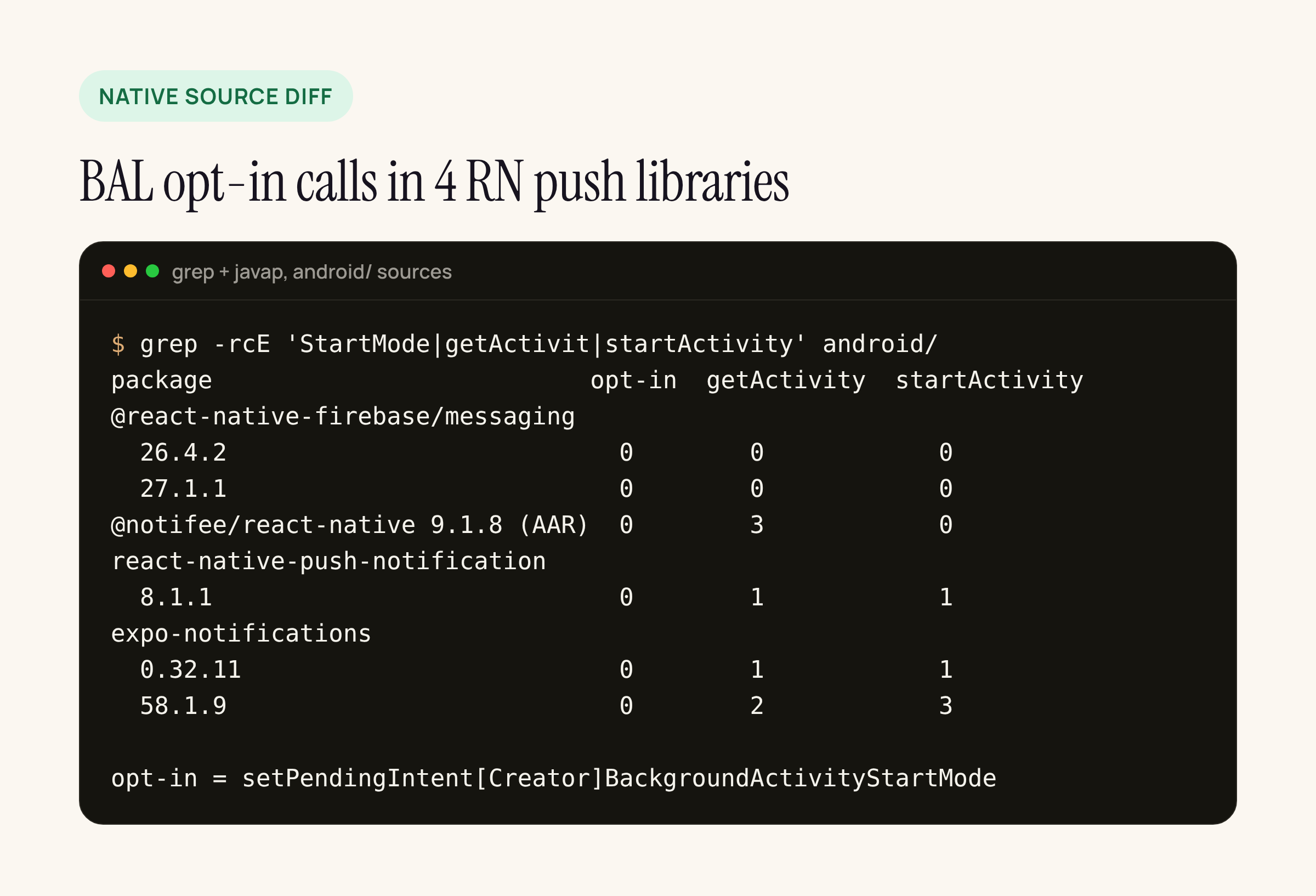
Zero opt-in calls in all six package versions; the other columns show where activities are created or started.
What the hits are:
- @react-native-firebase/messaging 26.4.2 and 27.1.1: no PendingIntent and no
startActivityin the module’s Java and Kotlin. When a notification message arrives in the background, the Firebase Android SDK displays it, and that SDK is a Maven dependency, not part of the npm package, so we did not read it. - @notifee/react-native 9.1.8: three classes in the core AAR call
PendingIntent.getActivity(two obfuscated classes andReceiverService), plusgetBroadcastandgetService. NoActivityOptionsreference anywhere. These are notification content intents, so the system-sent exception covers them. The package’s ownbuild.gradlestill declarestargetSdk: 33. - expo-notifications 0.32.11 and 58.1.9: the tap PendingIntent opens
NotificationForwarderActivity, which then callsstartActivityfor your main activity and sends a broadcast. That second start happens from an activity that is already in the foreground, which is the “visible window” exception. 58.1.9 adds one morePendingIntent.getActivityinExpoSchedulingDelegate: the launch-app intent passed toAlarmManager.setAlarmClockfor alarm-clock schedules. - react-native-push-notification 8.1.1: content intents use
PendingIntent.getActivity(fine). Action buttons are different: they go toRNPushNotificationActions, aBroadcastReceiver, which callsinvokeApp()and thencontext.startActivity()wheninvokeAppis true (the default). That is a notification trampoline, which Android 12 already blocks for apps targeting API 31 (Android 12 changes). The package was last published on 4 Nov 2022 and itsbuild.gradledefaults totargetSdkVersion 28.
What to change in your app
- Your own PendingIntent sends. Search your
android/folder for.send(on aPendingIntentand forIntentSender. A common one in banking apps: an in-app banner that replays a notification’scontentIntentwhile the app is open. PassActivityOptionswith the new mode on API 36 and later:
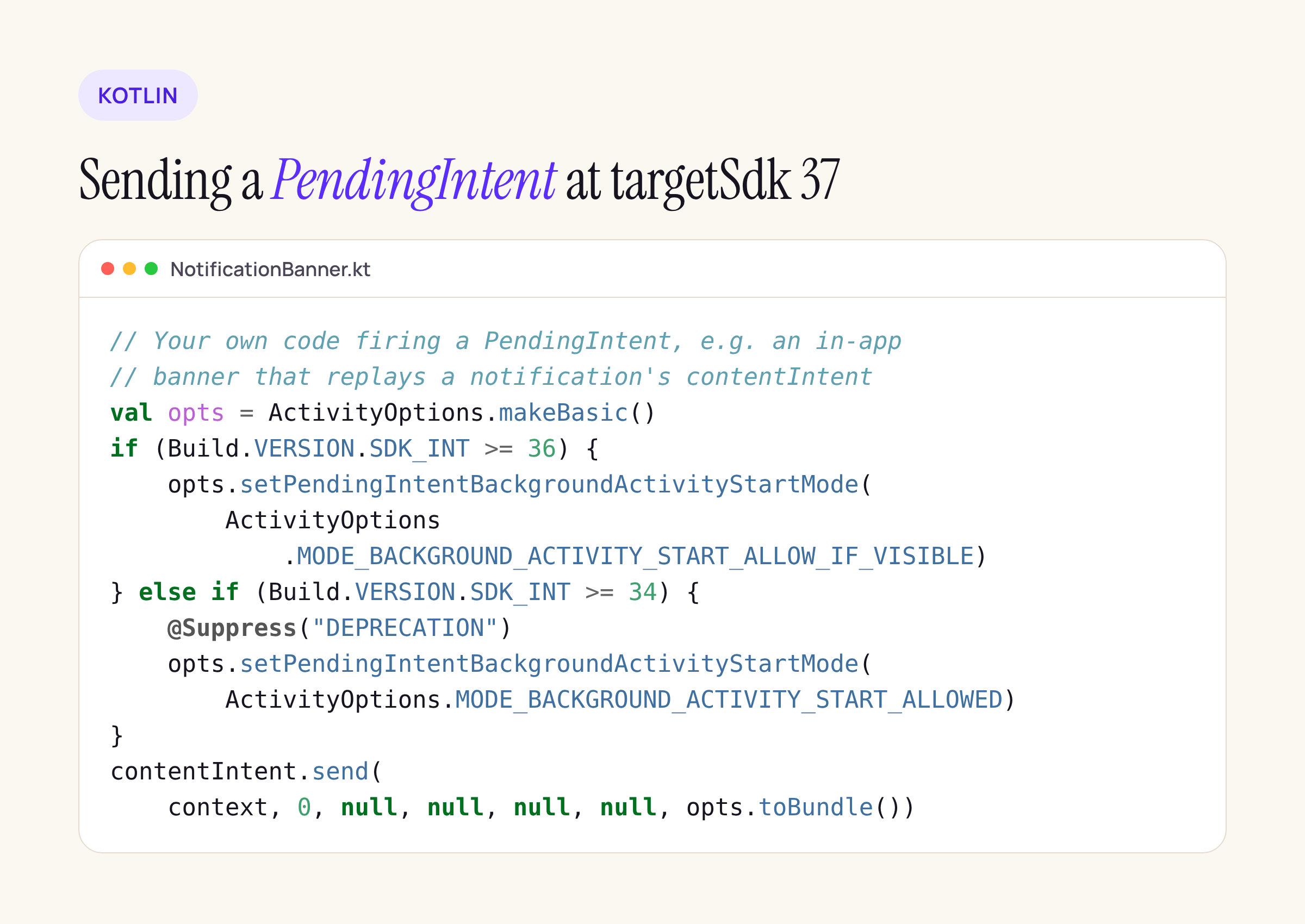
The send-side opt-in, version-gated so API 34 and 35 still get a mode.
val opts = ActivityOptions.makeBasic()
if (Build.VERSION.SDK_INT >= 36) {
    opts.setPendingIntentBackgroundActivityStartMode(
        ActivityOptions.MODE_BACKGROUND_ACTIVITY_START_ALLOW_IF_VISIBLE)
} else if (Build.VERSION.SDK_INT >= 34) {
    @Suppress("DEPRECATION")
    opts.setPendingIntentBackgroundActivityStartMode(
        ActivityOptions.MODE_BACKGROUND_ACTIVITY_START_ALLOWED)
}
contentIntent.send(context, 0, null, null, null, null, opts.toBundle())
-
Action buttons that open the app. If you use react-native-push-notification actions with
invokeApp: true, point the action at an activity withPendingIntent.getActivityinstead of a receiver, or move to a maintained library. On notifee and expo-notifications, keep “open app” actions as activity intents, which is what their tap path already does. -
Turn on the detection Android suggests. The Android 17 page recommends StrictMode and lint. Run a debug build with StrictMode’s VM policy enabled and watch Logcat while you tap notifications and action buttons.
if (BuildConfig.DEBUG) {
    StrictMode.setVmPolicy(
        StrictMode.VmPolicy.Builder().detectAll().penaltyLog().build())
}
What we did not check
We did not run any of this on an Android 17 device or emulator, so we make no claim about what Logcat prints or whether a given tap is blocked. We did not read the Firebase Android SDK, which displays background FCM notification messages. And ALLOW_ALWAYS exists, but Android’s reference says to use it sparingly; for a banking app, starting activities only while visible is the safer default.
If you want to repeat the audit on your own node_modules, the commands are the ones in the terminal card above: grep -rcE over each library’s android/ folder, and unzip plus javap -c for anything shipped as an AAR.






