
When your app targets Android 17 (API level 37), screenOrientation, resizeableActivity, minAspectRatio, maxAspectRatio and setRequestedOrientation() stop working on displays whose smallest width is above 600dp, and the Android 16 opt-out property no longer helps. The takeaway: before you raise targetSdk to 37, make every screen lay out by window width instead of by a locked orientation, and add Espresso Device tests (androidx.test.espresso:espresso-device, stable 1.1.0) that put a foldable emulator into tabletop, book and flat postures.
This post is a docs review plus a source checklist: we compared Google’s Android 17 restriction page (last updated 28 Oct 2026) and the Android 17 behaviour-changes page (11 Nov 2026) with the Android 16 page, then searched Google’s sample apps, the React Native 0.88.1 template and three React Native orientation libraries for the affected calls.
Why we did this: Shopkeeper and Peepal are phone-first React Native apps, and a targetSdk 36 to 37 port for them starts with this rule. The same question comes up in every client app that was designed portrait-only.
What Android 17 changes, and what it does not
Android 16 introduced the rule: “For apps targeting Android 16 (API level 36), orientation, resizability, and aspect ratio restrictions no longer apply on displays with smallest width >= 600dp” (Android 16 behaviour changes). It also gave a way out: declare android.window.PROPERTY_COMPAT_ALLOW_RESTRICTED_RESIZABILITY on an activity, or on <application> for the whole app. Google marked that as temporary: “The opt-out is temporary and won’t apply when targeting API level 37 in a future Android release.”
Android 17 is that release. The behaviour-changes page says the opt-out “will no longer be available for apps that target Android 17 (API level 37) or higher”, and the restriction page lists exactly what is ignored.
| Item | At targetSdk 37 on a large screen |
|---|---|
screen (all portrait and landscape values) |
Ignored |
resizeable |
No effect |
min, max |
No effect |
set |
Ignored |
get |
Listed as ignored |
| Android 16 opt-out property | Removed |
Games (by android:app) |
Exempt |
| Screens below sw600dp (normal phones) | Unchanged |
| User picked an aspect ratio in device settings | User choice wins |
Two details matter for planning. First, phones are not affected: a locked-portrait app still stays portrait on a normal phone screen. The rule hits tablets, foldables when unfolded, and large external displays. Second, there is nothing left to switch off. If your app still ships the opt-out property, it stops counting the day you raise targetSdk.
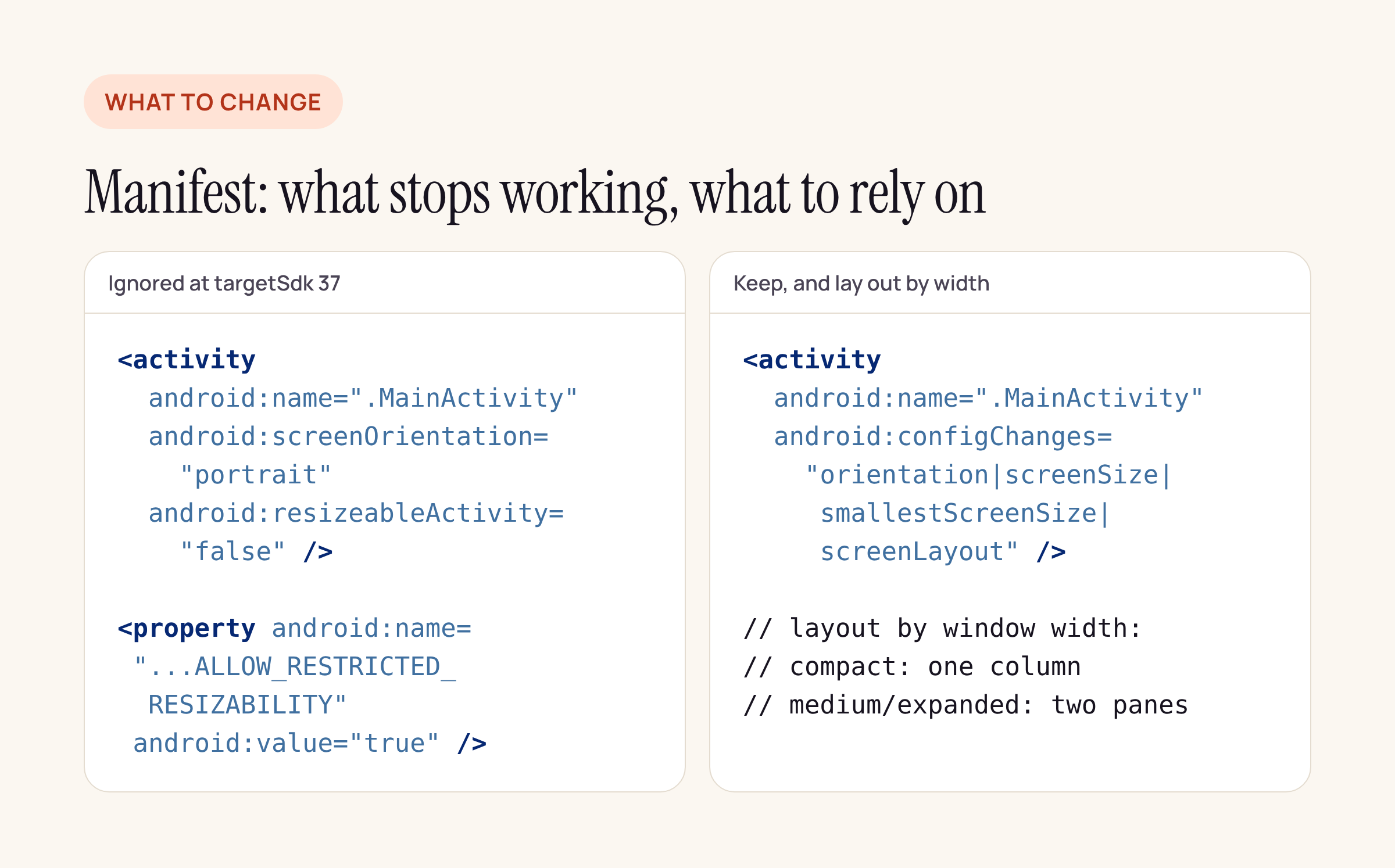
Left: what Android 17 ignores on large screens. Right: the activity set-up that keeps working.
What we found in samples and libraries
We searched for screenOrientation, resizeableActivity, minAspectRatio, maxAspectRatio, setRequestedOrientation and requestedOrientation in six code bases: Google’s nowinandroid (commit 2982e63) and compose-samples (09aae20), the @react-native-community/template 0.88.1 npm package, and the npm packages of react-native-orientation-locker 1.7.0, expo-screen-orientation 58.0.4 and react-native-orientation-director 3.1.0.
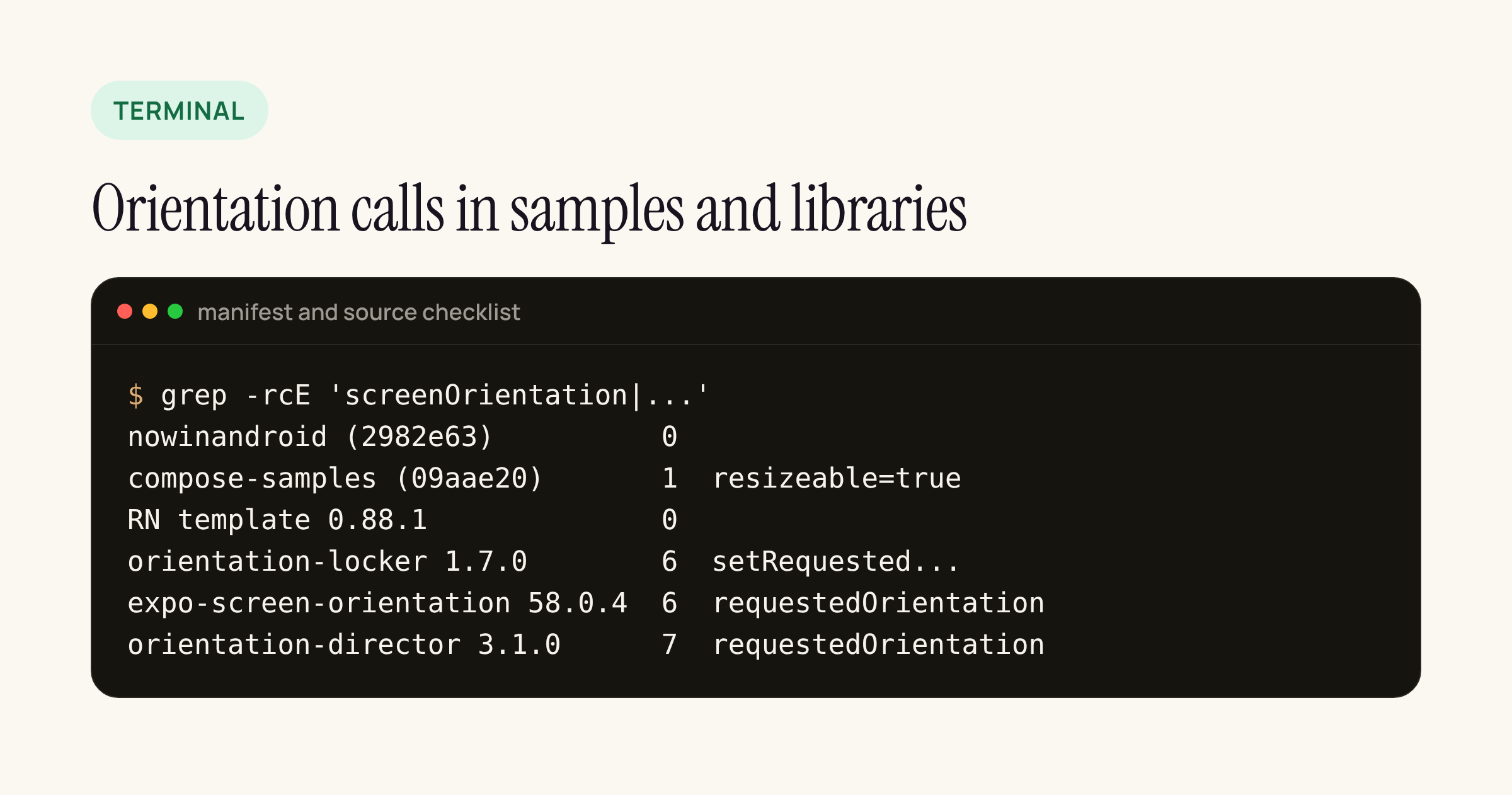
Real output from our checklist, summarised per code base.
- Google’s samples never lock orientation. The only hit in compose-samples is JetLagged’s
android:resizeableActivity="true", which is harmless. nowinandroid targets SDK 36 and compiles against 37 with no lock at all. Both were written for adaptive layouts from the start. - The React Native 0.88.1 template has no lock either. Its
MainActivitydeclaresconfigChangeswithorientation|screenSize|smallestScreenSize|screenLayout, so a fold or rotation resizes the React root view instead of recreating the activity. The template setstargetSdkVersion = 36andcompileSdkVersion = 37, so your own app is the one that moves to 37. - The three orientation libraries all work by writing
Activity.requestedOrientation(orientation-locker callssetRequestedOrientation()in six lock methods). None of them checks screen width or API level. On a large screen at targetSdk 37 their lock calls are among the ignored APIs. - expo-screen-orientation also reads
requestedOrientationback to answergetOrientationLockAsync(). Since Google listsgetRequestedOrientation()as ignored too, do not trust that value to tell you what a tablet is showing. We diffed its Android folder between 57.0.3 and 58.0.4: only the version and one error message changed.
What to change before raising targetSdk to 37
- Delete the opt-out property from the manifest so nobody assumes it still works.
- Stop treating orientation as layout. Pick the layout from the current window width: compact width gets one column, medium and expanded get two panes. In Compose that is the window size class; in React Native it is
useWindowDimensions(), which follows window size changes; the template’sconfigChangeskeeps the activity alive while that happens. - Keep orientation locks for phones only. A
lockToPortrait()call on a phone still works; on a tablet it is now a no-op, so the screen must already look right in landscape. - Check camera and video screens. These are the screens most often locked. A KYC capture screen or a player has to handle landscape on a tablet even if the phone version stays portrait.
- Turn the rule on early. Both Android pages point to the app compatibility framework: enable the
UNIVERSAL_RESIZABLE_BY_DEFAULTcompat flag for your package on a large-screen emulator while still on targetSdk 36, and you see the targetSdk 37 behaviour today.
Testing folds without a foldable: Espresso Device
androidx.test.espresso:espresso-device drives the emulator for you: postures, rotation and window size. The AndroidX Test release page (updated 9 Nov 2026) lists 1.1.0 as stable and 1.2.0-alpha04 as the newest alpha. We read the library’s source in the android-test repository at commit 1abd63f to confirm the API.
| API | What it does |
|---|---|
on |
Half folded, hinge horizontal |
on |
Half folded, hinge vertical |
on |
Fully open, like a tablet |
on |
Folded shut |
set |
Rotates the device |
set |
Resizes to a window size class |
@Requires |
Skips the test where that posture is unavailable |
@Requires |
Runs only on a matching display |
The posture actions are documented as emulator-only, and a non-foldable emulator throws DeviceControllerOperationException. The same source tree also has a PhysicalDeviceController that maps flat, tabletop or book, and closed to a physical device’s OPENED, HALF_OPENED and CLOSED states when the device reports them, so treat physical-device support as something to verify on your own hardware.
The emulator needs gRPC control switched on. The library’s own Gradle test project does it like this:
android {
    testOptions {
        emulatorControl {
            enable = true
        }
    }
}

dependencies {
    androidTestImplementation "androidx.test.espresso:espresso-device:1.1.0"
}
Run it on a foldable emulator profile (the Pixel Fold or a generic foldable AVD) so the posture calls have a hinge to move.
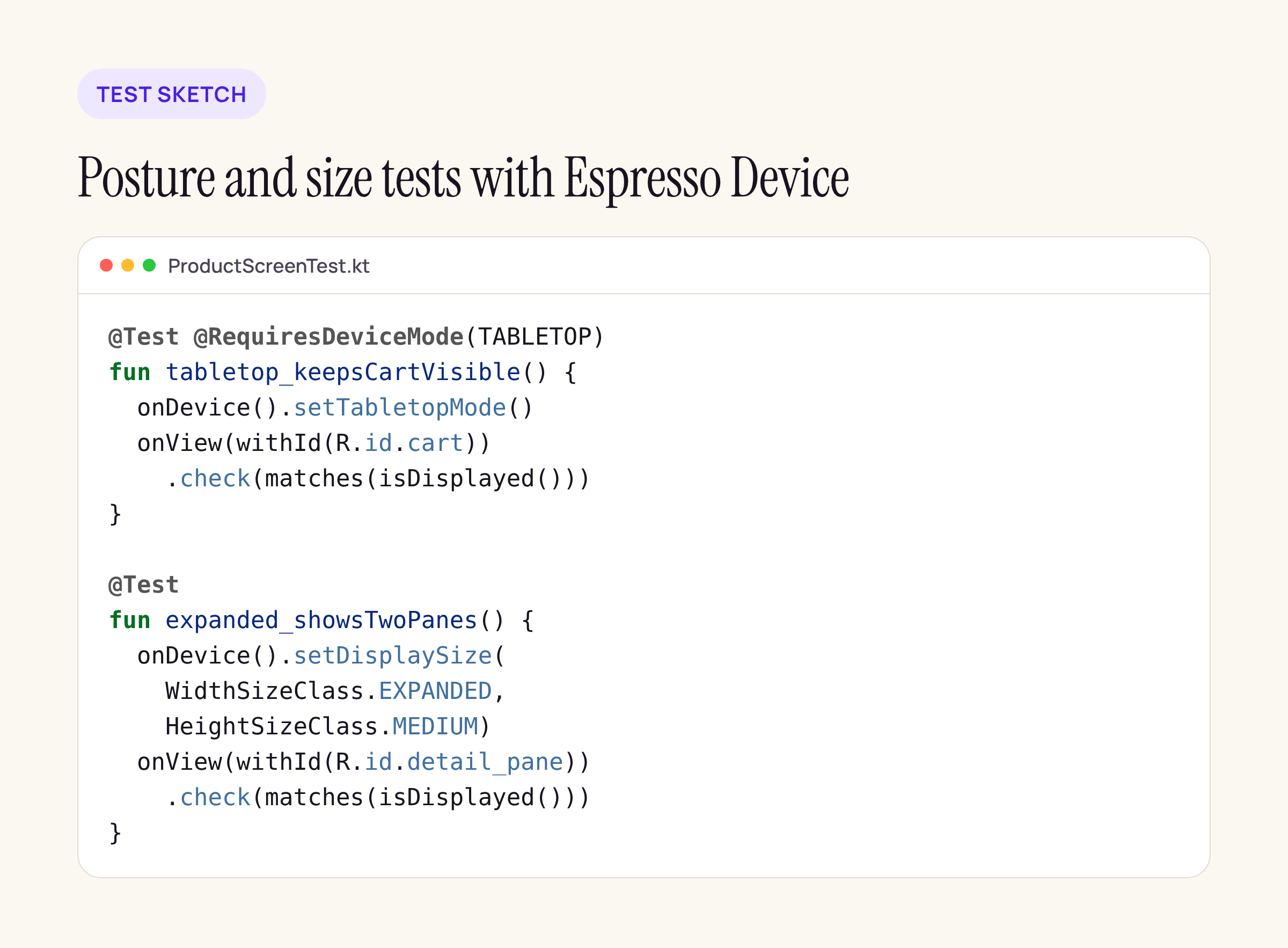
A test sketch for a product screen: treat it as a starting point and compile it against your own views.
The two tests cover the cases this rule creates. The tabletop test checks that a key control (here, the cart) stays on screen when the device is half folded. The expanded-width test checks that a large screen gets the two-pane layout instead of a stretched phone layout, which is what users would see once the portrait lock is ignored.
What to check on your own app
- Search your
android/app/src/main/AndroidManifest.xmland native modules for the six names above. Every hit on a screen that matters needs a landscape or two-pane layout. - List which JavaScript screens call an orientation library. Those are the screens to open on a tablet emulator with
UNIVERSAL_RESIZABLE_BY_DEFAULTturned on. - Add one tabletop and one expanded-width Espresso Device test per critical flow (login, payment, capture), and run them in CI on a foldable emulator before the targetSdk bump lands.
For the related network change in the same release, see our post on Android 17 certificate transparency and ECH for pinned apps.






