Short version: on iOS, give every banking App Intent an explicit authenticationPolicy (the default, .alwaysAllowed, runs it on a locked phone), and do not expose AppEntity types that carry balances or transactions yet. The iOS 27.3 beta 2 release notes list a known issue (190573761): when an entity or entity property requires unlock, “Siri AI might not request an unlock before it displays these entities.” On Android, Jetpack AppFunctions 1.0.0-rc01 (4 Nov 2026) only lets callers with the privileged EXECUTE_APP_FUNCTIONS permission run your functions, so the gate there is the system assistant, and your own code has to re-check the session.
Why we did this: we build Beacon-type banking apps in React Native with native modules on both platforms. Apple opened Siri AI to all developers on 3 Nov, Google moved AppFunctions to RC a day later, and the question from the bank side is the same on both: what may an assistant show or do while the phone sits on a table?
This post is a review of Apple’s App Intents documentation and the iOS 27.3 beta 2 release notes, the AppFunctions release notes and guide, and Google Play’s policy deadlines page, read on 17 Nov 2026. The code is a sketch to adapt and compile against your own targets.
What Apple announced and what is still open
Apple’s news post of 3 Nov 2026: “Starting today with the iOS 27.3, iPadOS 27.3, macOS 27.3, and visionOS 27.3 betas, a new Developer Preview enables any developer to integrate their app with Siri AI.” Customers get it “in a few months”, and App Store submission opens “in the spring”. It needs an Apple Intelligence device set to a supported language, and “Siri AI is currently unavailable in the EU in iOS, iPadOS, and watchOS.”
Siri AI uses App Intents, the same framework as Shortcuts and Spotlight. That matters for a bank app that already ships App Intents for Shortcuts: those intents become reachable by a far more capable caller without a line of code changing.
The iOS 27.3 beta 2 release notes have two App Intents items: the new Video schema domain, and the known issue 190573761 quoted above, with no workaround listed.
The three authentication policies
From Apple’s IntentAuthenticationPolicy reference (iOS 16 and later):
| Case | Apple’s description |
|---|---|
always |
“allows the app intent to run at any time, including when the device is locked” |
requires |
“requires authentication before running the app intent” |
requires |
“requires the person to unlock the device running the intent” |
Where you can set it:
- On an intent:
AppIntent.authenticationPolicy. Apple: “The default value of this property isIntentAuthenticationPolicy.alwaysAllowed.” - On an entity:
AppEntity.authenticationPolicy, “The authentication policy to enforce when the system accesses this entity.” - On an entity property, per the 27.3 release note wording.
The default is the trap. An intent written for Shortcuts a year ago, with no policy set, runs on a locked device.
Two related properties worth checking in the same pass: isDiscoverable (iOS 17 and later; set it to false and “system features can’t access it”, while your app and widgets still can), and openAppWhenRun, which Apple now marks deprecated in favour of supportedModes.
Our expose or hold list
For a banking app on the 27.3 betas, we sort every candidate action by what it reveals and what it changes:
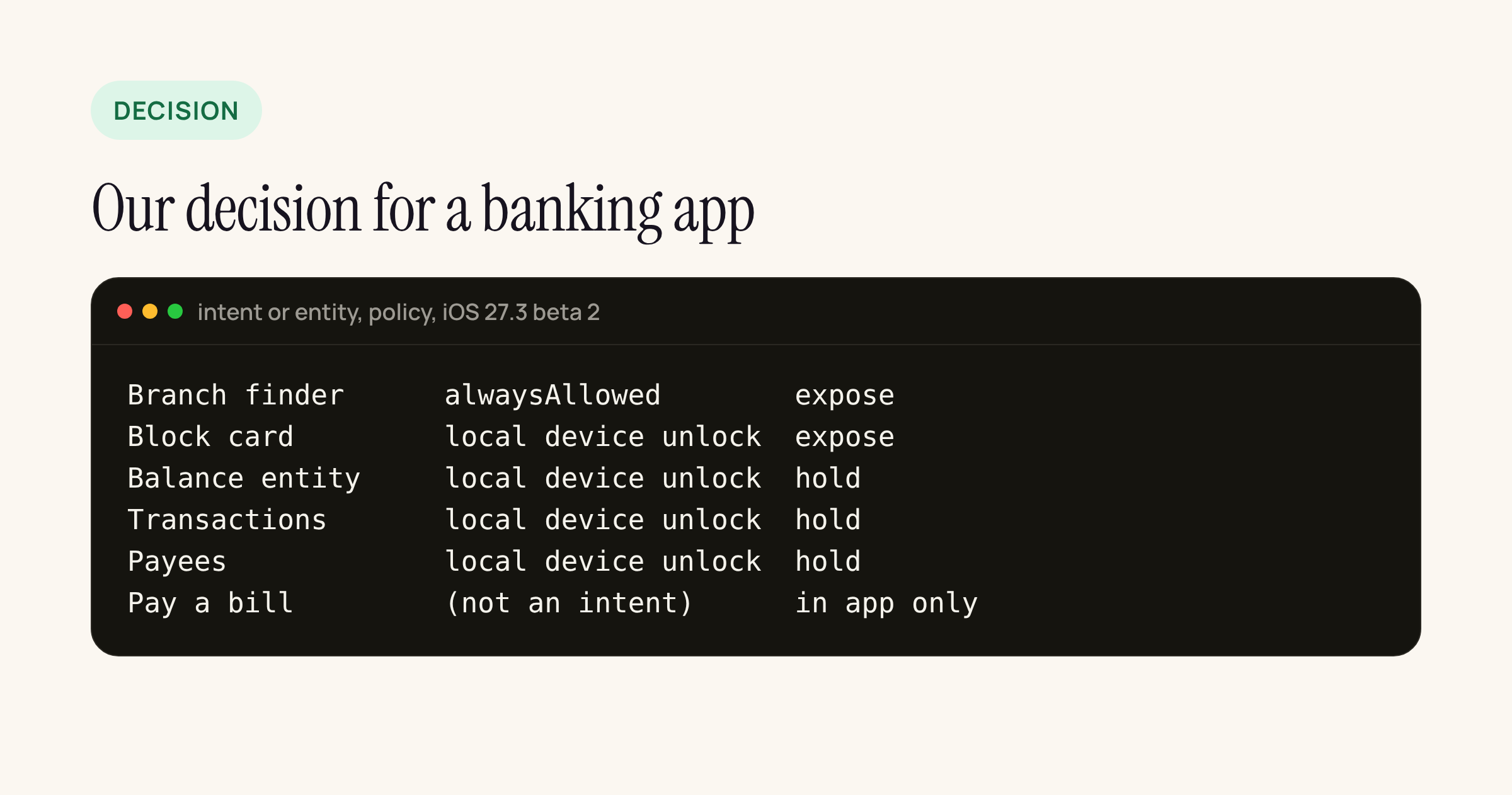
What we expose to Siri AI now, and what waits for the entity unlock fix.
- Branch and ATM finder: public data,
.alwaysAllowed. The one intent that should work on a locked phone. - Block card: an intent with
.requiresLocalDeviceAuthentication. Blocking a lost card is the one action a customer wants from a voice assistant, and it is safe to over-trigger. TheCardEntityit takes shows only a masked label (“Debit card ending 4821”) and carries the same policy. - Balance, transactions, payees as entities: held. These are exactly the case in 190573761: the entity requires unlock, and Siri AI may show it without asking. We revisit when a later beta lists the issue as resolved.
- Pay a bill, transfers: not intents at all. They stay inside the app behind the app’s own login and step-up checks. A bank’s transaction signing does not belong in an assistant flow, whatever the policy.
The intent from the list, as a sketch:
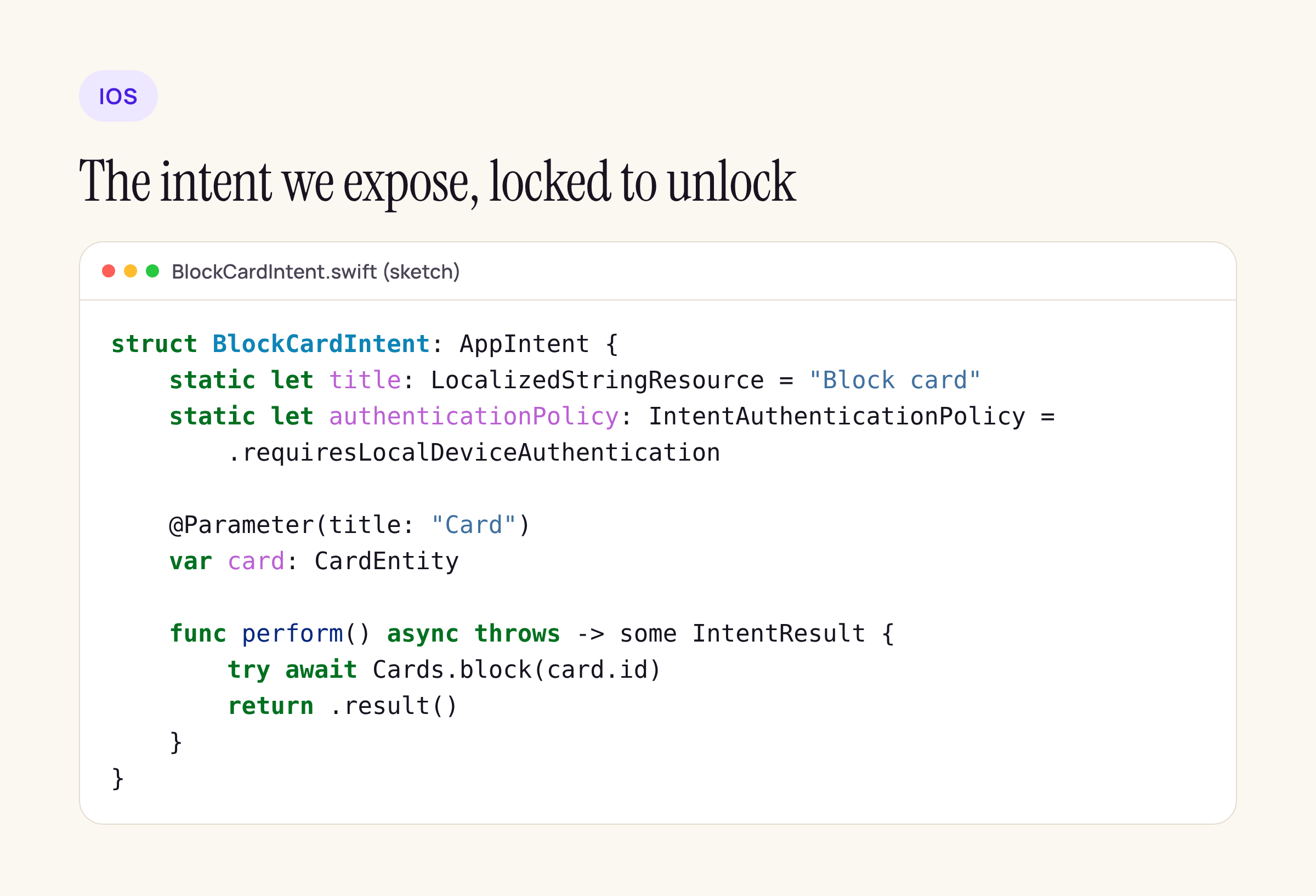
The policy is a static property on the intent, next to the title.
perform() still checks the app’s own session before calling the card service. The authentication policy proves someone unlocked the phone; it does not prove the bank session is valid.
The Android side: AppFunctions 1.0.0-rc01
The AppFunctions release notes list 1.0.0-rc01 on 4 Nov 2026 with three artifacts: appfunctions, appfunctions-compiler and appfunctions-testing. The only change in rc01: “Version bump to RC and remove legacy aggregation compiler option.” Two beta-era renames to watch if you started on an alpha: AppFunction became AppFunctionDeclaration (alpha13), and AppFunctionContext was removed (alpha12).
dependencies {
    implementation("androidx.appfunctions:appfunctions:1.0.0-rc01")
    ksp("androidx.appfunctions:appfunctions-compiler:1.0.0-rc01")
}
From the AppFunctions guide:
- “AppFunctions is available on devices running Android 16 or higher.” The guide’s service class carries
@RequiresApi(36). - Functions are suspend functions annotated
@AppFunctionDeclaration(isDescribedByKDoc = true); the KDoc becomes the description the agent reads. - A service extending
AppFunctionService, annotated@AppFunctionServiceEntryPoint, hosts them; the library “generates an XML schema file that lists all the declared AppFunctions”. - “Discovering and calling other apps’ AppFunctions requires the privileged
EXECUTE_APP_FUNCTIONSpermission, which Android grants only to authorized system assistants.” - The guide does not describe any user confirmation step, and the page is marked experimental.
The same block-card action, as a sketch:
class CardFunctions(private val cards: CardRepo) {
    /**
     * Blocks the customer's card so it cannot be used.
     * @param cardId Id of the card to block.
     */
    @AppFunctionDeclaration(isDescribedByKDoc = true)
    suspend fun blockCard(cardId: String): Boolean {
        if (!cards.sessionIsValid()) return false
        return cards.block(cardId)
    }
}
There is no authenticationPolicy equivalent in what Google documents. So on Android the session and lock-state check lives in the function body, and anything that reads balances stays out until the bank’s own risk team has signed off.
Play’s rule from 14 April 2027
Google Play’s policy deadlines table carries an AppFunctions row, announced 29 Oct 2026, deadline 14 Apr 2027: “Developers building AppFunctions must comply with all existing Google Play policies”, and “AppFunctions are strictly prohibited from deceiving or manipulating AI agents”. The same sentence also prohibits bypassing security controls and interfering with other apps. For a bank, the practical reading is: KDoc descriptions must say exactly what the function does, and a function must never do more than its description.
Side by side
| Question | iOS and Android |
|---|---|
| Who can call | iOS: Siri AI, Shortcuts, Spotlight (if discoverable) Android: Callers with EXECUTE_ |
| Minimum OS | iOS: iOS 16 for the policy API; Siri AI from 27.3 beta Android: Android 16 |
| Lock gate | iOS: authentication, default alwaysAndroid: Not documented; check in code |
| Description the AI reads | iOS: Title, parameters, entity display Android: KDoc |
| Store rule | iOS: Siri AI terms “more to share soon” Android: Play policy from 14 Apr 2027 |
What to check in your own app
- Search the iOS target for every
AppIntentandAppEntitytype. Any without an explicitauthenticationPolicyruns or shows on a locked phone. - Set
isDiscoverable = falseon intents that exist only for widgets or in-app use. - On the 27.3 betas, lock the phone and ask Siri for each exposed entity. If it shows without an unlock prompt, hold that entity.
- On Android, put a session check at the top of every
@AppFunctionDeclarationfunction, and read your KDoc as an agent would: it is now part of your API contract. - Watch the 27.3 release notes for 190573761 moving to resolved before exposing any account data.