Short version: to go from Android Gradle Plugin 8.13 to 9.5, move the Gradle wrapper to 9.6.0 first, keep JDK 17, then bump AGP. The two big switches arrive in 9.0, not 9.5: built-in Kotlin and the new DSL are on by default. You can set android.builtInKotlin=false and android.newDsl=false to keep building today, and the React Native 0.88.1 template does exactly that, but the 9.0 notes say the DSL opt-out goes away in AGP 10. The real work is in your libraries, not in your app module.
This guide compares the release notes for AGP 8.13.0 and 9.0 through 9.5.0 (all pages last updated 5 Nov 2026), and we read the Android build files of the React Native 0.88.1 template and eight common libraries from their npm packages.
Why we did this: Peepal and Shopkeeper still build with AGP 8, and the BMDB TV app is next in line. We wanted one ordered list of edits before touching any of them.
What each AGP version needs
Every row comes from that version’s release notes. JDK 17 is the minimum and the default in all of them.
| AGP | Minimum Gradle, max API |
|---|---|
| 8.13.0 (Sep 2025) | Gradle 8.13, API 36.1, Build Tools 35.0.0 |
| 9.0 (Jan 2026) | Gradle 9.1.0, API 36.1, Build Tools 36.0.0, KGP 2.2.10 at runtime |
| 9.1 (Apr 2026) | Gradle 9.3.1, API 37.0 |
| 9.2 (Apr 2026) | Gradle 9.4.1, API 37.0 |
| 9.3 (Jul 2026) | Gradle 9.5.0, API 37 |
| 9.4 (Sep 2026) | Gradle 9.6.0, API 37 |
| 9.5 (Oct 2026) | Gradle 9.6.0, API 37 |
Two things stand out. If you target API 37, you need at least AGP 9.1. And from 9.4 on, the Gradle floor stops moving, so 9.4 and 9.5 share one wrapper.
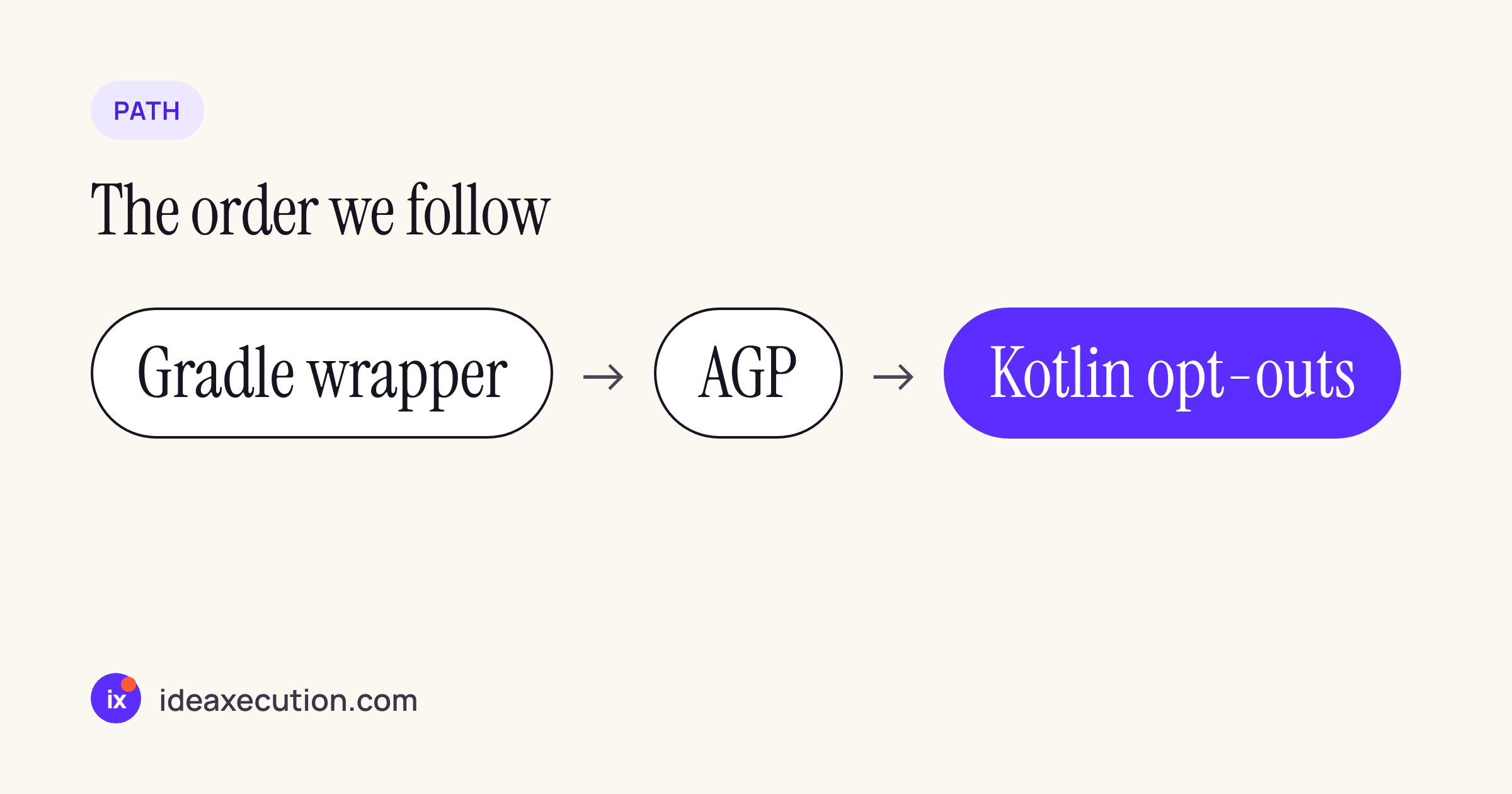
The order we follow: wrapper first, AGP second, opt-outs last.
Step 1: the wrapper and the plugin version
Set the wrapper in gradle/wrapper/gradle-wrapper.properties:
distributionUrl=https\://services.gradle.org/distributions/gradle-9.6.0-bin.zip
Then the plugin. With a version catalog:
[versions]
agp = "9.5.0"

[plugins]
android-application = { id = "com.android.application", version.ref = "agp" }
AGP 9.0 brings a runtime dependency on Kotlin Gradle Plugin 2.2.10. The 9.0 notes say you can only pin an older KGP if you have opted out of built-in Kotlin.
Step 2: built-in Kotlin
The 9.0 notes: “Android Gradle plugin 9.0 introduces built-in Kotlin support and enables it by default.” AGP compiles your Kotlin sources itself, and “The org.jetbrains.kotlin.android plugin is not compatible with the new DSL.”
For your own modules, the edit is small: delete the kotlin-android or org.jetbrains.kotlin.android line. The harder part is every library module in your build that applies the plugin itself. We read the android/ build files of the React Native 0.88.1 template and eight libraries we use in client apps:
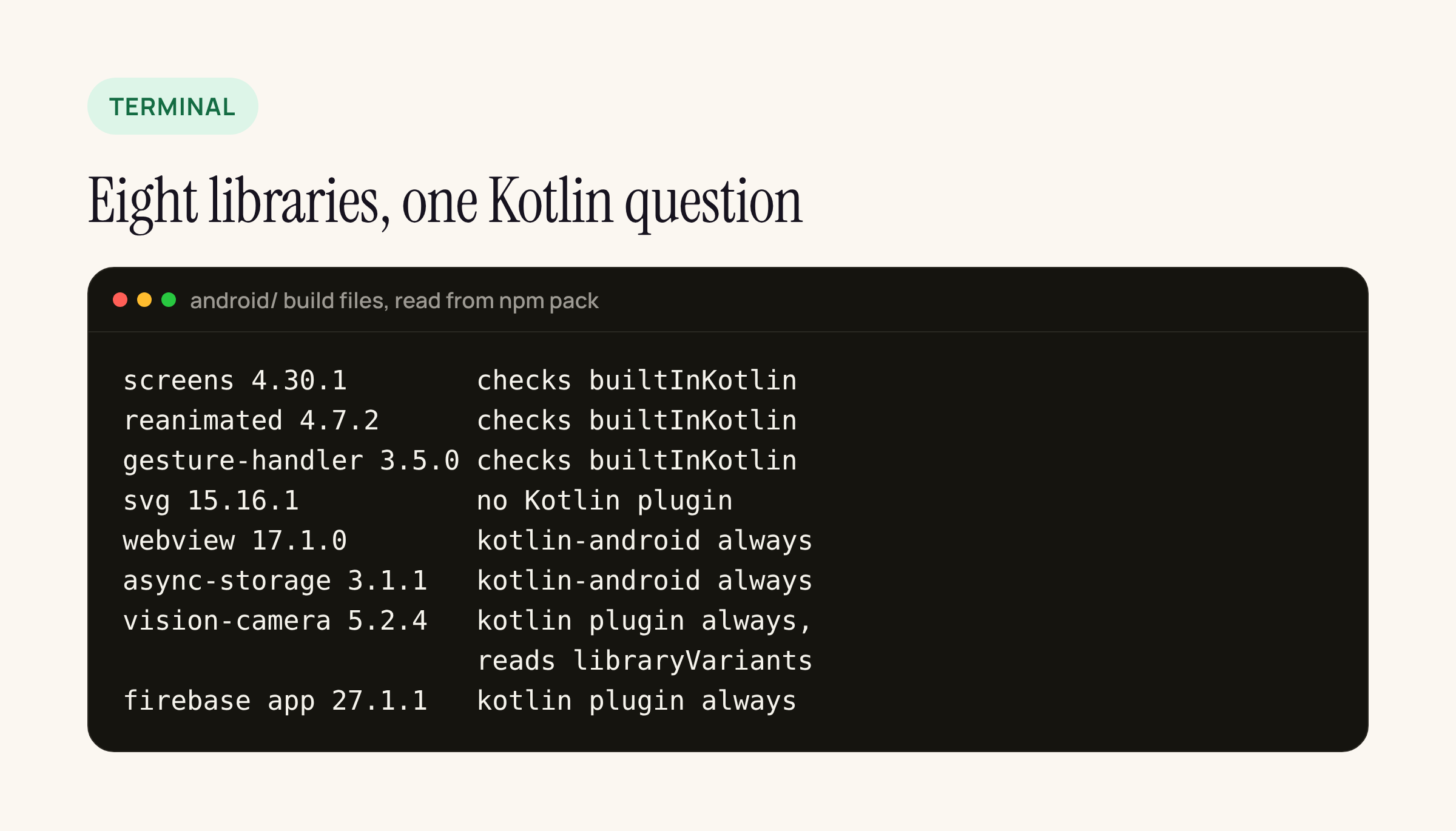
Summary of the android/ build files in each npm package.
- react-native-screens 4.30.1, react-native-reanimated 4.7.2, react-native-gesture-handler 3.5.0 read
android.builtInKotlinand apply the Kotlin plugin only when AGP is 8 or older, or when the app opted out. The screens build file explains why: when built-in Kotlin is active, “additionally applying the Kotlin Android plugin fails the build”. - react-native-webview 17.1.0, @react-native-async-storage/async-storage 3.1.1, react-native-vision-camera 5.2.4, @react-native-firebase/app 27.1.1 apply the Kotlin plugin every time.
- react-native-vision-camera 5.2.4 also ships
fix-prefab.gradle, which readsandroid.applicationVariantsorandroid.libraryVariants. AGP 9.0 removed both in the new DSL in favour ofandroidComponents.onVariants. - react-native-svg 15.16.1 has no Kotlin plugin line.
Several of these packages also declare an old AGP (7.0.4 to 8.10.1) in their own buildscript block. In screens, svg and Firebase that block only runs when the library is built on its own (project == rootProject), so the app’s AGP wins. Webview and async-storage declare it unguarded; your root build’s plugin version still decides in practice, but it is worth a look in ./gradlew buildEnvironment.
So for a React Native app, the opt-out is not optional yet. One unconditional kotlin-android in any library is enough to keep android.builtInKotlin=false in gradle.properties.
Step 3: the new DSL and the removed variant API
AGP 9.0 “uses our new DSL interfaces exclusively”. The removed calls you are most likely to have in an older app build file:
| Removed in 9.0 | Use instead |
|---|---|
application, library, test, unit |
android |
variant |
android |
dex |
nothing (removed) |
sdk, ndk, boot, adb |
android |
device, test |
Gradle managed devices |
The most common case in app modules is a block that loops over every variant. The 9.x shape is a callback on androidComponents; treat this as a starting point and move your per-variant logic into it:
androidComponents {
    onVariants { variant ->
        println("Variant: ${variant.name}")
    }
}
The escape hatch is android.newDsl=false in gradle.properties. AGP 9.4 added a narrower one, android.newDsl.optOut=:example-lib1, that opts out a single module, and its notes say: “Starting with AGP 10, the new Variant API is mandatory for all projects.” Use the per-module form to fence off the one library that still reads libraryVariants, and keep the rest of the build on the new DSL.
Step 4: the defaults that flipped in 9.0
AGP 9.0 changed the default of a long list of gradle.properties flags. The ones that change behaviour in an app we ship:
android.useAndroidxandandroid.uniquePackageNamesnow default to true.android.sdk.defaultTargetSdkToCompileSdkIfUnsetis true: a module with notargetSdknow gets yourcompileSdk. SettargetSdkexplicitly in every app module.android.r8.optimizedResourceShrinkingandandroid.r8.strictFullModeForKeepRulesare true. Keep rules that leaned on R8 compatibility behaviour need a second look; run a release build and the app’s main flows before shipping.android.defaults.buildfeatures.resvaluesis false. If you useresValuein a module, addbuildFeatures { resValues = true }there.android.proguard.failOnMissingFilesis true: aproguardFilesentry that points at a missing file now fails the build.
Two properties were removed outright: android.defaults.buildfeatures.aidl and android.defaults.buildfeatures.renderscript. Delete them from gradle.properties.
Step 5: what 9.1 to 9.5 add on top
Nothing between 9.1 and 9.5 removes DSL, according to the notes. The changes are mostly R8:
- 9.1: R8 repackages classes into the unnamed package by default. If reflection or JNI looks classes up by name, add
-dontrepackageor keep rules for them. - 9.2:
-keepattributeswildcards “no longer matchRuntimeInvisibleAnnotations“. Name those attributes explicitly if a library needs them. - 9.3: a new task,
./gradlew :app:analyzeReleaseR8Config, and keep-rule files undersrc/<variant>/keepRules/. - 9.4: dynamic-feature modules get a warning when their flavor dimensions do not match the app’s;
android.enforceDynamicFeatureVariantMatching=trueturns it into an error. - 9.5: experimental backup and restore tests, behind
android.experimental.testSuiteSupport=trueandandroid.experimental.enableBackupTest=true, declared intestOptions.backupTests. Useful for apps that keep a login state, but optional.
What a React Native 0.88.1 app looks like today
The template in @react-native-community/template 0.88.1 already sits on AGP 9.2.1 (from @react-native/gradle-plugin 0.88.1) and Gradle 9.4.1, and carries both opt-outs:
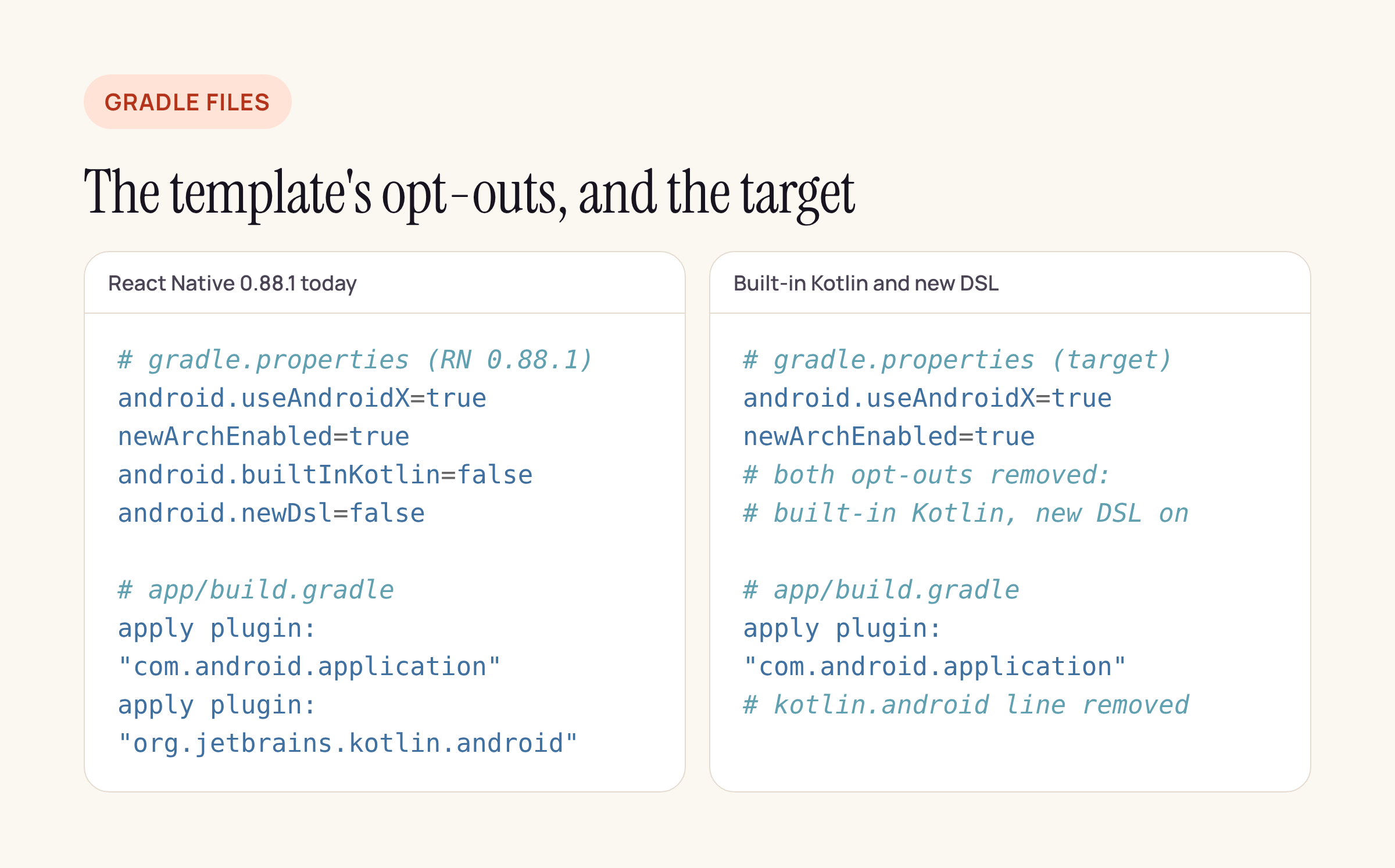
Left: the template as shipped. Right: where AGP 10 pushes it.
For a React Native app, the practical plan is:
- Move the wrapper to 9.6.0 and the AGP version to 9.5.0. Keep both opt-outs.
- Fix the flipped defaults: explicit
targetSdk,resValueswhere used, a release build with R8. - Check each library’s
android/build.gradlefor an unconditional Kotlin plugin line and forapplicationVariantsorlibraryVariants. File issues or patches upstream. - When no library applies the plugin unconditionally, remove
android.builtInKotlin=falseand the Kotlin plugin line inapp/build.gradle. Swapandroid.newDsl=falsefor per-moduleandroid.newDsl.optOutentries, then remove those one by one.
For a native Kotlin app with no third-party Gradle modules, steps 3 and 4 shrink to deleting one plugin line and porting any variant API code.
Sources
- AGP release notes: 8.13.0, 9.0, 9.1, 9.2, 9.3, 9.4, 9.5.
- npm packages read: @react-native-community/template 0.88.1, @react-native/gradle-plugin 0.88.1, react-native-screens 4.30.1, react-native-reanimated 4.7.2, react-native-gesture-handler 3.5.0, react-native-svg 15.16.1, react-native-webview 17.1.0, @react-native-async-storage/async-storage 3.1.1, react-native-vision-camera 5.2.4, @react-native-firebase/app 27.1.1.