Xcode 27.3 beta (3 Nov 2026) changes three things a team notices on day one: Xcode now ships as an Apple Encrypted Archive (.aea) and 27.3 is the final release that also comes as .xip; UI tests can be written with Swift Testing; and a new XCUIHinge class sets the iPhone Duo hinge angle from a UI test. The takeaway: update your Xcode install scripts to .aea now (xcodes 2.2.0 and Xcodes.app 4.2.0b42 already handle it), while 27.3 still gives you a .xip fallback, and add a hinge test for every screen that changes when an iPhone Duo folds.
This post is a docs review and a source checklist: we compared Apple’s Xcode 27.2 and 27.3 beta release notes, read the XCUIHinge and XCUIDevice reference pages, and checked the source of five install tools on GitHub on 17 Nov 2026.
Why we did this: our iOS builds use scripted Xcode installs, and Cardigami opens its pop-up cards with the iPhone Duo hinge, so a UI test that can move the hinge matters to us directly.
Xcode 27.2 to 27.3 beta, side by side
Built from the Xcode 27.2 release notes and the Xcode 27.3 beta release notes.
| Item | 27.2 | 27.3 beta |
|---|---|---|
| Swift | 6.4 | 6.4 |
| SDKs | 27.2 for all platforms | 27.3 for all platforms |
| macOS needed | Tahoe 26.6 or later | Tahoe 26.6 or later |
| Download format | .xip |
.aea; last release with .xip too |
| iPhone Duo hinge in UI tests | none | XCUIHinge (new) |
| UI tests with Swift Testing | no | yes |
| Device Hub | Standby on iPhone Duo | drag and drop .app or .ipa to install |
Two things stay the same: Swift is 6.4 in both, and the macOS requirement does not move, so a Mac that runs 27.2 runs the 27.3 beta. The work is in your scripts and your test targets.
The .aea archive: what to change in install scripts
Apple’s note is short: “Xcode is now available as an Apple Encrypted Archive (.aea). If you’re installing Xcode from the command line, use archiveutil extractXcodeAEA to extract the Xcode archive.” and “Xcode 27.3 is the final release supporting the .xip format.” So from the next release, any script that downloads a .xip and runs xip --expand breaks.
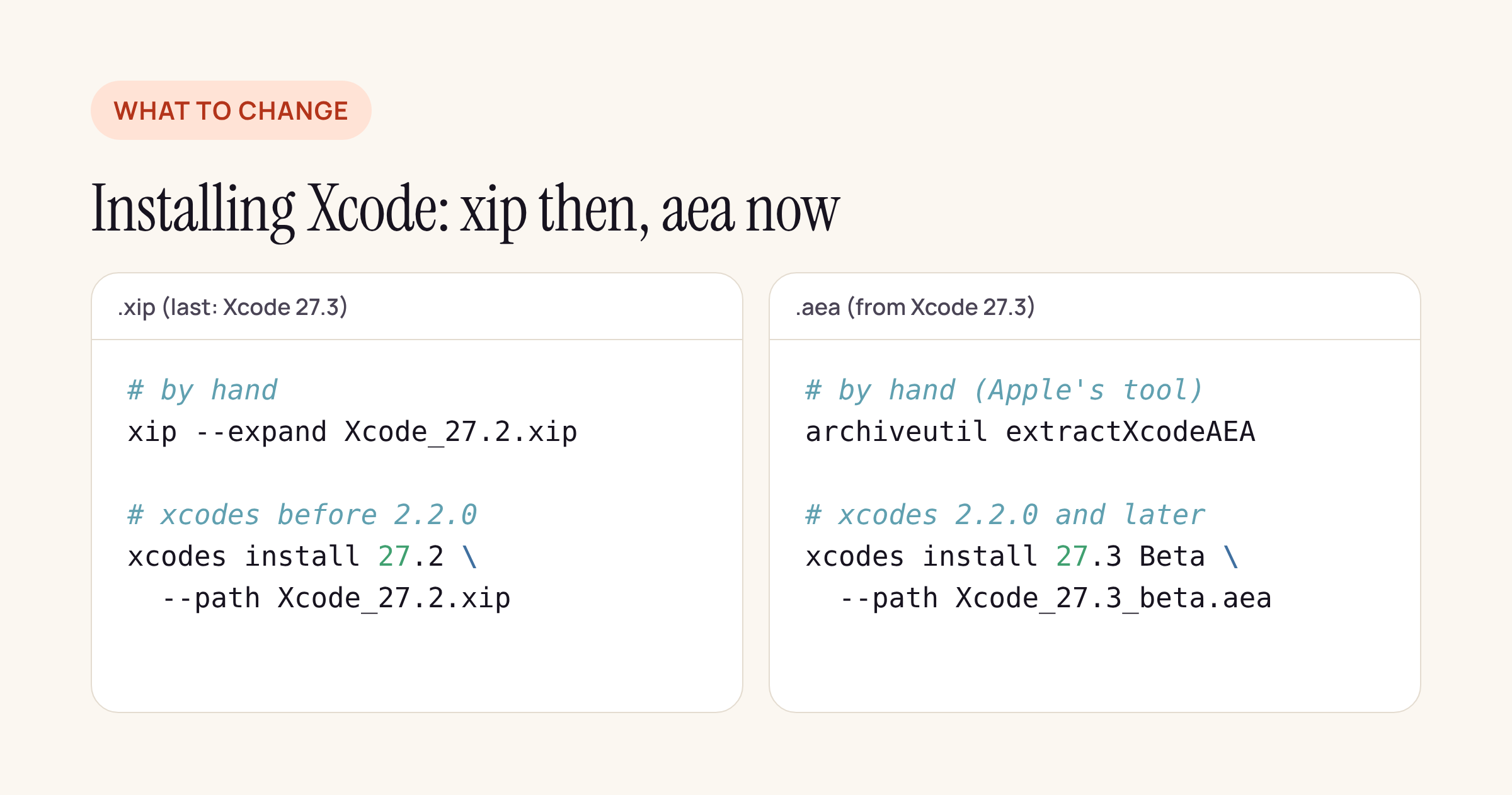
Left: the old path. Right: the new one, by hand with Apple’s tool or through xcodes.
We checked the tools most small teams use to install Xcode, at their newest commits on GitHub:
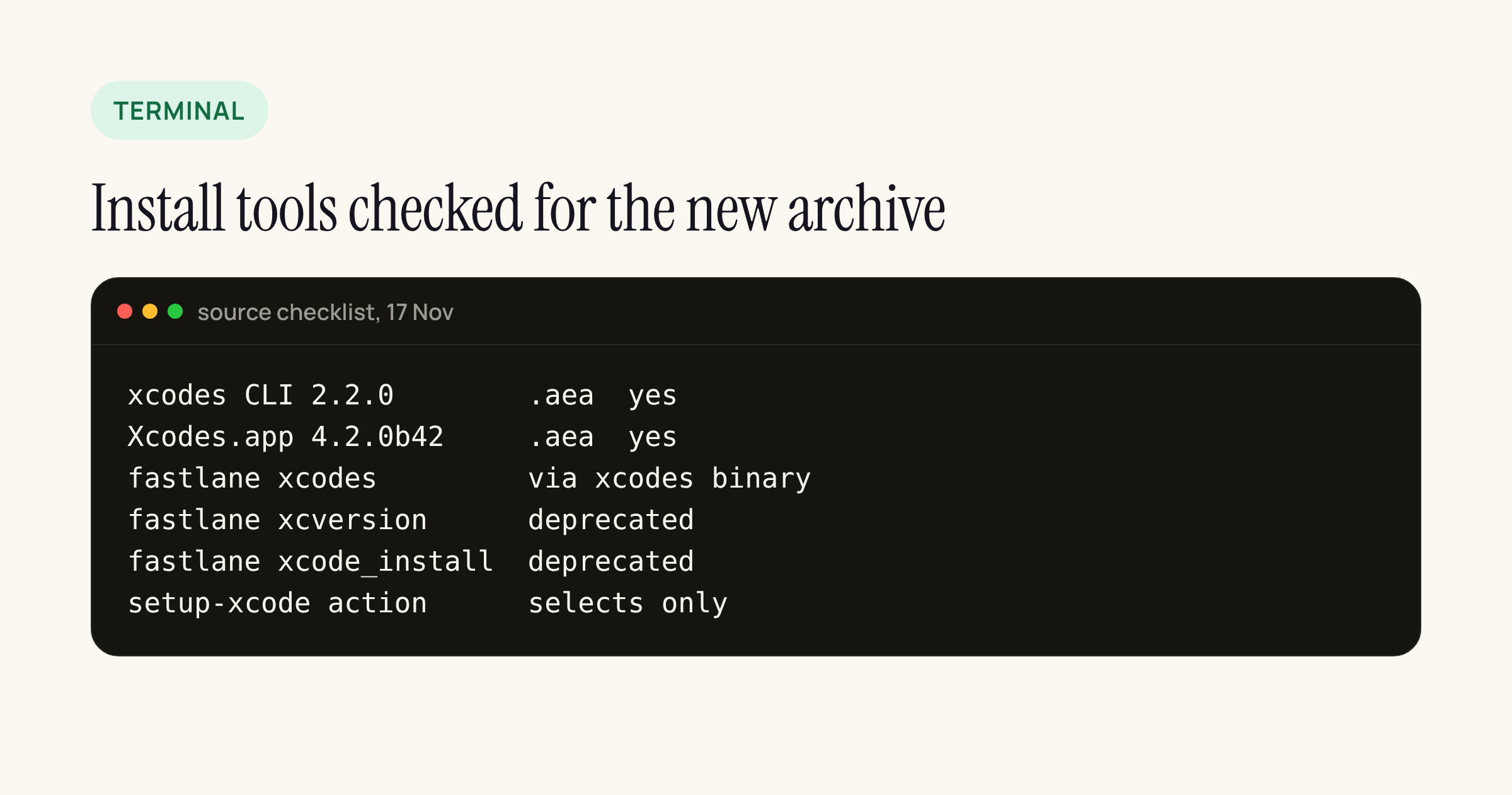
Summary of what we found in each tool’s source and README.
- xcodes CLI 2.2.0 (tagged 11 Nov 2026): the commit “Support AEA archives in the xcodes CLI” (10 Nov) adds an
extractingAEAinstall step that is chosen when the archive ends in.aea, and--pathnow accepts “a .xip or .aea archive”. The README says installing an.aea“requires macOS witharchiveutil extractXcodeAEA“. - Xcodes.app 4.2.0b42 (10 Nov 2026): “Support AEA archives in Xcodes.app”, with tests that assert an
.aeadownload bypasses the.xipunpacker. - fastlane
xcodesaction: runs the xcodes binary and only checks for version 1.1.0 or later. It gets.aeasupport when the xcodes binary on the machine is 2.2.0 or later, so pin that version in your Brewfile or CI image. - fastlane
xcversionandxcode_install: both marked deprecated because “The xcode-install gem, which this action depends on, has been sunset.” If a lane still calls them, move it toxcodesbefore the first.aea-only release. - setup-xcode GitHub Action: it only switches between Xcode versions already installed on the runner image (
xcode-select -s), so the archive format does not affect it.
For a hand-rolled script, the change is one line: download the .aea, extract it with archiveutil extractXcodeAEA, then move Xcode.app into place as before. Check the exact arguments with archiveutil help on your build Mac, because Apple’s note names only the subcommand.
XCUIHinge: moving the iPhone Duo hinge in a UI test
The release note says: “XCUIAutomation supports setting the hinge angle on iPhone Duo with a new XCUIHinge class.” The reference pages fill in the API:
| API | What Apple documents |
|---|---|
XCUIDevice. |
XCUIHinge?: “The device’s hinge, if it has one.” |
XCUIHinge |
@Main: “A reference to the hinge on iPhone Duo.” |
angle |
CGFloat { get set }, in radians |
Setting angle |
“can cause the device to switch between displays” |
| Physical devices | Opening the hinge from closed “is not supported and results in a test failure” |
Three consequences for a test target. The hinge is optional, so unwrap it and skip on devices without one. The angle is in radians, so 90 degrees is .pi / 2. And Apple warns that “Reading the angle alone does not tell you which layout your app uses”, so assert on your own UI after setting it, not on the angle.
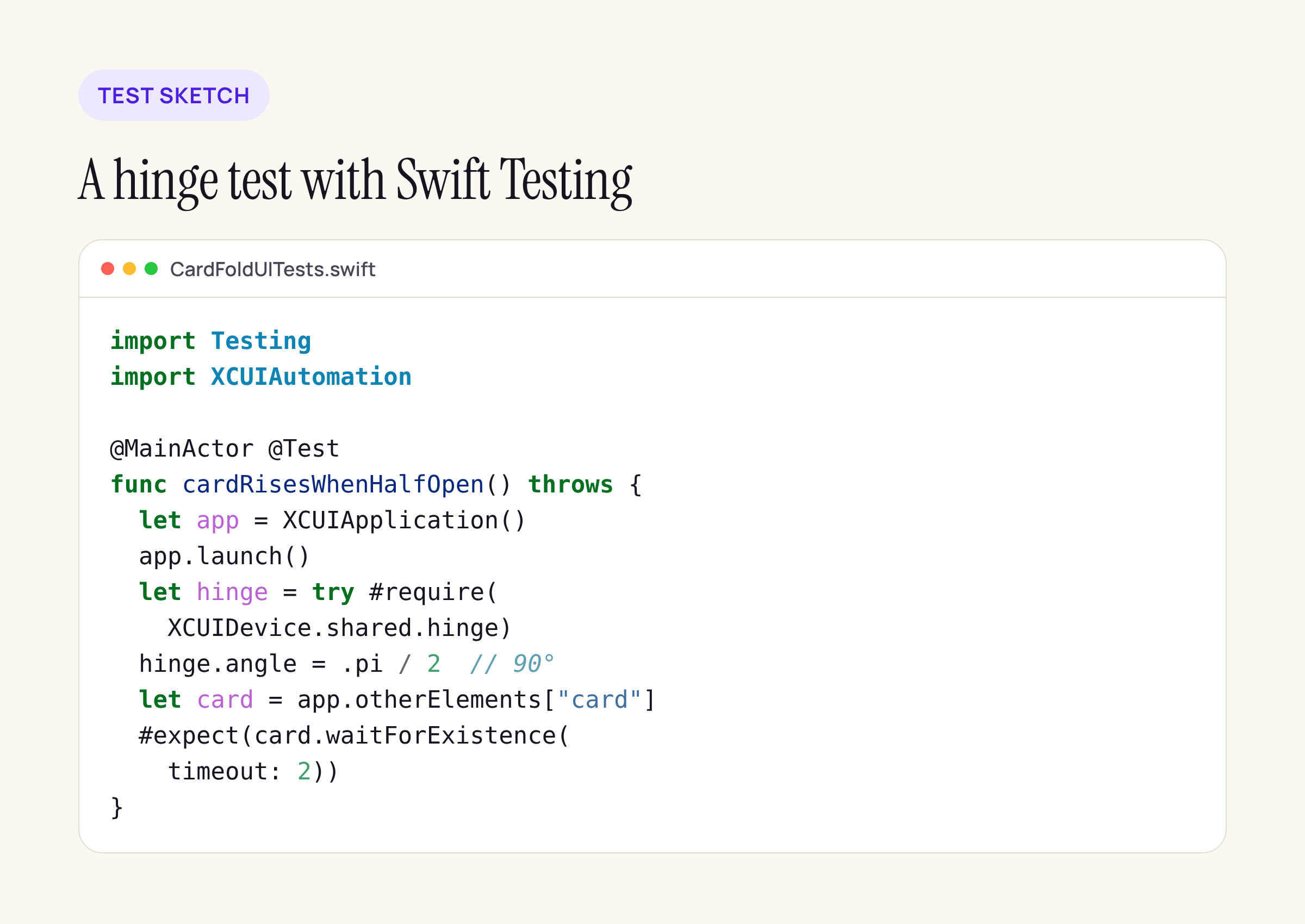
A test sketch for a card screen: treat it as a starting point and compile it against your own target.
The sketch uses #require to stop cleanly when there is no hinge, sets the hinge to half open, and then checks that the card view appears. For Cardigami-style screens, add one test per state your layout reacts to: closed, half open and flat.
Swift Testing for UI tests
The 27.3 note says: “Xcode now supports writing UI tests with Swift Testing and XCUIAutomation.” That means @Test, #expect and #require in a UI test target, the same style many teams already use for unit tests. Apple’s reference pages do not yet have a separate guide for it, so start small:
- Add one Swift Testing file to an existing UI test target, next to the XCTest cases.
- Mark UI test functions
@MainActor, sinceXCUIDeviceandXCUIHingeare main-actor types. - Keep
XCUIApplicationlaunch code in a helper, so XCTest and Swift Testing cases share it while you migrate.
What to check on your own setup
- Search your CI scripts and Fastfiles for
.xip,xip --expand,xcversionandxcode_install. Each hit needs the.aeapath or a move to xcodes 2.2.0. - Install the 27.3 beta from the
.aeaon one build Mac now, while a.xipstill exists as a fallback. - List the screens in your app that change layout when an iPhone Duo folds, and give each one a hinge test.
- Keep the Device Hub drag and drop in mind for testers: dropping an
.ipaonto a device installs it.
For the SDK side of the same release cycle, see our guide to moving from the iOS 26 SDK to 27.2.