
When an app moves its targetSdkVersion to 37 (Android 17), two TLS defaults change with no code change on your side: Certificate Transparency (CT) is enforced, and Encrypted Client Hello (ECH) is used wherever the networking library and the server support it. For most banking apps with certificate pinning this is safe, but check three things before you ship: any server whose certificate is not in public CT logs, any domain where ECH breaks a middlebox you rely on, and how your debug builds trust a test proxy. This post is a docs review of the Android 17 behaviour-change page (last updated 11 Nov 2026) and the Network Security Configuration reference (last updated 28 Aug 2026), plus a diff of the npm packages of React Native 0.88.1 and 0.89.0-rc.1 and the community template at the same two versions.
Why we did this: the Beacon-type banking apps we build pin their API certificates in network_security_config.xml, and the React Native 0.89 template moves new apps to API 37, so these defaults arrive with the next upgrade.
What changes, in one table
Every row comes from the two official pages: behaviour changes for apps targeting Android 17 and the Network Security Configuration reference.
| Behaviour | targetSdk 36 vs 37 |
|---|---|
| Certificate Transparency | API 36: off, opt in. API 37: on by default; opt out per domain or globally |
CT with custom trust anchors (src="user" or @raw) | Not checked, on both levels |
| Encrypted Client Hello | API 36: not available. API 37: mode="enabled" by default, if the library and server support it |
| ECH not negotiated | API 37: the client sends ECH GREASE (RFC 9849) |
pin-set, debug-overrides, overridePins | Unchanged |
| localhost | From Android 17, an implicit config applies if none is defined; it does not enforce CT |
Two lines from the reference sum up the scope. On CT: “Starting with Android 17 (API level 37), certificate transparency is enabled by default.” On ECH: “The configuration specified here will only take effect if the networking library has adopted ECH.”
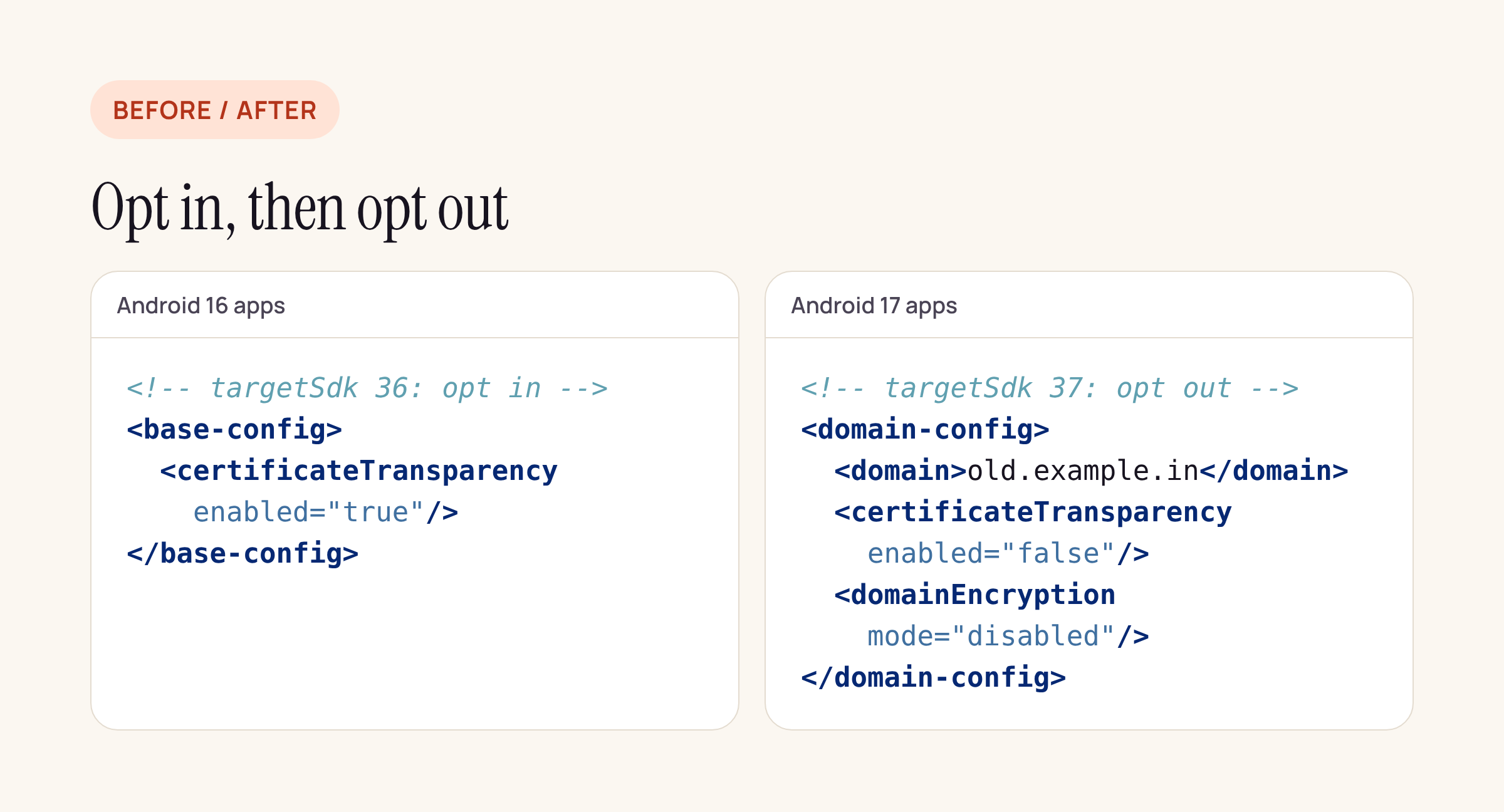
On API 36 you had to opt in to CT; on API 37 you opt out, per domain or globally.
How CT meets certificate pinning
CT and pinning are separate checks, and Android 17 does not change pinning. A <pin-set> still requires one public key in the chain to match a pin, and an expiration date still turns pinning off after that date (“If the attribute is not set, then the pins do not expire.”). What is new is that, on top of the pin check, the chain must now be backed by CT logs.
The reference gives the evaluation order for each domain:
- If
certificateTransparencyis enabled, verification is on. - If any trust anchor is
"user"or inline (for example@raw/cert.pem), verification is off. - Otherwise the inherited config decides, which on API 37 means on.
So a typical pinned config like this one keeps working, as long as the certificate on api.examplebank.in comes from a public CA and is logged, which is the normal case for publicly trusted certificates:
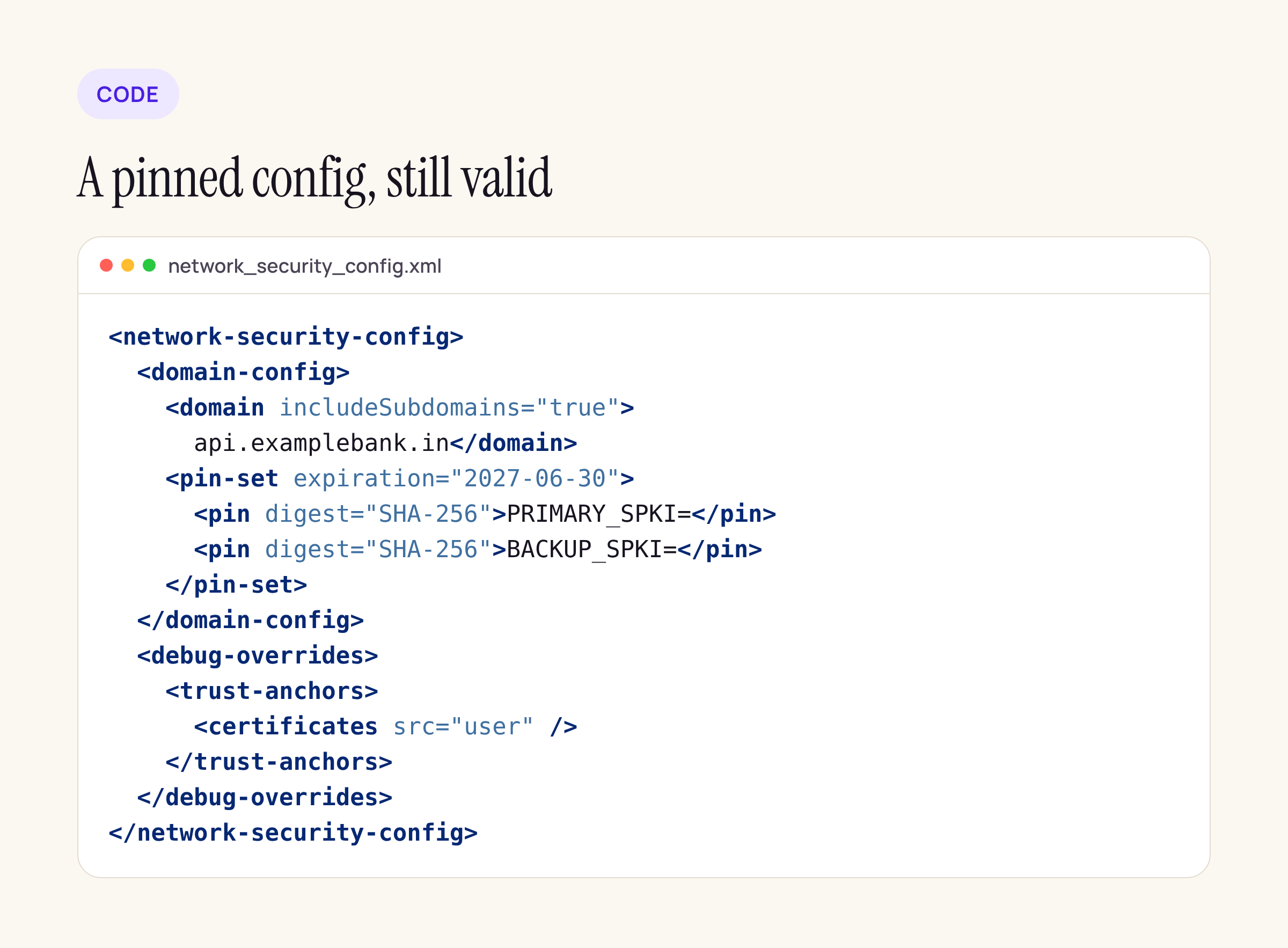
The pins and the debug-only user trust store are unchanged by Android 17.
Where CT can fail in a bank app
- A partner or internal host with a certificate that is not in CT logs but chains to a CA the device trusts. On API 37 that handshake now fails. Either move the host to a logged certificate or add a
<domain-config>for that host with<certificateTransparency enabled="false"/>, and record why. - A host you trust through your own bundled CA (
<certificates src="@raw/bank_ca"/>). The reference says CT is skipped for custom anchors, so this keeps working without an opt-out. Do not addenabled="true"to such a domain: the reference notes you can force verification, and a private certificate is “likely” not public, so forcing it would break the connection. - Pins that have expired. Once
expirationpasses, pinning stops but CT stays on. Treat the expiry date as a release deadline, not a safety net.
Debug builds and a test proxy
Most teams inspect traffic in debug builds through a proxy whose CA is installed as a user certificate, trusted only through <debug-overrides>. Nothing breaks there on API 37:
<debug-overrides>applies only whenandroid:debuggableis true, and “certificate pinning is not performed” when the chain uses one of its debug-only anchors.- Those anchors are user certificates, so per step 2 above CT is not checked on those connections either.
What does not work, before or after Android 17, is the same proxy against a release build: release builds that target API 24 and higher do not trust user CAs, and the debug section “is completely ignored.”
How a given proxy tool handles ECH is outside this post. If a debug build shows handshake failures through the proxy only after the move to API 37, the per-domain <domainEncryption mode="disabled"/> switch is the one to try.
ECH: who it affects
ECH encrypts the server name in the TLS handshake, so a network observer cannot read which host the app connects to. For an app it only matters if both ends support it. The Android docs name HttpEngine, WebView and OkHttp as examples of libraries that may integrate it. Things to check:
- WebView flows. Many bank apps open net-banking pages, payment gateways or KYC forms in a WebView. If WebView on the device and that server both speak ECH, those connections will use it.
- Corporate or bank networks that filter by server name. Some enterprise firewalls allow or block traffic by the name in the Client Hello. If an app must work on such a network and the server has ECH enabled, test it there, and if needed set
<domainEncryption mode="disabled"/>for that domain only. - Do not turn ECH off globally to fix one host: per-domain config exists for this.
The React Native side, diffed
We packed react-native and @react-native-community/template at 0.88.1 and 0.89.0-rc.1 and compared the Android parts:
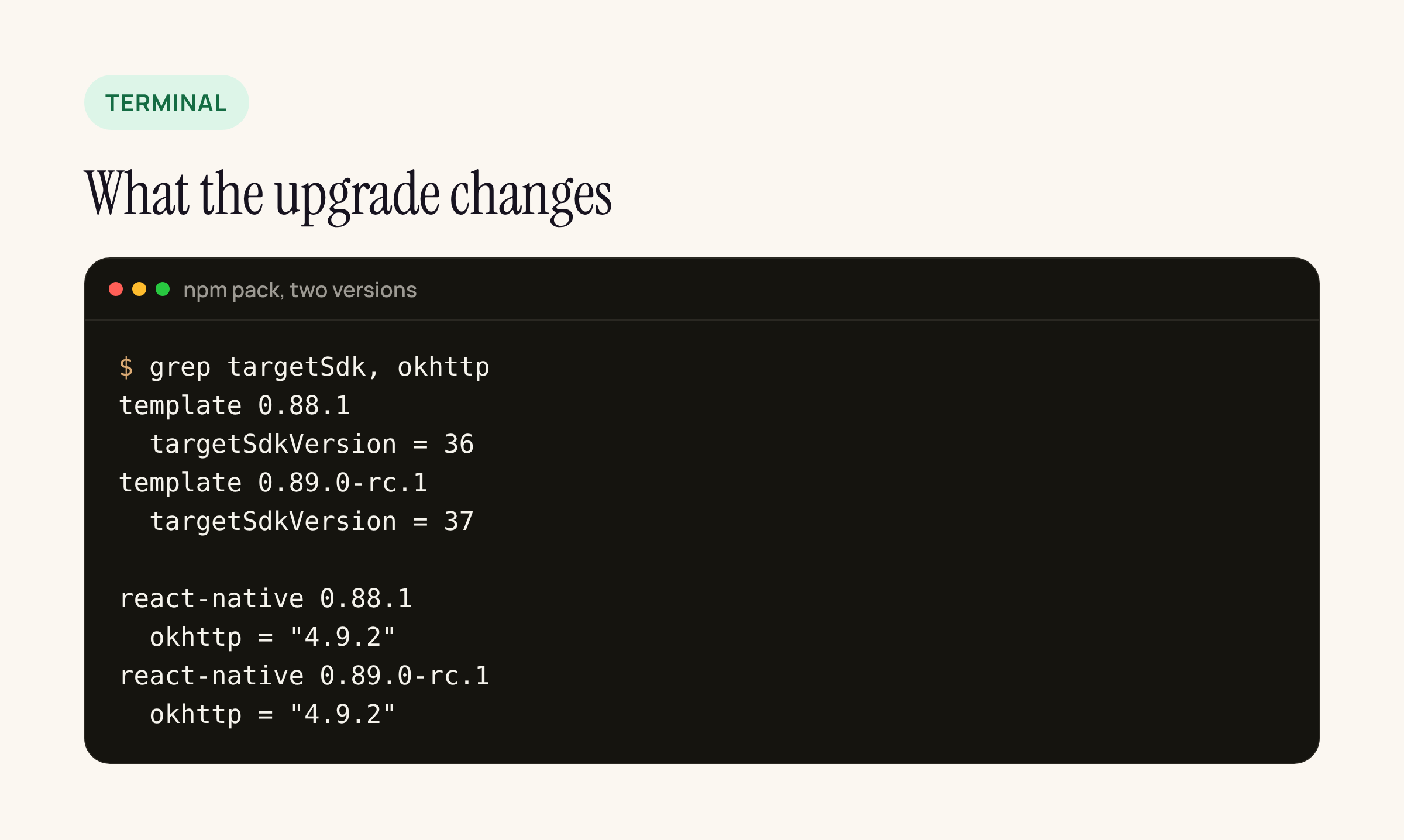
Summarised from our grep of the two npm packages.
- The template’s
targetSdkVersiongoes from 36 to 37 inandroid/build.gradle(compileSdkVersionis 37 in both,minSdkVersion24 in both). An app generated from the 0.89 template, or one that copies the template diff during the upgrade, gets the CT and ECH defaults at that point. - React Native’s own
gradle/libs.versions.tomlalso movestargetSdkfrom 36 to 37, and keepsokhttp = "4.9.2"in both versions. - No TLS changes in the networking module. The
ReactAndroid/.../modules/networkfolder differs only inNetworkingModule.kt: removedpublicmodifiers, a reformatted progress listener and one null-safety change on an app label. Neither version sets a customsslSocketFactory,TrustManagerorConnectionSpec, sofetchandXMLHttpRequestuse the platform trust setup, which is where the Network Security Configuration applies. - The template ships no
network_security_config.xml. Its manifest only setsusesCleartextTrafficthrough a placeholder, so the platform defaults above apply unless you add a config. - Pinning libraries layered on OkHttp. We checked
react-native-ssl-public-key-pinning1.2.6: its Android module builds an OkHttpCertificatePinnerand contains no customTrustManagerorsslSocketFactory. Its pins are checked by OkHttp in addition to the platform’s trust checks, so CT on API 37 applies to its connections as well.
Whether ECH is used on fetch depends on the OkHttp build in your app, not on React Native. React Native pins 4.9.2; if another dependency resolves a newer OkHttp, check that library’s release notes for ECH support before assuming either way.
What to check on your own app
- List every host the app connects to, including payment gateways, analytics, crash reporting and any partner APIs. For each, confirm the certificate is publicly trusted and logged, or that you reach it through a bundled
@rawCA. - Open
network_security_config.xmland check every<pin-set>has a backup pin and an expiry date you have planned a release around. - Raise
targetSdkVersionto 37 on a branch, run your API, WebView and file-upload flows on an Android 17 emulator, and watch Logcat for TLS handshake failures. - If a host fails only because it is not in CT logs, add a per-domain
<certificateTransparency enabled="false"/>with a comment, and open a ticket to move that host to a logged certificate. - Keep proxy trust inside
<debug-overrides>only. Never addsrc="user"to<base-config>to make testing easier: in a release build that trusts every user-installed CA.
The rest of the React Native 0.89 upgrade is in React Native 0.89 RC: what changes and what breaks on upgrade; this post covers only the TLS part.






