
Short version: the Apple TV 4K that reached stores on 13 Nov 2026 has, in Apple’s words, “a new, dedicated AV1 decoder” in its A19 chip. For a streaming app, that changes one decision: whether to serve AV1 variants to the box. Detect it with VTIsHardwareDecodeSupported(kCMVideoCodecType_AV1), package AV1 as fMP4 at Level 6.2 or lower, and keep a complete H.264 or HEVC ladder next to it, because Apple’s HLS spec says clients should not be required to switch codecs. If your tvOS app plays video through react-native-video 6.19.3, the codec choice is AVPlayer’s: the library’s iOS sources contain no codec checks at all.
This post is a review of Apple’s documentation (the press release of 13 Oct 2026, the VideoToolbox, CoreMedia and AVFoundation reference pages, and the HLS Authoring Specification for Apple Devices, all read on 16 Nov 2026) plus a source check of react-native-video 6.19.3 and 7.0.0-beta.12 from npm. Playback on the device itself is outside this post.
Why we did this: we build catalogue and player apps for TV, including BMDB on Android TV and React Native TV apps, and the first question a streaming client asks about new hardware is whether to change its encoding ladder.
What Apple actually announced
From the Apple Newsroom release of 13 Oct 2026: “The A19 chip also includes a new, dedicated AV1 decoder, enabling more efficient, high-quality streaming while using less bandwidth.” The box went on sale on Friday, 13 Nov.
That is the whole statement. The release names no AV1 profile, bit depth or level, and no new developer API. Two things follow:
- Do not assume a profile or level from the press release. Ask the device (next section) and stay inside the levels Apple’s HLS spec allows.
- Do not hard-code “new Apple TV = AV1”. Ask the API on every launch, so older boxes and future models get the right answer without an app update.
Siri AI also arrived on Apple TV with tvOS 27.2 and 27.2.1 (MacRumors, 13 Nov 2026); neither source names a developer API for it on tvOS, so it is out of scope here.
The APIs, in one table
| What you need | API | What Apple’s page says | Availability on the page |
|---|---|---|---|
| Is AV1 decoded in hardware on this device? | VTIsHardwareDecodeSupported(_:) |
“Returns a Boolean value that indicates whether the current system supports hardware decode for the specified codec.” | tvOS 11.0+, iOS 11.0+, macOS 10.13+ |
| The codec to ask about | kCMVideoCodecType_AV1 |
Declared as var kCMVideoCodecType_AV1: CMVideoCodecType { get }; the page has no abstract |
No version stated: check it against your deployment target |
| Can AVFoundation play this codec string? | AVURLAsset.isPlayableExtendedMIMEType(_:) |
“Returns a Boolean value that indicates whether the asset is playable with the specified codecs and container type.” | tvOS 9.0+, iOS 5.0+ |
The first answers a hardware question, the second a playback question. They are not the same: a device may be able to play a codec in software. On a TV box, hardware decode is what you want for 4K, so we treat the VideoToolbox answer as the gate and the MIME check as a sanity check on the exact codec string we plan to serve.
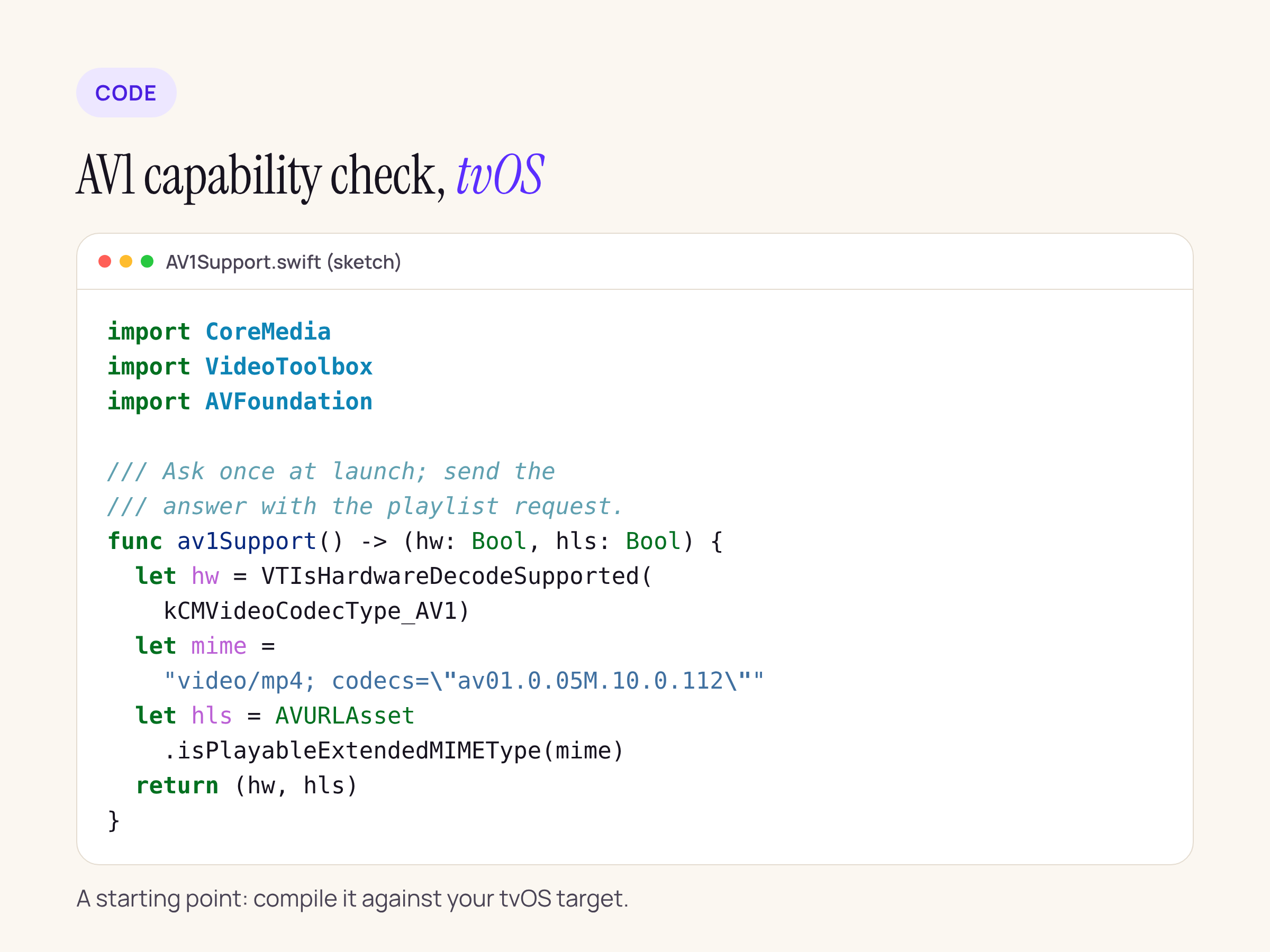
A starting point built from the signatures above; compile it against your tvOS target. The codec string is the HDR10+ AV1 example from Apple’s HLS spec.
Send the result with the playlist request (a query parameter or header) if your backend builds playlists per device, or log it if you only want to know how many of your viewers have the new box before you pay for a second encode.
What the HLS spec requires for AV1
All rows come from the HLS Authoring Specification for Apple Devices, section numbers as on the page.
| Section | Rule (verbatim) | What it means for an AV1 ladder |
|---|---|---|
| 1.1 | “All video MUST be encoded using H.264/AVC, HEVC/H.265, Dolby Vision, or AV1.” | AV1 is a first-class codec in the spec |
| 1.37 | “Level for AV1 MUST be less than or equal to Level 6.2” | Cap your encoder’s level |
| 1.39 | “The container format for AV1 video MUST be fMP4.” | No MPEG-TS segments for AV1 |
| 1.12 | “For backward compatibility, some video content SHOULD be encoded with H.264.” | Keep an H.264 ladder for older devices |
| 1.23 | “If multiple video streams are provided (H.264, HEVC, HDR), each stream SHOULD provide all anticipated bandwidths. Clients SHOULD NOT be required to switch codecs.” | An AV1 ladder must cover every bitrate step on its own, not fill gaps in the HEVC one |
| 9.16 | “The VIDEO-RANGE attribute MUST be specified unless all variants and renditions are SDR.” |
HDR AV1 variants need VIDEO-RANGE |
| SUPPLEMENTAL-CODECS examples | “AV1 w/ HDR10+ | av01.0.05M.10.0.112 | av01.0.05M.10.0.112/cdm4 | PQ” | The codec string format to use in CODECS |
Two things are not in the spec, as of 16 Nov 2026: an AV1-specific fallback rule, and an AV1 entry in the table of CODECS attribute values (the only av01 strings are the two examples in the SUPPLEMENTAL-CODECS table). The iOS amendments add Dolby Vision Profile 10 (single layer 10-bit AV1); the tvOS amendments have no AV1 rule. The fMP4 rule was added on 24 Jun 2025, well before this hardware.
In practice, the playlist for a box that may or may not decode AV1 in hardware looks like two complete ladders side by side, each with its CODECS string, and AVPlayer picks the one the device can play:
#EXT-X-STREAM-INF:BANDWIDTH=4500000,CODECS="av01.0.05M.10.0.112",RESOLUTION=1920x1080,VIDEO-RANGE=PQ
av1/1080/prog.m3u8
#EXT-X-STREAM-INF:BANDWIDTH=6000000,CODECS="hvc1.2.4.L123.B0",RESOLUTION=1920x1080,VIDEO-RANGE=PQ
hevc/1080/prog.m3u8
#EXT-X-STREAM-INF:BANDWIDTH=2000000,CODECS="avc1.640028",RESOLUTION=1280x720
avc/720/prog.m3u8
The bitrates are placeholders; set them from your own encodes. If you would rather not trust automatic selection, build the playlist on the server from the capability flag and leave AV1 out for devices that report false.
What a React Native tvOS app inherits
Many React Native tvOS video apps play through react-native-video. We ran npm pack on 6.19.3 (the current npm latest) and 7.0.0-beta.12, and searched the ios/ sources for anything codec related.
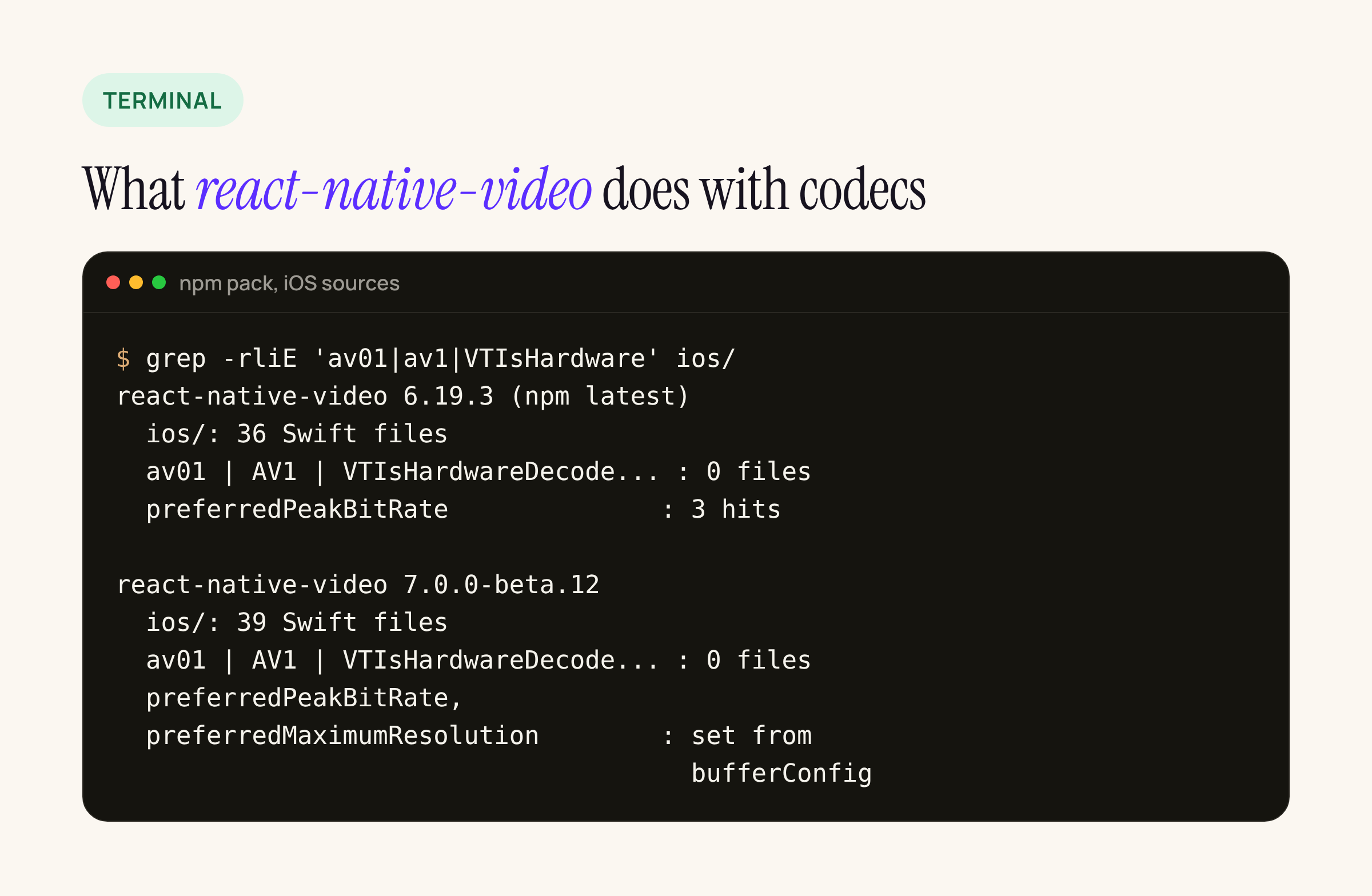
Real output from our test server, summarised per package.
Neither version mentions av01, AV1, VTIsHardwareDecodeSupported or kCMVideoCodecType in its 36 and 39 Swift files. What they do set on the AVPlayerItem is preferredPeakBitRate (6.19.3, from the maxBitRate prop) and, in 7.0 beta, preferredPeakBitRate and preferredMaximumResolution from bufferConfig. So:
- Variant choice between AV1 and HEVC is AVPlayer’s, driven by the playlist’s
CODECSattributes. Nothing in the library needs to change for the new box. - A low
maxBitRatecap still applies to whichever codec AVPlayer picks; AV1’s lower bitrates for the same quality only help if the AV1 variants sit under that cap. - If you want the capability flag in JavaScript, it is a few lines of a native module around the sketch above; the library does not expose one.
What to check on your own app
- Ask, do not assume. Call
VTIsHardwareDecodeSupported(kCMVideoCodecType_AV1)and log the result per device model before changing your encoding plan. - Package AV1 as fMP4, Level 6.2 or lower, per sections 1.39 and 1.37.
- Ship a complete ladder per codec. Every bitrate step in AV1 and in HEVC or H.264, per section 1.23, and keep H.264 for older devices, per section 1.12.
- Set
CODECSandVIDEO-RANGEon every variant, using theav01string format from the spec’s examples. - Recheck your bitrate caps.
maxBitRateinreact-native-video, orpreferredPeakBitRatein native code, apply to the AV1 ladder too. - Keep older Apple TV models in your test matrix. The press release calls the decoder new in A19; the capability check is what tells you how each older model answers.






